

Why Configure Subscription Products in Odoo 18?
The subscription economy is booming, and with the release of Odoo 18, managing recurring revenue is easier than ever.
If you’ve ever thought about offering monthly or yearly services, memberships, or product deliveries, you’re in the right place. With Odoo 18, it’s not only possible but also simple. Whether you’re running a small online business or a growing company, learning how to configure subscription products in Odoo can completely change how you handle recurring sales. And the best part? It’s all automated; no more chasing invoices or manually sending reminders. Everything flows smoothly once you get accustomed to it.
Let’s explore the world of Odoo 18 subscription products. By the end of this blog, you’ll be ready to set up your own in no time.
Why Odoo 18 Subscription Products Are a Catalyst
Suppose you sell an online service such as a monthly coaching plan. Now, every month, you’re manually sending invoices, following up on payments, tracking renewals, and worrying about who’s cancelling when. Sounds exhausting. That’s where Odoo 18 subscription products shine. They enable you to change your regular product or service into a subscription-based offering, allowing Odoo to handle the rest automatically.
Once you configure it right, it’s like setting up a system that runs in the background while you focus on growing your business. You can define how long a subscription lasts when the customer is billed, how reminders work, and even what happens when someone cancels. It’s smart, it’s smooth, and it’s very user-friendly.
Create a Subscription Product in Odoo 18 Without Any Confusion
Now, here comes the fun part of building your first subscription product. To create a subscription product in Odoo 18, direct to your product list, click “New,” and enter all the necessary basic information. However, here’s where it gets interesting: you’ll find a checkbox labelled “Subscription Product.” Once you tick that, the real magic begins.
You’ll now be able to choose a subscription template, define recurring prices, and set your invoicing rules. You can offer a weekly fitness class, a monthly content pack, or even an annual consulting package, and Odoo will handle the billing cycle for you. This isn’t just a feature; it’s a business booster.
Configure the Odoo Subscription Module the Right Way
When you install the Subscription app in Odoo 18, you’ll need to make a few adjustments to get everything running exactly as you like. To configure the Odoo subscription module, direct to settings and determine how you want things to behave, such as whether customers should receive reminders before renewal, how many failed payment attempts should trigger cancellation, and how long a subscription should last.
You can also choose whether you want to allow users to cancel from their customer portal or not. These settings may seem small, but they provide you with complete control. It’s like building your subscription rules in your style, and once done; you rarely need to touch them again.
Get the Odoo Subscription Product Setup from Scratch
Setting up a subscription product in Odoo might sound technical, but it’s honestly just a series of clicks. The real trick is understanding how the Odoo subscription product setup works. First, create a template; this is where you define your pricing, duration, billing period, and what happens when the subscription ends.
Then, link that template to your product. That’s it. Now, every time someone buys this product, Odoo knows precisely when to invoice, when to remind, and when to stop. You’ll love how clean and organized everything becomes. And the customer? They get a smooth, professional experience from day one.
Step-by-Step Guide to Create & Configure Subscription Products in Odoo 18
Subscription products are a powerful way to build consistent revenue and keep your customers engaged. Whether you offer monthly training sessions, digital content, or physical goods delivered regularly, Automax is simple to set up with flexible pricing and automated invoicing. So, let’s get started.
Open the ‘‘Subscription’’ module.
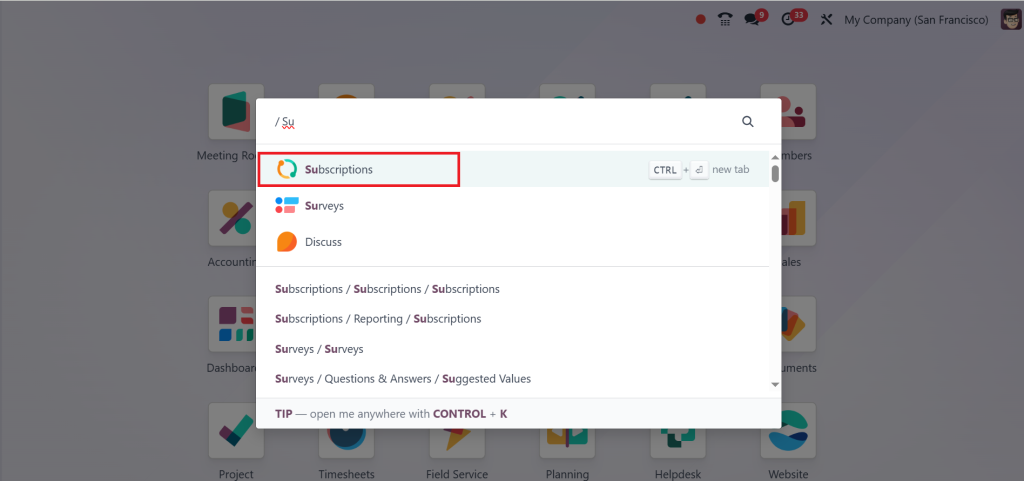
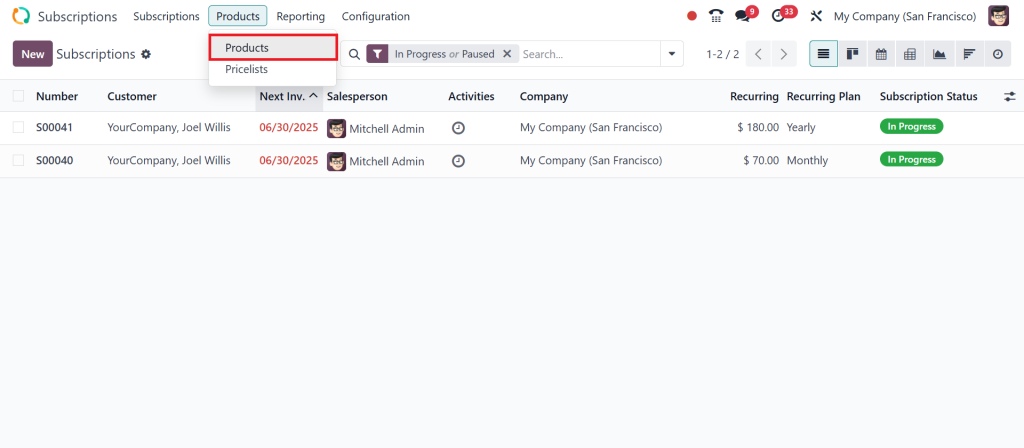
Go to the top menu, click on ‘‘Products’’ and ‘‘Products’’ again.
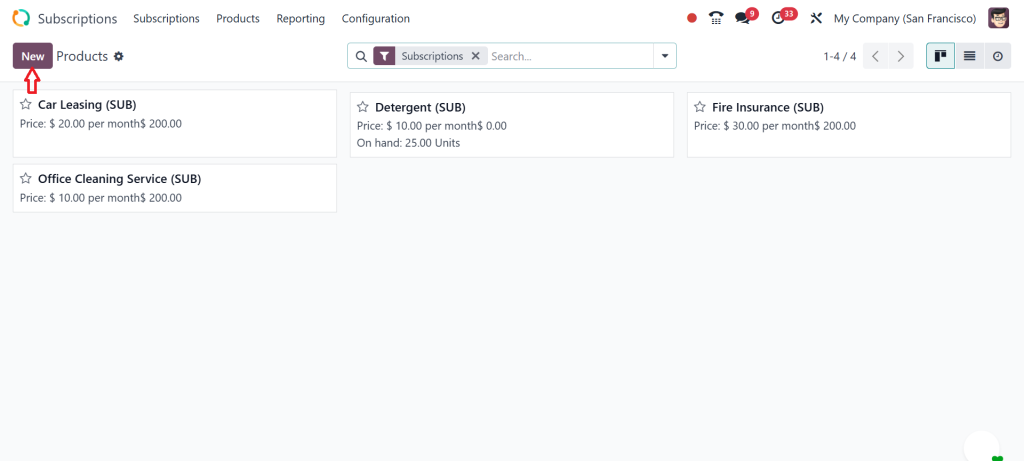
Click on the ‘‘New’’ button.
Fill the details like Product/Service name, type, order type & cost etc.
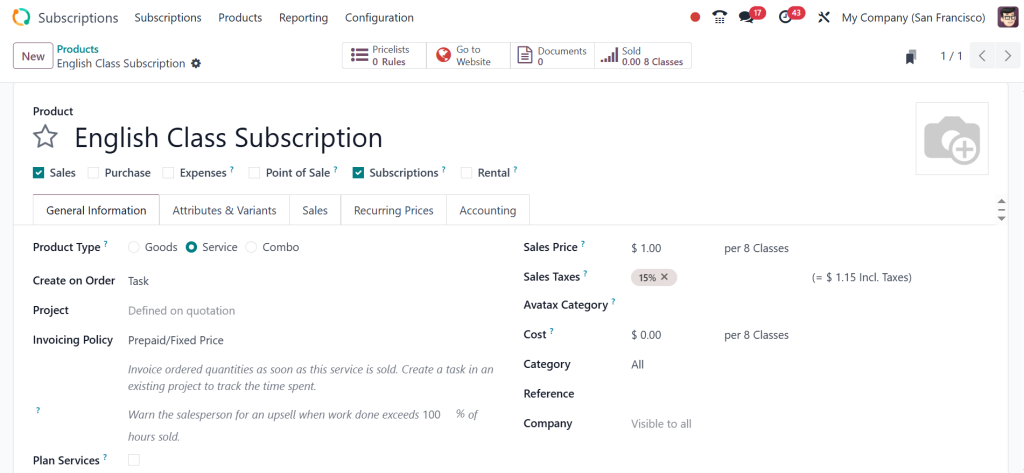
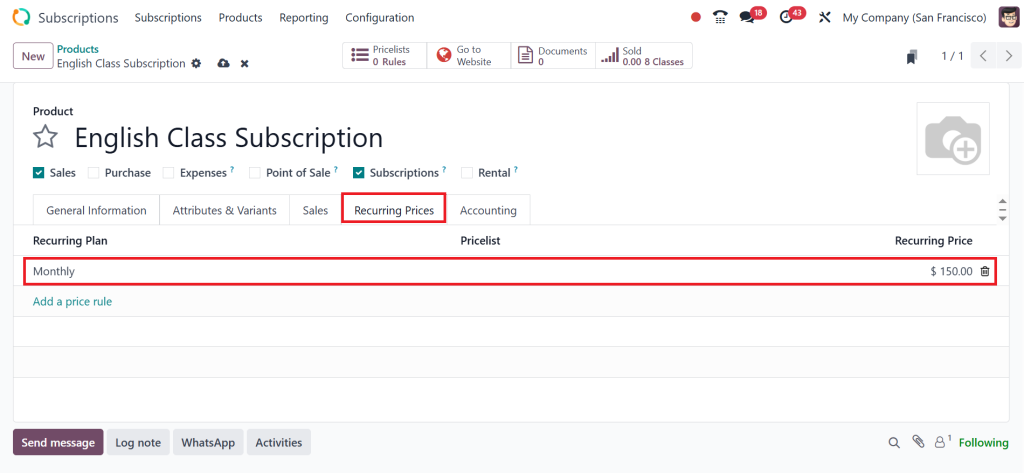
Now click on the ‘‘Recurring Prices’’ tab. This is where we define the subscription plans. Click ‘‘Add a price rule’’. Then select the billing interval. Let’s start with monthly and set the price to $150.
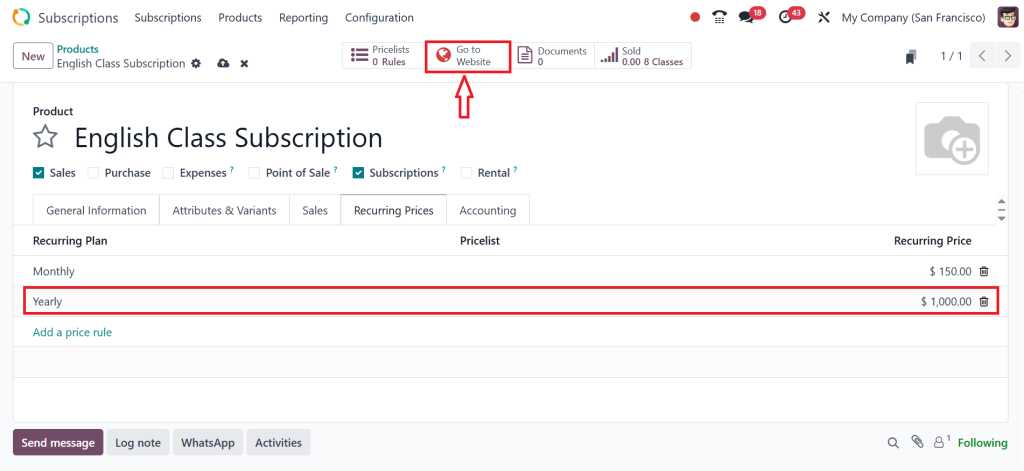
Next, let’s create a yearly plan for those who prefer to commit longer term. Click ‘‘Add a price rule’’ again. Select yearly and set the price to $1000 for the year. You can create as many price rules as you like based on different durations or customer segments. Odoo also lets you limit a pricing rule to a specific ‘‘Pricelist’’. But if you leave that field empty it applies to all customers.
Once your subscription product is fully configured click on the ‘‘Go to Website’’ button.
And enable the ‘‘Published’’ button. That way customers can view and purchase it from your site.
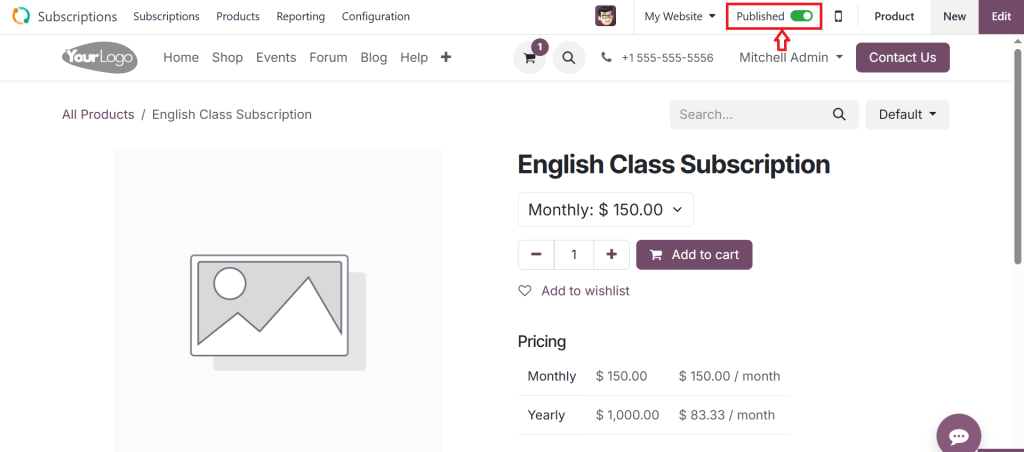
That’s how you can easily create and configure subscription products in Odoo 18.
Subscription Management in Odoo 18 Is Seriously Impressive
Once you’ve set everything up, managing it becomes a breeze. The dashboard for subscription management in Odoo 18 allows you to view who is active, who has been cancelled, who requires follow-up, and the monthly revenue you’re generating.
You can view subscription histories, check renewal rates, and even handle customer requests directly from the platform. Plus, you can run automated reports that show your churn rate, your recurring revenue trends, and your most popular plans. You won’t just be running subscriptions; you’ll be growing them with smart decisions backed by real-time data. Odoo isn’t just a tool here; it becomes your silent business partner.
All About Odoo Recurring Products 18
The Future is Automated
We all want to save time, and nothing saves time like automation. That’s what Odoo recurring products 18 are designed for. Whether you’re offering content subscriptions, monthly product boxes, or premium memberships, recurring products are the way to go. You don’t need to manually invoice clients or send reminders; Odoo handles it all.
Would you like to bill on the first of every month? Easy. Would you like to offer a free trial and then start billing? Done. Would you like to stop billing after 12 months? You got it. It’s your subscription and your rules, and Odoo follows them like clockwork.
Odoo 18 Subscription Billing Configuration Made Simple
A common question we often receive is, “But how does the billing part work?” And here’s the answer: Odoo 18 subscription billing configuration is so flexible that you’ll wonder how you ever managed without it. When you set up a subscription product, you can choose whether to bill monthly, quarterly, yearly or even after a custom number of days. You can add taxes, discounts, and automatic payment methods using Stripe or PayPal.
Invoices can be sent automatically, and payment reminders can be fully customized to fulfil your specific needs. The billing flow is neat, accurate, and fully automated, which means fewer mistakes and more happy customers. To build trust with clients, precise billing is the first step, and Odoo excels in this area.
Here's What Happens When You Truly Configure Subscription Products in Odoo
Once you fully understand how to configure subscription products in Odoo, a whole new world opens up. Your sales crew spends less time on manual follow-ups. Your customers enjoy an effortless experience. Your finance team receives accurate and timely revenue data. And your business becomes more predictable and scalable. You can focus on building better services, improving customer satisfaction, and expanding your reach while Odoo takes care of the backend. This isn’t just software. It’s a more innovative way of running your business.
The Might of Simplicity with Odoo 18
By now, you can tell that Odoo 18 subscription products aren’t just about recurring payments; they’re about building lasting relationships. You’re not just sending a product every month; you’re creating a customer journey that starts with a click and continues for months or years. When you make a subscription product in Odoo 18 and properly configure the Odoo subscription module, you’re not just selling something; you’re setting up a system that works for you 24/7.
The more you explore this feature, the more you’ll realize its power and flexibility. From the initial setup of Odoo subscription products to real-time insights and automated billing, Odoo 18 has provided businesses with a tool they can genuinely rely on. If you’re still handling subscriptions manually, it’s time to rethink your approach. Let automation work for you. Let your systems handle the complexity. And most importantly, let Odoo help you grow.
Now, go ahead and open your dashboard, explore the app, and start configuring. Your subscription-based future is waiting.
Ready to take the next step? Let Netilligence help you configure subscription products in Odoo 18 and modernize the way you manage recurring revenue smarter, faster, and more easily.




