

Why Businesses Need Odoo to Facilitate Customer Payment Follow-Ups
Every business owner knows how stressful it is to wait for customers to pay their dues. A deal is not really complete until the payment is received, and when invoices remain pending for weeks or months, it affects everything from cash flow to day-to-day operations. This is why companies look for more innovative tools that can facilitate customer payment follow-ups without creating extra pressure on their teams.
Odoo Accounting is one such solution. It combines automation, customization, and professionalism to handle reminders in a way that makes sense. With features like Odoo payment follow-up, Odoo customer payment reminders, Odoo overdue invoice management, Odoo follow-up levels, Odoo automatic payment reminders, and the Odoo customer statement report, the platform ensures no invoice is ignored and no customer is forgotten.
In fact, Odoo is not just about chasing payments; it’s about doing it with a system that is polite, consistent, and reliable. By the end of this article, you will see how Odoo makes the whole process of facilitating customer payment follow-ups simple yet effective, and why every modern business needs it.
How Odoo Payment Follow-Up Keeps You Ahead
Most businesses try to manage overdue payments manually, using spreadsheets, sticky notes, or countless email drafts. This approach is not only time-consuming but also risky; what if you miss reminding a critical client? Odoo changes that with Odoo ERP payment follow-up, which creates a clear picture of all pending payments in one place.
You no longer have to jump between tools or guess who owes what. Everything is visible on a single dashboard. With this clarity, businesses can follow up at the right time, making sure invoices are not forgotten. This organized approach helps to facilitate customer payment follow-ups without the stress of messy paperwork.
Odoo Customer Payment Reminders That Work Like Magic
Suppose sending reminders to customers without even raising a finger. That’s precisely what happens with Odoo ERP customer payment reminders. Once set up, the system automatically sends gentle but professional emails to customers, reminding them about pending invoices.
These reminders can be personalized to suit your company’s tone. Some customers need a soft nudge, while others may need a firmer message. By striking the right balance, Odoo enables businesses to facilitate customer payment follow-ups in a way that feels both human and professional.
Odoo Overdue Invoice Management for Better Control
Overdue payments are one of the most significant problems businesses face. Without a proper system, these invoices pile up and cause financial strain. With Odoo ERP overdue invoice management, companies no longer need to worry about missing overdue payments.
The system highlights invoices that are unpaid beyond their due date, making them easy to track and prioritize. This ensures that overdue accounts get attention at the right time. Instead of reacting late, businesses can take proactive steps to facilitate customer payment follow-ups and improve their overall cash flow.
Odoo Follow-Up Levels for Every Situation
Not all customers respond to the same type of follow-up. Some will pay after a friendly reminder, while others may only react after a stricter notice. That’s where Odoo ERP follow-up levels make a big difference.
You can configure different levels of reminders depending on how long the invoice has been overdue. For example, a gentle reminder at 7 days, a firmer one at 15 days, and a final notice at 30 days. This system ensures that you facilitate customer payment follow-ups with increasing seriousness while maintaining a professional approach that preserves client relationships.
Odoo Automatic Payment Reminders to Save Time
Chasing customers manually is exhausting. But with Odoo automatic payment reminders, the system does it for you. You set up the rules, and Odoo takes care of sending reminders at the right time.
This feature saves hours of manual effort and removes the chance of forgetting a reminder. The standout of this automation is that it still feels personal, and customers receive timely reminders that reflect professionalism. With this, businesses can easily facilitate customer payment follow-ups and maintain a steady cash flow.
Odoo Accounting Follow-Up Configuration for Flexibility
Every company has its own way of dealing with payments. Some businesses prefer being strict from the start, while others take a more relaxed approach. The Odoo accounting follow-up configuration gives you the flexibility to design reminders and follow-up rules that match your style.
You can set different timelines, create custom messages, and even decide which customers should receive which type of reminder. This personalized setup makes it easier to facilitate customer payment follow-ups without compromising on how you want your business to be perceived.
Odoo Customer Statement Report for Transparency
Sometimes customers delay payments not because they don’t want to pay, but because they lose track of their invoices. That’s where the Odoo ERP customer statement report comes in handy.
This report gives customers a detailed overview of all their pending invoices, past payments, and overall account balance. By sharing this report, businesses can clear up any confusion and avoid unnecessary disputes. It’s a simple but effective way to facilitate customer payment follow-ups while also building trust with clients.
How to Remind Customers to Make Their Payments
Reminding customers to pay their dues is one of the most uncomfortable tasks for any business. On one hand, you need the cash flow to keep operations running smoothly. On the other hand, you don’t want to damage your relationship with the client by sounding too harsh or impatient. Striking this balance is the key to getting paid on time while maintaining trust.
The good news? With the right approach, you can remind customers about payments in a polite, professional, and effective way. So, let’s remind customers to settle their accounts with us to prevent delays and avoid unpaid invoices from becoming bad debts.
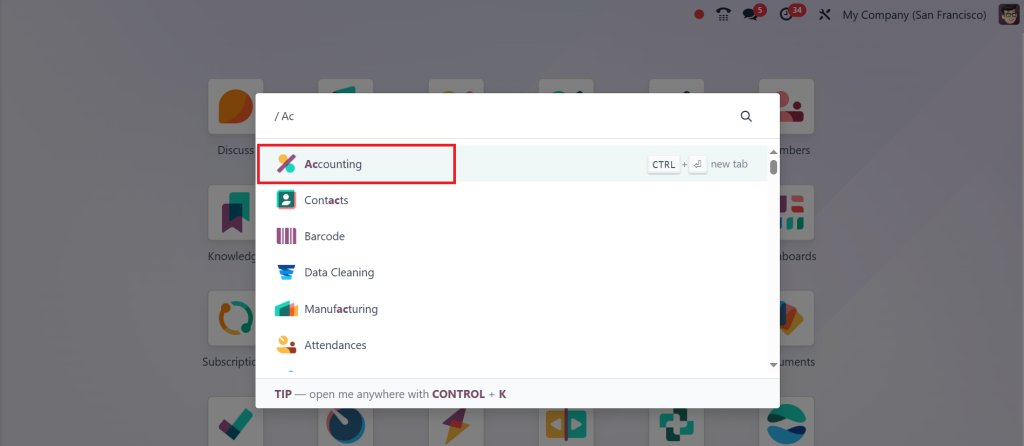
First, go to the Accounting app.
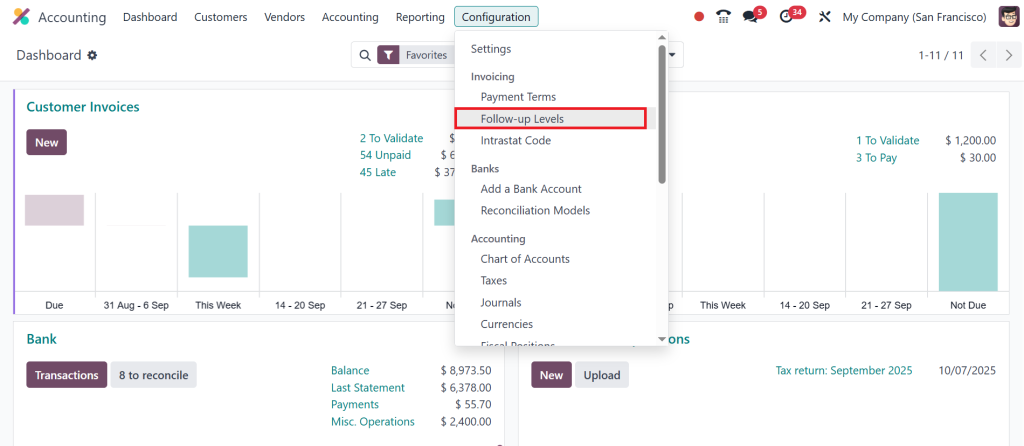
Then, click on the Configuration > Follow-up Levels.
Here, we can see all the actions that are activated after a specific number of days. Now, click on any of them.
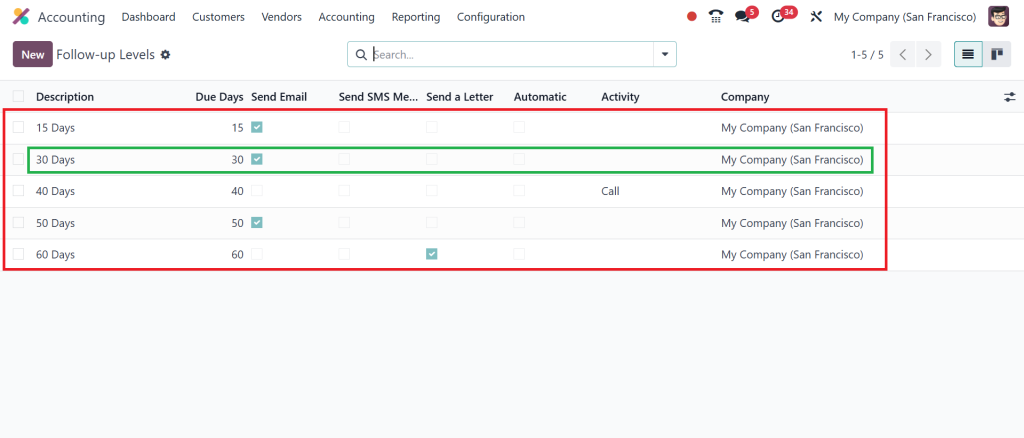
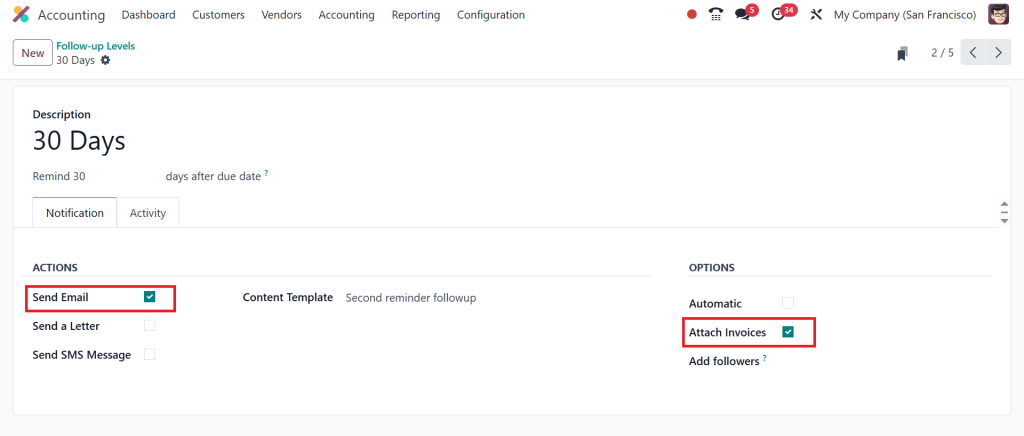
After clicking on 30 Days, you can see the follow-up level and manage additional options like choosing when to send this follow-up, selecting how you want to send it, and if you want to add any kind of template. For example, this lets you send any of your mail templates. You can also choose to send this follow-up automatically when it applies, and you can attach any invoices to the reminder.
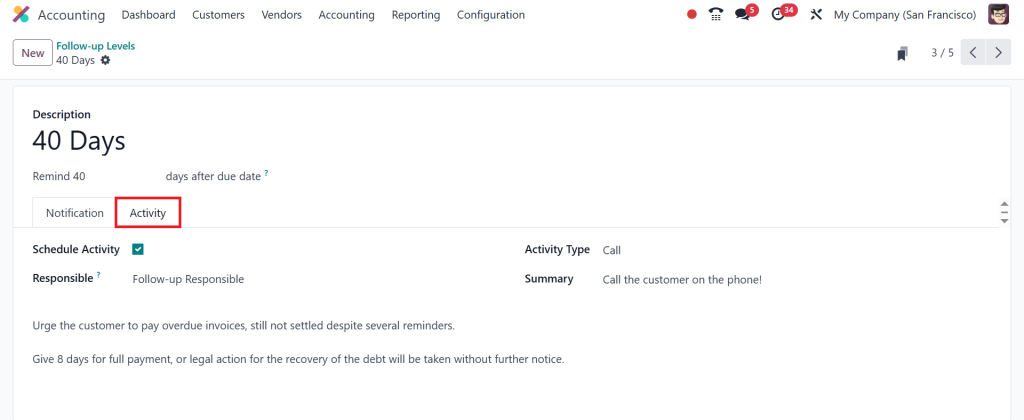
If you go to the Activity tab, you can even schedule activities here.
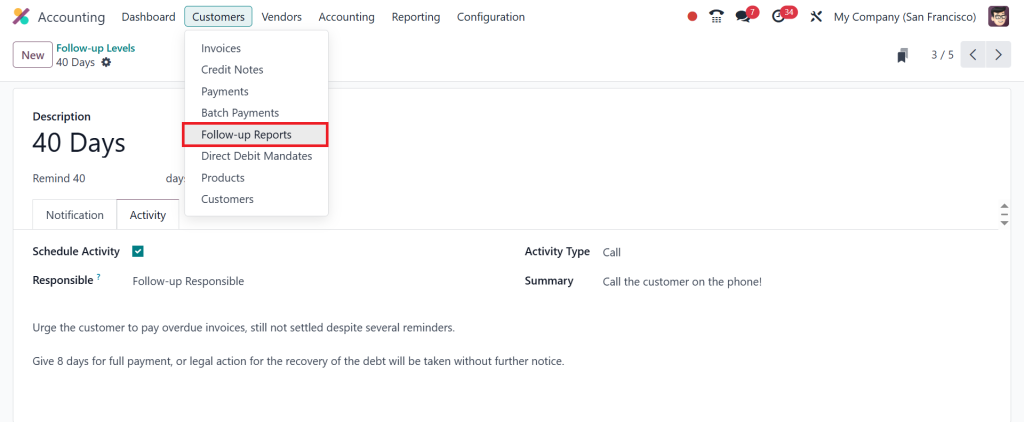
Now, let’s go to the Follow-up Reports under the Customers menu.
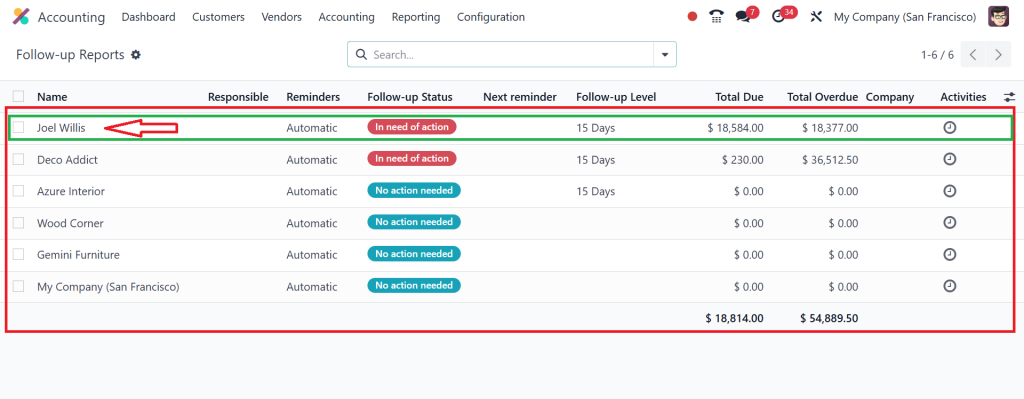
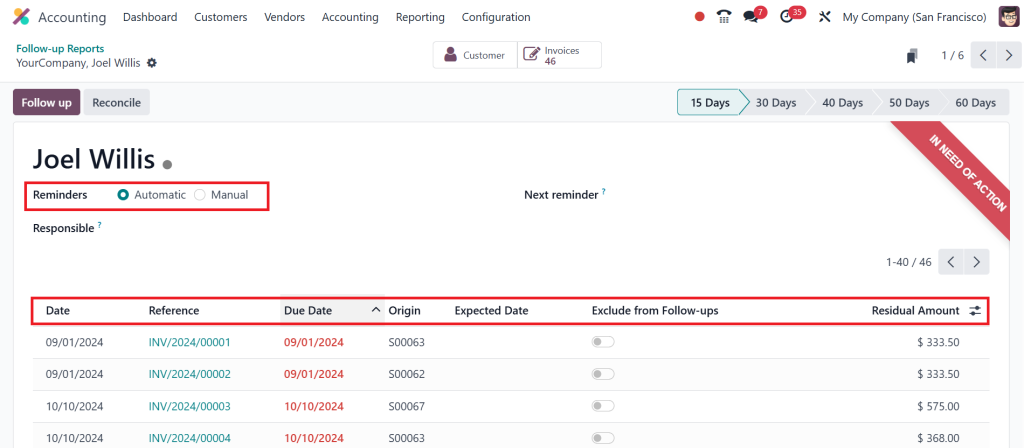
Here, you can see everything that customers owe. In the below screenshot you can see the total amount customers must pay and how much is overdue. I will click on Joel Willis to see a summary of their transactions.
Now you can see the whole overview of this customer and their open invoices with information like due date, the expected date if customers tell us when they will pay. And we can also set up automated or manual reminders and exclude specific invoice from follow-ups.
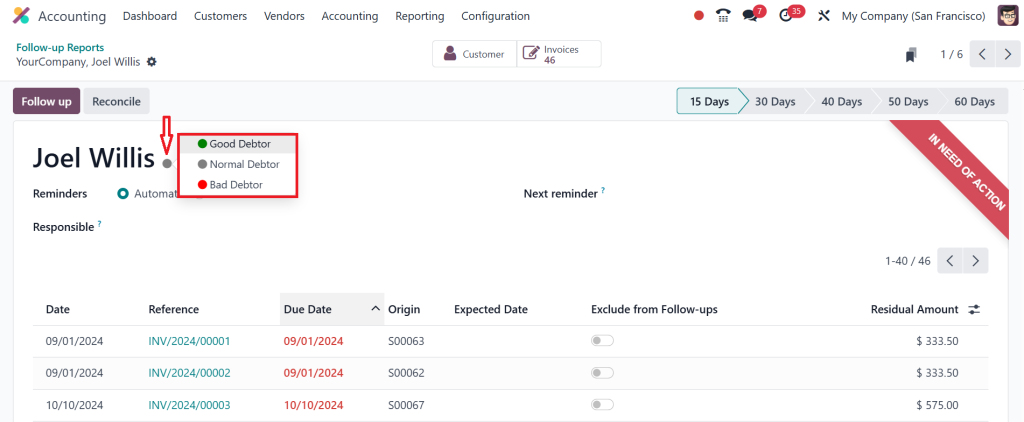
By clicking on the gray dot we can even label contacts as good, normal or bad debtors.
It’s so easy to track outstanding payments on a daily, weekly or monthly basis in Odoo ERP.
How Businesses Benefit from Odoo Payment Follow-Up Tools
When companies start using Odoo for payment follow-ups, they quickly notice several benefits:
- Less administrative work: Automation means fewer manual tasks.
- Faster payments: Customers are reminded on time, so cash flow improves.
- Better communication: Reminders are polite, professional, and consistent.
- Scalable process: As the company grows, Odoo continues to handle follow-ups smoothly.
These benefits demonstrate that Odoo doesn’t just send reminders; it changes how businesses facilitate customer payment follow-ups in a structured and reliable manner.
A Real-Life Example of Odoo Accounting in Action
Think about a company dealing with hundreds of clients every month. Before Odoo, the finance team was buried in endless spreadsheets, chasing customers manually, and missing essential follow-ups. Payments often came late, and disputes were common.
After switching to Odoo:
- The Odoo ERP payment follow-up dashboard showed overdue invoices instantly.
- Odoo ERP customer payment reminders went out automatically, saving hours of work.
- Odoo follows up levels handled escalation without the team lifting a finger.
- Odoo ERP customer statement reports improved transparency and reduced disputes.
Within a few months, the company’s overdue payments dropped significantly, and its cash flow stabilized. This is precisely how Odoo helps to facilitate customer payment follow-ups and make financial management stress-free.
Odoo Makes Payment Follow-Ups Easier Than Ever
At the end of the day, businesses need to get paid on time, which requires innovative systems to be in place. Odoo Accounting is built to facilitate customer payment follow-ups through automation, reporting, and professional communication.
From Odoo ERP payment follow-up dashboards to Odoo ERP automatic payment reminders, from Odoo ERP overdue invoice management to Odoo ERP customer statement reports, every feature works together to make payment follow-ups simple yet effective. Instead of wasting energy chasing invoices, businesses can now focus on growth while Odoo handles the heavy lifting.
If cash flow is the heartbeat of your business, then Odoo is the system that keeps it strong and steady.
Ready to simplify your accounting and get paid faster? Let Netilligence help you implement Odoo Accounting today and change the way you manage customer payments. Contact us now to get started!




