

Why Reuse Past Purchase Orders in Odoo 18 Matters?
If you are handling daily buying tasks, you already know how much time goes into preparing purchase orders again and again. Suppose you ordered the same items last month, and now you have to reorder them. Creating everything from the start feels repetitive, right? This is precisely where the option to reuse past purchase orders in Odoo 18 saves the day.
With Odoo’s latest version, you can duplicate and copy a purchase order in Odoo 18, or even design an Odoo 18 purchase order template that you can bring back anytime you need. The whole process of Odoo 18 purchase order duplication is built to make repeated tasks quicker. Many businesses use the option of repeat purchase order Odoo 18 whenever they deal with vendors for the same products regularly.
In this detailed blog, we will explore in detail how to reuse past purchase orders in Odoo 18, how to duplicate a purchase order in Odoo 18, and how to follow the complete Odoo 18 purchase order workflow when reordering items. By the end, you will clearly understand how these features work and how they save effort in your daily operations.
The Idea Behind Reusing Past Purchase Orders in Odoo 18
The feature to reuse past purchase orders in Odoo 18 was introduced to solve a widespread business challenge: repeating the same order multiple times. Many companies deal with fixed vendors and fixed product lists. Instead of preparing new requests each time, Odoo lets you use the previous record as a ready-made base.
For example, if you ordered office supplies last quarter, you don’t have to add each product line again. You can simply copy the purchase order from Odoo 18 and send it within minutes. This is not just about speed, but also about reducing manual errors because the old purchase order already contains correct vendor details, pricing, and product quantities.
The idea is simple but very effective: keep using what you already built, and just adjust the details when required.
How Does Duplicate Purchase Order in Odoo 18 Actually Works?
The option to duplicate a purchase order in Odoo 18 is designed for quick use. It means you do not need to go through the complete creation cycle of a purchase order again. Instead, Odoo provides a duplication feature that creates a new draft based on an existing one.
Let’s walk through the process of how to reuse past purchase orders in Odoo 18 effectively.
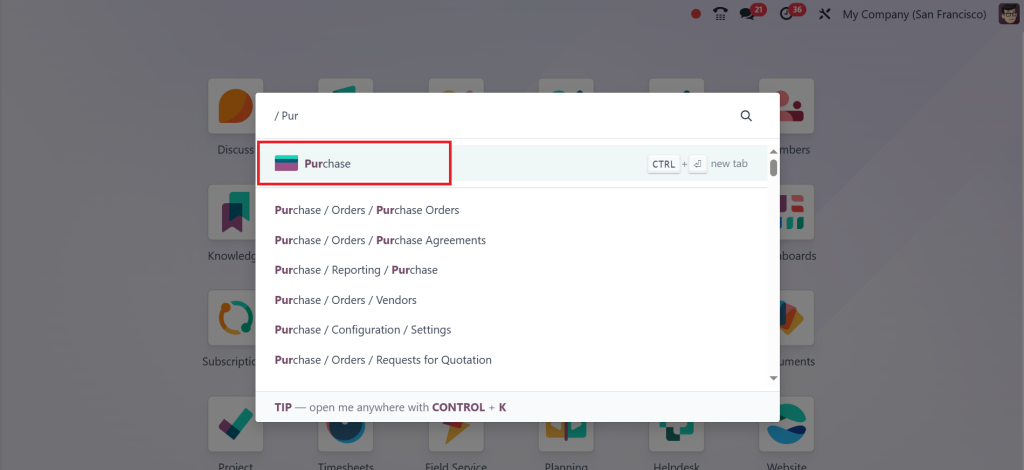
Log in to your Odoo 18 account and open the Purchase app.
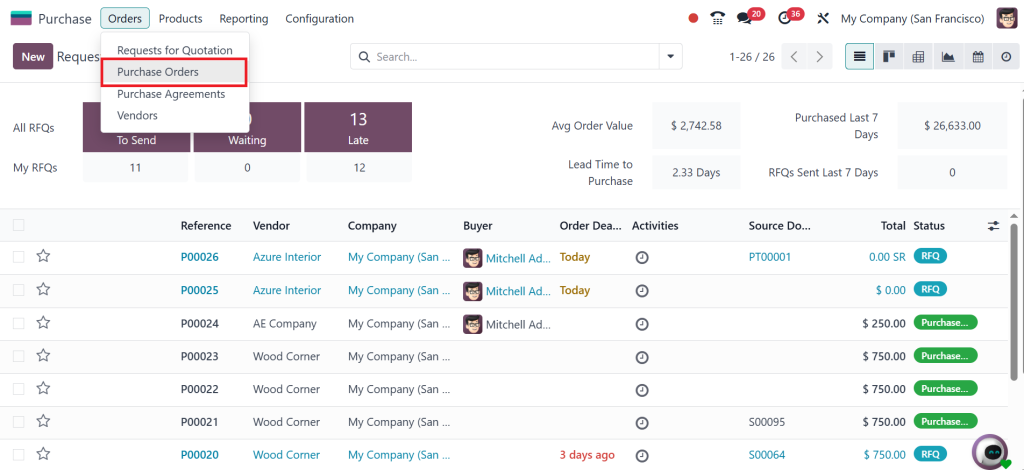
Go to Orders > Purchase Orders.
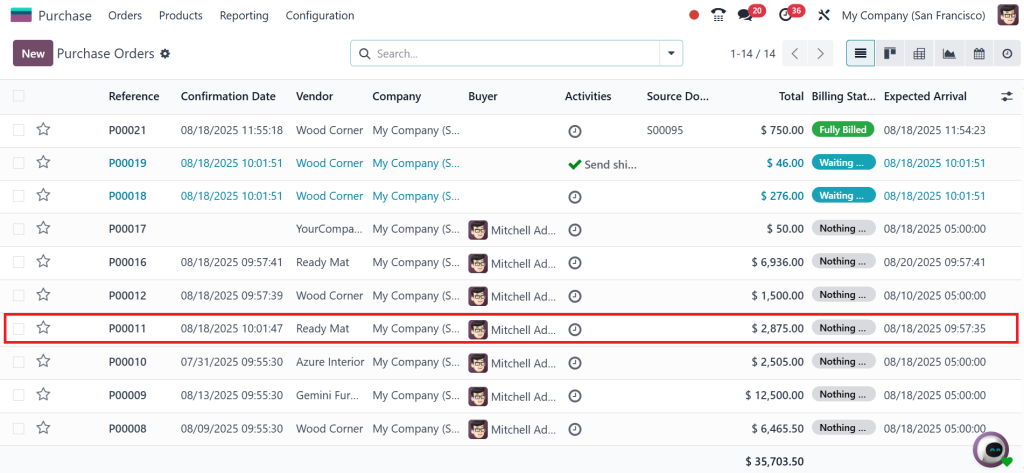
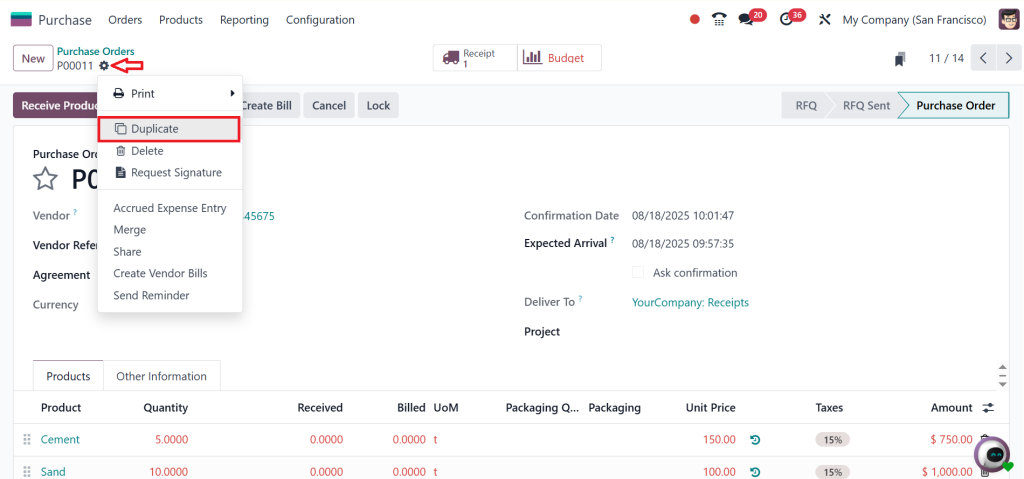
Select the purchase order you want to reuse.
Click on the “Action” button, then choose Duplicate purchase order Odoo 18.
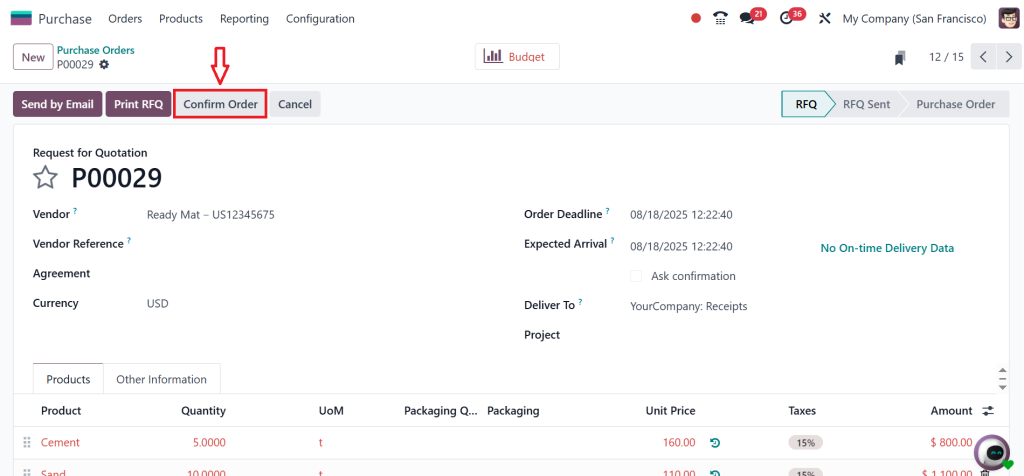
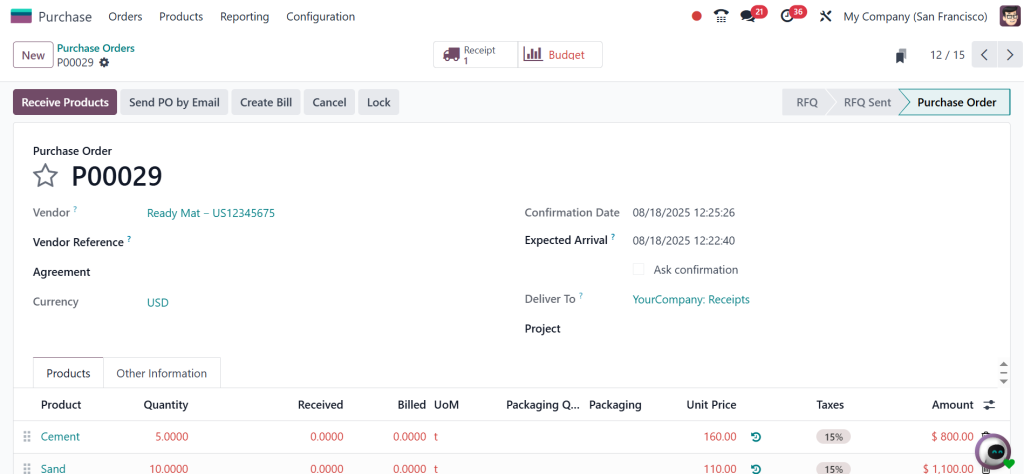
Adjust quantities, dates, or pricing if necessary and then click on Confirm.
This simple workflow allows you to reuse past purchase orders in Odoo 18 without errors or delays.
By using the feature of Odoo 18 purchase order duplication, businesses save time while ensuring consistency in their transactions.
Why Copy Purchase Order in Odoo 18 Saves Time
When you copy a purchase order in Odoo 18, you reduce repetitive work. Think about vendors you contact monthly for raw materials or stock refills. Instead of typing everything again, a simple copy brings all the needed information forward.
This feature also avoids mistakes. For example, if you are always buying 100 units of a specific item, you don’t have to risk typing the wrong number. By using the previous order, the system ensures all essential details are carried over.
In short, the copy function is like a ready-to-use checklist. It keeps your records accurate, saves minutes on every order, and builds confidence that you won’t miss anything important.
The Role of Odoo 18 Purchase Order Template
Another beneficial function is creating an Odoo 18 purchase order template. While duplication works on existing orders, templates are predesigned purchase orders that you can use again and again for future needs.
For instance, if your company orders the same batch of supplies every two weeks, you can create a template once. Whenever you need it, you just load the template, check if the details are still valid, and confirm.
Templates are beneficial for seasonal orders, standard contracts, or fixed vendor agreements. Instead of relying only on past orders, you have a ready-made draft that reflects your everyday purchasing habits.
Repeat Purchase Order in Odoo 18 for Regular Transactions
For businesses that work with the same vendors repeatedly, the repeat purchase order Odoo 18 option feels very natural. It allows you to bring back past orders and use them without confusion.
Here’s an example:
A manufacturing unit buys packaging boxes from the same supplier every month. Instead of preparing a new purchase order every time, the team can repeat the last one, make slight changes if needed, and confirm.
This saves not only time but also builds a reliable relationship with suppliers because the orders are always consistent. Vendors also appreciate repeated and accurate purchase orders since they can prepare deliveries without confusion.
Step-by-Step Flow of Odoo 18 Purchase Order Workflow
Now, let’s look at the Odoo 18 purchase order workflow when it comes to reusing or duplicating past orders. The workflow shows how the system processes every step until the order is complete.
Drafting: When you duplicate or reuse an order, Odoo generates a draft.
Editing: At this stage, you can make updates. For example, changing the delivery date or adding new products.
Approval: Depending on company rules, the draft may need approval before confirmation.
Confirmation: Once approved, the order is confirmed and sent to the vendor.
Tracking: The purchase order can be tracked until delivery and invoicing are complete.
This workflow makes sure nothing is skipped. By using Odoo 18 purchase order duplication, you fit directly into the regular cycle while saving preparation time.
Linking Duplicate Purchase Order Odoo 18 with Real Business Needs
The concept of duplicate purchase order in Odoo 18 is not just about speed; it connects directly to real business practices. Many industries depend on routine purchasing:
- Retail shops restocking shelves.
- Manufacturers buy raw materials.
- Offices ordering stationery.
- Restaurants reordering food supplies.
In each case, reusing old orders is far more practical than starting from scratch. The ability to reuse past purchase orders in Odoo 18 aligns with the daily workflows of such businesses, ensuring they never lose track of what’s needed.
Making Copy Purchase Order Odoo 18 Part of Your Routine
Once you understand how to copy a purchase order in Odoo 18, it easily becomes a part of your daily tasks. Every purchase manager knows how much time can be saved when you don’t need to type product details again.
This practice also creates consistency across departments. For example, if one manager places an order today and another manager repeats it next month, the system keeps both orders aligned. Everyone in the crew or team stays on the same page.
How Odoo 18 Purchase Order Template Adds Long-Term Value
A template is not just about saving one order. It creates a long-term system. With an Odoo 18 purchase order template, your company builds a library of orders that can be reused whenever needed.
Over time, these templates reflect your company’s buying habits and provide a proper record. Managers can see what is usually ordered, from which vendors, and in what quantity. This makes financial planning, vendor negotiation, and reporting much easier.
Building Efficiency with Repeat Purchase Order Odoo 18
Using the repeat purchase order Odoo 18 method means you are not wasting resources. It also ensures that repeated vendors receive clear and correct orders. In many industries, repeated orders are the backbone of supply. By repeating past purchase orders, businesses can keep stock levels balanced and maintain good supplier relationships.
Why Odoo 18 Purchase Order Duplication is Reliable for Teams
Another reason companies like the Odoo 18 purchase order duplication feature is that it keeps team members confident. Anyone can handle reordering tasks even if they did not create the original order. The system automatically carries over all required details.
This reduces training needs and makes it easier for new employees to handle purchase responsibilities. It also means there is less dependency on one person, since the system itself holds the complete record ready to duplicate.
Getting the Best Out of Odoo 18 Purchase Orders
The option to reuse past purchase orders in Odoo 18 brings simplicity to one of the most repeated business tasks. Whether you use duplicate purchase order Odoo 18, copy purchase order Odoo 18, create an Odoo 18 purchase order template, or simply follow the Odoo 18 purchase order workflow, each method makes daily buying activities faster and more accurate.
If your company often deals with repeated purchasing needs, it’s time to explore how Odoo 18 purchase order duplication can fit into your routine. Instead of spending valuable time creating the same orders again and again, you can let Odoo do the heavy lifting.
At Netilligence, we help businesses set up and optimize Odoo for fundamental needs like these. If you want to make the most of features like reusing past purchase orders, reach out to our team today and discover how Odoo can support your business growth step by step.




