

Presets in Odoo 19 Point of Sale and the Reality of Running a Busy Business
Presets in Odoo 19 Point of Sale may appear, at first glance, to be another configuration option in the POS system. However, for businesses that deal with constant customer flow, multiple order types, and staff working under pressure, this feature quietly becomes one of the most impactful tools in daily operations. Restaurant owners, café managers, and retail business operators often invest in modern POS software expecting it to simplify work. Yet, many still face delays, billing errors, and confusion at the counter. The root cause is rarely the staff or the business model; in most cases, it is the way the POS is structured and the number of decisions it expects humans to make in real time.
In a real-world business environment, especially in food and hospitality, staff members are required to handle dine-in customers, takeaways, and deliveries simultaneously. When every order requires manual selection of order type, taxes, receipt format, and workflow, even experienced cashiers can make mistakes during peak hours. This is precisely where Presets in Odoo 19 Point of Sale play a critical role. By allowing businesses to predefine these decisions, Odoo 19 reduces staff’s mental load and replaces uncertainty with consistency. Businesses that learn to manage POS properly in Odoo 19 often experience faster billing, calmer staff behavior, and noticeably better customer satisfaction without changing their team or increasing effort.
The Everyday Problems Presets in Odoo 19 Point of Sale Solve
Most business owners accept POS-related stress as part of daily operations, but that stress often stems from predictable, preventable issues. Orders placed under the wrong type, incorrect tax applications, kitchen tickets sent to the wrong printer, or receipts that don’t match customer expectations are all common problems. These issues do not happen because staff are careless; they happen because the POS requires too many manual choices at the wrong time.
By implementing Presets in Odoo 19 Point of Sale, these recurring issues are addressed at the system level. When staff no longer need to think about whether an order is dine-in or takeaway, or which tax applies, mistakes naturally reduce. This is why businesses that properly manage POS presets in Odoo 19 often report fewer refunds, cleaner daily reports, and smoother end-of-day reconciliation. Over time, these minor operational improvements translate into better customer trust and more predictable business performance.
How to Manage Presets in Odoo 19 Point of Sale (Step-by-Step Guide)
Step 1: Enable Presets in POS Settings
To start using Presets in Odoo 19 Point of Sale:
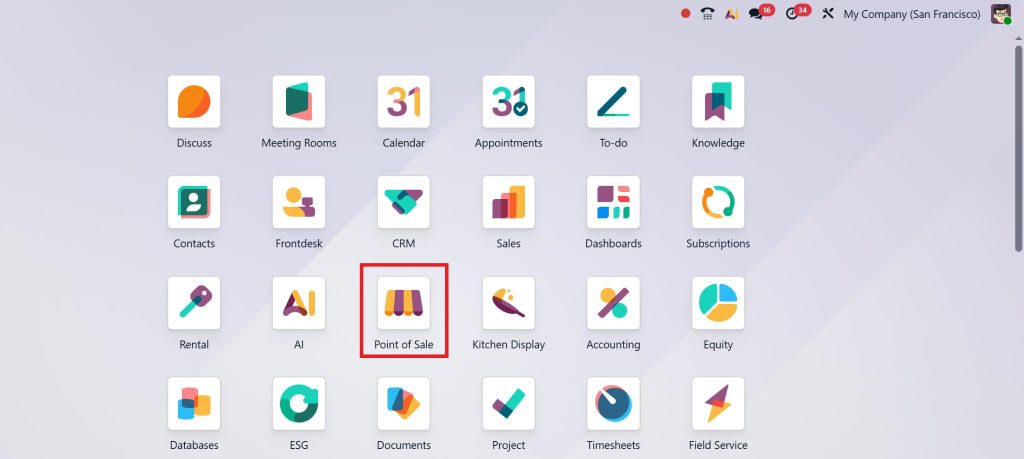
- Go to Point of Sale →
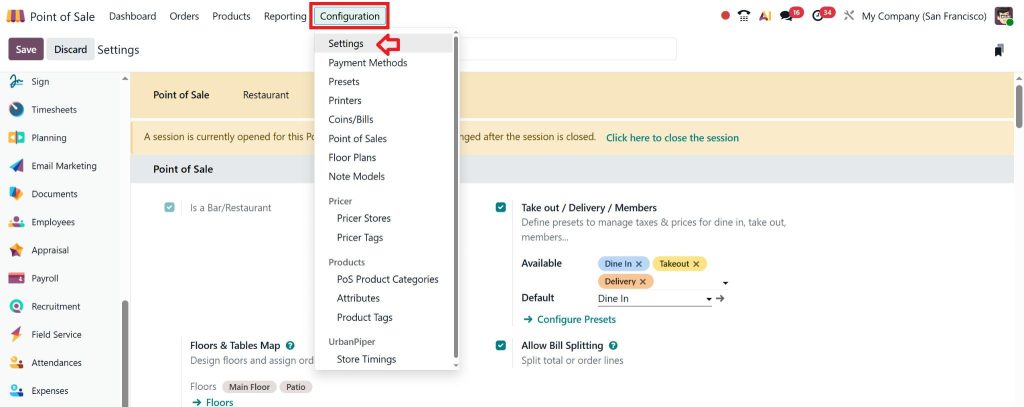
- Configuration → Settings
- Enable the POS Presets option
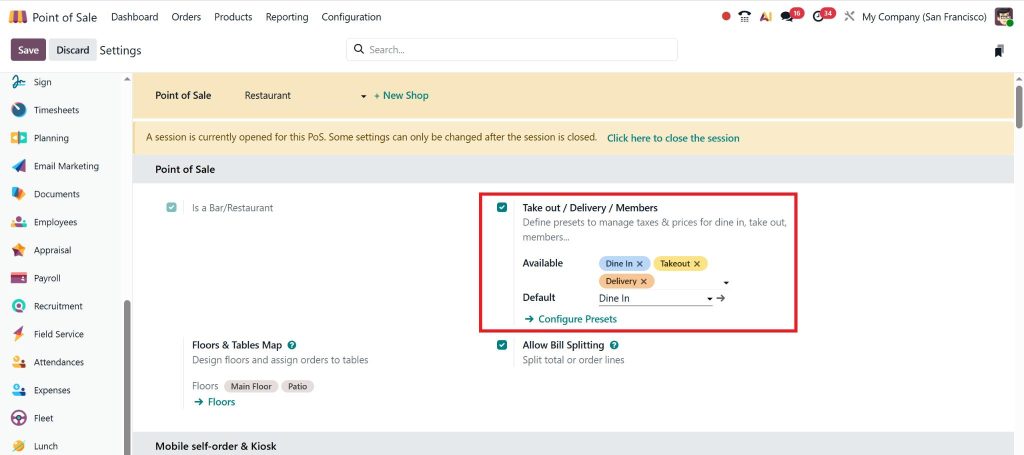
- Save the settings
Once enabled, the preset feature becomes available in the POS configuration.
Step 2: Create POS Presets
- Go to Point of Sale → Configuration → Presets
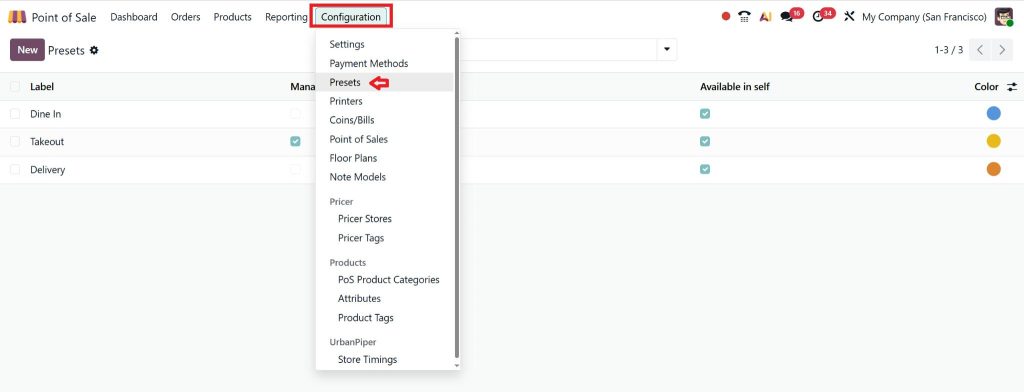
- Click Create
- Enter a clear preset name, such as:
-
- Dine-In
- Takeaway
- Delivery
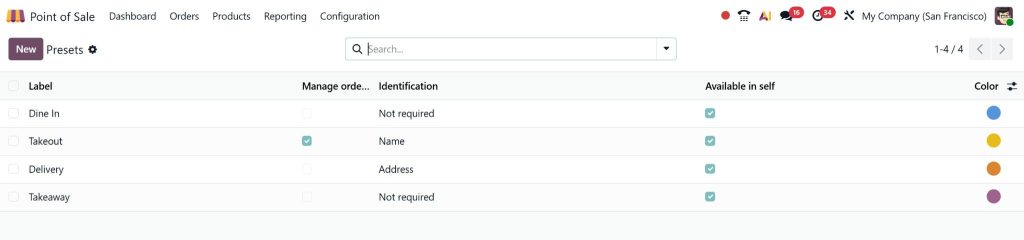
This step lays the foundation for your Odoo 19 POS presets configuration.
Step 3: Configure Preset Details
Each preset can be configured with:
- Order type behavior
- Default customer or guest
- Tax and fiscal position
- Payment methods
- Receipt design
- Kitchen or bar printer routing
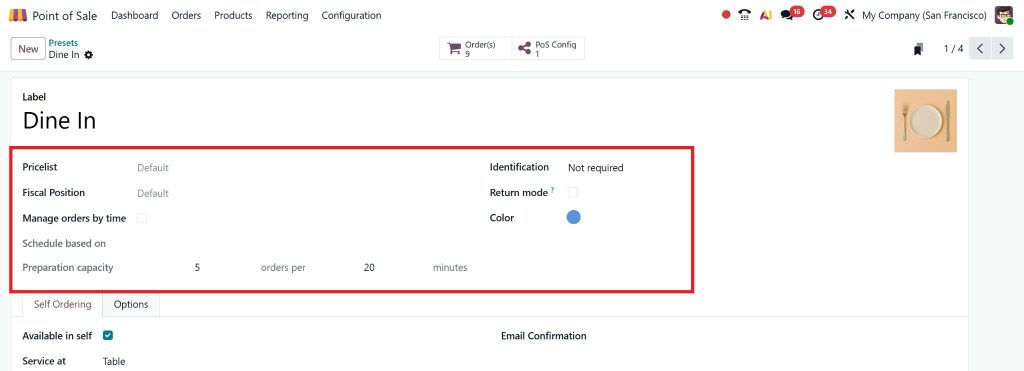
In Odoo 19, food businesses’ POS dine-in and takeaway presets automatically send orders to the correct preparation area.
Step 4: Assign Presets to POS Sessions
Once presets are created:
- Open your POS configuration
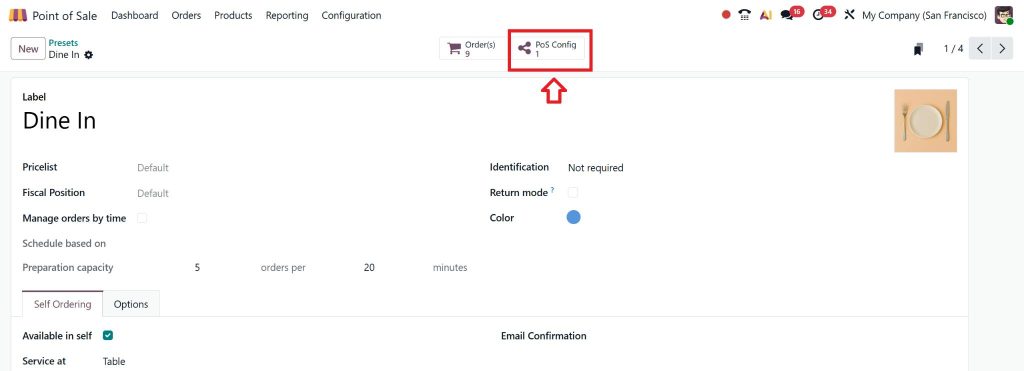
- Assign available presets

- Set a default preset if needed
This ensures staff can easily manage POS presets in Odoo 19 during live sales.
Step 5: Test Presets Before Going Live
Always test:
- Order placement
- Receipt printing
- Kitchen tickets
- Tax calculations
Testing ensures your Presets in Odoo 19 Point of Sale work smoothly under real conditions.
Key Benefits of Presets in Odoo 19 Point of Sale
1. Faster Billing with Two-Click Presets
One of the most significant advantages of two-click presets in Odoo 19 POS is speed. Cashiers no longer waste time manually selecting order types, taxes, or customers. A single click selects the preset, and the order is ready to process.
This improves:
- Customer waiting time
- Order throughput during peak hours
- Staff confidence and efficiency
2. Reduced Errors and Refunds
Manual POS configuration often leads to mistakes such as incorrect taxes or wrong order routing. In Odoo 19 Point of Sale, Presets automatically apply settings, significantly reducing human error.
3. Ideal for Restaurants and Cafés
Restaurants benefit significantly from the POS presets in Odoo 19 because they handle multiple order flows daily. Presets provide clear separation between dine-in, takeaway, and delivery orders, reducing confusion.
4. Better Staff Training
Training new staff becomes easier when using presets. Instead of learning complex POS settings, employees simply select the correct preset and focus on customer service.
Using Presets in Odoo 19 POS for Restaurant Operations
Restaurants deal with high order volumes and multiple order types. Presets POS restaurant Odoo 19 bring clarity and speed to daily operations.
Dine-In Preset
- Table selection enabled
- Kitchen printing activated
- Service charges or tips applied
Takeaway Preset
- No table selection
- Faster billing flow
- Simplified receipt format
Delivery Preset
- Delivery charges are applied automatically
- Customer address required
- Online payment enabled
With Odoo 19 POS order type presets, restaurant staff can focus on service rather than system settings.
Presets in Odoo 19 Point of Sale for UAE Businesses
Businesses in the UAE operate under strict VAT regulations and high customer service expectations. When you configure presets Odoo POS UAE, you ensure:
- Accurate VAT application
- Correct fiscal positions
- Consistent pricing across branches
- Clean audit-ready reports
Netilligence has implemented Odoo 19 POS presets configuration for multiple UAE-based restaurants and retail businesses, ensuring both speed and compliance.
Why Netilligence Takes a Different Approach to Presets in Odoo 19 Point of Sale
At Netilligence, the focus is not just on enabling features but on understanding business reality. Before configuring Presets in Odoo 19 Point of Sale, the team studies how orders flow, where mistakes usually occur, and what causes delays during busy hours. Presets are then designed to remove friction rather than add another layer of complexity.
This approach ensures that the POS feels intuitive to staff and reliable to management. Businesses that work with Netilligence often find that their POS stops being a source of stress and becomes a quiet support system that simply works in the background.
Presets in Odoo 19 Point of Sale as a Practical Business Upgrade
Presets in Odoo 19 Point of Sale are not a flashy feature, but they deliver some of the most meaningful improvements in daily operations. By reducing manual decisions, standardizing workflows, and supporting staff during peak hours, presets quietly transform how a business functions. When implemented thoughtfully, they improve speed, accuracy, staff confidence, and customer satisfaction without requiring significant changes to the business itself.
For businesses looking to make their POS feel simpler, calmer, and more reliable, learning how to manage POS presets in Odoo 19 is a smart step forward. With the proper configuration and guidance, presets turn everyday POS challenges into a smooth, predictable process that supports long-term growth.




