How to Setup Sale Credit Limit in Odoo 18 Accounting?
Why is Setting Up a Sales Credit Limit Important in Odoo 18 Accounting?
Have you ever worried about extending too much credit to customers and the potential risks it could bring to your business? If yes, then you’re not alone! Managing customer credit is one of the most critical tasks in business, especially when keeping your cash flow stable. That is where Odoo 18 accounting steps in with its handy feature: sales credit limits.
In Odoo 18, you can easily set a credit limit for each customer, ensuring they don’t place orders beyond their financial capacity. The Odoo 18 sales credit limit setup provides businesses with a robust method to track outstanding balances and prevent bad debt. Moreover, Odoo 18’s customer credit management ensures that your business is not exposed to excessive financial risks while maintaining healthy customer relationships.
By configuring Odoo 18 sales order credit control, you can safeguard your business from customers who cannot pay their dues on time. The Odoo 18 credit limit feature prevents sales orders from exceeding a customer’s available credit, making financial management much easier and more secure.
By the end of this blog, you’ll have a clear understanding of how to:
Configure the Odoo 18 credit limit configuration settings.
Restrict sales orders using the Odoo 18 to restrict sales based on credit features.
Utilize the Odoo 18 credit limit feature to enhance your accounting processes.
What Is a Sales Credit Limit in Odoo 18?
Breaking Down the Concept
Before diving into the configuration details, let’s first understand a sales credit limit. A credit limit is the maximum amount of credit a business is willing to extend to a customer. It sets a financial boundary for customers, ensuring they don’t make purchases beyond their ability to pay.
For example, if you set a credit limit of $1,000 for a customer, they won’t be able to place orders that exceed this amount unless they make a payment to reduce their outstanding balance. This mechanism is essential for maintaining cash flow and reducing the risk of overdue payments. In Odoo 18, you can easily configure this feature for each customer, allowing you to manage their credit effectively.
How to Set Up a Sale Credit Limit in Odoo 18 Accounting?
Now that we understand the importance of setting a credit limit let’s walk through the process of setting up a sale credit limit in Odoo 18 accounting. Don’t worry, it’s straightforward!
Step 1: Activate the Credit Limit Feature in Odoo 18
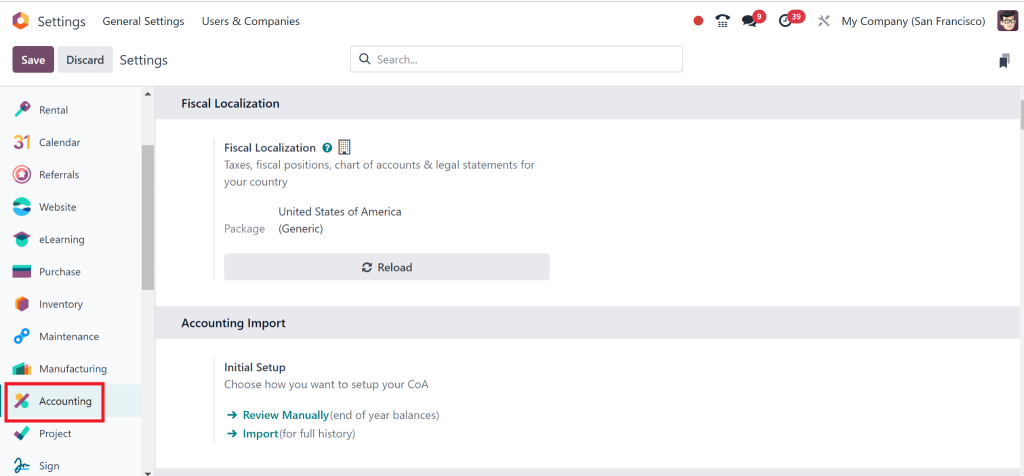
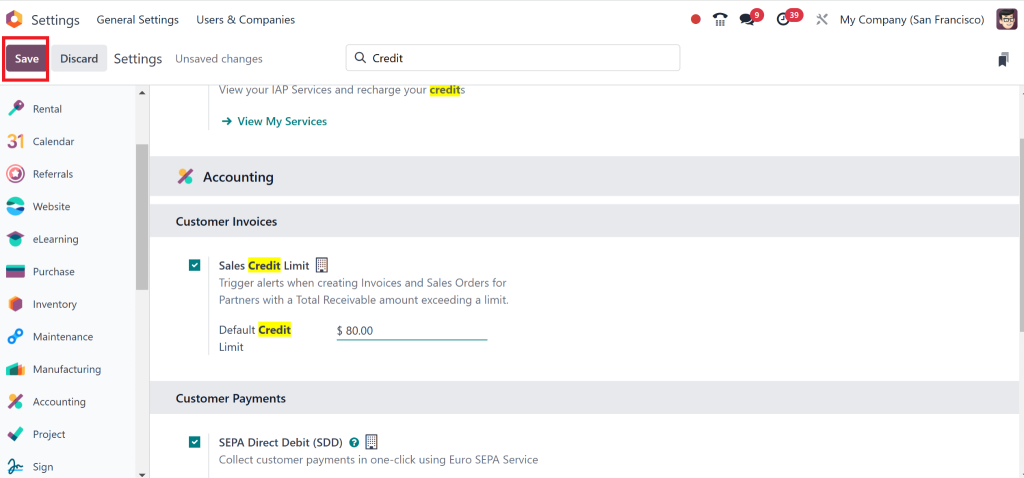
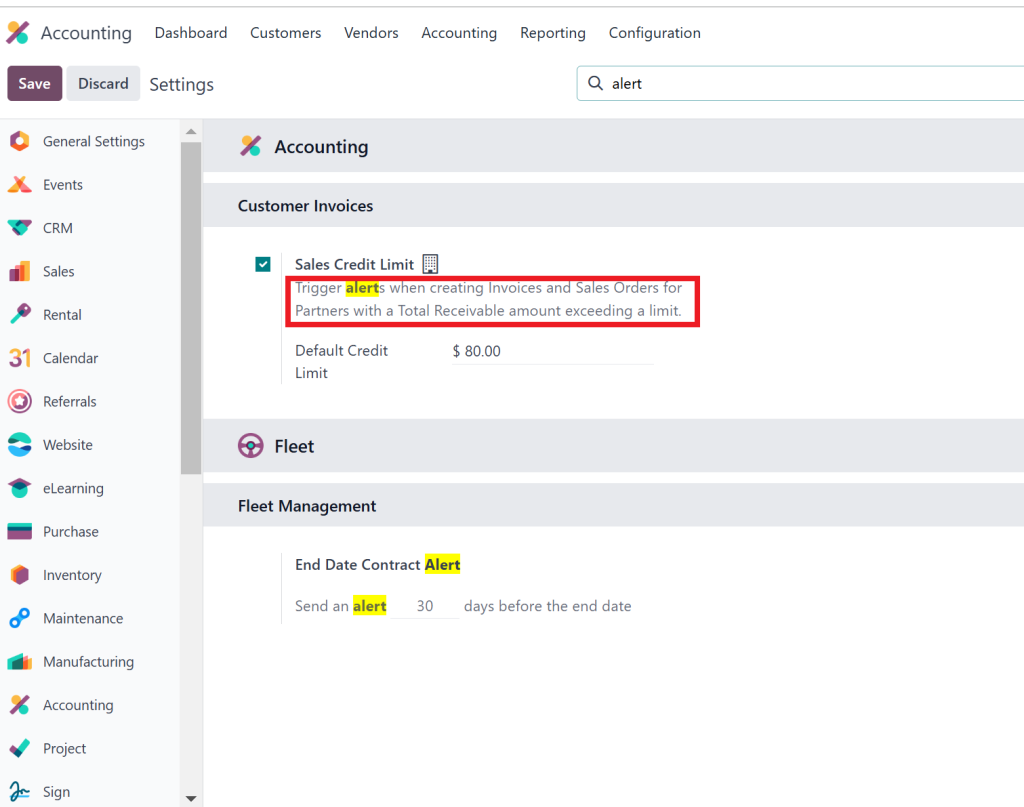
Before setting any limits, you must ensure that the Odoo 18 accounting credit limit feature is turned on. Here’s how you do it:
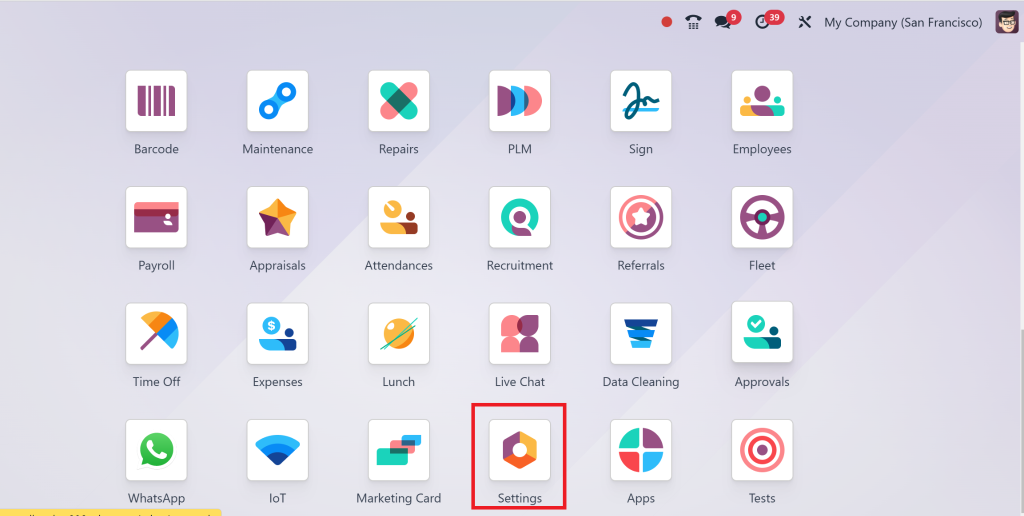
Go to the Settings module in your Odoo dashboard.
Under Accounting, click on Configuration.
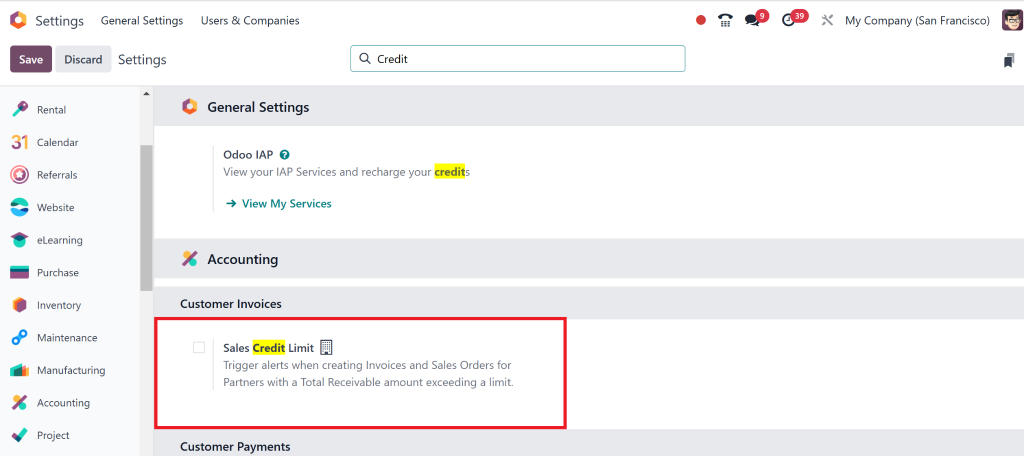
Scroll down to Customers and locate the option’ Credit Limit’.
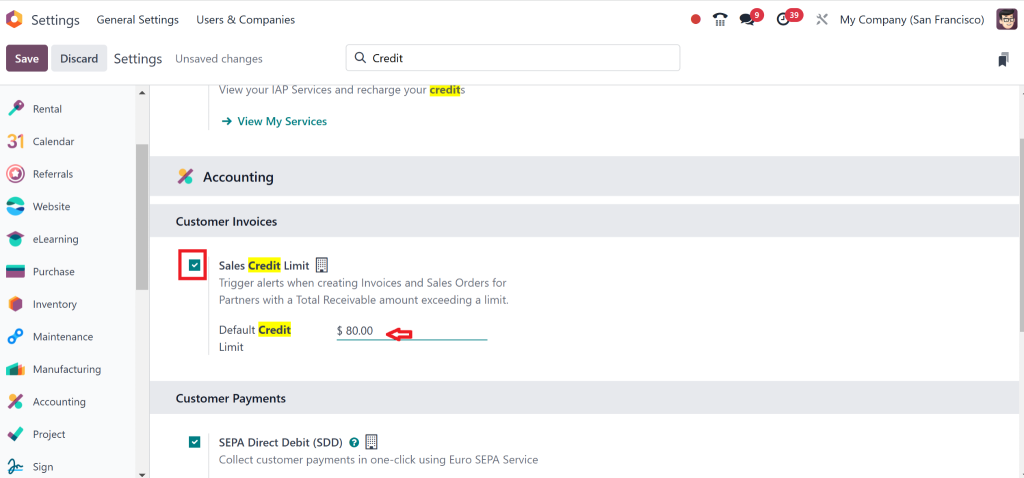
Check the box next to ‘Enable Credit Limit’ and set the Default amount.
Hit Save to confirm.
Once this feature is activated, you can start setting individual credit limits for your customers. That will also help you with Odoo 18 sales order credit control, ensuring that the sales orders are checked against the credit limits you set.
Step 2: Define Credit Limits for Your Customers
Now that the feature is activated, you can assign credit limits to your customers. Here’s how:
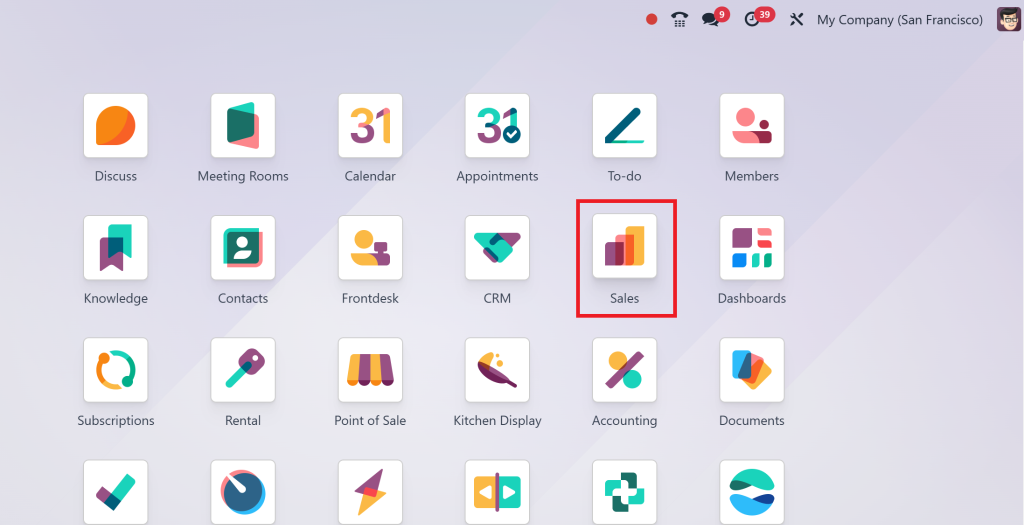
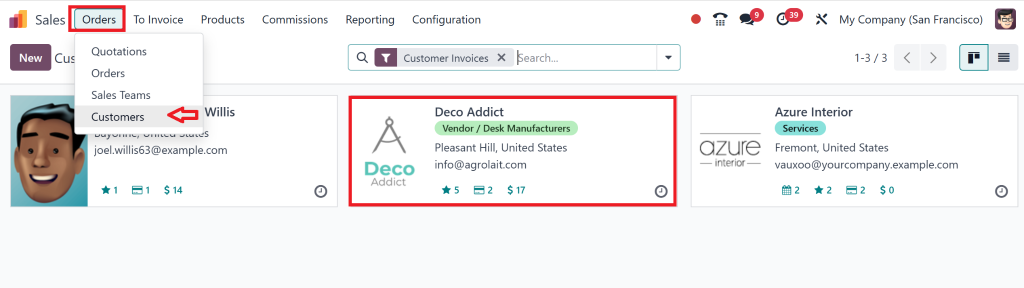
Go to the Sales module.
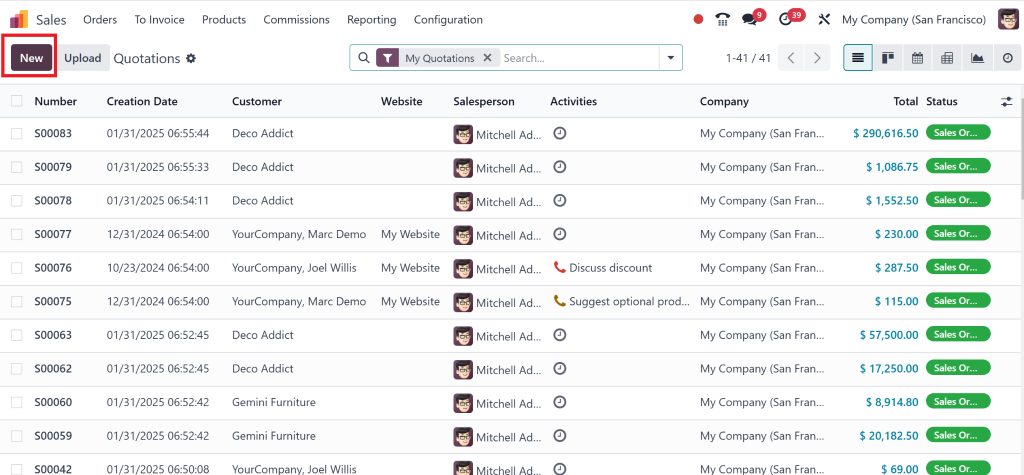
Select New from the menu.
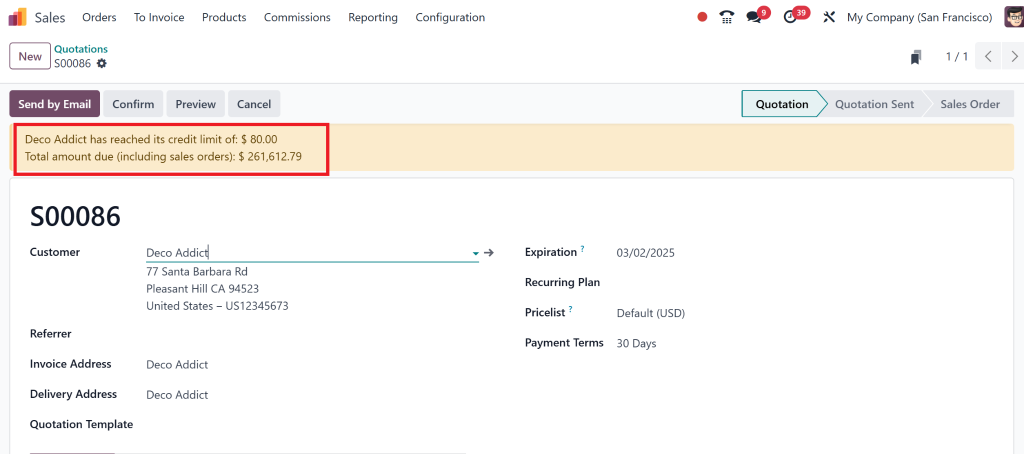
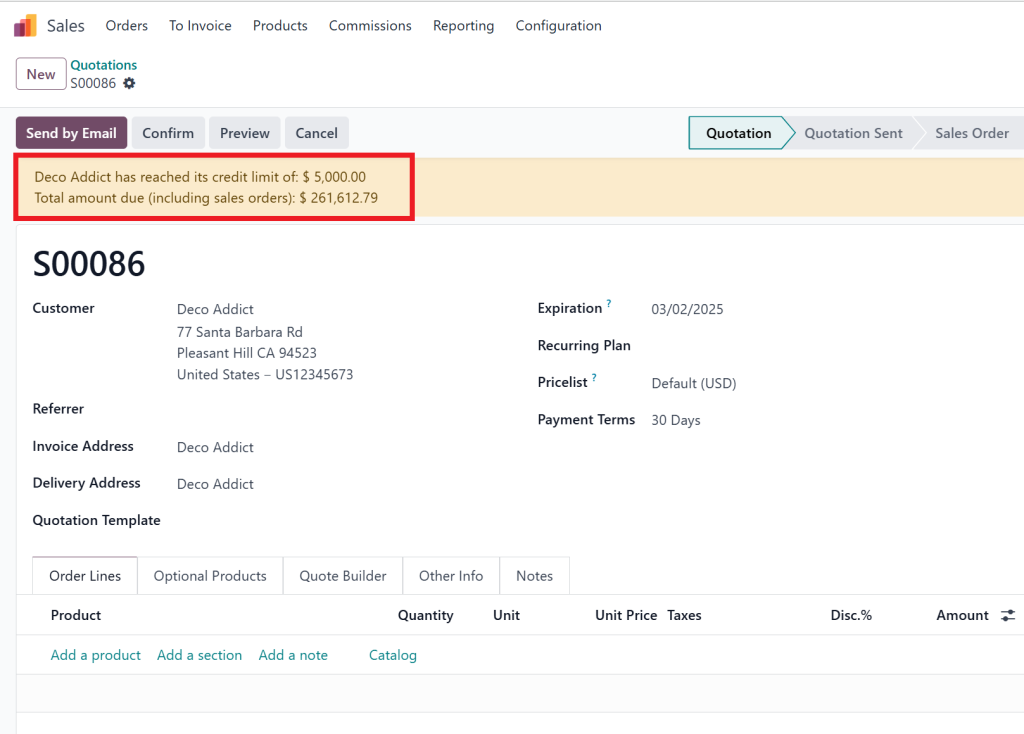
Select the Customer and then after entering the customer we can see a message appear:
Open the customer profile for which you want to set a credit limit.
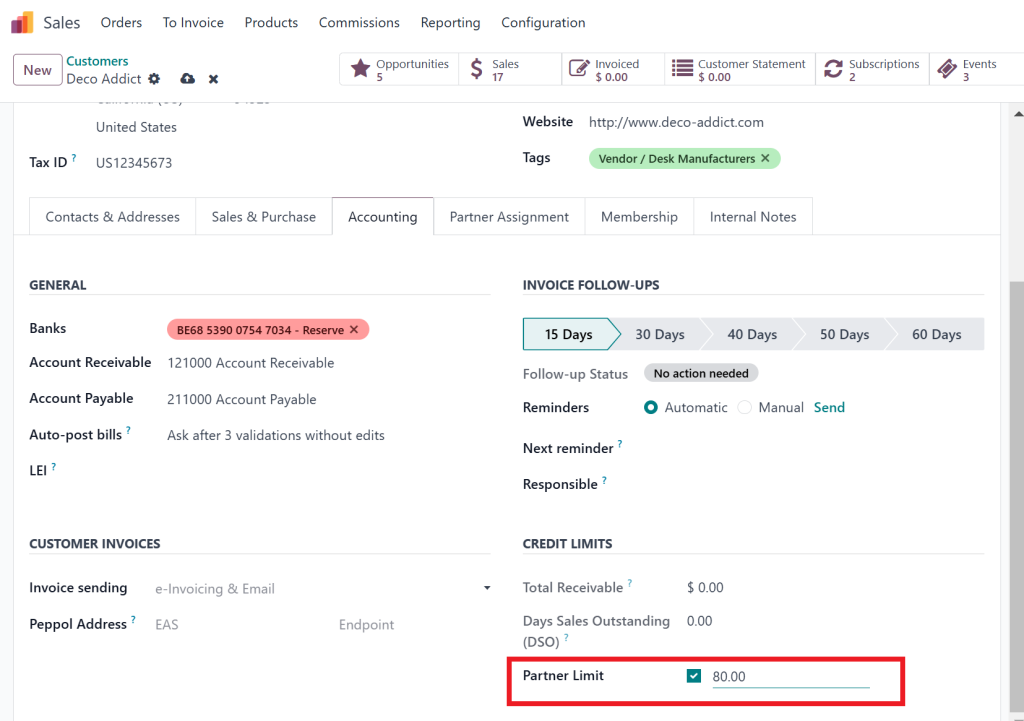
At the time, it is shown as the default amount.
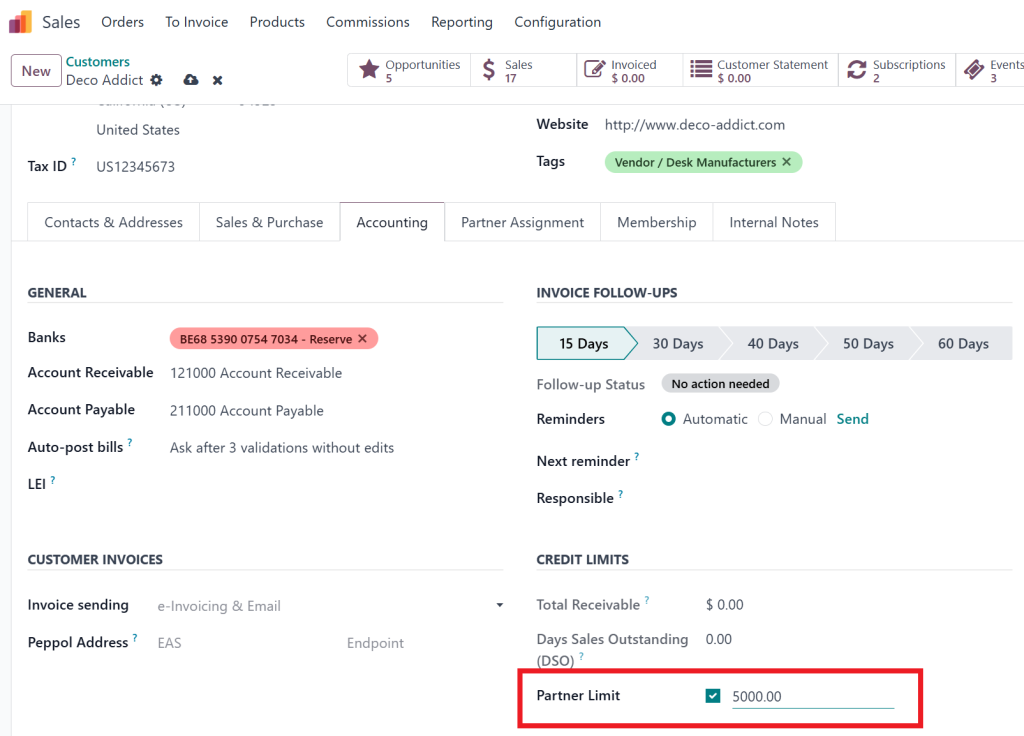
Enter the maximum credit limit in the Credit Limit field (e.g., $1,000, $5,000, or any figure that fits your business model).
Save the changes.
Each customer will now have a predefined credit limit in the system, which Odoo 18 sales order credit control will use to check during sales order placement.
Configuring Credit Limit Control in Odoo 18 Sales Orders
Step 3: Enabling Credit Control for Sales Orders
At this point, you’ve set up individual credit limits for your customers, but we also want to ensure that sales orders are automatically restricted based on these limits. That is where Odoo 18 sales order credit control comes into play.
To enable this feature, follow these steps:
Go to the Sales module.
Click on Configuration, then Settings.
Look for the Credit Control section and enable the ‘Check Credit Limit’ option.
Choose to restrict sales entirely when the credit limit is exceeded or show a warning. Like shown in the screenshot.
Once activated, this feature automatically blocks sales orders exceeding the customer’s available credit, ensuring no risky sales transactions occur. This step is crucial to maintaining financial security within your business. It’s one of the key aspects of Odoo 18 to restrict sales based on credit.
How to Set Up Credit Limit Alerts in Odoo 18
Wouldn’t it be helpful to receive a heads-up when a customer is about to hit or exceed their credit limit? Luckily, Odoo 18 allows you to configure alerts for this exact scenario. You can proactively manage credit and avoid overdue situations by setting up credit limit alerts.
Here’s how to set them up:
Go to the Accounting module.
Select Configuration, then Settings.
Enable the option “Alert on Credit Limit Breach”.
You can receive alerts by email or have them appear as notifications within Odoo.
This feature alerts you whenever a customer’s credit reaches a critical point so you can take action – whether that means reminding the customer to make a payment or halting further sales until the balance is cleared.
Understanding the Benefits of Odoo 18 Credit Limit Features
Now that you’ve set up everything, let’s take a moment to understand how these Odoo 18 credit limit features benefit your business:
Risk Management:
Setting up a credit limit ensures you do not extend too much credit to any customer, helping you avoid potential financial losses.
Cash Flow Security:
With controlled credit, your cash flow remains stable, and you won’t have to worry about overdue payments affecting your business operations.
Improved Customer Relationships:
By being transparent about credit limits, you create clear customer expectations, which can foster a more professional relationship.
Efficient Workflow:
With the credit limit feature, you don’t need to manually check if a customer’s order exceeds their available credit. Odoo does it for you automatically.
By using Odoo 18 sales order credit control and the Odoo 18 restrict sales based on credit option, you ensure that your business is protected from over-exposure while maintaining a smooth sales process.
Best Practices for Odoo 18 Customer Credit Management
To make the most of the Odoo 18 sales credit limit set up, keep these tips in mind:
Review Credit Limits Regularly:
Update limits based on customer payment behaviour.
Communicate Clearly:
Make sure customers understand their credit terms.
Train Your Team:
Educate your sales team on the importance of credit limits.
Monitor Trends:
Use Odoo 18’s reporting tools to track credit utilization and spot potential issues.
Get Your Odoo 18 Sales Credit Limit Configuration
Setting up a sales credit limit in Odoo 18 accounting is an excellent way to update business operations and prevent financial risks. With the ability to manage Odoo 18 customer credit management easily and configure Odoo 18 credit limit features, you can keep track of all your customer accounts and ensure that no sales orders exceed the credit limits you’ve set.
By implementing the Odoo 18 credit limit configuration, you can improve your business’s financial health, enhance cash flow, and reduce risks associated with overdue payments. The flexibility of Odoo 18 sales order credit control allows you to choose how strict you want to be with credit enforcement, whether it’s through alerts, warnings, or sales restrictions.
Remember, managing credit effectively is key to long-term business success, and Odoo 18 provides you with all the tools you need to do it effortlessly.
Hi, I'm Nabia, an Odoo ERP functional & technical content writer. I specialize in blogs, social media content, ad copy, landing pages, service pages, and email campaigns.
We use cookies to ensure that we give you the best experience on our website. If you continue to use this site we will assume that you are happy with it.