

Take Full Command of Your Spending with Analytic Budgets in Odoo 19 Accounting
On paper, everyone has a budget.
In reality, very few people actually use it.
Most budgets are created in Excel annually, approved in meetings, and then forgotten. They exist as static documents that no one reviews until the end of the quarter or financial year. By that time, the damage is already done. Overspending has already occurred, projects have gone off track, and management is once again forced to make reactive decisions rather than proactive ones.
This is not a people problem.
It is a system problem.
Over there, tucked inside old-school spreadsheets, budgeting runs on its own clock. Meanwhile, across the room, companies actually move – transactions piling up in finance apps, leads tracking in CRM, teams logging progress elsewhere. A few of those places talk. The numbers stay locked away while things unfold nearby.
What stands out now becomes clear when using Analytic Budgets in Odoo 19 Accounting. That mismatch? It finally gets resolved here.
Not just for number-crunching, budgets in Odoo weave into how you actually work. Where every cost – like bills, hours tracked, or orders placed – shapes what fits within your financial plan.
In other words, budgeting stops being a “finance department activity” and becomes a live business control system.
How Analytic Budgets Change the Way Managers Think
Most businesses face these recurring challenges:
- Overspending without realizing it – departments or projects go over budget before anyone notices.
- Disconnected financial data – expenses, invoices, payroll, and project costs are scattered across systems.
- Manual tracking and reporting – tedious spreadsheets and late reconciliations delay critical insights.
- Poor forecasting – without accurate cost tracking, predicting future expenses is almost impossible.
Analytic Budgets in Odoo 19 Accounting solve all these problems. They allow you to set budgets at the department, project, or cost center level, track expenses in real time, and instantly see where your money is going.
By linking budgeting to analytical accounting, Odoo 19 repurposes it as a forward-looking exercise rather than just paperwork. Compare planned costs with actual outcomes directly on a single, clear screen. Avoid going past target limits while gaining early opportunities to adjust – all handled within that central view.
The Strategic Value of Odoo 19 Analytic Budgets Setup
Most people think of the Odoo 19 analytic budgets setup as a technical configuration task.
In reality, it’s a strategic design exercise.
You are not just setting up fields and categories.
You are defining how your business measures success.
The way you structure your analytic accounts determines:
- What performance looks like
- What gets measured
- What gets managed
- What gets ignored
For example:
If you only track budgets by department, you’ll optimize departments.
If you track by project, you’ll optimize projects.
If you track by product line, you’ll optimize products.
Odoo gives you the flexibility to design all of this, but flexibility without strategy leads to chaos.
That’s why serious implementations start with business questions like:
- Where do we make money?
- Where do we lose money?
- What decisions do we struggle with?
- What do we need visibility into?
Only after answering these questions does the technical setup make sense.
Enable Budget Management and Analytic Accounting in Odoo 19
Before you start creating budgets, ensure the foundations are set correctly.
Step 1: Activate Analytic Accounting
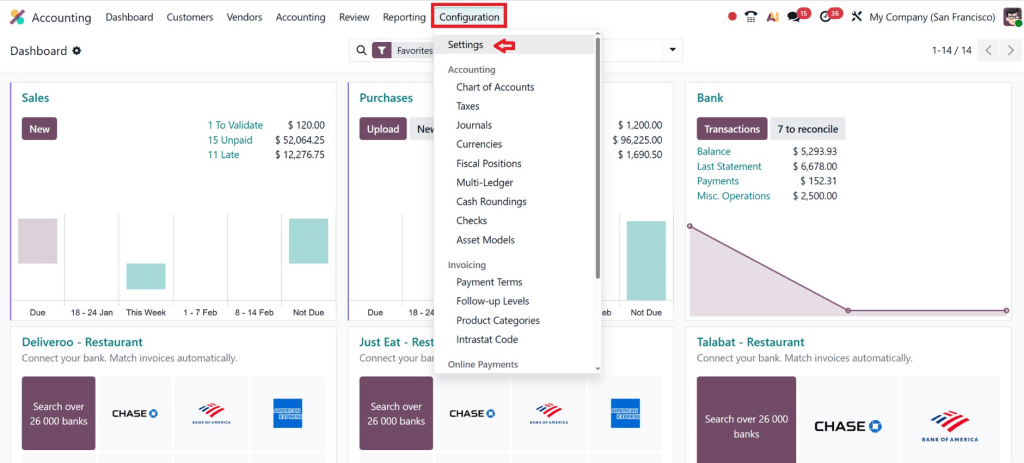
- Go to Accounting → Configuration → Settings
- Enable Analytic Accounting
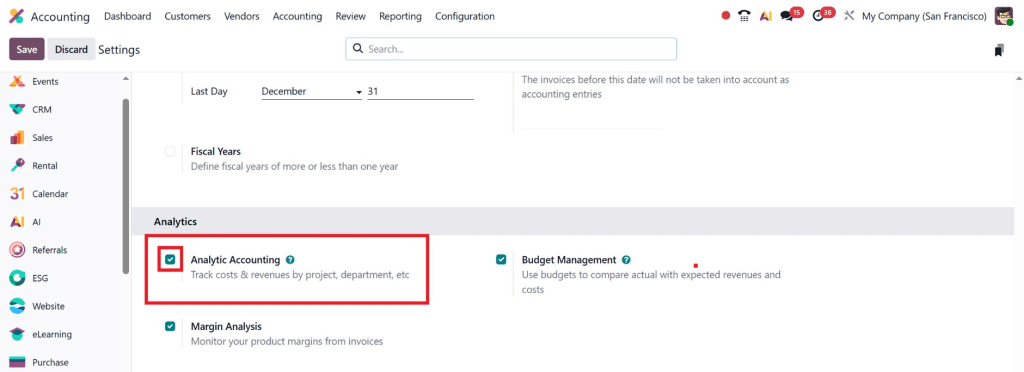
- Save the changes
This allows you to assign analytic accounts to invoices, expenses, vendor bills, and payroll. Every financial transaction can now be linked to a project, department, or cost center.
Step 2: Enable Budget Management
- In the same settings menu, enable Budget Management
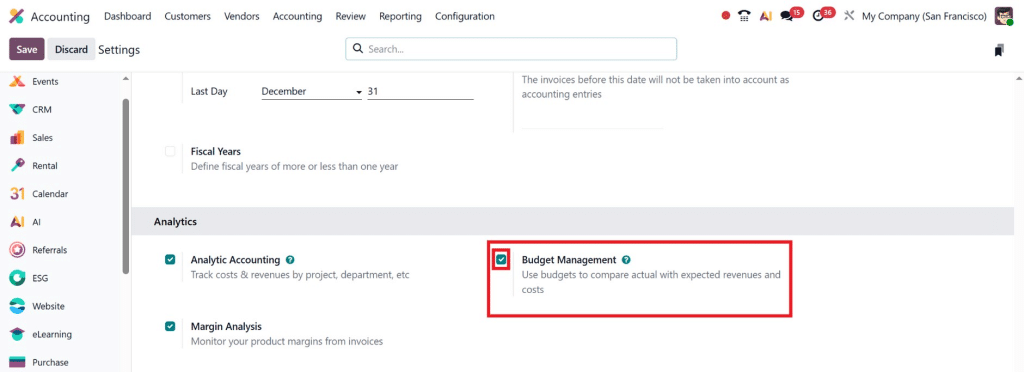
- Save the changes
Once enabled, you are ready to start creating and managing analytic budgets in Odoo 19 Accounting.
Step-by-Step: Setting Up Analytic Budgets in Odoo 19
Creating an analytic budget isn’t just about entering numbers, it’s about building a system that works for your business.
Step 1: Define Analytic Accounts
What holds your budget together? That would be analytic accounts. These labels where money goes – to projects, departments, campaigns, or cost centers. Tracking becomes clearer when meaning attaches to numbers.
Examples of analytic accounts:
- Marketing – Q1 Campaign
- Project Alpha
- Operations – UAE
- R&D Department
Go to Accounting > Configuration > Analytic Accounts > Create
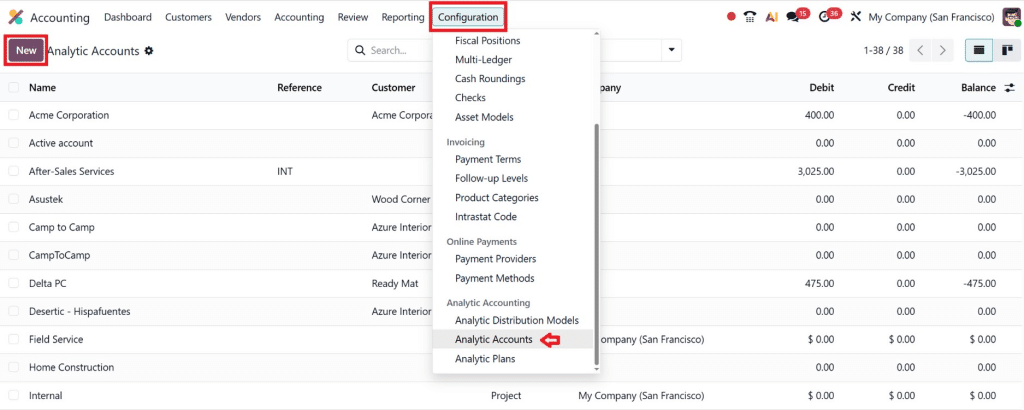
Pro Tip: Simple structures are more effective for data analysis. Too many accounts can slow things down. Tracking becomes harder that way.
Step 2: Set Up Budgetary Positions
Here’s one thought: when cash flows change within your setup, which costs stand out? Tracing how money moves, even just sorting it, makes things clearer without extra effort.
Examples:
- Salaries
- Marketing spending
- Travel Expenses
- Office Rent
Each budget amount is linked to a unique account number, so every dollar spent is clearly recorded in the system.
Step 3: Create the Analytic Budget
Now you’re ready to create your actual budget.
Navigation: Accounting → Budgets → Create
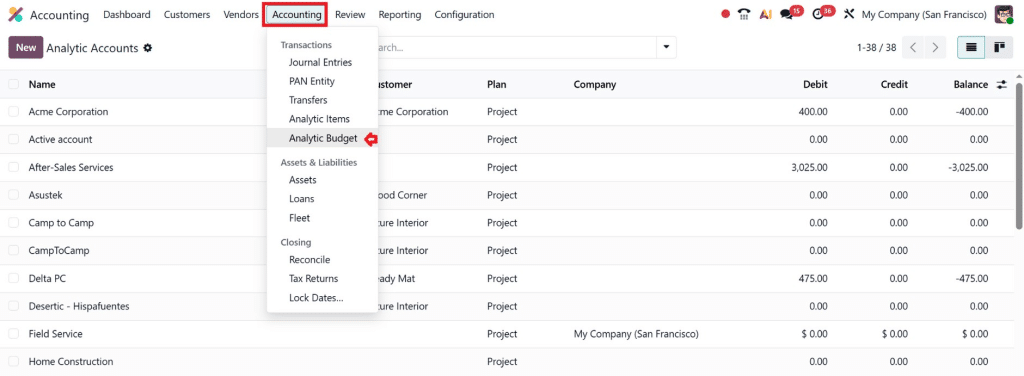
You need to specify:
- Budget Name
- Start and End Dates
- Analytic Account
- Budgetary Position
- Planned Amount
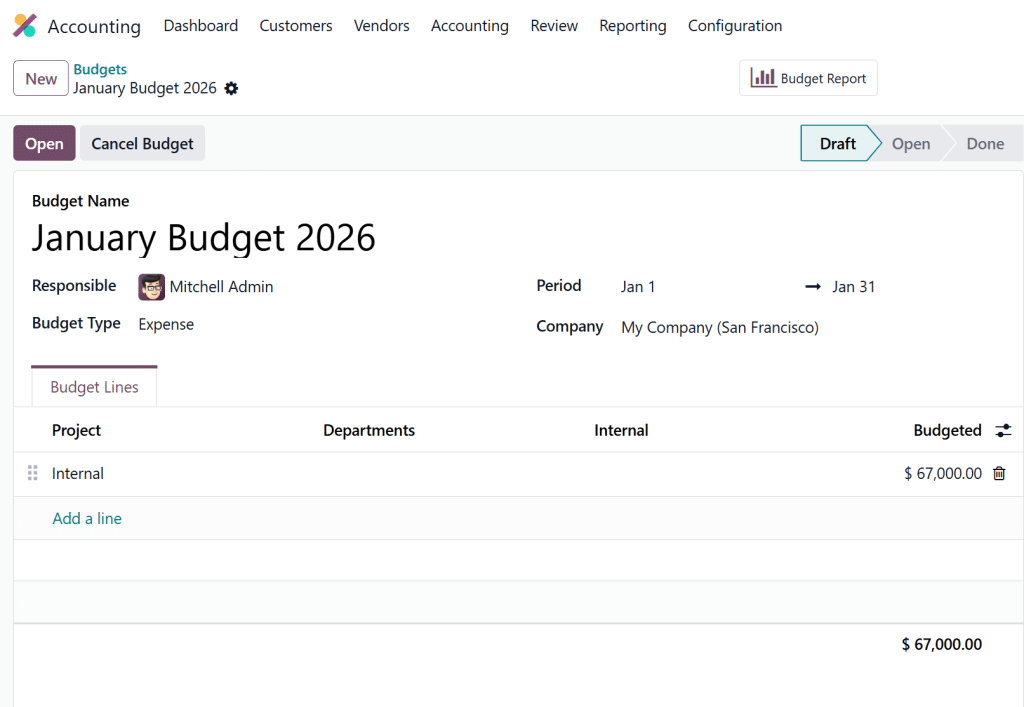
Once saved, your budget is live. Any transaction linked to this analytic account will automatically update the budget in real time, giving you instant insight into budget usage.
Managing Analytic Budgets in Odoo 19 Accounting
Starting with how you handle money isn’t enough. What matters most happens when you stay involved at every step.
- Link each transaction – invoices, expenses, payroll – to the right analytic account. Every record needs a clear match.
- Money spent is tracked here; Odoo shows actual use against the original plan, along with the remaining balance.
- Approaching budget limits should trigger alerts to management.
This is how analytic budgets in Odoo 19 accounting help companies stay in control without manual oversight.
Project and Department Analytic Budgets in Odoo 19 as a Growth Framework
Most companies view budgets as a means of control.
In reality, the best use of project/departmental analytics budgets in Odoo 19 is for growth optimization.
Once you clearly see:
- Which projects scale profitably
- Which departments generate ROI
- Which activities drain resources
You can:
- Reallocate budgets intelligently
- Invest more in high-performing areas
- Cut low-impact initiatives
- Build a more focused business model
This is how mature companies grow:
Not by working harder.
But by allocating resources better.
Analytic budgets give you the data foundation for that.
The Hidden ROI of Analytic Accounting Budget Odoo 19
Thinking about ROI often means focusing on just a few things
- Cost savings
- Saving money on spending.
- Better reporting
What makes analytic accounting budget Odoo 19 pay off – not just financially – is a quieter truth:
It cuts down on
- Decision fatigue
- Internal conflicts
- Financial uncertainty
- Management stress
It’s not about guessing, arguing, or debating. You simply know.
You know where money goes.
You know what works.
You know what doesn’t.
And clarity is one of the most underrated business assets.
Advanced Tips to Maximize Your Analytic Budgets
To get full value from Analytic Budgets in Odoo 19 Accounting, implement these strategies:
- Keep Analytic Accounts Simple
Overcomplicated structures make reports hard to read. Stick to departments, projects, or major cost centers. - Automate Approvals
Use Odoo workflows to ensure that any expense that exceeds a budget limit is approved before processing. - Regularly Review Budget Reports
Monthly reviews identify overspending patterns, giving you control before it becomes a problem. - Train Your Team
Staff need to understand why analytic accounts matter and how to assign expenses correctly. - Use Alerts and Notifications
Real-time warnings prevent budget overruns and improve accountability.
This Is What Real Financial Control Looks Like
If you are serious about financial control, growth, and long-term sustainability, Analytic Budgets in Odoo 19 Accounting are no longer optional. It is a core management tool.
It connects planning with reality.
It connects operations with finance.
It connects decisions with consequences.
With a proper Odoo 19 analytic budget setup, regular use of the Odoo 19 budget vs. actual analytic report, and a structured approach to managing analytic budgets in Odoo 19, your company moves from reactive management to proactive leadership.
And that, honestly, is the real purpose of any ERP system:
not just to record the past, but to control the future.




