


Why Knowing How to Manage Sales Credit Limit in Odoo 19 Accounting Matters
Managing customer credit effectively is crucial for any business. If you are looking for a clear, practical way to manage your receivables, understanding how to manage sales credit limits in Odoo 19 accounting is essential. In this blog, we will explain everything you need to know about Odoo 19 sales credit limit configuration, how to set customer credit limit in Odoo 19, and how to get alerts when the Odoo 19 credit limit exceeded warning appears.
Knowing how to manage customer credit limits in Odoo 19 sales allows businesses to avoid bad debts and maintain smooth cash flow. The Odoo 19 accounting customer receivable credit limit feature ensures you can control which customers can purchase on credit and up to what amount. By learning to enable sales credit limit in Odoo 19 settings, you can make your accounting system smarter and safer.
Whether you are a small business or managing multiple client accounts, mastering how to manage sales credit limit in Odoo 19 accounting can save you time, reduce risk, and improve profitability.
What is a Sales Credit Limit in Odoo 19 Accounting?
A sales credit limit is the maximum amount of unpaid invoices a customer is allowed before Odoo prevents further sales. In simple words, it’s a safety control that protects your business from credit risk.
With Odoo 19 sales credit limit configuration, you can:
- Define limits for each customer.
- Get notifications when a customer exceeds their credit limit.
- Automatically stop or allow sales based on set rules.
Using Odoo 19 accounting customer receivable credit limit, you ensure that customers cannot place orders beyond their creditworthiness. This protects your cash flow and helps maintain a healthy accounting system.
How to Enable Sales Credit Limit in Odoo 19 Settings
Before you can use any credit limit features, you need to enable the sales credit limit Odoo 19 settings. Here’s how to do it step-by-step:
- Go to Settings → Accounting → Customer Credit Limit.
- Enable the feature by checking the box.
- Save the changes to activate the credit limit module.
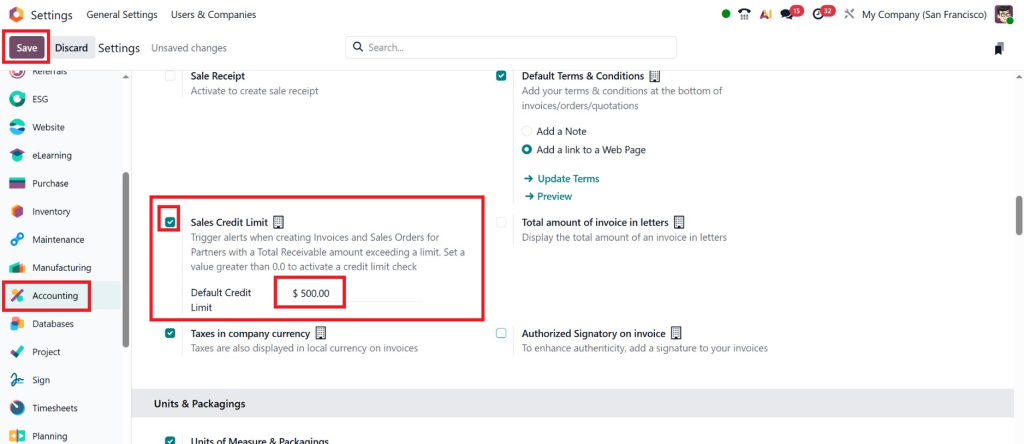
Once enabled, you will see options to define limits for each customer and configure automated alerts. Enabling this feature is the foundation of the Odoo 19 sales credit limit configuration and ensures your finance team can actively monitor customer credit.
Step-by-Step Guide to Setting Customer Credit Limit in Odoo 19
Once you have enabled credit limit management, the next step is to set the customer credit limit in Odoo 19. Here’s a detailed workflow:
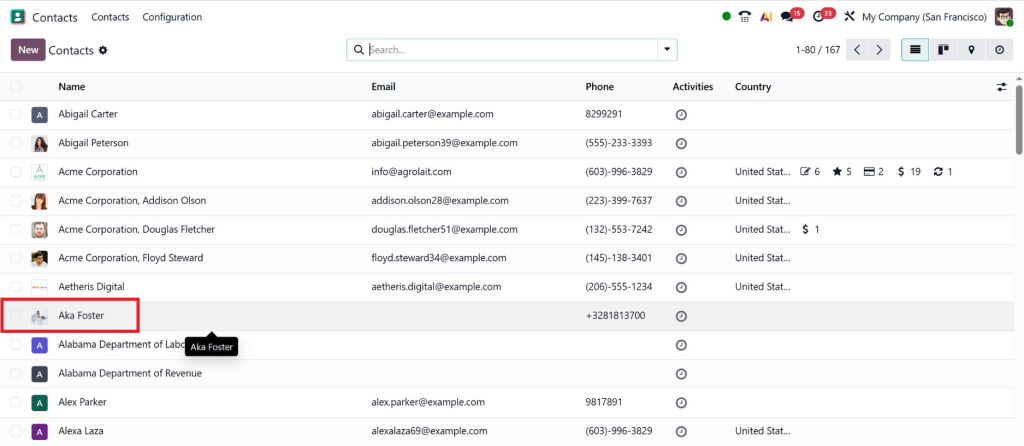
Step 1: Open Customer Profile
Navigate to Contacts → Customers in Odoo 19 and select the customer for whom you want to set a credit limit.
Step 2: Enter Credit Limit
In the customer profile, locate the Credit Limit field. Enter the maximum amount that this customer can owe at any time. This is part of Odoo 19 sales credit limit configuration that keeps your receivables in check.
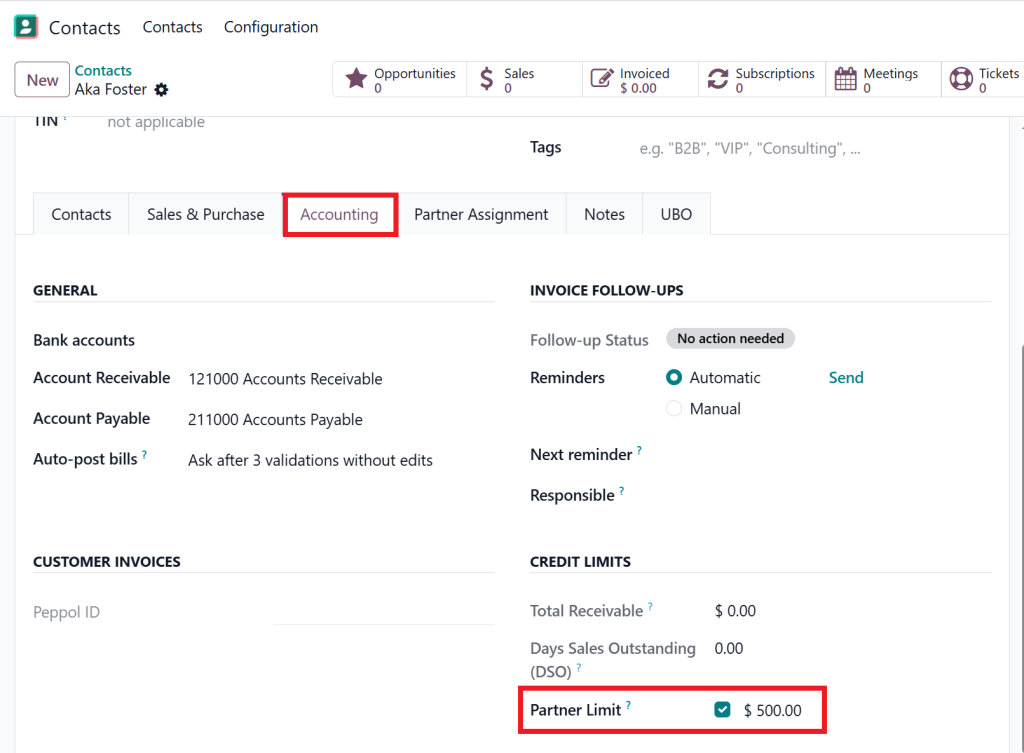
Step 3: Define Credit Limit Behavior
You can choose how Odoo responds when a customer exceeds their credit limit:
- Soft Warning: Notifies your team but allows the order to proceed.
- Hard Stop: Blocks orders until the customer clears outstanding invoices.
By setting these options, you ensure proper management of customer credit limits in Odoo 19 sales, minimising risk without affecting loyal customers unnecessarily.
Step 4: Save and Monitor
Once configured, save the changes. Your system will now monitor the customer’s credit automatically and provide alerts whenever needed. The Odoo 19 credit limit exceeded warning ensures that your sales and accounting teams are always aware of potential issues.
Benefits of Learning How to Manage Sales Credit Limit in Odoo 19 Accounting
Implementing and managing credit limits in Odoo 19 is not just a technical task; it’s a strategic move for your business. Some benefits include:
- Control Financial Risk – Prevent customers from overspending and reduce bad debt.
- Increase Business Efficiency – Automation saves time by alerting you to credit issues immediately.
- Increase Customer Management – Maintain better relationships with clients by controlling credit responsibly.
- Accounting Integration – All credit information is directly updated in your Odoo 19 accounting customer receivable credit limit module.
By mastering how to manage sales credit limit in Odoo 19 accounting, you’re not just managing numbers; you are empowering your business to make informed financial decisions.
Monitoring and Reporting with Odoo 19 Accounting Customer Receivable Credit Limit
Monitoring credit usage is just as important as setting limits. Odoo 19 provides robust tools for tracking outstanding invoices and customer credit balances through Odoo 19 accounting customer receivable credit limit reports.
These reports give you insights such as:
- Total credit used per customer
- Outstanding invoices per period
- Customers approaching or exceeding their credit limits
- Alerts for overdue balances
Regular monitoring ensures you can intervene early, preventing bad debts and keeping your business finances healthy.
Advanced Strategies to Optimise Customer Credit Management in Odoo 19
Once the basics are in place, you can take credit management to the next level:
1. Categorise Customers by Risk
Divide your customers into different risk categories:
- Low Risk: Trusted clients with a history of timely payments; assign higher credit limits.
- Medium Risk: Moderate limits with close monitoring.
- High Risk: Smaller limits with strict control and alerts.
This approach allows for smarter credit allocation and better financial planning.
2. Automate Alerts and Notifications
Configure Odoo 19 credit limit exceeded warning to send automated notifications to the sales and finance team. This reduces manual tracking and ensures no oversights.
3. Periodic Credit Reviews
Customer behavior changes over time. By reviewing credit limits periodically, you can adjust them based on recent payment history and business strategy.
4. Integrate with Accounting Reports
Combine credit limit management with accounting dashboards to see the full picture. Odoo 19 accounting customer receivable credit limit reports can provide real-time insights, helping management make strategic decisions.
5. Educate Your Sales Team
Ensure that your sales team understands the importance of credit limits. By using Odoo 19 sales credit limit configuration, they can make informed decisions when approving orders without compromising business safety.
Real-Life Benefits of Managing Sales Credit Limit in Odoo 19
Let’s explore how businesses benefit when they implement how to manage sales credit limit in Odoo 19 accounting:
- Reduced Financial Risk: Customers cannot overspend, reducing the chances of bad debts.
- Improved Cash Flow: Timely payments keep operations smooth and consistent.
- Efficiency in Operations: Automatic alerts and rules reduce manual monitoring.
- Better Customer Relationships: Clear credit policies create transparency and trust.
- Strategic Decision Making: Real-time credit data supports business growth plans.
When used effectively, Odoo 19 sales credit limit configuration is more than just a technical tool; it becomes a strategic advantage for your business.
Common Mistakes to Avoid While Managing Credit Limits in Odoo 19
Even with a powerful system like Odoo 19, businesses can make mistakes that reduce the effectiveness of credit management:
- Not Enabling Credit Limit Settings: Without enabling sales credit limit Odoo 19 settings, you cannot enforce limits.
- Ignoring Monitoring Reports: Credit limits are effective only if regularly reviewed.
- Overlooking Alerts: The Odoo 19 credit limit exceeded warning is useless if ignored.
- One-Size-Fits-All Limits: Every customer has a different risk level; customise limits for greater accuracy.
By avoiding these mistakes, your credit management system becomes more reliable and impactful.
Take Charge of Your Business Finances with Odoo 19
Understanding how to manage sales credit limit in Odoo 19 accounting is vital for business growth and risk management. With Odoo 19 sales credit limit configuration, you can set customer credit limit in Odoo 19, monitor their usage with Odoo 19 accounting customer receivable credit limit, and receive timely Odoo 19 credit limit exceeded warning alerts.
By enabling sales credit limit Odoo 19 settings, your finance team gets a smarter, automated, and accurate system that protects cash flow and reduces financial risk.
Businesses that master how to manage sales credit limit in Odoo 19 accounting not only reduce the risk of bad debts but also improve efficiency, customer satisfaction, and overall profitability. Start implementing Odoo 19 credit management today and experience smarter financial control.




