

Managing quotations with accuracy and speed is essential for any sales process. Many businesses struggle with manual calculations, inconsistent pricing, and delays in responding to customers. The quote calculator in Odoo 19 sales addresses these challenges by providing a structured and automated approach to quotation creation.
The quote calculator in Odoo Sales works as a core component within the Sales module, allowing users to generate precise quotations without relying on external tools. By using the Odoo ERP quote calculator, pricing, taxes, discounts, and product details are calculated automatically, reducing the chances of errors.
With the introduction of the Odoo 19 quote calculator, the process has become more refined. Businesses can now combine pricing rules, templates, and automation in a single workflow. Whether working with an Odoo ERP sales quotation template or configuring advanced pricing logic, the system ensures consistency across all quotations.
A clear understanding of the quote calculator in Odoo sales helps businesses maintain accuracy, improve response time, and manage quotations with confidence.
What Is the Quote Calculator in Odoo 19 Sales?
The Odoo ERP quote calculator is a built-in functionality within the Odoo Sales module that automatically calculates the price of products and services in a quotation.
It considers multiple factors such as:
- Product price
- Quantity
- Taxes
- Discounts
- Pricelists
- Custom formulas
Instead of manually calculating each line, the system handles everything instantly. This is especially useful for businesses with dynamic pricing models. In simple terms, the quote calculator in Odoo sales ensures that every quotation is accurate, consistent, and quick to generate.
Core Functionality of Quote Calculator in Odoo Sales
The quote calculator in Odoo Sales is designed to automate the calculation of quotation values based on predefined configurations. When a user creates a quotation, the system evaluates multiple elements, including product price, quantity, applicable taxes, discounts, and pricing rules.
The Odoo ERP quote calculator eliminates the need for manual calculations by updating totals in real time. Any modification in quantity, pricing, or discount is instantly reflected in the quotation.
This functionality ensures that every quotation remains accurate and aligned with the company’s pricing strategy defined in the Odoo quotation pricing setup.
Odoo Quote Calculator and Odoo Quotation Pricing Setup
The effectiveness of the Odoo ERP quote calculator depends largely on the Odoo quotation pricing setup. Pricing rules define how product prices are calculated for different customers and scenarios.
Through this setup, businesses can configure:
- Customer-specific pricing
- Quantity-based discounts
- Region-based pricing rules
Once these rules are defined, the quote calculator in Odoo Sales automatically applies them during quotation creation. This removes the need for manual adjustments and ensures consistent pricing across all transactions.
Odoo Sales Quotation Template and Odoo 19 Quotation Template Calculator Setup
An Odoo ERP sales quotation template allows businesses to standardize their quotation format. Templates can include predefined product lines, pricing structures, and terms and conditions.
With the Odoo 19 quotation template calculator setup, templates are further enhanced by integrating calculation logic directly into them. When a template is applied, the system not only inserts predefined data but also calculates totals automatically using the Odoo ERP quote calculator. This approach reduces repetitive work and ensures that all quotations follow a consistent structure.
Key Enhancements of Odoo 19 Quote Calculator
The Odoo 19 quote calculator introduces improvements that enhance usability and efficiency in quotation management.
Key enhancements include:
- Real-time calculation updates with improved responsiveness
- Better integration with pricing rules and templates
- A more user-friendly interface for managing quotations
These improvements allow sales teams to generate quotations quickly while maintaining accuracy and consistency.
Managing Complex Pricing with Odoo CPQ Configure Price Quote
The Odoo CPQ configures price quote functionality designed for businesses dealing with configurable or customizable products.
CPQ enables users to:
- Define product configurations
- Apply pricing rules based on selected options
- Generate accurate quotations automatically
The quote calculator in Odoo sales works in combination with CPQ to ensure that every selected option is reflected in the final price. This is particularly useful for industries such as manufacturing, construction, and custom product sales.
Odoo Quotation Calculator Spreadsheet vs System-Based Calculation
Many organizations rely on an Odoo quotation calculator spreadsheet for pricing calculations. While spreadsheets offer flexibility, they often lead to inconsistencies and errors due to manual handling.
In contrast, the Odoo ERP quote calculator centralizes all calculations within the system. Pricing rules, product data, and tax configurations remain consistent and up to date.
This shift from spreadsheets to system-based calculation improves accuracy and reduces dependency on manual processes.
How to Test the Quote Calculator in Odoo 19 Sales?
Testing the quote calculator in Odoo 19 ERP Sales is an important step before using it in real business scenarios. It helps ensure that your pricing rules, templates, and calculations are working correctly. A proper test also reduces the risk of errors when sending quotations to customers.
Below is a clear, structured, and professional step-by-step guide to test the Odoo 19 quote calculator effectively.
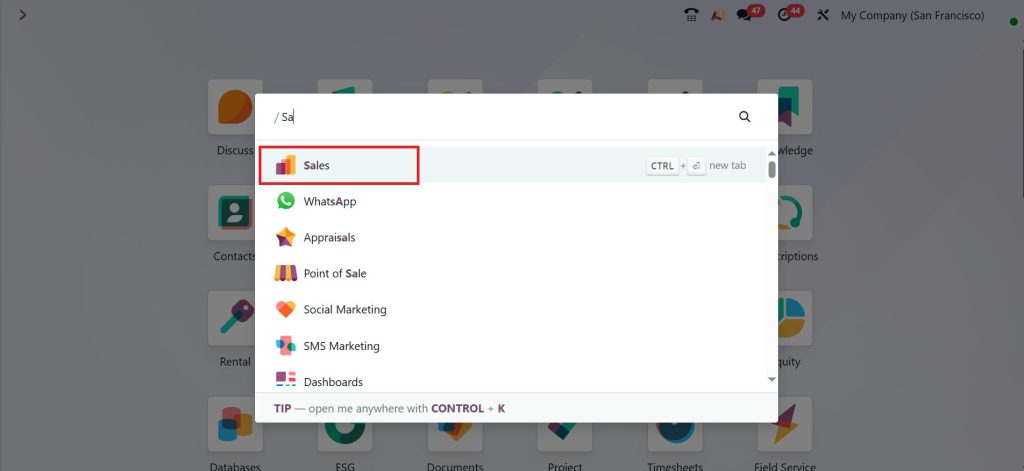
Open the Sales App.
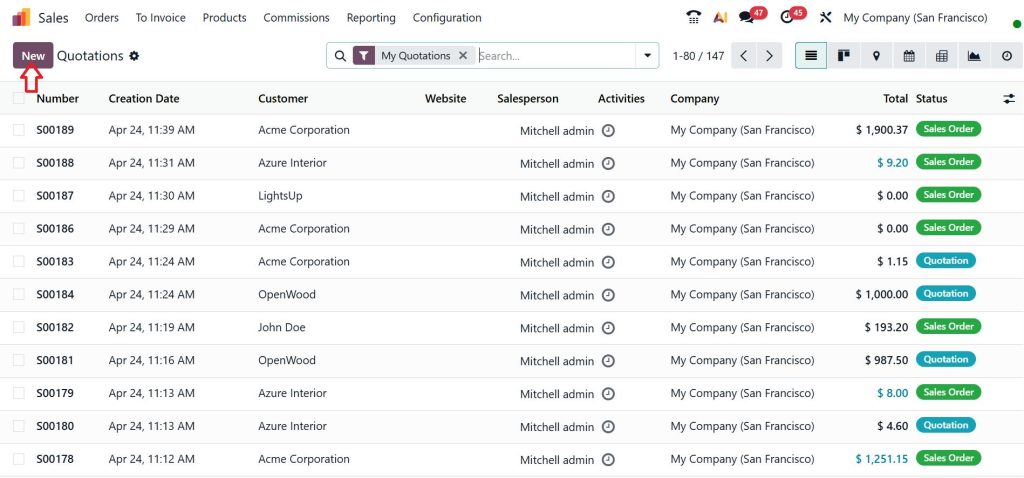
Quotations and create a New quotation.
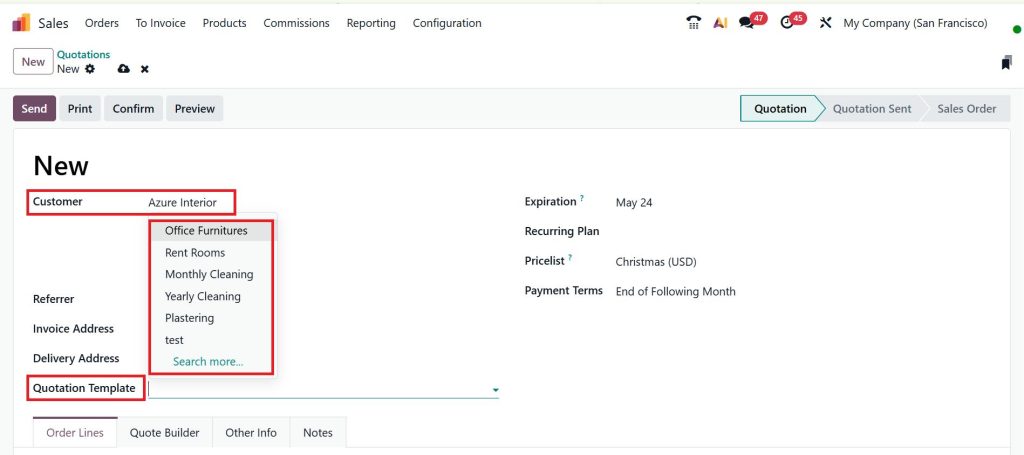
Select a test Customer & Quotation Template.
After selecting the Customer & Quotation Template, scroll down, and you can see a pre-made quotation.
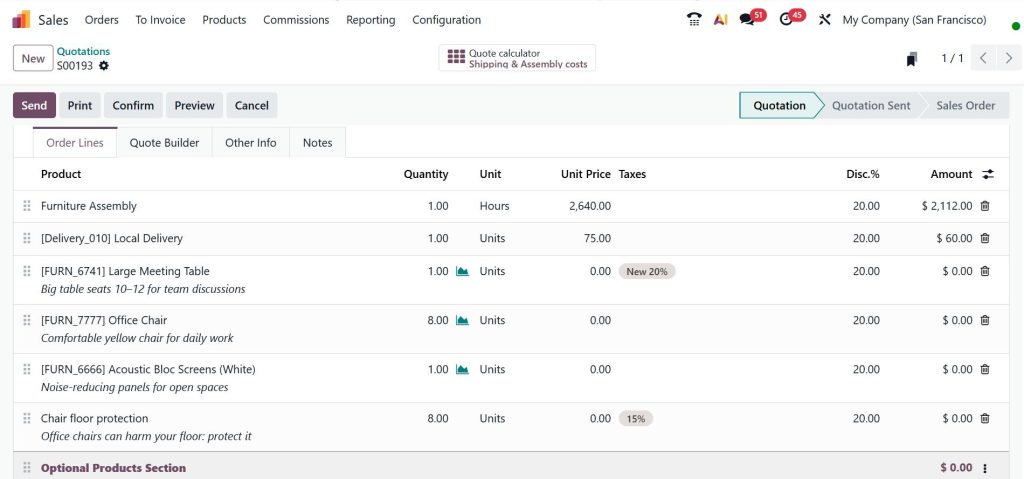
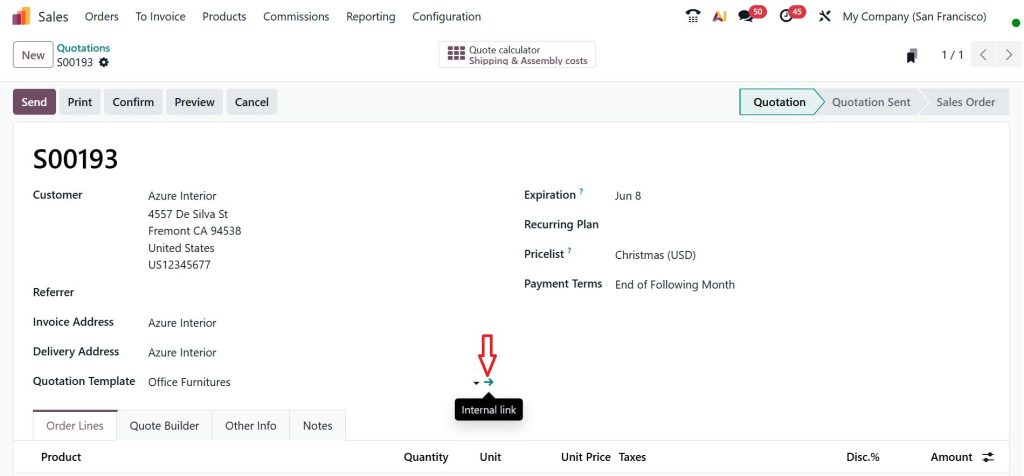
Scroll up and click on the Internal Link.
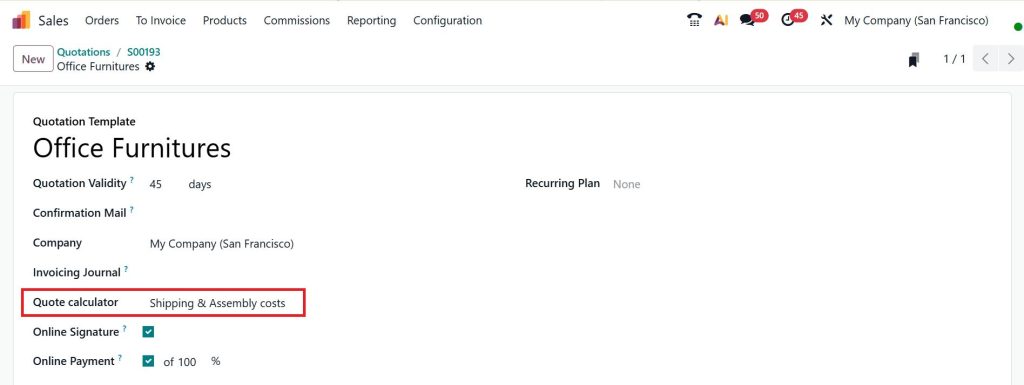
Now, click on the Quote Calculator and select Shipping & Assembly Costs.
Go back to the quotation and click on the above Quote Calculator Shipping & Assembly costs smart button.
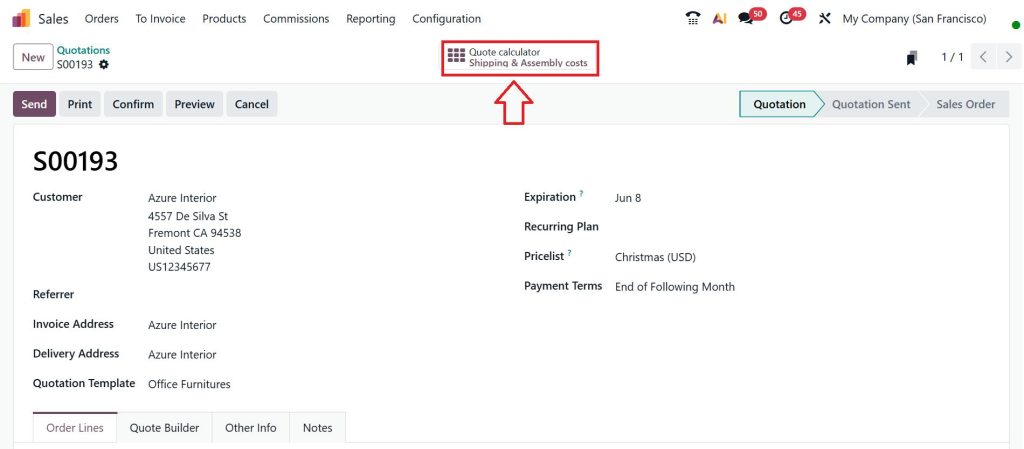
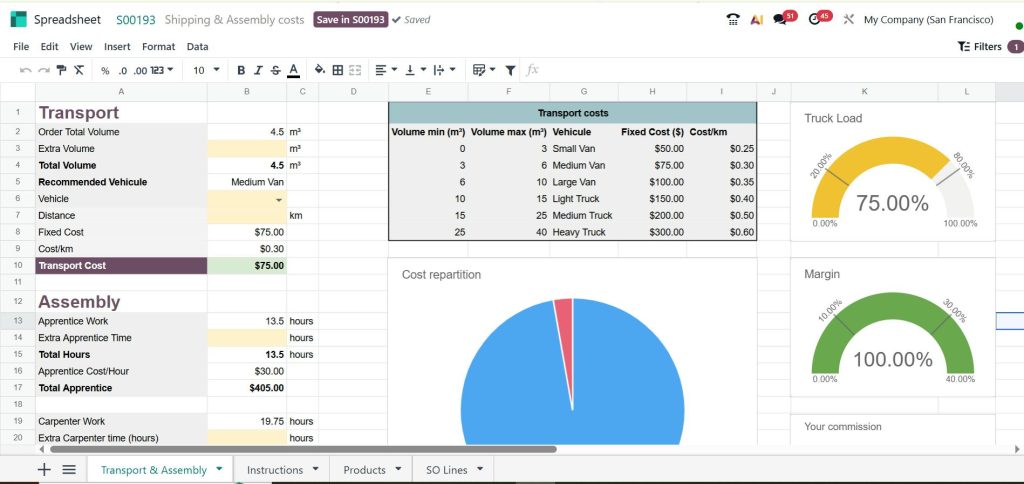
Here, you have a preconfigured quote calculator. At the bottom of this preconfigured spreadsheet, you can see tabs for Transport & Assembly, Instructions, Products, and SO Lines.
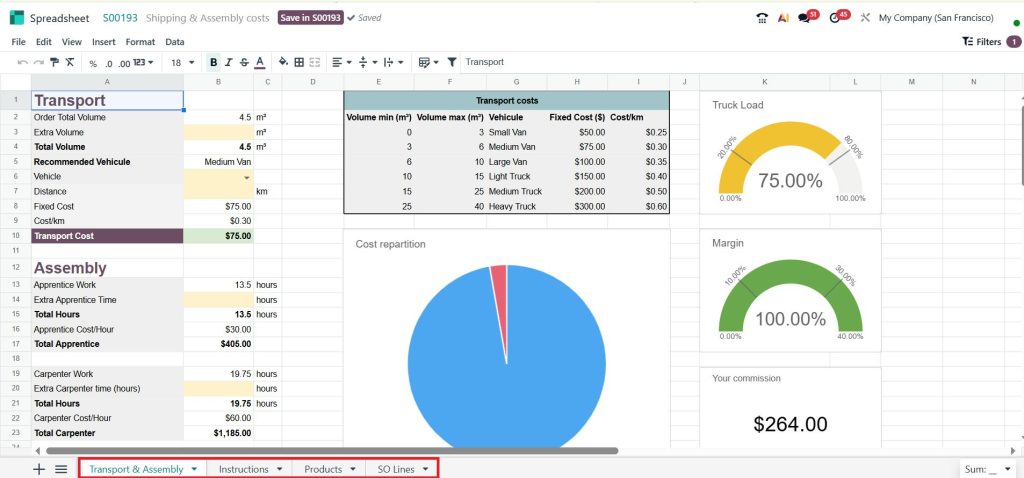
Transport & Assembly is the sheet where we will actually make the changes that update the quotation.
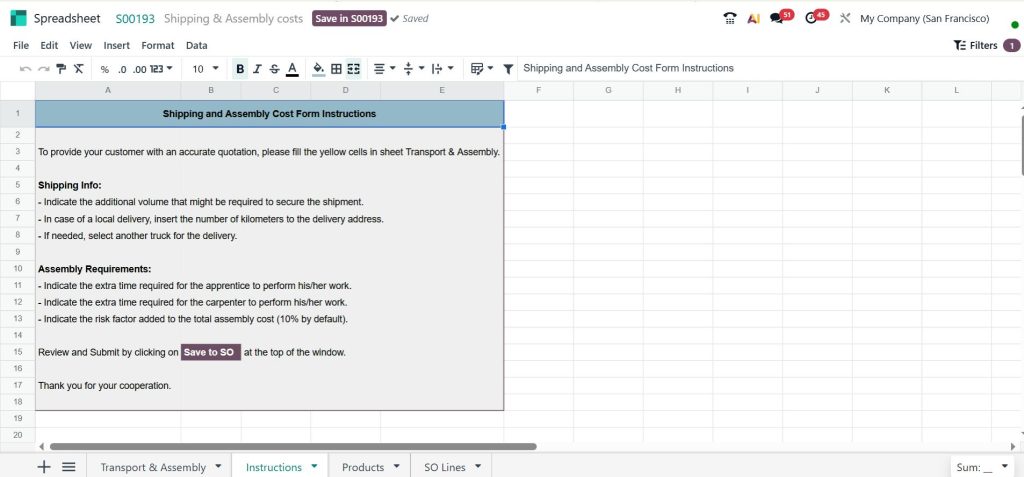
The Instructions sheet is just for the user on how this particular calculator works.
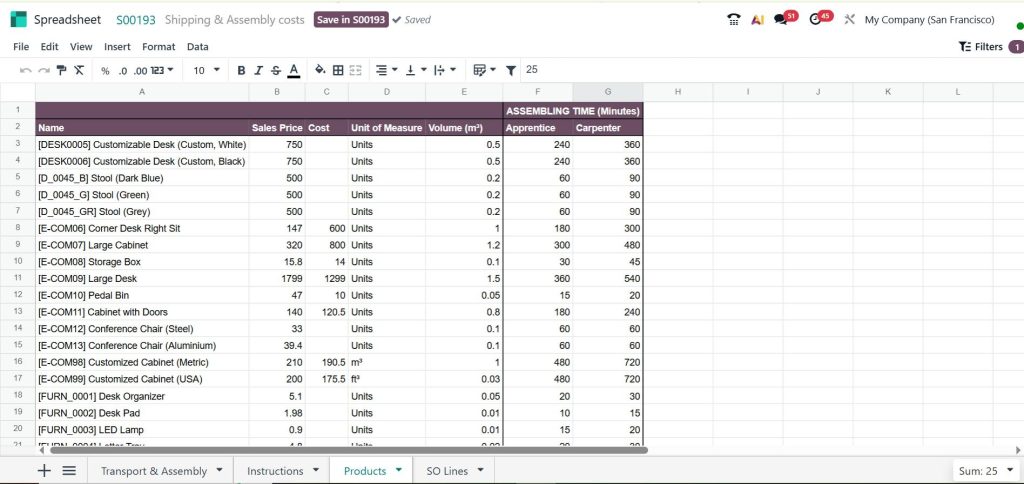
In the Products sheet, there is a list of every product and its related information. We need that information to calculate a quote.
Moving to the SO Lines sheet, this section shows what’s in the sales order, and that is why we called SO Lines, and it uses that information to do the calculations.
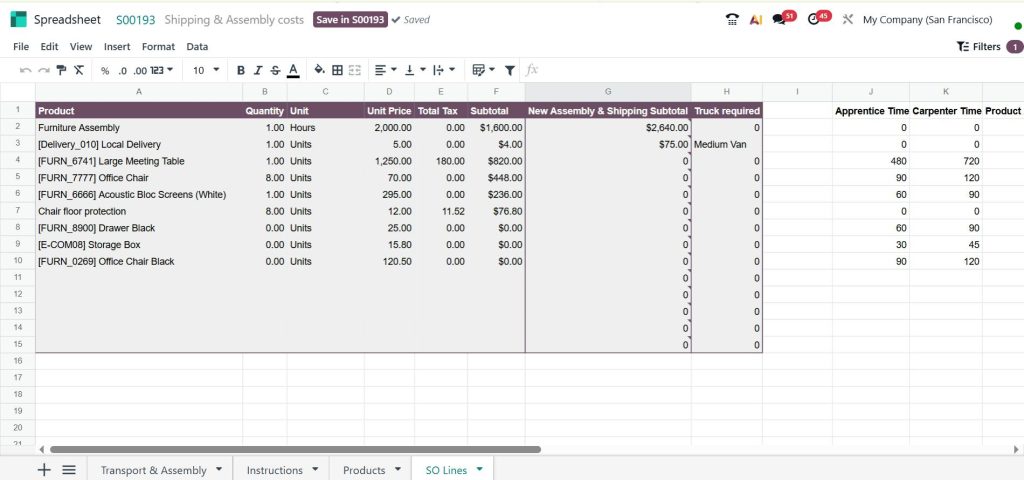
So, that’s how you can easily test the quote calculator in the Odoo 19 Sales app. Testing the Odoo 19 quote calculator is not just a technical step; it is a business requirement. Accurate quotations directly impact customer trust and company revenue.
By following this step-by-step approach, businesses can ensure that:
- Pricing rules are working correctly
- Templates are properly configured
- Automation is reliable
A properly tested quote calculator in Odoo sales provides confidence that every quotation sent to customers is accurate and professional.
Improving Efficiency of Odoo Sales Quote Automation
The Odoo sales quote automation feature enhances productivity by reducing repetitive tasks involved in quotation creation.
Automation allows the system to:
- Apply pricing rules automatically
- Calculate totals without manual input
- Populate quotation data based on predefined conditions
By combining automation with the quote calculator in Odoo sales, businesses can significantly reduce the time required to generate quotations while maintaining accuracy.
Odoo Quote Calculator Transport Assembly Cost
In many industries, quotations involve additional costs beyond product pricing. These may include transport charges, assembly fees, or service costs.
The Odoo ERP quote calculator transport assembly cost functionality allows businesses to include such expenses directly in the quotation. These costs can be configured as:
- Fixed charges
- Variable costs based on distance or quantity
- Service-based fees
This ensures that the final quotation reflects the complete cost structure, providing transparency for both the business and the customer.
Odoo 19 Quotation Template Calculator Setup
The Odoo 19 quotation template calculator setup involves a structured approach to configuration. Initially, products must be defined with accurate pricing and cost details. Following this, the Odoo quotation pricing setup should be configured to establish pricing rules.
Next, businesses can create an Odoo ERP sales quotation template that includes commonly used products and standard terms. Once templates are ready, the system’s automation features can be enabled to support calculation and data population. Testing the setup ensures that all calculations and pricing rules function as expected before deployment.
Common Challenges Addressed by Quote Calculator in Odoo Sales
Sales teams often encounter challenges such as pricing inconsistencies, calculation errors, and delays in quotation preparation.
The quote calculator in Odoo Sales addresses these issues by:
- Automating calculations
- Applying predefined pricing rules
- Ensuring consistency across all quotations
This reduces the risk of errors and improves overall efficiency in the sales process.
Business Advantages of Using Odoo Quote Calculator
The Odoo ERP quote calculator offers several advantages for businesses aiming to improve their sales operations.
These include:
- Accurate and consistent pricing
- Faster quotation generation
- Reduced manual workload
- Improved customer response time
The Odoo 19 quote calculator further strengthens these benefits with enhanced usability and system integration.
Building a Reliable Quotation Process with Odoo
The quote calculator in Odoo Sales provides a reliable framework for managing quotations with accuracy and efficiency. By integrating pricing rules, templates, and automation, businesses can maintain consistency across all sales transactions.
Features such as the Odoo ERP sales quotation template, Odoo ERP CPQ configure price quote, and Odoo ERP sales quote automation contribute to a structured and dependable quotation process. Implementing the Odoo 19 quotation template calculator setup allows organizations to reduce errors, improve productivity, and handle complex pricing scenarios with confidence.
Netilligence supports businesses in implementing the quote calculator in Odoo 19 sales with proper configuration and best practices.
Contact our team to ensure your quotation process is accurate, efficient, and aligned with your business requirements.




