


Managing business data within Odoo becomes increasingly complex as records continue to grow across modules such as CRM, Sales, Inventory, and Accounting. Locating specific information without a structured approach often leads to wasted time and reduced productivity.
The concept of search by filters in Odoo 19 addresses this challenge by allowing users to refine and control how records are displayed. Through the effective use of the Odoo 19 ERP search bar and an appropriate Odoo search filter, users can significantly reduce the effort required to locate relevant data.
Understanding how to use filters in Odoo ensures that users are not limited to basic keyword searches. Instead, they can apply structured conditions, create an Odoo ERP custom filter, organize data using an Odoo group by filter, and perform detailed queries through Odoo 19 ERP advanced search. Additionally, frequently used conditions can be stored using Odoo save’s favorite filter, further improving daily efficiency.
A well-executed filtering strategy leads to improved accuracy, faster navigation, and better decision-making through Odoo 19 ERP precision search.
How Odoo 19 Search Bar and Odoo Filter Search Records List View Works?
The Odoo 19 ERP search bar serves as the central tool for locating and refining records within any module. Positioned at the top of the interface, it integrates directly with the Odoo filter search records list view, ensuring that all filtering actions are immediately reflected in the displayed data.
In list view, records are presented in a structured format with rows and columns. Without filters, large datasets can become difficult to manage. By applying an Odoo ERP search filter, users can instantly narrow down the visible records based on defined conditions.
This interaction between the search bar and list view enables users to move from broad datasets to highly specific results without navigating away from the current screen.
Odoo Search Filter for Targeted Data Selection
An Odoo ERP search filter allows users to define criteria that limit the records displayed on the screen. These filters are essential for focusing only on relevant information within large datasets.
For example, users may filter records to display:
- Confirmed sales orders only
- Invoices with pending payments
- Leads assigned to a specific salesperson
The ability to apply such conditions ensures that users can work with clarity and avoid unnecessary distractions. Consistent use of filters enhances operational efficiency and supports better data management practices.
How to Use Filters in Odoo for Structured Searching (Step-by-Step Guide)
Understanding how to use filters in Odoo involves a clear sequence of actions within the interface. Let’s break down how to use filters in Odoo.
Go to any module like Sales, CRM, or Inventory.
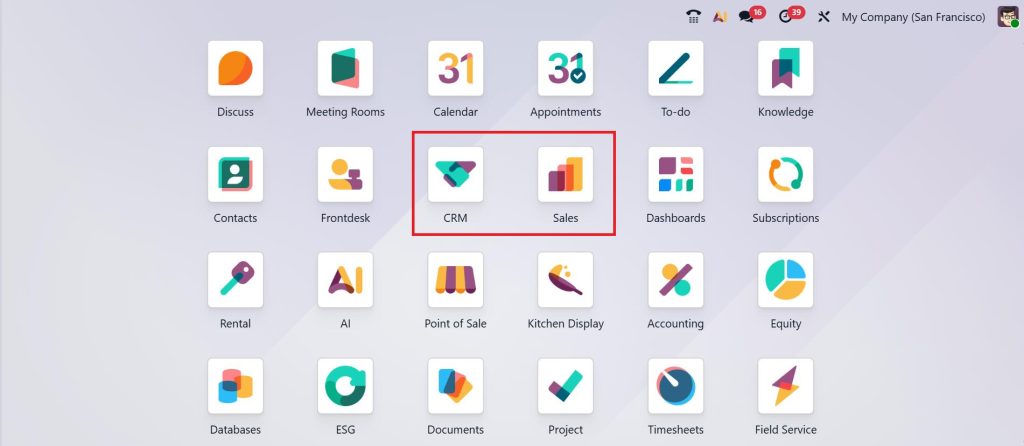
Click on the Search Bar. You’ll see options like:
- Filters
- Group By
- Favorites
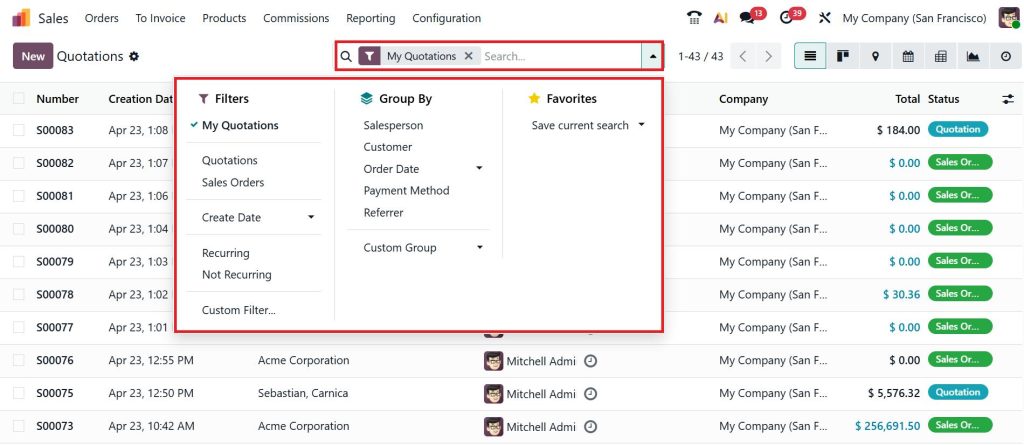
Select a predefined/default filter such as:
- Quotations
- My Records
- Active Records
- Recent Activities
Click on Custom Filter.
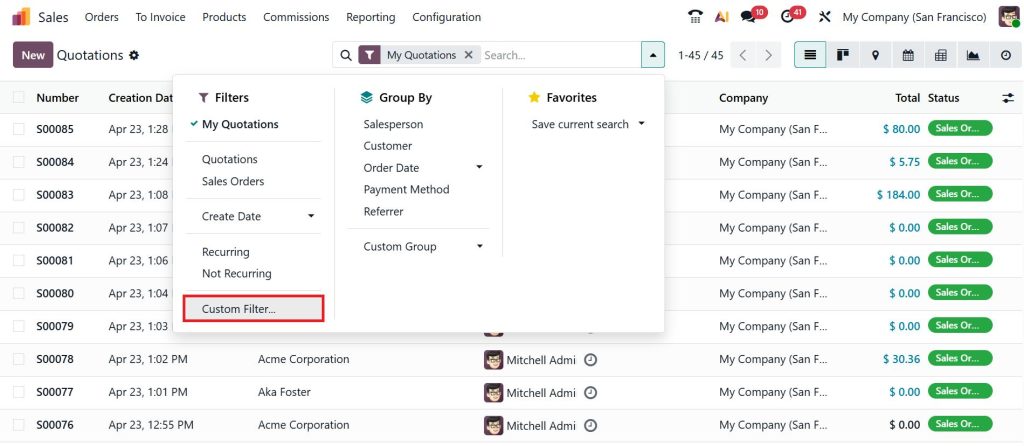
Now, define a new rule:
- Field (e.g., Customer)
- Operator (e.g., is equal to, contains)
- Value (e.g., AT Company)
- Click the Search button
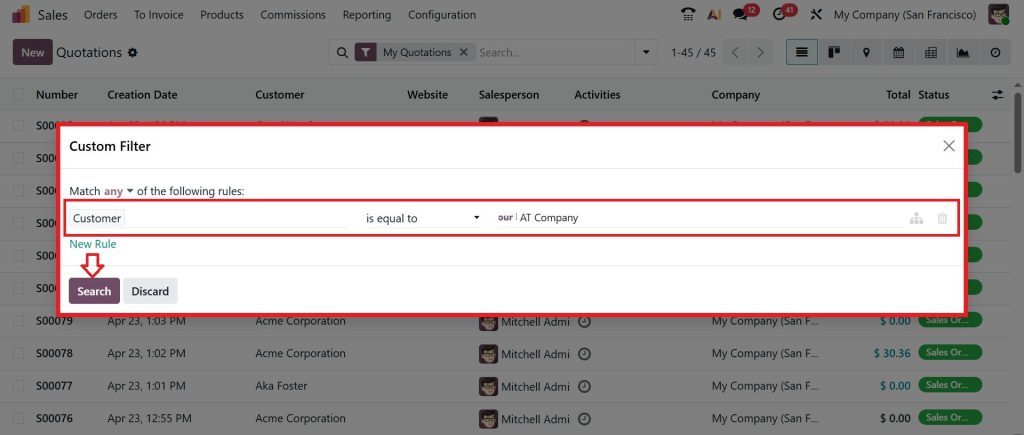
This structured approach supports Odoo 19 ERP precision search, ensuring that results are both accurate and relevant.
Odoo Custom Filter for Advanced Data Conditions
Standard filters often address common requirements, but complex scenarios require additional flexibility. An Odoo ERP custom filter allows users to create specific conditions that match their operational needs.
For instance, users can define multiple criteria such as:
- Orders exceeding a certain value
- Records created within a specific timeframe
- Data linked to particular customers or regions
Multiple conditions can be combined within a single filter, enabling refined control over the displayed results. This level of customization supports more detailed analysis and improves the accuracy of retrieved information.
Odoo Group by Filter for Organized Data Presentation
While filters reduce the number of visible records, the Odoo ERP group by filter focuses on organizing those records into meaningful categories.
Grouping allows users to view data based on shared attributes such as customer, status, date, or salesperson. For example, grouping sales orders by customer provides a consolidated view of transactions associated with each client.
This structured presentation simplifies data analysis and makes it easier to identify patterns or trends. When combined with filtering conditions, grouping becomes an integral part of Odoo 19 ERP advanced search.
Odoo 19 Advanced Search for Complex Queries
The Odoo 19 ERP advanced search functionality enables users to apply multiple conditions simultaneously. This is particularly useful when working with large datasets that require precise filtering.
Advanced search supports logical operators such as AND & OR, allowing users to define complex queries. For example:
- Records that meet multiple criteria simultaneously
- Records that match one condition or another
This flexibility ensures that users can perform detailed searches without manual effort. It enhances the overall effectiveness of search by filters in Odoo 19 by providing greater control over data retrieval.
Odoo Save Favorite Filter for Consistent Workflow
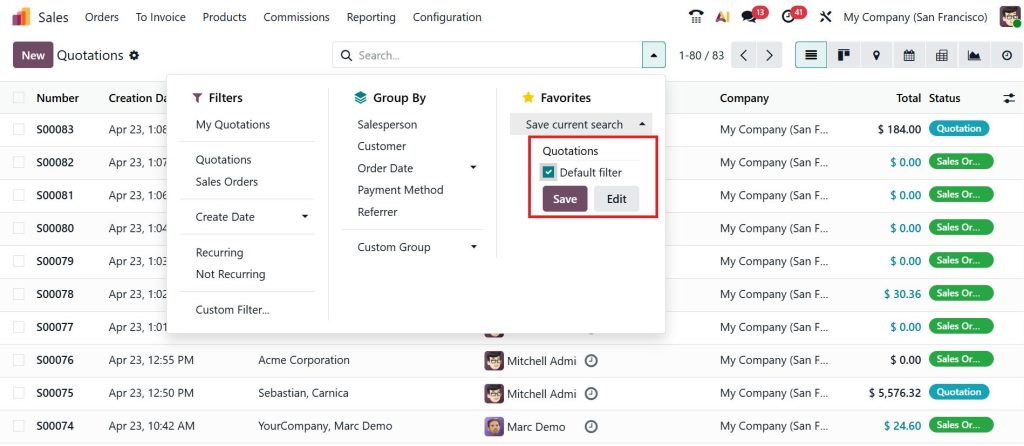
Repeatedly applying the same filters can be inefficient, especially in daily operations. The Odoo ERP save favorite filter feature allows users to store frequently used filter configurations.
Once a filter is created, it can be saved and accessed later with a single click. This eliminates the need to redefine conditions each time and ensures consistency in how data is viewed.
Saved filters are particularly useful for recurring tasks such as monthly reporting, sales tracking, or monitoring specific records. This feature contributes significantly to improved workflow efficiency.
Odoo Filter Search Records List View for Improved Navigation
The Odoo filter search records list view plays a critical role in day-to-day operations. It is the primary interface where users interact with filtered data.
Applying filters within the list view ensures that only relevant records are displayed, reducing clutter and improving navigation. Users can quickly scan, sort, and act on data without unnecessary distractions.
This approach supports faster decision-making and enhances the overall user experience within the system.
Odoo 19 Precision Search for Accurate Results
Accuracy is essential when working with business data. Odoo 19 ERP precision search enables users to retrieve exact results by applying clearly defined conditions.
Rather than relying on broad searches, users can specify detailed criteria to locate specific records. This reduces the risk of errors and ensures that decisions are based on reliable information.
Precision search is particularly valuable in areas such as accounting, inventory management, and sales reporting, where even minor inaccuracies can have significant consequences.
Common Challenges with Odoo Search Filter and Practical Solutions
While filters are highly effective, certain challenges may arise during usage. One common issue is the application of too many conditions, which can lead to overly restrictive results.
Another challenge is the failure to save frequently used filters, resulting in repetitive work. Additionally, overlooking the Odoo ERP group by filter may limit the ability to analyze data effectively.
Addressing these challenges involves maintaining clarity in filter conditions, saving useful configurations, and combining filtering with grouping where appropriate.
Search by Filters in Odoo 19 as a Daily Productivity Tool
The ability to perform search by filters in Odoo 19 is essential for managing data efficiently in a modern business environment. It enables users to move beyond basic searches and adopt a structured approach to data retrieval.
By effectively using the Odoo 19 search bar, applying an Odoo ERP search filter, creating an Odoo ERP custom filter, organizing records with an Odoo ERP group by filter, and leveraging Odoo save favorite filter, users can significantly improve their workflow.
The addition of Odoo 19 ERP advanced search and Odoo 19 ERP precision search further enhances the ability to handle complex datasets with confidence and accuracy.
Improve Your Odoo Experience with Netilligence
Many organizations utilize only a limited portion of Odoo’s capabilities. A deeper understanding of filtering and search features can lead to noticeable improvements in daily operations.
Netilligence supports businesses in optimizing their Odoo usage through practical guidance and implementation expertise. By applying the right strategies, teams can work more efficiently and manage data with greater accuracy.
Improve how your team works in Odoo with smarter filtering and accurate search practices. Connect with Netilligence to make your daily operations faster, clearer, and more efficient.




