


Introduction to Customer Follow-up Levels in Odoo 19 Accounting
Managing unpaid invoices is one of the biggest challenges for businesses. Late customer payments can affect cash flow, delay operations, and create accounting confusion. That is why many companies are now searching for ways to set up customer follow-up levels in Odoo 19 to automate reminders and improve collections.
With the help of Odoo 19 customer follow-up levels, businesses can create automatic reminder schedules for overdue invoices. Instead of manually calling or emailing customers every time a payment becomes overdue, Odoo 19 Accounting allows businesses to configure smart follow-up actions.
When companies learn how to set up customer follow-up levels in Odoo 19, they can reduce manual accounting work and maintain professional communication with customers. The system automatically sends reminders based on due dates and configured follow-up rules.
The Odoo 19 accounting follow-up system helps finance teams manage outstanding invoices more efficiently. Businesses can define multiple reminder levels, add delays, customize messages, and even assign internal actions for accountants.
Using customer payment follow-up in Odoo 19, companies can maintain healthy cash flow while improving customer relationships. Automated reminders help businesses stay professional without sounding aggressive.
Another major benefit of Odoo invoice follow-up reminders is consistency. Every customer receives reminders at the right time according to the configured schedule. This reduces missed follow-ups and improves payment collection rates.
Businesses also use Odoo overdue invoice reminders to track pending payments directly from the accounting dashboard. This gives accountants a clear view of overdue accounts and pending customer balances.
With proper Odoo accounting follow-up configuration, businesses can fully automate reminder emails, letters, and internal notes. Companies that want to automate customer follow-ups in Odoo often see faster payments and better financial control.
In this guide, we will explain step-by-step how to set up customer follow-up levels in Odoo 19, how the system works, key configuration options, practical business benefits, and why professional Odoo implementation matters for long-term success.
What are Customer Follow-up Levels in Odoo 19?
Customer follow-up levels in Odoo 19 are automated reminder stages used to follow up with customers who have unpaid invoices.
Instead of manually checking overdue invoices every day, the accounting team can configure follow-up actions that are triggered automatically after a payment due date passes.
These follow-up levels help businesses:
- Send payment reminders automatically
- Reduce overdue invoices
- Improve cash flow
- Save accountant time
- Maintain professional customer communication
- Organize collections efficiently
The Odoo follow-up levels system works based on delays. For example:
3 days overdue | Friendly reminder email |
10 days overdue | Strong payment reminder |
20 days overdue | Escalation notice |
30 days overdue | Internal collection action |
This automation makes customer payment follow-up in Odoo 19 much easier for businesses of all sizes.
Why Businesses Need Odoo 19 Accounting Follow-up
Many businesses struggle with delayed payments because they rely on manual tracking. Employees forget reminders, communication becomes inconsistent, and customers delay payments further.
Using Odoo 19 accounting follow-up, businesses can solve these common problems.
Better Cash Flow Management
Late payments directly impact business operations. Automated follow-ups encourage customers to pay on time.
With Odoo overdue invoice reminders, businesses can reduce outstanding receivables and improve cash availability.
Reduced Manual Work
Manual invoice tracking consumes valuable accounting time.
By learning how to set up customer follow-up levels in Odoo 19, businesses can automate repetitive reminder tasks and allow finance teams to focus on more important responsibilities.
Professional Communication
Sometimes businesses avoid sending reminders because they fear damaging customer relationships.
However, Odoo invoice follow-up reminders help maintain a professional and polite communication process.
Messages can be customized to match the company tone.
Centralized Accounting Process
The entire follow-up process remains inside the Odoo accounting system.
This helps businesses maintain complete visibility over:
- Pending invoices
- Customer communication
- Reminder schedules
- Collection activities
How to Set Up Customer Follow-up Levels in Odoo 19
Now, let us understand step-by-step how to set up customer follow-up levels in Odoo 19.
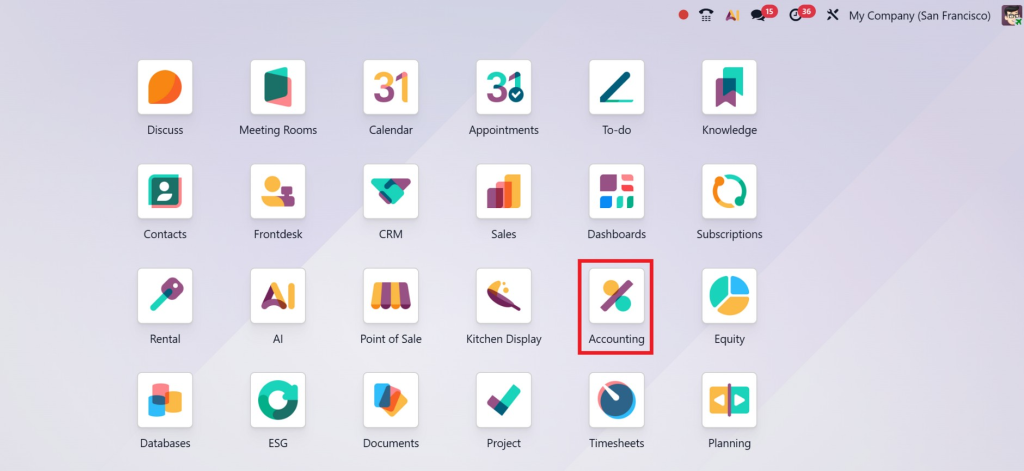
Step 1: Open the Accounting Module
First, log in to your Odoo 19 system.
Go to:
Accounting Module →
Configuration → Follow-up Levels
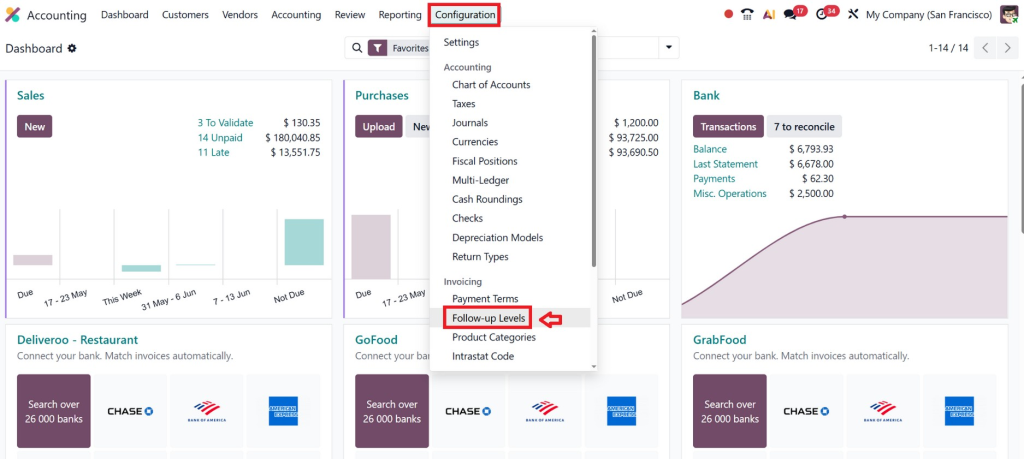
This section contains all follow-up configurations.
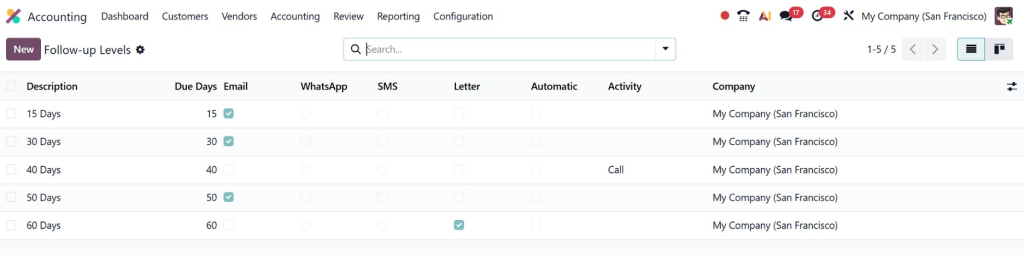
Businesses using Odoo accounting follow-up configuration can create multiple reminder stages based on overdue periods.
Step 2: Enable Follow-up Features
Before creating levels, businesses need to activate the follow-up feature.
Go to:
Accounting → Settings
Then:
- Search for customer follow-up options
- Enable follow-up management
- Save settings
Once activated, the follow-up menu becomes available.
This is the foundation for automating customer follow-ups in Odoo.
Step 3: Create Follow-up Levels
Now create reminder stages according to your business process.
Each follow-up level includes:
- Delay after due date
- Reminder type
- Message content
- Internal notes
- Responsible actions
Example structure:
5 days | Friendly email |
15 days | Strong payment notice |
25 days | Collection warning |
These stages define the behavior of Odoo 19 customer follow-up levels.
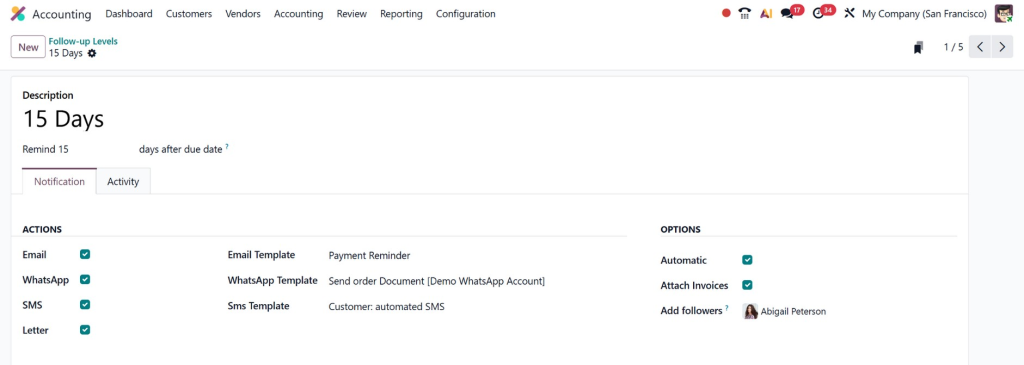
Step 4: Configure Reminder Messages
One of the most important parts of Odoo invoice follow-up reminders is message customization.
Businesses should write:
- Clear reminders
- Professional language
- Payment references
- Invoice details
- Due date information
Example:
Dear Customer,
Your invoice INV/2026/005 has become overdue. Kindly process payment at your earliest convenience.
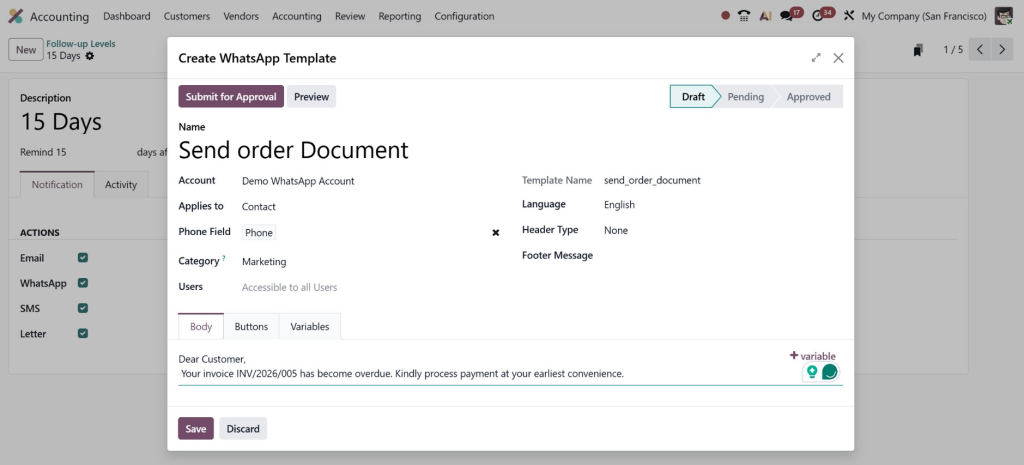
Professional communication improves payment response rates.
Step 5: Configure Automatic Actions
Businesses can automate several actions:
- Automatic emails
- Printed reminder letters
- Internal accounting notes
- Follow-up activities
This is where automating customer follow-ups in Odoo becomes extremely useful.
Automation ensures:
- No missed reminders
- Faster collection cycles
- Reduced accountant workload
Step 6: Assign Follow-up Responsible Users
Companies can assign responsible accountants or finance staff to manage collections.
This helps:
- Track accountability
- Organize collections
- Improve communication flow
For large businesses, this step is very important in Odoo 19 accounting follow-up management.
Step 7: Monitor Overdue Invoices
Once configured, Odoo automatically tracks overdue invoices.
The accounting dashboard displays:
- Overdue customers
- Pending balances
- Reminder status
- Follow-up stages
Using customer payment follow-up in Odoo 19, finance teams gain complete visibility into receivables.
Best Practices for Odoo Follow-up Levels
Lorem ipsum dolor sit amet, consectetur adipiscing elit. Ut elit tellus, luctus nec ullamcorper mattis, pulvinar dapibus leo.
Setting up reminders is easy, but businesses should follow best practices to maximize results.
Keep First Reminder Friendly
The first follow-up should always remain polite and professional.
Many delays happen accidentally.
Avoid aggressive language during initial reminders.
Use Clear Payment Instructions
Always include:
- Invoice number
- Due date
- Payment amount
- Payment methods
This improves customer response time.
Avoid Too Many Reminders
Sending reminders daily may frustrate customers.
Businesses should create balanced follow-up intervals.
A structured Odoo accounting follow-up configuration creates better customer experiences.
Separate High-Risk Customers
Some businesses configure special follow-up levels for customers with repeated late payments.
This helps finance teams prioritize collections.
Review Follow-up Reports Regularly
Businesses should monitor:
- Collection success rates
- Average overdue duration
- Customer payment behavior
This helps improve Odoo 19 customer follow-up levels over time.
Common Challenges Businesses Face Without Follow-up Automation
Companies that do not use automated follow-ups often face serious accounting issues.
Missed Payment Reminders
Manual processes lead to forgotten reminders.
Delayed Cash Flow
Late collections affect operational budgets.
Poor Customer Communication
Inconsistent reminders confuse customers.
High Accountant Workload
Manual collections increase workload significantly.
Lack of Financial Visibility
Without Odoo overdue invoice reminders, businesses struggle to monitor receivables efficiently.
Benefits of Automating Customer Follow-ups in Odoo
Businesses that automate customer follow-ups in Odoo gain multiple advantages.
Faster Payment Collection
Automated reminders encourage customers to pay quickly.
Improved Financial Control
Finance teams can monitor all overdue accounts from one system.
Better Customer Experience
Professional reminder communication improves relationships.
Reduced Human Errors
Automation removes manual mistakes and missed follow-ups.
Increased Team Productivity
Accounting teams spend less time chasing payments manually.
Advanced Features in Odoo 19 Follow-up Management
Odoo 19 introduces several improvements in accounting automation.
Automated Email Templates
Businesses can create branded reminder emails with:
- Company logos
- Payment links
- Dynamic invoice details
Activity Scheduling
The system can automatically assign activities to finance teams.
Multi-level Escalation
Companies can create escalating reminder structures.
Example:
- Friendly reminder
- Strong reminder
- Legal notice
Customer Follow-up Reporting
Businesses can generate reports for:
- Outstanding invoices
- Collection performance
- Customer payment history
These features make Odoo 19 accounting follow-up highly efficient for growing companies.
Industries That Benefit from Odoo Follow-up Automation
Almost every business that sends invoices can benefit from customer payment follow-up in Odoo 19.
Industries include:
- Retail businesses
- Manufacturing companies
- Logistics companies
- Service providers
- Healthcare organizations
- Wholesale distributors
- Construction businesses
Any company managing customer receivables can improve collections using Odoo invoice follow-up reminders.
Why Professional Odoo Implementation Matters
Although Odoo 19 provides powerful accounting features, proper implementation is very important.
Incorrect setup can create:
- Wrong reminder schedules
- Missing customer communication
- Reporting issues
- Accounting confusion
That is why businesses often work with experienced Odoo partners like Netilligence.
As an experienced Odoo service provider, Netilligence helps businesses:
- Configure Odoo accounting modules
- Set up customer follow-up automation
- Customize reminder workflows
- Optimize accounting operations
- Improve financial visibility
- Train finance teams
Professional implementation ensures businesses fully benefit from Odoo accounting follow-up configuration.
How Netilligence Helps Businesses Configure Odoo 19 Accounting
Businesses often require custom accounting workflows depending on their industry.
Netilligence provides:
- Odoo 19 implementation
- Accounting module customization
- Follow-up automation setup
- ERP consulting
- Odoo migration services
- Ongoing technical support
Whether a company wants simple reminders or advanced collection workflows, Netilligence helps configure scalable accounting solutions.
Their experienced Odoo experts understand how to optimize:
- Customer invoicing
- Payment tracking
- Follow-up automation
- Financial reporting
This allows businesses to reduce overdue invoices and improve operational efficiency.
How to Set Up Customer Follow-up Levels in Odoo 19
Learning how to set up customer follow-up levels in Odoo 19 is extremely important for businesses that want better financial control and faster payment collection.
With the help of Odoo 19 customer follow-up levels, companies can automate reminders, reduce manual accounting work, and improve customer communication.
The Odoo 19 accounting follow-up system helps businesses manage overdue invoices professionally while maintaining healthy customer relationships.
By using Odoo follow-up levels, businesses can:
- Improve cash flow
- Automate collections
- Reduce delays
- Increase accounting efficiency
- Maintain organized financial operations
Modern businesses cannot rely on manual invoice tracking anymore. Using Odoo overdue invoice reminders and automated accounting workflows helps companies stay financially organized and competitive.
If your business wants professional Odoo implementation and accounting automation support, Netilligence can help you configure the right Odoo 19 solution according to your operational needs.




