


Introduction: How to Record Cash Transfer Transactions in Odoo 19
How to record cash transfer transactions in Odoo 19 is one of the most common questions businesses ask after implementing Odoo Accounting. Every organization transfers money between cash accounts, bank accounts, or multiple company accounts. Recording these transactions correctly is essential for maintaining accurate financial records, avoiding reconciliation issues, and producing reliable financial reports.
Whether you need an Odoo 19 cash transfer, an Odoo 19 internal transfer, an Odoo 19 bank transfer, or a cash-to-bank transfer in Odoo 19, the Accounting module provides simple yet powerful features to manage every movement of funds.
Many businesses still rely on manual entries or traditional Odoo 19 contra voucher methods to record transfers. However, Odoo 19 automates much of the process, reducing errors while improving transparency across your financial operations. Whether you are processing a bank-to-cash transfer in Odoo 19 or simply need to record a cash transaction in Odoo 19, understanding the correct workflow is essential.
In this guide, you will learn how to record cash transfer transactions in Odoo 19, how internal transfers work, how bank reconciliation becomes easier, and why companies choose Netilligence to customize Odoo Accounting according to their business needs.
Understanding Cash Transfer Transactions in Odoo 19
A cash transfer transaction refers to moving funds from one financial account to another without creating income or expenses. Since the money remains within the organization, these transactions are considered internal movements.
Examples include:
- Cash to bank deposits
- Bank withdrawals to cash
- Transfers between two bank accounts
- Petty cash funding
- Branch cash movements
- Intercompany fund transfers
Instead of affecting profit or loss, these transactions simply change where the company’s money is stored.
Odoo 19 simplifies this process by allowing users to record internal transfers without creating duplicate accounting entries.
Why Accurate Cash Transfer Recording Matters
Recording transfers properly provides several important benefits.
Maintains Accurate Financial Records
Incorrect transfers often create duplicate income or duplicate expenses. Proper recording prevents accounting mistakes.
Simplifies Bank Reconciliation
When internal transfers are recorded correctly, bank statements match accounting records much faster.
Improves Audit Readiness
Every transfer has supporting journal entries, making audits easier and more transparent.
Better Cash Flow Visibility
Managers always know how much cash is available in every account.
Different Types of Cash Transfer Transactions in Odoo 19
Businesses perform different types of transfers every day.
Cash to Bank Transfer
This occurs when physical cash is deposited into a bank account.
Example:
The cashier deposits $5,000 collected during the day into the company’s bank account.
Odoo records:
- Credit Cash Account
- Debit Bank Account
Bank to Cash Transfer
Sometimes businesses withdraw money from the bank for daily expenses or petty cash.
Example:
Withdraw $2,000 from the bank to replenish petty cash.
Odoo automatically updates both accounts.
Bank-to-Bank Transfer
Companies operating multiple bank accounts frequently move funds between accounts.
Examples include:
- Payroll account funding
- Vendor payment account transfers
- Currency account management
Petty Cash Transfers
Organizations maintain petty cash for daily operational expenses.
Funds can be transferred from:
- Main Bank → Petty Cash
- Cash Register → Petty Cash
This ensures sufficient cash is always available for small purchases.
How to Record Cash Transfer Transactions in Odoo 19
One of the strongest features of Odoo 19 Accounting is its built-in Internal Transfer functionality.
The overall process is simple.
Step 1: Open the Accounting Module
Navigate to:
Accounting → Customers → Payments
or
Accounting → Vendors → Payments
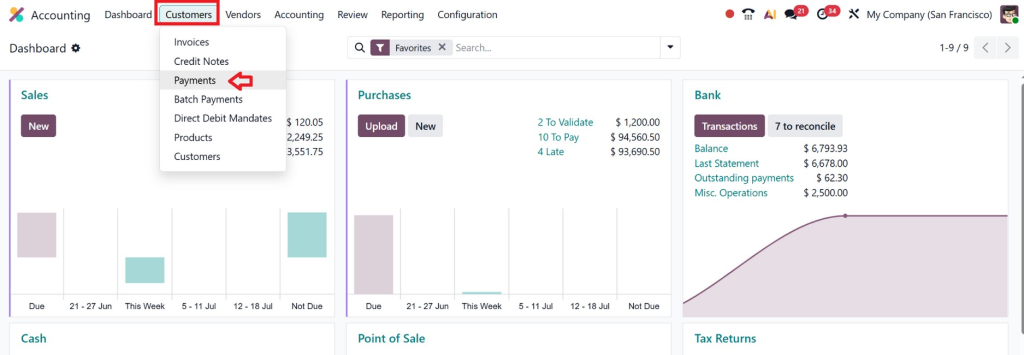
Depending on your workflow, you can also initiate transfers directly from the bank journals.
Step 2: Create a New Payment
Click New.
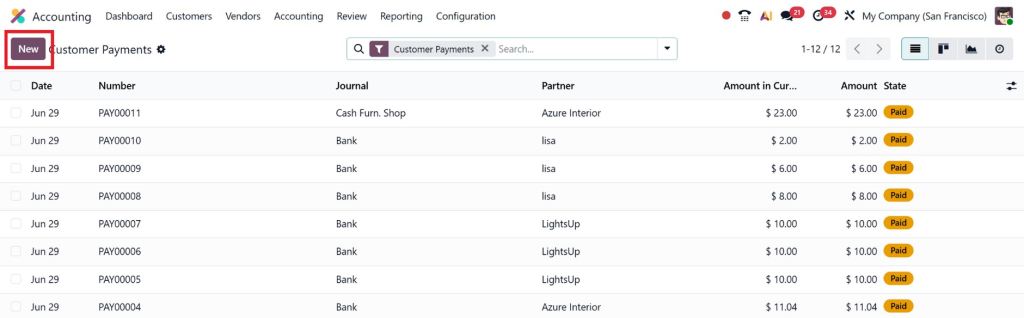
Choose:
- Internal Transfer
- Payment Amount
- Source Journal
- Destination Journal
- Payment Date
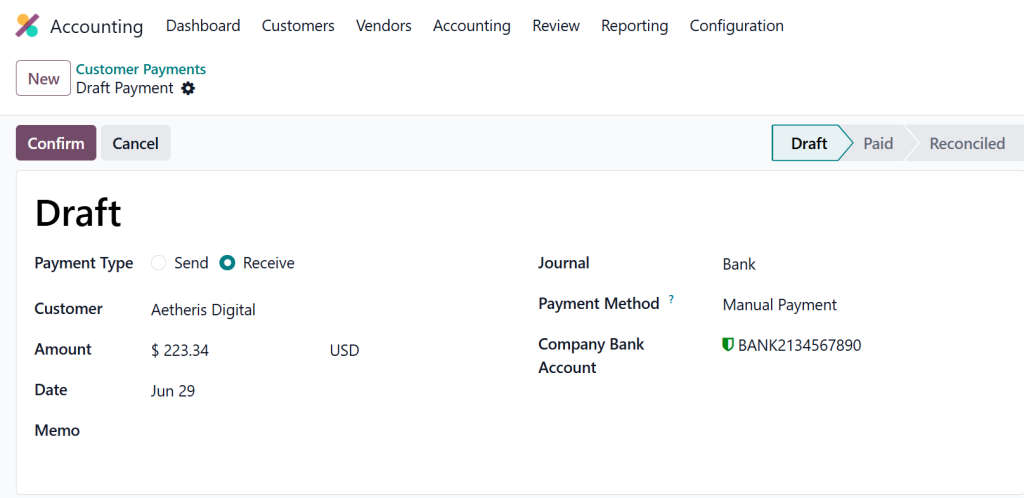
Step 3: Select Source Account
Choose the account where the money currently exists.
Examples:
- Cash
- Bank Account A
- Petty Cash
Step 4: Choose Destination Account
Now select the account receiving the funds.
Examples:
- Main Bank
- Savings Account
- Cash Register
- Payroll Account
Step 5: Confirm the Transfer
Review:
- Amount
- Reference
- Date
- Journals
Click Confirm.
Lorem ipsum dolor sit amet, consectetur adipiscing elit. Ut elit tellus, luctus nec ullamcorper mattis, pulvinar dapibus leo.
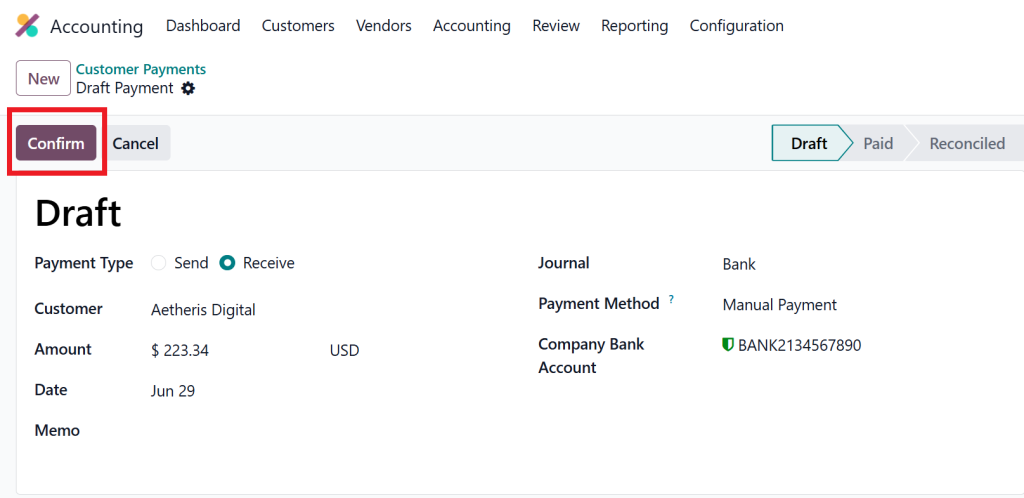
Odoo immediately generates the accounting entries.
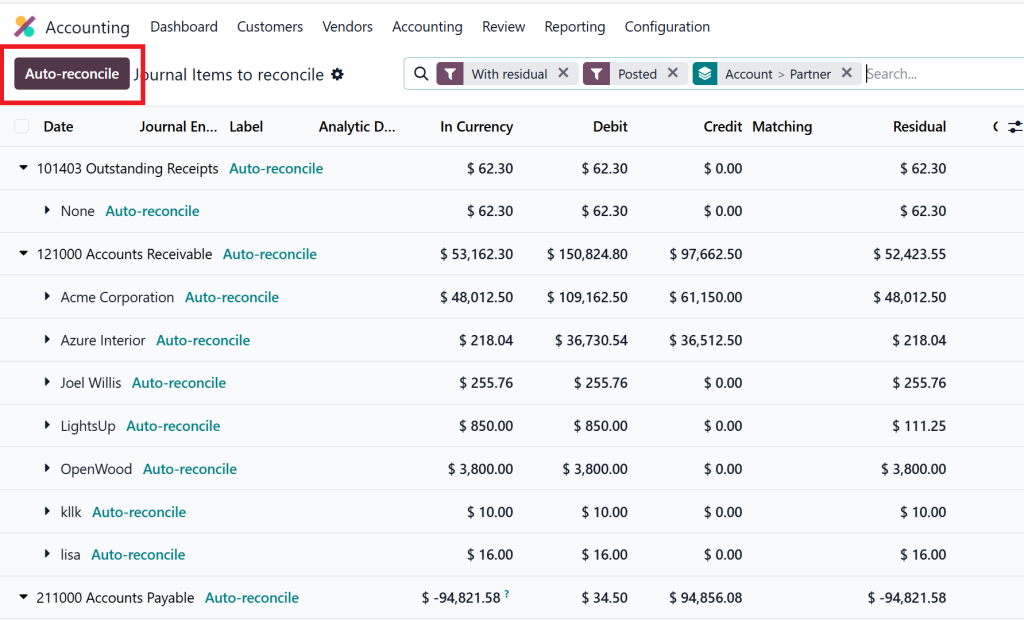
Step 6: Reconcile Both Transactions
When bank statements are imported later, reconciliation becomes extremely simple because both entries already exist within the accounting system.
Journal Entries Created During Internal Transfers
Suppose your company deposits $10,000 into its bank account.
The journal entry will appear like this:
Account | Debit | Credit |
Bank Account | 10,000 | |
Cash Account | 10,000 | |
Notice that:
- No income account is affected.
- No expense account is affected.
- Total assets remain unchanged.
Only the location of the money changes.
Benefits of Using Internal Transfers Instead of Manual Contra Vouchers
Many accountants coming from traditional accounting software are familiar with contra vouchers.
Although the concept remains similar, Odoo offers a smarter workflow.
Advantages include:
- Automatic journal creation
- Better audit trail
- Easy reconciliation
- Reduced manual errors
- Improved reporting
- Faster accounting processes
- Clear transfer history
Instead of entering debit and credit manually every time, users simply create an internal transfer.
Recording Different Cash Transfer Scenarios in Odoo 19
Every business handles money differently. Some companies deal with daily cash deposits, while others frequently transfer funds between multiple bank accounts. Odoo 19 is flexible enough to support all these situations through its Accounting module.
Let’s look at some common cash transfer scenarios and how they are managed.
Cash to Bank Transfer in Odoo 19
A cash-to-bank transfer in Odoo 19 is one of the most common accounting transactions. Businesses often collect cash from customers throughout the day and deposit it into their bank accounts.
For example, a retail store collects cash sales of $8,000 during business hours. At the end of the day, the cashier deposits the money into the company’s bank account.
In Odoo 19, you simply select the Cash journal as the source and the Bank journal as the destination. Once the transfer is confirmed, Odoo creates the required journal entries automatically.
This method keeps your cash balance accurate while increasing your bank balance by the same amount.
Bank to Cash Transfer in Odoo 19
Sometimes businesses need physical cash for office expenses, transportation costs, or employee reimbursements.
A bank-to-cash transfer in Odoo 19 allows companies to withdraw funds from their bank account and move them into their cash account.
Instead of manually creating journal entries, users can use the Internal Transfer feature.
Examples include:
- Office petty cash
- Employee travel advances
- Emergency operational expenses
- Daily cash drawer balance
This process reduces manual work and ensures proper accounting records.
Bank-to-Bank Transfers
Many organizations operate multiple bank accounts.
For example:
- Salary Account
- Operating Account
- Foreign Currency Account
- Savings Account
Transferring money between these accounts is a routine activity.
Using Odoo 19 bank transfer, users can transfer funds without affecting income or expense accounts.
Odoo automatically tracks:
- Source account
- Destination account
- Reference number
- Transfer date
- Amount
- Journal entries
This provides complete visibility for finance teams.
Intercompany Cash Transfers
Businesses operating multiple companies often transfer funds between legal entities.
For example:
- Parent company funding a subsidiary
- Branch office cash allocation
- Temporary working capital support
With proper multi-company configuration, Odoo records these transactions separately while maintaining consolidated financial reporting.
This is especially valuable for growing businesses that manage several companies under one ERP system.
Lorem ipsum dolor sit amet, consectetur adipiscing elit. Ut elit tellus, luctus nec ullamcorper mattis, pulvinar dapibus leo.
Common Mistakes to Avoid
Even experienced accountants occasionally make mistakes when recording internal transfers.
Here are some of the most common ones.
Recording Transfers as Expenses
This is one of the biggest accounting errors.
Moving money between company accounts is not an expense.
Doing so will distort financial reports.
Recording Transfers as Income
Likewise, transferring money from cash to bank should never increase company revenue.
It simply changes the location of the funds.
Using Incorrect Journals
Selecting the wrong journal can cause reconciliation problems.
Always verify both source and destination journals before confirming the transaction.
Duplicate Entries
Some users manually create journal entries after already using the Internal Transfer feature.
This results in duplicate transactions.
Trust the automated workflow provided by Odoo.
Ignoring Reconciliation
Without reconciliation, unmatched bank transactions accumulate quickly.
Regular reconciliation keeps your books clean.
Advantages of Using Odoo 19 Accounting for Cash Transfers
Modern businesses need more than basic bookkeeping.
Odoo 19 offers several powerful advantages.
Automation
Manual journal entries are minimized.
Accuracy
Automatic debit and credit postings reduce human error.
Faster Reconciliation
Imported bank statements match existing transfers quickly.
Complete Audit Trail
Every transfer records:
- User
- Date
- Amount
- Reference
- Journal
Better Reporting
Financial reports always reflect accurate cash positions.
Multi-Bank Support
Manage multiple bank accounts without complexity.
Multi-Currency Support
Businesses operating internationally can transfer funds between foreign currency accounts with proper exchange rate calculations.
Why Businesses Choose Netilligence for Odoo 19 Accounting Solutions
Implementing Odoo is only the first step. Configuring it to match your accounting processes requires expertise.
At Netilligence, we help businesses customize Odoo 19 Accounting according to their operational requirements. Whether you need assistance with Odoo 19 cash transfer, Odoo 19 accounting internal transfer, bank reconciliation, multi-company accounting, or financial reporting, our experienced consultants ensure your ERP system works efficiently.
Our services include:
- Odoo 19 implementation
- Accounting module configuration
- Multi-company setup
- Bank integration
- Workflow automation
- Custom accounting reports
- User training
- Ongoing technical support
- Odoo customization
- ERP migration and upgrades
We focus on building solutions that reduce manual work, improve accounting accuracy, and help finance teams work more efficiently.
How to Record Cash Transfer Transactions in Odoo 19
Understanding how to record cash transfer transactions in Odoo 19 is essential for maintaining accurate financial records and ensuring smooth day-to-day accounting operations. Whether you are performing an Odoo 19 internal transfer, an Odoo 19 bank transfer, a cash-to-bank transfer in Odoo 19, or a bank-to-cash transfer in Odoo 19, using Odoo’s Internal Transfer feature eliminates unnecessary manual entries and improves overall financial accuracy.
Instead of relying on traditional Odoo 19 contra voucher methods, businesses can automate internal fund movements, simplify bank reconciliation, and maintain a complete audit trail. Properly managing these transactions also ensures that financial statements remain accurate and reliable.
If your organization wants to optimize its accounting workflows, automate financial processes, or customize Odoo 19 to match specific business requirements, Netilligence is ready to help. Our team of Odoo experts can implement, configure, and customize the Accounting module so your finance department can work more efficiently and confidently.




