


How is the sales module connected with inventory in Odoo 19 is one of the most important topics for businesses planning to improve sales operations, inventory control, and order fulfillment. In modern business environments, sales and stock management cannot work separately. Every sale directly impacts inventory levels, product availability, warehouse operations, and customer satisfaction.
The Odoo 19 sales inventory integration creates a seamless connection between customer orders and stock movements. When a sales team confirms an order, the inventory system automatically reacts by checking stock availability, reserving products, creating delivery orders, and updating warehouse operations.
This powerful inventory integration in Odoo 19 helps businesses eliminate manual work, reduce stock errors, improve delivery accuracy, and maintain real-time inventory visibility. The connection between Odoo 19 sales and inventory ensures that every sales transaction is reflected accurately in inventory records.
Through the Odoo sales order inventory flow, businesses can track products from quotation to delivery without switching between multiple systems. The Odoo 19 stock reservation from sales order feature automatically reserves available products and prevents overselling.
Companies using the Odoo 19 sales module gain better control over warehouse activities while ensuring customers receive accurate delivery commitments. The complete Odoo sales-to-delivery order process becomes automated, efficient, and transparent.
In this guide, we will explore how the sales module is connected with inventory in Odoo 19, how the workflow operates, key features, business benefits, and why organizations are choosing Odoo 19 to manage their sales and inventory operations together.
Why Sales and Inventory Integration Matters in Modern Businesses
Before understanding how is the sales module connected with inventory in Odoo 19, it is important to understand why this integration is critical.
Many businesses still use separate systems for sales and inventory management. This often creates problems such as:
- Stock discrepancies
- Delayed deliveries
- Overselling products
- Inventory inaccuracies
- Manual data entry errors
- Poor customer experience
Imagine a salesperson confirms an order without knowing whether stock is available. The warehouse later discovers insufficient inventory, causing delivery delays and customer dissatisfaction.
With Odoo 19 sales inventory integration, sales and inventory operate as a single system. Every confirmed sale automatically updates stock operations, ensuring accurate information across departments.
The result is:
- Better inventory visibility
- Faster order processing
- Improved customer satisfaction
- Reduced operational costs
- Higher business efficiency
Understanding the Connection Between Sales and Inventory in Odoo 19
The answer to how sales module connected with inventory in Odoo 19 lies in Odoo’s integrated architecture.
Unlike standalone applications, Odoo connects all business modules through a centralized database. This means information entered in one module instantly affects related modules.
When a sales representative creates a sales order, Odoo automatically communicates with the inventory module.
The system performs several actions:
Stock Availability Check
Odoo verifies whether requested products are available in inventory.
The sales team can instantly see:
- Available stock
- Forecasted stock
- Incoming inventory
- Outgoing inventory
This helps sales representatives make informed commitments to customers.
Product Reservation
When the order is confirmed, Odoo 19 stock reservation from sales order automatically reserves inventory for that customer.
Reserved stock cannot be accidentally sold to another customer.
Delivery Order Creation
The system generates delivery orders automatically.
This is a key component of the Odoo sales to delivery order workflow.
Warehouse teams receive delivery instructions immediately without manual intervention.
Stock Movement Updates
Once products leave the warehouse, inventory quantities are automatically adjusted.
This ensures accurate inventory records at all times.
Odoo Sales Order Inventory Flow Explained Step-by-Step
One of the biggest advantages of Odoo sales order inventory flow is automation.
Let’s examine the complete process.
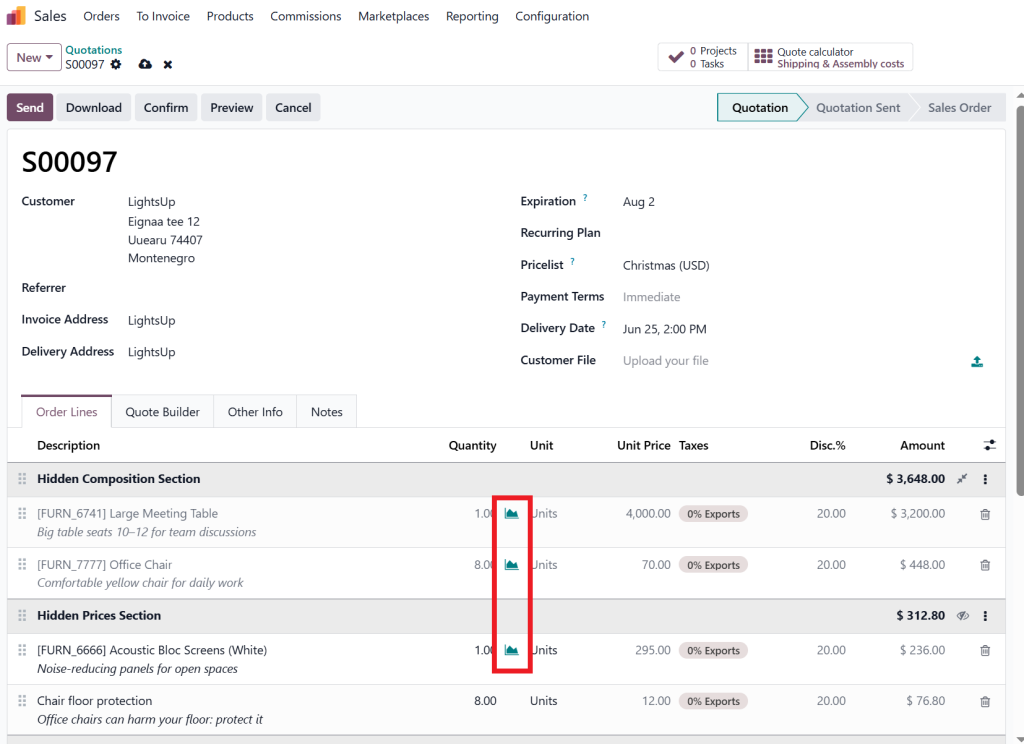
Step 1: Customer Inquiry
A customer requests products from your company.
The sales team creates:
- Quotation
- Product selection
- Pricing details
- Delivery information
At this stage, Odoo displays available inventory.
Step 2: Quotation Confirmation
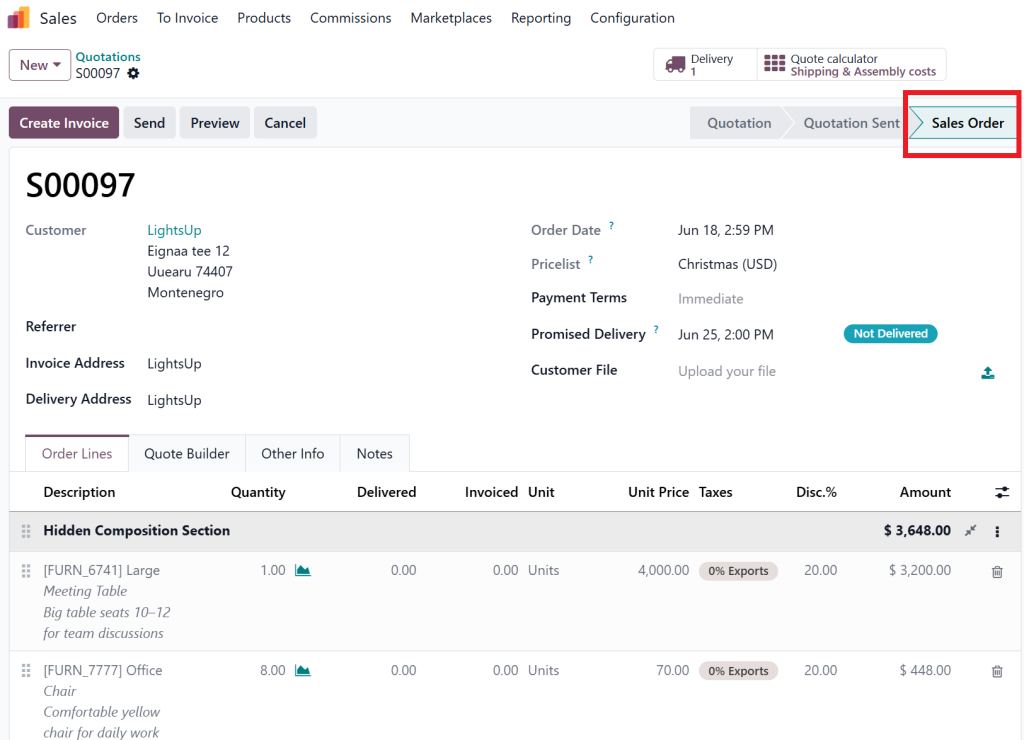
Once the customer approves the quotation, it becomes a sales order.
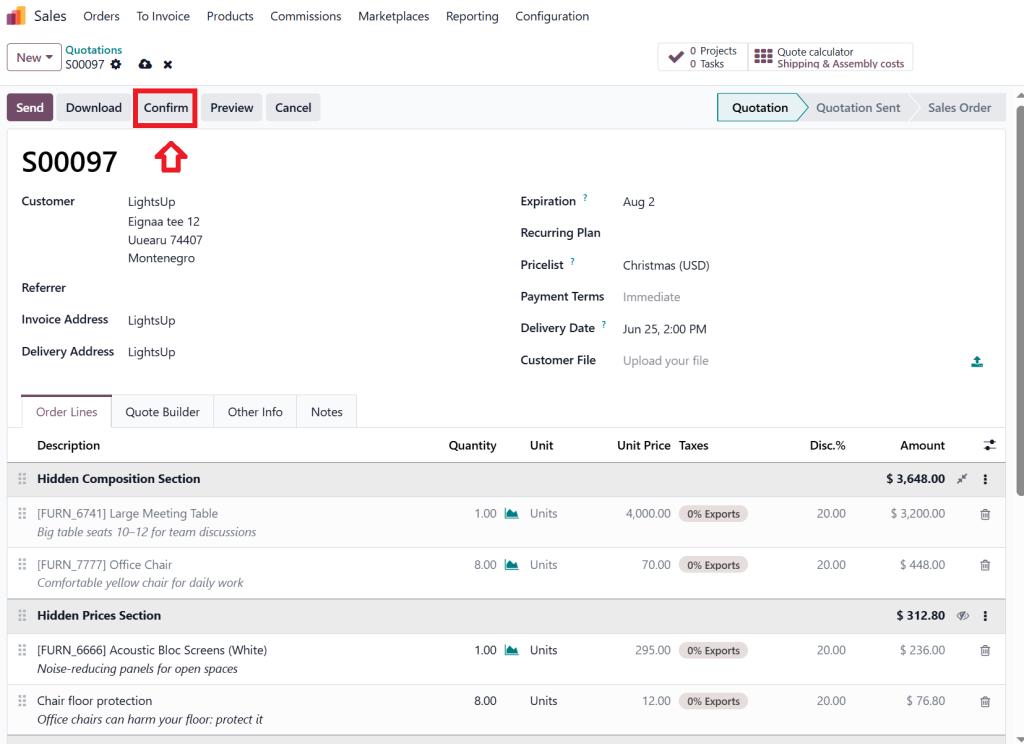
The system immediately triggers inventory-related actions.
This is where Odoo 19 sales and inventory begin working together automatically.
Step 3: Stock Verification
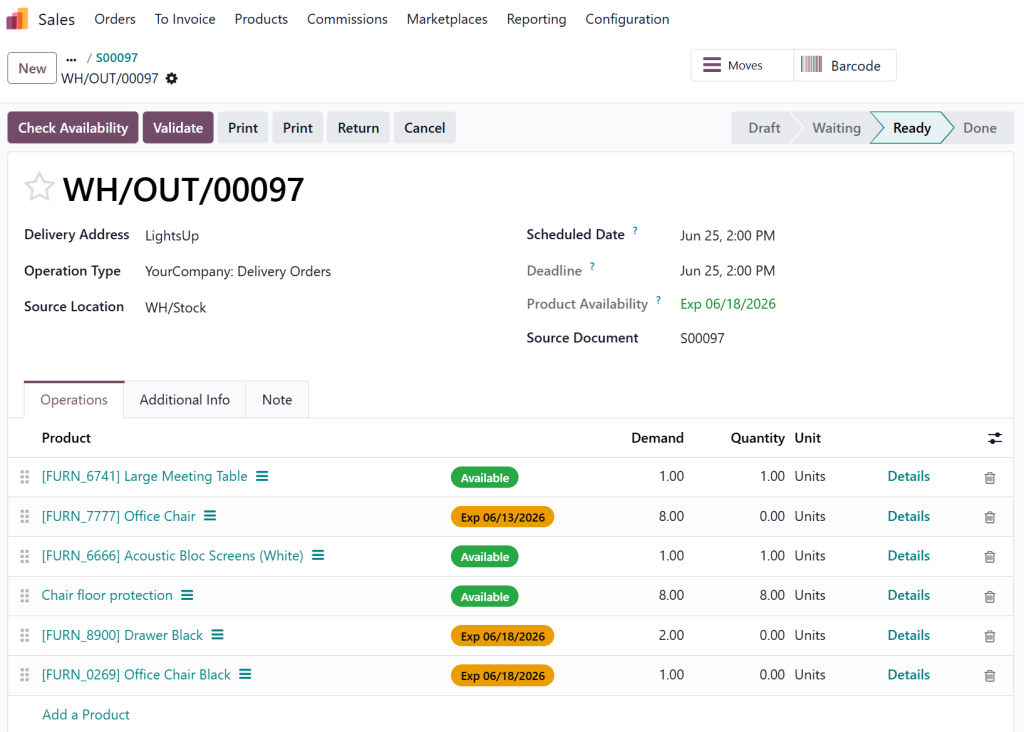
Odoo checks inventory availability.
Possible scenarios include:
Available Stock
Products exist in inventory.
The order proceeds directly to reservation.
Partial Availability
Some products are available while others require replenishment.
Odoo creates procurement activities.
Out of Stock
Products are unavailable.
The system can trigger:
- Purchase orders
- Manufacturing orders
- Replenishment requests
depending on configuration.
Step 4: Stock Reservation
The Odoo 19 stock reservation from the sales order process reserves products for the customer.
Benefits include:
- Prevents double selling
- Improves fulfillment accuracy
- Protects customer commitments
- Reduces stock conflicts
Step 5: Delivery Order Generation
The inventory module automatically generates a delivery order.
Warehouse personnel receive:
- Product details
- Quantities
- Storage locations
- Delivery instructions
This automated Odoo sales to delivery order workflow significantly improves warehouse productivity.
Step 6: Picking and Packing
Warehouse teams perform:
- Picking products
- Packing products
- Verifying quantities
- Preparing shipments
Odoo updates each stage in real time.
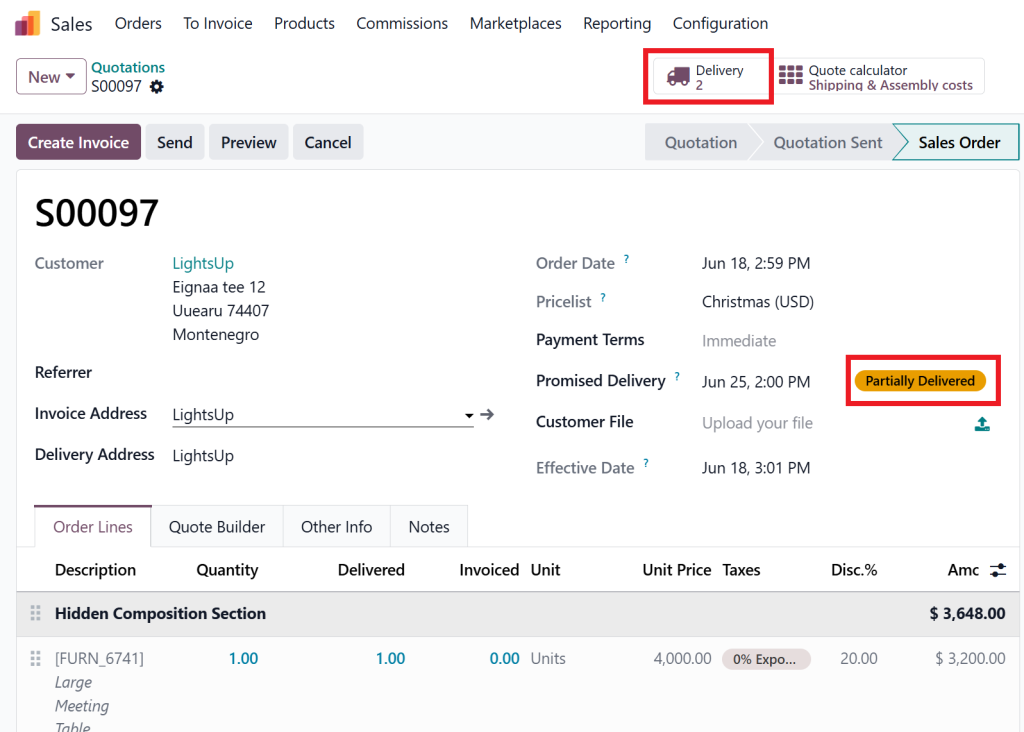
Step 7: Shipment Validation
Once products are shipped, inventory levels decrease automatically.
The sales order status updates simultaneously.
This real-time synchronization demonstrates the effectiveness of inventory integration in Odoo 19.
Key Features of Odoo 19 Sales Inventory Integration
Several features make Odoo 19 sales inventory integration extremely powerful.
Real-Time Inventory Visibility
Sales teams can instantly view:
- Available stock
- Reserved stock
- Incoming stock
- Forecasted stock
This prevents inaccurate commitments.
Automatic Stock Reservation
Products are reserved immediately after order confirmation.
This ensures inventory is allocated correctly.
The Odoo 19 sales order stock process becomes more reliable and accurate.
Smart Replenishment
When stock is unavailable, Odoo can automatically create:
- Purchase orders
- Manufacturing orders
- Internal transfers
Businesses avoid stock shortages while maintaining operational efficiency.
Multi-Warehouse Support
Organizations managing multiple warehouses benefit from centralized inventory visibility.
Sales representatives can determine:
- Which warehouse has stock
- Transfer possibilities
- Delivery timelines
This improves fulfillment decisions.
Delivery Management
The Odoo sales to delivery order workflow automates delivery generation and tracking.
Warehouse operations become faster and more organized.
Traceability
Businesses can track:
- Product movements
- Delivery status
- Inventory history
- Customer orders
This improves accountability and operational transparency.
Benefits of Connecting Sales and Inventory in Odoo 19
Understanding how sales module connected with inventory in Odoo 19 becomes easier when examining business benefits.
Improved Customer Satisfaction
Customers receive:
- Accurate delivery dates
- Faster fulfillment
- Better communication
This builds trust and loyalty.
Reduced Manual Work
Automation eliminates repetitive tasks such as:
- Manual stock updates
- Inventory checks
- Delivery creation
- Warehouse notifications
Employees focus on higher-value activities.
Better Inventory Accuracy
Inventory records stay synchronized automatically.
Businesses avoid:
- Stock discrepancies
- Inventory mismatches
- Counting errors
Faster Order Fulfillment
Warehouse teams receive delivery orders immediately.
This reduces delays between:
- Order confirmation
- Picking
- Packing
- Shipping
Prevention of Overselling
One major advantage of Odoo 19 stock reservation from sales order is preventing inventory conflicts.
Reserved products remain allocated to the correct customer.
Improved Business Visibility
Management gains complete visibility into:
- Sales performance
- Inventory turnover
- Order status
- Warehouse operations
This supports better decision-making.
Real Business Example of Odoo Sales and Inventory Integration
Consider a wholesale electronics distributor.
The company receives hundreds of orders daily.
Without integration:
- Sales teams manually check stock.
- Warehouse teams receive email instructions.
- Inventory updates occur later.
- Errors become common.
With Odoo 19 sales and inventory integration:
Sales Department
Creates customer orders.
Inventory Department
Receives automatic stock reservations.
Warehouse Team
Gets instant delivery orders.
Management
Monitors real-time operations through dashboards.
The result includes:
- Faster deliveries
- Fewer errors
- Better customer service
- Increased profitability
This practical example demonstrates why businesses value Odoo sales order inventory flow.
Advanced Inventory Processes Triggered by Sales Orders
The connection between sales and inventory extends beyond simple stock deductions.
Odoo 19 can automate advanced workflows.
Dropshipping
When products are unavailable internally, Odoo can:
- Generate purchase orders
- Ship directly from suppliers
- Update sales orders automatically
Make-to-Order
Products can be manufactured only after receiving customer orders.
Sales orders trigger manufacturing workflows.
Procurement Rules
Odoo automatically follows predefined procurement strategies.
Examples include:
- Buy
- Manufacture
- Transfer
- Replenish
This enhances the power of inventory integration in Odoo 19.
Multi-Step Deliveries
Businesses can configure:
- Pick
- Pack
- Ship
processes based on operational requirements.
Sales orders automatically initiate these workflows.
Why Businesses Choose Netilligence for Odoo 19 Implementation
While understanding how sales module connected with inventory in Odoo 19 is important, successful implementation requires expertise.
Many businesses fail to maximize Odoo’s capabilities because of improper configuration.
At Netilligence, we help organizations:
- Implement Odoo 19 successfully
- Configure sales workflows
- Optimize inventory processes
- Automate warehouse operations
- Customize business workflows
- Integrate multiple departments
- Train users effectively
Our experienced Odoo consultants ensure that your sales and inventory modules work together efficiently to deliver measurable business results.
Whether you manage wholesale distribution, retail operations, manufacturing, logistics, or eCommerce businesses, Netilligence can help you unlock the full power of Odoo 19.
How is the Sales Module Connected with Inventory in Odoo 19?
If you are wondering how is the sales module connected with inventory in Odoo 19, the answer is simple: Odoo creates a fully integrated workflow where sales activities automatically trigger inventory operations.
Through powerful Odoo 19 sales inventory integration, businesses can automate stock reservations, generate delivery orders, maintain accurate inventory records, and improve customer satisfaction.
The seamless connection between Odoo 19 sales and inventory eliminates manual work, prevents overselling, improves warehouse efficiency, and provides complete operational visibility.
From Odoo sales order inventory flow to Odoo sales to delivery order automation, every process works together to ensure faster and more accurate order fulfillment.
Organizations looking to improve efficiency, reduce operational errors, and gain better control over inventory should strongly consider implementing Odoo 19. With the right configuration and expert support from Netilligence, businesses can transform their sales and inventory operations into a streamlined, automated, and highly productive system.




