


Manage Batch and Lot Tracking with Odoo 18
Managing inventory efficiently is critical to success in the ever-evolving world of business. From pharmaceuticals to food and manufacturing, industries require precise product tracking systems. Odoo batch tracking is a powerful feature that rationalises inventory management, ensuring traceability, compliance, and operational efficiency.
With lot tracking in Odoo 18, businesses can gain better control over their stock while addressing challenges like expiry management and recalls. This comprehensive guide will explore how batch and lot tracking in Odoo works, its benefits, and the steps in setting up Odoo 18 inventory tracking. Discover how to manage batch and lot tracking with Odoo 18, batch and lot tracking Odoo, and batch tracking setup, and learn how to use batch tracking in Odoo 18 for your business success.
What Are Batch and Lot Tracking?
Understanding Batch Tracking
Batch tracking involves grouping products produced or received together under a unique identifier. This identifier, or batch number, helps track the production and movement of that specific batch across the supply chain. Batch tracking is essential for industries managing products with similar manufacturing or purchase dates.
Understanding Lot Tracking
On the other hand, lot tracking focuses on more granular traceability by assigning unique identifiers to smaller groups or individual units within a batch. It’s beneficial in pharmaceuticals, food production, and electronics sectors, where strict traceability and quality assurance are non-negotiable.
Odoo ERP batch tracking integrates both methods to provide businesses with robust inventory solutions, enabling efficient Odoo inventory management.
Why Choose Odoo 18 for Batch and Lot Tracking?
Advanced Traceability
With lot tracking in Odoo 18, businesses can track products across the supply chain, from procurement to final delivery. This level of traceability ensures compliance with industry regulations and enhances customer trust.
Simplified Inventory Management
Odoo 18 inventory tracking simplifies complex inventory operations. Its user-friendly interface and automation capabilities make managing batches much more manageable.
Real-Time Insights
Gain real-time visibility into stock levels, movements, and locations with batch and lot tracking in Odoo. This insight helps in making informed decisions about procurement and production planning.
Customizable Features
Odoo 18 batch tracking setup can be customized to suit various business needs, ensuring flexibility and scalability.
Cost-Effective Solution
By automating inventory processes and minimizing errors, Odoo ERP batch tracking reduces operational costs while improving efficiency.
Key Features of Batch and Lot Tracking in Odoo 18
Expiry Management
Easily manage products with expiry dates using the batch and lot tracking features. Set up alerts to ensure you’re aware of products nearing expiration.
Traceability Reports
Generate comprehensive traceability reports to track products from origin to end-users, ensuring regulatory compliance.
Barcode Integration
Speed up batch and lot identification with barcode scanning capabilities, making operations smooth and error-free.
Multi-Warehouse Support
Manage inventory across multiple warehouses with centralized control using Odoo 18 inventory tracking.
Integration with Other Modules
Integrate batch and lot tracking in Odoo with manufacturing, purchasing, and sales modules for a holistic inventory management experience.
How to Set Up Batch and Lot Tracking in Odoo 18
Activate Batch and Lot Tracking
To get started, you need to enable batch and lot tracking in Odoo:
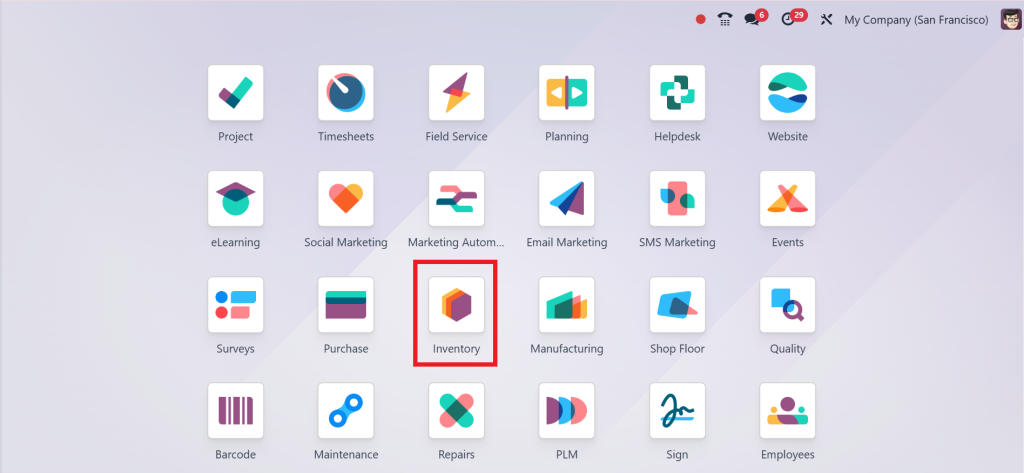
Direct to the Inventory Module.
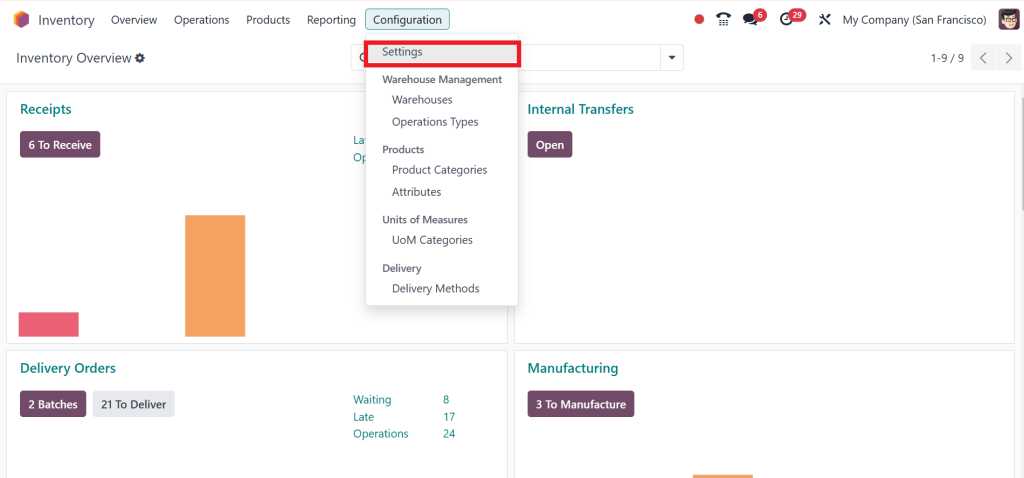
Go to Configuration > Settings.
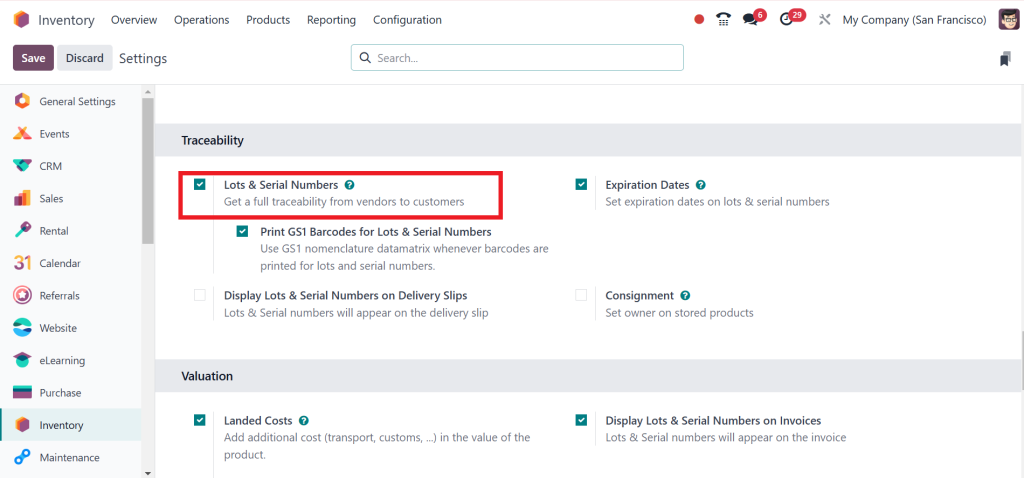
Under the Traceability section, activate the Lot and Serial Numbers options.
Configure Products for Tracking
After enabling the feature, assign tracking options to specific products:
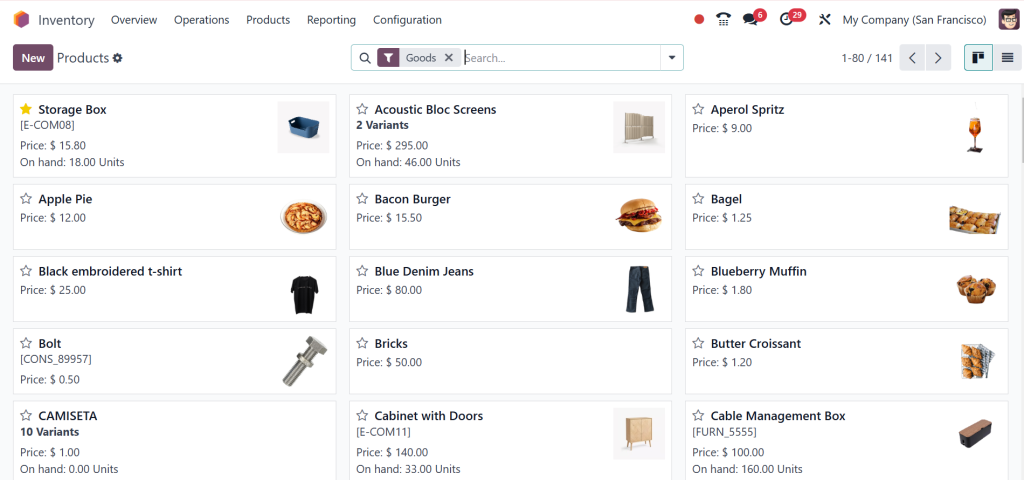
Open the products form in the Inventory Module.
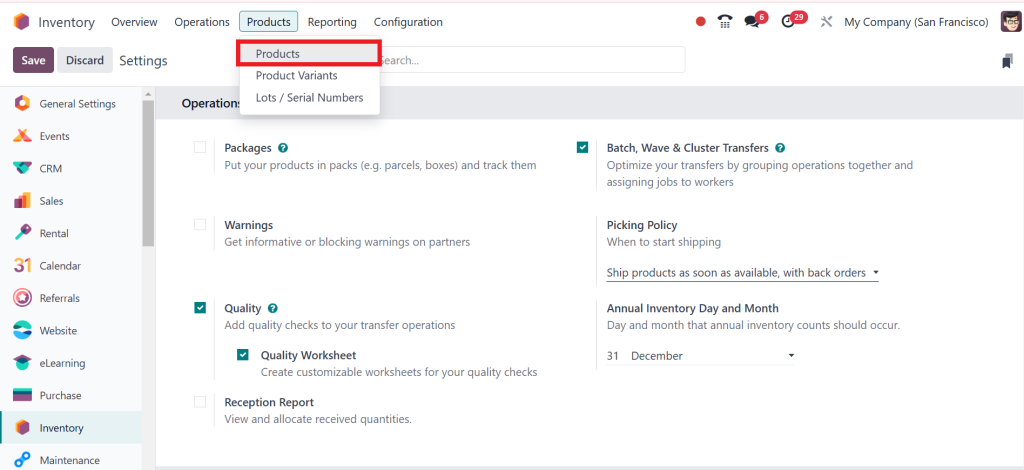
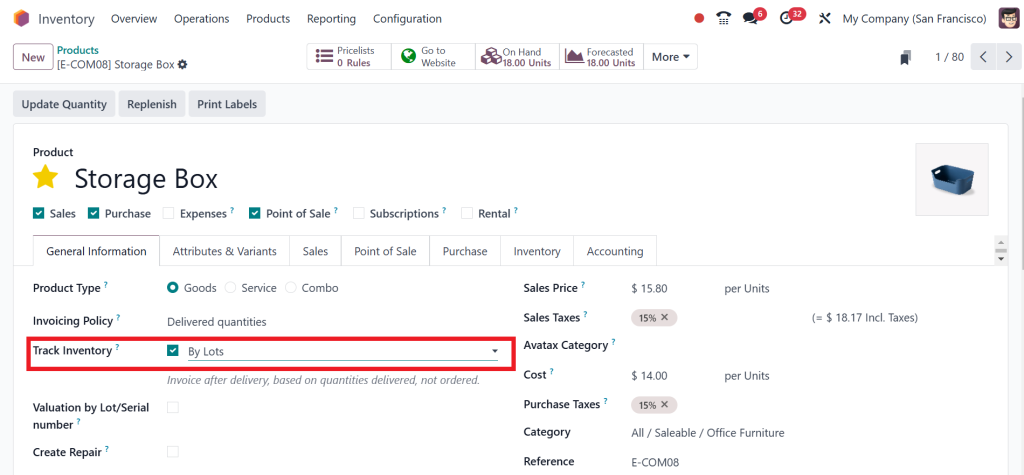
Here, you can see all the products. Then, Click on the product ‘‘Storage Box’’.
Under the Track Inventory Tab, select By Lots or Unique Serial Numbers as the tracking option.
How to Use Batch Tracking in Odoo 18
Receiving Inventory
Assign batch or lot numbers to items when they are received. Use the Odoo 18 batch tracking setup to automate this process for recurring goods.
Stock Management
Monitor stock levels, expiry dates, and product movements with real-time updates. Ensure that batches and lots are stored under optimal conditions.
Delivery and Sales
Select specific batch or lot numbers during order fulfillment to ensure delivery accuracy and traceability.
Quality Checks
Perform regular quality inspections to ensure that products meet required standards.
Audits and Compliance
Use traceability reports for audits, helping your business adhere to industry standards and regulations.
Benefits of Batch and Lot Tracking with Odoo 18
Enhanced Inventory Accuracy
Minimize errors in inventory tracking with automated batch and lot management.
Improved Operational Efficiency
Save time and resources with efficient processes that integrate flawlessly into your workflow.
Better Compliance Management
Ensure compliance with industry standards and regulations by maintaining complete traceability of products.
Reduced Product Waste
Track expiry dates and use products efficiently, reducing waste and associated costs.
Increased Customer Satisfaction
Deliver high-quality products with reliable traceability, improving customer trust and loyalty.
Real-World Applications of Odoo Batch Tracking
Pharmaceutical Industry
Lot tracking in Odoo 18 is crucial for managing medicines and medical devices, ensuring compliance with health regulations and patient safety.
Food and Beverage
Track perishable goods, manage expiry dates, and ensure food safety with robust batch and lot tracking.
Manufacturing
Rationalize production processes, monitor quality, and enhance traceability in complex manufacturing environments.
Retail
Optimize stock management and improve customer satisfaction by accurately fulfilling orders with Odoo ERP batch tracking.
Best Practices for Batch and Lot Tracking in Odoo 18
Regularly Update Data
Keep batch and lot records updated to ensure accuracy and reliability.
Train Your Team
Provide comprehensive training to employees on using the Odoo 18 batch tracking setup to maximize efficiency.
Leverage Automation
Automate barcode scanning and report generation to save time and reduce manual errors.
Monitor Expiry Dates
Set up alerts for products nearing expiry dates to avoid losses and compliance issues.
Conduct Regular Audits
Perform periodic audits to ensure your tracking system functions effectively and aligns with your business goals.
Challenges Addressed by Odoo Batch Tracking
Traceability Issues
Odoo’s advanced tracking tools ensure complete traceability, reducing product recalls and non-compliance risks.
Operational Inefficiencies
Automating batch and lot tracking eliminates manual errors and speeds up processes.
Compliance Complexity
Industries with strict regulatory requirements can rely on Odoo’s built-in compliance features for peace of mind.
Transform Your Inventory Management with Odoo ERP Batch Tracking
Efficient inventory management is the backbone of any successful business, and Odoo ERP batch tracking offers a powerful solution for managing stock with precision. From enhanced traceability and compliance to improved operational efficiency, lot tracking in Odoo 18 provides businesses with the tools they need to excel.
By implementing the Odoo 18 batch tracking setup, companies can optimize their workflows, reduce costs, and deliver exceptional customer value. Refrain from letting inventory management challenges hold your business back; embrace the power of Odoo inventory management and experience the difference today.
Start leveraging batch and lot tracking in Odoo to stay ahead in a competitive market and take your business to new heights!




