


Stock Flow Management with Odoo 18 Push/Pull Rules
Managing inventory can be one of the trickiest parts of running a business, especially when staying within the inventory of essential products. That’s where Odoo 18 push/pull rules come into play! These rules are designed to make stock flow management smoother, more efficient, and automated.
If you’re new to Odoo 18 inventory stock flow, don’t worry. In this post, we’ll walk you through how these push and pull rules work, why they are a innovation for stock management in Odoo 18, and how they can streamline your entire procurement and inventory process. We’ll also get into the difference between push and pull rules in Odoo, show you how to manage stock locations in Odoo 18, and explore the benefits of Odoo inventory automation with regulations.
What Are Push and Pull Rules in Odoo 18?
push/pull rules define how stock moves across different locations in your supply chain. Understanding their mechanics is key to leveraging Odoo 18 inventory stock flow capabilities.
Push Rules
Push rules trigger automatic stock transfers when specific conditions are met. For instance:
- If a product is received at Warehouse A, push rules can direct it to be moved to Warehouse B.
- That is ideal for predefined workflows, ensuring smooth operations.
Pull Rules
Pull rules, on the other hand, work on a demand basis. Products are transferred only when there’s an order. For example:
- A customer order at a retail store can trigger stock movement from a central warehouse.
- Both rules allow for flexibility and precision, ensuring your stock is always where it needs to be.
Why These Rules Matter for Your Inventory Stock Flow
Both push/pull rules in Odoo 18 are vital for automating your stock flow and improving efficiency. The main goal is to reduce manual work, eliminate human error, and ensure products are always available when needed. Odoo 18 inventory stock flow becomes smooth, so you can manage and run your enterprise without worrying about stock levels.
How to Set Up Odoo Inventory Automation with Push and Pull Rules
Step-by-Step Setup for Push and Pull Rules
Getting started with push-and-pull rules in Odoo 18 is pretty straightforward. Here’s how you can set them up:
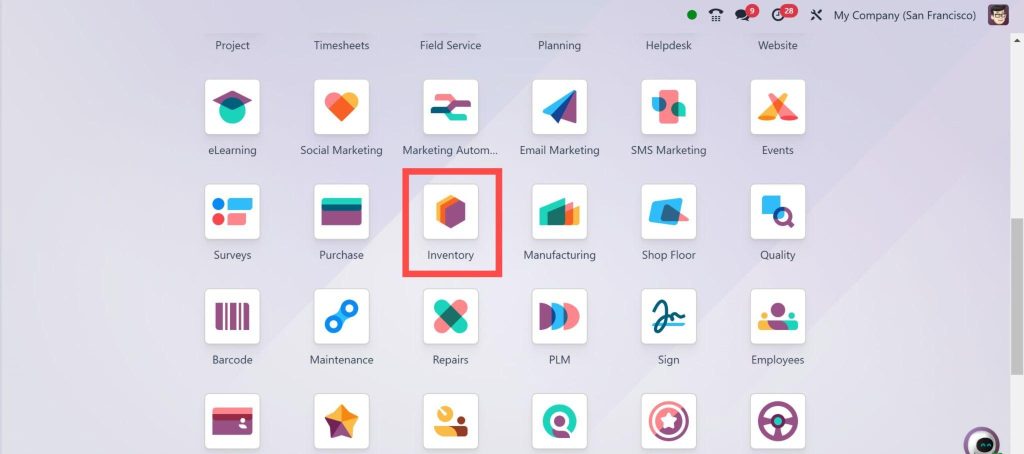
- Go to the Inventory Module: Go to the Inventory section in Odoo 18.
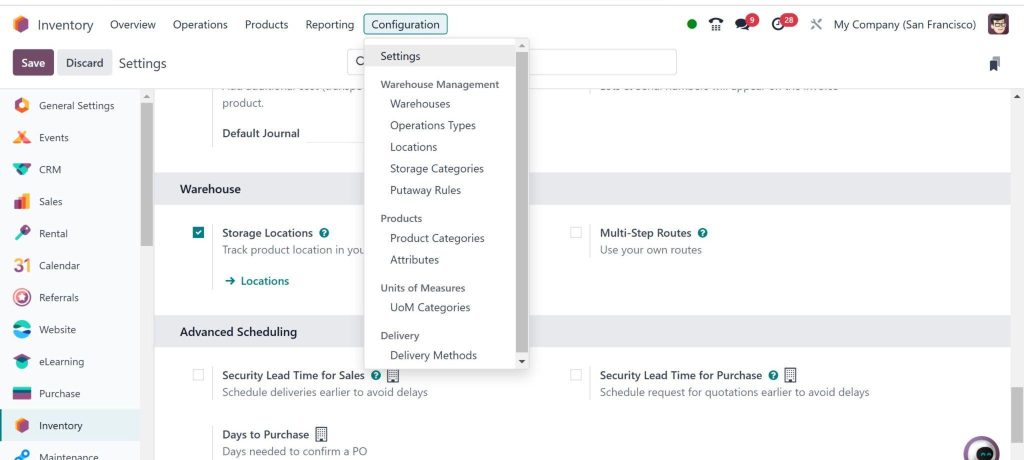
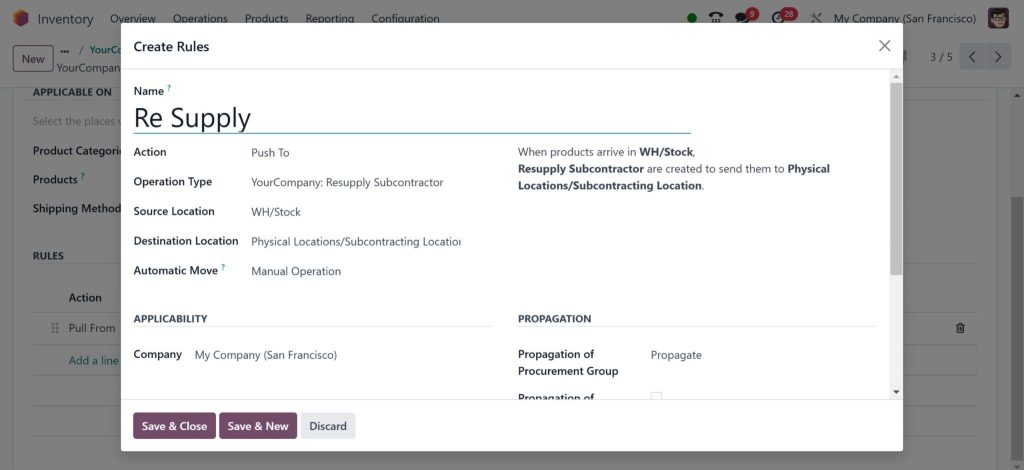
2. Create Rules: You can create new push/pull rules by going to the Warehouse Configuration settings.
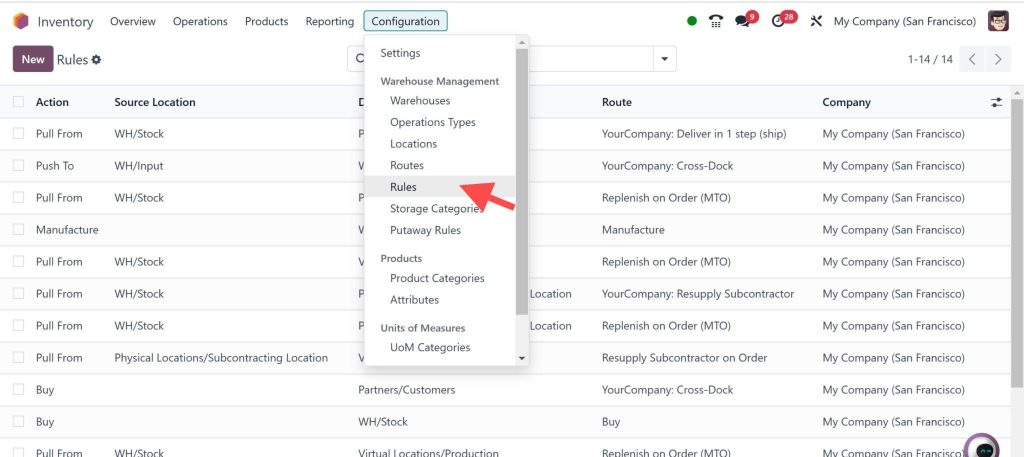
Then Go to Configuration and select Rules to add:
3. Set Triggers and Conditions: Define when these rules should be activated (e.g., when stock levels fall below a certain point or when an order is placed).
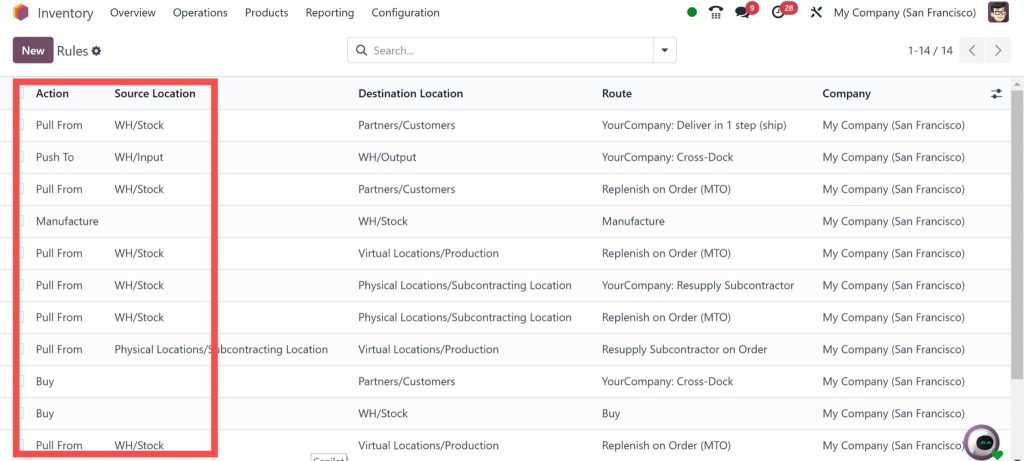
4. Automate Actions: Based on your rule setup, Odoo will automatically take the necessary actions, like creating purchase orders or transferring stock.
5. Test and Refine: Test the system once everything is set up to ensure smooth operation. Adjust as necessary based on performance.
How Push/Pull Rules Make Stock Management Smarter
Automating Warehouse Operations
Managing a warehouse involves constant stock movement, products coming in, moving to different locations, and going out. It can get overwhelming. However, with push-and-pull rules in Odoo 18, inventory management has become automated and much less time-consuming. Instead of manually transferring stock between locations, Odoo handles it for you, saving you weekly work hours.
Push and pull rules keep things flowing smoothly, whether they ensure that stock is always available in a particular warehouse or transfer items from one location to another.
Executing Replenishment Efficiently
One of the biggest headaches in inventory management is replenishment, including when and how much to reorder products. With push rules in Odoo 18, you can set up automatic stock transfers to different locations based on predefined minimum stock levels. So, if a warehouse runs low on an item, the system will push stock from a central location to replenish it, ensuring you’re always ready for demand.
Conversely, pull rules ensure you only bring stock in when it’s genuinely needed. For example, an order triggers the stock to be pulled from the warehouse, minimizing overstocking and waste.
Enabling Procurement
Odoo 18 procurement rules tie into push/pull rules, allowing you to reorder items from suppliers when stock levels drop automatically. That means you no longer have to manually track inventory and place orders; it’s all done for you.
Managing Stock Locations in Odoo 18
Stock Movement Made Easy
When you have multiple warehouses or different stock locations, keeping track of where your products are can take time and effort. But Odoo 18 makes it easy to manage. With push/pull rules, Odoo ensures stock moves automatically between locations when required. Whether transferring products from a central warehouse to a regional one or moving items within the same warehouse, Odoo can handle it for you.
By setting up these rules, you can ensure stock is always in the right place at the right time without manually moving it yourself.
Better Visibility and Control
The best part? These rules give you better visibility and control over your stock. You can see where your products are when they’re being moved and when they’ll be available for sale or shipment. That helps you stay on top of your stock flow and make more informed decisions for your business.
Push Rules vs. Pull Rules in Odoo 18: Which Should You Use?
Choosing between push and pull rules depends on your business needs.
Feature | Push Rules | Pull Rules |
Trigger | Predefined workflow | Demand-driven |
Use Case | Routine transfers | On-demand stock movement |
Example | Distributing stock from a hub | Fulfilling a customer order |
For businesses with predictable workflows, push rules are ideal. For dynamic and on-demand operations, pull rules provide better flexibility.
Why Automating Stock Flow is so important
When you automate stock movement with push/pull rules in Odoo 18, you’re not just saving time but making your business more responsive. You’ll reduce human error, automate operations, and ensure that your customers always get what they need when they need it.
Why Odoo 18 Is the Best for Stock Flow Management
The All-in-One Solution
Odoo 18 is an all-in-one solution for managing your business’s inventory, procurement, and stock flow. The push-and-pull rules are just the beginning. From stock location management to procurement automation, Odoo offers everything you need to run your inventory efficiently and without hassle.
Scalable for Any Business
No matter the size of your business, Odoo 18 inventory stock flow can scale with you. Whether you’re managing a small warehouse or multiple locations, Odoo has the tools to keep your inventory organized and running smoothly.
Make Inventory Management a Snap with Odoo 18 Push and Pull Rules
To sum it up, Odoo 18 push/pull rules are essential for any business looking to enhance its inventory stock flow and procurement processes. By automating stock movement, managing locations more efficiently, and improving procurement, Odoo by Netilligence helps companies save time, reduce errors, and improve their overall stock management.




