

Update Product Variant Pricing in Sales with Odoo 19.1
Managing product variant pricing has always been one of the trickiest parts of sales operations. If your business sells configurable products, you know the struggle of keeping variant-specific prices accurate and consistent. This is where Odoo 19.1 shines, offering businesses a simplified, effective way to update product variant pricing in sales.
The Odoo 19.1 product variant pricing update empowers sales teams to edit product variant prices, import variant pricing in bulk, and update variant pricing directly in quotations. By using these tools, businesses can reduce errors, save time, and increase sales efficiency.
In this blog, we will explore:
- The Odoo 19.1 sales variant pricing simplification
- How to edit sales price product variants in Odoo 19.1
- Bulk import features for variant pricing
- Real-world benefits of product variant extra price Odoo 19.1
- Steps to update sales price per variant in Odoo
- Why businesses should leverage this update with Netilligence
By the end of this article, you’ll understand how updating product variant pricing in sales in Odoo 19.1 can transform your sales workflow, improve profitability, and reduce manual errors.
What Is Product Variant Pricing in Odoo Sales?
A product variant is a version of a product that differs based on attributes such as size, color, material, or configuration. Each variant can have different costs, margins, and selling prices, making pricing management complex.
For example, consider a clothing store selling t-shirts:
- A “Small Red Cotton T-shirt” variant may cost $5 and sell at $15.
- A “Large Black Silk T-shirt” variant may cost $10 and sell at $25.
In previous Odoo versions, managing variant pricing required:
- Extra pricing rules
- Complex price lists
- Manual adjustments
This often led to pricing errors, delays in quotation creation, and frustration among sales teams.
With Odoo 19.1, updating product variant pricing in sales has been streamlined to make pricing management more accurate, faster, and user-friendly.
Odoo 19.1 Product Variant Pricing Update: What's New?
Odoo 19.1 introduces simplified variant pricing, allowing businesses to:
- Set a sales price per variant
- Edit prices directly in the product form
- Adjust pricing without affecting the base product
This means your sales team can confidently quote prices without consulting the finance team for every minor change.
Key highlights include:
- Inline price editing in quotations
- Bulk updates for large product catalogs
- Integration with product variant extra price Odoo 19.1 for attributes
In short, the Odoo 19.1 product variant pricing update reduces errors, updates operations, and gives businesses greater control over pricing strategy.
Step-by-Step Guide: Update Product Variant Pricing in Sales
Let’s outline the exact process for updating product variant pricing in Odoo 19.1.
Step 1: Access Products with Variants
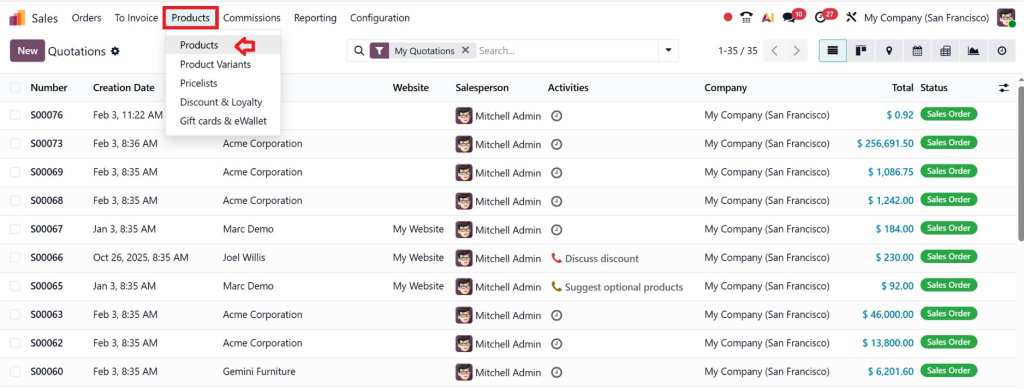
- Go to Sales → Products.
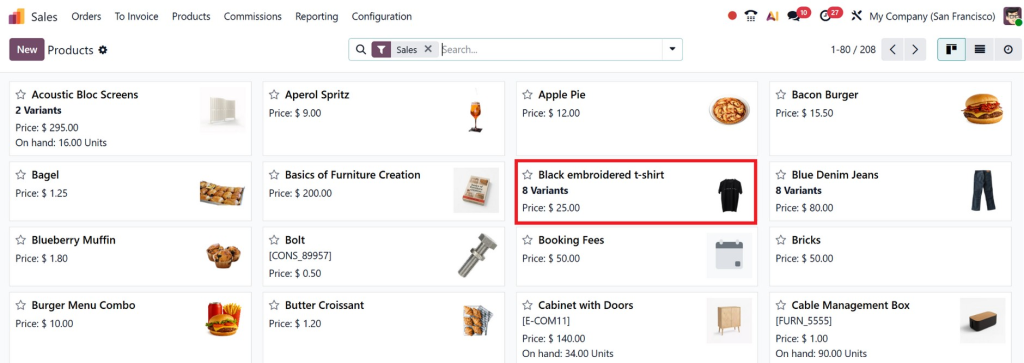
- Select a product that has multiple variants.
- Switch to the Variants view to see all available options.

Step 2: Update Sales Price Per Variant
- For each variant, enter the sales price.
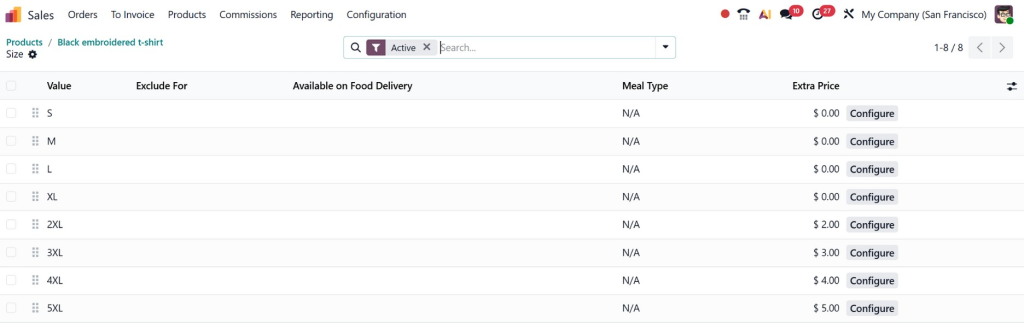
- Odoo 19.1 allows you to set prices independently, allowing you to assign different prices to each variant.
Example:
- Small Red T-shirt → $15
- Medium Red T-shirt → $18
- Large Red T-shirt → $20
This ensures accurate pricing across all variants, helping the sales team quote confidently.
Step 3: Edit Sales Price Without Changing Base Product
Previously, changing a product’s sales price affected all variants, causing inconsistencies.
With Odoo 19.1, you can:
- Edit variant prices independently
- Keep the base product price unchanged
- Adjust prices for specific customer requests or promotions
This is crucial for businesses selling premium variants or seasonal products.
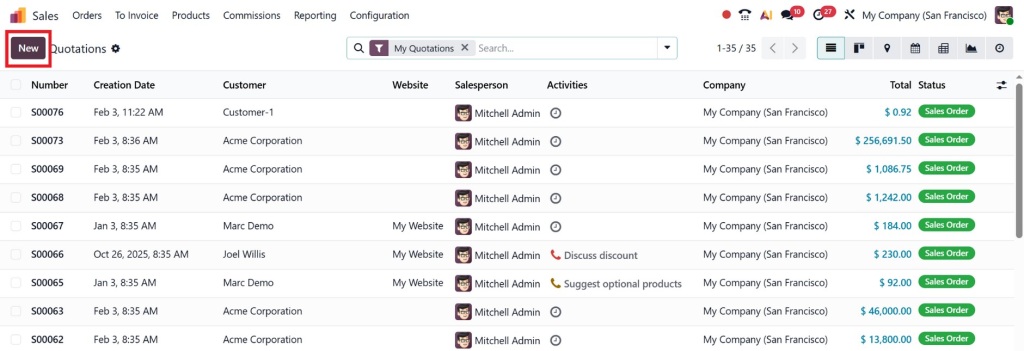
Step 4: Update Variant Pricing Directly in Quotations
The biggest improvement in Update Product Variant Pricing in Sales is the ability to adjust prices directly in quotations.
How it Works:
- Open a quotation
- Select the desired product variant
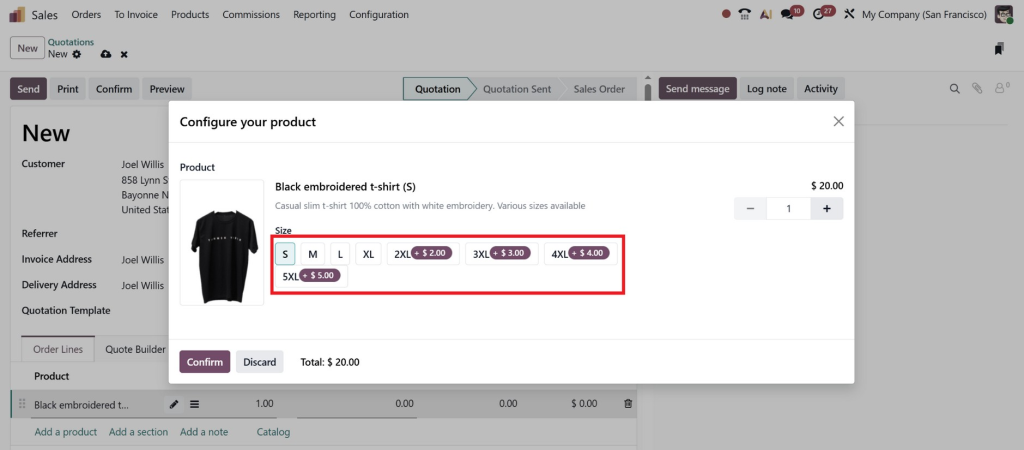
- Edit the sales price inline
This saves time, especially when dealing with:
- Custom pricing requests
- Urgent orders
- Negotiation scenarios
This feature highlights why businesses love updating variant pricing directly in quotations in Odoo, it’s faster, simpler, and more accurate.
Step 5: Utilize Product Variant Extra Price Odoo 19.1
Odoo 19.1 still supports additional price adjustments for attributes, but now they work alongside direct variant pricing.
Example:
- Base T-shirt price: $15
- Extra for silk material: +$5
- Final variant price: $20
This allows advanced pricing strategies without complicating the sales process.
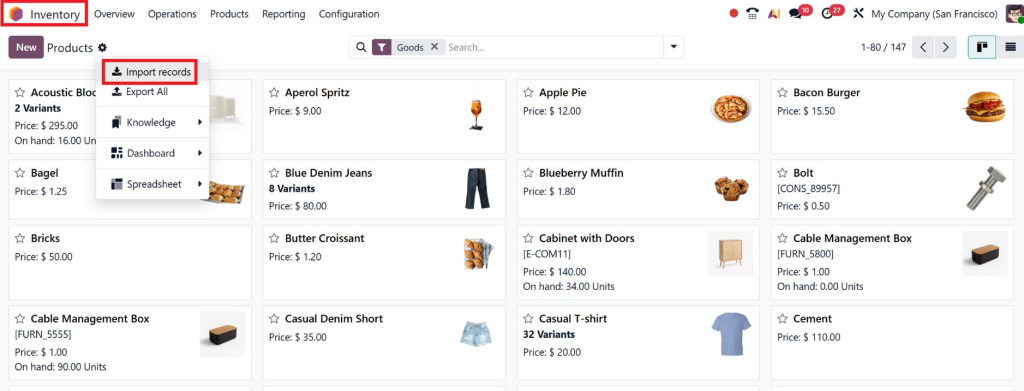
Step 6: Import Product Variant Sales Price in Odoo 19.1
For businesses with hundreds or thousands of variants, Odoo 19.1 allows bulk import of variant sales prices.
How it helps:
- Saves time from manual updates
- Maintains consistency across products
- Reduces pricing errors
Steps:
- Go to Inventory → Products → Import
- Prepare a CSV file with:
-
- Product Name
- Variant Attributes
- Sales Price
- Cost (optional)
- Upload and validate
This is perfect for retail, wholesale, and manufacturing businesses that manage large catalogs.
Key Benefits of Updating Product Variant Pricing in Sales
Updating product variant pricing in sales using Odoo 19.1 offers tangible benefits:
- Faster Quotation Creation – Inline pricing reduces the time required to create each quotation.
- Accurate Prices – Each variant has its own price, reducing errors.
- Better Margin Control – Finance can set precise margins per variant.
- Improved Customer Trust – Customers see accurate pricing, increasing satisfaction.
- Lower dependency on IT – Sales teams can update prices without technical support.
- Flexible Promotions – Adjust variant prices for seasonal or special offers.
Industries That Benefit Most from Odoo 19.1 Variant Pricing
While any business selling configurable products benefits, here are the top industries:
- Retail & E-commerce – Multiple sizes, colors, and bundles.
- Fashion & Apparel – Seasonal collections and limited editions.
- Food & Beverage – Custom packs, flavors, or combos.
- Manufacturing – Customizable product lines.
- Wholesale Distribution – Bulk orders with variant-specific pricing.
- Automotive Parts – Different specifications for each part variant.
For all these industries, updating product-variant pricing in the sales streamlines operations and improves profitability.
Real-Life Use Case: Clothing Retailer
Imagine a clothing retailer with 200 t-shirt variants. Previously:
- Updating variant prices required manually editing each product.
- Sales often quoted the wrong prices.
- Discounts caused errors in pricing reports.
With Odoo 19.1:
- Prices are set per variant.
- Sales team edits prices directly in quotations.
- Bulk import updates save hours.
Outcome:
- Faster quotation creation
- Accurate pricing
- Reduced errors
- Improved customer satisfaction
Why Netilligence Is Your Best Odoo 19.1 Partner
Implementing the Odoo 19.1 product variant pricing update requires expertise. At Netilligence, we help businesses:
- Configure variant pricing for every product
- Train sales teams on efficient pricing practices
- Import variant prices in bulk without errors
- Set up price rules, extra prices, and quotation editing
- Optimize workflows for faster deal closure
With Netilligence, businesses gain full control over sales pricing, reduce errors, and maximize revenue potential.
Welcome to Odoo 19.1 Product Variant Pricing Update
The Odoo 19.1 product variant pricing update is an upgrade for businesses of all sizes. By allowing edits to sales prices on product variants in Odoo 19.1, updating sales prices per variant, and updating variant pricing directly in quotations, Odoo empowers businesses to streamline operations, reduce errors, and empower sales teams.
Whether you’re in retail, wholesale, manufacturing, or e-commerce, this feature ensures your pricing strategy is accurate, flexible, and profitable.
Ready to transform your sales operations? Partner with Netilligence today to implement Odoo 19.1 variant pricing effectively and unlock your business potential.
📩 Contact Netilligence for a free consultation and start managing your product variant pricing effortlessly.




