


Everything You Need to Know About Odoo 19 Knowledge Module Template
The Odoo Knowledge module has become essential to business information management within the Odoo ecosystem. With the release of Odoo 19, the features of the Odoo Knowledge module have been enhanced significantly, especially when organizing and structuring internal documentation through templates. In this article, we’ll explore in detail how to add a template in Odoo 19 Knowledge module, using the powerful features offered by this tool.
Understanding how to add a template in Odoo helps standardize documentation across teams and allow users to reuse content efficiently. Whether you’re a developer, project manager, or administrator, utilizing Odoo 19 Knowledge templates gives you a massive productivity boost.
In this blog you’ll also get a detailed Odoo Knowledge module tutorial, discover tips from Odoo Knowledge GitHub insights, and explore how the Odoo Knowledge article template can help your teams collaborate better. So if you’ve ever wondered how to add a template in Odoo, buckle up, this is your ultimate Odoo Knowledge module guide.
What Is the Odoo Knowledge Module?
The Odoo Knowledge module is a centralized hub for creating, organizing, and sharing internal content. Think of it as your company’s wiki system, embedded right into your Odoo backend. It’s part of the suite of productivity tools provided in Odoo 19 and is a powerful tool for building an Odoo knowledge base.
With it, teams can document SOPs, internal policies, tutorials, onboarding guides, and more. The module supports collaborative editing, page hierarchy, tagging, and templates.
How to Add a Template in Odoo – Understanding the Basics
Before we get to the technical steps, let’s understand what templates mean in the context of the Odoo Knowledge module. In Odoo 19, the Knowledge module is a centralized space where your organization’s collective intelligence is stored, shared, and scaled. Adding templates to this system can be a turning point.
Templates in this context refer to preformatted layouts or content blocks that users can quickly replicate across different articles, categories, or teams. When you master adding a template in Odoo, you’re not just saving time creating a standardized, efficient workflow that boosts collaboration and ensures that your team always speaks the same language.
Dipping into the Odoo 19 Knowledge Module Template Ecosystem
The Odoo 19 Knowledge module template is more than just a convenience: it’s a blueprint for repeatable success. These templates can include formatted text, bullet points, predefined section headings, tables, or even embedded media. They become a vital part of your Odoo knowledge base strategy when implemented well.
From onboarding guides to technical SOPs, there’s no limit to what you can achieve with a strong template system. The beauty of Odoo 19 Knowledge templates lies in their flexibility. Whether a marketing executive or a software developer, templates help you create organized, digestible content that scales.
Step-by-Step: Odoo Knowledge Module Add Template
Now, let’s get to the core of the matter: How to add a template to the Odoo 19 Knowledge module. This is where it gets exciting.
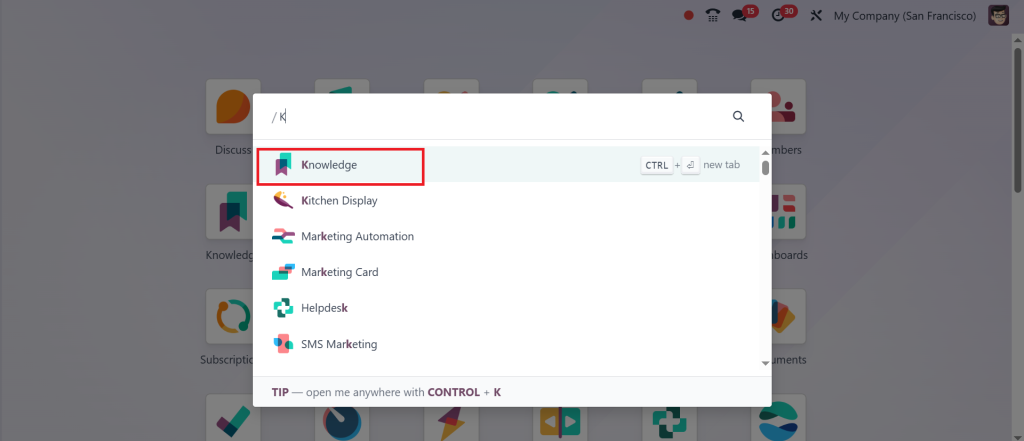
Go to the Knowledge Module
Start by heading to the Odoo Knowledge app on your dashboard. It’s clean, minimal, and packed with utility.
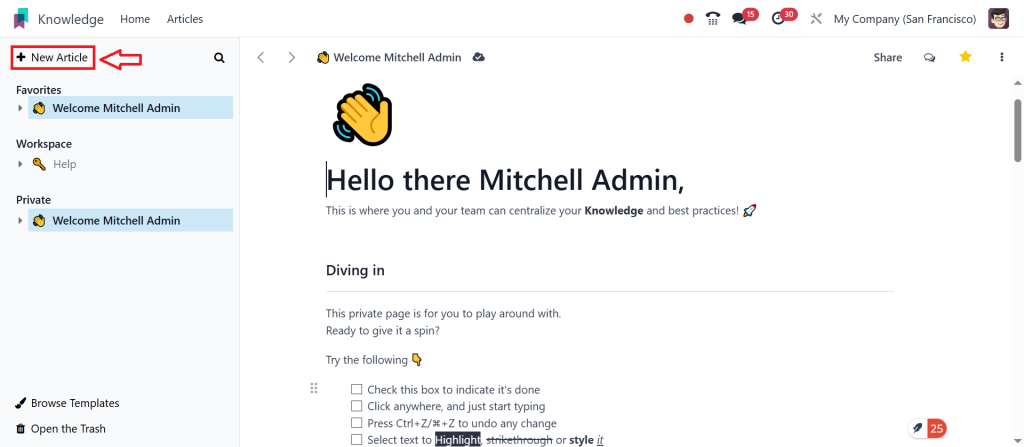
Create a New Article
Click “New Article” to open a blank article. This is your canvas. From here, you can design the perfect template layout.
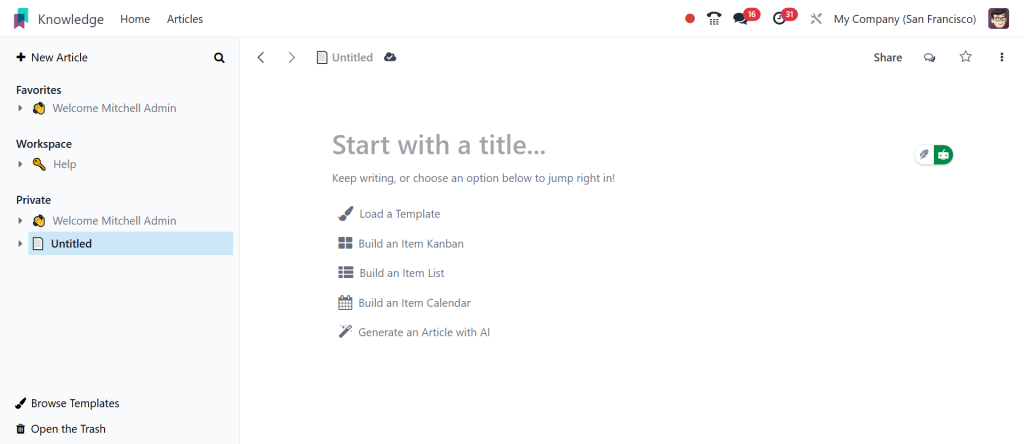
Add Structured Content
Utilise headings, lists, and formatting tools. You can even insert dynamic elements like tables or code snippets, making the Odoo Knowledge article template rich and functional.
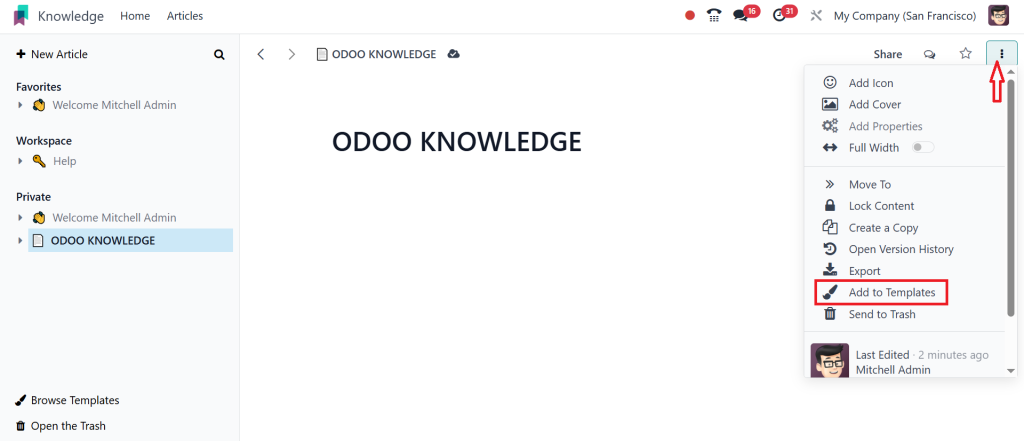
Save As Template
This is the magic step. Once your article layout looks like the ideal format, click the three-dot menu and choose “Add to Templates.” Odoo will now store this layout for future use.
Apply Template
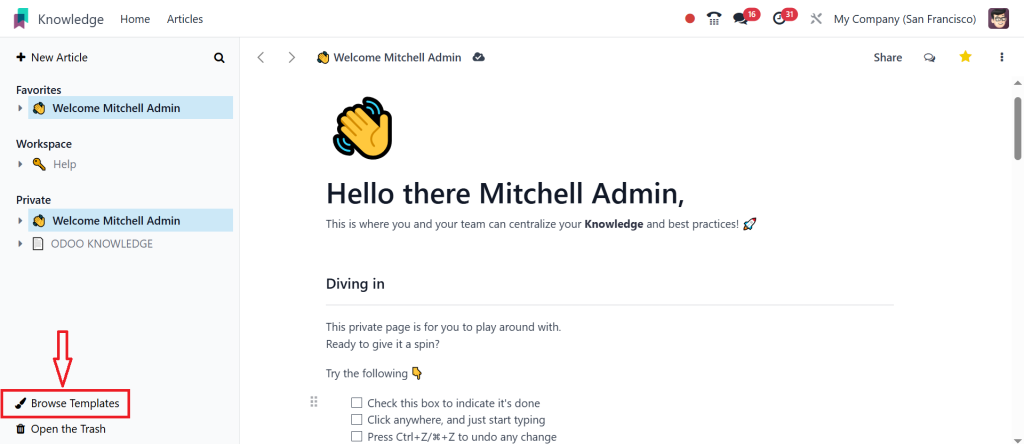
When creating a new article next time, click “Browse Templates”.
And select the one you saved.
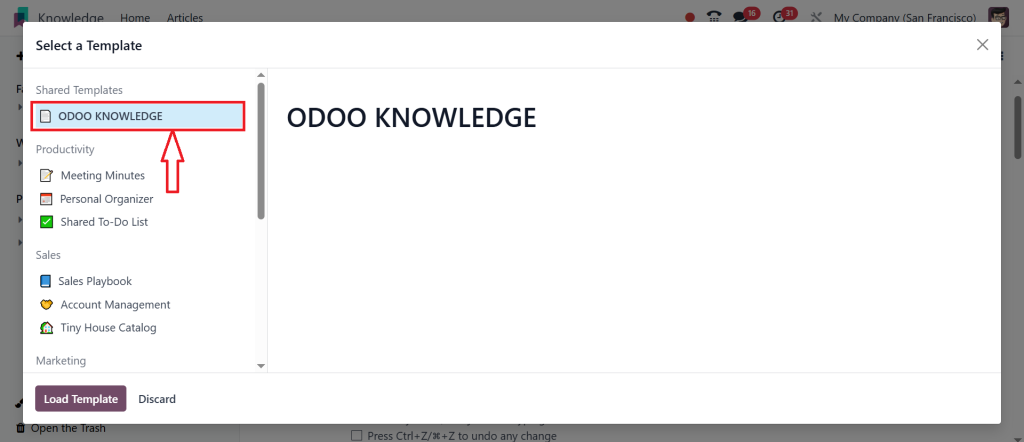
You’ve now learned the Odoo Knowledge module adds template functionality, a tool that’s deceptively simple but immensely powerful.
Exploring Odoo Knowledge Module Features That Make Templates Shine
To truly harness templates, you must understand the Odoo Knowledge module features that support them. These features are the backbone of your documentation ecosystem:
Real-Time Collaboration
Collaborate live with your teammates on shared templates. No more emailing versions back and forth.
Hierarchical Organization
Create parent-child relationships between articles using templates. This is essential when scaling your Odoo knowledge base.
Access Control
Control who can view, edit, or manage templates, ensuring that sensitive content stays secure.
Embed Anywhere
Use templates across other modules like Projects, Odoo CRM, or even Invoices for smooth integration.
Searchable Metadata
Tag your templates and make them searchable with smart filters. This is an underrated yet influential part of the Odoo knowledge documentation experience.
The Role of Odoo Knowledge Article Template in Workflow Automation
Imagine this: every new hire receives a welcome article in the same format, with zero manual formatting involved. That’s the power of an Odoo Knowledge article template. Templates let you automate recurring documentation processes and maintain brand consistency.
Templates can turn a cluttered content system into a well-lubricated machine, whether it’s weekly meeting notes, technical how-tos, or legal compliance steps. For companies with remote or hybrid teams, templates are helpful and essential for alignment.
Use Cases for Odoo 19 Knowledge Templates
Let’s talk real-world. Here’s how you can practically apply your skills after learning how to add a template in Odoo:
HR Departments
Standardize employee onboarding, policy updates, and benefit guides using Odoo Knowledge article templates.
IT & DevOps Teams
Maintain consistent formats for system architecture, deployment steps, or bug resolution guides.
Sales Teams
Share template scripts or email formats using the Odoo 19 Knowledge module template across territories.
Customer Service
Build a knowledge base with predefined FAQ templates to reduce ticket volume.
Project Management
Use repeatable Odoo Knowledge templates for retrospectives, kick-off meetings, or sprint planning.
Each use case proves one thing: The Odoo Knowledge module adds template functionality, a cornerstone of organizational clarity.
Building a Smart Odoo Knowledge Base with Templates
Templates are the scaffolding that hold your Odoo knowledge base together. They make it easier to scale content, onboard contributors, and keep documentation unified. As your library grows, templates help ensure structure doesn’t fall apart.
But it doesn’t stop there. Intelligent linking between articles, consistent tagging, and advanced search filters uplift your Odoo knowledge base from good to great. Pair this with template-driven article creation, and you’ve got a living, breathing knowledge ecosystem.
Learn More through the Odoo Knowledge Module Guide and GitHub
Still curious? There’s more to discover. The official Odoo Knowledge module guide is an excellent resource for understanding system logic, hidden features, and upcoming improvements.
But the Odoo Knowledge GitHub repository is your playground for the real deep dive. Explore how other developers and companies customize their templates, automate processes, and integrate with third-party APIs.
You’ll find open-source tools, community discussions, and even code snippets that can enhance your Odoo Knowledge app experience.
Why Every Business Should Learn How to Add a Template in Odoo
Let’s end with a bold statement: If you’re using Odoo and not taking advantage of templates in the Odoo Knowledge module, you’re sacrificing productivity.
Learning how to add a template in Odoo is not just a technical skill; it’s a business strategy. It permits every team member, reduces duplication, enhances compliance, and leads to faster decision-making.
With the robust features of Odoo 19 Knowledge templates, the organizational advantages of the Odoo knowledge base, and the insights from Odoo Knowledge GitHub, there’s no excuse not to simplify your internal knowledge today.
Knowledge is Power. Use it!
Learning how to add a template in Odoo opens doors to a more structured, efficient, and collaborative workplace. You’re building a culture of knowledge-driven growth by leveraging Odoo Knowledge module features, crafting effective Odoo Knowledge article templates, and continuously improving through the Odoo Knowledge documentation.
From HR to IT to Customer Support, the ripple effect of using templates in the Odoo 19 Knowledge module is profound.
Remember, the best way to predict your organization’s future success is to document beautifully, consistently, and intelligently.




