


An effective commission plan is necessary for any business that relies on sales teams to drive revenue. A well-designed commission structure motivates salespeople and ensures the right incentives are in place to maximize performance. The ability to set up commission plan in Odoo 18 CRM is one of the critical tools to enhance your sales team’s motivation and performance. Whether you’re looking to create commission structures, manage commissions, or configure sales incentives, Odoo 18 CRM provides the features you need to manage sales commissions effectively.
This guide will walk you through setting up commission plans in Odoo 18 CRM, create commission structures in Odoo 18, how to configure commission plans in Odoo, and utilizing Odoo CRM tools for sales incentives. By the end of this article, you’ll clearly understand how to set up commission plan in Odoo 18 CRM and leverage it to drive success for your business.
Why Set Up Commission Plan in Odoo 18 CRM?
When you set up a commission plan in Odoo 18 CRM, you’re disclosing a powerful tool for motivating your sales team and ensuring they are rewarded fairly for their hard work. Commission plans are essential to any sales-driven business, and Odoo makes it easier than ever to configure them in Odoo 18.
By creating a well-structured commission plan, you can align the interests of your sales team with your business goals. This blog will show you how to generate commission structures in Odoo 18, manage commissions efficiently, and improve sales performance. Odoo 18’s flexibility allows you to set up commission plans customized to your business needs, making it the perfect tool for businesses of all sizes.
What is the Commission Plan in Odoo 18 CRM?
In Odoo 18 CRM, a commission plan is a system that defines how salespeople are compensated for closing deals. Commissions are typically paid as a percentage of the sale value, though Odoo allows for more flexible arrangements. When you set up a commission plan in Odoo 18 CRM, you’re configuring how these incentives will be calculated, tracked, and paid.
Key Features of Commission Plans in Odoo 18
- Commission Structures: Odoo allows you to create multiple commission structures, which can be applied to different salespeople or departments.
- Flexible Configurations: You can define commissions based on sales revenue, margin, or other performance metrics.
- Automation: Odoo can automatically calculate commissions based on pre-defined rules, saving time and reducing errors.
- Tracking and Reporting: The system offers tools to track commission payouts and generate reports, ensuring transparency.
Odoo 18 makes commission management in Odoo CRM simple and customizable, enabling businesses to configure a Odoo 18 sales commission set up that matches their unique sales strategies.
How to Set Up Commission Plan in Odoo 18 CRM?
Setting up a commission plan in Odoo 18 CRM is straightforward. Let’s break it down into easy-to-follow steps to help you create commission structures and get your commission plan up and running.
Step 1: Enable Commission Features in Odoo CRM
Before setting up a commission plan in Odoo 18 CRM, you must ensure that commission features are enabled in your Odoo instance. Here’s how:
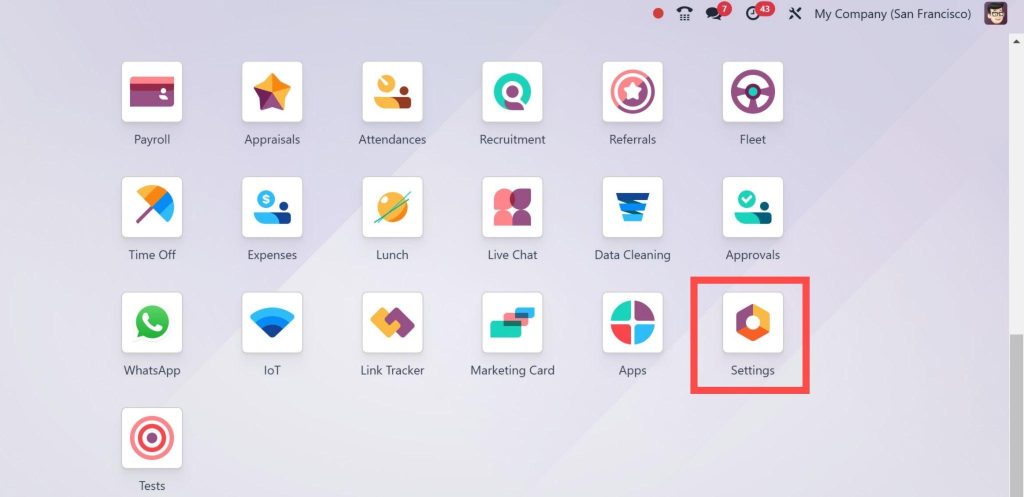
Go to Odoo Settings: Open your Odoo 18 instance and navigate the Settings module.
Activate Commission Features: Find the “Sales” section in the settings. Look for the “Sales & Purchases” settings, and ensure the “Commissions” feature is activated. If it’s not, enable it.
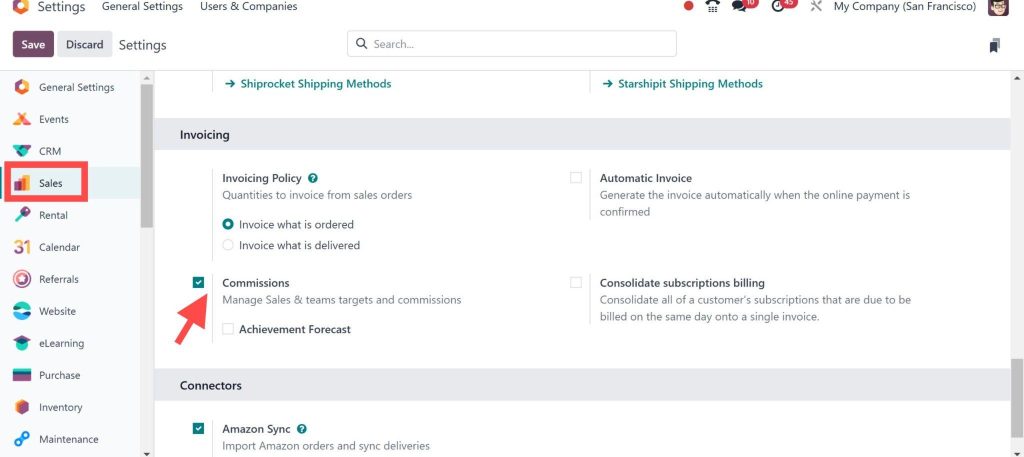
Once the commission feature is activated, you can set up your commission plan in Odoo 18 CRM.
Step 2: Create Commission Structures
The next step is to define your commission structures. That allows you to set specific rules and conditions for how commissions will be calculated and applied.
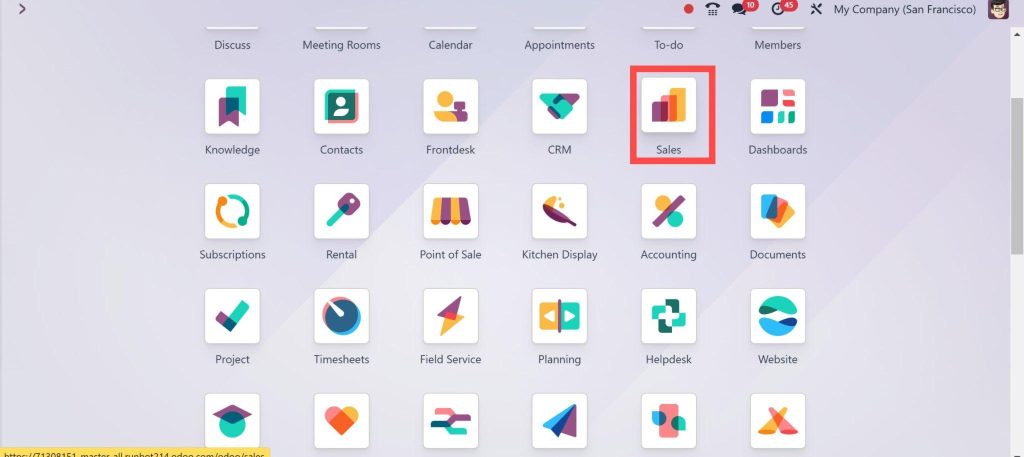
Go to the Sales Module: Go to the Sales module from the main dashboard.
Open Commission Settings: click “Commissions.”
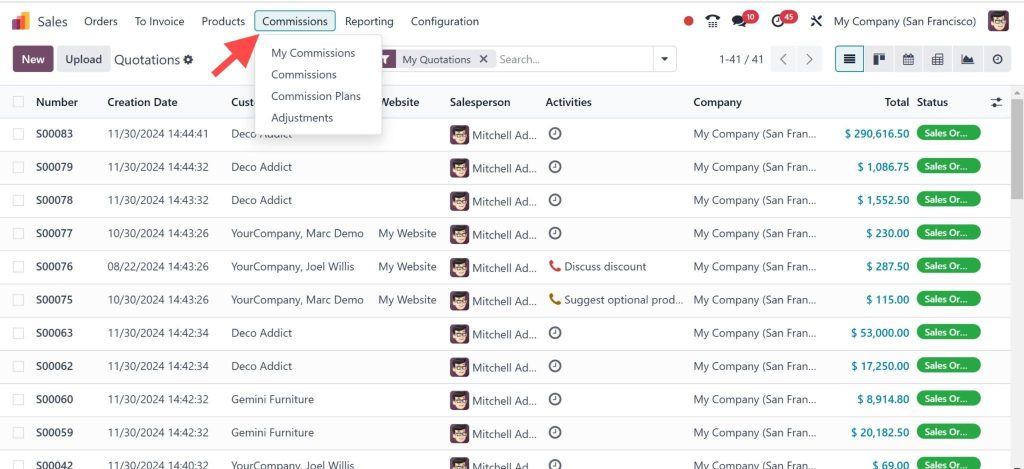
Create a New Commission Structure: Click the “New” button to set up a new commission plan.
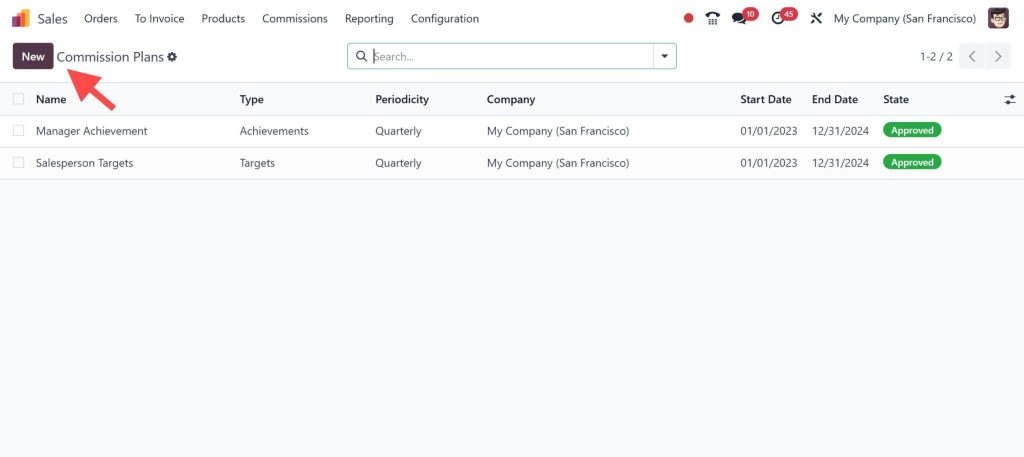
Define the Commission Type: You can decide whether the commission will be based on a fixed amount, a percentage of the sale, or specific conditions like margins or volumes.
Set Commission Rates: Enter the commission rate as a fixed amount or percentage.
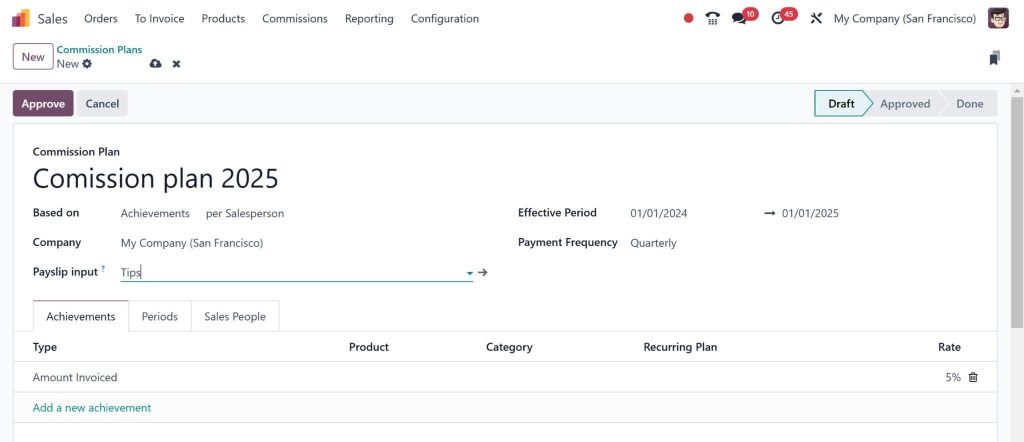
Assign Commission Plans: You can assign specific commission plans to sales teams, individual salespeople, or particular products.
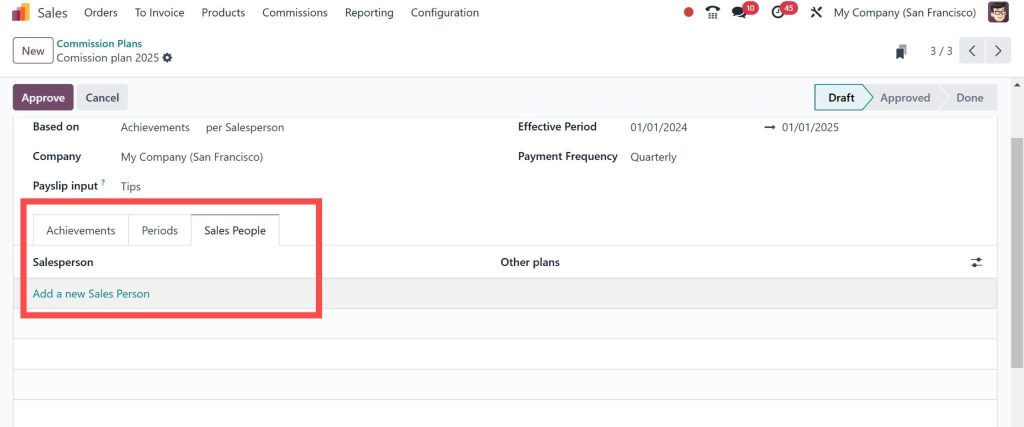
With these settings, you can configure commission plans in Odoo 18 that are flexible and tailored to your business needs.
Step 3: Assign Commission Plans to Sales Orders
Once your commission plan in Odoo 18 CRM is set up, the next step is to assign it to sales orders. That ensures that your salespeople are rewarded appropriately for their sales.
Create a New Sales Order: Go to the Sales module and create a new order.
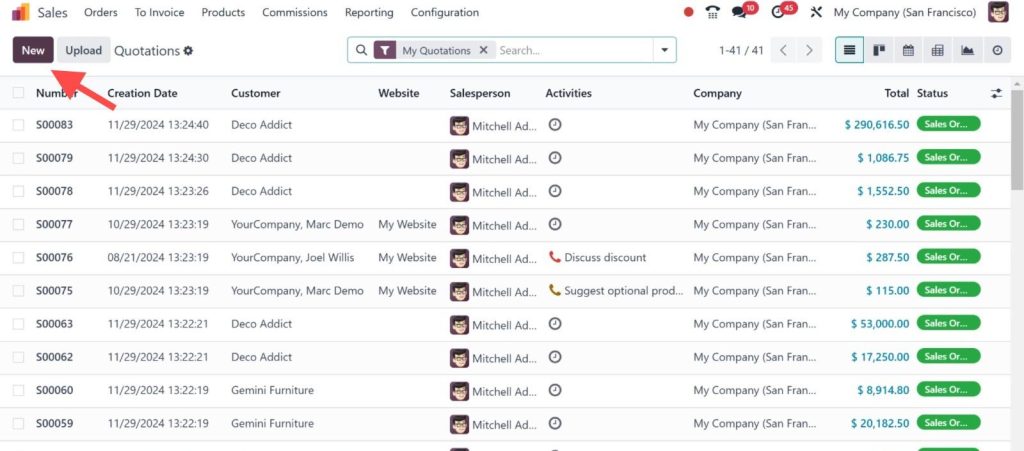
Select a Commission Structure: When entering details for the sales order, select the appropriate commission structure that will apply to the order.
Track Commission Payments: Odoo will automatically calculate the commission based on the sales order value and the commission structure you’ve set.
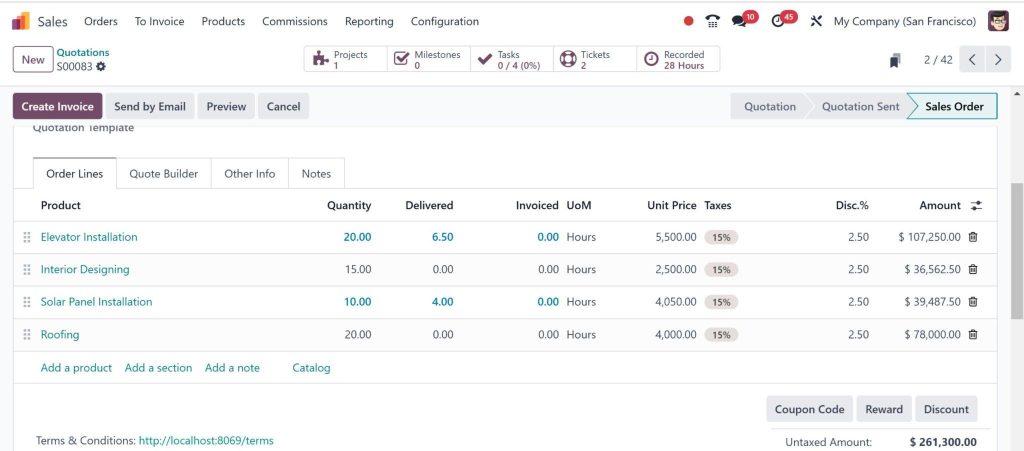
This integration ensures that commission calculations are done automatically, saving time and reducing errors.
Step 4: Track and Manage Commission Payouts
Odoo 18 makes it easy to manage commissions once they’ve been earned. You can track commissions directly from the sales order or use the reporting tools in Odoo to monitor total commissions.
View Commission Reports: Go to the “Reporting” section in the Sales module. Select the “Sales” tab and filter by commission reports to see a breakdown of commissions earned by each salesperson.
Adjust Commission Payments: You can manually adjust commissions or override automated calculations.
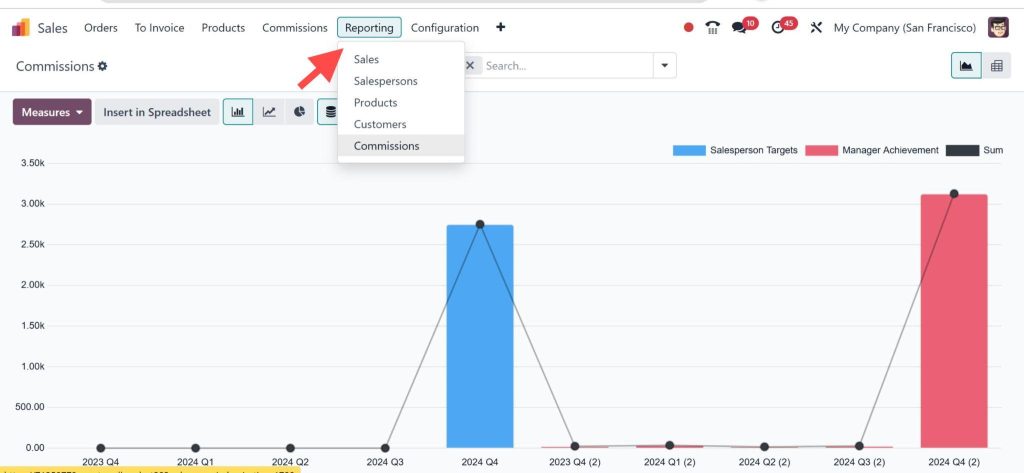
By using these tools, you can ensure accurate and transparent commission management in Odoo CRM.
Best Practices for Commission Plan Configuration in Odoo 18
To get the most out of your Odoo 18 CRM commission plan configuration, here are some best practices to follow:
Set Clear Commission Rules
Ensure commission rates and criteria are clearly defined and communicated to your sales team. That will help avoid confusion and ensure everyone is on the same page regarding their incentives.
Customize Commission Structures for Different Teams
If your sales team has different roles or operates in other regions, consider creating separate commission structures for each group. This customization allows you to modify the incentive system based on specific goals.
Automate Commission Calculations
Take full advantage of Odoo’s automation features to calculate commissions automatically. That will save time, reduce errors, and ensure that commissions are always accurate.
Regularly Review and Adjust Commission Plans
As your business evolves, so should your commission structures. Regularly review your commission management in Odoo CRM to ensure your incentives align with business goals and market conditions.
Odoo 18 CRM Tools for Sales Incentives
Odoo 18 CRM offers a variety of tools designed to help businesses manage sales incentives effectively. Beyond commission plans, Odoo provides features that can further enhance your sales team’s performance:
Sales Targets and Goals
You can set sales targets and track performance against those targets. When salespeople hit their targets, they can earn additional incentives or bonuses.
Performance Dashboards
Odoo CRM includes customizable dashboards that give managers and salespeople real-time insights into their performance. This transparency helps boost motivation and ensures salespeople stay focused on their goals.
Integration with Other Odoo Modules
Odoo CRM integrates flawlessly with other Odoo modules, such as Accounting and Project Management. This integration makes it easier to track commissions and ensures that payouts align with other business processes.
Entrust Your Sales Team with Odoo 18 CRM
Setting up a commission plan in Odoo 18 CRM is a powerful way to motivate your sales team and ensure they are appropriately rewarded for their efforts. With Odoo’s flexible commission configuration options, you can easily create commission structures that align with your business goals. Following the steps outlined in this guide, you can configure commission plans in Odoo, automate commission calculations, and improve your sales performance.
Odoo 18’s commission management in Odoo CRM helps you stay on top of commissions and ensures your salespeople are incentivized to perform at their best. Start using the Odoo 18 sales commission setup today and see how it can drive success for your business.




