

Creating a New Quotation in Odoo 18 Sales Made Simple
If you are using Odoo for your business, knowing how to create a new quotation in Odoo 18 is one of the most important skills you can have. The Odoo 18 Sales quotation feature is designed to make your sales process faster, more organized, and easier to manage. Whether you are sending your first-ever quotation or you have been doing it for years, learning the right way to handle the sales quotation process in Odoo 18 can save you time and help you close more deals.
Many people ask, “How to create a quotation in Odoo 18 without making it too complicated?” The good news is that Odoo has made the process simple. From selecting the right customer to using an Odoo 18 quotation template, you can create a professional and accurate quote in just a few clicks. By following the correct Odoo 18 quotation steps, you’ll not only speed up your work but also make a good impression on your clients.
When you create a new quotation in Odoo 18, you’re not just making a document, you’re creating the first step toward turning a lead into a paying customer. With the flexibility of Odoo 18 Sales’ new quote tools, you can customize every detail, add discounts, and even include payment terms to make the offer attractive.
In this guide, we’ll walk you through everything. We’ll explore the features, tips, and tricks to help you get the most out of Odoo 18 Sales quotation features. By the end, you’ll be able to create professional quotes in minutes and turn them into confirmed sales orders with ease.
Understanding the Odoo 18 Sales Quotation Process
Before we jump into the steps, it’s essential to understand how the sales quotation process in Odoo 18 works. A quotation is a formal offer you send to your customer. It contains product details, prices, terms, and validity dates. If the customer accepts it, you can convert it into a sales order instantly without re-entering the data. Here’s how the typical process flows:
Upon receiving an inquiry from a customer, you create a new quotation in Odoo 18. Next, you customize it with products, prices, and terms, and then send it to the customer. The customer reviews it, and they either accept, negotiate, or reject. If accepted, you convert it into a confirmed order.
The beauty of the Odoo 18 Sales quotation process is that you can track every stage in real time. You’ll know when the customer has opened the quote, whether they have made changes, and when they are ready to confirm. This gives you control over your sales pipeline.
How to Create Quotation in Odoo 18 – Step-by-Step
Creating a quotation is one of the simplest things you can do in Odoo, but the secret to doing it well is in the details. Let’s go through the Odoo 18 quotation steps in a smooth, easy-to-follow way.
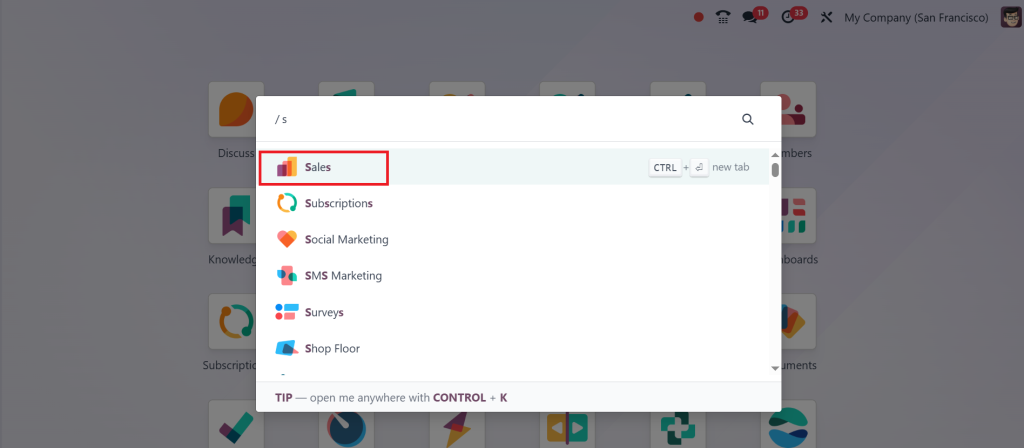
First, log in to your Odoo 18 account and head over to the Sales app. This is where all your quotations are stored and managed.
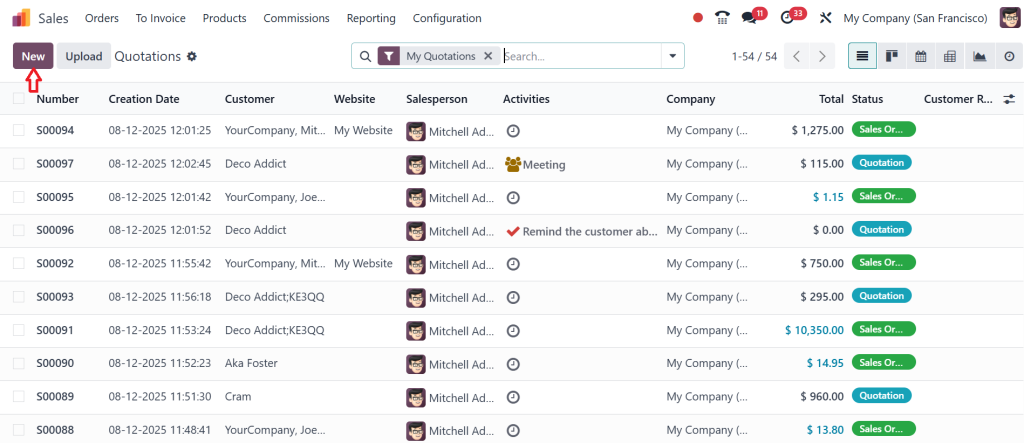
Once you’re inside, click on the “New” button.
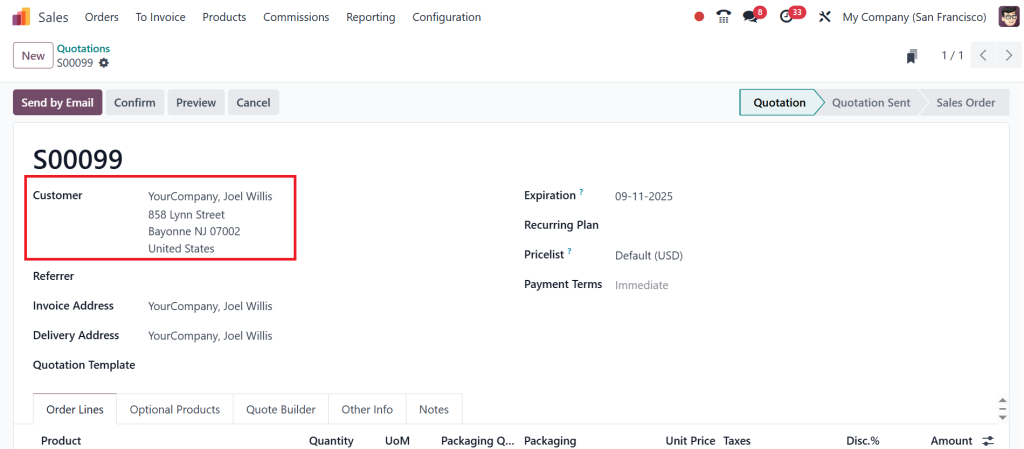
Now, choose your customer from the list. If they are a new customer, you can add them right here without leaving the page. Odoo will fill in the details like name, address, and contact information for you. This saves you time and keeps your records accurate.
Next, add the products or services you want to offer. You can search for them in your product catalog, and Odoo will automatically bring in the price, description, and taxes you have set up. This ensures your Odoo 18 Sales quotation is correct every time.
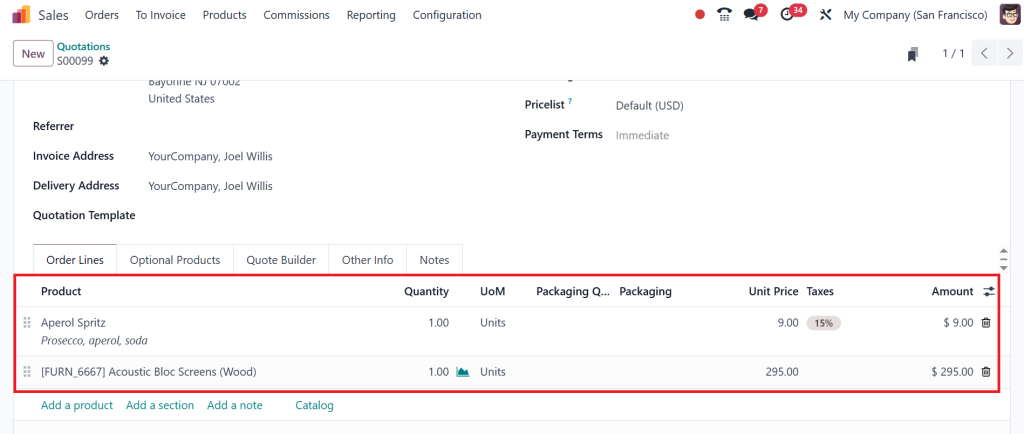
If you use an Odoo 18 quotation template, this is the stage where it helps. A template automatically fills in standard terms and conditions, payment details, and other repetitive information. You can still customize it for each customer, but it saves you from starting from scratch each time.
After that, set the payment terms and validity date. This step is essential because it creates a sense of urgency for the customer to respond. A quotation without an expiry date might get ignored, so always give it a deadline.
Once everything looks good, save your work and send the quotation to your customer. You can do this directly from Odoo through email, or you can share it via the customer portal, where they can view, accept, or request changes instantly.
Using an Odoo 18 Quotation Template for Faster Sales
The Odoo 18 quotation template feature is a big time-saver. Think of it like having a ready-made form that you can quickly fill in with specific customer details. Instead of typing out terms, payment methods, and product descriptions over and over, the template does it for you.
For example, if you often send the same type of offer for a product package, you can create a template that already includes all the details. When creating a new quotation in Odoo 18, you select a template, make any necessary adjustments, and then send it.
This not only saves time but also keeps your quotations consistent. Your brand image stays professional because every quote looks clean, clear, and well-structured.
Odoo 18 Quotation Steps – Making the Process Smooth
When you follow the Odoo 18 quotation steps correctly, you can create a quotation in under two minutes. The process is smooth because Odoo links everything together: your customer database, product catalog, taxes, and templates all work in sync.
For instance, when you add a product, Odoo already knows its price and tax rules. When you select a customer, it already knows their contact details. This means you spend less time filling in information and more time talking to your customers.
The key is to set up your system well in the beginning, add your products, set your pricing rules, and create a few templates. After that, creating a quotation becomes as simple as selecting a customer, adding items, and hitting send.
Odoo 18 Sales New Quote – Turning Opportunities into Orders
An Odoo 18 Sales new quote is more than just a price list. It’s your chance to convince a customer that your offer is the best. That’s why Odoo provides you with numerous tools to create clear, attractive, and readily accepted quotes.
You can add optional products to suggest upgrades, apply discounts to make your offer more appealing, and even add notes or images to help customers understand what they’re getting. The better your quotation looks, the more likely the customer is to accept it without negotiation.
Once the customer accepts the quotation, you can confirm it with a single click, and Odoo will automatically turn it into a sales order. This saves you from having to create a new order manually.
Improving Your Sales Quotation Process in Odoo 18
To maximize the benefits of Odoo 18 Sales quotation features, consider optimizing your time. For example, look at how quickly customers respond to your quotes. If they often take too long, consider adjusting your validity dates or implementing follow-up reminders.
You can also use Odoo’s reporting tools to see which quotations convert into sales and which ones don’t. This helps you understand what’s working and what needs to change.
Why Learning Odoo 18 Quotation Creation is Essential
When you know how to create a quotation in Odoo 18 the right way, you give yourself a significant advantage. You save time, reduce errors, and present a more professional image to your clients. Every minute you save on creating quotes is a minute you can spend building relationships and closing deals.
With Odoo 18 quotation template options, automated steps, and easy customization, the whole process becomes faster and smoother. You can concentrate on what counts most: winning more customers and growing your business.
Closing Deals Faster with Odoo 18 Sales Quotations
Learning how to create a new quotation in Odoo 18 is not just about using software, it’s about improving the way you do business. The Odoo 18 Sales quotation process, with its easy steps, templates, and automation, helps you respond to customers faster and with more accuracy. Whether you’re using an Odoo 18 Sales new quote to send your very first offer or you’re sending hundreds every month, the process is designed to make your life easier.
The more comfortable you get with the Odoo 18 quotation steps, the more efficient your sales cycle will become. In the end, a reasonable quotation is more than just numbers, it’s a reflection of your business’s professionalism and your commitment to serving your customers well.
If you’re ready to simplify your sales strategy and make professional quotations in minutes, get in touch with Netilligence today and let our Odoo experts help you set up, customize, and master your Odoo 18 Sales quotations.




