


Working in Odoo often involves repetitive tasks like writing descriptions, updating records, responding to leads, and filling in missing data. Over time, these small tasks consume significant effort and reduce overall efficiency. That’s why AI enabled fields in Odoo become highly useful.
Instead of manually entering data repeatedly, Odoo can generate content based on your instructions. You define what you need, and the system produces the output directly inside your workflow.
In this guide, you will learn how to create AI fields in Odoo, how Odoo AI Studio fields function, and how to apply them in real scenarios. If you are exploring an Odoo 19 AI fields tutorial, this blog will help you understand the process clearly and practically.
Understanding AI enabled fields in Odoo
AI-enabled fields in Odoo are fields that generate values using artificial intelligence instead of manual input. These fields rely on instructions, also known as prompts, to produce content. Once configured, they can:
- Generate text automatically
- Complete missing information
- Suggest responses
- Support decision-making
This functionality is closely linked with Odoo AI data enrichment fields, where existing data is enhanced without manual effort.
How to Create AI Fields in Odoo
To understand how to create AI fields in Odoo, start by opening any module, such as CRM, Sales, or Inventory. Let’s open Sales.

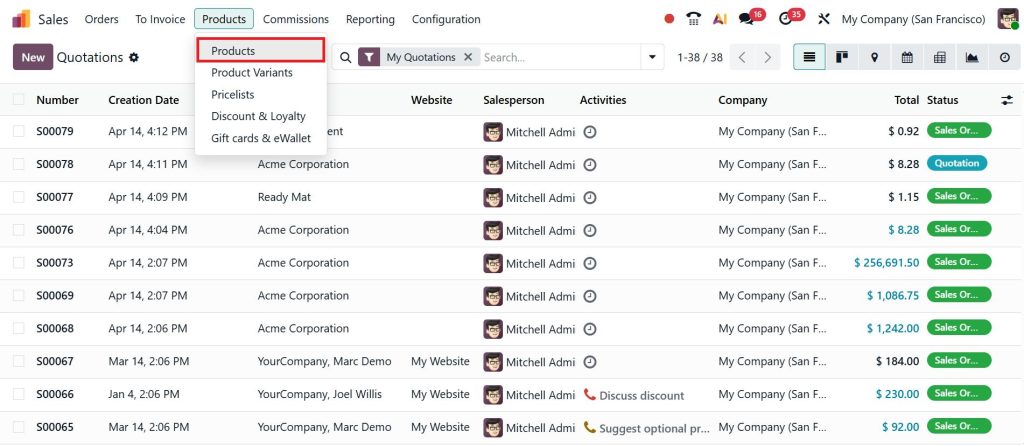
Go to Products > Products.
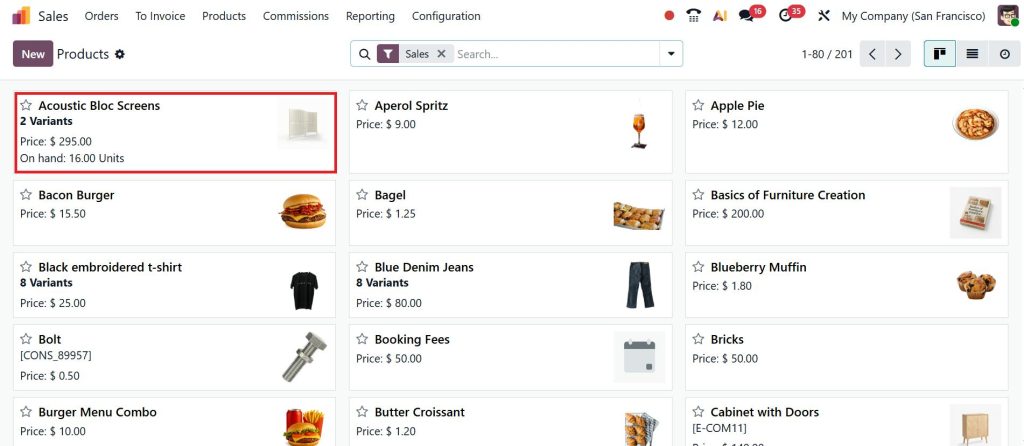
Select any product, and I’ll choose Acoustic Bloc Screens.
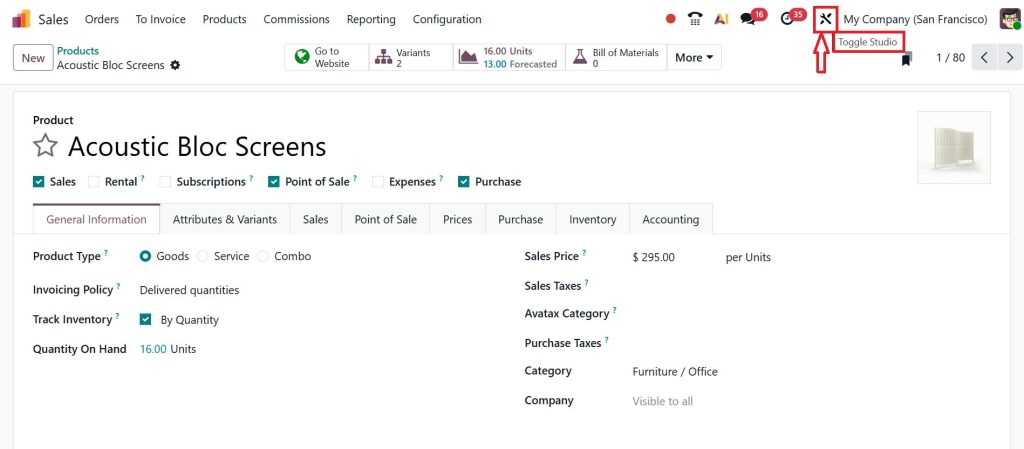
Access Odoo Studio from the top menu.
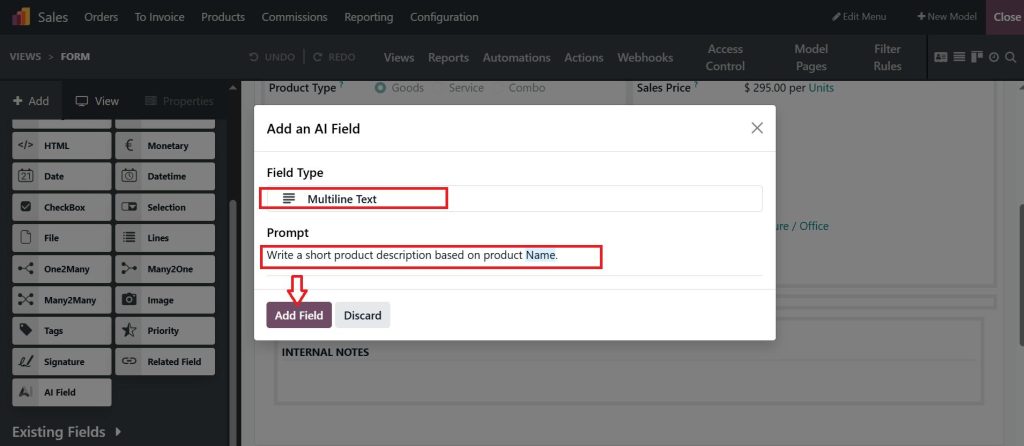
Add an AI Field by dragging it into the desired form view.
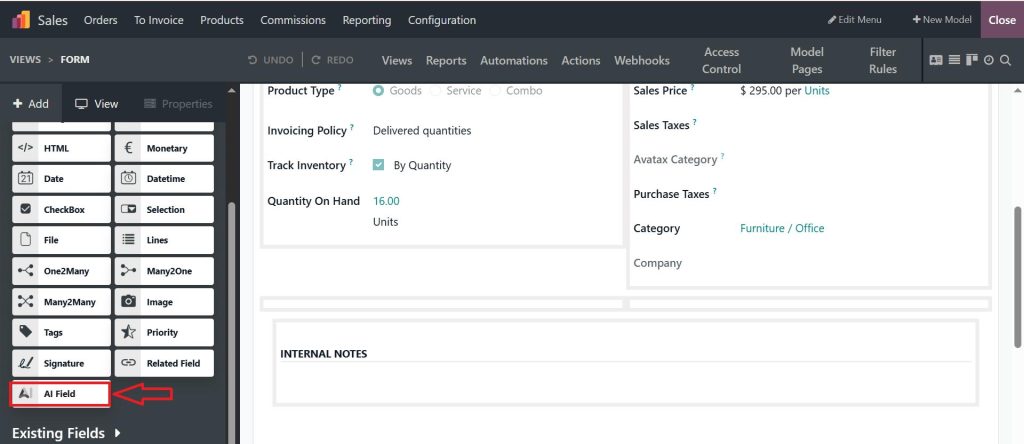
After dragging, select the appropriate field type based on your requirement, such as Multiline Text.
The next step is to define Odoo AI field prompts. These prompts instruct the system on what type of content to generate.
For example:
- ‘‘Write a short product description based on the product name.’’
- “Write a professional email reply based on the customer inquiry.”
- “Generate a product description using product name and category in 50 words.”
Then click on Add Field and test the field by creating or updating a record.
The AI will generate content based on the defined prompt. So, that’s how you can utilize AI fields in Odoo.
Odoo AI Studio Fields and Their Role in Daily Operations
Using Odoo AI Studio fields helps reduce repetitive work across different departments. Instead of manually writing similar content multiple times, AI fields can handle:
- Product descriptions
- Customer communication
- Internal notes
- Data completion
As a result, teams can focus more on decision-making rather than routine data entry. It also improves consistency across records.
Odoo 19 AI Fields Tutorial with Advanced Capabilities
The latest updates highlighted in this Odoo 19 AI fields tutorial introduce more refined features. AI fields can now process multiple inputs to generate better outputs. For instance, a product description can be generated using several related fields such as name, category, and specifications.
The system also adapts to context, improving the relevance of generated content. These enhancements make AI fields more reliable for business use.
How to Utilize AI Fields Odoo Studio Effectively
Knowing how to utilize AI fields in Odoo Studio is essential for achieving real value. In CRM, AI fields can generate lead summaries and draft responses to customer messages. In Sales, they assist in writing quotations and product-related content.
In Inventory, Odoo AI data enrichment fields help fill missing details in bulk records. In HR processes, AI can summarize candidate profiles and assist in evaluation. When used consistently, these fields reduce workload and improve overall efficiency.
Create AI Computed Fields Odoo for Dynamic Updates
Another advanced use case is to create AI-computed fields in Odoo. These fields combine logic with AI-generated output. They update automatically based on defined conditions.
For example, when a customer meets certain criteria, such as a high purchase value, the system can generate a summary of the customer’s behavior.
To configure this, define the conditions and attach an AI prompt. The field will update automatically whenever the conditions are met.
Odoo AI Field Prompts and Their Impact on Results
The effectiveness of AI fields depends largely on Odoo AI field prompts. Clear and specific instructions produce better results.
For example:
- Less effective: “Write about the product.”
- More effective: “Write a concise product description in 40 words using the product name and key features.”
Defining tone and format also improves output quality. Prompts can be adjusted over time to achieve more accurate results.
Odoo AI Data Enrichment Fields for Improving Data Quality
Incomplete data is a common issue in many systems. Odoo AI data enrichment fields address this problem by generating missing information based on available inputs.
This is especially useful when working with imported data or older records that lack details. By applying AI enrichment, data becomes complete and more usable without manual correction.
AI Fields Automation Odoo in Real Workflows
With AI fields in Odoo, these fields can be connected to automated actions.
Examples include:
- Generating summaries when new records are created
- Creating product descriptions automatically
- Suggesting responses for incoming messages
Automation ensures that tasks are completed without constant user intervention, improving consistency and saving time.
Common Challenges and How to Manage Them
While working with AI-enabled fields in Odoo, a few challenges may arise.
- Unclear prompts often lead to irrelevant results.
- Refining instructions usually resolves this issue.
- Overreliance on AI without reviewing the output can create inconsistencies, especially with critical data.
It is also important to use AI fields selectively. Applying them only where needed produces better outcomes.
Applying AI Enabled Fields in Odoo Effectively
Adopting AI-enabled fields in Odoo helps reduce repetitive work and improve data quality across the system. From understanding how to create AI fields in Odoo to applying Odoo AI Studio fields in daily operations, the process becomes more efficient with consistent use.
Advanced features such as creating AI-computed fields in Odoo, well-structured Odoo AI field prompts, and AI fields automation in Odoo allow businesses to manage data more effectively.
If you want to save time, improve efficiency, and scale your business, it’s time to start using AI-enabled fields in Odoo. Starting with a few practical use cases and expanding gradually leads to better adoption and long-term benefits.
Looking to implement AI features in your Odoo system with a clear strategy? Netelligence can help you set up and optimize AI-driven workflows to meet your business needs.




