Managing finances is one of the most critical parts of running a business, but let’s be honest, it can also be one of the most overwhelming. If you’ve ever struggled to keep track of unpaid vendor bills, missed due dates, or spent hours digging through spreadsheets, you’re not alone.
This is exactly where Find Unpaid Bills Using AI in Odoo 19 becomes a game-changer.
With the evolution of Odoo 19 AI accounting, businesses no longer need to rely on manual tracking or outdated methods. Instead, they can show unpaid vendor bills in Odoo 19, identify Odoo 19 overdue bills, and even use AI to find unpaid invoices in Odoo 19 automatically.
The beauty of Odoo 19 vendor bill tracking lies in its intelligence. It doesn’t just store your data, it analyzes it. Whether you want to summarize outstanding vendor bills in Odoo 19 or get real-time alerts, the Odoo AI accounting assistant ensures you never miss a payment again.
In this blog, we’ll walk you through how to Find Unpaid Bills Using AI in Odoo 19, why it matters, and how it can completely transform your accounts payable process using Odoo 19 accounts payable AI.
What Makes Odoo 19 AI Accounting So Powerful?
Traditional accounting systems required manual effort, checking invoices, updating spreadsheets, and reconciling accounts. But with Odoo 19 AI accounting, things have changed dramatically.
AI in Odoo 19 acts like a smart assistant that:
Scans your financial records
Identifies unpaid invoices
Flags overdue bills
Suggests actions in real time
Instead of reacting late, you stay proactive.
Key Benefits of Odoo AI Accounting Assistant
1. Real-Time Insights
The Odoo AI accounting assistant continuously monitors your accounts and highlights unpaid bills instantly.
2. Smart Automation
No more manual filtering. You can automatically show unpaid vendor bills in Odoo 19 with just a click.
3. Reduced Human Errors
AI minimizes mistakes in tracking and calculations, making your financial data more reliable.
4. Faster Decision Making
With insights like Odoo 19 overdue bills, you can prioritize payments and maintain vendor relationships.
How to Find Unpaid Bills Using AI in Odoo 19
Step-by-Step Process
Let’s break it down simply and practically.
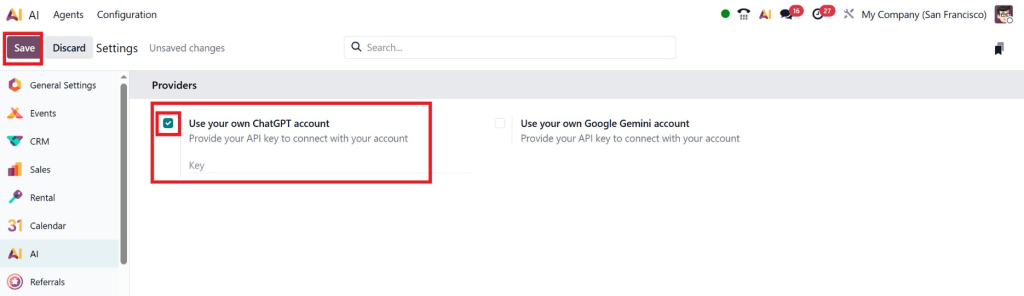
First of all, from the AI module, configure the settings as “Use your own ChatGPT account”.
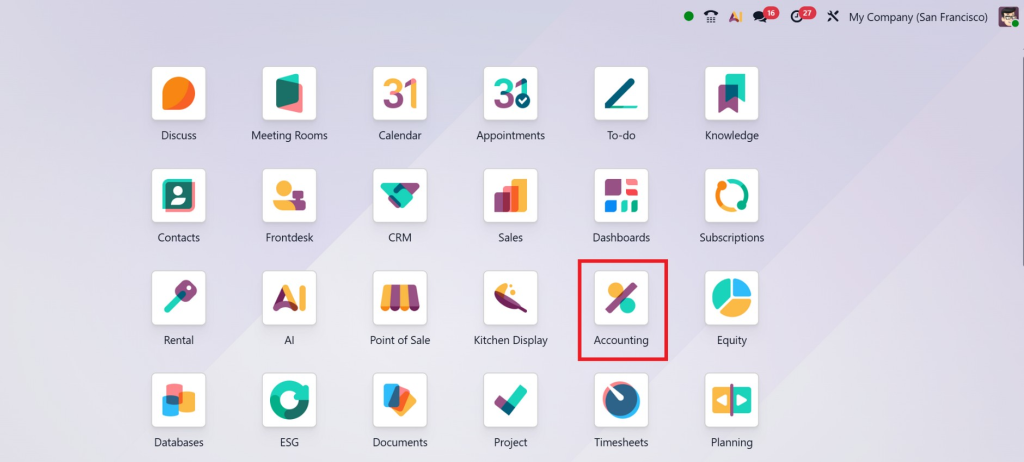
Step 1: Access the Accounting Module
Start by navigating to the Accounting module in Odoo 19.
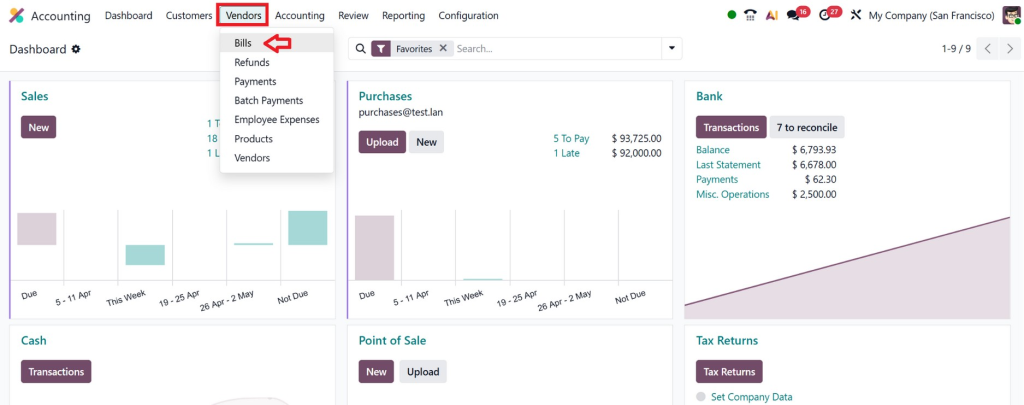
Step 2: Open Vendor Bills Section
Go to:
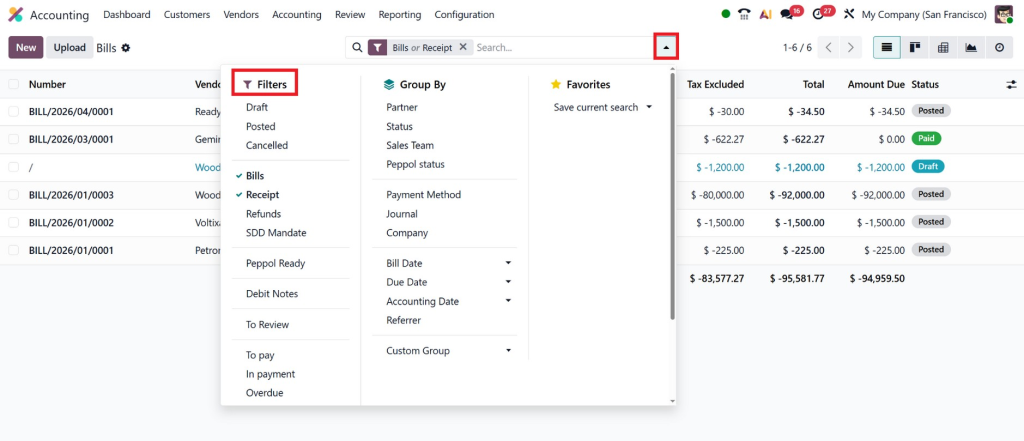
Accounting → Vendors → Bills
Here, you’ll find all your vendor bills in one place.
Step 3: Use AI Filters and Smart Search
This is where the magic happens.
With Odoo 19 accounts payable AI, you can:
Filter by “Unpaid”
Filter by “Overdue”
Use AI suggestions for pending bills
This allows you to quickly Find Unpaid Bills Using AI in Odoo 19 without manually checking each record.
Step 4: Use AI Insights Dashboard
Odoo 19 provides intelligent dashboards that:
Highlight unpaid invoices
Show aging reports
Identify critical overdue bills
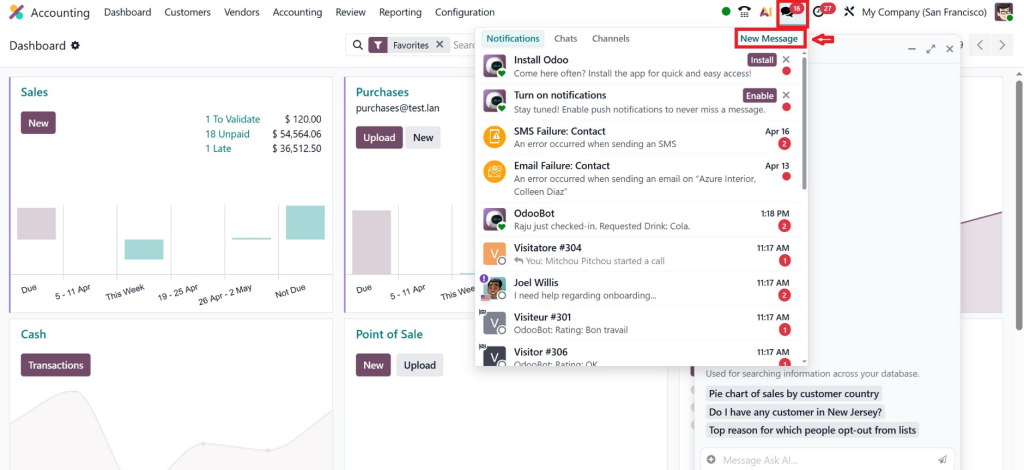
Here, from the message icon, select the new message.
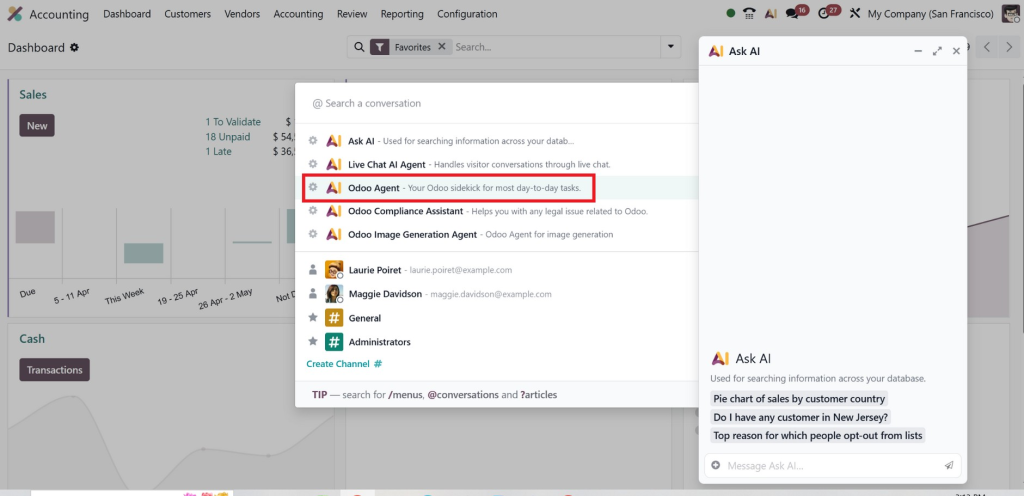
And then select the “AI Agent”.
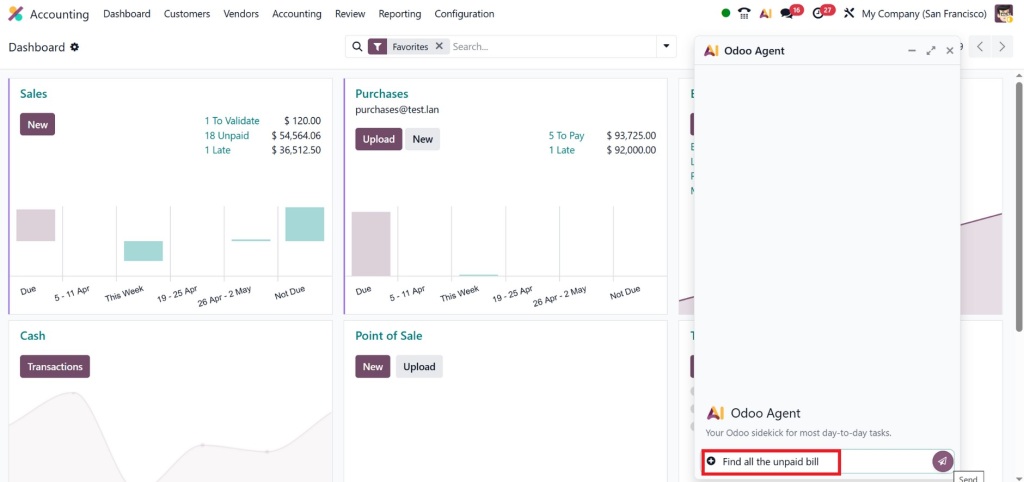
Then provide the prompt to AI, “Find all the unpaid bills”.
This is how you can effectively summarize outstanding vendor bills in Odoo 19.
Using AI to Identify Overdue and High-Risk Bills
One of the biggest advantages of AI is its ability to detect patterns.
With AI to find unpaid invoices in Odoo 19, the system:
Tracks due dates
Flags overdue bills automatically
Sends alerts for urgent payments
This ensures you never miss a deadline again.
Prioritizing Payments with AI
Not all unpaid bills are equal. Some are more urgent than others.
AI helps you:
Identify high-value unpaid bills
Detect long-overdue invoices
Suggest priority actions
This makes Odoo 19 vendor bill tracking smarter and more strategic.
Advanced Features for Vendor Bill Tracking in Odoo 19
1. Automated Bill Categorization
AI automatically categorizes bills based on:
Vendor
Amount
Due date
This makes it easier to show unpaid vendor bills in Odoo 19 in a structured way.
2. Intelligent Notifications
The Odoo AI accounting assistant sends alerts such as:
Upcoming due dates
Overdue warnings
Payment reminders
3. Predictive Analytics
Odoo 19 goes beyond tracking; it predicts.
With predictive insights, you can:
Forecast cash flow
Avoid late payments
Plan finances better
4. Smart Reporting
Generate reports to:
Summarize outstanding vendor bills in Odoo 19
Analyze payment trends
Identify bottlenecks
Why Businesses Need AI for Accounts Payable in Odoo 19
The Problem with Manual Tracking
Without AI, businesses often face:
Missed payments
Poor vendor relationships
Time-consuming processes
The AI Advantage
With Odoo 19 accounts payable AI, you get:
Automation
Accuracy
Efficiency
And most importantly, peace of mind.
Real Business Impact
Companies using AI-powered accounting reports:
Faster invoice processing
Reduced late fees
Improved financial control
Best Practices to Maximize AI in Odoo 19
1. Keep Your Data Clean
AI works best with accurate data. Always ensure:
Correct invoice entries
Updated vendor details
2. Use Filters and Dashboards Regularly
Don’t just rely on automation, actively monitor:
Unpaid bills
Overdue invoices
3. Customize AI Alerts
Set up notifications based on:
Due dates
Payment thresholds
4. Leverage Reports
Regularly summarize outstanding vendor bills in Odoo 19 to stay in control.
Common Mistakes to Avoid
Lorem ipsum dolor sit amet, consectetur adipiscing elit. Ut elit tellus, luctus nec ullamcorper mattis, pulvinar dapibus leo.
How Netilligence Can Help You Implement Odoo 19 AI
Implementing AI in accounting isn’t just about software; it’s about strategy.
Hi, I'm Nabia, an Odoo ERP functional & technical content writer. I specialize in blogs, social media content, ad copy, landing pages, service pages, and email campaigns.
We use cookies to ensure that we give you the best experience on our website. If you continue to use this site we will assume that you are happy with it.