

Manually managing the work schedules of employees in an organisation can prove to be quite a hassle for the HR department. Keeping a tab of the working hours, allocating different shifts to various employees, ensuring the right number of staff members are available at the workplace, are all of those mundane and monotonous tasks that make the lives of HR personnel quite hectic, especially when working with mundane tools such as spreadsheets and paper. Fortunately, most of these issues can now be very efficiently resolved with the help of contemporary Enterprise Resource Planning (ERP) systems such as Odoo.
If you are wondering how to create employee shifts in Odoo 19, you will be pleased to know that Odoo provides a powerful Planning Module that enables businesses to organise work schedules, assign shifts, manage teams, and optimise employee productivity in a structured manner.
In this blog, we are going to learn how to create employee shifts in Odoo 19. If you have a shift-based business, such as manufacturing, restaurants, hospitals, logistics, or call centres, then you must know the importance of Odoo 19 employee shift scheduling. This feature allows you to manage your workforce effectively by assigning the right employees to the required locations and time slots efficiently, thereby eliminating overwork.
The Odoo 19 planning module shifts feature allows HR managers to easily assign work hours, monitor availability, and plan resources efficiently. Instead of manually creating schedules every week, companies can automate recurring employee shifts and reduce scheduling errors.
Another powerful advantage of Odoo 19 employee shift management is transparency. With Odoo HR shift planning in Odoo 19, employees are able to view their schedules, future shifts and assignments, which leads to clear communication and a reduction of misunderstandings. This is especially beneficial to businesses seeking to improve their workforce planning activities.
In this post we are going to describe how to create employee shifts in Odoo 19, also we will explain how does the Odoo Planning Module works and how companies can take advantage of it by building a working schedule, also we will talk about Odoo 19 recurring employee shifts, as well as some shift planning and practices to take into account when looking to manage workforce efficiently.
By the end of this article, you will clearly understand how to create employee shifts in Odoo 19 and how this feature can transform your workforce management process.
Understanding Employee Shift Scheduling in Odoo 19
Before learning how to create employee shifts in Odoo 19, it is important to understand what employee shift scheduling means.
Employee shift scheduling refers to the process of assigning working hours to employees based on business needs, department requirements, and employee availability. In businesses where operations run beyond standard office hours, shift scheduling becomes essential.
Odoo makes this process simple through its Planning Module, which allows HR teams to:
- Assign shifts to employees
- Schedule work hours for teams
- Plan projects and resources
- Manage workforce availability
- Track planned working hours
With Odoo 19 employee shift scheduling, HR managers can avoid scheduling conflicts and ensure smooth operations.
For example, a logistics company may need:
- Morning shift employees
- Evening shift staff
- Night shift operators
Using Odoo 19 employee shift management, HR can create structured shift plans and assign them to employees within minutes.
Odoo 19 Planning Module for Shift Management
The Odoo 19 Planning Module is designed specifically for workforce planning and shift management. It helps companies assign tasks and working hours while keeping track of employee availability.
With Odoo 19 planning module shifts, businesses can easily:
- Plan employee schedules
- Create shift templates
- Assign employees to specific tasks
- Avoid scheduling overlaps
- Improve workforce utilization
The module provides a visual calendar interface where managers can simply drag and drop shifts for employees.
This makes create shift schedule in Odoo 19 extremely easy, even for HR teams with limited technical knowledge.
Another great feature is integration with other HR modules, such as:
- Employees
- Attendance
- Payroll
- Time Off
Because of this integration, Odoo HR shift planning in Odoo 19 ensures that employee schedules remain aligned with leaves, working hours, and payroll calculations.
Step-by-Step Guide: How to Create Employee Shifts in Odoo 19
Now, let’s understand how to create employee shifts in Odoo 19 step by step.
Step 1: Install the Planning Module
First, you need to install the Planning Module.
Steps:
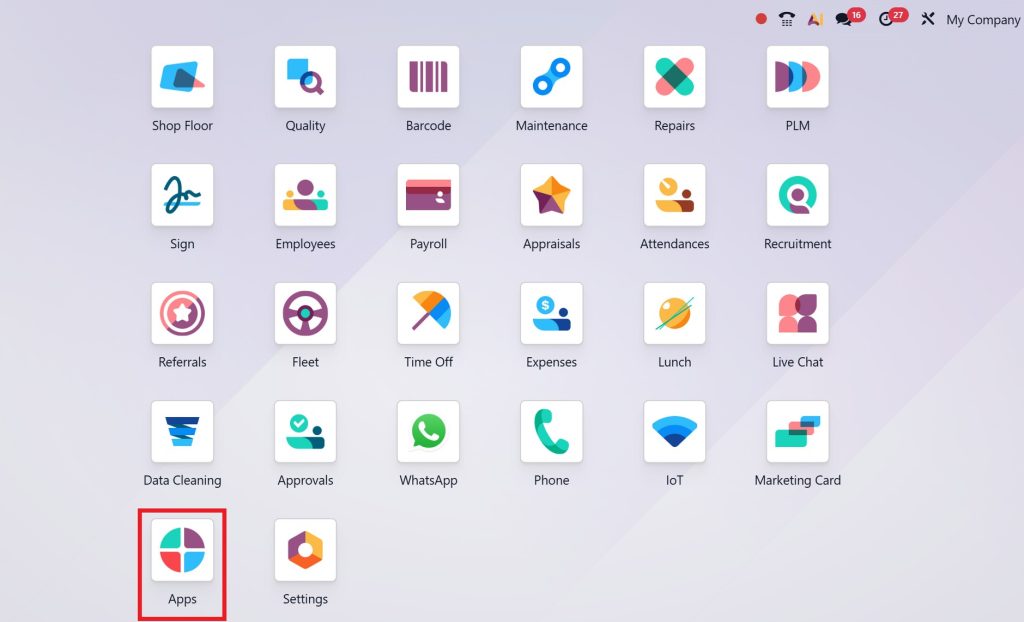
- Open the Odoo Apps menu
- Search for Planning
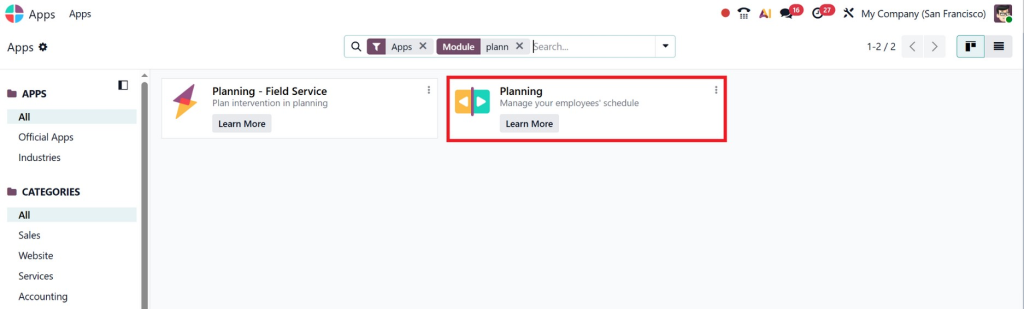
- Click Install
Once installed, the module will appear in your dashboard.
The Odoo 19 planningmodule’s shifts feature will now be available for workforce scheduling.
Step 2: Configure Employees
Before scheduling shifts, make sure your employees are properly configured.
Go to:
Employees → Employee Records
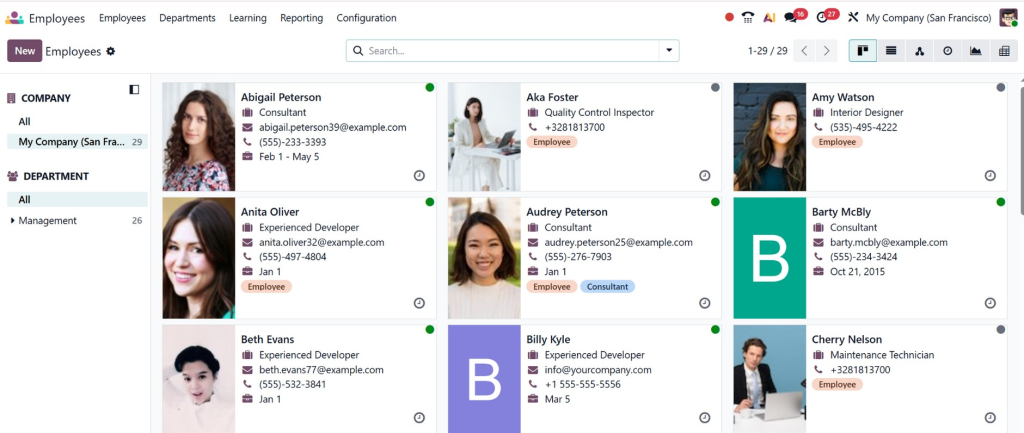
Here you can:
- Add new employees
- Assign departments
- Define job roles
- Set working hours
This ensures that Odoo 19 employee shift scheduling works accurately.
Step 3: Open the Planning Dashboard
Next, open the Planning Module.
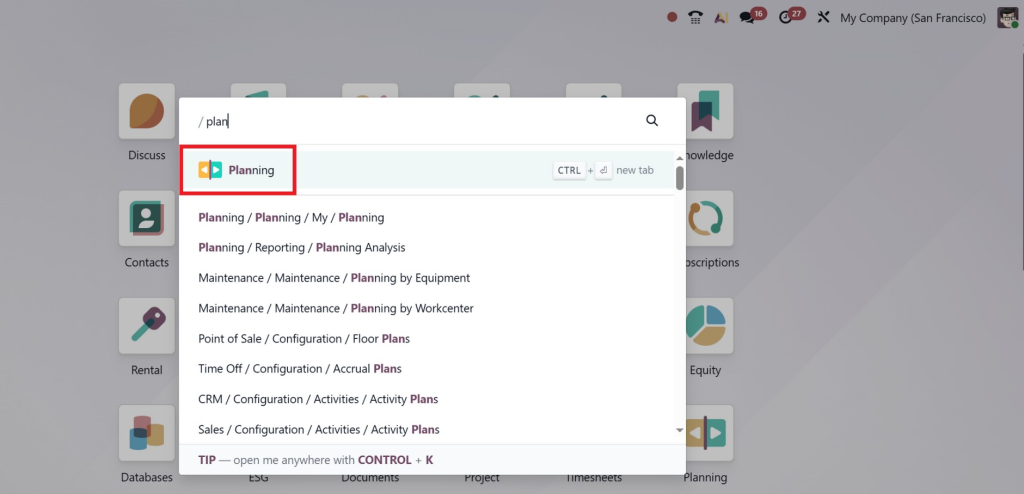
Navigation:
Planning → Planning Dashboard
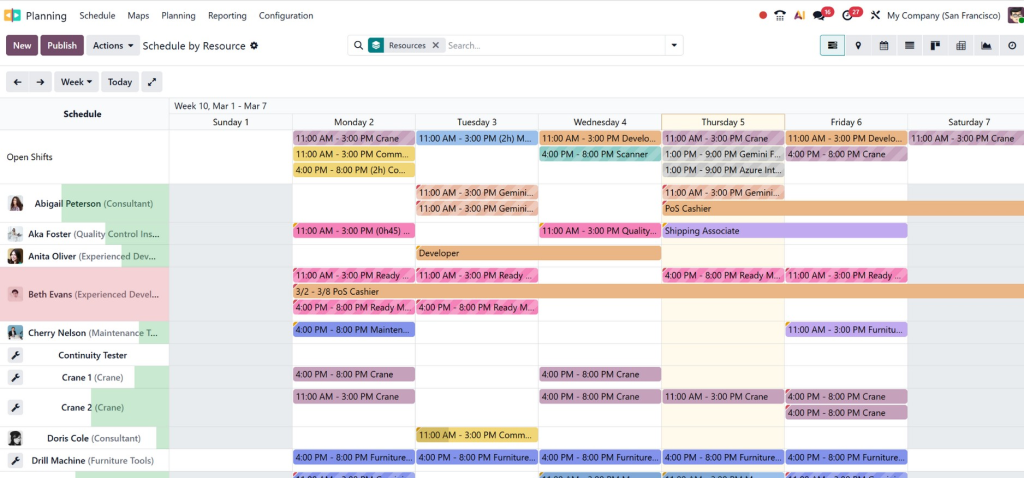
The dashboard will display a calendar-style interface where shifts can be created and assigned.
This visual layout makes create shift schedule in Odoo 19 very intuitive and easy.
Step 4: Create a New Shift
To create a shift:
- Click on the Create button
- Select the employee
- Set the shift start time
- Set the shift end time
- Assign a role or task
- Save the shift
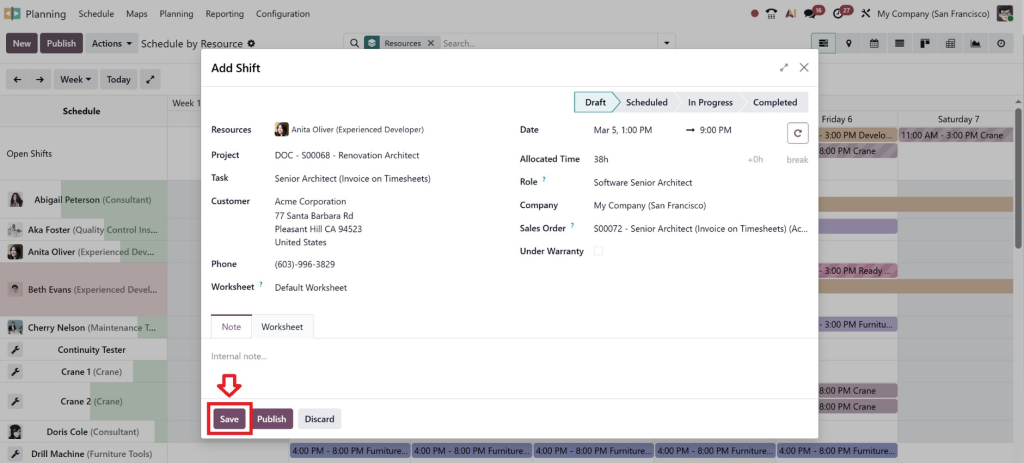
Once saved, the shift will appear in the planning calendar.
This is the basic method of how to create employee shifts in Odoo 19.
Lorem ipsum dolor sit amet, consectetur adipiscing elit. Ut elit tellus, luctus nec ullamcorper mattis, pulvinar dapibus leo.
Step 5: Assign Roles to Shifts
Roles help define the type of work employees will perform.
For example:
- Customer Support
- Warehouse Staff
- Machine Operator
- Delivery Coordinator
Assigning roles helps managersorganisee Odoo 19 employee shift management more effectively.
How to Create Recurring Employee Shifts in Odoo 19
Many businesses operate on fixed schedules where shifts repeat every week.
Instead of creating shifts manually each time, Odoo 19 allows recurring employee shifts.
Steps to create recurring shifts:
- Create a shift normally
- Enable the Repeat Option
Lorem ipsum dolor sit amet, consectetur adipiscing elit. Ut elit tellus, luctus nec ullamcorper mattis, pulvinar dapibus leo.
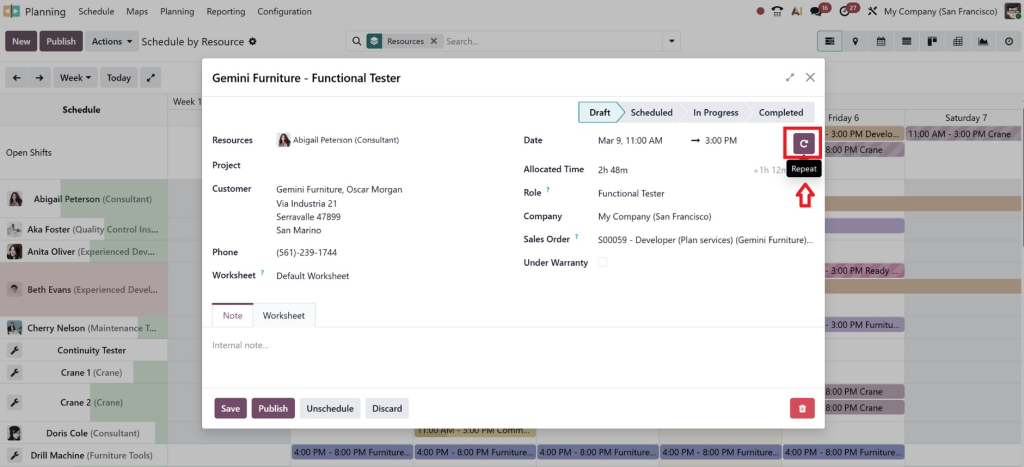
- Choose the frequency
-
- Daily
- Weekly
- Monthly
- Select the repetition duration
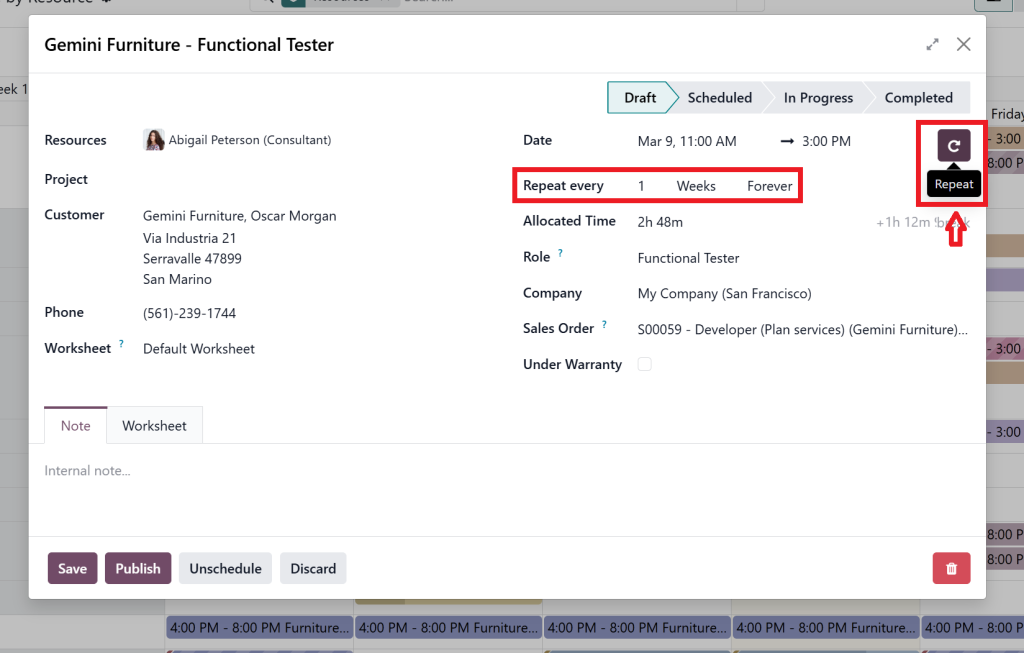
- Save
This automation simplifies Odoo HR shift planning in Odoo 19 significantly.
For example:
A restaurant may schedule:
- Chef → 4 PM to 12 AM daily
- Waiter → 6 PM to 2 AM
- Manager → 3 PM to 11 PM
Using Odoo 19 recurring employee shifts, these schedules can be automated.
Benefits of Odoo 19 Employee Shift Management
Understanding how to create employee shifts in Odoo 19 brings several benefits for organisations. With smart scheduling tools and automation, businesses can manage their workforce more efficiently and avoid common scheduling problems.
1. Better Workforce Planning
Odoo allows managers to plan shifts based on employee availability, workload, and department requirements. This helps organisations ensure the right number of employees are working at the right time. As a result, businesses can maintain smooth operations without overloading their staff.
2. Reduced Scheduling Conflicts
The system automatically highlights overlapping shifts or unavailable employees while scheduling. This helps managers avoid mistakes that often happen in manual scheduling. With better visibility, HR teams can create accurate and balanced shift plans.
3. Improved Employee Productivity
When employees clearly know their working hours and responsibilities, they can focus better on their tasks. Proper shift planning reduces confusion and last-minute changes. This leads to better performance and higher productivity across teams.
4. Transparency in Work Schedules
Employees can easily check their upcoming shifts directly in the system. This improves communication between managers and employees. Clear schedules also reduce misunderstandings and ensure everyone stays informed.
5. Automated Scheduling
With Odoo 19 recurring employee shifts, companies can automate repeated schedules such as daily or weekly shifts. This saves time for HR teams and reduces manual work. Automation also ensures consistency in workforce planning.
6. Centralised Workforce Management
All employee schedules, shifts, and planning data are stored in one centralised system. Managers can easily monitor schedules and make quick adjustments when required. This makes Odoo 19 employee shift scheduling far more organised than traditional spreadsheet-based methods.
Best Practices for Employee Shift Scheduling in Odoo 19
To get the most out of Odoo 19 employee shift management, companies should follow some best practices.
Plan Shifts in Advance
Creating schedules ahead of time helps employees prepare better.
Use Roles and Departments
Organising employees by roles improves scheduling efficiency.
Avoid Overlapping Shifts
Ensure that employees are not assigned multiple shifts at the same time.
Monitor Workload
Balanced workloads improve employee satisfaction.
Use Recurring Shift Automation
Automating shifts saves time for HR teams.
When businesses follow these practices, Odoo HR shift planning in Odoo 19 becomes even more powerful.
Why Businesses Choose Odoo for Shift Planning
Modern organisations prefer ERP-based workforce planning instead of manual methods.
With Odoo, companies can:
- Manage HR processes
- Track attendance
- Plan employee shifts
- Automate scheduling
- Improve workforce visibility
This makes Odoo 19 planning module shifts a valuable tool for industries like:
- Manufacturing
- Healthcare
- Logistics
- Retail
- Hospitality
- Customer support centres
By implementing proper Odoo 19 employee shift scheduling, businesses can optimise workforce performance and reduce administrative workload.
Lorem ipsum dolor sit amet, consectetur adipiscing elit. Ut elit tellus, luctus nec ullamcorper mattis, pulvinar dapibus leo.
Final Thoughts on How to Create Employee Shifts in Odoo 19
Now you clearly understand how to create employee shifts in Odoo 19 and why it’s crucial for modern businesses.
From simple scheduling to advanced Odoo 19 recurring employee shifts, the system provides everything you need for professional workforce management.
If you want to:
- Simplify HR operations
- Reduce scheduling conflicts
- Automate recurring shifts
- Improve employee satisfaction
- Gain full workforce visibility
Then it’s time to implement smart Odoo 19 employee shift scheduling with expert guidance.




