

The Create and Manage loyalty cards in odoo 18 serves as your ideal solution for customer retention and maximizing repeat purchases and sales strategy empowerment. Customers in today’s competitive marketplace demand more than excellent products because they want personalized value and recognition. Odoo sales loyalty cards stand out as the solution for this purpose.
The Odoo 18 loyalty program enables businesses to establish reward systems for customers through structured Odoo 18 customer rewards which boost satisfaction and brand engagement. The new version of Odoo provides improved features for loyalty management through its Odoo loyalty points setup and advanced sales promotions capabilities.
This guide provides a step-by-step approach to handle Odoo 18 loyalty cards management while showing you how to personalize offers and link rewards to sales workflows. The Odoo 18 loyalty program mastery will revolutionize your sales and CRM operations regardless of your current program status.
Why Loyalty Programs Are Essential for Business Growth
Elevate Sales with Odoo 18 Loyalty Program
The Odoo 18 loyalty program functions as a strategic business tool beyond its feature status. Loyalty programs help businesses:
> Encourage repeat sales
> Enhance customer engagement
> Increase lifetime customer value
> Reduce churn rates
Odoo 18 provides you with the ability to automate all these processes. The platform enables you to customize every aspect of your loyalty program through its features for assigning Odoo sales loyalty cards and setting reward thresholds. The centralized dashboard allows you to distribute points based on purchases while offering discounts and exclusive promotions.
How to Create a Loyalty Program in Odoo 18
Steps to Set Up Loyalty Program in Odoo 18 Sales Module:
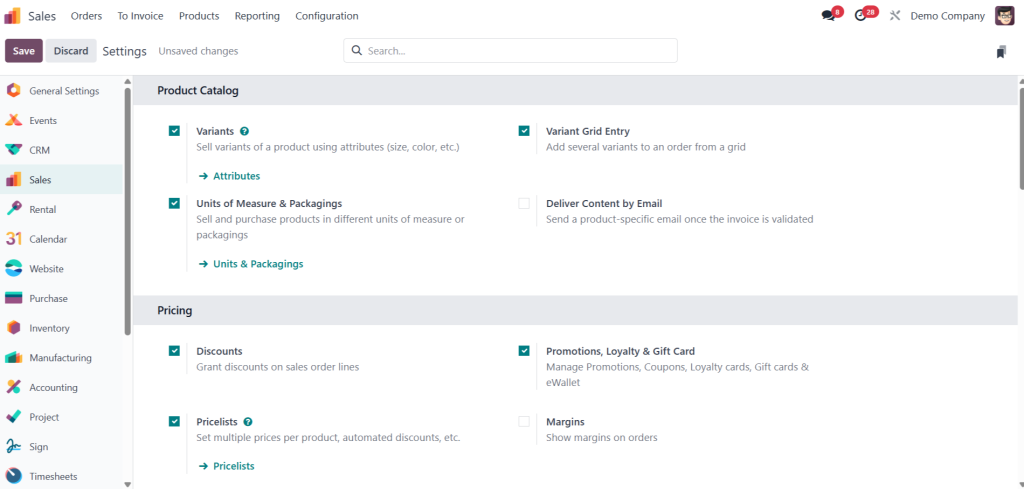
Step 1: Enable Loyalty Program Feature
- Navigate to the Sales Module.
- Go to Configuration > Settings.
- Enable: Promotions, Loyalty Program & Gift Cards
- Click Save.
Step 2: Create a New Loyalty Program
- Go to Products > Discounts & Loyalty.
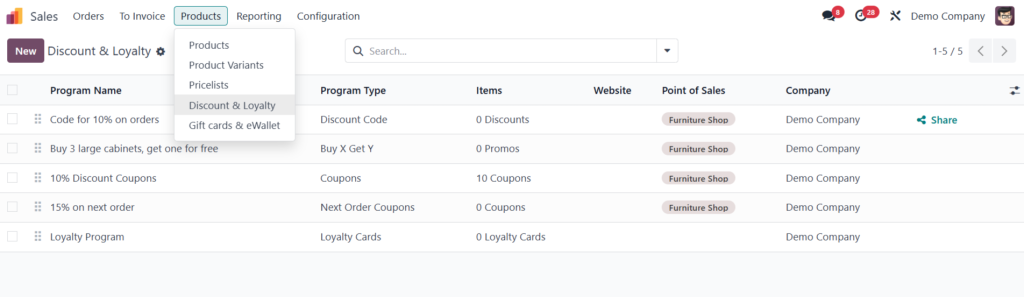
2. Click Create to add a new Loyalty Program.
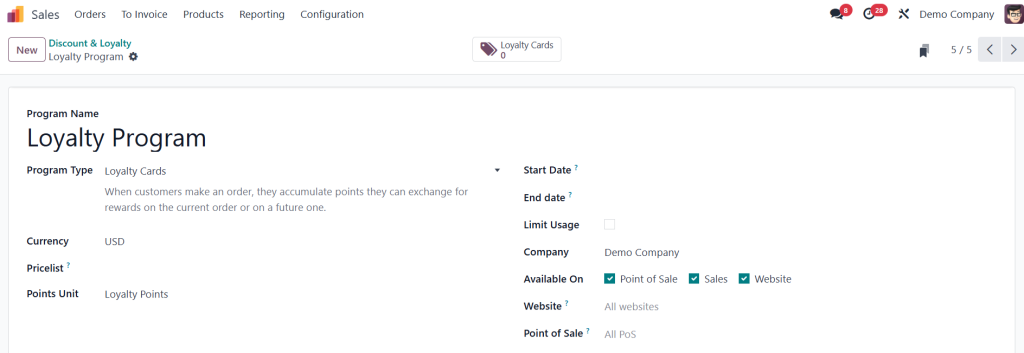
3. Set the Name (e.g., “Loyalty Program”).
4. Set Type as Loyalty Card.
5. Choose the Currency (e.g., USD).
6. Set the Point Unit (e.g., Loyalty Points).
7. Define Start Date and End Date to control the validity.
8. (Optional) Limit usage using the “Limit usage” field.
9. Assign the program to:
Company
Enable on Point of Sale, Sales Module, or Website as required.
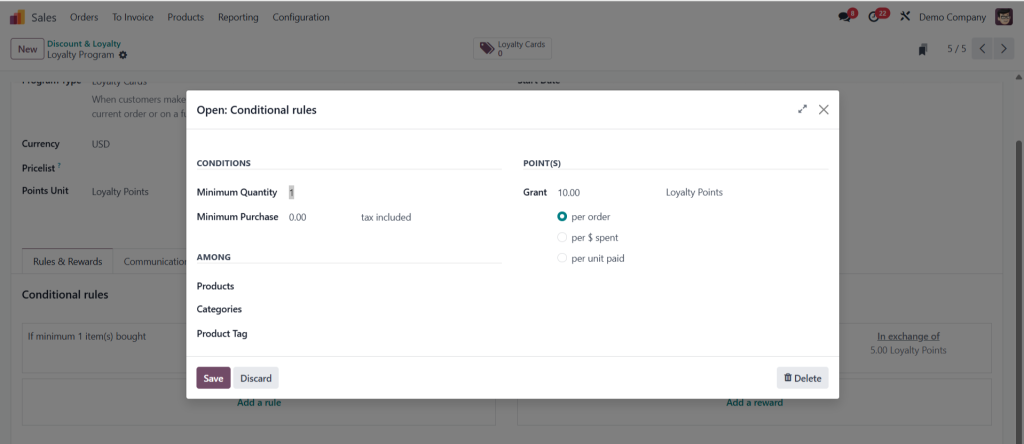
Step 3: Configure Earning Rules
- Under the Rules and Rewards section:
- Click Add to define earning conditions:
- Example: When a customer purchases minimum 1 quantity, grant 10 loyalty points.
- You can restrict by:
- Product
- Product Category
- Product Tag
3. Click Save.
Step 4: Create a Reward Rule
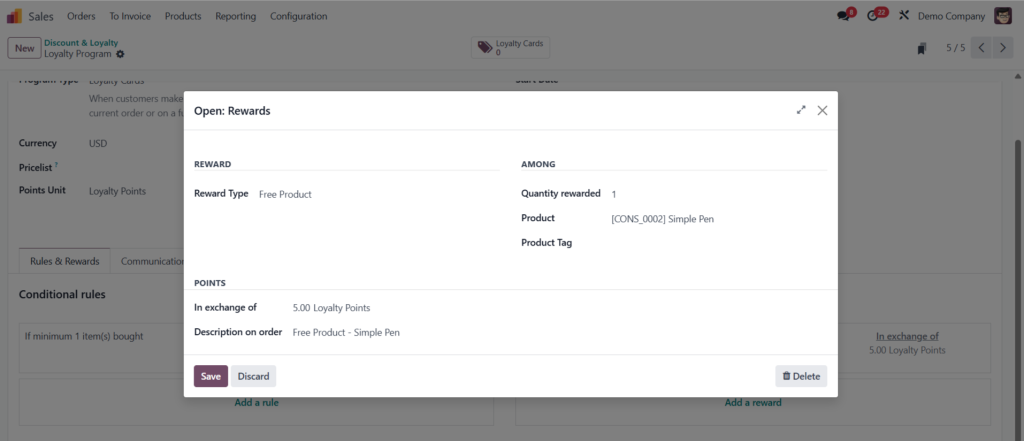
- Under the same Rules and Rewards section:
- Click Add Reward.
- Define what the customer receives for redeeming points:
- Example: Exchange 5 loyalty points for a free product (e.g., a simple pad).
- Other reward types include:
- Discount
- Free Shipping
- Coupon Codes
4. Click Save.
Step 5: Test Loyalty Program via Sales Order
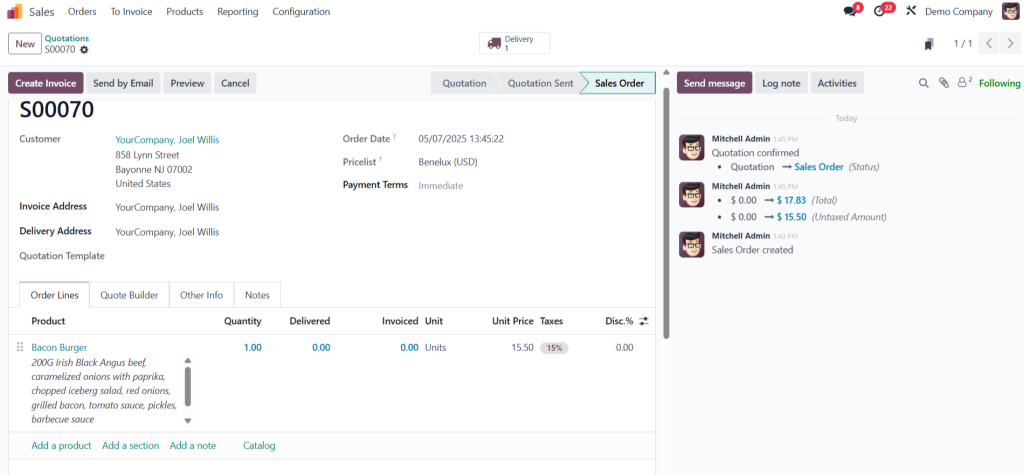
- Go to Sales > Orders.
- Click Create to make a new quotation.
- Select a Customer.
- Add a Product to the order.
- Upon order creation, the system will show earned loyalty points.
6. Click Confirm to finalize the order and allocate loyalty points.
Step 6: View Loyalty Cards and Points
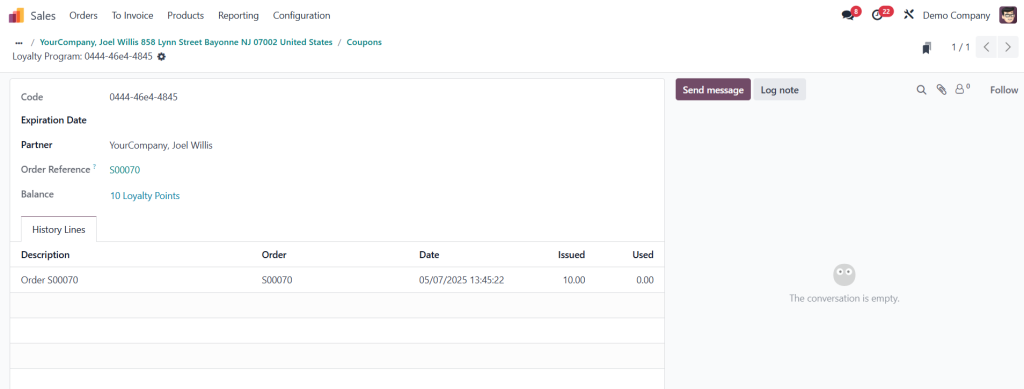
- After confirming, go to the Customer Profile.
- Find the generated Loyalty Card under the Loyalty Tab.
- Check:
- Issued Points
- Used Points
- Coupon Code
- Order Reference
Manage Loyalty Cards in Odoo 18 Sales
Full Control to Manage Loyalty Cards Odoo 18
The management of your loyalty program becomes straightforward after its initial setup:
> The system automatically provides loyalty cards to customers when they register or make a purchase.
> The CRM and Sales dashboards display both accumulated points and points redeemed by customers.
> The system allows you to segment customers based on their loyalty status for targeted email marketing campaigns.
> The system provides analytics and reporting tools to help you visualize data trends which optimize the performance of Odoo 18 customer rewards.
The loyalty card system in Odoo is smart—it updates based on transactions and allows for manual overrides if needed. The system allows you to set up automatic point deduction after use or expiration.
Best Practices for an Effective Loyalty Strategy
Make the Most of Odoo 18 Loyalty Program Features
The following expert advice will help you maximize the power of your Odoo 18 loyalty program:
> Clear point systems and rewards should be simple to reduce friction.
> The user experience should be gamified through progress bars and level progression and surprise elements to create delight.
> The program needs to maintain consistency across retail and e-commerce and mobile platforms.
> Your loyalty benefits should be heavily promoted through Odoo newsletters and banners.
> The success of your program should be evaluated through KPIs which include repeat purchase rate and average order value.
Odoo provides complete customization capabilities which enable you to modify your strategy according to your business expansion. Your Odoo sales loyalty cards should integrate with promotional campaigns for seasonal boosts and exclusive VIP rewards.
Integrating Loyalty with Other Odoo 18 Modules
Seamless Integration Drives Sales Promotions
Odoo 18 loyalty program management stands out because it integrates perfectly with other modules. The system operates through the following connections:
> POS Integration: Instantly reward in-store customers.
> Website & E-commerce: Offer loyalty-based pricing online.
> CRM: Track customer interactions for tailored communication.
> Inventory: Automate stock movements for reward products.
> Marketing: Launch email and SMS campaigns based on loyalty levels.
The integrated ecosystem enables you to create a complete reward experience from initial awareness through retention without ever exiting the Odoo platform.
Final Thoughts: Empower Customer Engagement with Odoo 18 Loyalty Program
The Odoo 18 loyalty program enables businesses to establish trust while boosting sales and achieving long-term profitability. Odoo provides businesses with advanced tools to build loyalty programs and automate rewards and targeted sales promotions which transform customer relationships beyond basic transactions.
After learning how to handle loyalty cards Odoo 18 you should proceed with implementation. Adapt the system to your brand identity while matching it to your sales objectives and continuously improve through customer feedback and analytics.
Your business success will begin when you start rewarding your loyal customers today.




