

Odoo 18 shipping cost invoicing plays an essential role in managing logistics expenses and ensuring accurate billing and operational transparency. Businesses benefit from tracking delivery charges for proper invoicing because it helps them save money while preventing undercharging and maintaining accurate accounting of real shipping expenses.
Through Odoo delivery methods configuration businesses can apply shipping fees to customer orders while reflecting those fees in invoices and linking logistics to inventory flow. Odoo 18 shipping cost invoicing provides complete system smoothness throughout all operational stages by allowing businesses to set up carriers and include shipping lines in sales orders.
The Odoo shipping cost invoice process together with Odoo invoicing shipping fees and Odoo 18 delivery cost setup enable automatic management of these processes which reduces manual entry and billing errors.
Step-by-Step Process for Shipping Cost Invoicing in Odoo
Step 1: Understand Shipping Cost Invoicing
- Shipping charges can be invoiced in two ways:
- Fixed cost agreed with the customer and included in the sales order.
Actual cost based on real-time shipping factors like distance, weight, and method.
Step 2: Enable Delivery Methods
- Go to Inventory Module → Configuration Settings → Enable Delivery Methods.
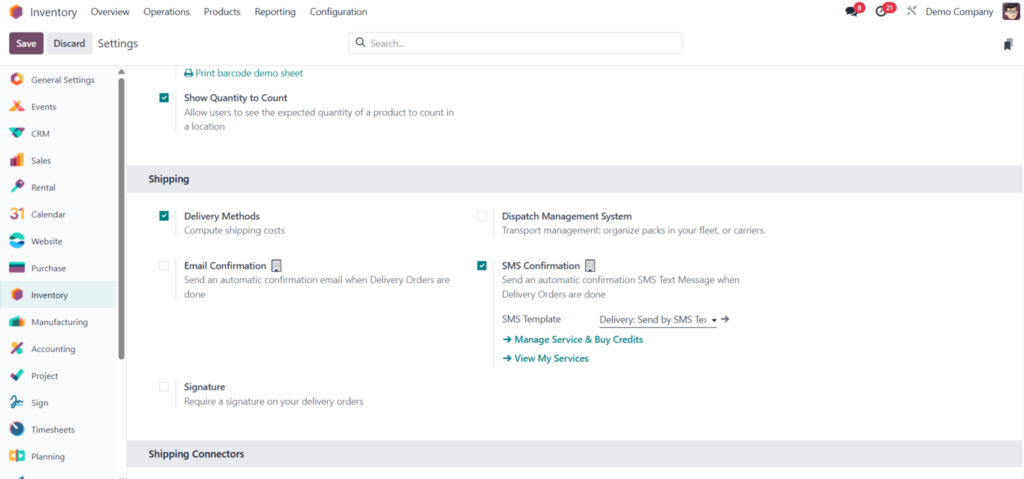
This allows Odoo to compute shipping costs based on method and integration.
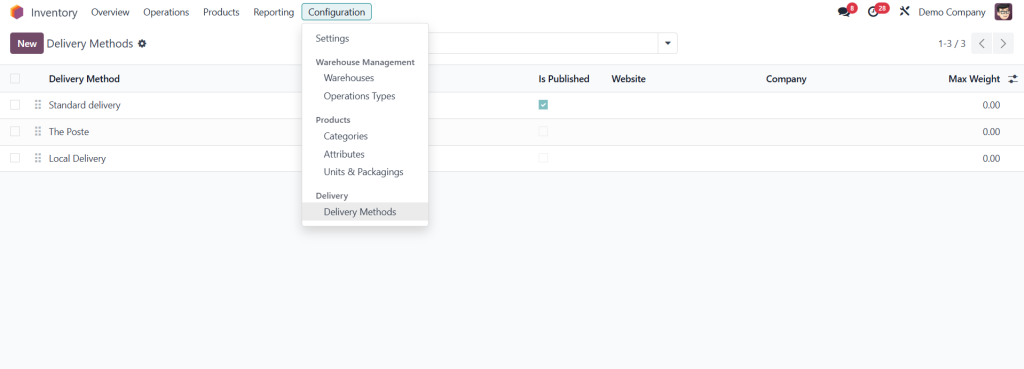
Step 3: Configure a Delivery Method
Go to Delivery → Delivery Methods.
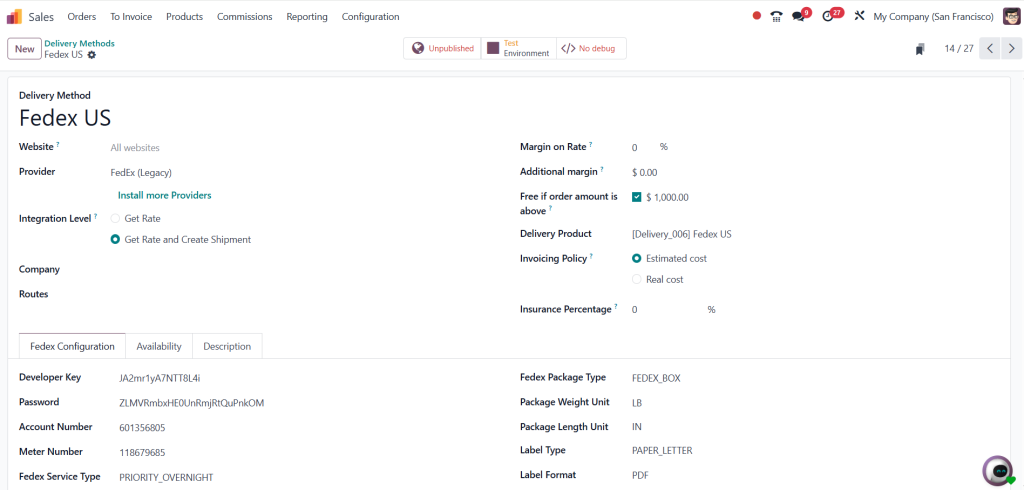
Set:
Name of the delivery method (e.g.,Standard delivery)
Website visibility
Provider (e.g., UPS)
Integration level
Margin on rate or additional margin
Free shipping criteria (e.g., orders above ₹5000)
Delivery product and invoicing policy (based on estimated cost)
Step 4: Create a Sales Order
- Go to the Sales Module → Create Quotation.
- Add:
- Customer name (e.g., ‘Dedicated’)
- Product (e.g., Chair Floor Protection)
- Quantity and Weight (e.g., 1 unit = 1 kg)
- Under Shipping, select your preferred delivery method (e.g., UPS).
Confirm quotation and validate delivery.
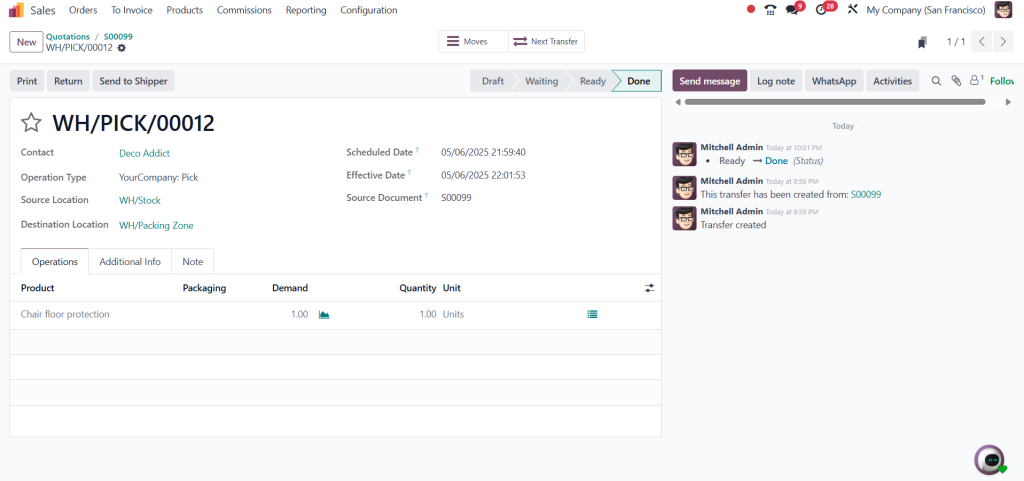
Step 5: Generate Invoice Including Shipping Cost
- Go to the order → Click Create Invoice.
- Choose Regular Invoice.
- You’ll see the shipping cost added as a separate line item.
- Confirm the invoice – it will move to posted state.
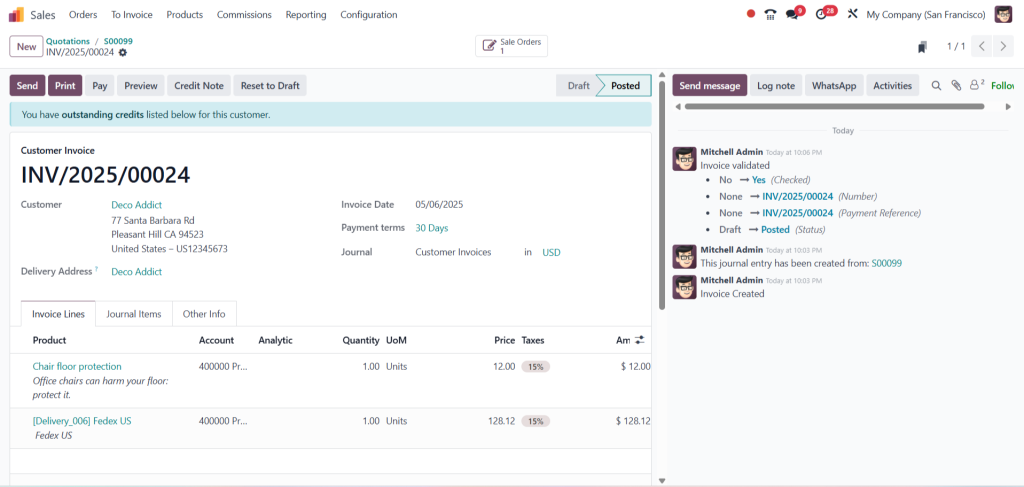
Step 6: Invoice Actual Shipping Cost (Optional Method)
- To invoice real shipping cost:
- Create a delivery method (e.g., Standard Delivery) with unit price set to zero.
- Create a new sales order with this delivery method.
- Validate delivery.
- When generating invoice, manually update shipping cost while invoice is in draft.
- Confirm invoice – real cost will be reflected.
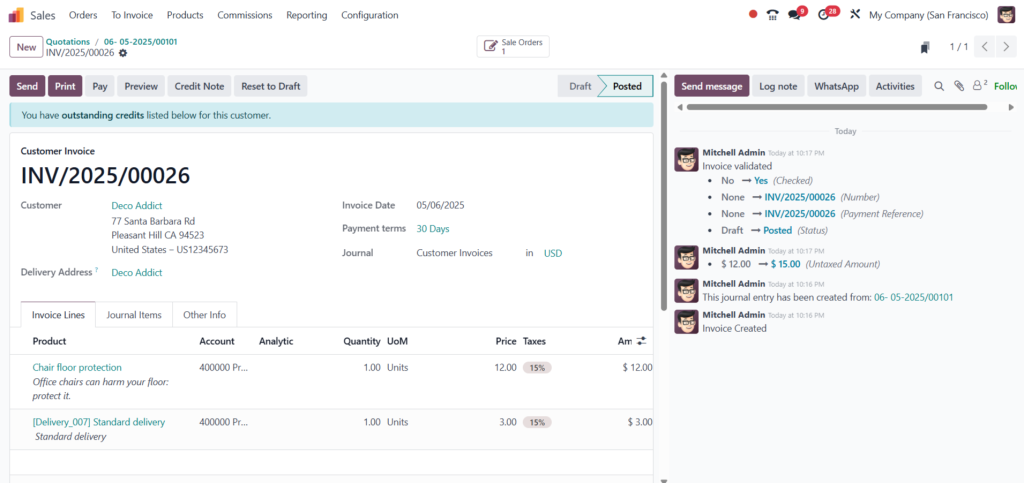
Link Shipping Fees to Inventory Operations
Odoo 18 inventory shipping charges are closely tied to your stock movements. When a sales order is confirmed, it generates a delivery order. Upon validation, inventory is updated, and shipping costs are finalized.
This connection ensures:
- Real-time stock deduction when items are shipped
- Visibility of shipping charges linked to inventory operations
- Delivery costs appear in accounting alongside sales items.
This integration benefits businesses with warehousing and logistics departments, especially when shipping costs impact inventory valuation.
Automate the Odoo Shipping Cost Invoice Process
The Odoo shipping cost invoice process eliminates the need to calculate or input delivery charges manually.
What the automation covers:
- Adds delivery cost to order at the click of a button
- Reflects the charge in the invoice automatically
- Syncs with real-time carrier APIs if enabled
- Applies correct tax and accounting rules to deliver products
This workflow reduces billing errors, shortens order-to-invoice time, and ensures no shipping fees are missed during invoicing.
Best Practices for Odoo Shipping Cost Management
Efficient Odoo shipping cost management depends on innovative practices that keep data accurate and customers satisfied.
Use these tips to improve operations:
- Create separate products for different shipping types (e.g. Standard, Express)
- Assign default delivery methods by country or zone.
- Set minimum order value for free shipping promotions.
- Include tax settings for shipping lines when required.
- Regularly update carrier rates to match actual costs.
When properly configured, the shipping charge process becomes seamless, and invoicing syncs with your logistics.
Handling Shipping Fee Invoicing with Precision
With Odoo invoicing shipping fees, every delivery line is added as a billable item, ensuring your business never misses out on recovering freight costs.
Whether you charge exact courier rates or apply a flat fee, the shipping cost line item appears clearly on the invoice. This reduces confusion, helps with audits, and improves customer communication.
Tax and accounting settings for delivery products can also be configured, making sure those charges are reported correctly in financial statements.
Setting Up Accurate Delivery Cost Logic
Your Odoo 18 delivery cost setup should reflect how your business ships goods. One-time configuration saves hours of effort later.
Checklist for setup:
- Enable delivery methods in both Inventory and Sales apps.
- Create delivery products with default income accounts.
- Connect shipping carriers via API if needed.
- Set price computation (fixed, rules, or API)
- Activate invoicing of delivery costs.
Zone-based rules and dynamic tax setups may also be required for companies with international shipping.
Why Netilligence is the Ideal Partner
Proper setup of Odoo 18 shipping cost invoicing isn’t just about software—it’s about business logic. Netilligence works with businesses of all sizes to deliver customized Odoo solutions that reflect your operations.
What we deliver:
- Carrier integrations
- Custom delivery rules
- Smart invoicing automation
- Inventory-to-invoice syncing
- Post-implementation support
When shipping and invoicing are aligned, your business runs better. With Netilligence, every delivery is tracked, billed, and profitable.
Final Thoughts
Managing Odoo 18 shipping cost invoicing the right way means:
- Fewer missed charges
- Faster invoice processing
- Accurate financial reporting
- Smoother logistics and customer service
By configuring delivery methods, automating cost applications, and linking everything to your inventory, shipping becomes a strength—not a complication.




