

The process of handling customer balances through manual methods proves to be both frustrating, time-consuming, and error-prone. Businesses that use Odoo often wonder about the location of the customer statement report within Odoo 18, or “Why can’t I generate accurate customer balances quickly?”
The customer statement reports in Odoo 18 function smoothly when you understand their proper usage.
This guide demonstrates how to create customer statements in Odoo 18 while explaining their financial importance and how Netilligence.io assists businesses in setting up and automating Odoo accounting reports for faster and more precise results.
What Is a Customer Statement Report in Odoo 18?
The main issue for businesses involves monitoring unpaid invoices and missed payments through an integrated customer overview system.
The Odoo 18 Customer Statement Report displays a summary of customer account status, which includes:
- Invoices issued
- Payments received
- Outstanding balances
- Aging of receivables
The report enables you to monitor customer debts while offering a professional document for payment reminder purposes.
The Customer Statement feature in Odoo 18 exists under Accounting > Customers > Customer Statements. The system provides financial transparency while making audits easier and enabling better collection strategies.
Our Odoo support team assists businesses in personalizing their customer statement designs and implementing automatic scheduling for currency and language-specific versions, so manual statement generation becomes unnecessary.
Why the Odoo 18 Customer Statement Report Matters
The main issue arises from delayed payments and missed receivables because of inadequate communication and outdated reports.
Your accounting team faces three major problems when financial reports from Odoo remain unclear, especially when it comes to customer statements.
- The team spends excessive time searching for data through manual methods.
- The team provides clients with outdated or incorrect balance information.
- The team fails to recognize essential follow-up opportunities.
The Odoo 18 customer statement report provides you with:
- Real-time balance updates
- Accurate aging reports
- The system generates professional follow-up documents through automatic PDF and email output.
Steps to Generate a Customer Statement Report in Odoo 18
Step 1: Open the Accounting App
- From the main Odoo 18 dashboard, click on the Accounting app.
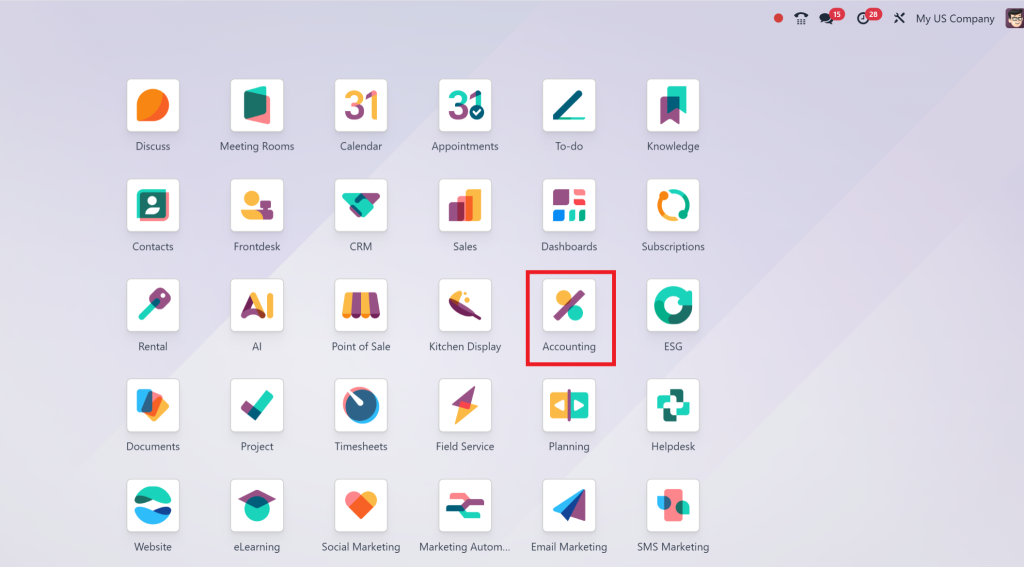
This is your central hub for managing invoices, payments, and financial reports.
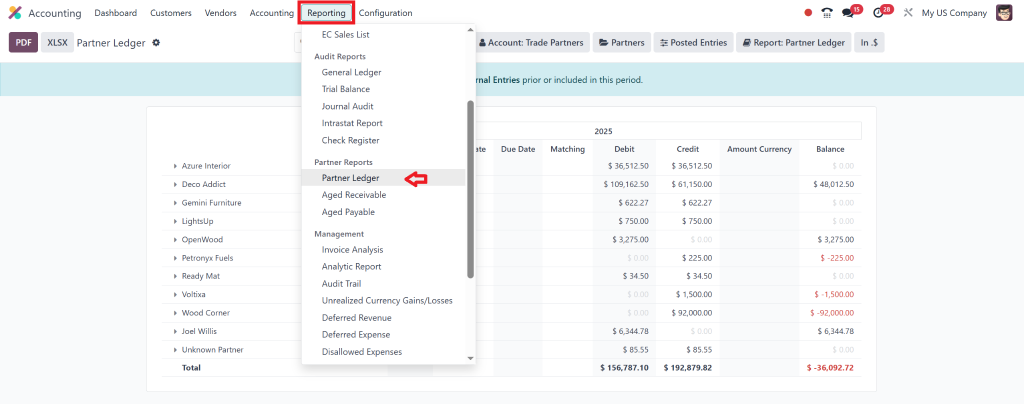
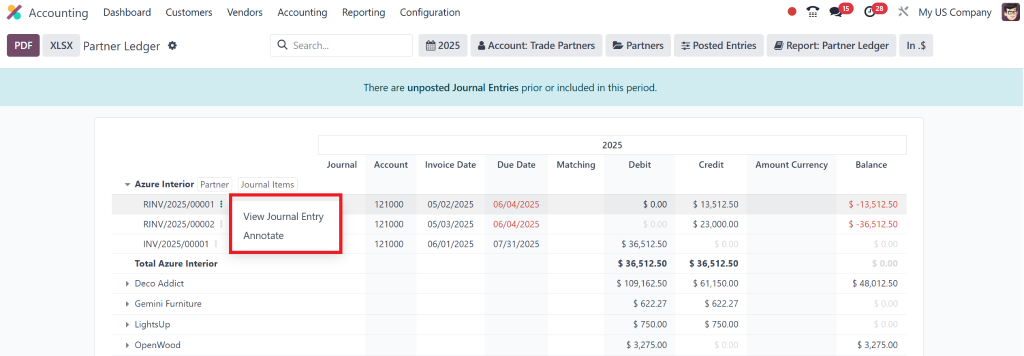
Step 2: Go to Reporting → Partner Ledger
- At the top menu bar inside the Accounting module, click Reporting.
- From the dropdown options, select Partner Ledger.
- Accounting → Reporting → Partner Ledger
Step 3: Filter for a Specific Customer
- Use the filter panel on the left to search and select a specific customer (partner).
- You can also use the search bar to type the customer’s name.
Once selected, you’ll see a detailed ledger of all that customer’s financial transactions, including:
- Invoices
- Payments
- Credits
- Outstanding amounts
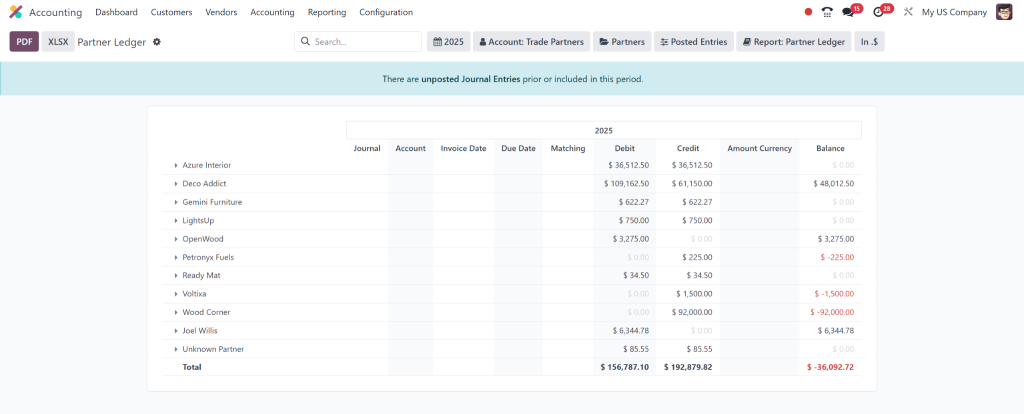
Tip: Make sure the date range is properly set at the top to include all relevant transactions.
Step 4: Configure the Report Options (Optional)
You can fine-tune what data to show in the ledger:
- Show reconciled entries
- Group by journal
- Add comparison filters
- Use the “Filter,” “Group By,” or “Search” tools for more control.
Step 5: Export the Customer Statement as PDF
Once the data looks correct:
- Click the “Print” button on the top right.
- Choose “Export to PDF”.
- This will generate a clean, downloadable PDF report similar to a customer statement.
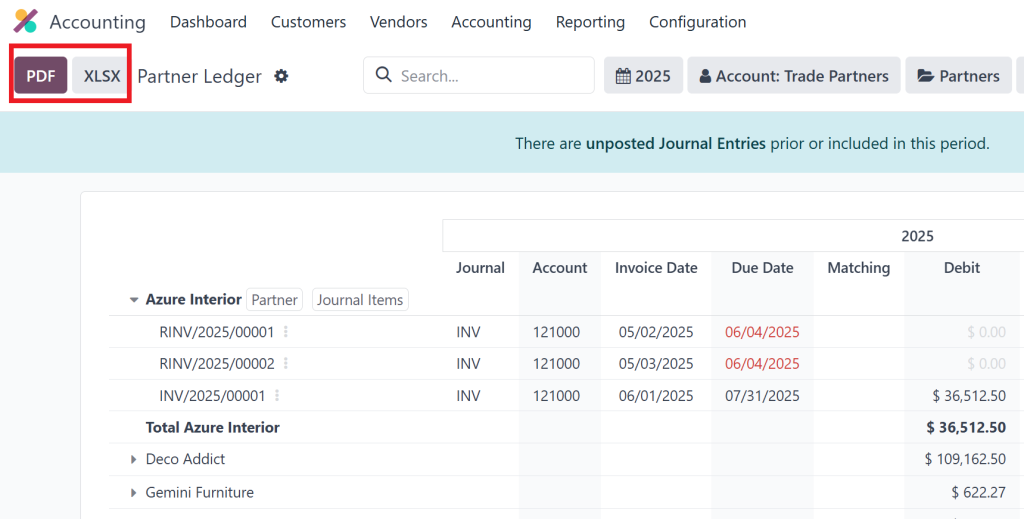
This report includes:
- All journal entries tied to that customer
- Debits and credits
- Total outstanding balance
- Due dates (if configured)
Top Benefits of Using Odoo 18 Customer Statement Reports
The main issue arises when businesses fail to achieve maximum ROI from Odoo accounting features because they do not use them effectively.
The correct implementation of Odoo 18 accounting features leads to transformative improvements in financial operations.
Benefits:
Better Cash Flow Management: Know who owes what, and when.
- Improved Client Trust: Send clear, branded, professional reports.
- Time Savings: Avoid repetitive manual data entry.
- Automated Workflows: Schedule reports for monthly circulation.
- Accuracy & Compliance: No more Excel errors or manual miscalculations.
Our team at Netilligence.io assists clients in integrating reports into automated AR workflows and performing no-code customizations through Odoo Studio and establishing connections with external systems, including payment gateways and CRMs.
How Netilligence.io Solves Real Customer Challenges
Businesses face a common challenge because they lack knowledge about Odoo report configuration for their business model and local compliance requirements.
Real Use Case:
The B2B distribution company operating in the UAE used Excel to create customer statements manually. They reached out to Netilligence.io because:
- The statements failed to support multiple currency processing.
- The company sent reports after payment terms had already expired.
- The team members at the company felt uncertain about the accounting setup within Odoo.
Our Solution:
- The team activated and set up the built-in customer statement module of Odoo.
- The company implemented bilingual reporting templates that supported both Arabic and English.
- The system began to send automated monthly statements to customers.
- The customer follow-ups were synchronized with their CRM system through Studio and API tools.
Digital Tools and Best Practices We Use for Better Reporting
The standard Odoo configuration does not always match the requirements of individual businesses.
At Netilligence.io we improve customer statement functionality through:
Digital Enhancements:
- Scheduled Report Automation (with scheduled actions & server actions)
- Custom Report Layouts using QWeb or Studio
- Dynamic Filtering (date ranges, customer groups, sales teams)
- Multi-company and multi-currency support
Best Practices:
- Use Activity Statements Monthly – Maintain a regular cycle of financial communication.
- Segment Your Customers – Not every client needs the same reporting detail.
- Sync With CRM/Collections – Improve team follow-up with centralized data.
- Test Before Dispatch – Always preview and test reports before bulk emailing.
Our proprietary reporting modules also let you track open balances, apply custom aging buckets, and connect with BI dashboards like Google Looker or Power BI.
Make the Most of Odoo 18 Customer Statement Reporting
The Odoo 18 customer statement report functions as an essential financial management tool that supports both financial stability, receivable collection, and customer relationship development.
The majority of businesses fail to maximize the potential of this robust feature. Our team at Netilligence.io exists to help. Our team at Netilligence.io specializes in Odoo financial reports, custom modules, and best-practice implementations to help your business achieve clarity quickly.




