

If you write emails every day, you already know how tiring it can be to craft every message so that it sounds clear, professional, and appropriate for the situation. There are moments when you sit with a blank screen, trying to find the right words to express yourself. And this is precisely why learning how to Generate Smarter Emails with AI in Odoo 19 feels so helpful. The platform now makes email writing easier, faster, and more natural. No matter what type of message you want to send, you can Generate Smarter Emails with AI in Odoo 19 with only a few words.
The system reads your context, understands your purpose, and gives you a ready-to-use message instantly. You can repeatedly Generate Smarter Emails with AI in Odoo 19 in sales, support, HR, finance, or even marketing tasks.
What makes this even better is how simple the process feels. You do not need to be a writer or a marketing expert. You only need to explain briefly what you want, and the tool helps you Generate Smarter Emails with AI in Odoo 19 without wasting time. This feature is convenient when you are busy, working with multiple tabs open, or handling several tasks simultaneously. Instead of thinking too much about structure and tone, you can Generate Smarter Emails with AI in Odoo 19 and focus on the work that matters.
In this blog, I will walk you through the entire experience of how you can Generate Smarter Emails with AI in Odoo 19, how the Odoo 19 AI email generation engine works, how AI email templates in Odoo can improve communication, how intelligent email automation in Odoo 19 reduces manual effort, how personalized emails Odoo AI create better connections, how Odoo AI communication tools improve content, how automated email content Odoo removes repetitive writing, and how Odoo 19 email marketing AI supports campaigns.
I aim to speak with you directly, in the same way you would with someone who truly understands the pressure of daily email writing. This blog offers a genuine solution to a very real problem.
How Odoo 19 AI Email Generation Makes Email Writing Lighter
There are days when you try to write a simple message, but the right words just do not come easily. You keep rewriting the same sentence again and again. This is when Odoo 19 AI email generation changes the moment for you. The tool understands where you are working, what you are doing, and what kind of message you might need. If you are in the CRM module, the email suggestions follow a sales tone. If you are in the accounting module, the message becomes billing-friendly. If you are in Projects, the email becomes more project-focused. The system reads your page, understands the situation, and gives you content that naturally fits your work.
You need to type something simple, such as “Write a follow-up,” “Send a polite reminder,” or “Create a friendly update.” The system instantly prepares a message that appears clean and ready. You can expand it, shorten it, or adjust the tone as needed. It feels like having someone sitting next to you who understands every aspect of your work and knows how to articulate your thoughts effectively.
How AI Email Templates Odoo Support Everyday Messages
Most businesses send the same type of emails repeatedly, such as follow-ups, reminders, onboarding messages, thank-you notes, confirmations, and updates. Typically, templates can feel quite rigid because you must edit them each time. But when you use AI email templates in Odoo, the story changes. These templates work like living documents. They adjust themselves based on the customer’s name, the transaction, the context, or the activity you’re currently handling.
If you open a template when working on a quotation, it automatically adjusts to that purpose. If you open the same template from an invoice, it prepares the content according to billing. Instead of writing new lines each time, you press the AI option, and the message refreshes into a new version. Every message feels fresh, even if the template remains the same.
Why Smart Email Automation Odoo 19 Feels Practical
When handling multiple customers, you cannot manually write every email at the perfect time. This is where intelligent email automation in Odoo 19 becomes extremely practical. Automation enables you to establish small rules within your system. These rules determine when a customer should receive a message, and AI prepares the content accordingly.
If a lead becomes inactive for a few days, the system prepares a small check-in message. If someone opens your quotation but does not respond, the system prepares a gentle follow-up. If an invoice becomes overdue, the system writes a clear reminder. If a new employee joins, the system prepares a welcome note. The best part is that you don’t need to prepare every single email manually. The tool understands the situation and produces the content for you each time.
How Personalized Emails Odoo AI Feel More Human
People respond better when a message feels personal and relevant. Nobody likes a robotic or generic email. And this is where personalized emails created by Odoo AI make a difference. The AI reads your customer’s information, including their name, history, previous conversations, purchase details, and preferences. Then it writes an email that feels like you wrote it specifically for that person.
If the customer asked a question earlier, the system can refer to it. If the customer viewed a quotation, the message can mention it. If the customer abandoned the cart, the email can address it politely. This makes the conversation more natural, more meaningful, and more engaging. You don’t have to write all this manually. AI helps you express yourself with clarity.
Better Communication with Odoo AI Communication Tools
Every business message needs the right tone. Sometimes your message feels too short. Sometimes it feels too long. Sometimes you want it to appear more polite. Sometimes you want it to sound more confident. With Odoo AI communication tools, you can adjust any message the way you want. These tools can rewrite your email more clearly, condense a long paragraph, clarify a confusing sentence, or correct your grammar.
This becomes particularly helpful when speaking with clients, partners, suppliers, or employees. Instead of worrying about small writing details, you can focus on what you want to say and let the AI refine the language. You can use these tools inside CRM, HR, Accounting, Projects, Helpdesk, or anywhere you need communication support. It adds clarity to your daily work without complicating things.
How Automated Email Content Odoo Removes Repetitive Work
Repetitive work is one of the primary reasons email writing can feel exhausting. You write the same type of message again and again, even when you already know the structure. This is where automated email content in Odoo removes unnecessary effort. Once you set up a rule, the system automatically generates the message each time based on the situation.
The content adjusts itself, so you don’t need to rewrite reminders, confirmations, updates, or notifications repeatedly. The AI learns from the rules you created and prepares the email whenever needed. It keeps your communication consistent without requiring your daily attention. You feel lighter because the system takes care of the writing that would have taken time every single day.
How Odoo 19 Email Marketing AI Supports Clearer Campaigns
Marketing emails require more effort because they must capture attention and maintain interest. Creating subject lines, deciding on the tone, writing the introduction, and shaping the content can be a time-consuming process.
This is where Odoo 19 email marketing AI helps you frame your ideas into proper emails. You can write a short prompt explaining your offer or announcement, and the system turns it into a complete email.
Whether you want to share a new product, send a newsletter, announce a discount, or highlight an achievement, the tool gives you a clean draft. You can adjust the message if you wish, but most of the time, the AI provides an obvious starting point. Your campaigns become easier to prepare, and you save more time for strategy instead of struggling with writing.
How to Generate Smarter Emails with AI in Odoo 19 in Real Everyday Work
Now that you understand the features, let’s explore how you can apply them in real-life situations. When working in sales, you may need to make quick follow-ups or update quotations. When working in support, it is essential to provide polite and respectful replies. When you are handling HR, you need friendly onboarding messages.
When you are processing accounts, you need clean payment reminders. When you are handling marketing, you need engaging newsletters. In every situation, you can open the AI writing tool and prepare your message instantly.
The system reads your exact page, understands your precise need, and produces a message that fits the moment. It does not feel forced or generic. It feels natural because it comes from the details already in your system. You can refine the message as needed, and your email is ready to send.
Odoo 19 has made email writing super easy even if you’re not good at writing! With the new built-in AI Email Generator, you can create professional, precise, and personalized emails in just a few seconds.
Here’s how you can generate smarter emails with AI in Odoo 19:
Open Settings from your Odoo dashboard.
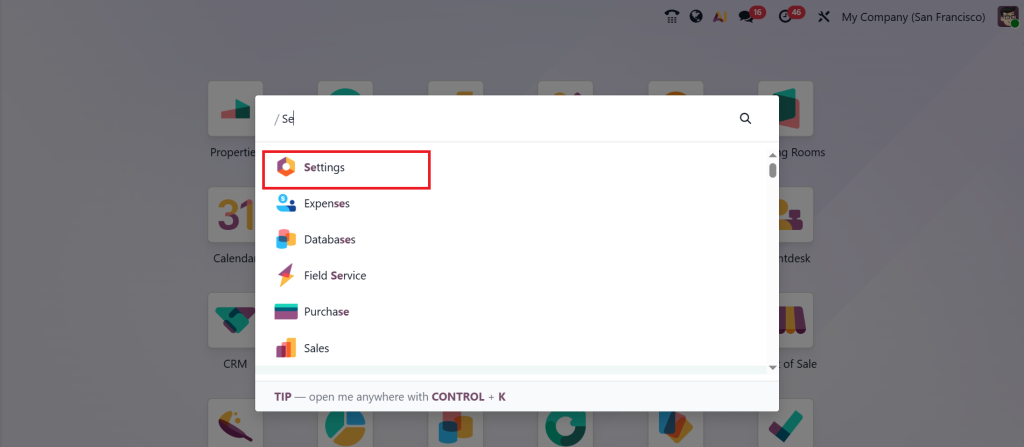
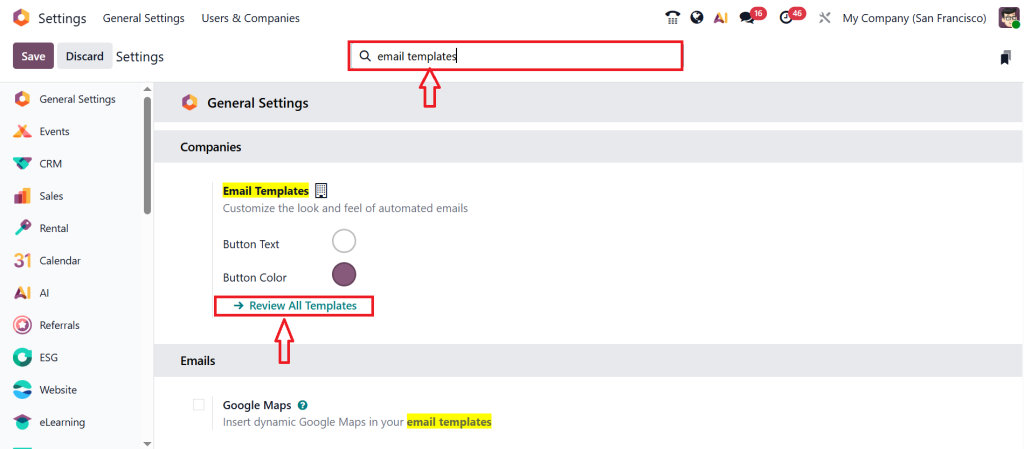
In the Search bar, type Email Templates and then click the Review all Templates button.
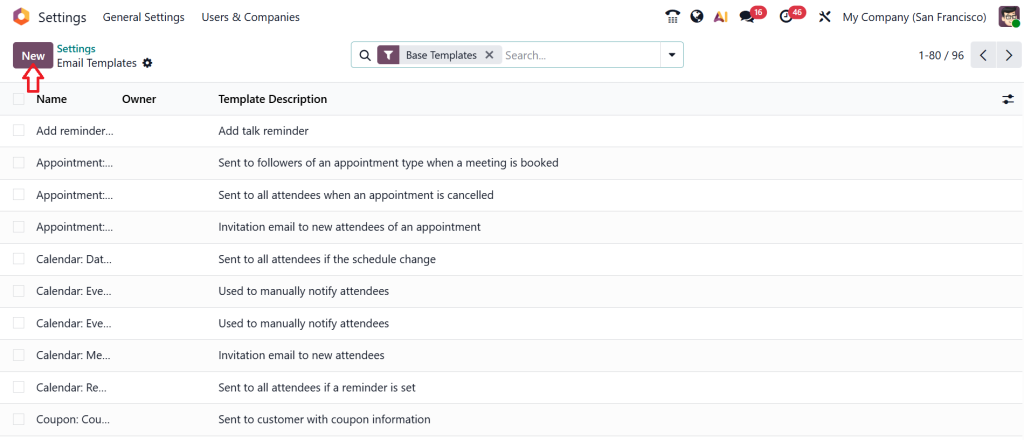
Here, you will see a list of all your existing templates. From this, you can edit any of them or create a brand new one. Let’s click ‘New’ to create a new template.
At the top, give your email a name. Let’s call this one a welcome email. Next, in the ‘Applies to‘ field, select the model with which you want this template to be linked.
In this example, I’ll choose Lead. So, this email can be sent automatically when a new lead is created. Then let’s add a Subject line, something simple like Welcome to Netilligence.
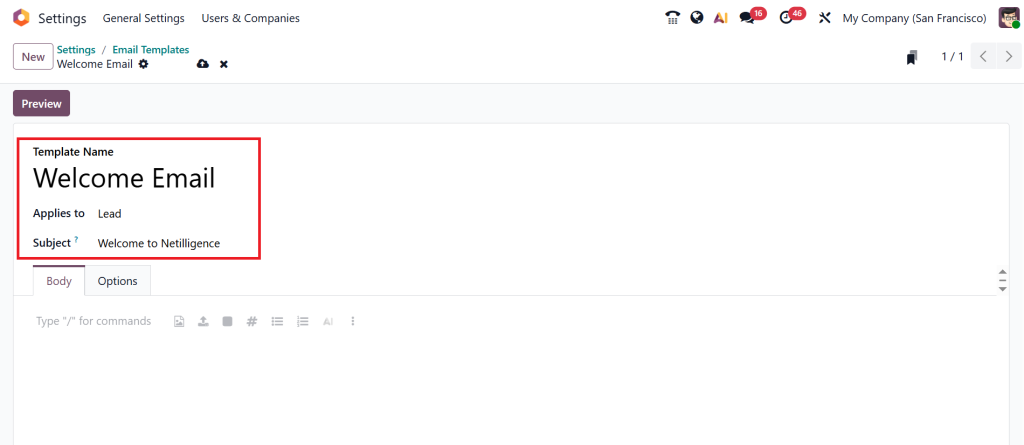
Now, let’s move down to the body section. This is where you will write the actual email content. And here’s where Odoo 19’s new AI tools really shine. In this editor, you can use the forward slash ‘‘/’’ to bring up a menu of quick commands; things like formatting options, inserting placeholders, or using AI prompts. Let’s choose Prompt.
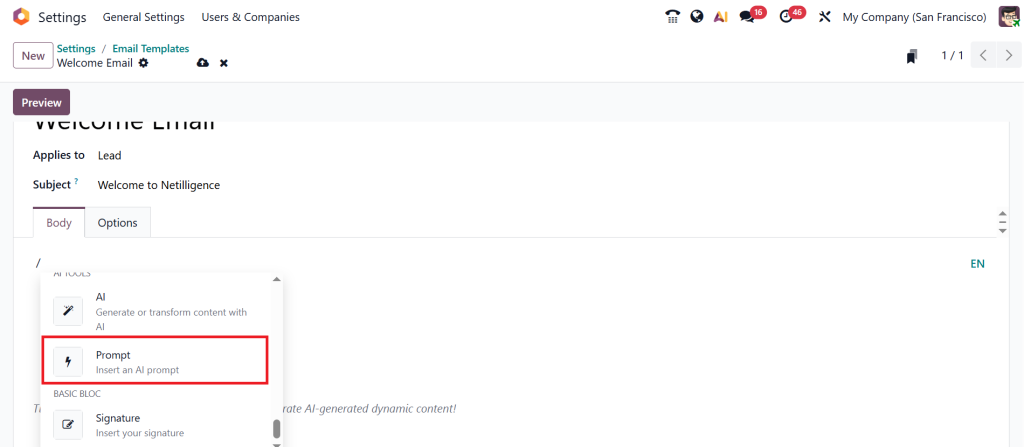
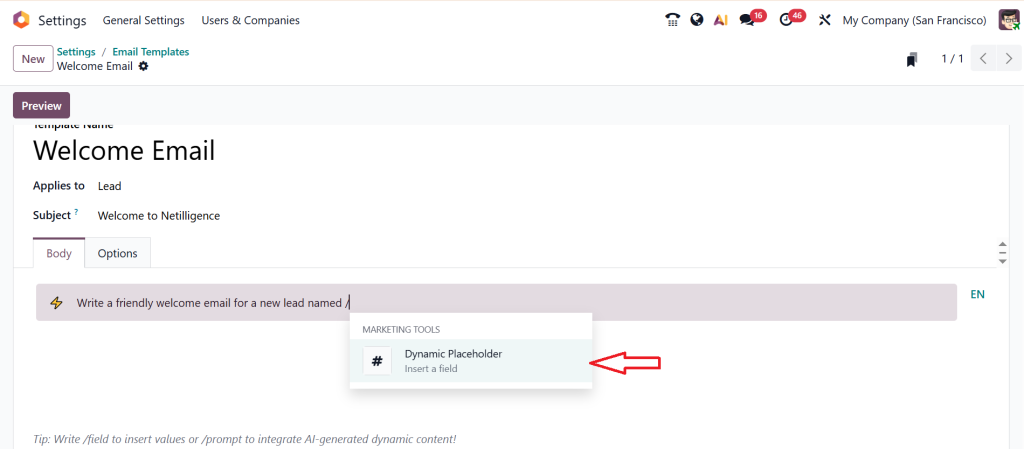
You will see a new field appear where you can describe what kind of message you want the AI to write for you. For example, I can type write a friendly welcome email for a new lead…, slash ‘/’ click on ‘Dynamic Placeholder’.
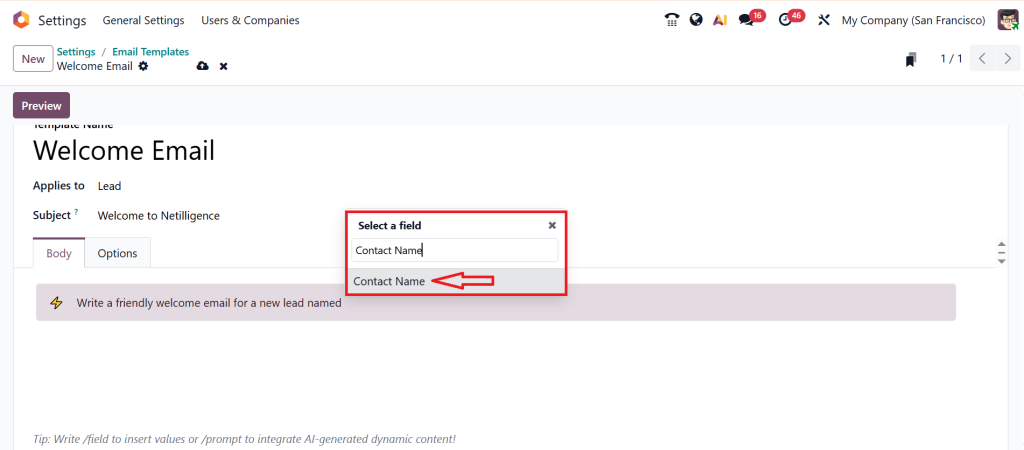
Select a field ‘Contact Name’.
Click ‘Insert’.
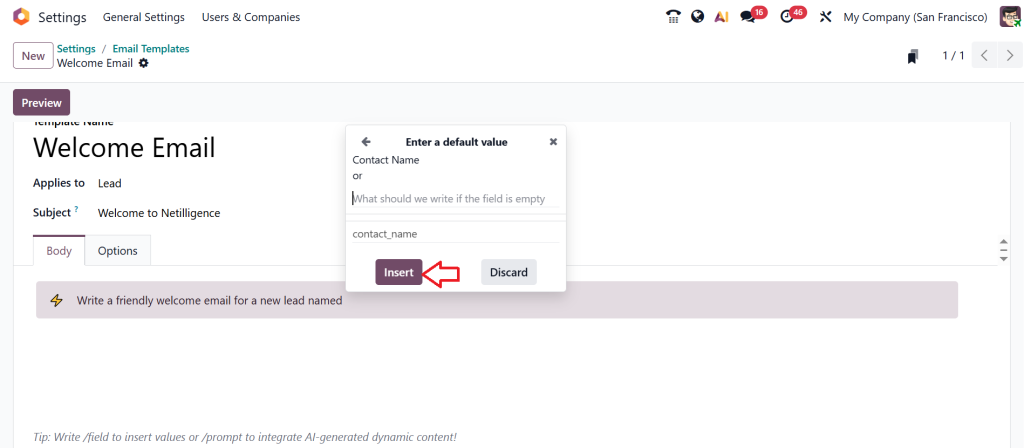
Complete the sentence ‘I can type write a friendly welcome email for a new lead named object.contact_name, introducing our company Netilligence. The highlighted part called a ‘Dynamic Placeholder’. It automatically pulls data from your records like the leads name, company or email address. That means every time this template is used Odoo will fill the real information for you making each email feel personal without any manual editing. Let’s click Preview.
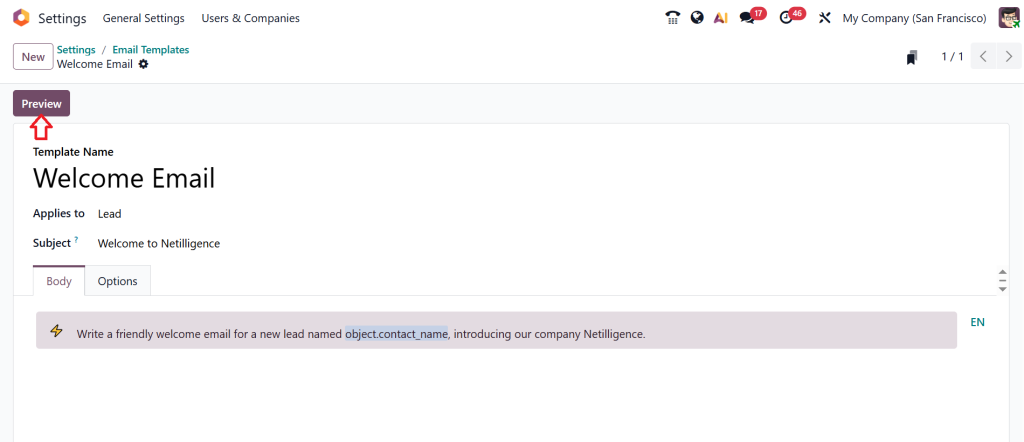
Here, you will see both your subject line and the body text.
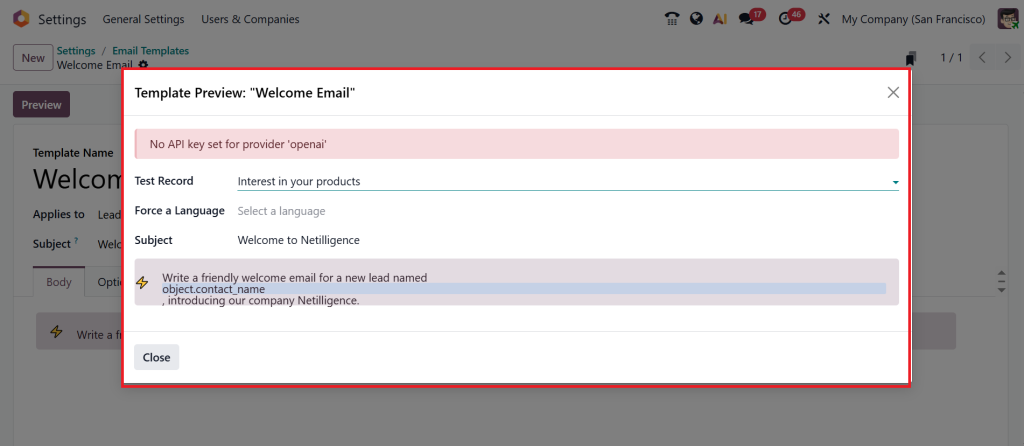
If you want to adjust the tone or style of the message? You don’t need to rewrite everything from scratch. Just tweak your prompt. For example, you can say make it more formal or let’s type add a meeting request and agin click on Preview.
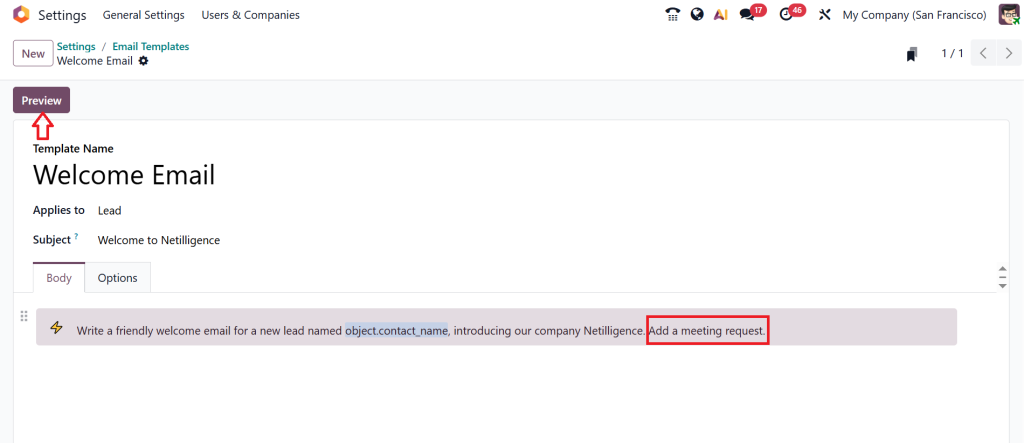
And Odoo instantly regenerates a new version of your email with those changes applied. You can use this approach for all kinds of templates, introductions, follow-ups, thank you notes or even marketing campaigns.
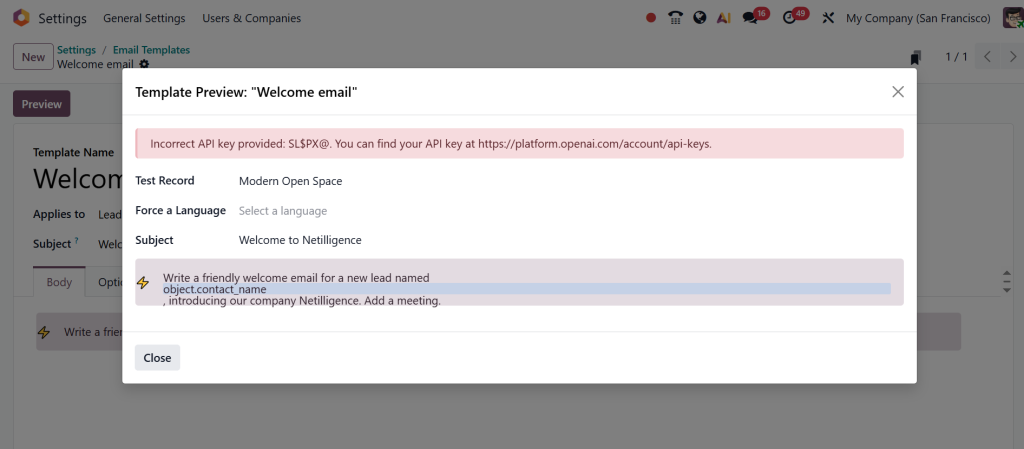
Whether you want your message to sound short and casual or professional and structured, the AI adopts automatically to your instructions. That’s how we can create a fully dynamic AI powered email template in Odoo 19. With this feature, you can save a lot of time, keep your communication consistent, and still make every message feel personal and engaging.
Your Next Step Toward Smarter Communication Starts Here
When you start using Generate Smarter Emails with AI in Odoo 19, you immediately feel how simple and stress-free your daily communication becomes. Writing emails no longer feels heavy or time-consuming. You give a small direction, and Odoo 19 helps you create clean, confident, and meaningful messages. Whether you want to improve customer responses, handle daily updates, or plan long-term email campaigns, the Odoo 19 AI email generation feature operates quietly in the background, ensuring everything remains smooth, consistent, and efficient.
You do not need to worry about complicated settings or long learning curves. You only need a clear goal, and Odoo’s AI email templates, intelligent email automation in Odoo 19, and automated email content support you from start to finish. And if growing faster is your priority, then the Odoo 19 email marketing AI tools help you send emails that speak directly to your audience and bring positive results.
If you want your business communication to feel lighter, more transparent, and more thoughtful, then this is your moment to move forward.
Ready to grow with smarter emailing? Connect with Netilligence today and start using Odoo 19 AI to make every email work better for your business.




