

Managing vendors isn’t always a smooth journey. Sometimes, a supplier delays an order, sends the wrong product, or creates a communication gap that leads to unnecessary chaos. That’s why Odoo 19 introduced the purchase alert system, a feature that offers significant benefits. In this blog, I’ll show you how to set alerts for vendors and products in the Odoo 19 Purchase App, making your purchasing workflow more innovative and more reliable.
Think of these alerts as your personal assistants. They remind you of what’s important before you make a mistake. You can set them to warn you about unreliable vendors, products under quality review, or even about pending payments before confirming a purchase order. Once you understand how to set alerts in Odoo 19, you’ll realize how effortless it becomes to avoid costly errors and delays.
Now, Odoo doesn’t just give you alerts. It gives you control. You decide when to see them, what they should say, and how they should react. It’s not just about reminders; it’s about keeping your purchasing process clean, quick, and free from surprises.
Step-by-Step Guide – How to Set Alerts for Vendors & Products in Odoo 19
Let’s start with the most crucial step: setting up vendor and product alerts in Odoo 19. Follow this easy guide to configure Odoo 19 vendor alert configuration and Odoo 19 Product Alerts Setup effectively.
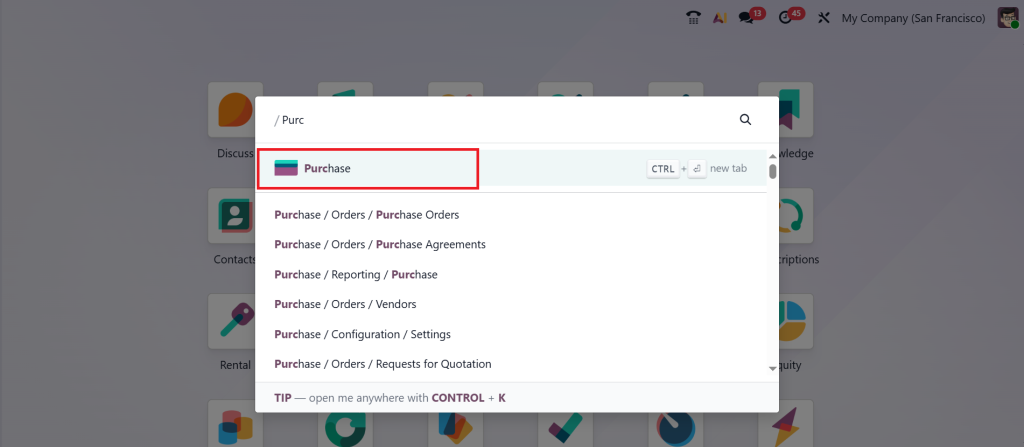
First, go to the Purchase App in your Odoo 19 dashboard. This is where all your supplier-related configurations and purchase activities are managed.
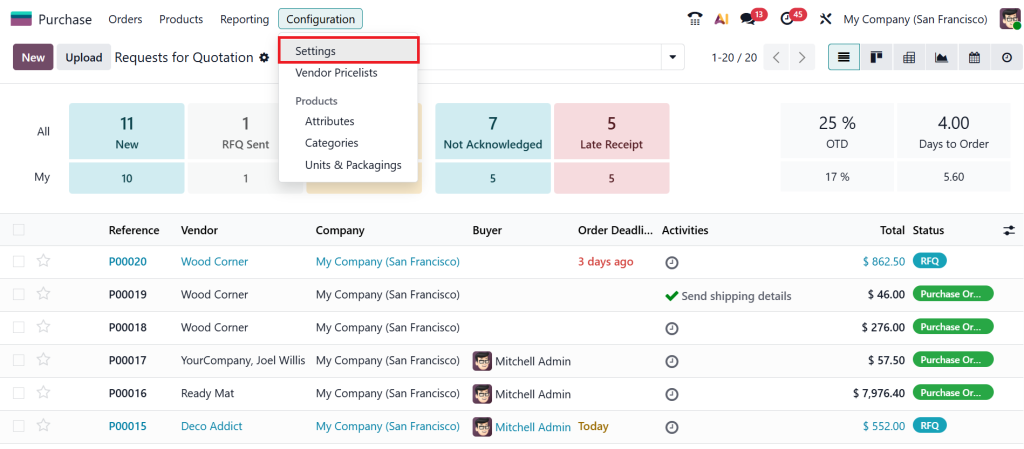
Then go to Configuration > Settings.
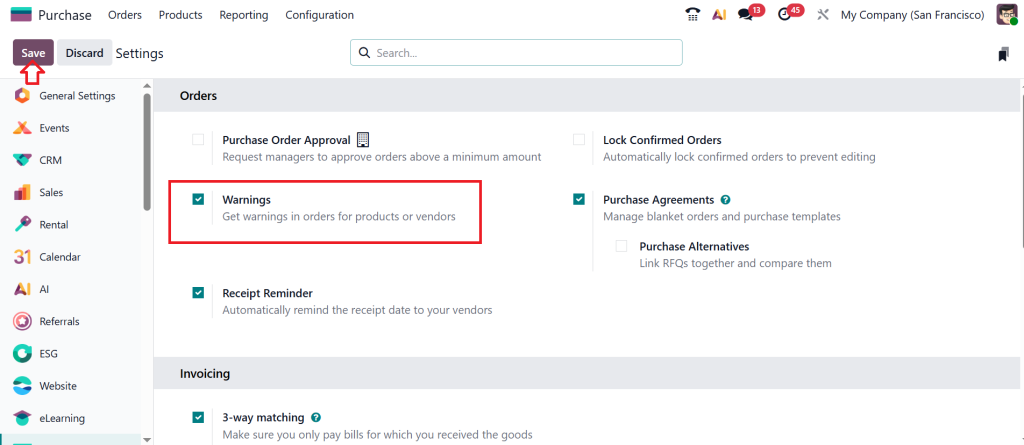
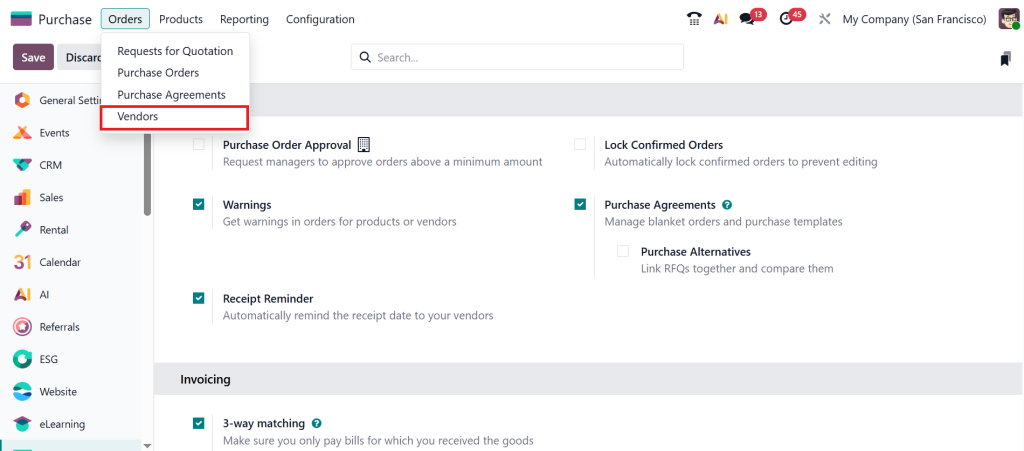
Under the Orders section, enable the Warnings feature and click Save.
Then, click Orders > Vendors.
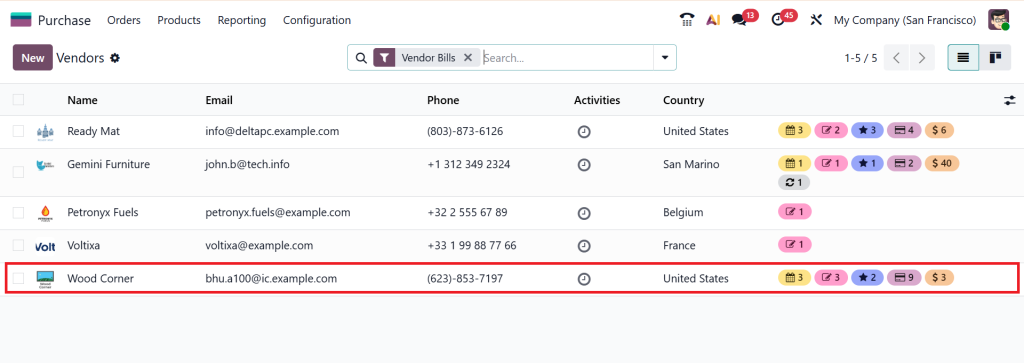
Select any Vendor from the list below. I’ll choose Wood Corner.
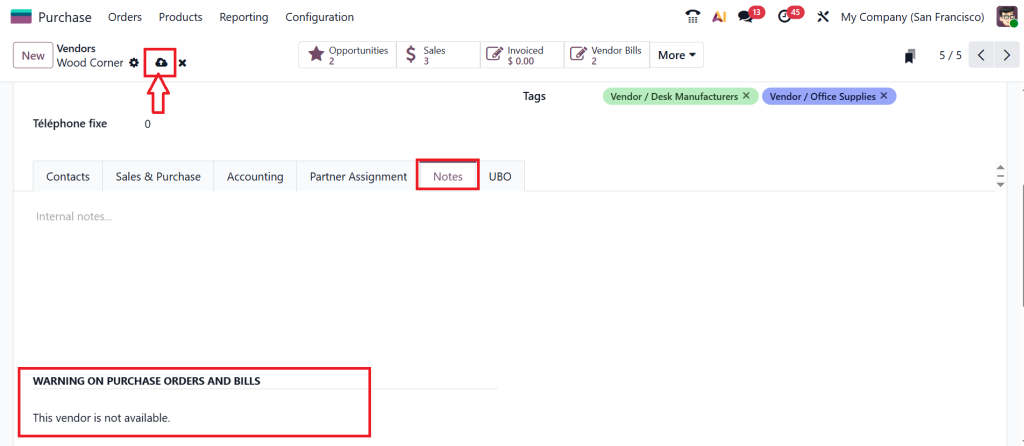
So, under the Notes tab, you can see an option ‘‘WARNING ON PURCHASE ORDERS AND BILLS’’. Here you can simply provide any kind of warning like ‘‘This vendor is not available’’ and click on Save.
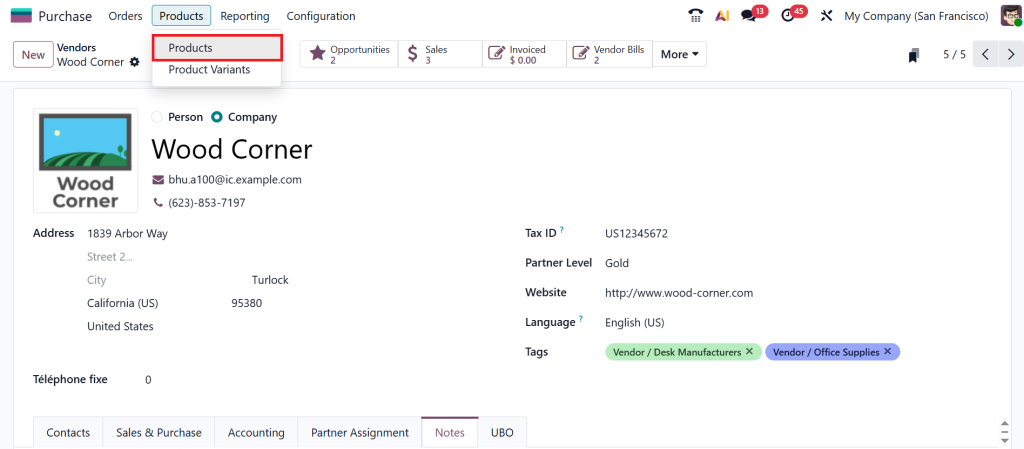
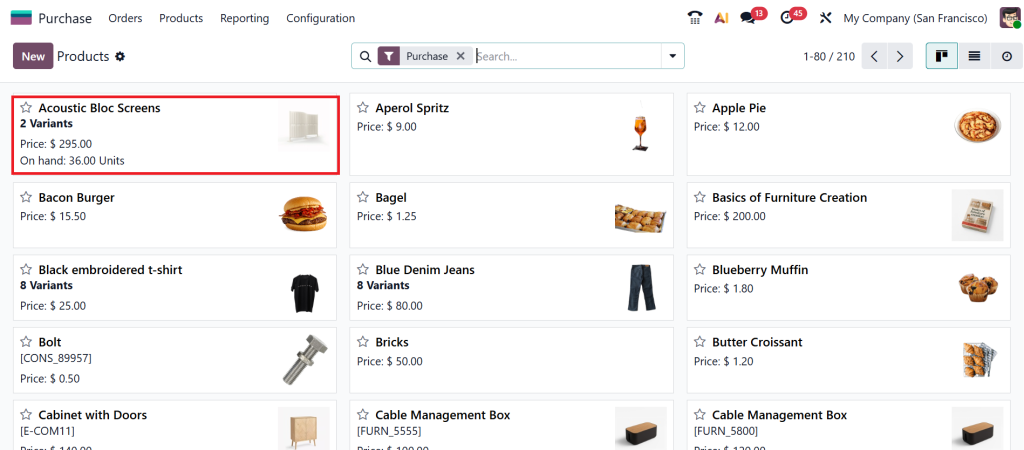
Let’s move to the Products > Products. Because now I want to add a warning message under a product also.
I am picking ‘‘Acoustic Block Screen’’ and adding a warning message under this product.
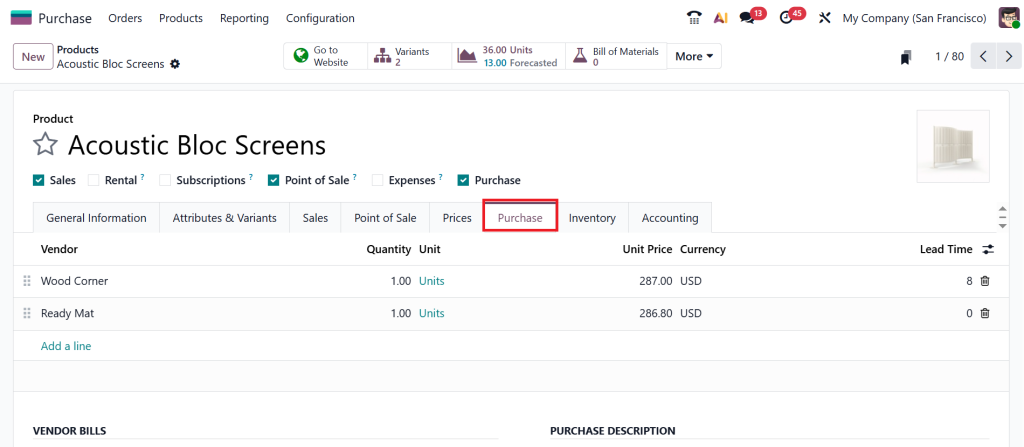
Once the product is open, click on the ‘‘Purchase’’ tab.
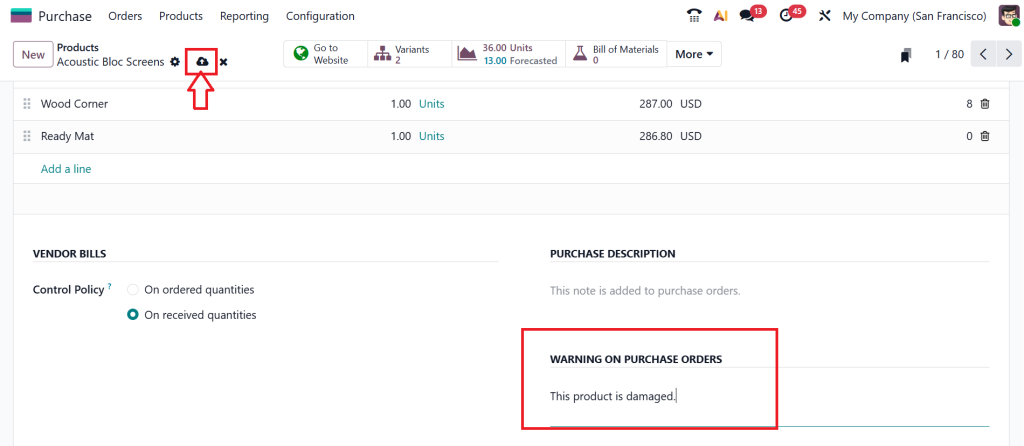
Scroll down and you can find an option called ‘‘WARNING ON PURCHASE ORDERS’’ same as before, just provide any kind of warning, for example ‘‘This product is damaged’’ and click Save.
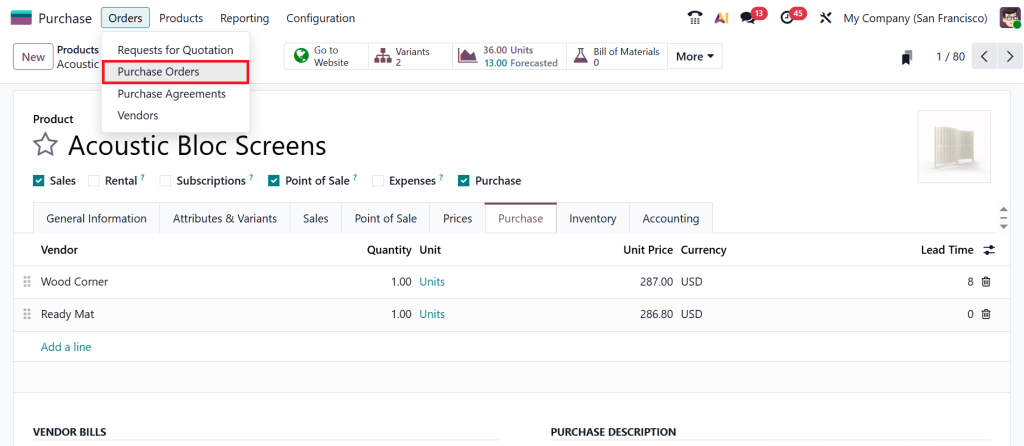
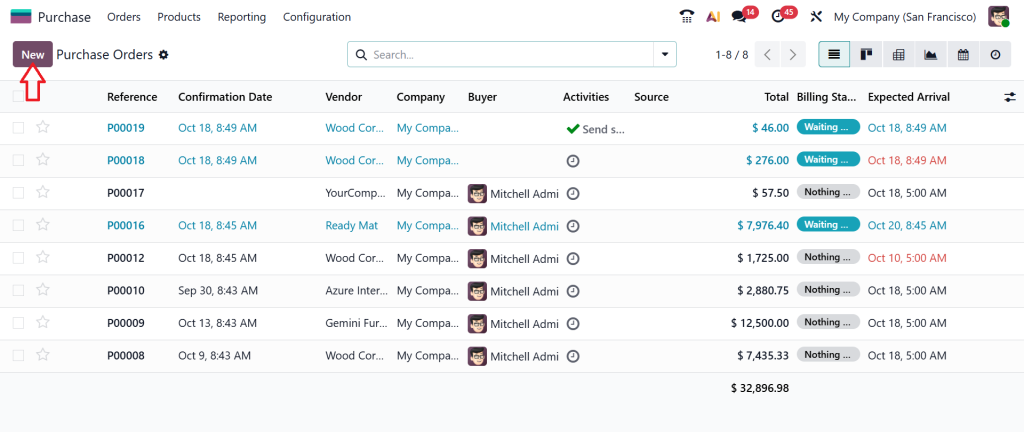
Now, go to the Orders > Purchase Orders.
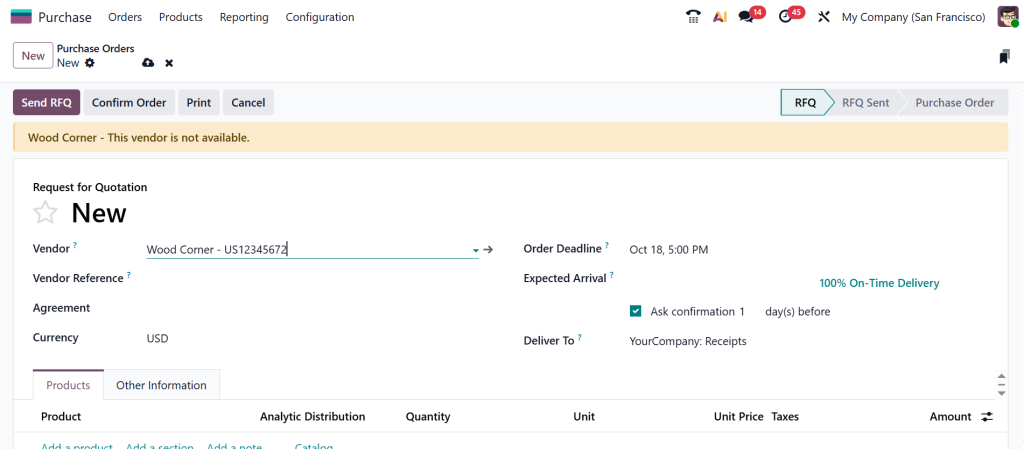
Create a new purchase order by clicking on ‘‘New’’.
After choosing the Vendor you can see a Yellow Color on the top of our purchase order which is ‘‘Wood Corner – This vendor is not available.’’
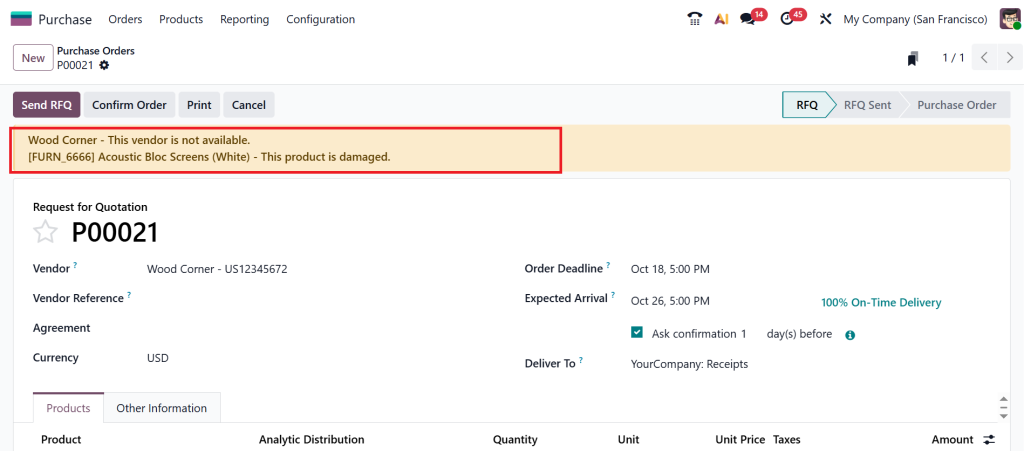
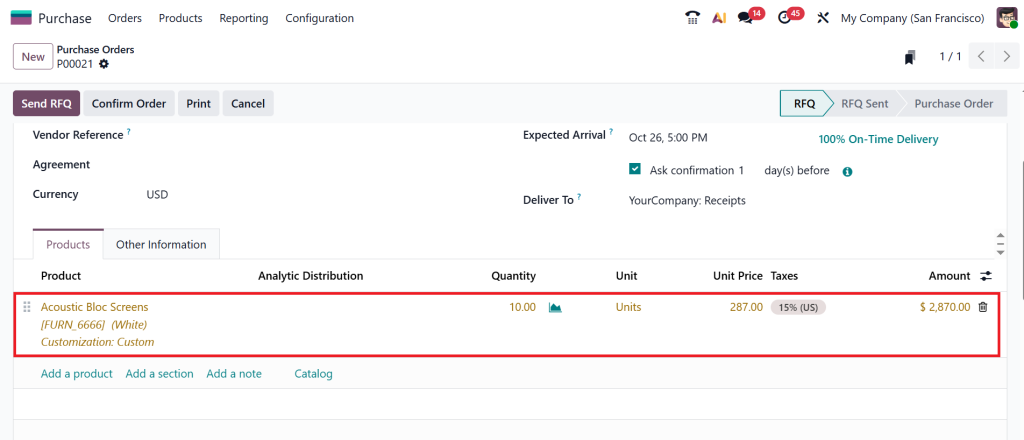
Now, test product warning message by choosing the product which is ‘‘Acoustic Block Screen’’. After confirming the product you can see a warning message ‘‘This product is damaged’’ on the top of the product.
On the other hand the product is showing us a ‘‘Yellow Color’’ because of some kind of warning.
That’s how effective Odoo 19 vendor alert configuration and Odoo 19 Product Alerts Setup can be; it saves you from unnecessary trouble before it even starts. This is a very good feature that you can use inside any purchase order.
How to Set Warnings in Odoo 19 Purchase App for Smarter Buying Decisions
Let’s explore why setting warnings in the Odoo 19 purchase app marks a significant turning point. We often think human errors are unavoidable in purchasing, but Odoo proves otherwise. With a few clicks, you can automate safety checks that never forget, never miss, and always alert you before something goes wrong.
When you set a warning, you’re basically teaching Odoo how to think like a procurement expert. It can alert you when dealing with a risky vendor, remind you of products with limited stock, or warn you when purchase amounts exceed a certain threshold. You don’t have to check everything manually. Odoo does it automatically.
So, you can personalize every message. It could be a friendly nudge, such as, “Hey, this vendor hasn’t delivered on time before,” or a firm stop sign saying, “Cannot proceed pending payment with this supplier.” Once these alerts are in place, your purchase orders become smarter, safer, and faster. That’s the magnificence of Odoo’s warning system: it’s like having your own internal quality control, but digital and automated.
Automated Vendor Notifications Odoo 19 – Keeping Everyone on the Same Page
The biggest challenge in procurement isn’t buying; it’s communication. How many times have you emailed a vendor about a purchase order change, only to realize they never saw it? That’s why automated vendor notifications in Odoo 19 are such a blessing.
By enabling automated notifications, Odoo sends alerts and updates to your vendors about purchase order changes, approvals, cancellations, or delays, eliminating missed emails and confusion. Everything is instantly communicated, and both sides stay on the same page.
It’s like having an automatic messenger that talks to your suppliers 24/7. Since it’s integrated directly into the Odoo 19 purchase alert system, you don’t need to send a single message manually. You focus on making the right purchase decisions, while Odoo takes care of the communication part.
This feature is handy for businesses that manage multiple vendors. You’ll always know that every supplier receives their updates on time, improving relationships and reducing misunderstandings. That’s what makes automated vendor notifications in Odoo 19 such a critical part of a modern, efficient purchasing process.
Product Warning Messages Odoo 19 – The Secret to Flawless Inventory Management
Let’s take a closer look at product warning messages in Odoo 19, as they warrant special attention. You know that feeling when you realize a product you just ordered is out of stock or discontinued? It’s frustrating, right? These product warnings save you from that headache.
By setting up product alerts, you can warn your team before they even reach the point of error. For instance, when a product is nearing expiration or temporarily unavailable, Odoo can display an alert stating, “This product is not available until next month.” That means no accidental orders, no wasted money, and no angry customers later.
These messages aren’t just internal; they guide your entire workflow. Your procurement, warehouse, and finance teams all get the same warnings, keeping everyone aligned. That’s how the Odoo 19 product alerts setup quietly prevents chaos before it begins.
And honestly, once you start operating them, you’ll wonder how you ever worked without them. It’s like adding a layer of intelligence to your daily purchasing routine, one that constantly watches over your decisions.
Odoo 19 Purchase Alert System – Your Smart Procurement Partner
Here’s something you’ll love about Odoo 19: its purchase alert system doesn’t just react; it predicts. The Odoo 19 purchase alert system operates in real-time, analyzing your vendor and product choices to trigger alerts wherever potential risks are detected. Whether you’re about to buy from a blocked supplier or reorder a faulty product, Odoo steps in with a clear message before you commit.
The system can even trigger alerts based on custom conditions. For instance, when the purchase amount exceeds a certain threshold or the vendor has outstanding invoices, Odoo automatically triggers a warning. It’s not just about catching mistakes, it’s about preventing them altogether.
That’s why businesses that use the Odoo 19 purchase alert system notice a vast improvement in accuracy, speed, and confidence. Instead of spending hours double-checking every detail, your team can rely on the system to guide them. And that’s what digital transformation is really about: more innovative tools making more intelligent decisions.
Odoo 19 Procurement Alert Management – From Chaos to Control
At this point, you can see how Odoo 19 turns purchasing from a reactive process into a proactive one. However, to reveal its full potential, you must understand Odoo 19 procurement alert management. Think of it as the command center of all your purchasing alerts. Here, you can analyze how often alerts are triggered, which vendors are problematic, and which products need review.
Over time, these insights help you refine your purchasing strategy. For instance, if a vendor consistently triggers warnings, it may be time to renegotiate terms or consider switching suppliers. If a particular product keeps getting flagged, it may indicate a quality or stock issue. That’s how Odoo turns simple alerts into actionable business intelligence.
The exquisiteness of Odoo 19 procurement alert management is that it scales with your business. As your business scales, you can add more rules, automate more actions, and fine-tune your warnings to match your workflow perfectly. It’s not just software, it’s a partner that continually learns from your operations and helps you make better decisions every day.
Why You'll Love Using Alerts in Odoo 19
If you’ve ever wished you had a system that could warn you before making a bad purchase, Odoo 19 is precisely what you need. It doesn’t just send alerts, it gives you peace of mind. By setting alerts for vendors and products, you’re building a safety net around your entire procurement process.
You don’t have to worry about delayed shipments, wrong products, or missing updates. The Odoo 19 vendor alert configuration, Odoo 19 product alerts setup, and automated vendor notifications Odoo 19 all work together to protect your business from human error.
Imagine your team working confidently, knowing that Odoo has their back. That’s the influence of an intelligent system, one that thinks ahead, warns early, and keeps everything running smoothly. Once you start using it, you’ll never want to go back to manual checks or email reminders.
With Odoo 19, procurement becomes what it should have always been: easy, intelligent, and entirely under control.
Making Procurement Smarter with Odoo 19
So, setting up alerts for vendors and products in Odoo 19 is more than just a technical process. It’s a strategy to make your purchasing smarter and safer. By grasping features such as Odoo 19 vendor alert configuration, Odoo 19 product alerts setup, automated vendor notifications, and product warning messages, you can convert your workflow into an automated, error-free system.
The Odoo 19 purchase alert system isn’t about controlling you; it’s about supporting you. It works silently in the background, ensuring accurate data, timely communication, and complete awareness of every purchase you make.
That’s the future of procurement, and Odoo 19 makes it simple. Once you experience Odoo 19 procurement alert management, you’ll see how small alerts can lead to massive improvements in productivity and trust.
If you haven’t tried setting alerts yet, go ahead, log in to your Odoo 19, explore the Purchase App, and start configuring. Because the most innovative businesses don’t wait for mistakes to happen, they set alerts before they do.
Ready to take your Odoo 19 setup to the next level?
Let Netilligence help you customize your Purchase App, automate vendor alerts, and rationalize your entire procurement process with precision. Get in touch with our Odoo experts today and discover how intelligent alerts can drive smarter business decisions.




