

Introduction: How to Generate Vendor Bills Automatically in Odoo 19
How to generate vendor bills automatically in Odoo 19 is one of the most common questions businesses ask when looking to improve their accounting efficiency. As companies grow, manually entering supplier invoices becomes time-consuming, error-prone, and difficult to manage.
With the latest advancements in Odoo 19, organizations can automate invoice processing, reduce paperwork, and speed up approval cycles. Whether you receive hundreds or thousands of invoices every month, automatic vendor bills in Odoo help eliminate repetitive tasks and improve financial accuracy.
If you are wondering how to generate vendor bills automatically in Odoo 19, the platform offers several methods, including purchase order integration, invoice digitization, OCR, and vendor bill automation workflows. These capabilities make Odoo 19 bill automation a game-changer for businesses seeking better control over their accounts payable process.
Another reason companies are searching for how to generate vendor bills automatically in Odoo 19 is the growing need for digital transformation. Businesses want faster invoice processing, better supplier management, and reduced administrative costs. With Odoo vendor bill automation, finance teams can focus on strategic decision-making rather than manual data entry.
In this guide, we will explain how to generate vendor bills automatically in Odoo 19, explore the benefits of automation, and show how features like creating a vendor bill from a purchase order in Odoo 19, uploading bills in Odoo 19, and invoice digitization in Odoo 19 can streamline your accounting operations.
Why Vendor Bill Automation Matters in Modern Businesses
Managing supplier invoices manually creates several challenges for businesses:
- Human errors in invoice entry
- Delayed payment processing
- Duplicate invoices
- Increased administrative workload
- Lack of visibility into payable expenses
- Higher operational costs
As organizations expand, these issues become more significant. Finance teams often spend countless hours entering invoice details manually and verifying information across multiple documents.
This is where Odoo 19 supplier bills automation becomes valuable.
By automating invoice creation and processing, businesses can:
- Save time
- Improve accuracy
- Enhance supplier relationships
- Accelerate approvals
- Reduce processing costs
- Improve compliance
Odoo 19 helps businesses create a highly efficient accounts payable workflow that supports long-term growth.
What Is Vendor Bill Automation in Odoo 19?
Vendor bill automation refers to the automatic creation, processing, and management of supplier invoices using intelligent workflows within Odoo.
Instead of manually creating every invoice, Odoo automatically extracts information from purchase orders, receipts, and uploaded invoices.
The automation process includes:
Purchase Order Integration
Purchase orders can automatically generate vendor bills when products are received or invoices are validated.
Invoice Digitization
Odoo’s OCR technology scans invoices and automatically extracts critical information.
Automated Data Entry
Supplier details, invoice numbers, dates, taxes, and amounts are filled automatically.
Approval Workflows
Bills can be routed through predefined approval stages before payment processing.
These features significantly reduce manual accounting work and increase efficiency.
How to Generate Vendor Bills Automatically in Odoo 19
Now let’s look at the process for generating vendor bills automatically in Odoo 19.
Step 1: Create a Purchase Order
The process starts with a purchase order.
Navigate to:
Purchases → Purchase Orders → Create
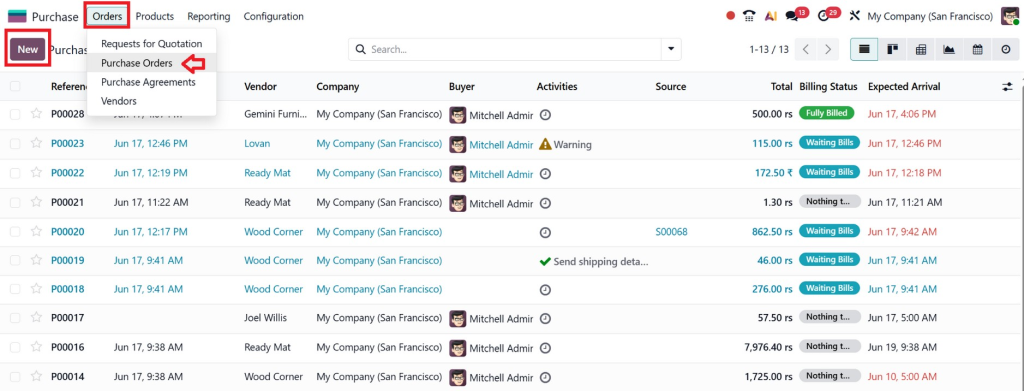
Enter:
- Vendor information
- Products or services
- Quantity
- Unit price
- Delivery dates
Once approved, confirm the purchase order.
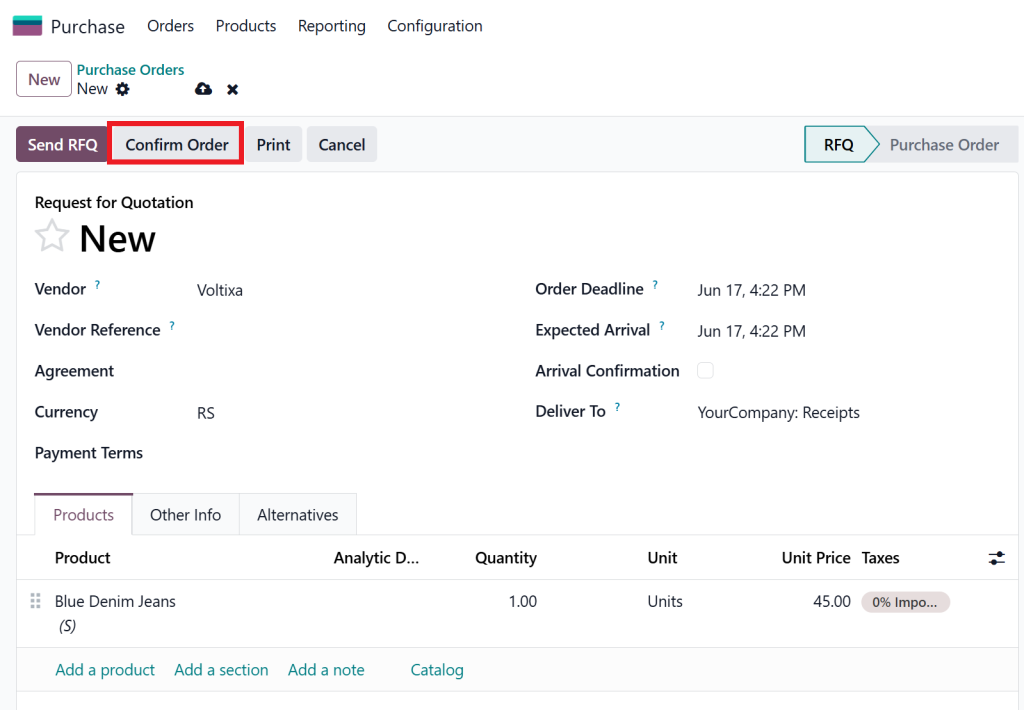
The purchase order becomes the foundation for future invoice automation.
Step 2: Receive Products
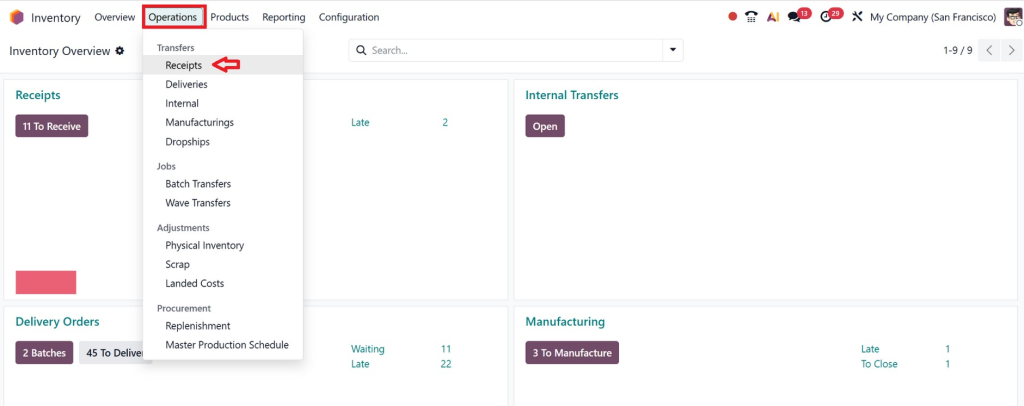
After receiving products from the supplier:
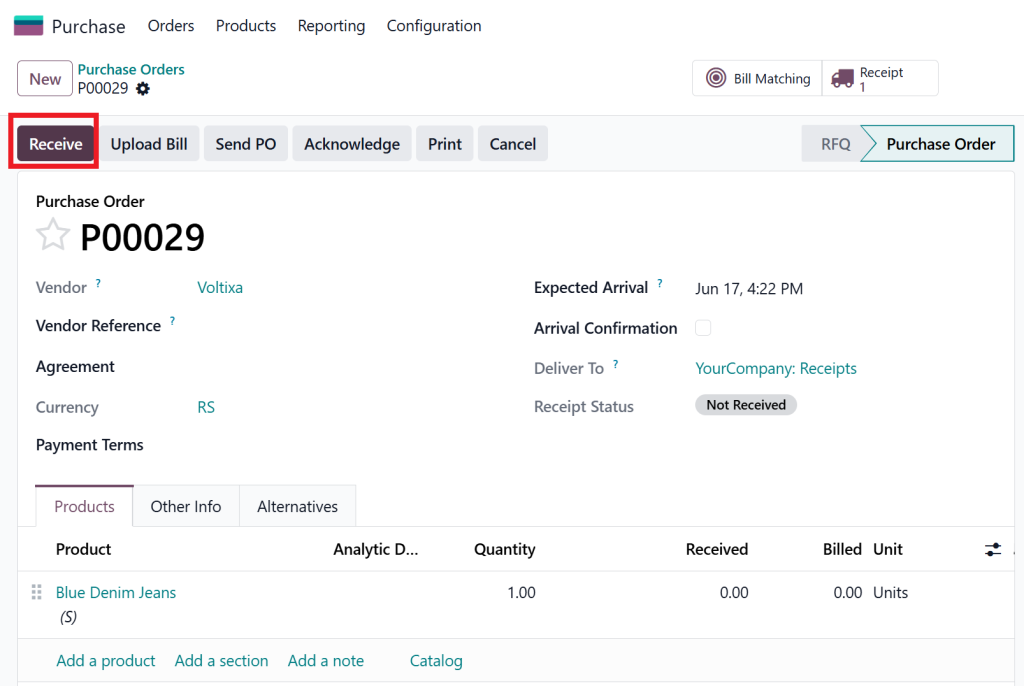
Navigate to:
Inventory → Receipts
Validate the received quantities.
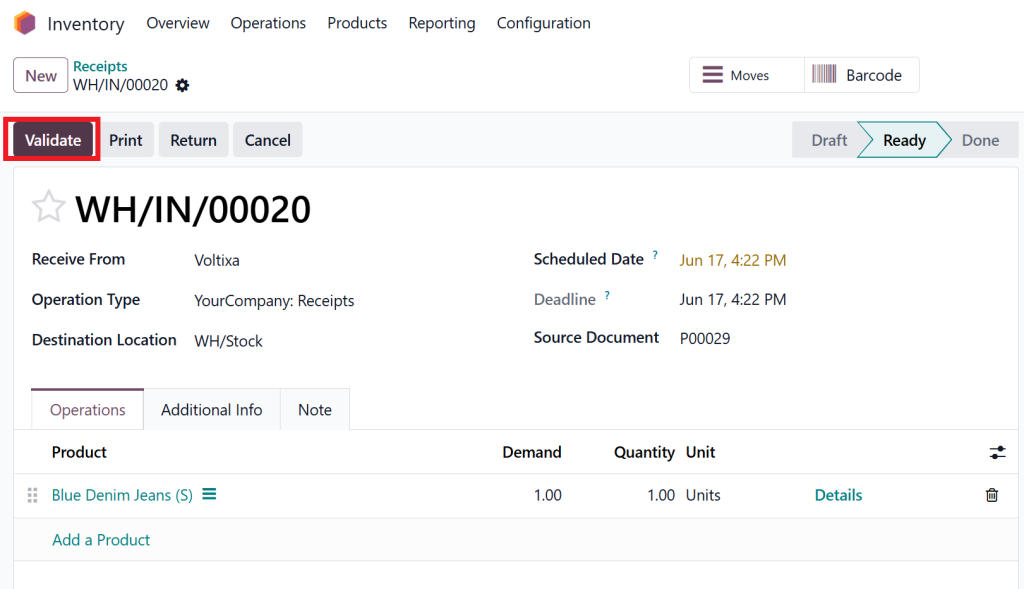
Odoo automatically updates inventory records and prepares data required for invoice generation.
This connection between purchasing and accounting is what makes creating a vendor bill from a purchase order in Odoo 19 so powerful.
Step 3: Generate Vendor Bill
Open the confirmed purchase order.
Click:
Create Bill
Odoo automatically pulls information from the purchase order, including:
- Vendor name
- Products
- Prices
- Taxes
- Quantities
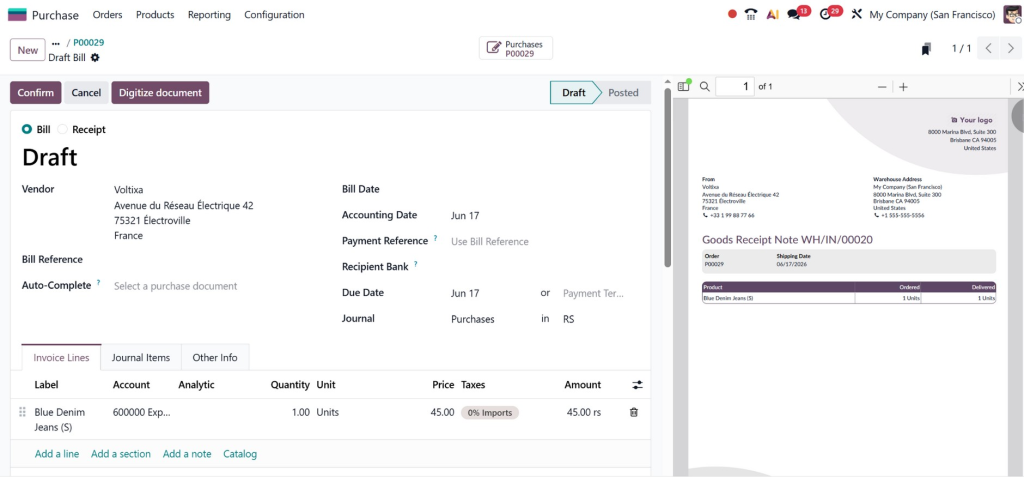
The vendor bill is generated instantly with minimal manual intervention.
Step 4: Validate the Vendor Bill
Review:
- Invoice amounts
- Tax calculations
- Due dates
- Vendor references
Once verified, click:
Confirm
The bill becomes an official accounting document ready for payment processing.
Step 5: Process Payment
After approval, payment can be processed directly from the vendor bill.
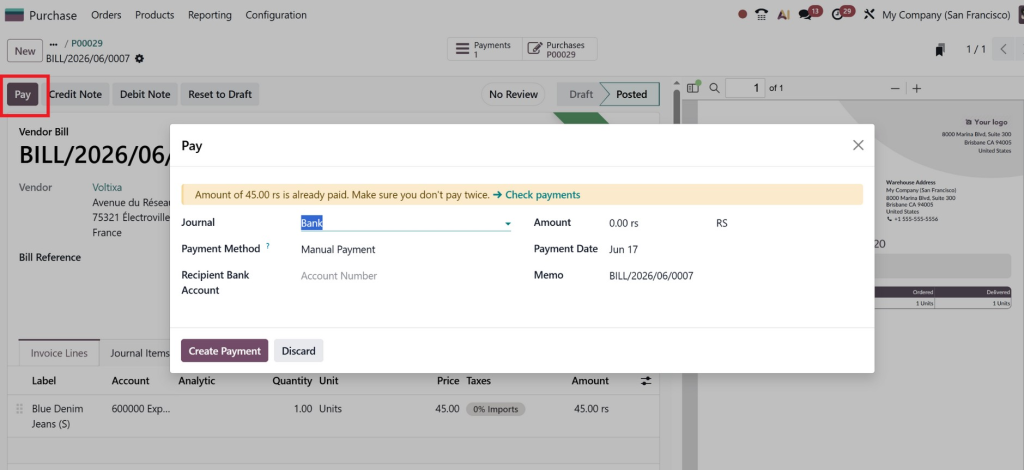
This smooth workflow reduces administrative workload and accelerates supplier payments.
Using Odoo 19 Invoice Digitization for Automatic Vendor Bills
One of the most exciting features in Odoo 19 is invoice digitization.
Many suppliers still send invoices through:
- Scanned documents
- Paper invoices
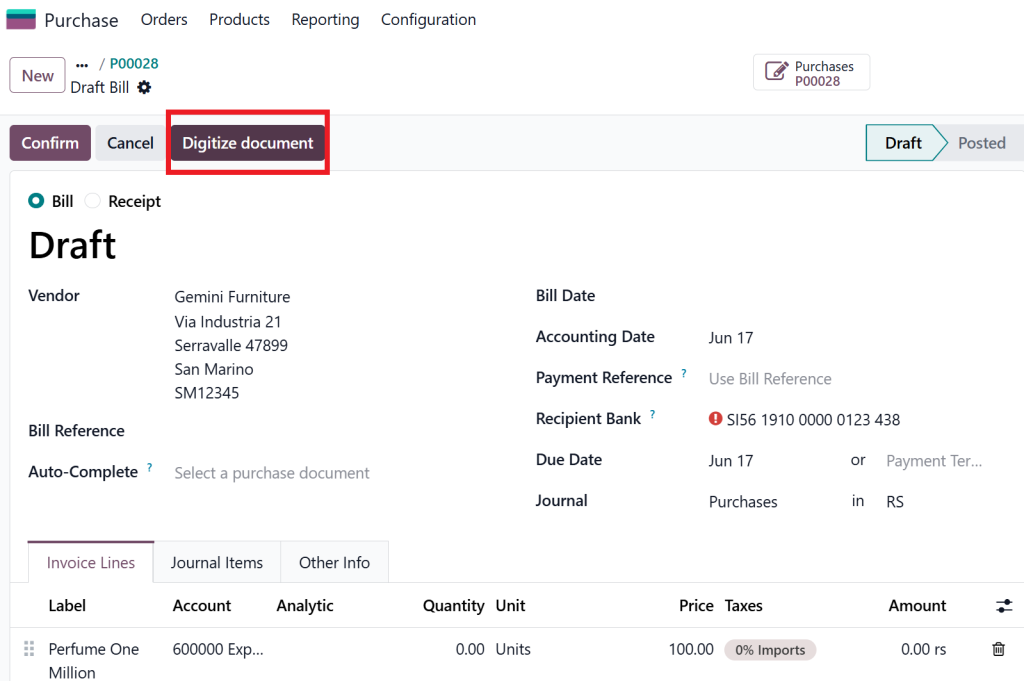
Instead of manually entering these invoices, businesses can use Odoo 19 invoice digitization.
How Invoice Digitization Works
Upload the invoice document into Odoo.
The OCR engine automatically extracts:
- Supplier name
- Invoice number
- Invoice date
- Tax details
- Product information
- Total amount
The extracted information is then used to automatically create a vendor bill.
Benefits of Invoice Digitization
- Faster processing
- Reduced data entry
- Improved accuracy
- Better compliance
- Less paperwork
This feature is especially useful for businesses processing high volumes of supplier invoices every month.
Odoo 19 Upload Bill Feature Explained
The Odoo 19 upload bill feature makes invoice processing even simpler.
Instead of creating invoices manually:
- Open Vendor Bills.
- Click Upload.
- Select the invoice file.
- Let Odoo process the document.
- Review extracted information.
- Confirm the bill.
The system automatically captures invoice details and creates accounting records.
Businesses using this feature often experience significant reductions in invoice processing time.
Benefits of Automatic Vendor Bills in Odoo
Improved Accuracy
Manual invoice entry often leads to mistakes.
Automation minimizes:
- Typing errors
- Tax calculation errors
- Duplicate invoices
Faster Processing
Bills can be generated in seconds rather than hours.
Better Cash Flow Management
Real-time visibility helps businesses:
- Track liabilities
- Monitor due dates
- Plan payments effectively
Stronger Supplier Relationships
Suppliers appreciate timely and accurate payments.
Automation helps maintain positive vendor relationships.
Reduced Administrative Costs
Less manual work means lower operational expenses.
Finance teams can focus on higher-value tasks rather than repetitive data entry.
Best Practices for Odoo Vendor Bill Automation
To maximize automation success, follow these best practices.
Maintain Accurate Vendor Records
Ensure supplier information remains updated.
Standardize Purchase Processes
Use purchase orders consistently.
Enable Approval Workflows
Establish approval rules based on:
- Invoice amount
- Department
- Vendor category
Use Invoice Digitization
Take advantage of OCR technology to speed up invoice processing.
Regularly Audit Vendor Bills
Review transactions periodically to ensure compliance and accuracy.
Common Challenges and How Odoo 19 Solves Them
High Invoice Volume
Odoo processes large numbers of invoices efficiently through automation.
Data Entry Errors
Automatic extraction reduces manual mistakes.
Approval Delays
Workflow automation speeds up approvals.
Missing Documents
All invoices are stored digitally for easy access.
Compliance Issues
Automated audit trails improve transparency and reporting.
Why Businesses Choose Netilligence for Odoo 19 Implementation
Implementing Odoo successfully requires expertise.
At Netilligence, we help businesses unlock the full potential of Odoo 19 through:
- Odoo implementation
- Odoo customization
- Odoo accounting setup
- Invoice automation configuration
- Purchase workflow optimization
- User training and support
- ERP consulting services
Our team ensures that your vendor bill automation processes are tailored to your business requirements, helping you save time, reduce costs, and improve financial efficiency.
Whether you need advanced invoice digitization, automated approval workflows, or whole purchase-to-payment integration, Netilligence delivers solutions that drive measurable results.
How to Generate Vendor Bills Automatically in Odoo 19 Conclusion
Understanding how to generate vendor bills automatically in Odoo 19 can significantly improve accounting efficiency and reduce administrative workload. Through intelligent features such as Odoo 19 vendor bills, automatic vendor bills in Odoo, Odoo 19 bill automation, creating a vendor bill from a purchase order in Odoo 19, Odoo 19 bill upload, and Odoo 19 invoice digitization, businesses can streamline accounts payable processes and eliminate manual bottlenecks.
Automation is no longer a luxury; it is a necessity for modern businesses seeking growth, accuracy, and operational excellence.
If you want to implement powerful vendor bill automation in Odoo 19 and maximize your ERP investment, Netilligence is ready to help. Our Odoo experts can design, configure, and optimize a solution that perfectly matches your business needs while ensuring a smooth digital transformation journey.




