

Allocation Warnings in Odoo 19 Time Off
If you are an HR manager, administrator, or Odoo consultant, chances are you’ve faced Allocation Warnings in Odoo 19 Time Off. These alerts usually appear when employees request Time off, but the system detects inconsistencies, errors, or limitations in their leave Entitlements. Whether it’s an Odoo 19 allocation warning, an Odoo Time Off allocation error, or an expired Entitlement issue in Odoo, these challenges can disrupt smooth employee leave management.
In this blog, we will delve deeply into why these warnings occur, the common scenarios in which an Odoo leave Entitlement issue arises, and, most importantly, how you can troubleshoot them like a pro. By the end, you’ll have a practical toolkit to resolve Odoo 19 Time off troubleshooting problems while making your Odoo employee leave management process seamless.
✅ Remember: Allocation Warnings in Odoo 19 Time Off are not system failures. They are smart indicators that something in your setup or data needs attention. Once you learn to handle them, you’ll actually improve or enhance the accuracy and efficiency of your HR operations.
Understanding Allocation Warnings in Odoo 19 Time Off
Before we jump into troubleshooting, let’s first understand what these warnings mean.
Allocation Warnings in Odoo 19 Time Off are alerts generated when the leave Entitlement rules or balances are violated. For example:
- When an employee request more leave than allocated.
- When the allocated leave has expired.
- When there’s an overlap in time-off policies.
- When an incorrect configuration causes a mismatch between Entitlement and entitlement.
These warnings are actually safeguards. They prevent HR teams from approving invalid leave requests and ensure compliance with company policies.
Step-by-Step Guide to Fix Allocation Warnings in Odoo 19
Now that you understand the causes, let’s walk through practical solutions for handling Entitlement Warnings in Odoo 19 Time Off.
Step 1 – Check Leave Balances
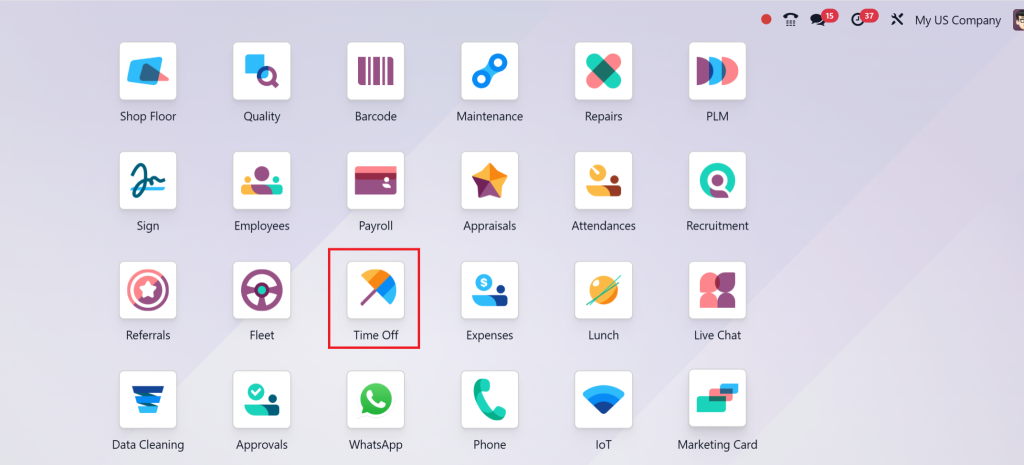
Navigate to the Time Off
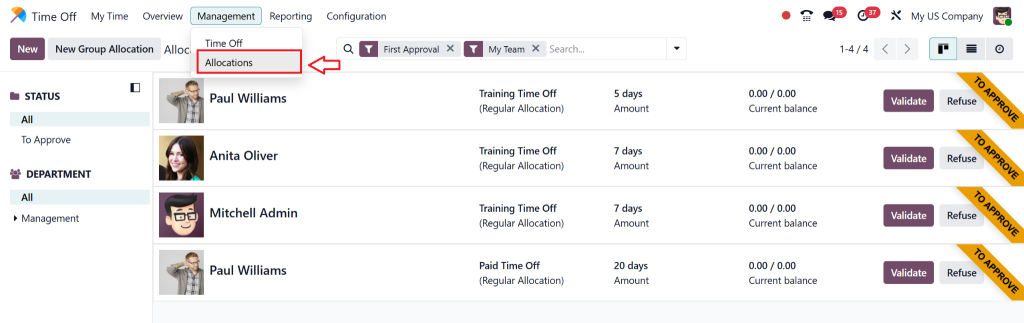
Then, the Entitlements menu.
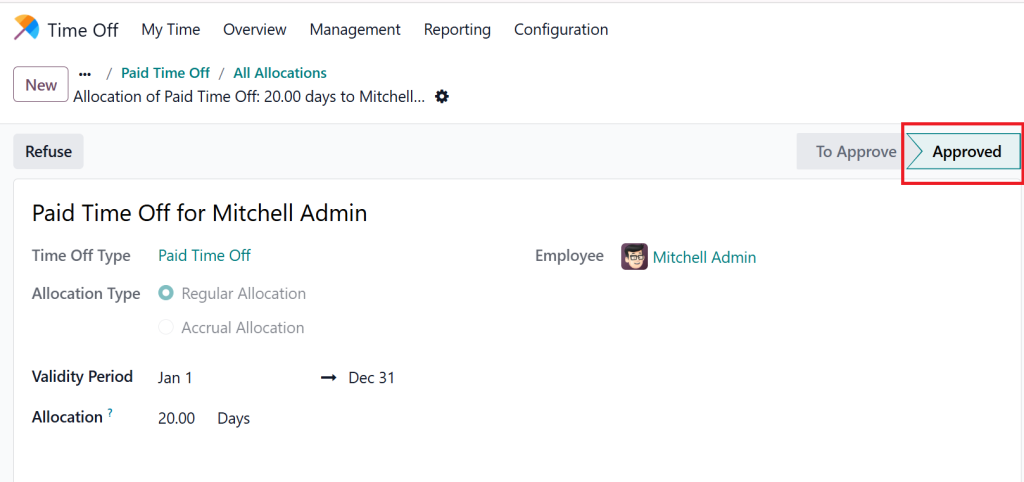
Verify if the employee has sufficient balance. If not, allocate additional leaves or reject the request.
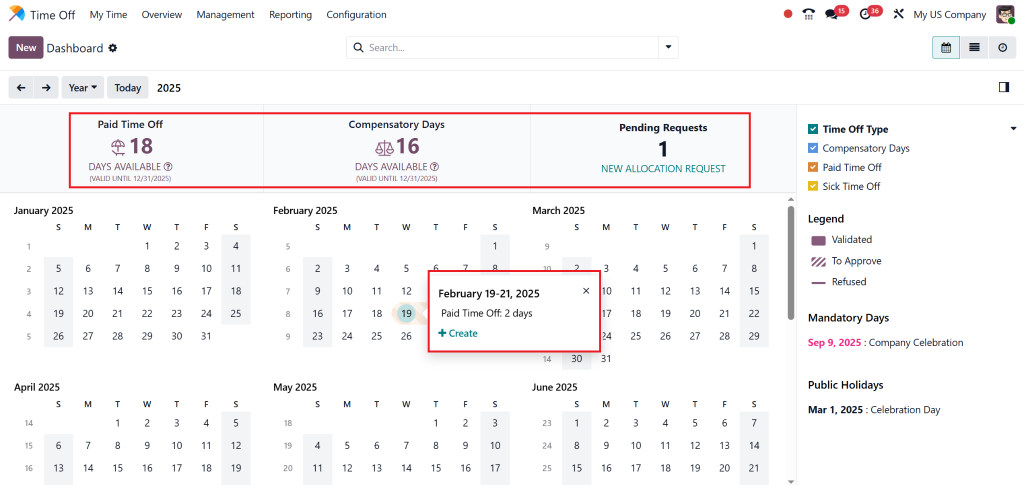
Step 2 – Review Policy Validity
Ensure the leave allocation validity dates are updated. If you see an Entitlement that has expired in Odoo, extend the validity or create a new Entitlement.
Step 3 – Configure Accrual Rules
Use accrual-based Entitlement when employees earn leave on a monthly basis. This prevents Odoo from leaving Entitlement issues related to sudden bulk requests.

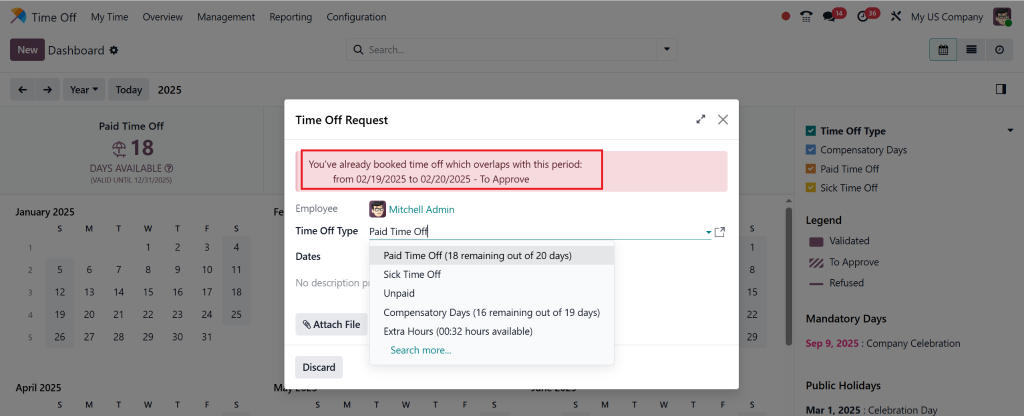
Step 4 – Fix Policy Overlaps
If two policies overlap (e.g., sick leave and unpaid leave), adjust configurations to avoid conflicts.
Step 5 – Automate Allocation Renewals
Utilise Odoo’s automation tools to automatically renew Entitlements annually, preventing expiration issues.
Common Types of Odoo 19 Allocation Warnings
Let’s break down the most frequent Odoo 19 Entitlement warnings you might encounter:
Odoo Time Off Allocation Error
The system generates this warning when an employee submits a leave request that exceeds their available leave quota. The system will display this warning when an employee requests more than 10 annual leaves which they have been allocated.
Odoo Leave Allocation Issue
This arises when leave policies overlap or conflict. For example, if an employee is eligible for both casual leave and annual leave but applies for the incorrect type, Odoo raises an alert.
Allocation Expired Odoo
This warning appears when the allocated leaves have a set validity period (e.g., January to December) and the employee requests Time off after expiration.
System Configuration Errors
Sometimes, troubleshooting Odoo 19 Time Off is required due to misconfigured settings, such as incorrect accrual policies, validation rules, or employee group assignments.
Why Allocation Warnings in Odoo 19 Time Off Occur
Here are the most common causes:
Incorrect Leave Policy Setup
If HR sets up time-off policies without properly defining maximum days or accrual rules, employees may face warnings.
Expired Leave Allocation
Allocation expiration scenarios are common in Odoo when HR forgets to update or renew Entitlements for the new year.
Employee Misuse
Employees might accidentally apply for leave under the wrong leave type or exceed their entitlement.
Data Migration Issues
When upgrading to Odoo 19 from older versions, misconfigured data can trigger Odoo Time Off allocation error messages.
Advanced Odoo 19 Time Off Troubleshooting Tips
The following advanced troubleshooting steps can help you resolve your problem:
- The developer mode provides a tool to detect configuration problems which help you identify the source of the issue.
- In some cases, the system displays employees under incorrect leave types.
- The approval process with manual validation requirements leads to delayed allocation processes.
- The system logs from the migration process should be reviewed because Odoo 19 users might encounter Entitlement data discrepancies.
- The system should generate automatic notifications that alert HR personnel about upcoming Entitlement expiration dates.
Best Practices for Odoo Employee Leave Management
To avoid frequent Odoo Time off allocation errors, HR teams should follow these best practices:
- Plan Allocations Annually: Assign leave entitlements at the start of each year.
- Enable Employee Self-Service: Allow employees to view their balances directly.
- Use Clear Policy Names: Avoid confusion by naming leave types clearly (e.g., “Annual Leave 2025”).
- Regular Audit Allocations: Quarterly checks prevent unexpected issues.
- Train HR Staff: Ensure your HR team understands Odoo’s Entitlement logic.
These steps will minimise Odoo 19 Entitlement warnings and keep your HR operations running smoothly.
Why Partner with Odoo Experts for Allocation Warnings in Odoo 19 Time Off
While Odoo is powerful, handling Odoo leave Entitlement issues can sometimes be complex. That’s where certified Odoo partners like Netilligence come in.
We provide:
- Expert Odoo 19 Time Off troubleshooting
- Custom leave Entitlement setup
- Automated workflows for Entitlement renewals
- Employee self-service dashboards
- Hands-on HR training for your team
With our help, you won’t just resolve entitlement warnings; you’ll transform your Odoo employee leave management system into a strategic HR advantage.
Take Control of Allocation Warnings in Odoo 19 Time Off
Allocation Warnings in Odoo 19 Time Off are more than just error messages; they are opportunities to refine your leave management process. Whether you’re facing an Odoo Time off Entitlement error, struggling with an expired Entitlement Odoo situation, or dealing with complex Odoo leave Entitlement issues, the key lies in proper configuration, proactive monitoring, and expert support.
With the proper guidance, you can ensure flawless Odoo employee leave management and provide your team with a smooth HR experience.
Looking for help? Partner with Netilligence, and let’s simplify your Odoo journey today!




