

Refund Management in Odoo 19 POS
Refund management is critical to maintaining customer trust in a retail business. Understanding how to handle refunds in Odoo 19 POS helps you process returns smoothly and maintain accurate financial records. The Odoo 19 POS refund process is designed to make these transactions fast, transparent, and reliable.
With Odoo 19’s improved return and refund management, you can issue refunds directly from your POS interface, handle partial returns, or even offer refunds via vouchers. Whether you’re dealing with damaged goods, order cancellations, or incorrect sales, Odoo makes it easy.
At Netilligence, an Odoo Partner, we help businesses set up, customize, and automate this process efficiently. By learning how to handle refunds in Odoo 19 POS, you not only enhance customer satisfaction but also streamline backend operations. This guide will walk you through everything from managing product returns in Odoo 19 POS to choosing refund payment methods and handling complex cases like partial refunds in Odoo POS.
Understanding the Refund Workflow in Odoo 19 POS
Refunds are not just financial reversals; they are customer service commitments. Odoo 19 POS simplifies this through a structured return and refund management workflow.
When a customer requests a refund, the cashier can locate the original order, select the items to return, and process the refund instantly. This automated workflow reduces manual errors and keeps your sales records accurate. The system also ensures that stock levels are updated in real-time once items are returned, maintaining consistent inventory tracking.
By understanding how to handle refunds in Odoo 19 POS, businesses gain full control over each step of the refund cycle, from request to completion. This not only helps avoid discrepancies but also supports quick decision-making during peak retail hours.
Step-by-Step Guide - How to Handle Refunds in Odoo 19 POS
Let’s explore the exact steps to process a refund efficiently in your Odoo POS.
Step 1: Access the POS Interface
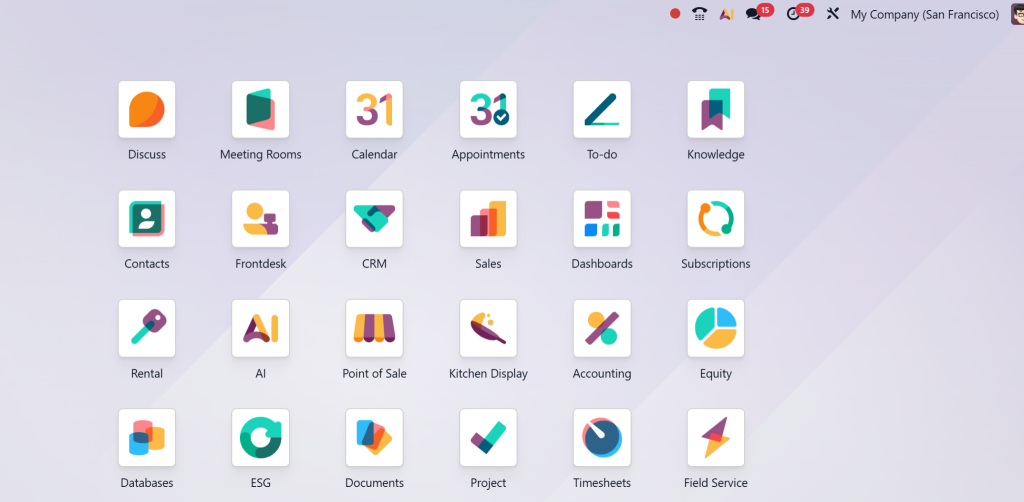
Open your Odoo 19 POS dashboard and log in as a cashier or manager.
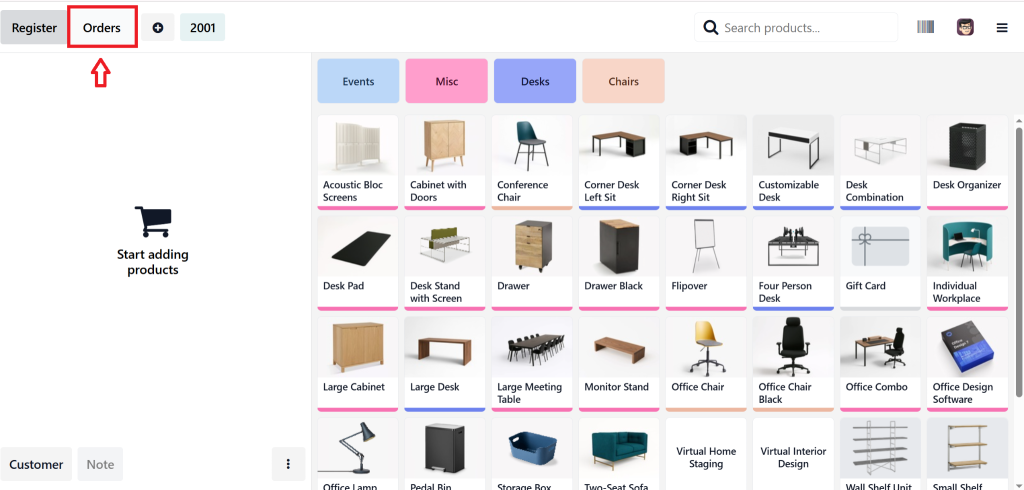
Locate the “Orders” section to view past transactions.
Step 2: Locate the Original Order
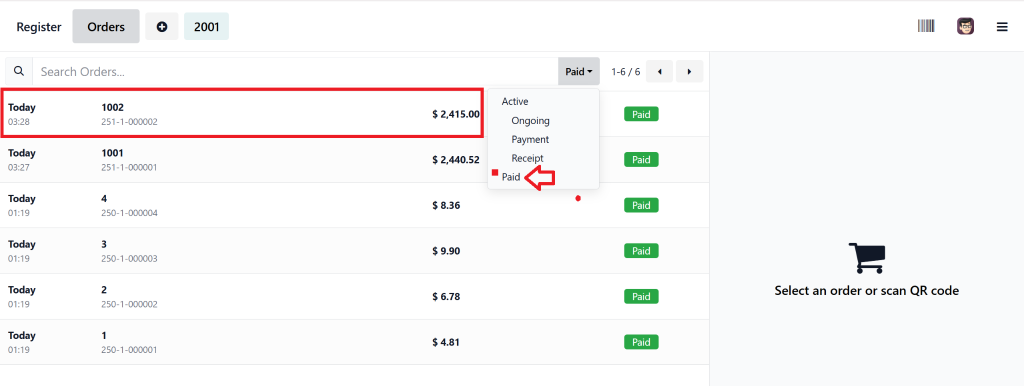
Use filters, the order reference number, or the paid status of the order to find the transaction linked to the customer’s purchase. Select the order you need to refund.
Step 3: Initiate the Refund
Click on “Refund” or “Return Order.”
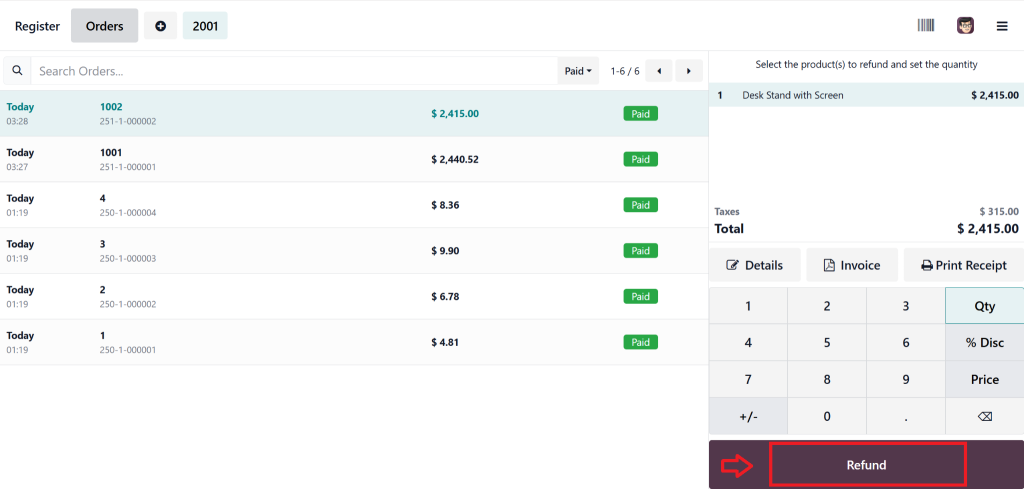
This will open a refund screen where you can select the items and quantities being returned.
Step 4: Confirm Return Items
For full refunds, select all products. For partial refunds in Odoo POS, select only the items being returned.
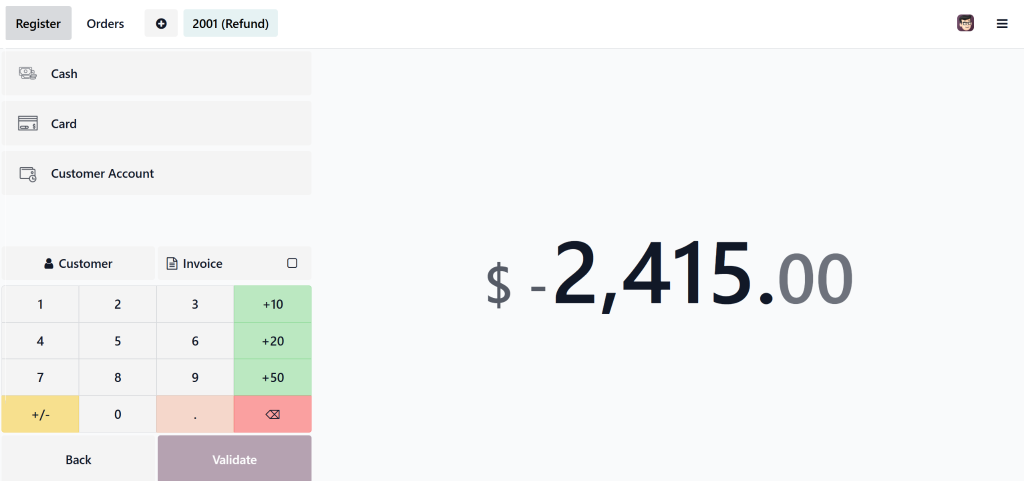
Step 5: Choose the Refund Method
Odoo 19 allows multiple POS refund payment methods: cash, card, or Odoo 19 refund via voucher. Choose the method that aligns with your store policy.
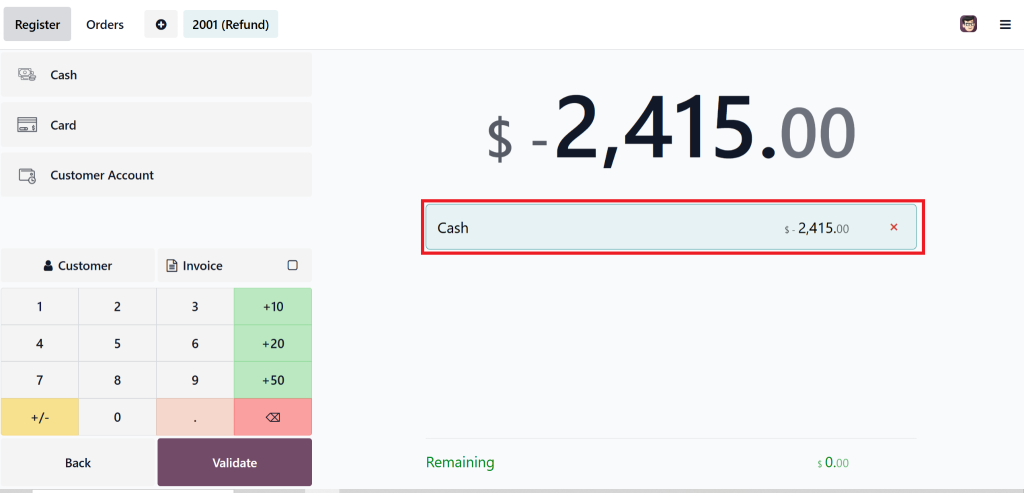
Step 6: Complete the Transaction
Click “Validate” to finalize the refund.
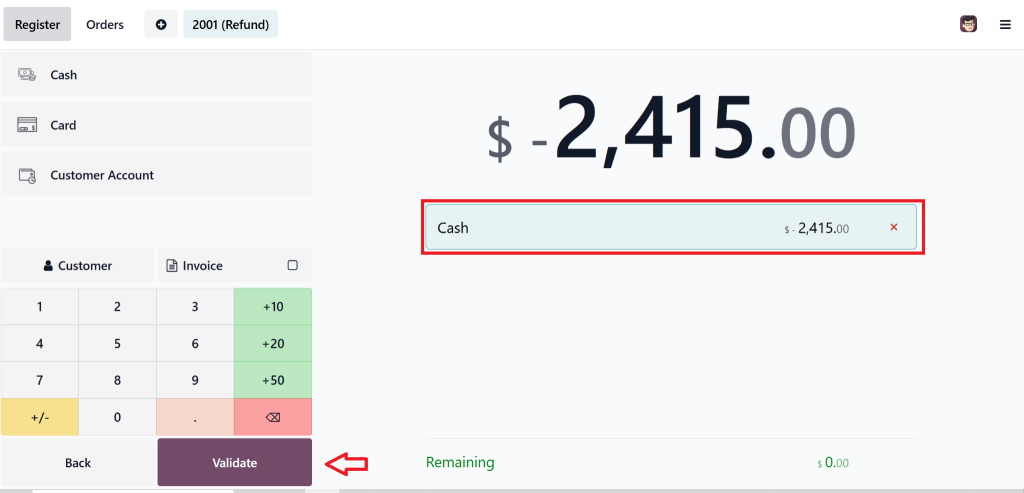
The system automatically updates stock levels and accounting entries.
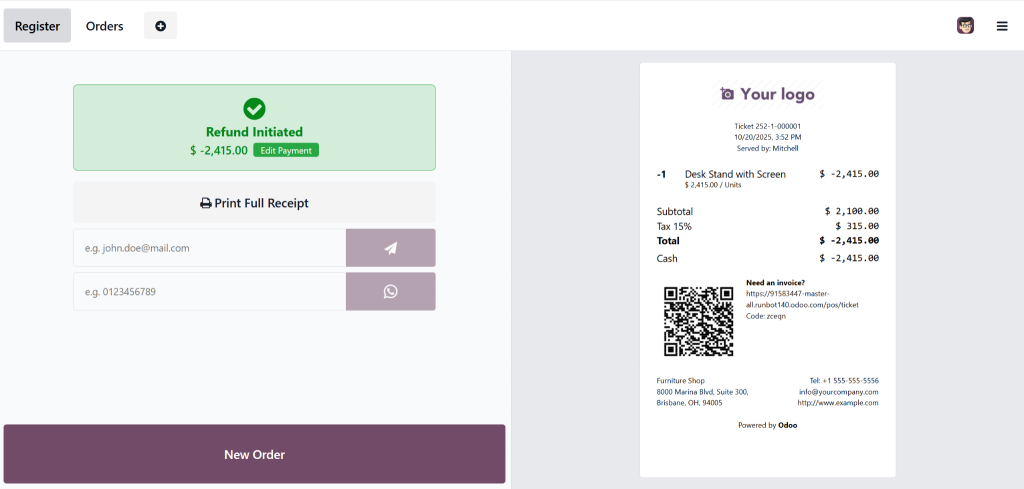
Following these steps, you can handle customer refunds effortlessly while keeping accurate financial data.
Odoo 19 POS Refund Process - Smart, Quick, and Accurate
The Odoo 19 POS refund process ensures both customer satisfaction and backend accuracy. Each refund action automatically triggers three key operations: inventory adjustment, financial entry reversal, and updated sales reporting.
This automation prevents human error and ensures complete transparency. For instance, when a product is returned, Odoo automatically re-adds it to stock and adjusts revenue entries, maintaining consistent data integrity.
Odoo also supports flexible refund types. You can issue full or partial refunds for complete returns for selected products. This adaptability allows your retail team to handle all kinds of refund scenarios confidently.
Manage Product Returns Odoo 19 POS
Handling product returns efficiently is essential for a smooth retail experience. Odoo 19 makes managing product returns in POS quick and straightforward.
When a customer returns an item, the POS module lets you initiate a reverse transaction directly. You can adjust quantities, track reasons for return, and generate detailed reports to analyze trends in product issues or customer preferences.
Additionally, each refund automatically updates your inventory, ensuring the returned product becomes available for resale or restocking. This innovative integration keeps your warehouse and sales data aligned in real time. With Odoo 19 return and refund management, your business maintains accuracy, efficiency, and trust at every transaction.
Partial Refund in Odoo POS - Flexibility That Fits Your Business
Not all customers return full orders. Sometimes, they only need to return a few items. That’s where the partial refund in the Odoo POS feature shines.
This functionality allows you to select specific items and quantities for refunding. It helps you maintain accurate stock and financial records while offering customers flexibility. For instance, if a buyer returns only one product from a multi-item order, you can issue a refund for that specific product without affecting the entire transaction.
This capability is ideal for retail environments where customized returns are frequent. By mastering how to handle refunds in Odoo 19 POS, your team can manage these partial transactions quickly and confidently.
Lorem ipsum dolor sit amet, consectetur adipiscing elit. Ut elit tellus, luctus nec ullamcorper mattis, pulvinar dapibus leo.
Odoo 19 Refund via Voucher - Build Customer Loyalty
The Odoo 19 refund via voucher feature transforms refunds into opportunities. Instead of refunding money, you can issue a store credit voucher equal to the refund amount. Customers can redeem this voucher during their next purchase.
This approach keeps revenue within your business and encourages repeat visits. It’s especially effective forretail stores looking to retain customers while managing returns efficiently. Odoo 19 automates this process, generating digital or printed vouchers instantly.
By incorporating a refund via voucher into your refund policy, you enhance customer satisfaction and loyalty. This modern solution demonstrates the flexibility and sophistication of the Odoo 19 POS refund process.
POS Refund Payment Methods Odoo 19 - Multiple Options for Convenience
Every customer prefers a different refund method. Odoo 19 supports various POS refund payment methods to accommodate them. Whether it’s cash, card, or voucher refunds, the system provides the flexibility to match your operational needs.
Each refund type is recorded automatically within the accounting module, ensuring transparent transaction tracking. The system also supports partial cash and voucher combinations, making offering tailored solutions during refunds easier.
This level of adaptability improves the customer experience while ensuring financial accuracy. With Odoo 19, every transaction, sale, or refund remains fully auditable and compliant with your business policies.
Reporting and Analytics in Odoo 19 POS Refund Management
Odoo 19 doesn’t just help you process refunds; it enables you to analyze them. The system generates detailed refund and return reports to give insights into sales performance, product quality, and customer satisfaction.
You can track frequent return reasons, identify faulty products, and understand refund trends by location or product category. This data empowers managers to take proactive steps, such as improving product quality or adjusting sales strategies.
Moreover, integration with the accounting module ensures that all refund transactions are correctly recorded, maintaining clean financial statements. When you master how to handle refunds in Odoo 19 POS, you also gain valuable data that can refine your business strategy.
Common Refund Scenarios and How Odoo 19 POS Handles Them
Let’s look at some real-world refund cases and how Odoo 19 POS refund process solves them efficiently:
- Case 1: Wrong Product Delivered
The cashier can quickly process a full refund or issue a voucher on the same transaction screen. - Case 2: Partial Return Request
Using partial refund in Odoo POS, staff can refund only selected items without affecting the complete order. - Case 3: Customer Requests Store Credit
With Odoo 19 refund via voucher, a credit note can be issued instead of cash.
Each case demonstrates how easy it is to adapt Odoo 19 POS to diverse customer needs while maintaining operational accuracy.
Why Choose Netilligence for Odoo POS Implementation
At Netilligence, we are an official Odoo Partner with years of expertise in deploying and customizing Odoo POS systems. Our team ensures your business can fully leverage features like refund management, partial returns, and voucher-based refunds for optimal efficiency.
We don’t just install Odoo, we help you transform your retail workflow. Our experts tailor refund and return management processes to your business type, ensuring smooth customer interactions and accurate backend reporting.
Partnering with Netilligence means access to end-to-end Odoo support, from setup and integration to staff training and performance optimization. With our help, you can master how to handle refunds in Odoo 19 POS and maximize your return on investment.
Key Benefits of Odoo 19 POS Refund Management
- Time Efficiency – Process refunds instantly through an intuitive interface.
- Accuracy – Automatic inventory and accounting updates ensure no errors.
- Flexibility – Supports full, partial, and voucher-based refunds.
- Customer Retention – Store credit options encourage repeat business.
- Transparency – Real-time reporting helps identify refund trends.
- Scalability – Works perfectly for single stores or multi-location businesses.
Odoo 19’s POS refund tools empower retail owners to run seamless operations while maintaining excellent customer relationships.
Make Things Easier Refunds with Odoo 19 POS and Netilligence
Odoo 19 POS refund management requires more than return processing because it needs to create an efficient customer-oriented system. Odoo 19 gives you all the necessary tools to handle returns efficiently through partial refunds and voucher-based transactions.
Netilligence, as an Odoo Partner, provides specialized assistance to help you set up and personalize, and automate your POS refund operations. Our customized Odoo solutions for retailers and wholesalers, and multi-branch businesses enable fast and accurate and efficient refund processing.




