

Odoo Approvals Internal Purchase Requests
Have you ever found yourself buried under a mountain of material purchase requests, struggling to keep track of approvals and status updates? If your company deals with frequent internal material purchase requests, then it’s time to simplify things! The Odoo Approvals App can make this process much smoother.
The Odoo Approvals App eliminates lost emails in your inbox and paper trails and removes the need for endless approval waiting periods. The Odoo Approvals App enables you to design workflows, establish roles and automate the complete approval process. The system ensures fast and efficient processing of all requests for office supplies, production materials and department-specific tools.
This blog explains the process of using the Odoo Approvals App to manage internal material purchase requests. The following guide explains the setup process and approval workflow requirements for your Odoo implementation. The system will become indispensable after you start using it.
What is the Odoo Approvals App?
Before we get into how it helps with internal material purchase requests, let’s first understand what the Odoo Approvals App is. If you’re familiar with Odoo, you know it’s an all-in-one ERP system. The Odoo Approvals App is one of the modules within this system designed to automate and manage approval workflows. It can be used for:
- Leave requests
- Travel expenses
- Document sign-offs
- And, of course, internal material purchase requests
The great thing about the Odoo Approvals App is that it integrates seamlessly with other parts of the Odoo ERP system (like inventory, purchase, and accounting), making it incredibly efficient. With Odoo 18, this app is even better, offering real-time updates and an enhanced user experience.
How to Set Up the Odoo 18 Approvals App Material Requests
We have identified the advantages of the Odoo Approvals App, so we can now proceed with its setup for internal material purchase requests. Here’s how you can get started:
Step 1: Install the Odoo Approvals App
Start by navigating to the Odoo Apps section and using the search function to locate the Approvals app. Click to install it after you find it. That takes just a few minutes.
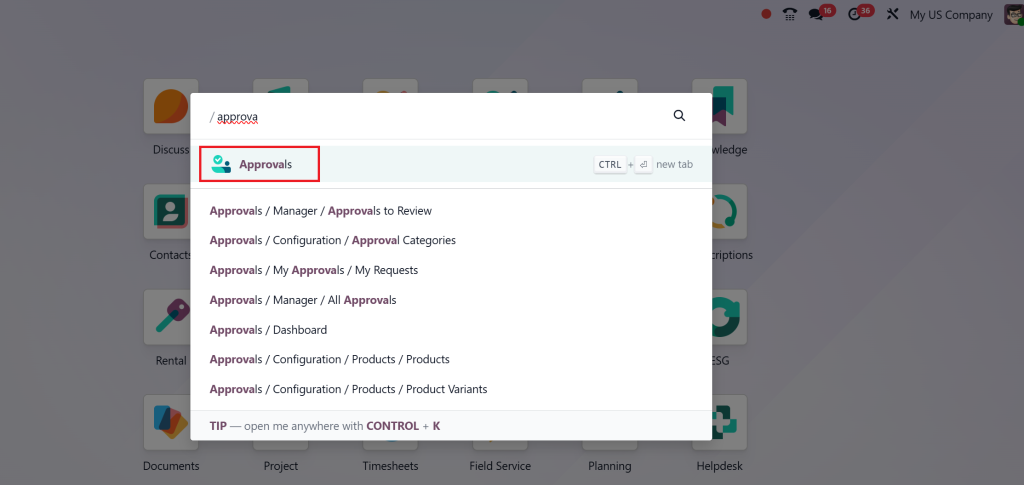
Step 2: Create a New Internal Material Purchase Request Odoo
After installation, navigate to Configuration > Approval Categories.
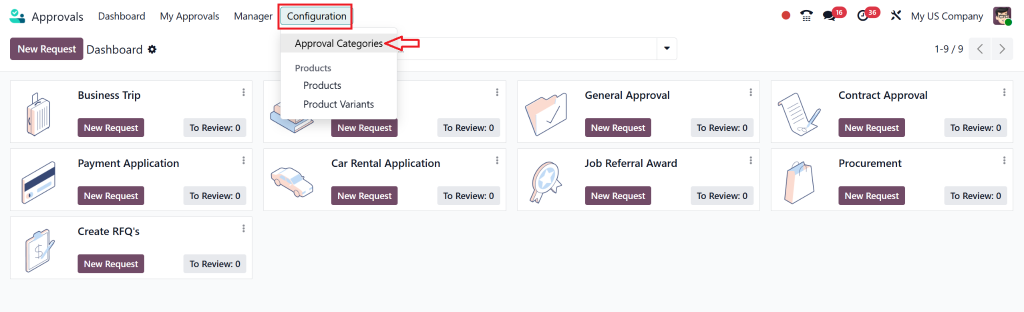
create a new approval type named “Material Purchase Request.” You will need to specify the information which must be included in the request (e.g., material name, quantity, department, and a brief description).
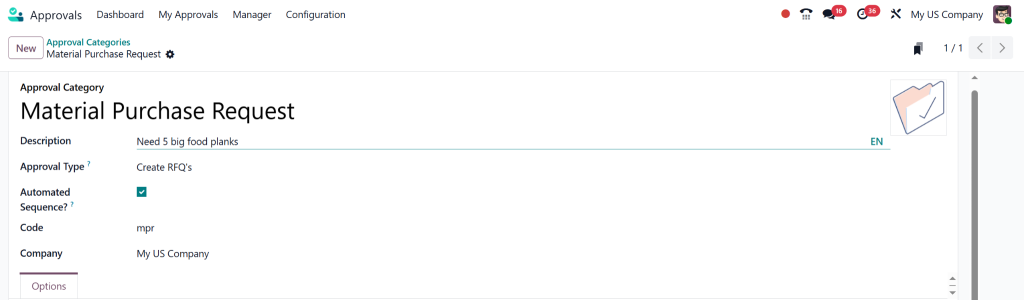
Step 3: How to Configure Approvals for Purchase in Odoo
Determine which personnel will be responsible for approving these requests. You can establish a multi-level approval process that allows department heads to approve small requests but requires higher-level approval from finance or executive team members for larger purchases.
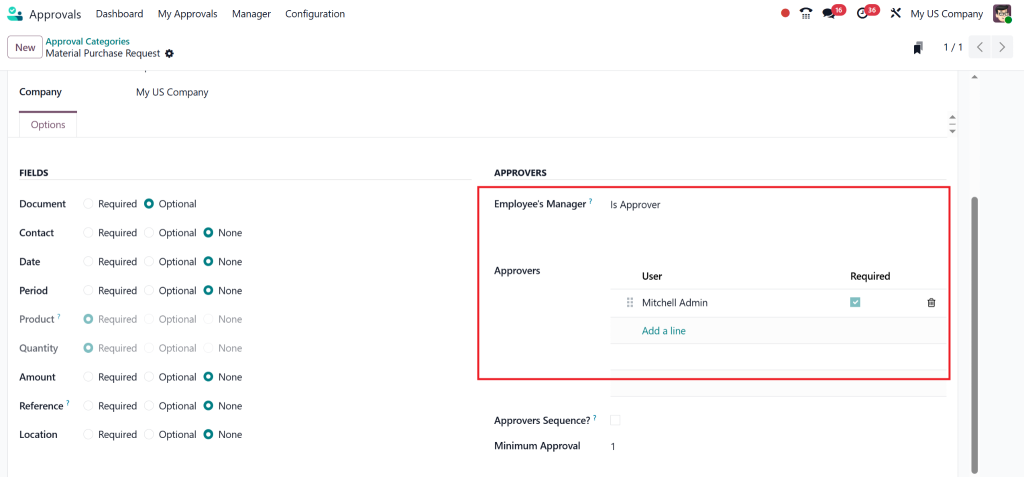
Step 4: Set Up the Odoo Purchase Requisition Approval Workflow
Determine the sequence of operations for material requests. You can determine who receives notifications about submitted requests and the approval process, and establish time limits to prevent delays in decision-making.
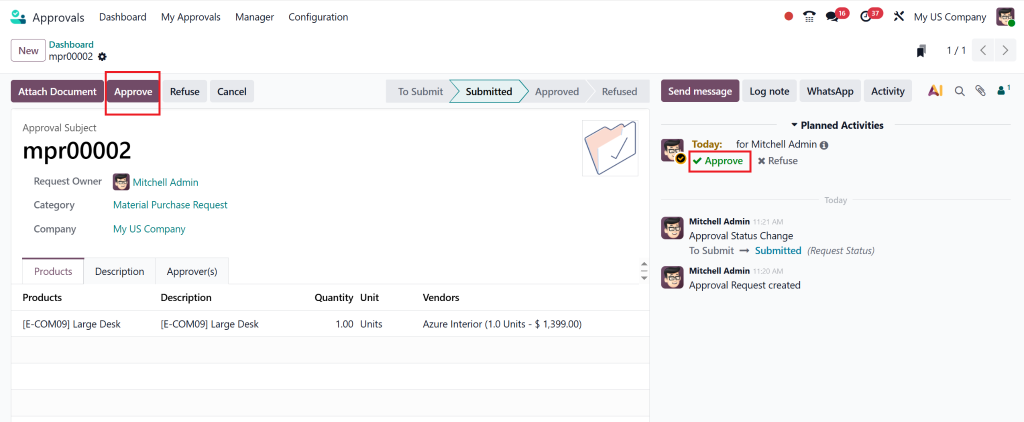
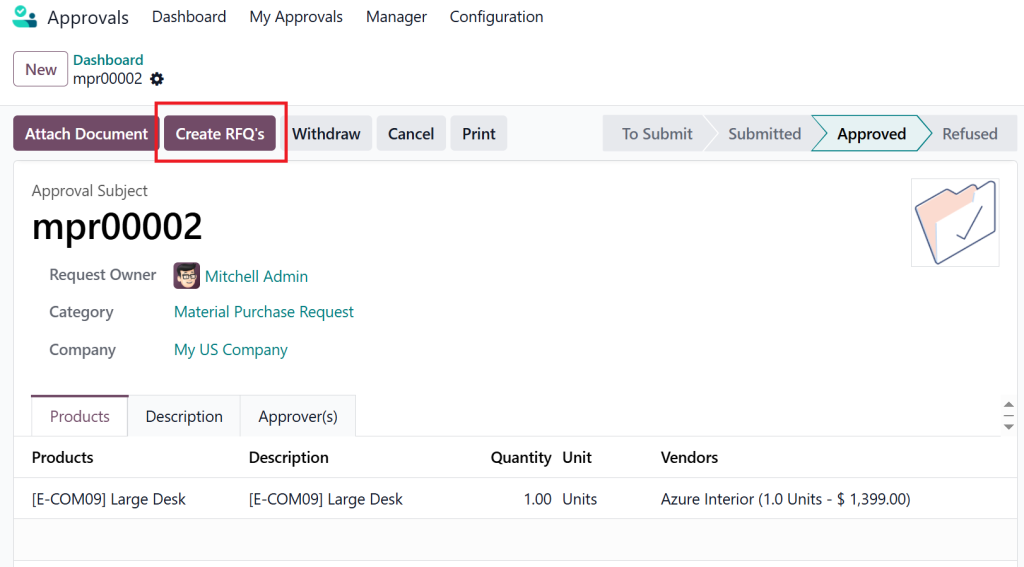
After this, you can create RFQ’s.
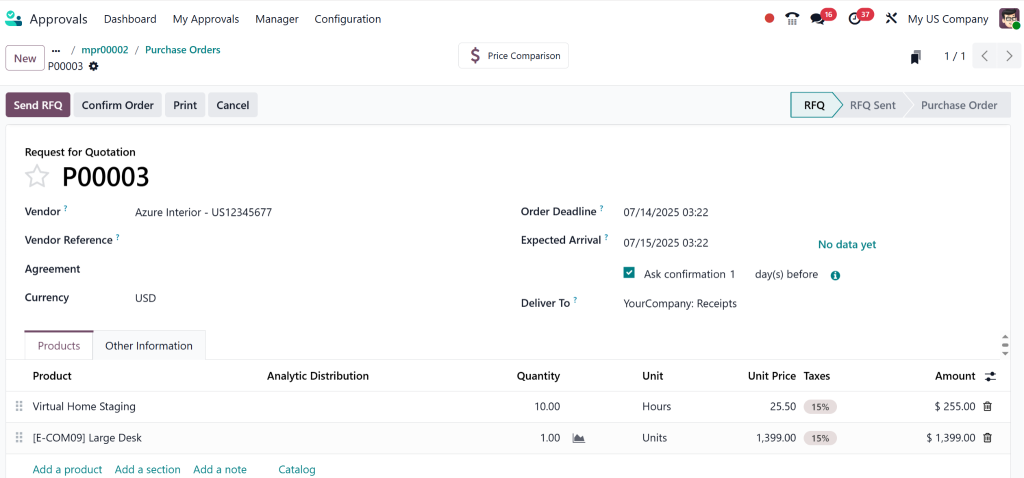
Purchase order or RFQ have been generated after Approval.
Step 5: Train Your Team
After setting up the system, ensure your team members understand how to use the system. The team members need to know how to create material purchase requests, who to contact as approvers, and how to monitor their request status.
Why Use the Odoo Internal Approval for Material Purchase?
Let’s look at why the Odoo Approvals App is for managing internal material purchase requests.
1. A Modernised Workflow
The Odoo Approvals App eliminates both email chain disorganisation and paper-based form management. The Odoo Approvals App enables requests to follow a predetermined automated workflow. The system automatically directs submitted requests to appropriate approvers who can handle approvals or rejections through the app interface. The system tracks all requests while preventing any request from disappearing during the process.
2. Real-Time Visibility and Tracking
The worst aspect of managing material purchase requests stems from the lack of visibility into their current status. The Odoo Approvals App provides instant status updates for each request. The system will always display the current status of each request, which includes waiting for approval, being approved or rejected. The system eliminates the need to guess if any requests have been lost in the process.
3. Centralised System for Easy Access
All requests are now stored in one central location instead of requiring email searches or physical form reviews. The system provides instant access to review and audit requests whenever you need them. The system allows you to filter and search through previous requests easily.
4. Customizable Approval Rules
Each request has its unique characteristics. Odoo Approvals enables you to establish rules which specify the approval procedures for various material purchase request types. The system requires extra approval for requests exceeding a particular value, and different departments need to follow separate approval procedures.
Odoo 18 Approvals App – What’s New?
If you’re already using the Odoo Approvals App, you’ll be excited to know that Odoo 18 introduces several improvements:
- Improved User Experience & Interface: The app now has a more intuitive, user-friendly interface. Plus, you can easily customize workflows with a drag-and-drop feature.
- Real-Time Notifications: Automatic notifications keep approvers in the loop, ensuring they never miss a request.
- Performance Improvement: The new version is faster and more efficient, even when handling a large number of requests.
- Integration with Other Odoo Modules: The Odoo Approvals App now integrates smoothly with Inventory, Purchase, and Accounting, so when a request is approved, it can automatically generate purchase orders and update stock levels.
Best Practices for Handling Internal Material Purchases with Odoo Approvals
To make the most of the Odoo Approvals App, here are some best practices:
1. Categorise Material Requests
Not all materials are created equal. Group similar requests together (e.g., office supplies, production materials, etc.) to simplify the approval process.
2. Set Spending Limits
Define limits for each request. Larger purchases can be flagged for additional approval, ensuring your budget is always under control.
3. Maintain Full Audit Trails
Every request is logged, so you can easily track who approved what and when. That is especially useful for audits and compliance.
4. Integrate with Inventory and Purchase
By integrating the Odoo Approvals App with the Inventory and Purchase modules, you can automatically generate purchase orders as soon as a request is approved, saving time and eliminating manual data entry.
5. Train Your Team on Efficient Use
A little training goes a long way. Make sure your team knows how to submit and track their requests efficiently and how to handle any issues that may arise.
Why Choose the Odoo Approvals App for Internal Material Purchase?
The Odoo Approvals App provides several benefits for handling internal material purchase requests.
- The system eliminates the need for waiting for decisions to be made.
- The system enables organisations to optimise their request and approval workflow.
- Better Budget Control: Monitor requests against budgets to prevent overspending.
- More Accountability: Clear, role-based approvals ensure everyone is responsible for their part.
- Reduced Errors: Pre-filled templates and automated workflows reduce mistakes.
Get Started with Netilligence – Your Odoo Partner
Our team at Netilligence provides Odoo 18 implementation services to businesses for maximum benefit. Our status as an Odoo Partner enables us to help you establish the Odoo Approvals App for managing internal material purchase requests. Our intelligent team assists in Odoo implementation for both new users and those who want to upgrade their system.
Your internal approval workflows need improvement. Contact Netilligence today to let us help you automate and streamline your material purchase request process.




