


Why Are Your Schedules Still Causing Delays?
Many businesses invest in ERP software expecting better planning, better productivity, and better control over resources. Yet scheduling problems continue to appear. Employees get assigned to overlapping shifts, managers spend hours updating schedules manually, projects miss deadlines, and resources remain underutilized.
Understanding how to improve schedule planning in Odoo 19 can help you solve these challenges without relying on spreadsheets, endless emails, or manual tracking. Odoo 19 introduces several planning features that make it easier to assign resources, organize shifts, monitor workloads, and adjust schedules when priorities change.
The improved Odoo 19 schedule planning capabilities allow businesses to create structured plans while maintaining flexibility for unexpected changes. Whether you manage a service company, manufacturing operation, retail business, or project-based organization, the right scheduling process can significantly improve efficiency.
In this guide, you will learn how to improve schedule planning in Odoo 19, how the Odoo 19 planning module works, and which features can help you build schedules that support both employees and business goals.
Understanding the Odoo 19 Planning Module
The Planning module is designed to help organizations allocate employees, resources, and work hours across different activities. Instead of creating schedules manually, managers can plan shifts, assign projects, distribute workloads, and track resource availability from a centralized dashboard.
When schedules are managed from multiple spreadsheets or departments use separate planning methods, conflicts become difficult to avoid. The Odoo 19 planning module solves this by providing one location where managers can view and manage all assignments.
This means employees know their responsibilities, managers can identify resource shortages early, and scheduling decisions become easier to control.
Why Odoo 19 Schedule Planning Matters for Business Operations?
Many businesses focus heavily on sales, operations, and customer service while overlooking scheduling. However, poor scheduling affects every department.
When schedules are inaccurate, employees may be assigned to the wrong tasks, projects can experience delays, overtime costs may increase, and customer commitments become difficult to meet.
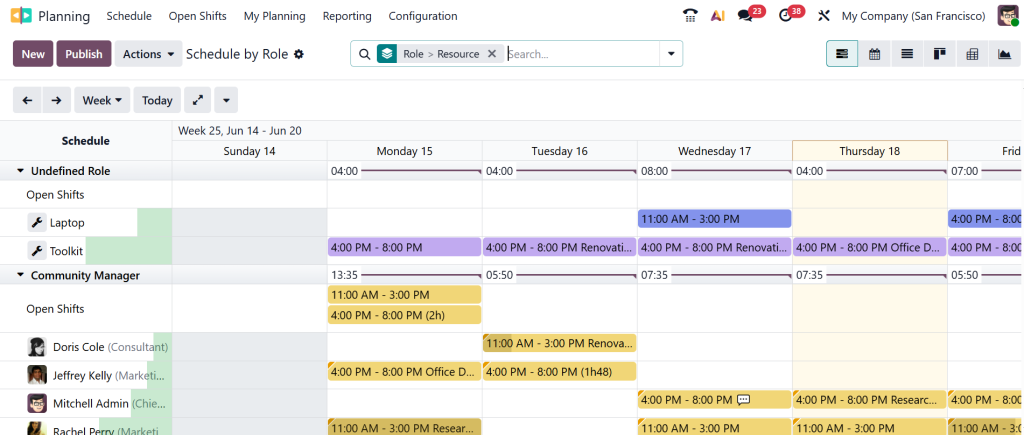
Effective Odoo 19 schedule planning helps businesses avoid these situations by ensuring that the right people are assigned to the right tasks at the right time.
Instead of reacting to scheduling issues after they occur, managers can identify potential conflicts during the planning stage and make adjustments before they affect operations.
How to Improve Schedule Planning in Odoo 19 with Accurate Resource Allocation?
One of the most effective ways to improve scheduling is by focusing on resource allocation. Many organizations assign tasks based on immediate availability without considering employee skills, workload capacity, or project priorities. This often leads to uneven work distribution and reduced productivity.
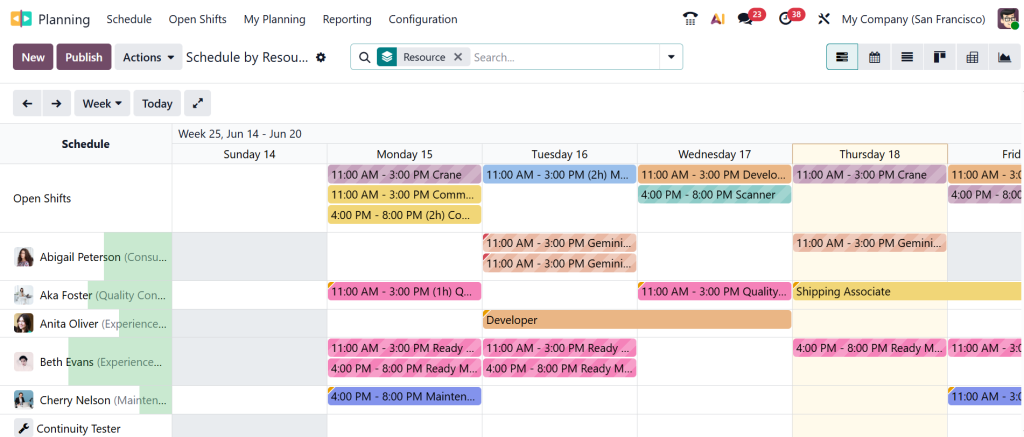
When learning how to improve schedule planning in Odoo 19, resource allocation should be one of the first areas to review. The system allows managers to see who is available, who is already assigned, and who has remaining capacity. This visibility helps prevent overbooking employees while ensuring available resources are fully utilized. Accurate resource allocation creates balanced schedules and supports better project execution.
Using Odoo 19 Workforce Planning to Balance Employee Workloads
A common scheduling challenge is workload imbalance. Some employees become overloaded with assignments while others remain underutilized. Over time, this can affect productivity, employee satisfaction, and project performance.
The Odoo 19 workforce planning features help managers distribute work more effectively. By reviewing workloads before finalizing schedules, managers can identify employees who have excessive assignments and redistribute tasks where necessary. This creates a more balanced working environment and helps teams maintain consistent performance.
Workforce planning also improves forecasting because managers can assess future staffing needs before workload demands increase.
Improving Odoo 19 Shift Scheduling for Better Team Management
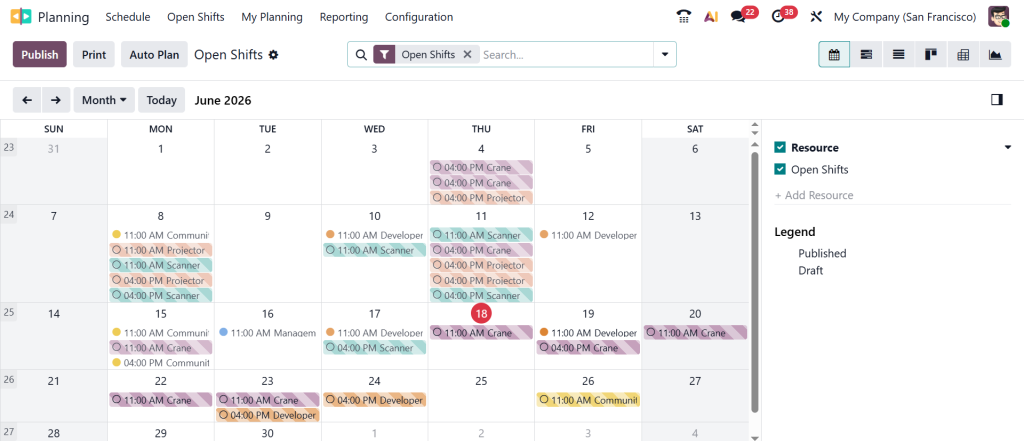
Shift management can become difficult when businesses rely on manual scheduling methods. Changes in employee availability, leave requests, and unexpected operational requirements often create confusion. The Odoo 19 shift scheduling tools help managers create organized shift plans while maintaining flexibility.
Managers can assign shifts, modify schedules, and communicate changes through the system. Employees can access their schedules without relying on printed timetables or separate communication channels. This improves visibility and reduces scheduling misunderstandings across teams.
Creating Consistency with Odoo Shift Templates
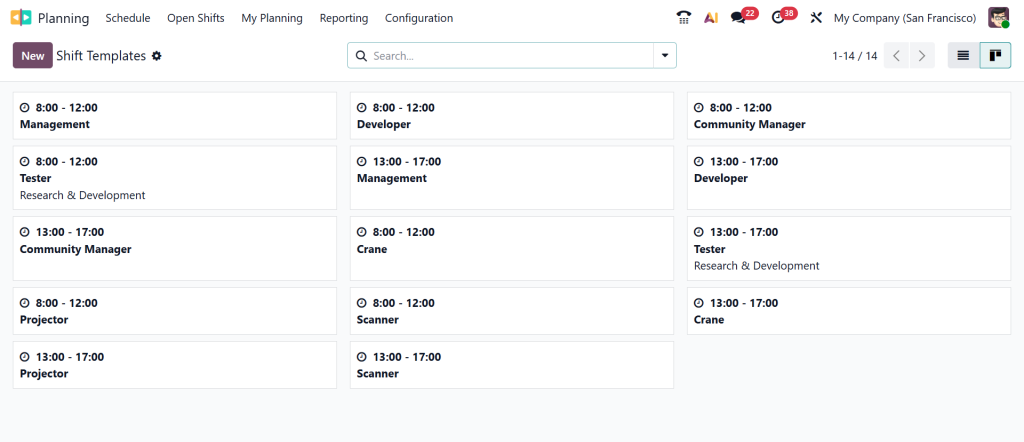
Many organizations use similar schedules every week. Creating the same shifts repeatedly consumes valuable time and increases the risk of scheduling errors. This is where Odoo shift templates become valuable.
Shift templates allow managers to create predefined scheduling patterns that can be reused whenever needed. Instead of building schedules from scratch, managers can apply existing templates and make adjustments only when necessary.
This approach saves time, improves consistency, and reduces administrative workload. Businesses with recurring shifts often see significant improvements in scheduling efficiency after implementing shift templates.
Using Odoo Planning Gantt View for Better Schedule Visibility
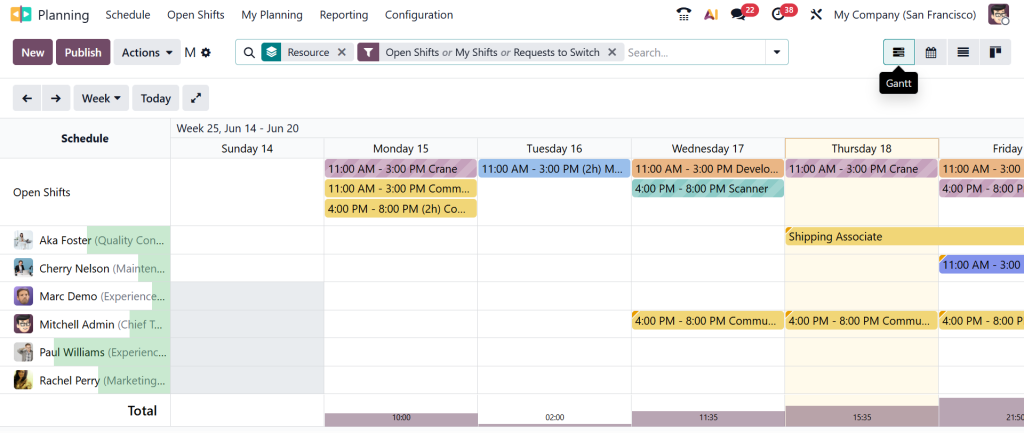
One of the most useful features available for planners is the Odoo Planning Gantt view. Scheduling becomes difficult when managers cannot clearly see assignments across teams, projects, or resources. The Gantt view provides a visual timeline that displays schedules in an easy-to-understand format.
Managers can quickly identify overlapping assignments, available resources, workload distribution, and project timelines. Instead of reviewing multiple reports or spreadsheets, everything can be monitored from a single visual interface. This visibility supports faster decision-making and helps managers respond quickly when schedule changes are required.
How the Odoo Planning Gantt View Helps Prevent Scheduling Conflicts?
Scheduling conflicts usually occur because managers do not have a complete view of all assignments. An employee may be assigned to multiple tasks simultaneously, or equipment may be scheduled for different projects during the same period.
The Odoo Planning Gantt view helps identify these conflicts before schedules are finalized. Managers can visually review assignments and make adjustments immediately. This reduces disruptions and improves schedule accuracy across departments.
Improving Odoo Schedule Optimization for Higher Efficiency
Creating schedules is only one part of the process. The next step is improving Odoo schedule optimization. Schedule optimization focuses on ensuring resources are utilized efficiently while maintaining operational requirements.
Managers can analyze workloads, review staffing requirements, and adjust assignments based on actual business needs. When schedules are optimized properly, businesses can reduce idle time, minimize overtime expenses, and improve overall productivity.
Organizations that regularly review scheduling performance often achieve better resource utilization compared to businesses that simply create schedules and leave them unchanged.
Enhancing Odoo 19 Resource Planning for Long-Term Growth
Short-term scheduling is important, but businesses must also prepare for future requirements. This is where Odoo 19 resource planning becomes essential.
Resource planning helps organizations evaluate future staffing, equipment, and operational requirements based on projected workloads. Instead of waiting for resource shortages to appear, managers can anticipate future needs and make informed decisions in advance. This supports business growth while reducing operational disruptions.
Strong resource planning also improves budgeting because managers gain better visibility into upcoming workforce and resource requirements.
Common Mistakes That Reduce Scheduling Efficiency in Odoo 19
Even with advanced planning tools, some businesses continue to face scheduling problems because of avoidable mistakes. One common issue is failing to update schedules regularly. Business priorities change frequently, and outdated schedules can quickly become inaccurate.
Another mistake is ignoring workload data when assigning tasks. Assignments should always be based on actual capacity rather than assumptions.
Some organizations also avoid using shift templates and visual planning tools, which increases manual work and creates opportunities for scheduling errors. Addressing these issues can significantly improve scheduling accuracy and overall operational performance.
Building Smarter Schedules with Odoo 19
Learning how to improve schedule planning in Odoo 19 is not only about creating employee schedules. It is about improving visibility, balancing workloads, managing resources effectively, and supporting long-term business objectives.
The combination of schedule planning, workforce planning, shift scheduling, and resource planning in Odoo 19 provides businesses with the tools needed to manage schedules more effectively.
Organizations that use these features strategically can reduce scheduling conflicts, improve resource utilization, and maintain better operational control.
If your business is looking to improve planning processes and maximize the value of Odoo 19, the experts at Netilligence can help you implement, configure, and optimize Odoo solutions that align with your operational requirements.




