

Bank Fees in Odoo 19 Accounting - A Critical Area for Financial Accuracy
Bank Fees in Odoo 19 Accounting: A fundamental aspect of financial management that directly impacts the accuracy of bank reconciliation, profit and loss reporting, and overall financial control. Despite this, many organisations still treat bank charges as minor adjustments, often recording them manually or inconsistently.
In real-world finance operations, bank fees are not limited to a single or two transactions. They occur daily in the form of transaction charges, payment gateway deductions, foreign exchange fees, bank transfer costs, and monthly service charges. When these amounts are not systematically managed in Odoo, finance teams face reconciliation gaps, unexplained variances, and unreliable financial reports.
This is why Bank Fees in Odoo 19 Accounting should be approached as a structured accounting process, not an afterthought.
Odoo 19 provides built-in tools, including reconciliation models, automated statement processing, and configurable expense accounts, enabling organisations to manage bank fees in a standardised, scalable manner.
In this guide, we will cover:
- How to record bank charges in Odoo 19
- How to configure Odoo 19 bank fees expense account
- How Odoo 19 bank statement fees handling works
- How to configure the reconciliation model bank fees in Odoo 19
- How does automatic bank fee reconciliation in Odoo improve accuracy
- Best practices for Odoo accounting bank service charges
This article is for finance managers, accountants, CFOs, and business owners seeking a clean, auditable, and automated accounting system in Odoo 19.
Why Bank Fees Require Structured Accounting Treatment
From an accounting perspective, bank fees are operational expenses. However, operational does not mean insignificant.
In most organisations, bank fees include:
- Interbank transfer charges
- Payment gateway commissions
- POS transaction fees
- Cheque processing charges
- Foreign exchange conversion fees
- Monthly account maintenance fees
Individually, these charges appear small. Collectively, they represent a recurring cost that impacts net profitability.
Without a proper structure for Bank Fees in Odoo 19 Accounting, businesses typically face the following issues:
- Bank balance in Odoo does not match the actual bank balance
- Reconciliation takes excessive manual effort
- Profit and loss statements understate expenses
- Audit trails become unclear
- Finance teams spend time on low-value corrections
For any organisation that processes a high volume of bank transactions, structured handling of Odoo accounting bank service charges is essential.
Understanding Bank Fees in Odoo 19 Accounting
In Odoo, bank fees are treated as expense transactions linked to bank journals. They are typically identified during bank statement import or bank synchronisation and must be posted to a dedicated expense account.
Common examples of Bank Fees in Odoo 19 Accounting include:
- Banks deduct NEFT/RTGS charges
- Payment gateway fees are deducted before settlement
- International wire transfer charges
- Currency conversion fees
- POS machine rental or per-transaction charges
These transactions should always be mapped to a specific bank fees expense account to ensure financial transparency.
How to Record Bank Charges in Odoo 19
There are two primary methods for recording bank charges in Odoo 19: manual entry and automated reconciliation.
Manual Recording (Basic Method)
This method is suitable for very small businesses with low transaction volumes.
Steps:
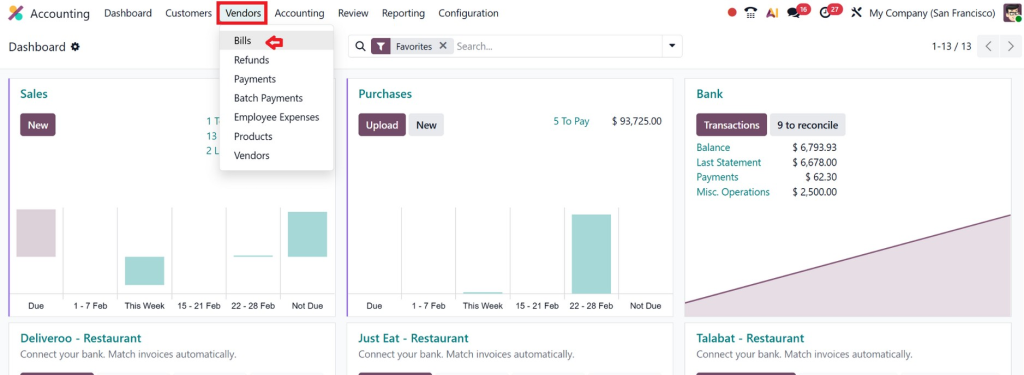
- Go to Accounting → Vendors → Bills
- Create a bill with the bank as the vendor.
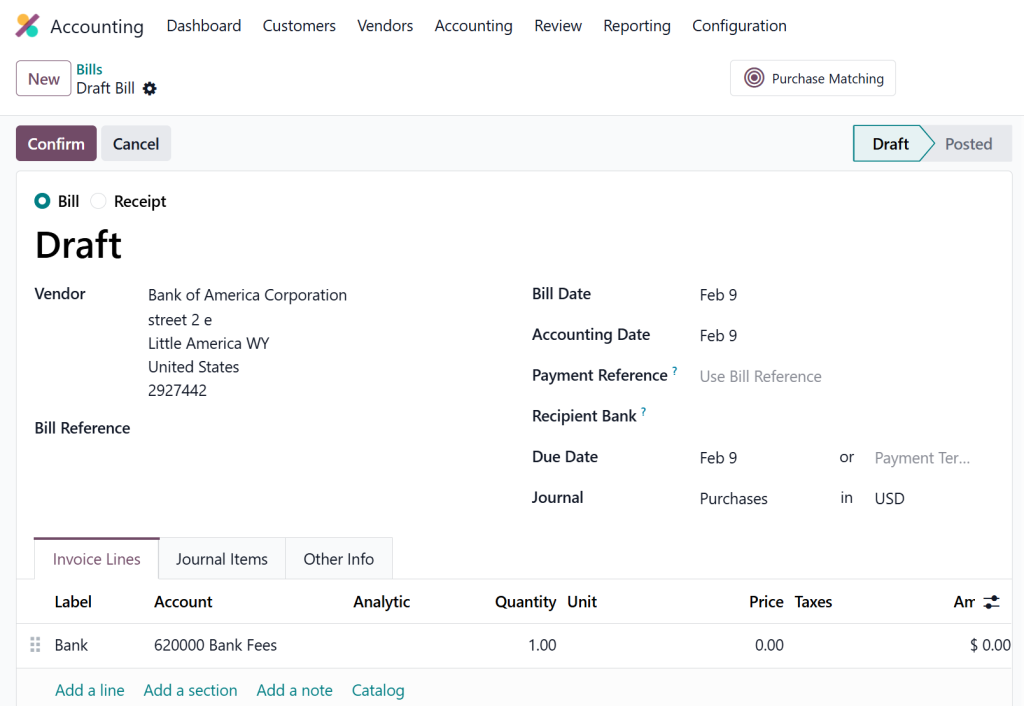
- Add a line for bank charges.
- Select the bank fees expense account
- Post the bill
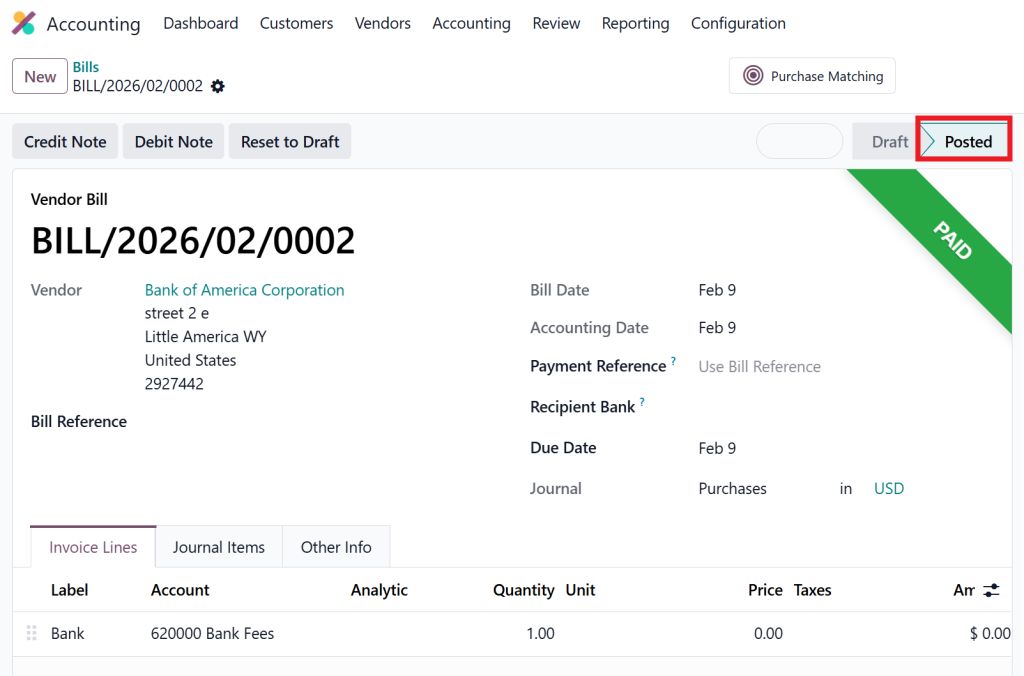
While this method works, it is neither efficient nor scalable for organisations that process frequent bank transactions.
Odoo 19 Bank Fees Expense Account Setup
Before automating anything, the first requirement is to configure a dedicated expense account.
Go to:
Accounting → Configuration → Chart of Accounts → Create
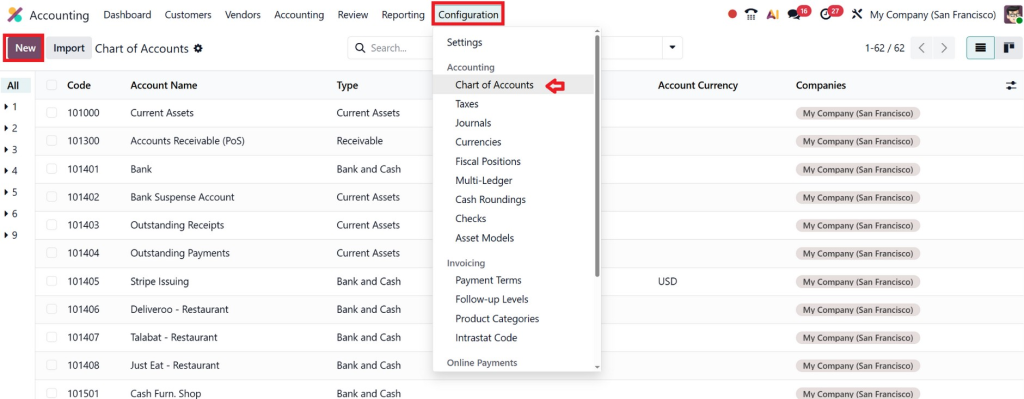
Set the following:
- Account Name: Bank Fees / Bank Charges
- Account Type: Expenses
- Code: As per your chart of accounts structure
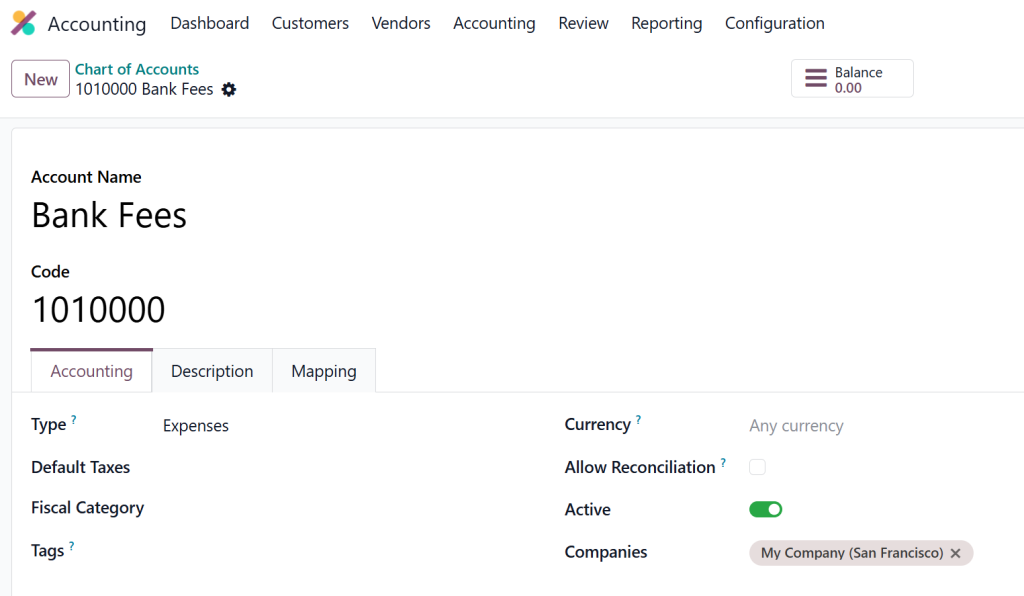
This account becomes the foundation for all Bank Fees in Odoo 19 Accounting.
Without a dedicated account, bank fees get mixed with general expenses, making financial analysis and audits difficult.
Odoo 19 Bank Statement Fees Handling
Most businesses use bank statement import or live bank synchronisation in Odoo. This process brings all transactions directly into the system.
Typical bank statement lines look like:
- “Service Fee – 10 USD”
- “Transfer Charge – 5 USD”
- “Gateway Commission – 3 USD”
These entries must be classified correctly.
This is where handling bank statement fees in Odoo 19 becomes important.
Instead of manually assigning each line, Odoo allows you to use reconciliation models to classify them automatically.
Configure Reconciliation Model Bank Fees Odoo 19
A reconciliation model is a rule-based mechanism that enables Odoo to automatically recognise and classify transactions.
This is the core feature behind automatic bank fees reconciliation in Odoo.
Steps to Configure:
- Go to Accounting Dashboard
- Open the Bank Journal
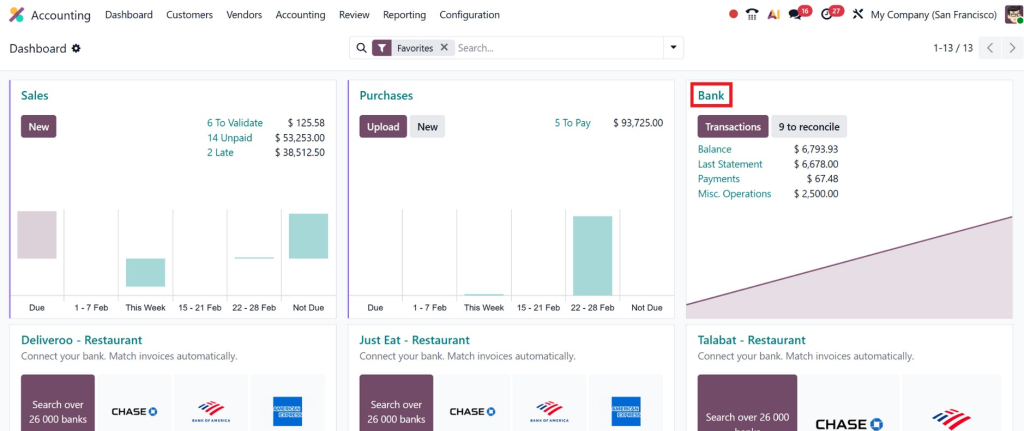
- Click Reconcile
- Select a bank fee transaction line
- Click Create Rule
- Define conditions like:
- Label contains: fee / charge / commission
- Set the counterpart account as Bank Fees Expense Account
- Save the rule
Automatic Bank Fees Reconciliation Odoo in Practice
Once the reconciliation model is active, the workflow becomes highly efficient.
Process:
- Import or sync bank statement
- Odoo scans transaction labels
- Matching lines are identified as bank fees
- The system suggests the reconciliation model
- User validates the entry
- The transaction is posted automatically
The result is a consistent classification of Bank Fees in Odoo 19 Accounting without manual intervention.
This significantly reduces reconciliation time and eliminates repetitive accounting work.
Handling Payment Gateway Fees
Payment gateway fees are one of the most common use cases.
Example scenario:
- Customer pays: 1,000
- Payment gateway deducts: 30
- Bank receives: 970
In accounting terms:
- Revenue = 1,000
- Bank balance increase = 970
- Expense (bank fee) = 30
Using automatic bank fees reconciliation in Odoo, the System splits the transaction and posts the difference to the bank fees expense account.
This ensures:
- Customer ledger remains accurate
- Revenue is not understated
- Expenses are correctly recorded
- Bank reconciliation balances perfectly
This is one of the strongest practical benefits of Bank Fees in Odoo 19 Accounting.
Best Practices for Odoo Accounting Bank Service Charges
1. Always Use Dedicated Expense Accounts
Never post bank fees to generic expense or miscellaneous accounts.
2. Use Separate Reconciliation Models per Bank
Different banks use different transaction labels.
3. Review Bank Fees Monthly
Analyse the amount paid to banks and gateways.
4. Automate as Much as Possible
Manual reconciliation increases the risk of errors.
5. Maintain Audit Trails
Ensure every bank fee is traceable to a statement line.
Common Errors in Bank Fee Management
In real-world Odoo implementations, the most common issues include:
- Posting bank fees to incorrect accounts
- Using manual journal entries
- Not configuring reconciliation models
- Ignoring small differences in reconciliation
- Mixing bank fees with vendor expenses
All these practices reduce the reliability of financial data.
Once Bank Fees in Odoo 19 Accounting are properly structured, these issues are automatically eliminated.
Why Professional Odoo Setup Matters
Odoo provides powerful features, but they require correct configuration.
Without a professional setup:
- Reconciliation models are incomplete
- Expense accounts are misclassified
- Automation is underutilized
- Finance teams revert to manual work
At Netilligence, we specialise in implementing Odoo accounting systems that adhere to best practices and meet real-world business requirements.
We help organisations:
- Configure reconciliation models
- Automate bank fee classification
- Integrate payment gateways
- Structure charts of accounts
- Train finance teams
- Prepare audit-ready accounting systems
When we implement the Odoo 19 bank fees reconciliation model, the objective is not just automation; it is long-term financial accuracy and scalability.
Business Impact of Automating Bank Fees
When Bank Fees in Odoo 19 Accounting are automated, organisations experience measurable benefits:
- Faster month-end closing
- Reduced reconciliation effort
- Improved audit readiness
- Accurate profit and loss reporting
- Better cost control
- Lower dependency on manual corrections
For CFOs and finance leaders, this translates into reliable financial data for strategic decision-making.
Bank Fees in Odoo 19 Accounting Is a Control Mechanism, Not a Feature
Bank Fees in Odoo 19 Accounting should not be seen as a minor configuration item. It is a financial control mechanism that ensures consistency, transparency, and accuracy across all bank-related transactions.
Organisations that invest in proper configuration benefit from:
- Clean reconciliation
- Standardised expense classification
- Reduced operational risk
- Higher confidence in financial reports
In modern finance operations, automation is no longer optional. It is a necessity.
Odoo 19 provides all the required tools. What matters is how correctly they are implemented.
Next Step
If you are planning to implement or optimise Odoo 19 accounting:
- Schedule a consultation with Netilligence
- Get your current accounting workflow reviewed
- Identify automation opportunities
- Build a clean and scalable finance system
Because accurate accounting is not about working harder.
It is about working with the right system, configured correctly.
Lorem ipsum dolor sit amet, consectetur adipiscing elit. Ut elit tellus, luctus nec ullamcorper mattis, pulvinar dapibus leo.




