How to Manage Customer Payment Follow-Ups in Odoo 18
Payment Follow-Ups in Odoo 18
The payment follow-up system in Odoo 18 represents a transformative solution for achieving financial efficiency in any business operation. The impact of delayed customer payments on cash flow, operations , and client relationships becomes significant for businesses of all sizes. Odoo 18 payment follow-up features automate the process to help you save time.
Payment Follow-Ups in Odoo 18 help in setting up scheduled email reminders, customising messages based on delay periods, tracking overdue invoices, and ensuring no revenue falls through the cracks. Through automated systems, Odoo offers an efficient and professional approach to following up with customers. This blog will explore how to utilise this functionality, its importance, and how to configure it effectively to meet your specific needs.
Why Are Odoo 18 Payment Follow-Ups Important for Your Business?
Unpaid invoices don’t just impact revenue; they can snowball into bigger financial problems. A solid strategy for customer follow-up in Odoo ensures consistent communication with clients and keeps your accounts receivable on track. It enhances cash flow, reduces outstanding dues, and fosters a sense of professionalism.
Benefits of Managing Odoo Automated Payment Reminders
Automation: Minimise manual work with Odoo’s powerful automation engine.
Customisation: Send personalised follow-ups that suit your customer tone.
Tracking: Stay updated with each client’s payment history.
Efficiency: Save time, reduce errors, and focus on high-priority tasks.
Setting Up Payment Follow-Ups in Odoo 18
Let’s get into how to manage payment follow-ups in Odoo step by step.
Step 1 - Activate Follow-Up Feature
To begin, navigate to Invoicing > Configuration > Settings and enable the Follow-Up Levels option.
Step 2 - Odoo Follow-Up Levels Configuration
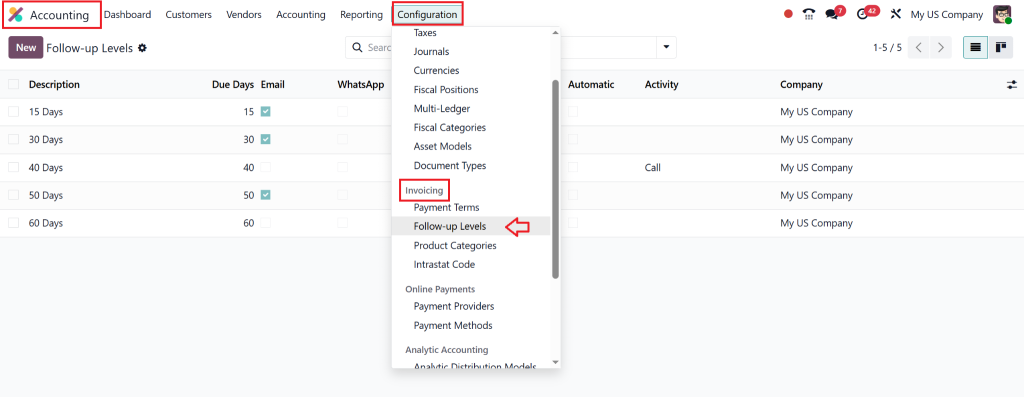
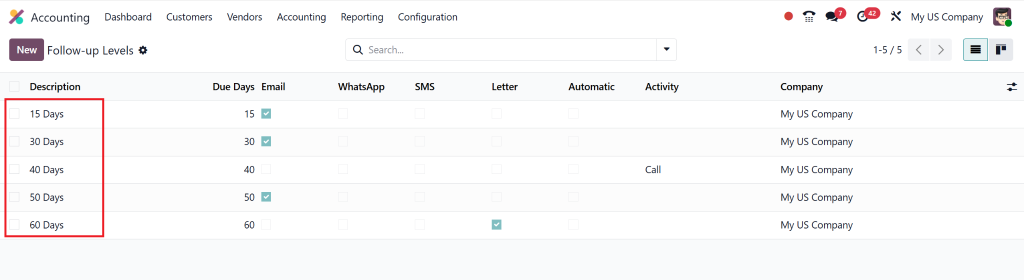
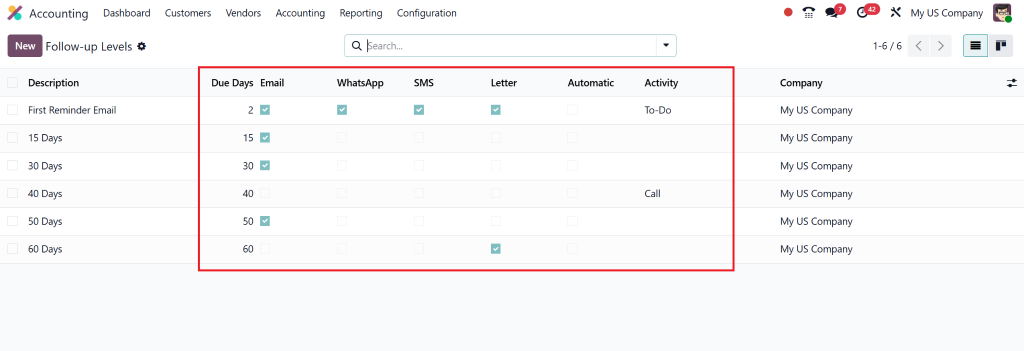
Under Accounting > Configuration > Invoicing > Follow-Up Levels, you can define multiple levels of reminders:
Level 1: Friendly reminder (Day 1)
Level 2: Firm but polite reminder (Day 5)
Level 3: Stronger warning (Day 10)
Level 4: Final Notice (Day 15+)
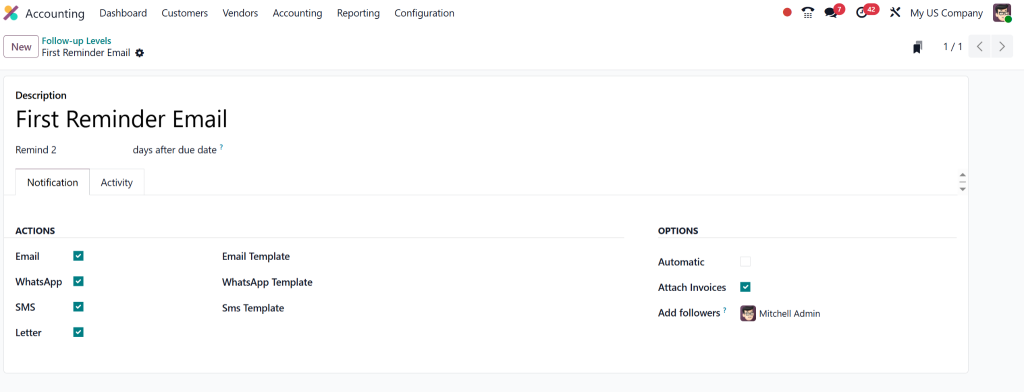
You can define:
Email subject and body
Delay duration
Whether to attach the invoice PDF
Include the account manager’s signature
Step 3 - Create and Send Follow-Ups
Once everything is set, go to Invoicing > Follow-Ups.
You can see the pending actions, manually trigger reminders, or schedule automatic emails.
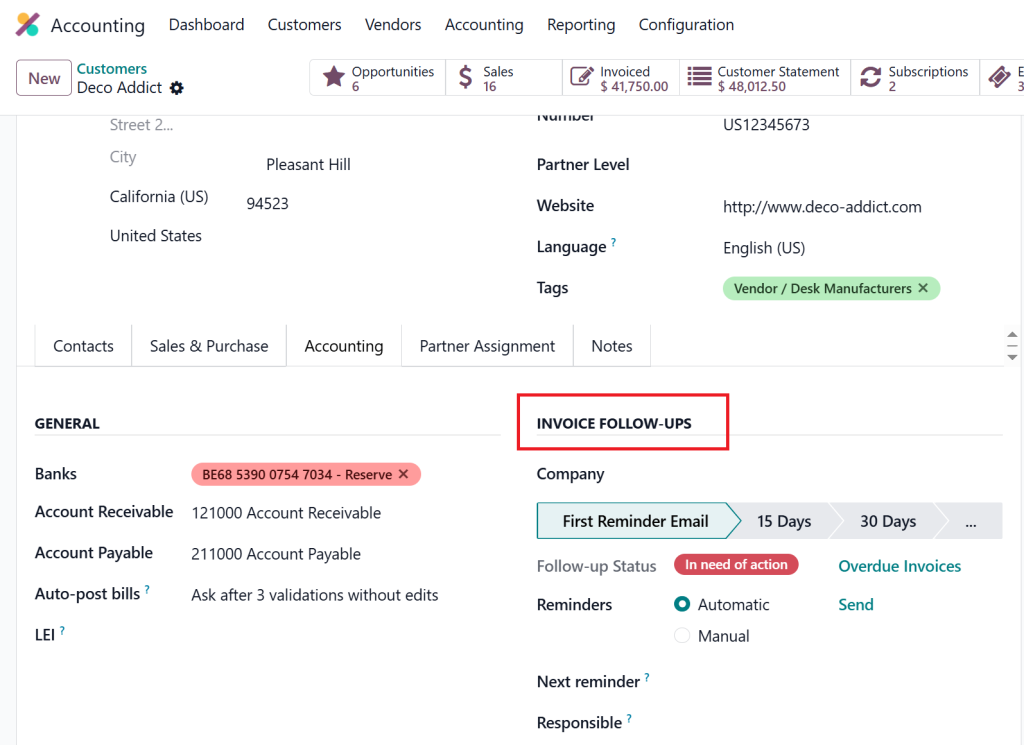
Also you can check by going to Customer > Customer.
Automating Payment Reminders with Odoo 18
Odoo’s automated payment reminders function as a key feature in this system. The system allows you to set automatic reminders that trigger according to due dates and specific follow-up levels.
How Automation Works:
The system checks due invoices daily.
Selects customers based on configured levels.
Sends reminders through email or printed letters.
You can track delivery status and read receipts.
Customising Customer Follow-Up Messages
Personalisation is key. With Customer follow-up in Odoo, you can tailor your emails to reflect your brand voice. Odoo lets you edit templates with variables like:
Customer name
Invoice amount
Due date
That makes every message feel human, not robotic.
Tips to Improve Your Odoo 18 Customer Invoice Reminders
Here’s how to make your Odoo 18 customer invoice reminders more effective:
Use Friendly Language: Don’t sound robotic or aggressive.
Be Clear: State the due date, amount, and invoice number.
Include Contact Info: Make it easy for clients to reach out.
Timing Matters: Early reminders yield faster payments.
Attach Invoices: Always include the original invoice file.
Best Practices to Handle the Payment Collection Process in Odoo
The payment collection process in Odoo requires more than just sending reminders, as it necessitates effective communication strategies. The following practices will help you master payment collection in Odoo:
Segment Customers
The payment follow-up approach for clients should vary between gentle reminders and strict follow-ups. Odoo provides tools to segment customers based on their needs and assign appropriate follow-up levels.
Track History
Odoo maintains a record of all communication activities which provides users with complete interaction histories for each client.
Sync with Accounting
The module provides instant accounting dashboard integration which speeds up reconciliation processes.
Why Netilligence for Odoo Payment Follow-Up Configuration?
We at Netilligence are proud to be an Odoo Partner, specialising in custom Odoo configurations and solutions. Our team understands how to mould Payment Follow-Ups in Odoo 18 to suit your unique business model. From automating reminders to setting strategic follow-up levels, we ensure your collections run like clockwork.
What You Get with Netilligence:
Expert Consultation
Custom Follow-Up Flows
Email & Letter Template Designs
User Training & Support
We don’t just sell software, we sell business peace of mind. When you choose Netilligence, you choose growth.
Turn Outstanding Payments Into Opportunities
The process of following up on payments in Odoo 18 functions as the foundation for maintaining both positive cash flow and satisfied customers. Every business size, from startups to corporate giants needs to handle payment collection processes effectively to achieve success. Your revenue should never remain uncertain. Odoo 18 enables you to automate and customise payment follow-ups for maximum success.
Contact Netilligence today if you want to optimise your payment collection processes. Our team will demonstrate how an optimised Odoo system functions.
Hi, I'm Nabia, an Odoo ERP functional & technical content writer. I specialize in blogs, social media content, ad copy, landing pages, service pages, and email campaigns.
We use cookies to ensure that we give you the best experience on our website. If you continue to use this site we will assume that you are happy with it.