How to Set Predictive Lead Scoring in Odoo 18 CRM?
Lead Scoring in Odoo 18 CRM – A Smarter Way to Prioritize Leads
When you’re managing dozens – or even hundreds-of-leads every week, it’s easy to get overwhelmed. Which one is worth your time? Who is most likely to buy? That’s where Lead Scoring in Odoo 18 CRM steps in to help. By giving a score to each lead based on behaviour and data, your sales team knows exactly who to focus on.
Odoo 18 CRM brings something even more helpful: Odoo predictive lead scoring. This system doesn’t rely solely on manual inputs; it uses your existing sales data to automatically estimate which leads are worth pursuing. This feature is worth your attention if you’ve ever wanted to work smarter, not just harder.
In this complete guide, we’ll walk you through:
What is Lead Scoring in Odoo 18 CRM and why it matters
How to use predictive lead scoring Odoo offers
Setting up Odoo CRM lead scoring models
Using Odoo CRM probability settings to prioritize leads
Hands-on tips from an Odoo CRM tutorial
Managing your pipeline with Odoo sales lead management
By the end, you’ll understand how to use lead scoring to drive better results, reduce wasted effort, and close more deals with less guesswork.
What is Lead Scoring in Odoo 18 CRM and Why Does It Matter?
Let’s start with the basics. Lead Scoring in Odoo 18 CRM ranks leads based on their chances or likelihood of converting. The higher the score, the greater the lead.
Traditionally, sales teams assign scores based on:
Email responses
Website visits
Deal size
Industry or location
However, with Odoo predictive lead scoring, the system learns from your previous deals to calculate a conversion probability using real data, rather than relying on intuition.
So, instead of treating every lead equally, your sales team can spend more time on high-probability leads and follow up accordingly. That is precisely what Odoo CRM lead scoring was built for.
Step-by-Step: How to Use Predictive Lead Scoring in Odoo CRM
Setting up predictive lead scoring Odoo provides is straightforward, especially if you’ve already been tracking your sales performance inside the platform.
Step 1: Enable the Feature
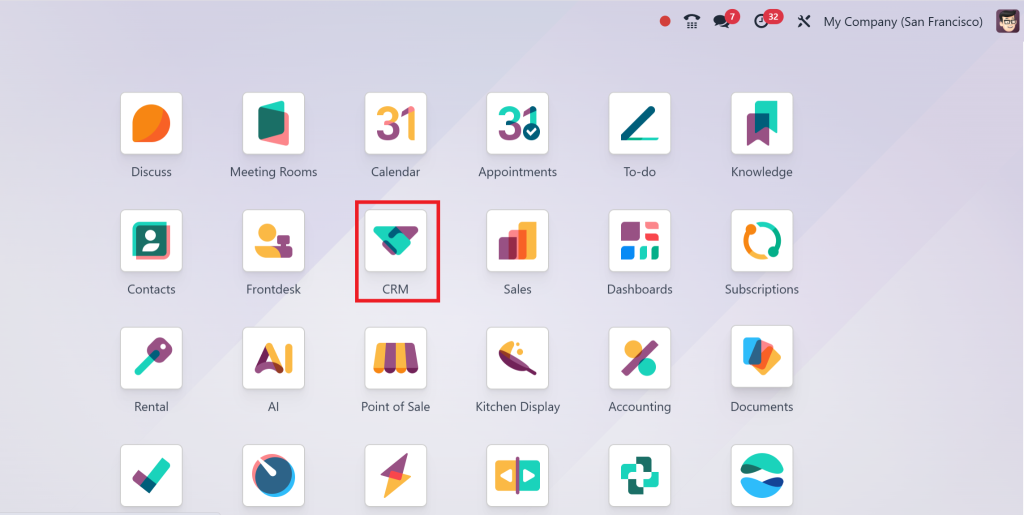
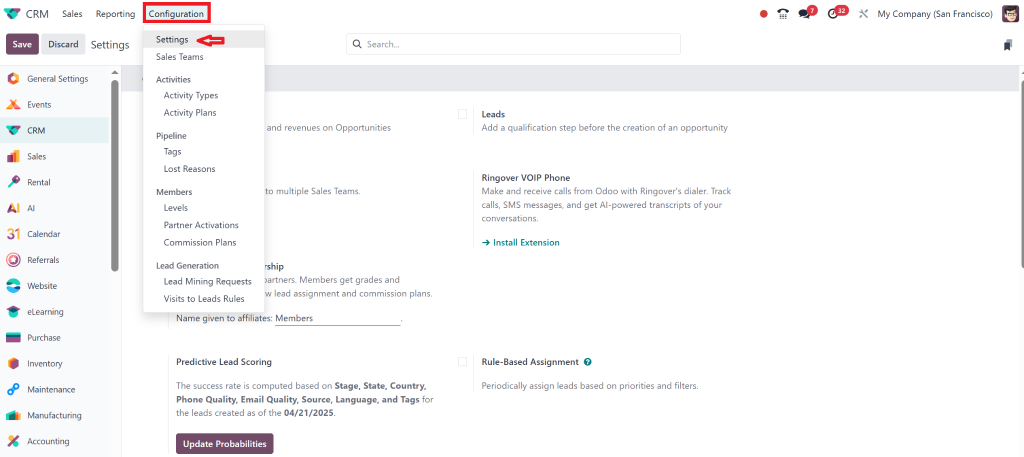
Go to CRM >
Configuration > Settings
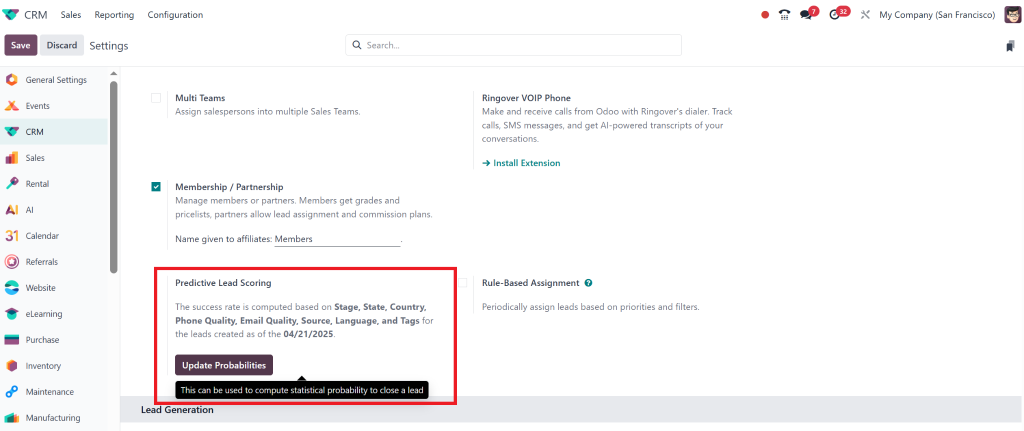
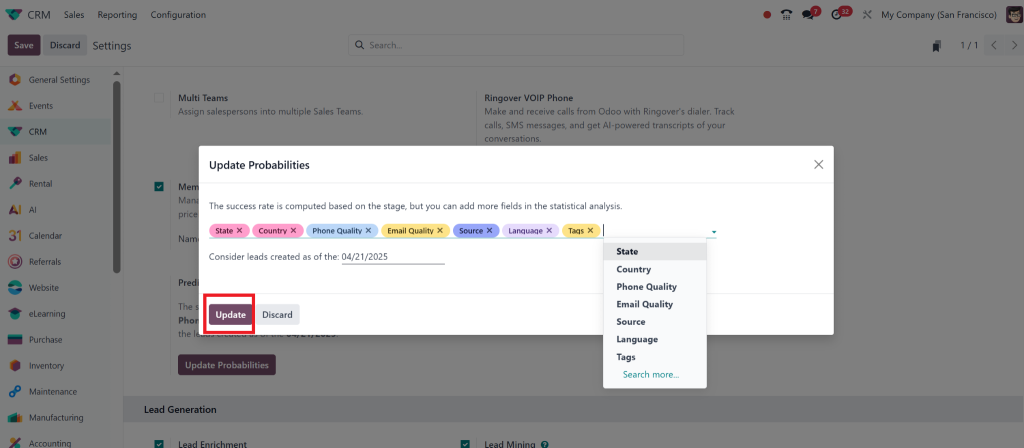
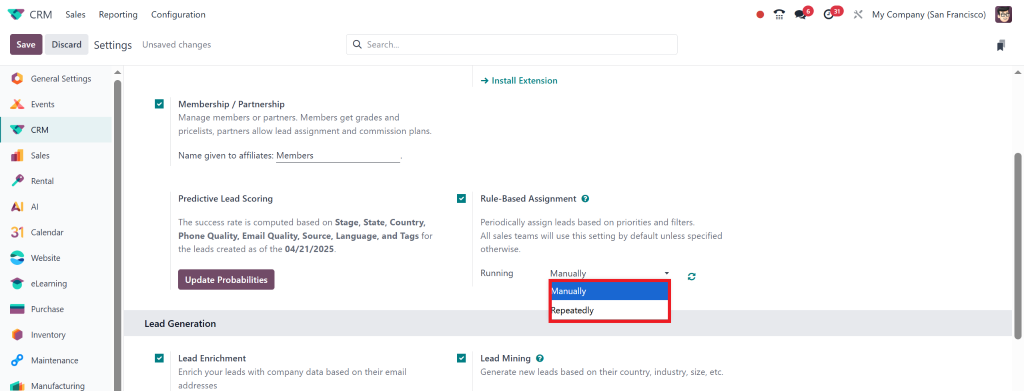
Under the Predictive Lead Scoring section, enable the features
By clicking on ‘Update Probabilities’, you can customise it according to your needs and then click ‘Update’.
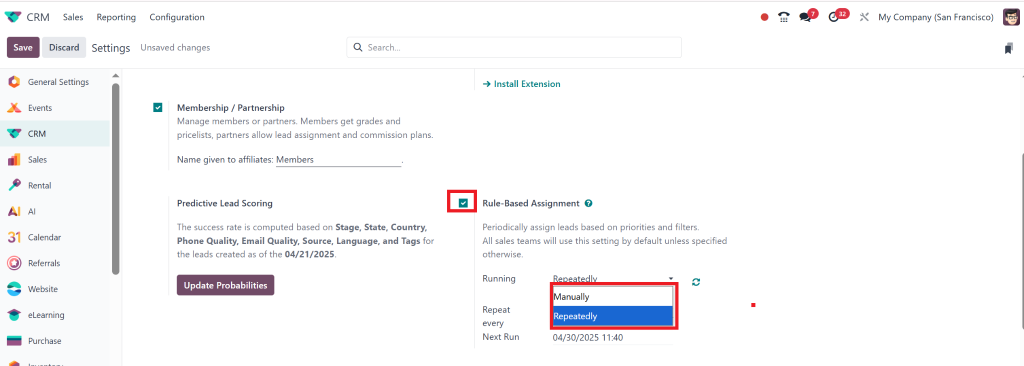
After updating, you can also check the mark the rule-based assignment option, in which you can select it either manually or repeatedly.
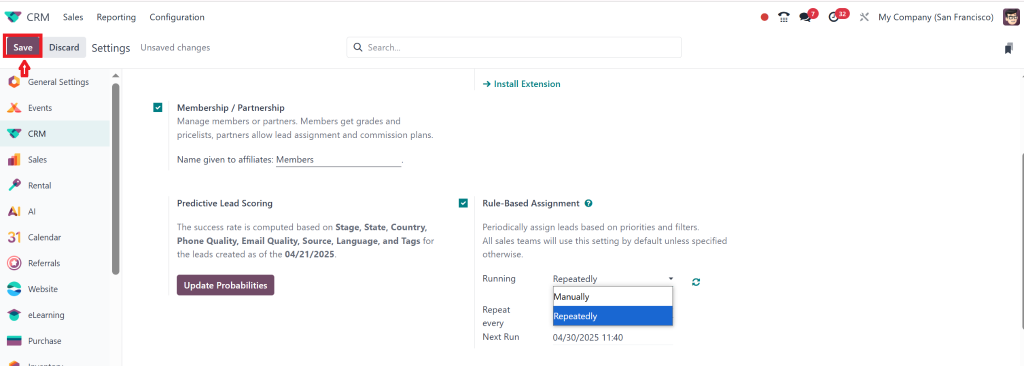
Click Save
Step 2: Allow the System to Analyze Existing Data
The power of Odoo 18 predictive lead scoring comes from historical data. It will analyze:
Previous deals won/lost
Lead sources
Contact Frequency
Industry, company size, etc.
After it gathers enough data, Odoo will automatically assign a conversion probability to each incoming lead.
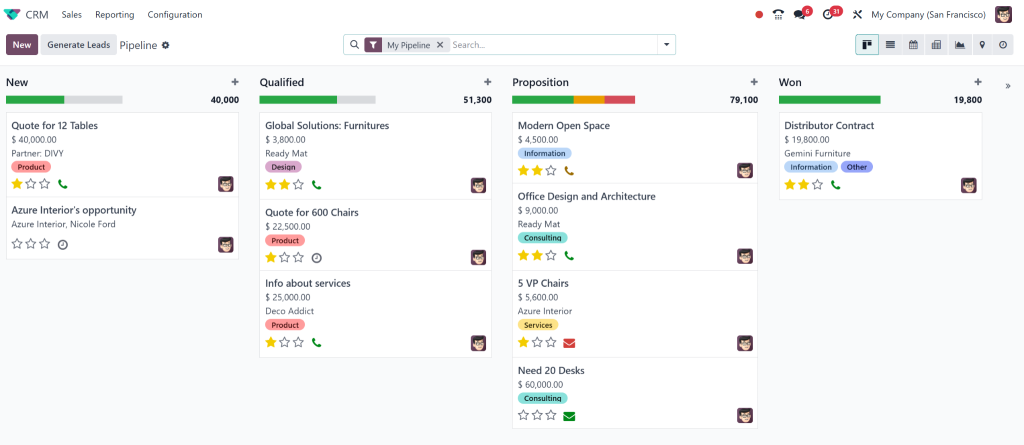
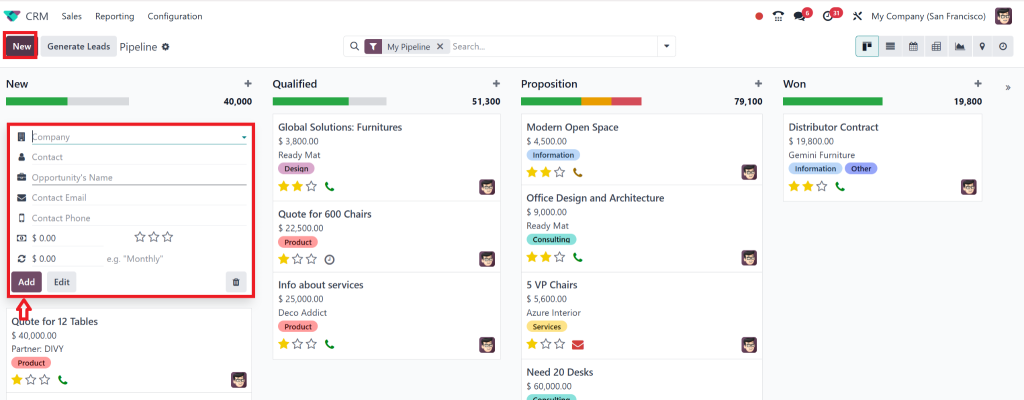
For example if we add a new lead by clicking on NEW.
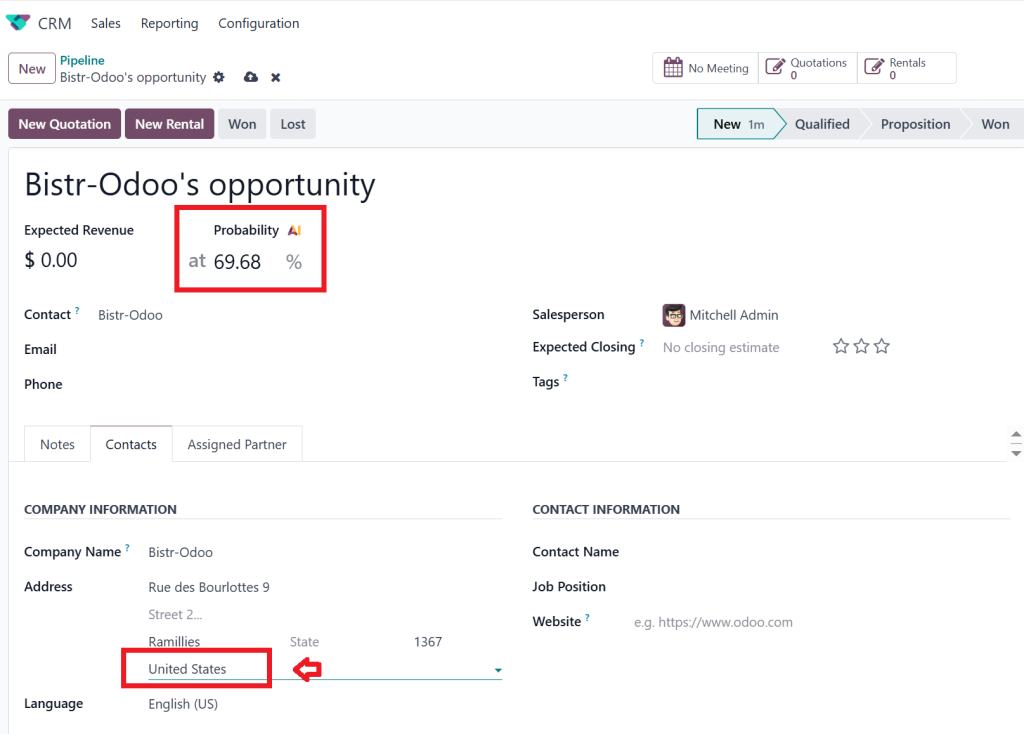
If we add the area from which we already won the lead, then it shows a higher probability of winning this new lead according to historical data.
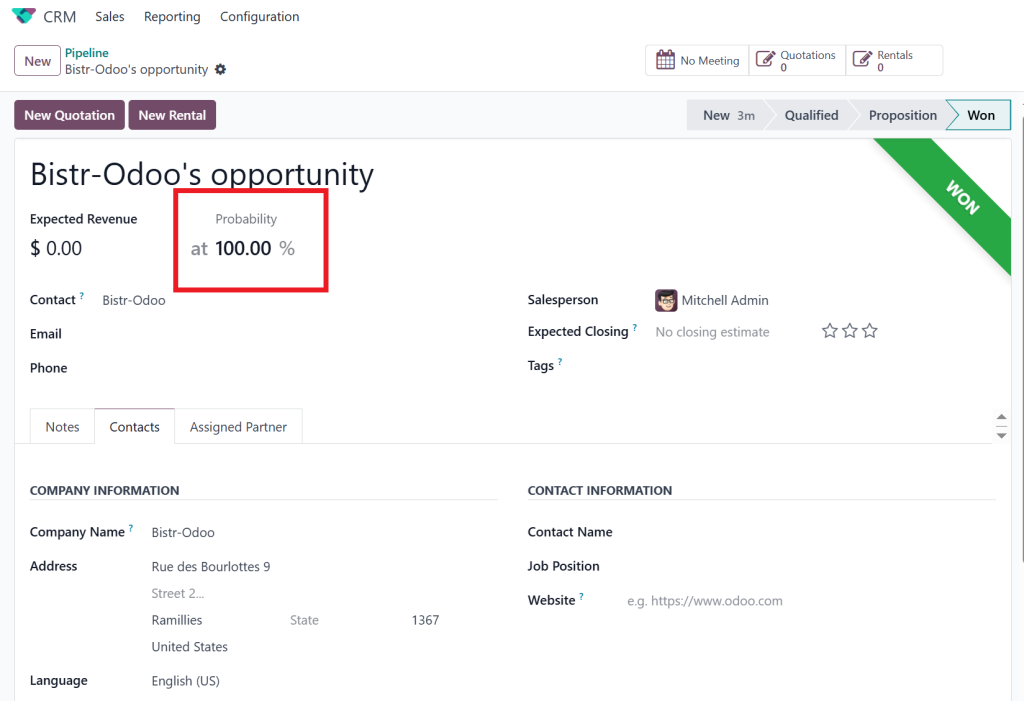
If we won the lead, then it shows a 100% probability.
Step 3: Display and Sort by Score
Now, when viewing your pipeline or lead list, you can:
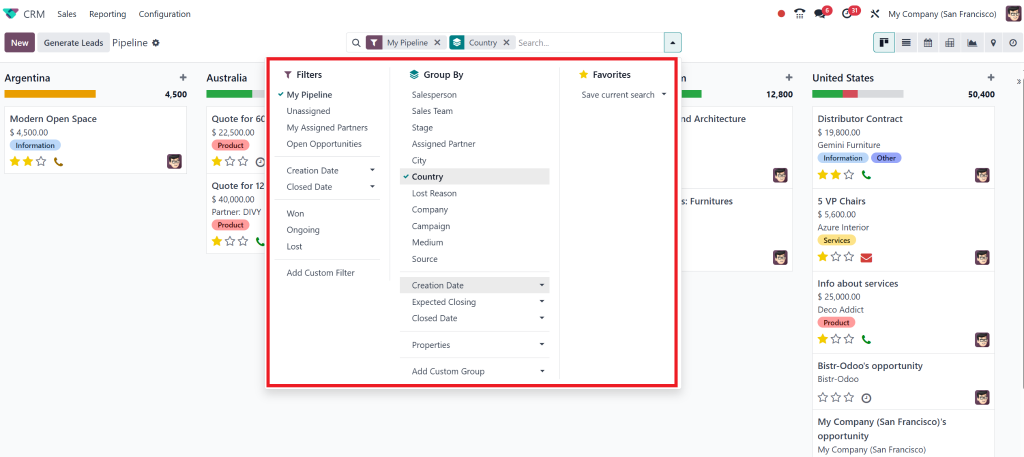
Sort by probability
Add scoring columns to views
Assign salespeople based on lead quality
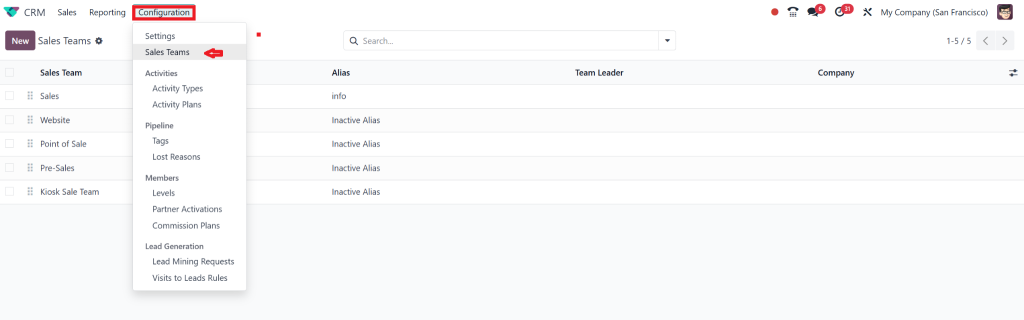
For this, go to Configuration > Sales Team
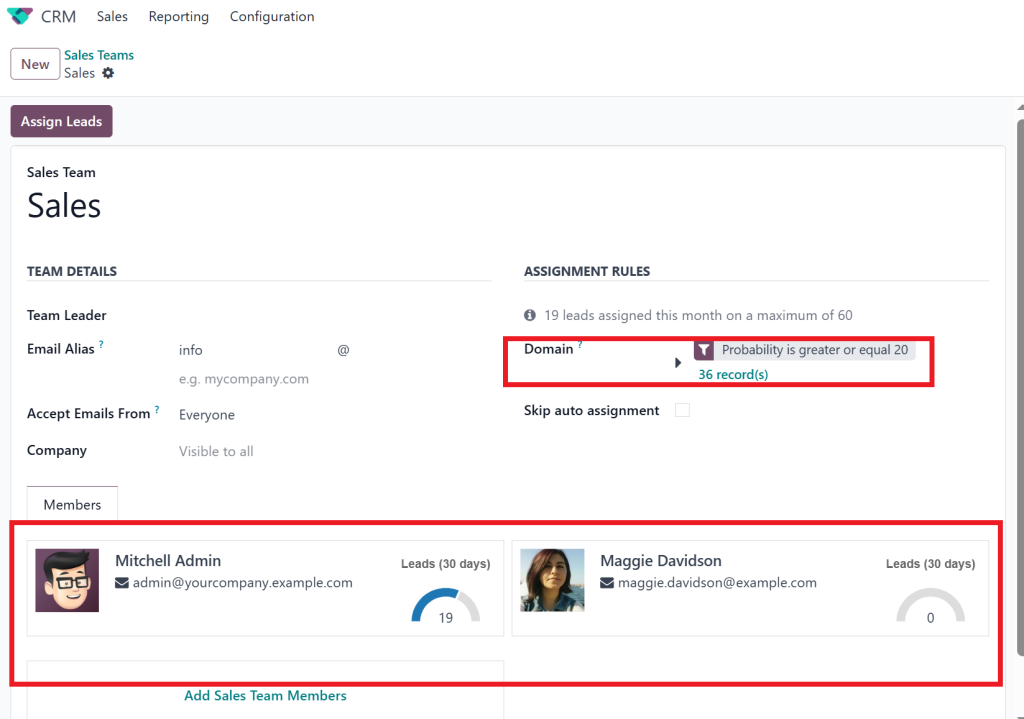
Select the appropriate team for the task. There are also assignment rules displayed here because, as shown above in the settings, we selected this option. Additionally, we can add rules here for this task.
Here it is showing that if the probability of winning the lead is greater than 20, then it will be automatically assigned to both persons.
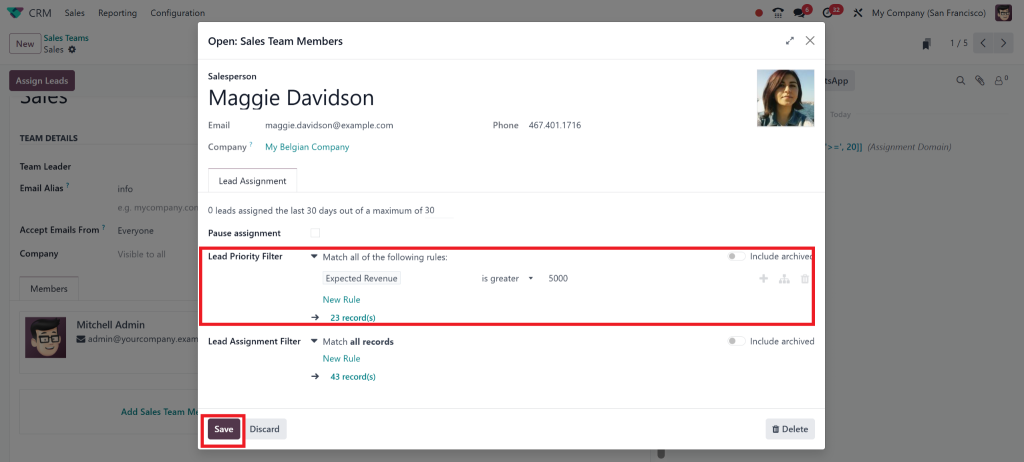
If we want to add a rule for a specific salesperson, we can do so here. For example, if we wish for only that one specific person to take care of the high-revenue task, then we can add a condition for him: if the revenue is above $5,000, it will be automatically assigned to him.
How to Configure Lead Scoring in Odoo CRM (Manual + Predictive)
You can combine manual methods with Odoo CRM lead scoring to refine results even more.
Creating Scoring Rules Manually
Go to CRM > Configuration > Settings:
Assign points based on industry, country, campaign, or activity
Example: +10 points for leads from email campaigns, +20 for certain industries
That helps you fine-tune your lead quality, especially before predictive scoring gathers enough data.
Using Probability to Prioritize Leads
Focus only on hot leads
Set follow-up reminders for high-scoring opportunities
Measure lead quality over time
Combining both manual scores and predictive lead scoring, Odoo offers you the best of both worlds.
Odoo 18 CRM Tutorial: Setting Up Lead Scoring Like a Pro
If you’re new to CRM or Odoo, this quick Odoo 18 CRM tutorial will help you get started fast.
Basic Setup
Install the CRM module from the Odoo Apps
Enable Predictive Scoring under CRM settings
Add custom fields to collect relevant lead data like:
Source of inquiry
Deal size
Industry type
Train your team to fill in lead details accurately
Customize Your Pipeline
Odoo lets you fully customize your pipeline stages to reflect your actual sales process:
New → Contacted → Qualified → Proposal Sent → Won/Lost
Add a scoring display to each stage card
Automate follow-ups based on probability levels
With these steps, lead scoring in Odoo CRM becomes a daily part of your workflow, not just a “nice-to-have” feature.
Using Odoo CRM Probability Settings to Improve Conversions
Let’s talk about the real benefit: conversions.
The Odoo CRM probability settings aren’t just numbers, they guide your entire sales strategy. Here’s how to make the most of them:
High-Probability Leads (80–100%)
Set auto-reminders, assign to senior reps, and follow up quickly.
Medium Leads (40–79%)
Add nurturing sequences or marketing campaigns.
Low-Probability Leads (<40%)
Put them into long-term nurturing or re-targeting.
By letting predictive lead scoring Odoo calculates guide your actions, you avoid wasting time on leads that are unlikely to close.
Lead Scoring in Odoo 18 CRM for Better Sales Lead Management
Regarding Odoo sales lead management, lead scoring isn’t just useful; it’s almost necessary. It makes your sales pipeline clearer and more organized.
Benefits You’ll Notice
Fewer lost opportunities: You don’t miss out on high-value leads anymore
Better follow-up: Your team knows which leads need attention and when
Improved forecasting: Managers can better predict revenue and sales performance
Odoo helps you manage all this visually, so it’s not just data; it’s actionable insight.
Tips to Improve Lead Scoring in Odoo CRM Over Time
Here are some expert tips we use at Netilligence when implementing Lead Scoring in Odoo 18 CRM for clients:
Keep your data clean
Incomplete leads can’t be scored correctly. Always validate your lead fields.
Review scoring rules monthly
As trends change, so should your scoring logic. Check for underperforming lead sources.
Combine manual and predictive scoring
Start with manual methods, then let Odoo predictive lead scoring enhance accuracy over time.
Use tags for segmentation
Tags help you create custom groups and apply rules easily.
Train your sales team
Teach your team how to use Odoo CRM probability settings to make smarter decisions.
Why Netilligence is the Right Partner for Setting Up Lead Scoring in Odoo 18 CRM
Getting the most out of Lead Scoring in Odoo 18 CRM means more than just enabling a feature. It takes proper setup, customization, and training. That’s where Netilligence comes in.
Our team helps you:
Analyze your current sales process
Build a custom scoring model with Odoo CRM tutorial assistance
Configure both manual and predictive lead scoring Odoo features
Train your sales reps to use Odoo CRM lead scoring daily
Monitor and improve scoring accuracy over time
When your lead scoring works, everything else in sales becomes easier.
Turn Data Into Decisions with Lead Scoring in Odoo 18 CRM
To wrap it up, Lead Scoring in Odoo 18 CRM helps you take control of your pipeline. Instead of chasing every lead, you’ll focus on the ones that matter, those with the highest chance of closing.
Whether using Odoo sales lead management to manage a small sales team or a large CRM operation, this feature simplifies decision-making. You’ll convert faster, forecast better, and reduce wasted effort.
With tools like Odoo 18 predictive lead scoring, you don’t need to guess anymore; your data does the work.
Want expert help setting up lead scoring in Odoo 18 CRM?
Let Netilligence optimize your CRM for better lead tracking, sales accuracy, and faster conversions.
Hi, I'm Nabia, an Odoo ERP functional & technical content writer. I specialize in blogs, social media content, ad copy, landing pages, service pages, and email campaigns.
We use cookies to ensure that we give you the best experience on our website. If you continue to use this site we will assume that you are happy with it.