How to Manage Overhead Cost and Labour Cost in Odoo 18 Accounting
The Real Cost of Running a Business (And How Odoo 18 Makes It Easier)
Every business is constantly battling with costs. Whether it’s electricity bills, staff salaries, or maintenance expenses, these numbers don’t just affect your bottom line; they define your survival. And if you’re reading this, you probably want one thing: clarity.
You want to know exactly where your money goes, what part of your workforce or department is draining your budget, and how you can reduce these without hurting performance. That’s where Overhead Cost and Labour Cost in Odoo 18 Accounting steps in.
In this guide, we’re going to walk you through how to manage overhead cost and labour cost in Odoo 18 Accounting, a powerful, integrated ERP solution that helps you:
Track real-time employee costs
Analyse overheads in depth
Set up smart cost centres
Generate automated cost reports
Make confident decisions with complete financial visibility
Whether you’re a small startup or a growing enterprise, understanding and managing Odoo 18 overhead cost accounting and Odoo 18 labour cost management is critical for your success. Let’s see the power of Odoo 18 and explore why this platform is a game-changer for any company serious about reducing costs.
What are Overhead Costs and Labour Costs?
To effectively use Overhead Cost and Labour Cost in Odoo 18 Accounting for cost tracking, you first need to understand what you’re dealing with.
Overhead Costs Defined
Overhead costs are the expenses a company incurs that are not directly tied to a specific product or service. These include:
Rent, electricity, and water bills
Office supplies
Managerial salaries
Insurance
Software subscriptions
They’re vital for operations, but can quietly erode your profits if not managed effectively. That’s why learning to manage overhead costs in Odoo 18 is essential.
Labour Costs Explained
Labour costs include:
Salaries and wages
Bonuses and incentives
Payroll taxes
Benefits (health insurance, retirement plans)
In Odoo 18, you can track labour cost for each employee, task, department, or project, giving you granular control over your most significant expense.
Step-by-Step: How to Manage Overhead Cost and Labour Cost in Odoo 18 Accounting
Set Up Initial Configurations
Before performing the actions in the video, it is essential to configure specific settings in Overhead Cost and Labour Cost in Odoo 18 Accounting.
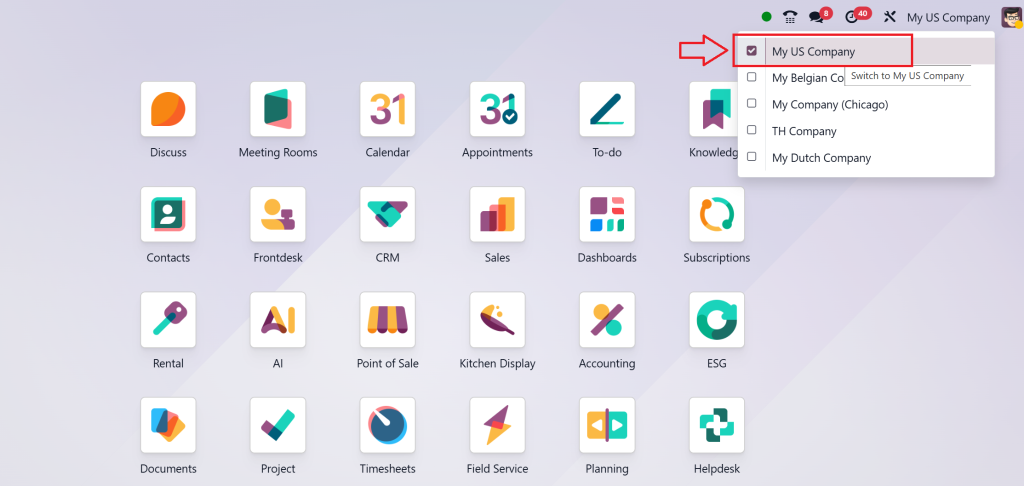
1.1 Configure a New Company
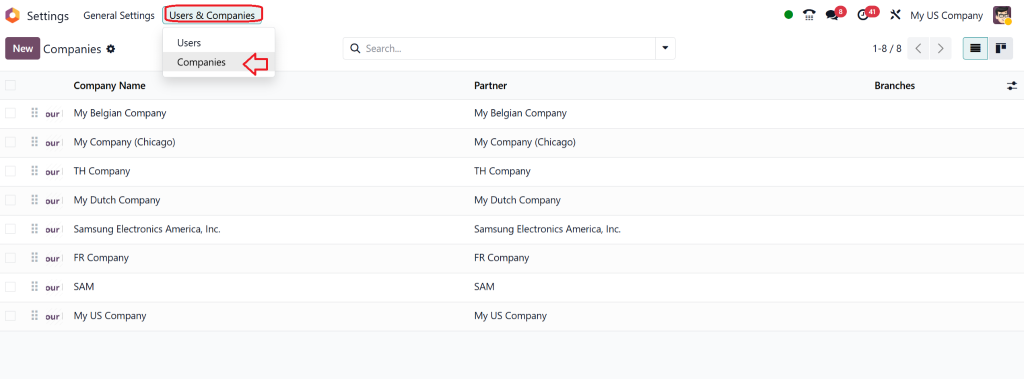
Go to: Settings > Companies
Select Create to set up a new company or choose an existing company.
Fill in all the necessary details like Company Name, Address, and Financial Information.
1.2 Configure Accounting Settings
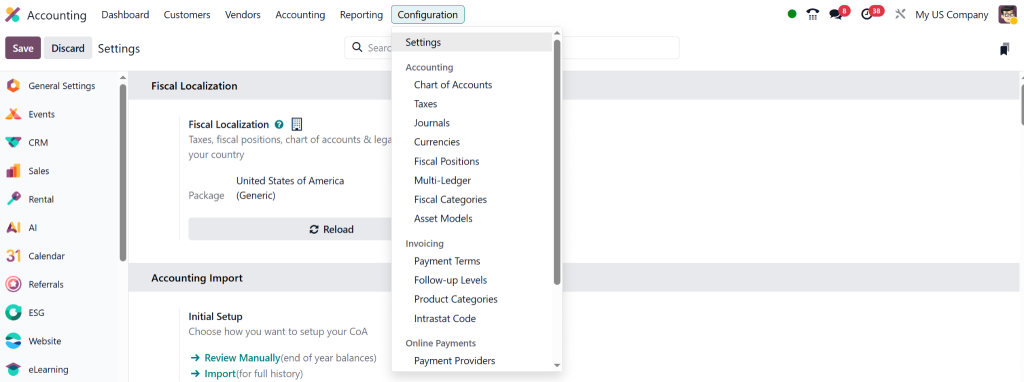
Go to: Accounting > Configuration > Settings
Ensure the following settings are configured:
Chart of Accounts: Choose the accounting structure (default or customized based on your business needs).
Enable Analytic Accounting: This helps in managing and tracking costs for cost centers (for labor and overhead).
Activate Costing Methods (FIFO, Standard Price, or Real Price).
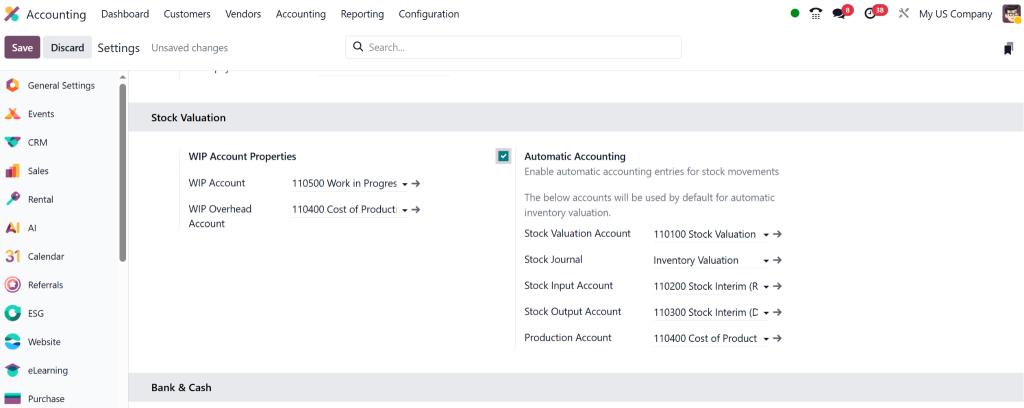
Enable stock valuation account and hit Save.
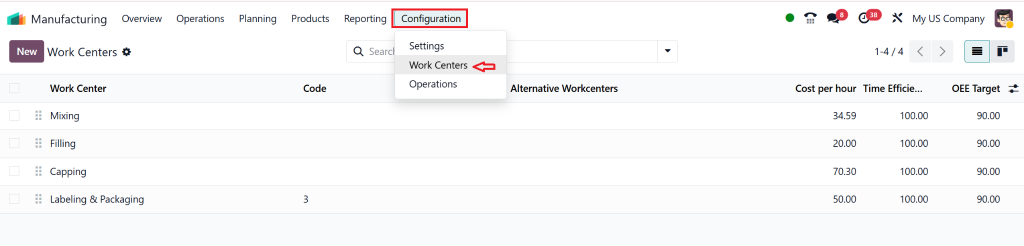
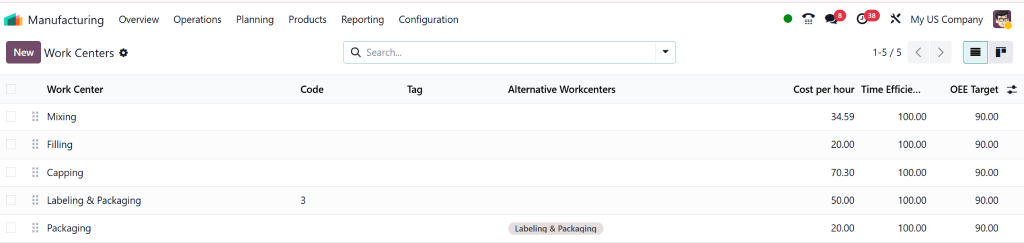
1.3 Configure Work Centres and Routes
Go to: Manufacturing > Configuration > Work Centers
Create New Work Centers:
Name each work center (e.g., Assembly, Packaging).
Define the fixed and variable costs per operation and input the time efficiency.
Go to: Manufacturing > Configuration > Routings
Create Routings: Link each work center with the corresponding operations for each product.
Add operations and time per operation for each routing.
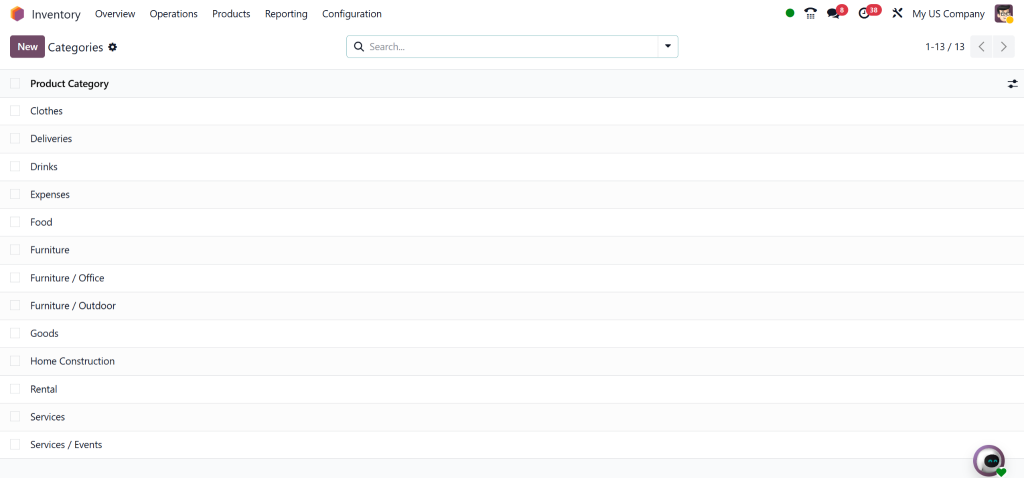
1.4 Configure Product Categories and BoM (Bill of Materials)
Go to: Inventory > Configuration > Product Categories
Set up categories based on product types (e.g., Raw Materials, Finished Goods).
Go to: Manufacturing > Products > Bill of Materials
Create a Bill of Materials (BoM): Link the BoM to the product you plan to manufacture. Assign the appropriate routing and work centers.
Step 1: Select a New Company
Navigate to: Settings > Companies
Select “Create” to set up a new company or choose an existing company.
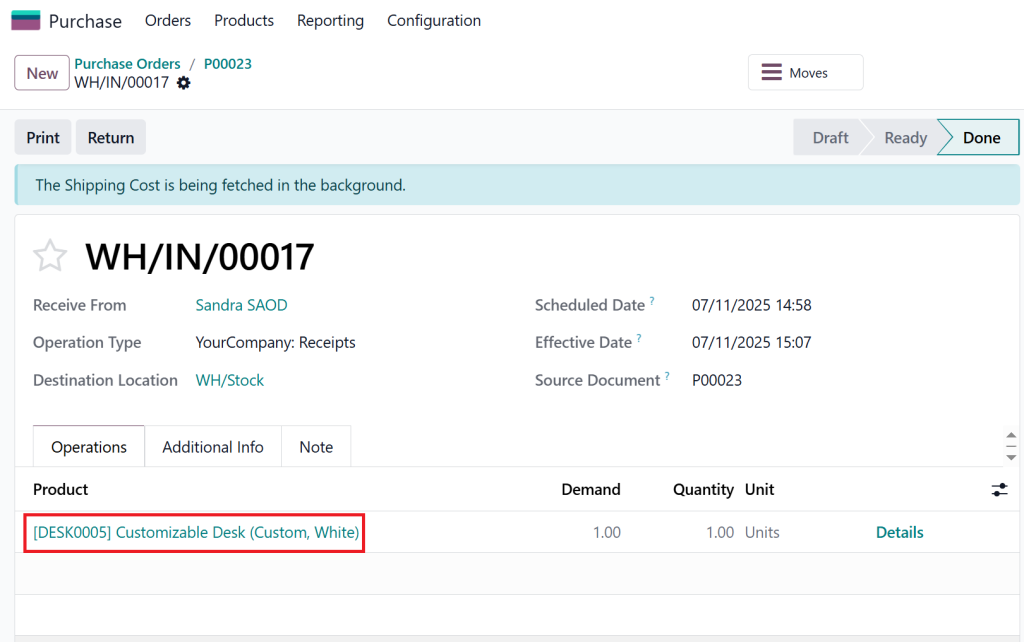
Step 2: Purchase a Product
Go to: Purchases > New
Select or create a new product.
Purchase the product to add it to your inventory.
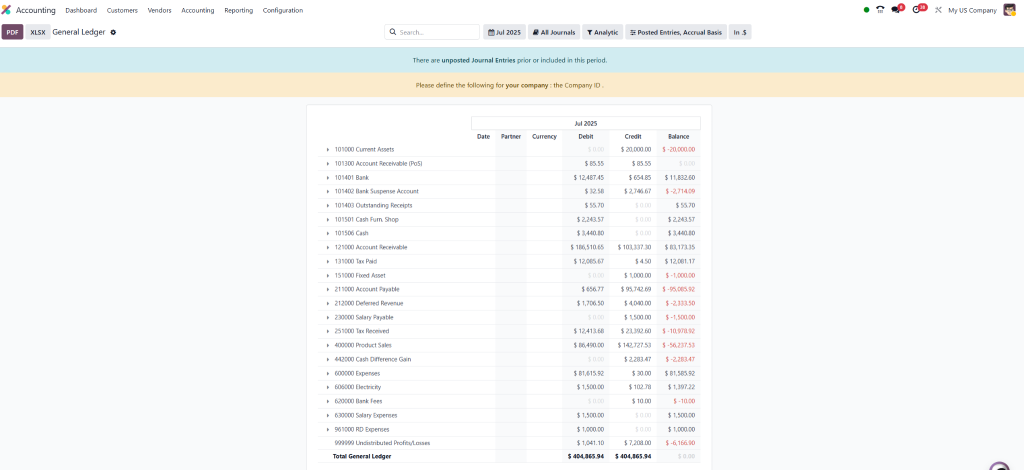
Step 3: Check General Ledger
Navigate to: Accounting > General Ledger
Review the journal entries related to the purchased product.
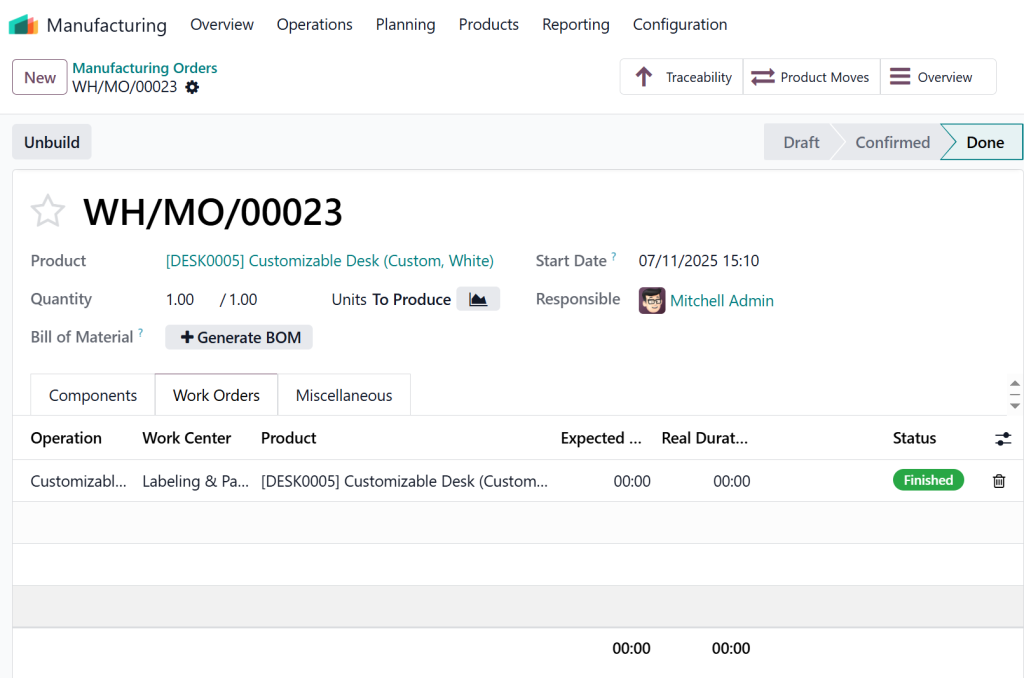
Step 4: Manufacture the Product
Go to: Manufacturing > Products
Select the same product that was purchased earlier.
Start the manufacturing process for this product.
Step 5: Check General Ledger Again
After the product is manufactured, navigate back to: Accounting > General Ledger
Recheck the journal entries to see how the cost of the manufacturing process has been reflected in the ledger.
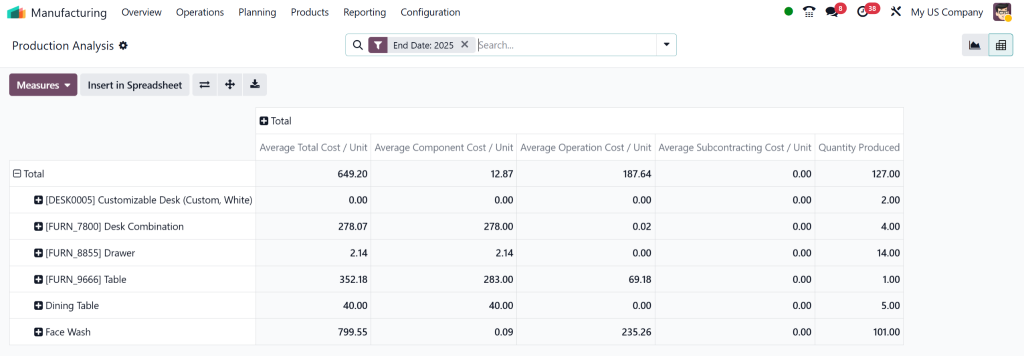
Step 6: Go to Product Analysis in Manufacturing Reports
Navigate to: Manufacturing > Reporting > Product Analysis
In the report, measure and track the following two parameters:
Employee Cost
Operational Cost
Step 7: Clarification on Expenses (Electricity Bill and Salary)
Here, the confusion arises because overhead costs like electricity bills and employee salaries are tracked separately but also need to be included in the manufacturing costs.
In typical cases, these costs are recorded separately and then allocated to manufacturing at the month-end, once exact figures are available.
Note: Separate bills (like electricity and salary) are usually added at month-end to avoid duplicate cost tracking.
Create a bill for electricity and include the amount and necessary details.
Add this expense to the general ledger by confirming the bill.
Step 9: Check General Ledger Again
After adding the electricity bill, go back to: Accounting > General Ledger
Review the updated journal entries to verify that the electricity expense has been properly recorded.
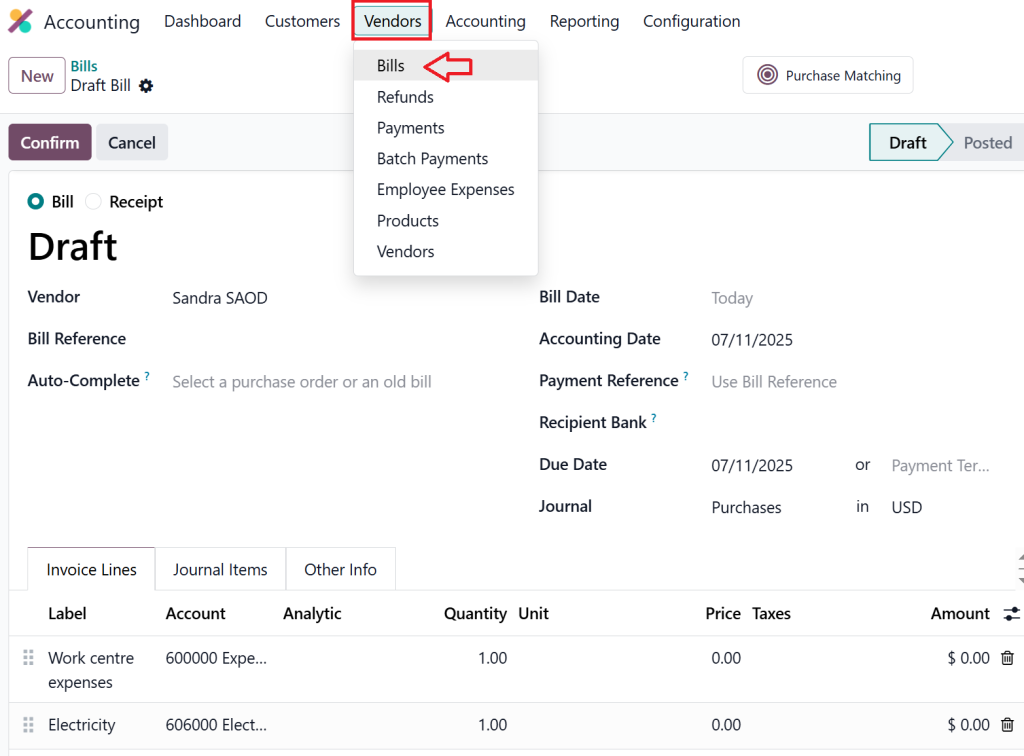
Step 10: Create Salary Bill
Navigate to: Accounting > Vendors > Bills
Create a bill for employee salaries and include the amount and necessary details.
Add this expense to the general ledger by confirming the salary bill.
Step 11: Check General Ledger Again
After adding the salary bill, navigate back to: Accounting > General Ledger
Verify the updated journal entries to ensure that the salary expense has been properly added to the ledger.
Step 12: Create a General Journal Entry to Balance Double Entry
Navigate to: Accounting > Journal Entries
Create a new general journal entry to balance the accounts.
Add the work center expense (from manufacturing).
Add the electricity and salary balances separately as overhead costs.
This ensures the general ledger is balanced, and each cost is recorded correctly.
Step 13: Check General Ledger Again
After creating the journal entry, go back to: Accounting > General Ledger
Review the entries to confirm that the work center balance is now zero and all costs have been correctly accounted for.
The Problem: Traditional Cost Tracking is Outdated and Error-Prone
Using spreadsheets or disconnected systems to track costs? That’s a ticking time bomb.
Data entry errors
Lack of real-time updates
No audit trail
Inconsistent allocations
You’re flying blind in a data-driven world. However, with Overhead Cost and Labour Cost in Odoo 18 Accounting, you gain not only visibility but also the power to act.
Why Odoo 18 is the Smart Way to Manage Costs
Odoo 18 is built with intelligent automation, centralised data, and real-time analytics. It gives you complete control over both direct and indirect costs.
Here’s what makes it exceptional:
Lorem ipsum dolor sit amet, consectetur adipiscing elit. Ut elit tellus, luctus nec ullamcorper mattis, pulvinar dapibus leo.
1. Smart Cost Centres
Odoo allows you to create cost centres, virtual pockets within your business (such as Sales, HR, and Production), where you can assign and manage expenses.
You can:
Allocate costs by department or project
Track actual vs budgeted costs
Automate internal recharges
Use case:
Assign 40% of your monthly rent to Production, 30% to Marketing, and 30% to Admin, all automated with rules.
2. Real-Time Labour Tracking
With integrated Timesheets, you can:
Track hours per employee, per task
Allocate time to projects or departments
Auto-link time to payroll and invoicing
You never have to guess who’s doing what, how long it took, or how much it cost. That’s how you track labour cost in Odoo 18 with ease.
Lorem ipsum dolor sit amet, consectetur adipiscing elit. Ut elit tellus, luctus nec ullamcorper mattis, pulvinar dapibus leo.
3. Automated Overhead Allocation
Set rules for cost distribution, percentage-based, formula-driven, or activity-based.
Example: Distribute monthly utility bills across departments based on headcount or square footage.
4. Actionable Cost Reports
With Odoo’s built-in reports, you can:
View total labour and overhead by month, quarter, or year
Filter by employee, team, project, or region
Detect cost leakages
Forecast future expenses
How Odoo Helps You Analyse Overhead Labour Cost Like a Pro
Let’s break down some key reports in Odoo 18:
1. Cost by Department
A visual chart showing total expenses (labour + overhead) by department. Identify which area is burning your budget.
2. Labour Utilization Rate
Track the number of billable hours vs. idle hours. This helps reduce waste and improve team performance.
3. Overhead vs Revenue Trend
See how your overheads are growing compared to revenue. Are you scaling profitably?
4. Labour Cost Per Task
Get real-time insights into how much each project or task is costing you in human hours.
These insights are when you need to analyze overhead labour cost in Odoo 18 for budgeting or investor reporting.
Lorem ipsum dolor sit amet, consectetur adipiscing elit. Ut elit tellus, luctus nec ullamcorper mattis, pulvinar dapibus leo.
Real-World Use Case: A Manufacturing Company Using Odoo 18
A medium-sized manufacturer struggled with uncontrolled costs across its departments. By implementing Odoo 18, they:
Created six cost centres (Production, QA, Sales, Admin, HR, Logistics)
Allocated rent, salaries, and utilities via rules
Linked timesheets to payroll for hourly employees
Used cost reports to cut down 12% of unnecessary expenses
They achieved ROI on their Odoo implementation in just 6 months.
Why Netilligence is Your Best Partner for Odoo 18 Cost Management
At Netilligence, we’re not just Odoo Partners; we’re business enablers.
Here’s why you should work with us:
Certified Odoo 18 experts with years of experience
Customised deployment for your industry
Cost tracking dashboards tailored to your KPIs
Post-implementation support & training
We’ve helped 300+ businesses simplify their Overhead Cost and Labour Cost in Odoo 18 Accounting, and we can help you too.
Cost Control is Power, Own It With Odoo 18
If you’re not controlling your costs, you’re not controlling your business. But when you combine the right tools with the right partner, you unlock efficiency, transparency, and profitability.
From timesheets to cost centres, from payroll to forecasting, Odoo 18 gives you complete control over your overhead and labour costs.
So why wait?
Get in touch with Netilligence today for a free consultation.
Let us show you how to utilise Odoo 18’s overhead cost accounting to reduce waste, enhance margins, and grow smarter.
Because your business deserves better than guesswork, it deserves insight.
Hi, I'm Nabia, an Odoo ERP functional & technical content writer. I specialize in blogs, social media content, ad copy, landing pages, service pages, and email campaigns.
We use cookies to ensure that we give you the best experience on our website. If you continue to use this site we will assume that you are happy with it.