

Effectively managing vendor price list in odoo 18 is essential for businesses that want to optimize procurement costs and streamline their purchasing operations. The Odoo 18 Purchase module provides powerful tools for managing vendor price lists, enabling companies to establish specific prices, discounts, and delivery terms for each vendor. This guide explores the details of the Odoo vendor price list. It provides a comprehensive tutorial on managing vendor prices in Odoo, importing vendor price lists, and making the most of the vendor pricing features in the Odoo purchase module.
What is Odoo Vendor Price List?
An Odoo vendor price list is a feature in Odoo 18’s Purchase module that allows businesses to establish specific pricing terms for each vendor. This includes setting unit prices, applying discounts, and defining delivery lead times. By managing vendor prices in Odoo, companies can ensure that purchase orders reflect the most accurate and favourable terms, enhancing cost control and supplier relationship management.
Setting Up Vendor Price List in Odoo 18
Accessing Vendor Price List Configuration
To begin managing vendor price list in Odoo 18, navigate to the Purchase module:
- Purchase > Configuration > Vendor Price Lists
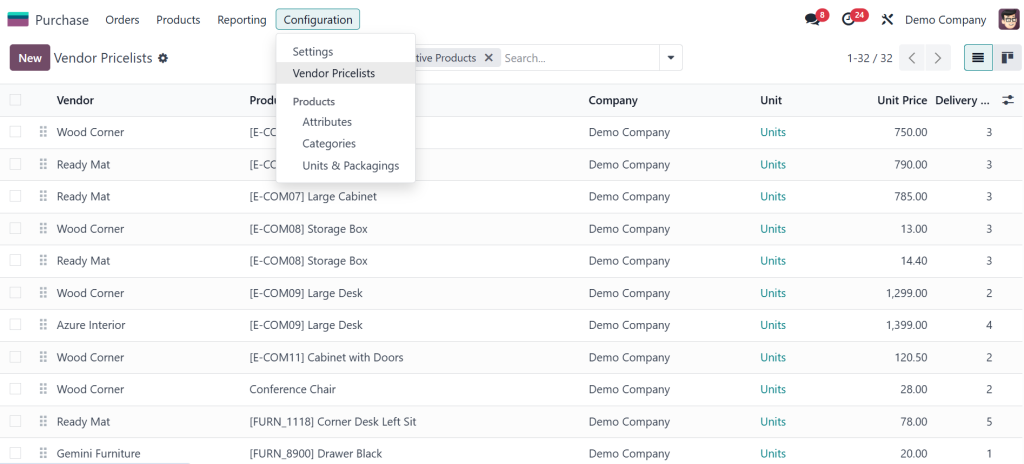
Here, you can view existing price lists or create new ones tailored to specific vendors.
Creating a New Vendor Price List
To create a new vendor price list: Click on Create.
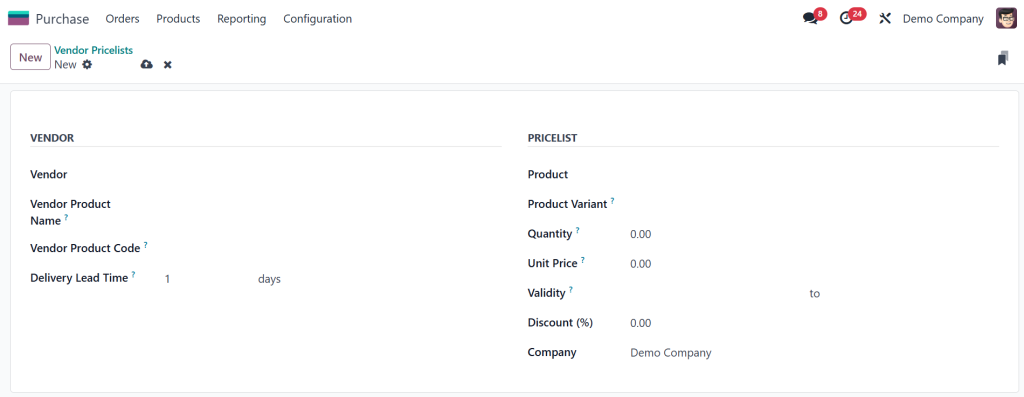
- Select the Vendor for whom the pricelist is intended.
- Define the Product and specify the Unit Price.
- Optionally, set a Discount percentage and Delivery Lead Time.
4. Save the pricelist.
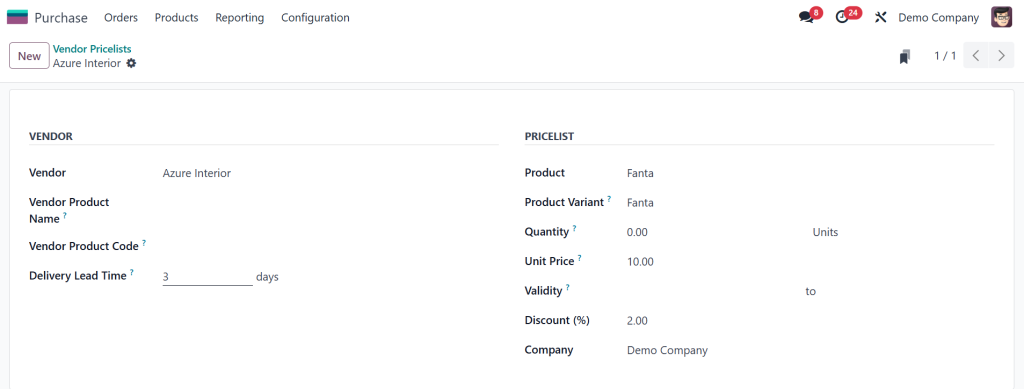
This setup ensures that when creating purchase orders or requests for quotations, Odoo automatically applies the defined terms, streamlining the procurement process.
Importing Vendor Price List in Odoo 18
For businesses with extensive vendor lists, manually entering pricelist data can be time-consuming. Odoo 18 facilitates bulk import of vendor price lists via CSV or XLSX files.
Exporting Existing Price List Template
To obtain a correctly formatted template:
- Go to Purchase > Configuration > Vendor Price Lists.
- Click on Actions > Export.
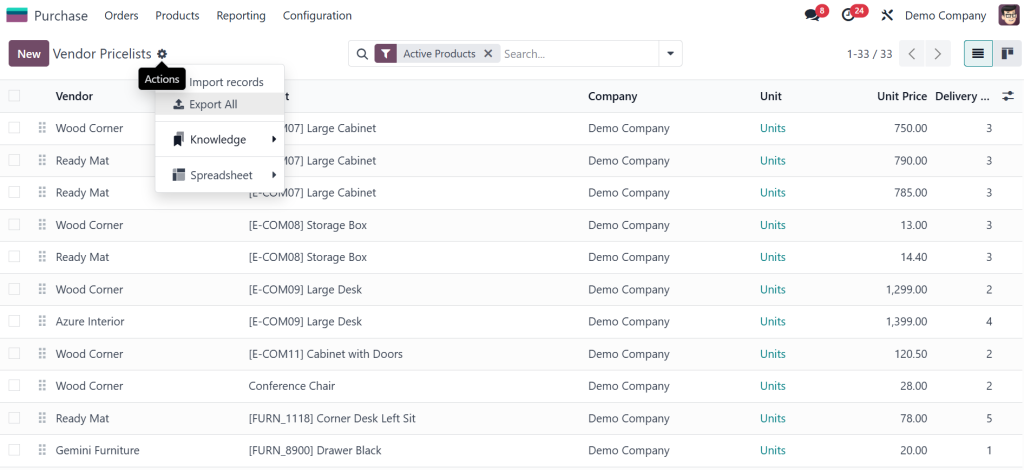
3. Choose the desired fields and export format (CSV or XLSX).
This exported file serves as a template, ensuring that the imported data aligns with Odoo’s requirements.
Importing Vendor Price List Data
To import vendor pricelist data:
- Navigate to Purchase > Configuration > Vendor Price Lists.
- Click on Action and select Import Records.
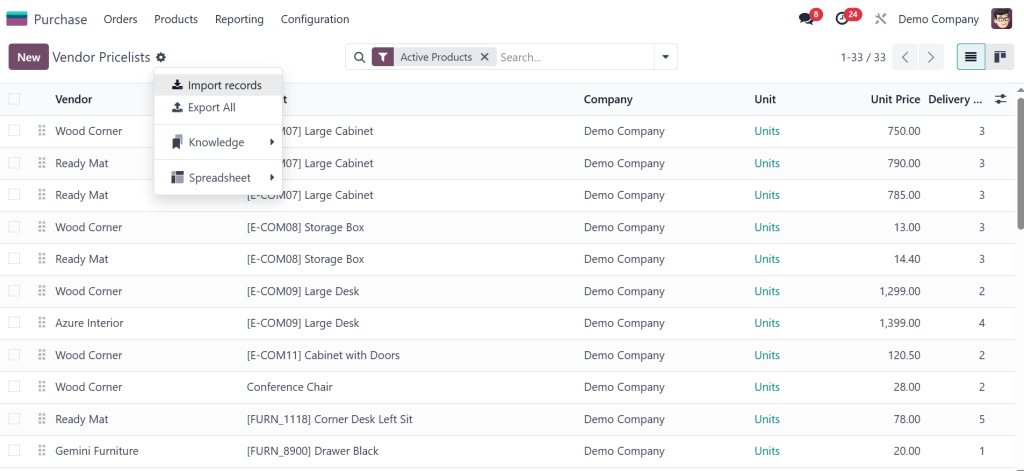
3. Upload the prepared CSV or XLSX file.
Ensure that the External ID field is included if updating existing records, as this uniquely identifies records for updates.
Managing Vendor Price list in Odoo 18
Applying Discounts and Lead Times
Odoo 18 allows businesses to effectively manage discounts and set delivery lead times directly within vendor price lists:
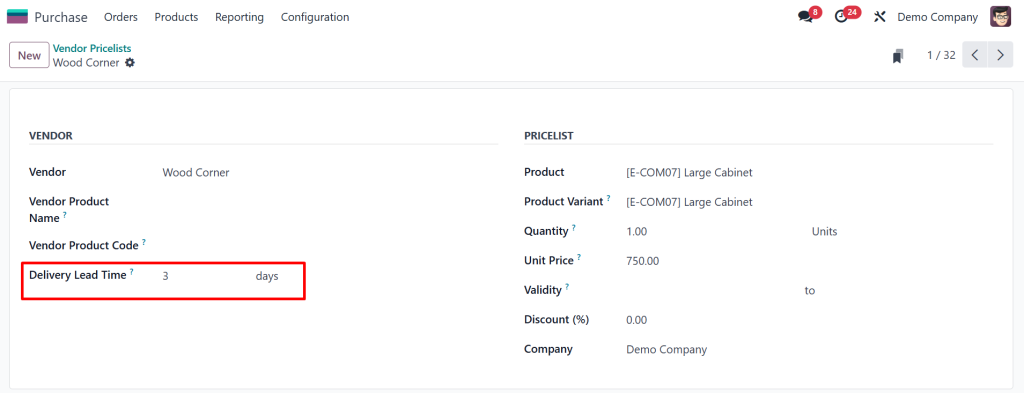
– Discounts: You can specify a discount percentage for individual products or product categories.
– Delivery Lead Time: This feature lets you define the days required for a product to be delivered after confirming a purchase order.
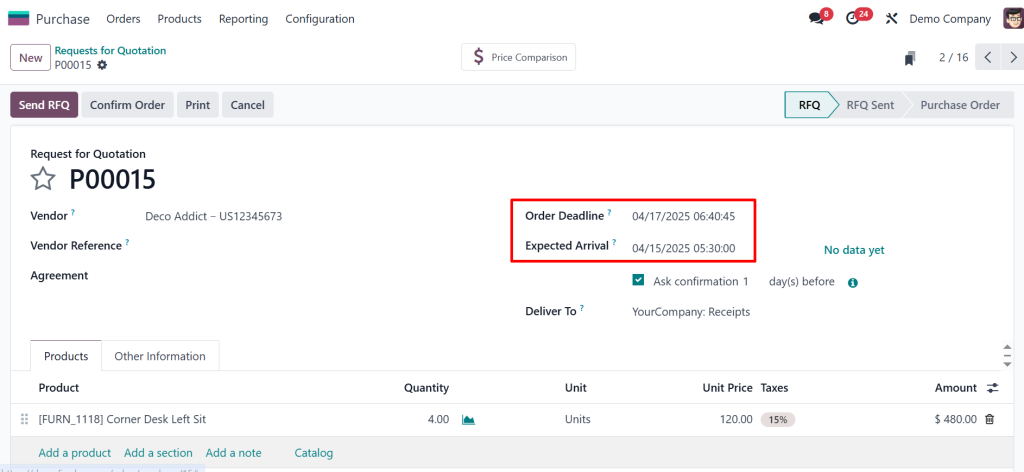
These settings ensure that purchase orders accurately reflect pricing and delivery expectations.
Managing Multiple Price Lists for a Single Product
Odoo 18 supports multiple vendor price lists for a single product, allowing businesses to compare and select the most favourable terms:
- Create separate price lists for each vendor offering the product.
- Specify different prices, discounts, and lead times as applicable.
- Select the desired vendor pricelist to apply the corresponding terms when creating a purchase order.
- This flexibility enables businesses to optimize procurement strategies and negotiate better supplier deals.
Best Practices for Vendor Price List Management
- Regular Updates: Please review and update the vendor price lists to reflect current market conditions and supplier agreements accurately.
- Data Accuracy: To prevent errors, ensure that all imported data is accurate and aligns with Odoo’s field requirements.
- Utilize Templates: Exported templates are used as a reference to maintain consistency and accuracy in imported data.
- Monitor Discounts: Keep track of discount terms and apply them appropriately to maximize cost savings.
Final Thoughts on Odoo Vendor Price List Management
Effectively manage vendor price list in Odoo 18 Purchase module is essential for businesses aiming to streamline procurement processes and maintain favourable supplier relationships. By leveraging Odoo’s vendor pricelist features, including importing data, applying discounts, and managing multiple price lists, companies can enhance operational efficiency and achieve cost savings. To implement or optimize Odoo 18 for your business, consider partnering with experienced Odoo consultants to tailor the system to your needs.




