

Suppose you deal with expenses every single day. In that case, whether you are a manager, accountant, HR professional, or business owner, you already know how stressful and confusing expense handling can become. And honestly, most companies struggle not because employees make too many claims, but because there is no clear structure behind how expenses are grouped, approved, recorded, and reimbursed. That’s precisely why we are talking about Employee Expense Categories in Odoo 19 today.
I want to show you how something as simple as organizing these categories properly can resolve most of the issues you face. And before we go deeper, let me repeat this clearly: everything starts with how you set up and manage your Employee Expense Categories in Odoo 19.
When you don’t define proper Employee Expense Categories in Odoo 19, employees get confused, managers spend more time asking questions, accounts get incorrect entries, reimbursements are delayed, and audits become stressful. But when the same categories are well-organized, everything flows naturally. Your system becomes easier for everyone. Employees select the right category without a second thought. Approvals move fast. Finance teams get clean data. And no one has to check hundreds of receipts again and again.
This blog is meant to give you a smooth experience by helping you understand Employee Expense Categories in Odoo 19 in a clear, friendly way. And by the time you finish reading, you will feel confident enough to create your own structure. So, let’s talk openly about issues, solutions, and every small detail that matters.
Understanding Employee Expense Categories in Odoo 19 and Why They Create Real Clarity
Whenever a business grows, so do its expenses. One person buys fuel, another books a hotel, someone else pays for team meals, and a fourth person purchases software. Now, when all these expenses arrive in the system without clear grouping, your entire workflow gets messy. This is why Employee Expense Categories in Odoo 19 work like a structure that keeps everything in order. Every claim goes to its right group, every entry lands in the correct account, and every report begins to make sense. You are no longer searching for receipts or trying to understand where a claim belongs. The system guides you.
The thing I like about Odoo 19 is that it gives you clean space to build your own rules. You decide how many categories to create, what to name them, which account they should link to, and how they should behave during reimbursement. When you invest some time in organizing your Employee Expense Categories in Odoo 19, the system does half the work for you.
Why Proper Odoo 19 Employee Expense Category Setup Makes Your Daily Work Easier
When you hear the phrase “Odoo 19 employee expense category setup,” you might think it’s technical or complicated. But the truth is, this setup is meant to make your everyday life easier. Think about the moments when you receive expenses that don’t match their purpose. For example, someone adds lunch to office supplies or fuel to the training category. These small mistakes waste time and create confusion between employees and finance teams. But once your Odoo 19 employee expense category setup is done correctly, employees stop guessing.
Categories become easy to understand. Your team feels confident when selecting them. And your approvals move faster because every claim is already sitting in the right place. The most satisfying part of doing this setup is watching how much time companies save with better clarity. And trust me, you won’t realize how much time you are wasting today until you fix your categories.
How to Organize Employee Expenses in Odoo 19 Without Any Confusion
The first thing you need is a clear naming structure. Don’t create confusing or overlapping category names. Keep them short and meaningful. For example, “Fuel”, “Hotel Stay”, “Meals”, “Office Supplies”, and “Software Subscription”. When you do this, employees understand instantly what belongs where.
Then comes the second part, which is a policy-based structure. If a category requires limit control, add it. If it involves receipt upload, make it mandatory. If a category should be approved only by a certain manager, set that rule. This is how you bring order into the system. And once you organize your employee expenses in Odoo 19 with clean rules, every month-end process becomes lighter. No one needs to fight with mismatched entries or unclear submissions.
Step-by-Step Guide to Organize Employee Expense Categories in Odoo 19
This is where you turn Odoo from a tool into a real business advantage. Below is the complete guide.
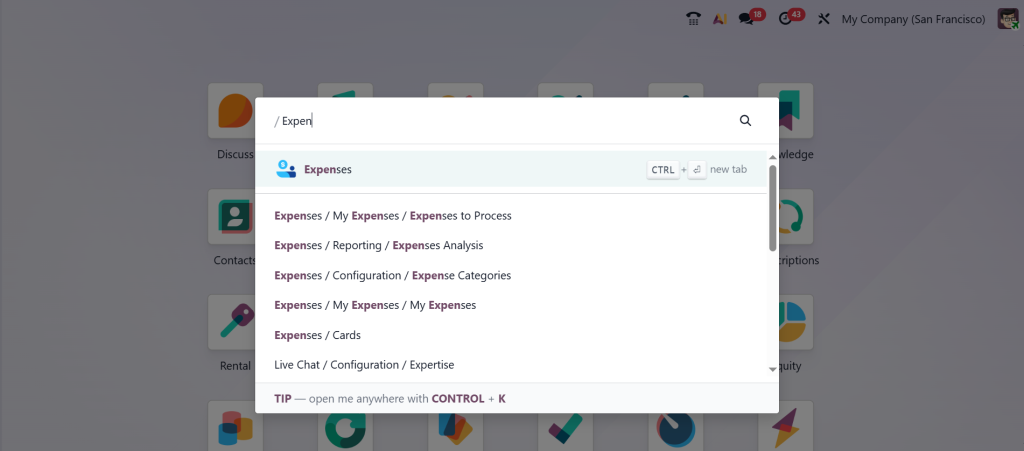
Open the Expenses module from your Odoo 19 Dashboard.
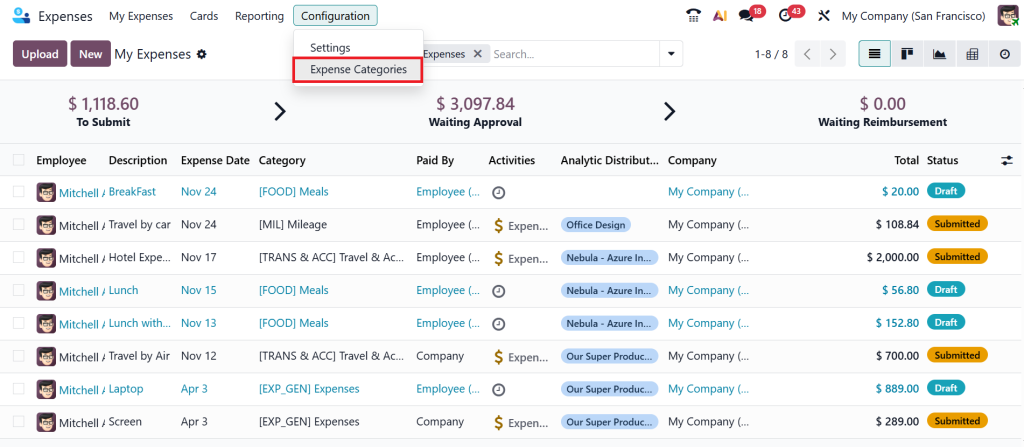
Go to Configuration > Expense Categories.
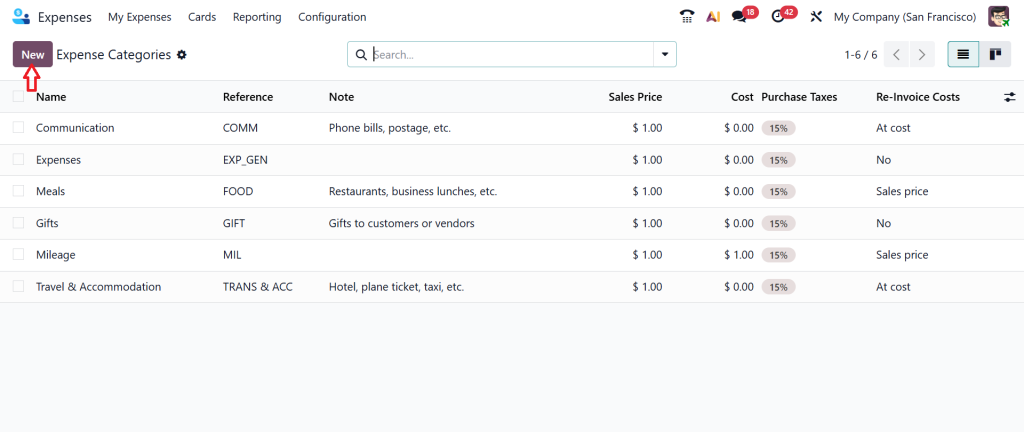
Here, you can see the pre-created expense categories. Click New and create a new category.
Now you can see the form for the expense category you need to fill out. Start by giving the product name: Lunch. This is the name the employee will see when creating an expense. You can also find different configured options under the product name, including cost, reference, category, company, guidelines, expense account, purchase & sales taxes, and lastly, invoicing. Then, click Save.
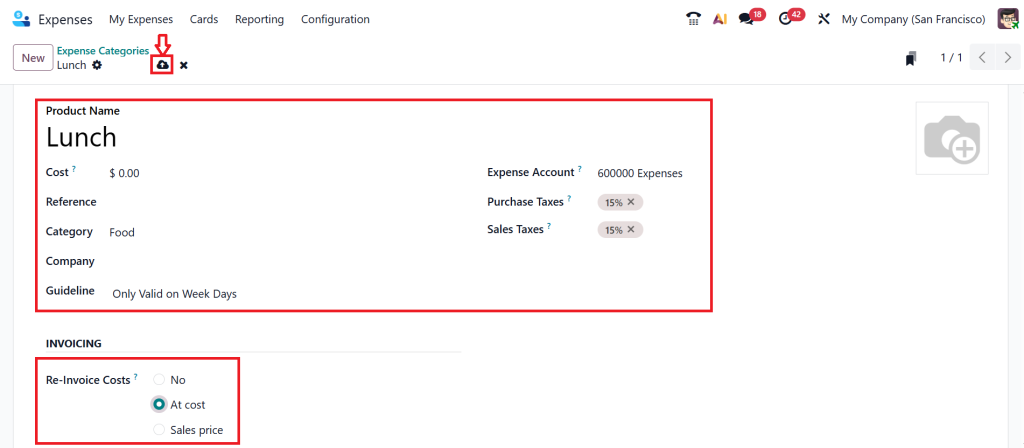
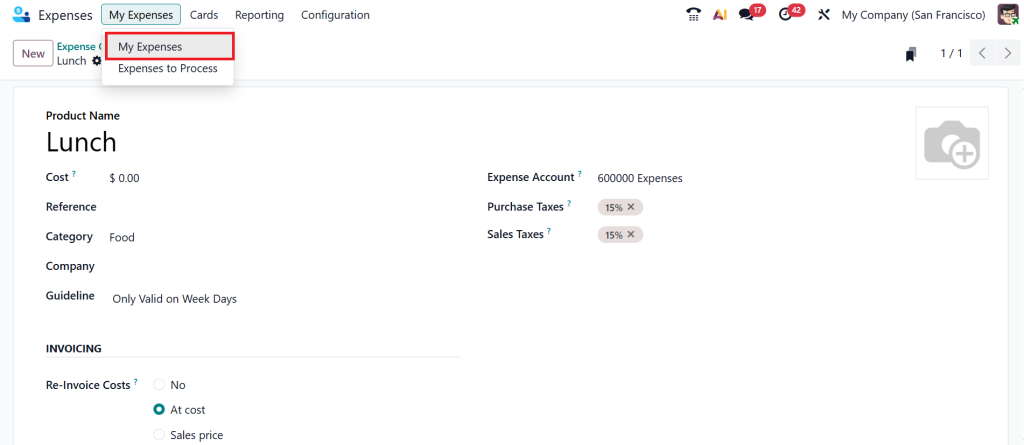
Your new category, Lunch expense, is ready to go, and from now on the employee can select it whenever they submit a meal or lunch-related expense. For that, let’s move to the My Expenses > My Expenses.
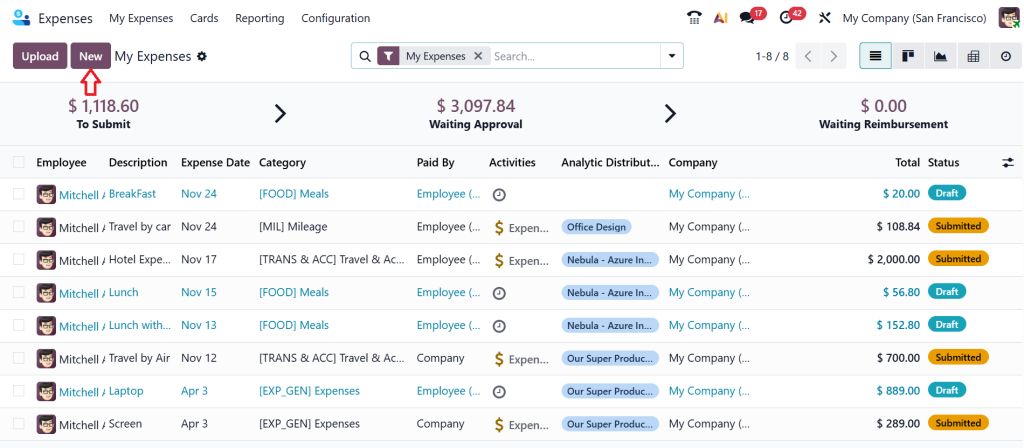
Click New.
Let’s choose the Category ‘‘Lunch’’.
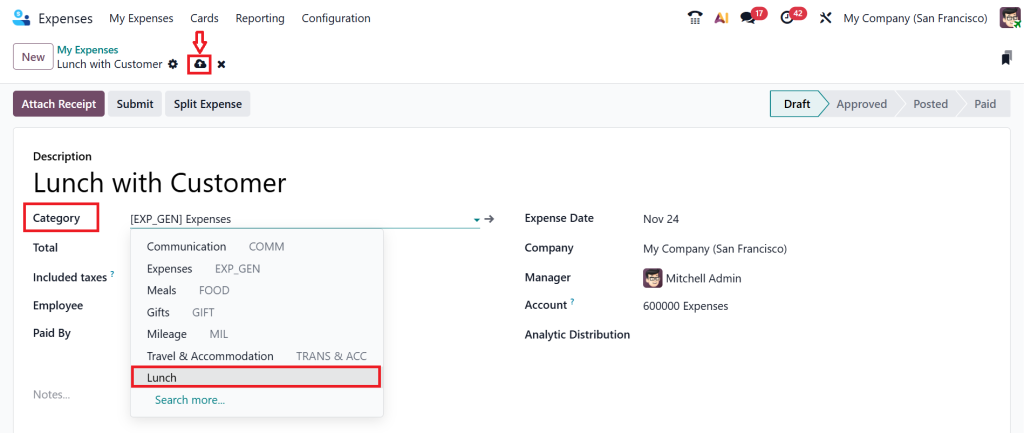
Provide the total cost and click Save.
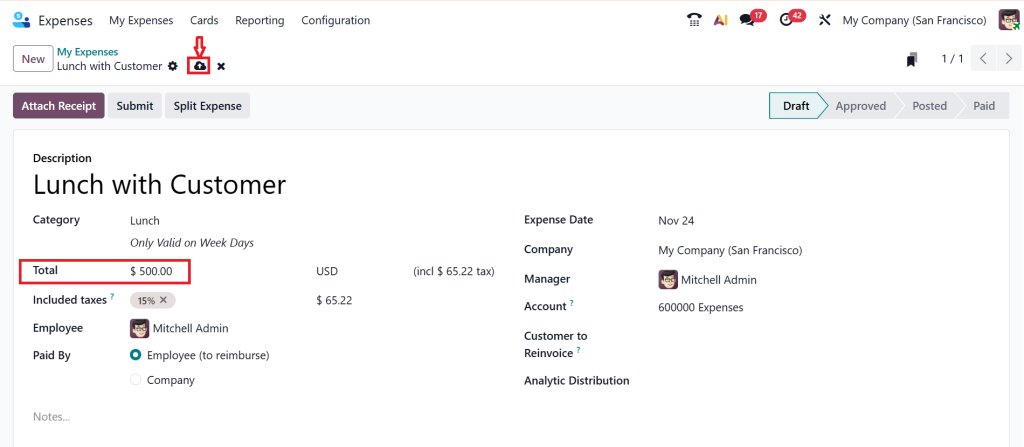
You can also give the notes, expense date, and the account, which we have already input in our expense category, which shows the expenses. Here you can also find all the details and submit this expense to your manager. So, that’s how you can create an expense category inside the expense app, and you can review this on your costs.
The Importance of Odoo Expense Category Configuration in Keeping Your Accounts Accurate
Behind every category lies accounting logic. That’s where Odoo expense category configuration plays a significant role. When your configuration is correct, all expense entries are automatically posted to the proper general ledger accounts. You don’t have to adjust manually. You don’t have to reverse entries. And you don’t have to explain to auditors why a fuel expense ended up in a training account.
This is why I always tell businesses to sit with their accountant during the configuration stage. Decide which expense account connects to which category. Decide whether taxes apply. Decide if the company, employee, or vendor should be linked. Once the Odoo expense category configuration is set up correctly, your financial reports start showing accurate numbers. That accuracy builds trust not just in your system, but in your decisions.
Why Expense Management in Odoo Matters More When You Scale
Some businesses think expense management is a small thing. But when you grow, this “small thing” can create huge problems if it’s not done right. This is where Odoo’s expense management becomes a reliable partner. Odoo allows you to record every claim, track its status, apply rules, and generate reports. And when your categories are organized, the whole system becomes easier to navigate. You start noticing patterns. You understand where your money is flowing. You detect unusual spending quickly.
The reason companies rely on Odoo’s expense management is not only that it organizes data, but also that it helps teams work smoothly. Employees get confidence when submitting claims. Managers get clarity during approval. And accountants get clean entries. This creates a reliable workflow that supports growth.
How Automating Expense Categorization in Odoo Saves Your Time Every Month
One of the benefits of Odoo 19 is its ability to suggest categories based on receipts and past patterns automatically. When you start using this feature, you will wonder why you didn’t try it earlier. This is what we call automated expense categorization in Odoo. Employees upload a picture of the receipt, and Odoo immediately captures the amount, vendor, date, and, in many cases, the correct category. This reduces mistakes, improves accuracy, and speeds up the whole process.
When you automate expense categorization in Odoo, you reduce your workload. And the more employees submit expenses, the brighter the system becomes. Over time, it recognizes consistent patterns. It starts suggesting categories with higher accuracy. And this saves employees and finance teams a lot of time.
Creating Clear and Easy-to-Understand Employee Reimbursement Categories
Now, let’s talk about employee reimbursement categories, one of the most critical areas for employee satisfaction. When reimbursement rules are unclear, employees get confused or frustrated. They don’t know how much will be repaid, when it will be repaid, or whether their claim aligns with the company policy. But when you build structured employee reimbursement categories, everything becomes transparent.
You can set rules like full reimbursement, partial reimbursement, non-reimbursable items, or company-paid expenses. Once these rules are applied to the categories, employees stop asking repeated questions. They know exactly how each category behaves. And this creates trust between employees and the finance team.
Using Odoo Expense Reporting Categories to Improve Your Visibility and Planning
When you finish setting up all your categories, the next step is to use Odoo expense reporting categories to understand where your company is spending. Odoo reports are clear, simple, and very detailed. You can check which categories have the highest expenses, which departments spend the most, which employees submit the most claims, and which months require the most budget.
If you use these Odoo expense reporting categories properly, you can improve your planning, budgeting, and decision-making. You will start noticing areas where spending should be reduced or where policies should be tightened. These insights help you keep your finances healthy and predictable.
The Right Setup of Employee Expense Categories in Odoo 19 Makes Your Life Easier
If expenses take too much of your time, or if your current tracking method feels messy, then reorganizing your Employee Expense Categories in Odoo 19 will make a noticeable difference. A clear structure enables better communication, faster approvals, more accurate accounting, and a better understanding of company spending. Every business, whether small or large, benefits when its expenses are easy to understand and easy to manage.
Spend some time today organizing your categories, deciding your rules, cleaning your naming structure, and aligning your accounts. Once this is done, your Odoo system starts working smoothly for everyone. And if you ever need help setting up your Odoo 19 environment in a professional, straightforward way, the Netilligence team is always ready to support you.
Ready to Optimize Your Odoo 19 Expense System?
If you want expert help in organizing, automating, or customizing your Employee Expense Categories in Odoo 19, the Netilligence team is here to assist.
We help businesses implement clean, efficient, and fully automated expense workflows that save time, reduce errors, and strengthen financial control.
Let us help you build an Odoo expense management system that works precisely the way your business needs.




