Let’s talk straight for a moment. Have you ever gone to buy a coffee, asked for a medium, and the cashier smiled and said, “For just a little more, you can get a large”? Or maybe you ordered a burger, and they suggested fries and a drink to go with it. You probably said yes at least once, right? That moment is what we call upselling and cross-selling.
Now, imagine doing the same thing inside your business but smarter, faster, and without missing a beat. That’s precisely what upsell and crossell in Odoo 19 POS do. It’s like having an intelligent assistant at your counter who whispers the right suggestions at the right time.
The key to Odoo 19 POS upselling is guiding your customers to better options. With the Odoo 19 cross-selling feature, you remind them of extras they’ll thank you for later. And when you combine Odoo 19 POS optional products and product recommendations, you don’t just make more sales; you make customers feel like you genuinely understand them. That’s how you increase the average sale in Odoo POS and eventually boost revenue with Odoo point of sale in a way that feels natural.
So, let’s talk. I’ll walk you through how this works, why it matters, and how you can start using it in your own shop today.
The Influence of Upsell and Crossell in Odoo 19 POS
Think about this for a second. If someone comes to your store and buys just one thing, you’ve already done your job. But what if they were actually open to buying more, and all they needed was a little suggestion? That’s the influence of upsell and cross-sell in Odoo.
With Odoo 19 POS upselling, you don’t just offer the basic version; you also let them know about the premium one. And with the Odoo 19 cross-selling feature, you’re saying, “Hey, people who bought this also loved that.” Sounds familiar, right? That’s because the most prominent online retailers in the world do this every single day. And now, you can do it too, right at your POS.
The magic lies in timing. When customers are ready to pay, they’re already in buying mode. That’s when product recommendations, such as those in Odoo 19 POS, slide in, and trust me, most people won’t mind adding one more item. They feel cared for, and you see your numbers climb.
Creating More Value with Odoo 19 POS Upselling
Let’s say a customer walks up and orders a regular pizza. You could just take their order, print the receipt, and move on. Or, with Odoo 19 POS upselling, you could say, “Would you like to try the large size? It’s just a little extra.” Nine times out of ten, customers see the value and go for it.
That’s what makes upselling so prevailing. It’s not about pushing. It’s about showing a better choice. And when you use upsell and cross-sell in Odoo, the POS system ensures you never forget to make those suggestions. It feels like part of the flow, not an interruption.
How to Configure Upsell and Cross-Sell in Odoo 19 POS
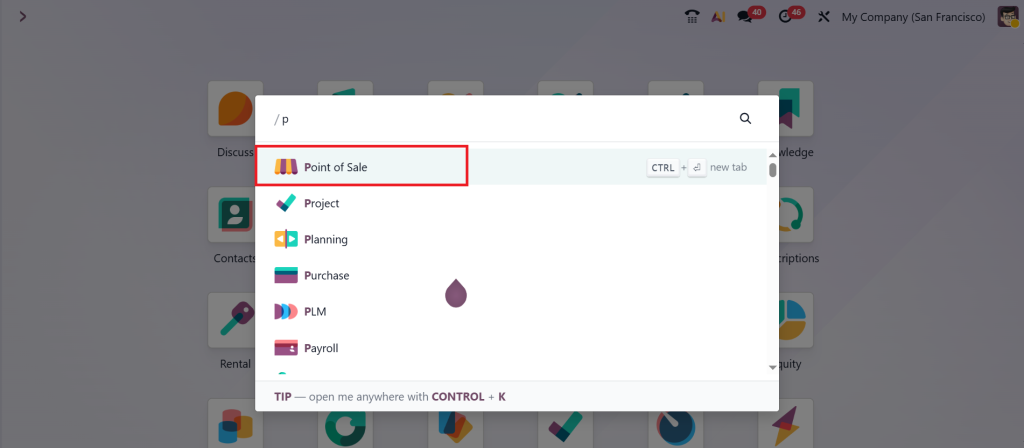
Let’s open the Point of Sale app in Odoo 19.
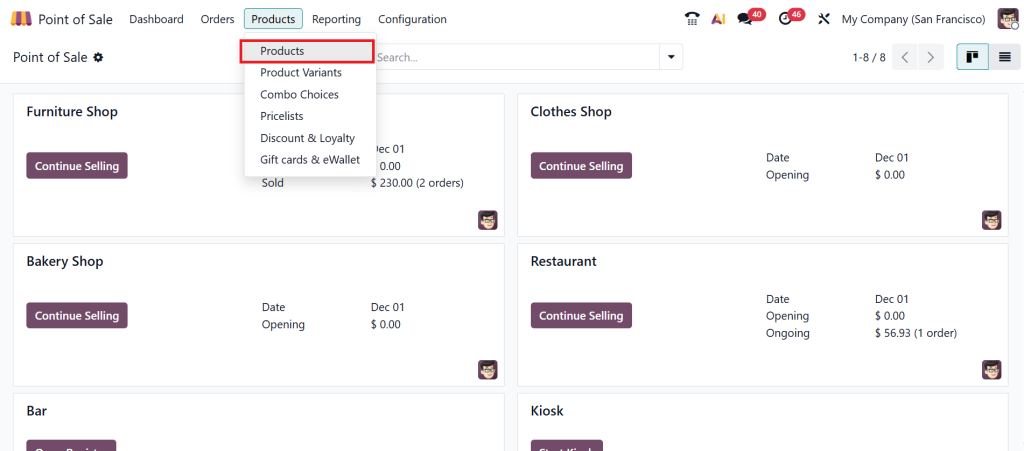
Go to the Products > Products.
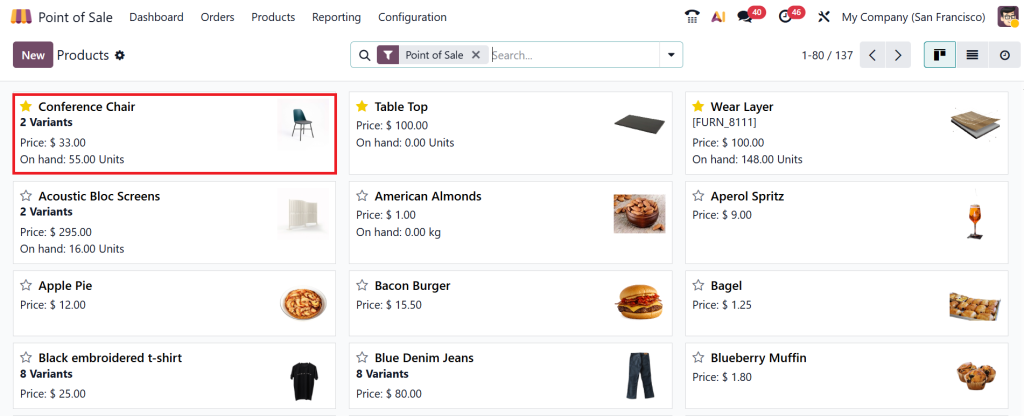
Choose the product “Conference Chair” or whichever one you want.
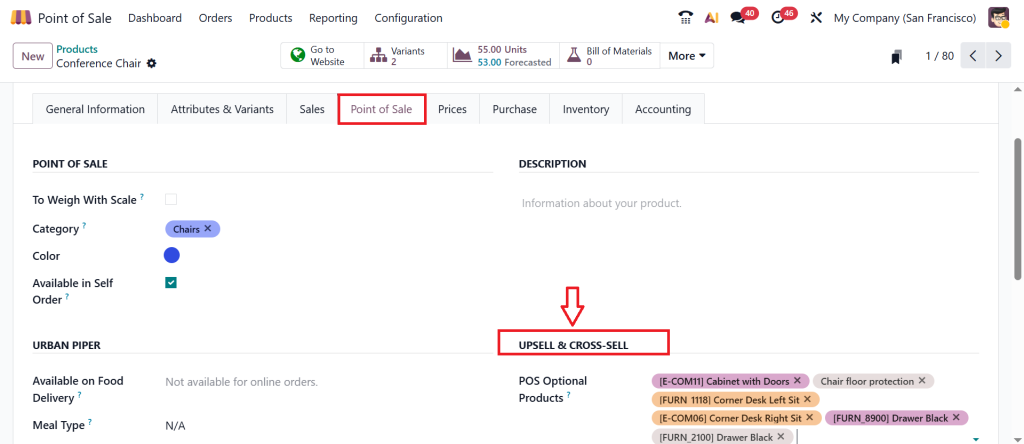
Under the Point of Sale tab, you can find the Upsell & Cross-Sell option. Here, you can add POS Optional Products (which means this option is used to add multiple products). This is the new feature in the Odoo 19 POS module.
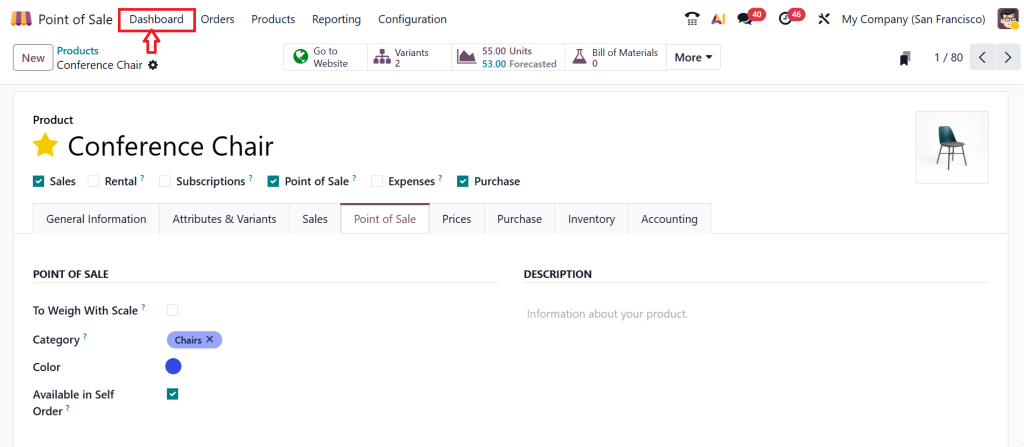
Let’s move on to the Dashboard.
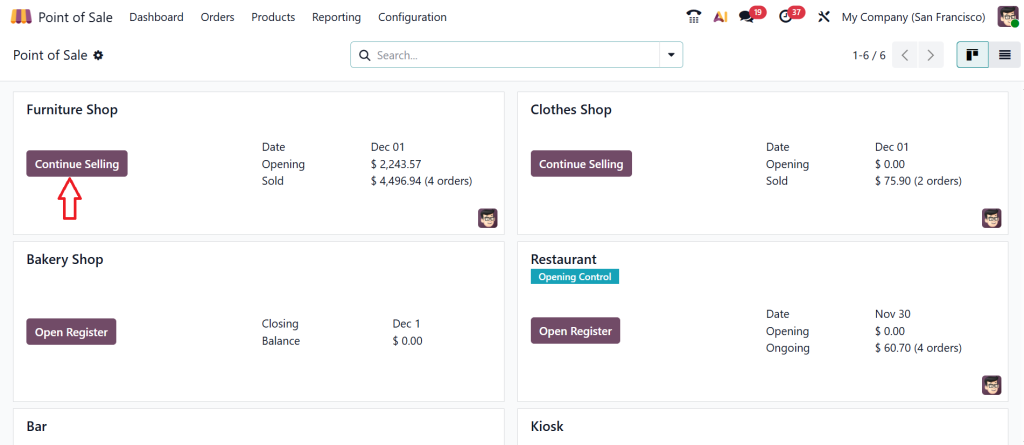
And click on the Continue Selling option.
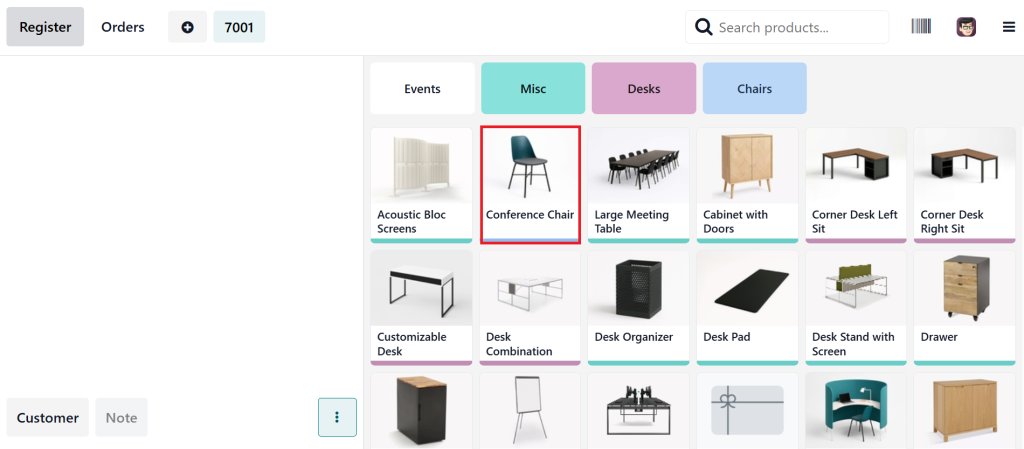
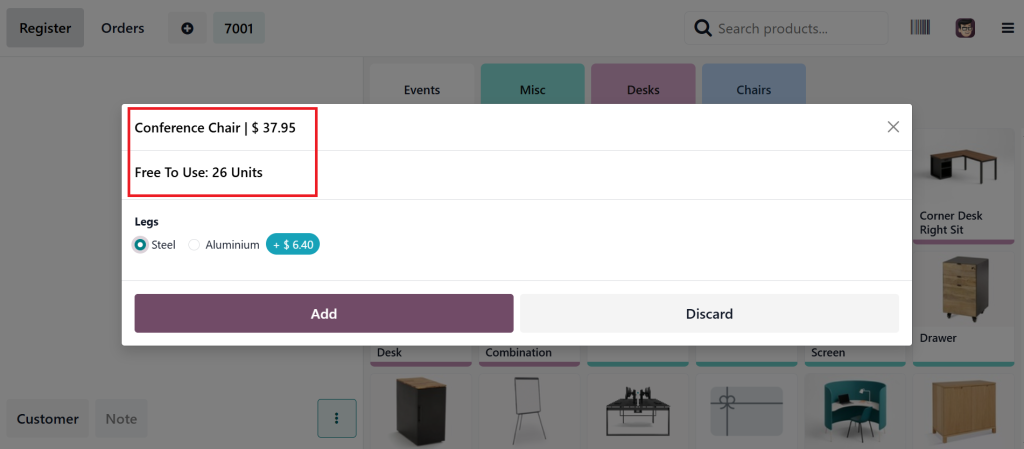
Select the product “Conference Chair”.
Now you can see the product price and the number of units.
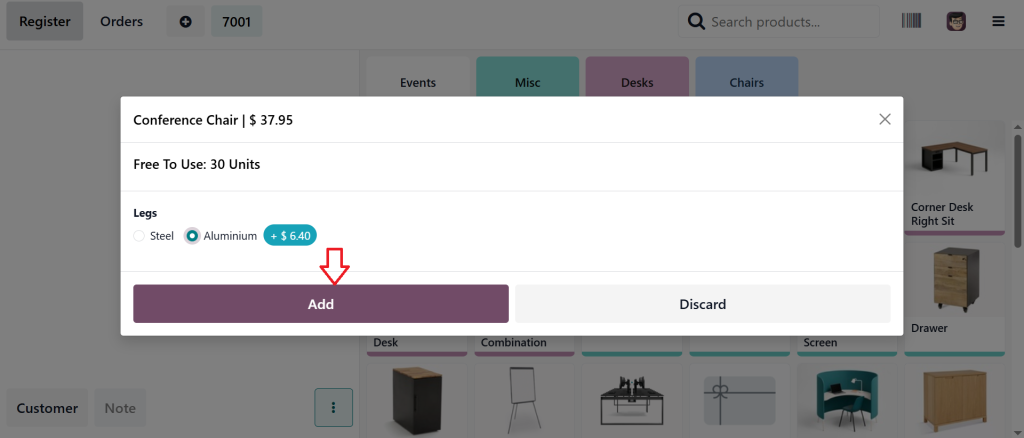
Switch to the Aluminium and click on the Add button.
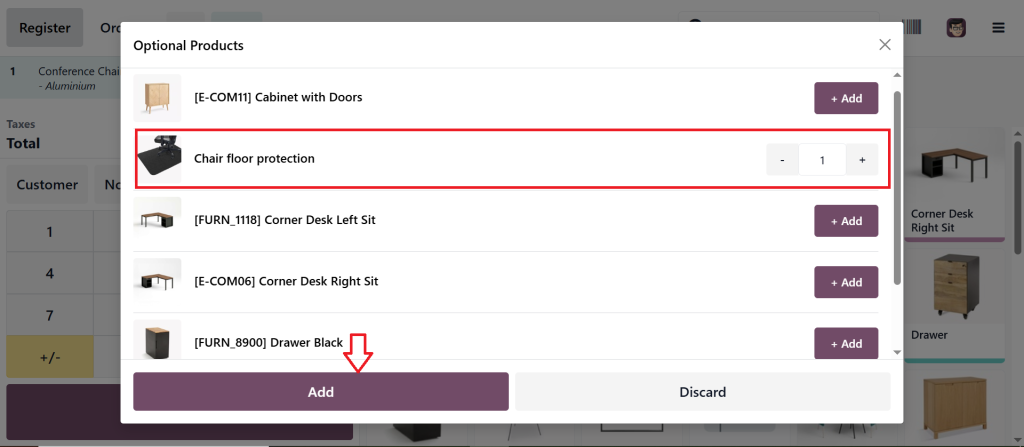
After clicking on the add button, you can see a wizard to add the optional products to the cart. This would allow you to upsell or cross-sell in the POS module. Let’s choose the item from here and click on Add to add the item to the cart.
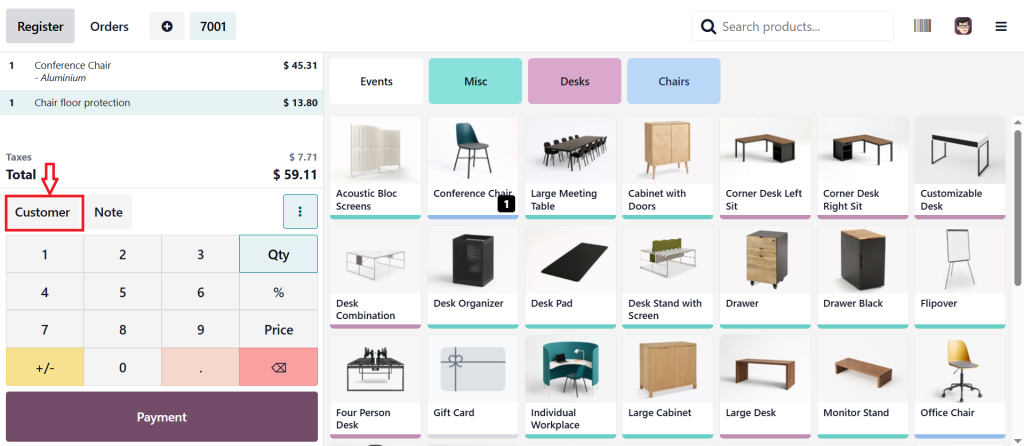
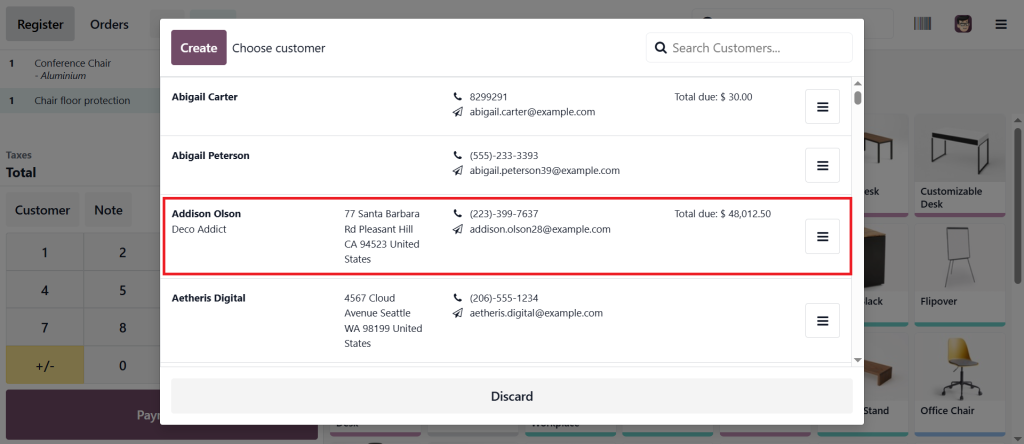
Now, click on the Customer.
Select the customer (Addison Olson) from the list.
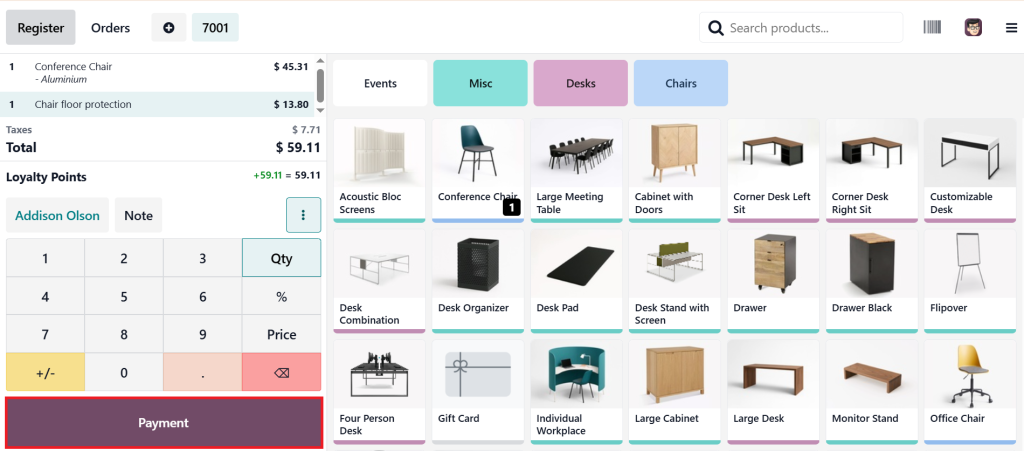
Click the Payment button.
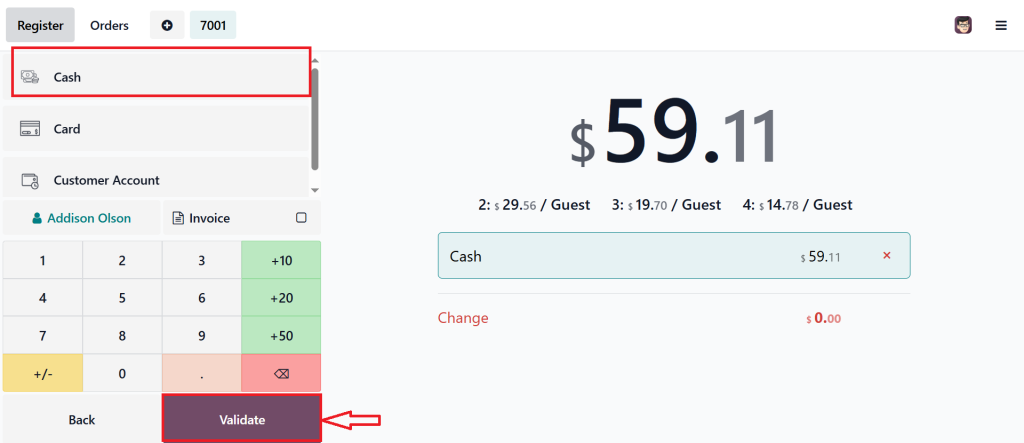
Choose the payment method (Cash) and click on the Validate.
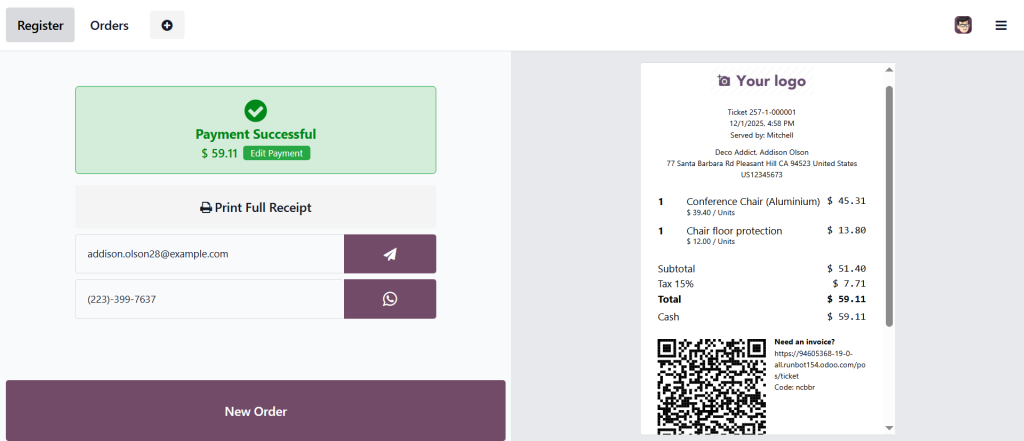
As you can see in the screenshot below, we have successfully made the payment. And that’s how we can handle upsell & cross-sell in the Odoo 19 point-of-sale app.
Making Shopping Complete with Odoo 19 Cross-Selling Feature
Now picture this. A customer buys a phone. Great sale. But then your POS says, “Do you want to add a screen protector or headphones?” That’s the Odoo 19 cross-selling feature at work. It’s simple, but it changes the game.
Because here’s the truth: most customers actually appreciate being reminded of what goes with their purchase. Nobody wants to go home and realize they forgot something important. So, cross-selling doesn’t feel like selling at all; it feels like helping. And at the same time, it’s one of the easiest ways to boost revenue from the Odoo point of sale without doing anything extra.
Learning the Flow with POS Upsell Cross-Sell Odoo Tutorial
Here’s where a POS upsell cross-sell Odoo tutorial comes in handy. Think of it as training wheels for your team. The system will show the recommendations, but your staff need to deliver them naturally. A simple “Would you like to upgrade?” or “This goes really well with what you picked” works wonders.
When your team understands how to use it, everything feels smooth and unified. Customers don’t feel pressured. They feel guided. And little by little, you increase the average sale of Odoo POS transactions because suggestions become part of everyday conversations.
Finding Hidden Revenue with Odoo 19 POS Optional Products
The feature I really love in Odoo 19 is the option to add products to the POS. Suppose this: someone buys a laptop, and before they check out, the POS suggests a mouse, a bag, or even an extended warranty. The customer never thought about it, but suddenly, it makes sense.
That’s how optional products work; they’re the quiet heroes of upselling. They don’t scream for attention, but they show up right when customers are making decisions. And every time they say yes, you’re adding more value for them and more revenue for yourself.
Selling Smarter with Product Recommendations Odoo 19 POS
Product recommendations in Odoo 19 POS aren’t just random guesses. They’re smart. They’re based on what other customers buy, what goes together, or what’s trending.
For example, if people often buy shampoo and conditioner together, the system will know to suggest it. It’s like having a sales assistant who remembers every customer habit, but better, because it never forgets. This is how you increase average sales Odoo POS without even trying too hard.
And the best part? Customers love it because it saves them time and makes shopping easier.
Watching Your Numbers Grow by Boosting Revenue with Odoo Point of Sale
At the end of the day, all of this upselling, cross-selling, optional products, and recommendations comes down to one thing. You want to boost revenue from the Odoo point of sale.
And you know what? You will. Not in a pushy way, not in a “sell at any cost” way. But in a way that feels natural. Each customer spends just a little more, and before you know it, your daily totals are higher, your monthly reports look better, and your business feels stronger.
Turning Small Steps into Big Wins by Increasing Average Sale Odoo POS
Here’s a truth most people forget: small steps matter. That’s why the real goal is to increase the average sale of Odoo POS transactions. A few extra dollars per customer don’t sound like much in the moment, but add it up across hundreds of sales, and suddenly, it’s big.
That’s how upsell and cross-sell work, they’re not giant leaps but small nudges. And Odoo 19 ensures that those nudges occur every single time.
Why Upsell and Cross-Sell in Odoo is the Future of Selling
So, here’s where we land. Upsell and cross-sell in Odoo isn’t just about pushing products. It’s about creating better experiences. Odoo 19 POS upselling makes upgrades feel natural. The Odoo 19 cross-selling feature makes extras seem essential. The POS upsell cross-sell Odoo tutorial helps your team make it part of their routine. The Odoo 19 POS optional products and product recommendations ensure the system works smarter with every sale.
Put it all together, and what happens? You don’t just boost revenue with Odoo Point of Sale. You create happy customers who feel well cared for. And those customers keep coming back, which is worth more than any single sale.
So next time you’re behind the counter, remember this: a small suggestion isn’t just a sale. It’s the start of a better relationship with your customer. And with Odoo 19 POS, you’ll never miss the chance to make it happen.
If you’re ready to boost your sales and want expert help in setting up upsell and cross-sell in Odoo, Netilligence is here to guide you. Let’s talk today and turn every POS sale into a bigger win for your business.
Hi, I'm Ilsa Shabbir, an Odoo ERP content writer specializing in functional blogs on Odoo modules. I simplify complex Odoo features, creating clear and engaging content to help businesses understand and optimize their ERP solutions.
We use cookies to ensure that we give you the best experience on our website. If you continue to use this site we will assume that you are happy with it.