


Automatic Transfers in Odoo 18 Accounting
There’s much to keep track of when managing your business monetary matters. Between moving money from one account to another, reconciling bank statements, and making sure your bills are paid, it’s easy to get swamped. But what if you could make these tasks more manageable – and more accurate – by automating them?
This is where automatic transfers in Odoo 18 accounting come in. With Odoo 18 automatic transfers, you can save time and reduce errors by automating some of your business’s most common financial tasks. From internal transfers between accounts to regularly scheduled transfers, Odoo makes it easy to keep your financial operations running smoothly.
Whether you’re new to Odoo 18 accounting automation or looking for ways to improve your current workflows, this blog will walk you through everything you need to know. By the end, you’ll understand how Odoo 18 automatic transfers can help you save time and run your business more efficiently.
What Are Odoo 18 Accounting Automation?
Before discussing how to set up automatic transfers in Odoo 18 accounting, let’s consider what this feature does.
At their core, automatic transfers in Odoo 18 accounting allow you to move money between different accounts without doing everything manually. This is particularly helpful if you perform transactions regularly and they also need to happen on a particular schedule or if you need to move funds between internal accounts like your savings accounts.
As instance:
- Transferring funds between your business’s main account and your payroll account
- Making regular payments to vendors or suppliers
- Moving money between accounts to cover bills or other misc or significant expenses
With Odoo 18 internal transfers, you can set up these transactions to occur automatically without manually entering them every time. Odoo 18 accounting automation also comes with scheduled transfers, which means you can set up transfers on specific monthly or quarterly dates so you never miss a payment.
How to Set Up Automatic Transfers in Odoo 18 Accounting?
Now that we’ve covered what automatic transfers in Odoo 18 accounting can do let’s read how to set them up. Don’t worry if you’re not a financial expert – Odoo’s interface is simple, and setting up Odoo 18 automatic transfers is easier than you might think.
Step 1: Enable Automation Features
First, you must ensure the automation features are turned on in your Odoo 18 system. That is a simple process that’ll only take a few minutes:
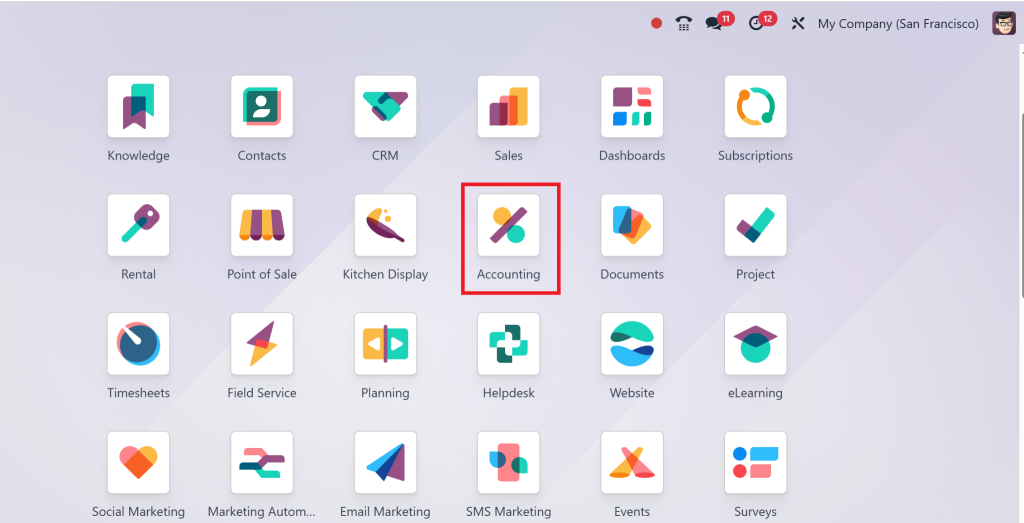
- Open the Accounting module on your Odoo 18 dashboard.
- Go to Settings > Configuration.
- Scroll down to the Accounting Settings section and enable the options for Automated Bank Feeds, Automated Transfers, and Scheduled Transfers.
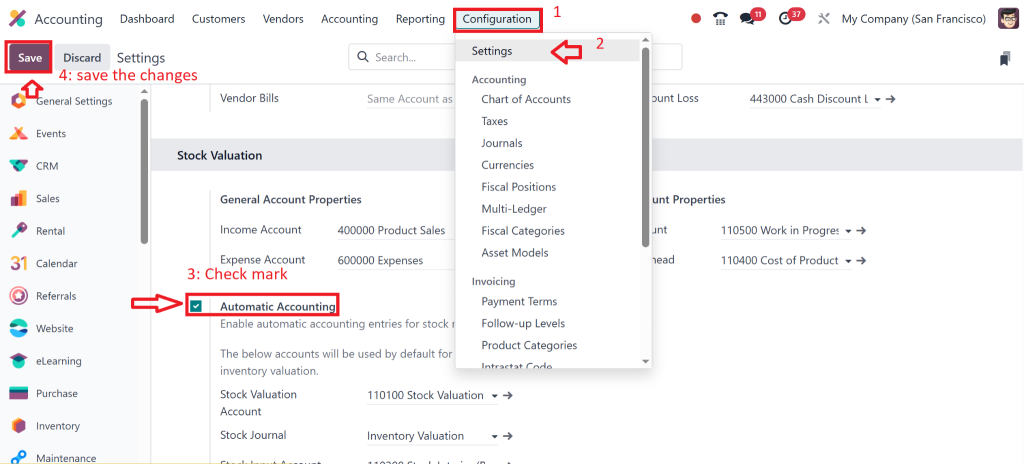
Once all these features are enabled, you can start setting up your automatic transfers.
Step 2: Setting Up Odoo 18 Internal Transfers
One of the most common types of automatic transfers is Internal transfers. These involve moving money between accounts within your business, from your business checking account to a savings account. Here’s how to set up this:
- Go to the Accounting & Click on Transfers.
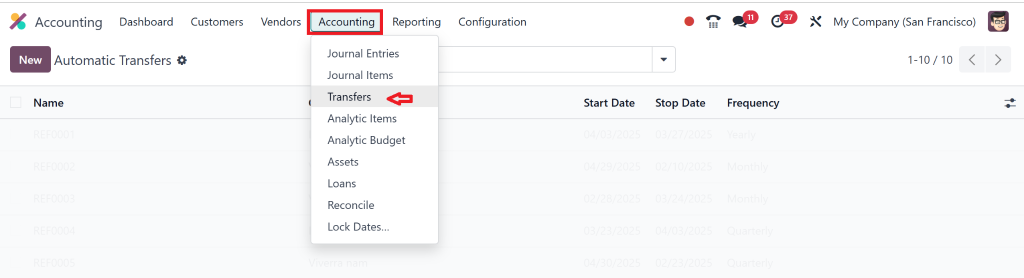
- Under the Transfers tab, select Internal Transfers.
Step 3: Odoo 18 Scheduled Transfers for Recurring Payments
Next, let’s talk about scheduled transfers. These automatic transfers happen at planned times, like paying rent, making tax payments, or paying other bills. To set up scheduled transfers in Odoo 18:
- Create a New.
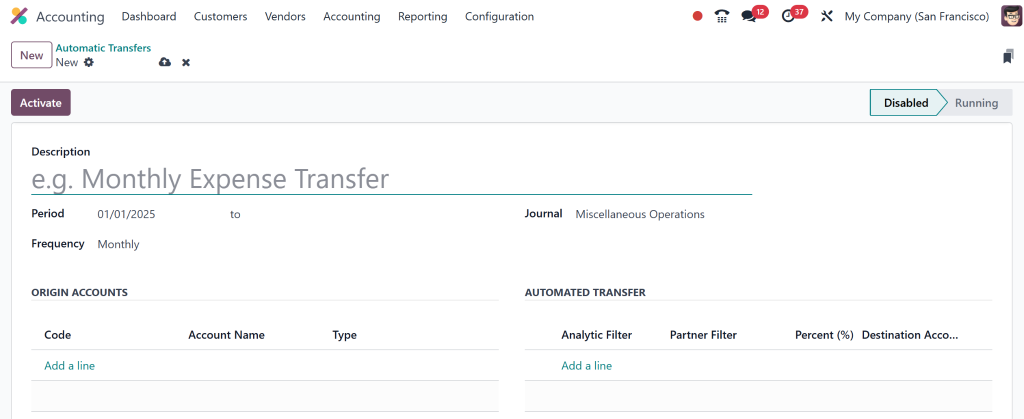
- Add all the details, such as Description, period, frequency, origin account, and the account to which we want to make an automated transfer.
- Select the Automatic Transfer option to automate this process and click on Activate.
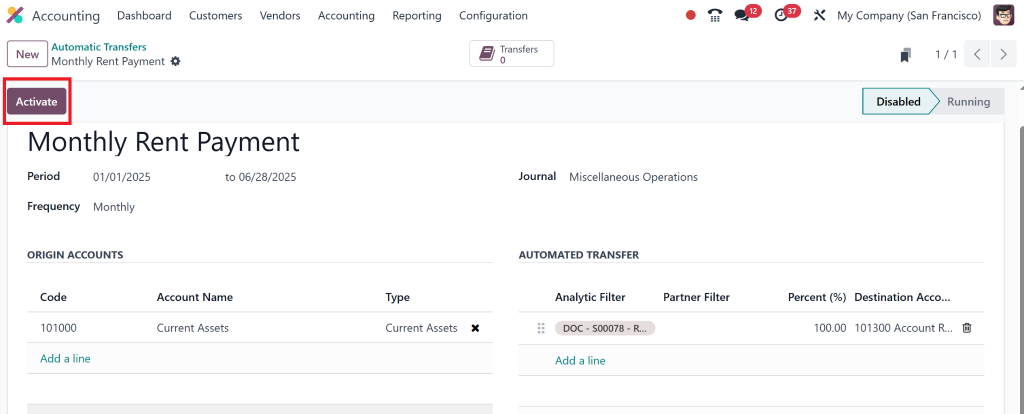
Once this is done, Odoo will take care of the rest, ensuring that your scheduled transfers happen automatically without you needing to do anything.
Now, any time a transfer is due between these accounts, Odoo will handle it automatically, freeing you from doing it manually.
Step 4: Odoo 18 bank reconciliation
Another fantastic feature of Odoo 18 automatic transfers is the ability to reconcile your bank transactions with ease. Odoo 18 bank reconciliation is essential to keep your financial records accurate, and it’s unrealistically easy to do with Odoo. Here’s how:
- Go to the Accounting.
- Click on Bank Reconciliation.
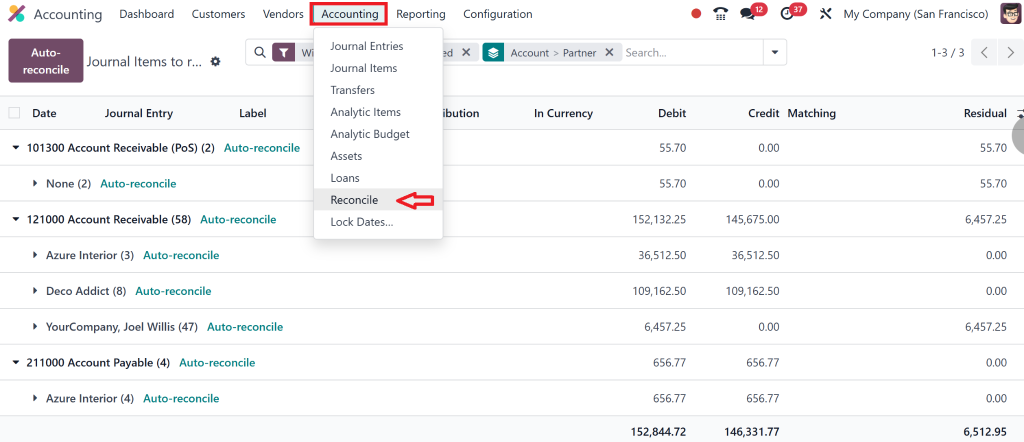
- Odoo will automatically match your bank transactions with the entries in your system.
- You’ll only need to review and approve the reconciliation, and Odoo will handle the rest.
That ensures that your accounting records stay current and match what’s in your bank account without requiring manual intervention.
Best Practices for Using Odoo 18 Automatic Transfers
While Odoo 18 automatic transfers are a great tool, there are a few best practices that can help you get the most out of them:
1. Review Scheduled Transfers Regularly
Besides, Odoo scheduled transfers are automated, so it’s a good idea to review them occasionally to ensure they’re still set up correctly. For example, if the amounts or frequency of payments change, you’ll want to update your scheduled transfers to reflect these changes. Regular reviews ensure you’re not missing critical payments and that everything runs smoothly.
2. Monitor Your Account Balances
Just because you’ve set up automatic transfers doesn’t mean you can ignore your bank accounts entirely. Monitor your account balances regularly to avoid any overdraft situations. Odoo 18 internal transfers can help move money around between accounts. Still, keeping an eye on your balances is essential to ensure there’s always enough money to cover your automated transactions.
3. Customize Transfer Rules to Fit Your Needs
Odoo accounting automation is highly customisable. You can set up specific rules for different types of transfers based on factors like accounts involved, transaction amounts, or payment methods. By customising these rules to fit your business’s unique needs, you can ensure that your transfers align with your financial goals.
4. Keep Track of Transfer History
Transparency is a significant part when it comes to financial management. Luckily, Odoo 18 automatically logs all transactions, making it easy to track the history of your transfers. You’ll have all the necessary records if you need to refer back to a specific transaction or prepare for an audit.
Why Should You Trust Odoo 18 Accounting Workflows?
Let’s take a moment to look at some of its key advantages if you’re wondering why Odoo 18 accounting automation is the right choice for your business:
1. User-Friendly Interface
Despite its powerful features, Odoo 18 is incredibly user-friendly. Its clean and user-friendly interface makes it easy to navigate accounting processes, even for people who aren’t accounting experts. Whether setting up internal transfers or managing scheduled transfers, you’ll find the system easy to use.
2. Flexibility and Scalability
Odoo 18 is highly flexible and scalable, so any size business could adopt it quickly. Whether you’re running a small startup or a medium-large enterprise, Odoo’s accounting automation can grow with you. It’s customisable to fit your business needs, and as your business grows, you can add more complex workflows without worrying about system limitations.
3. All-in-One Solution
Another significant benefit of using Odoo 18 is its all-in-one business management solution. It handles accounting and financial tasks and integrates with other areas of your business, such as sales, inventory, and HR. That means you can manage your entire business from one platform, creating a smooth experience for you and your team.
4. Real-Time Insights and Reporting
With Odoo 18 automatic transfers and accounting workflows, you gain real-time insights into your financial situation. The platform generates up-to-date reports, allowing you to track your business’s financial health anytime. These insights help you make informed and helpful decisions, identify problems, and improve cash flow management.
Let Odoo 18 Financial Automation Facilitate Your Accounting Workflows
Managing your business finances doesn’t have to be complicated. With Odoo 18 automatic transfers, you can automate a significant portion of your accounting tasks and free up valuable time for other parts of your business. Whether performing internal transfers, scheduling recurring payments, or reconciling your bank statements, Odoo accounting automation offers a simple, efficient solution to keep your financial operations on track.
Using Odoo automatic transfers ensures that your financial processes are more organised, accurate, and efficient. No more manual entries or missed payments – just smooth, automated accounting that saves you time and reduces errors.
At Netilligence, an Odoo Partner, we specialise in helping businesses set up and upgrade their Odoo 18 systems to automate accounting processes and improve financial management. Contact us today to learn how we can help you implement Odoo 18 automatic transfers and other accounting automation tools for your business.




