


Duplicate records are a common issue in CRM systems, and duplicate contacts in Odoo can create confusion across sales, accounting, and communication processes. When multiple entries exist for the same customer, it becomes difficult to maintain accurate records and track interactions effectively.
Understanding how to merge duplicate contacts in Odoo 19 helps maintain consistency in your database. When you merge duplicate contacts in Odoo, all related information is consolidated into a single record, which improves reporting accuracy and operational efficiency.
Many users search for how to combine contacts in Odoo, how to find duplicate contacts in Odoo, or how Odoo’s merge contacts works. This guide addresses each of these areas in a structured and practical manner, including Odoo duplicate partner merge and Odoo ERP contact deduplication practices.
Duplicate Contacts in Odoo and Their Common Causes
Duplicate entries are usually the result of routine system usage rather than intentional errors. These records often appear due to:
- Multiple users entering the same contact manually
- Data imports without validation checks
- Website forms generate new entries
- Email integrations create contacts automatically
- Absence of regular Odoo ERP contact deduplication
Without proper control, these situations lead to repeated duplicate contacts in Odoo, affecting overall data quality.
How to Find Duplicate Contacts in Odoo Efficiently
Before performing any merge operation, it is necessary to find duplicate contacts in Odoo accurately. Within the Contacts module, duplicate records can be identified using filters such as email address, phone number, or company name. Grouping contacts based on these fields allows quick identification of repeated entries.
Odoo also provides a built-in feature for Odoo ERP contact deduplication, which detects similar records automatically. This method is particularly useful for large databases where manual review may not be practical. Regular monitoring ensures that duplicate contacts in Odoo are identified early and handled efficiently.
How to Merge Contacts in Odoo Using Built-In Tools?
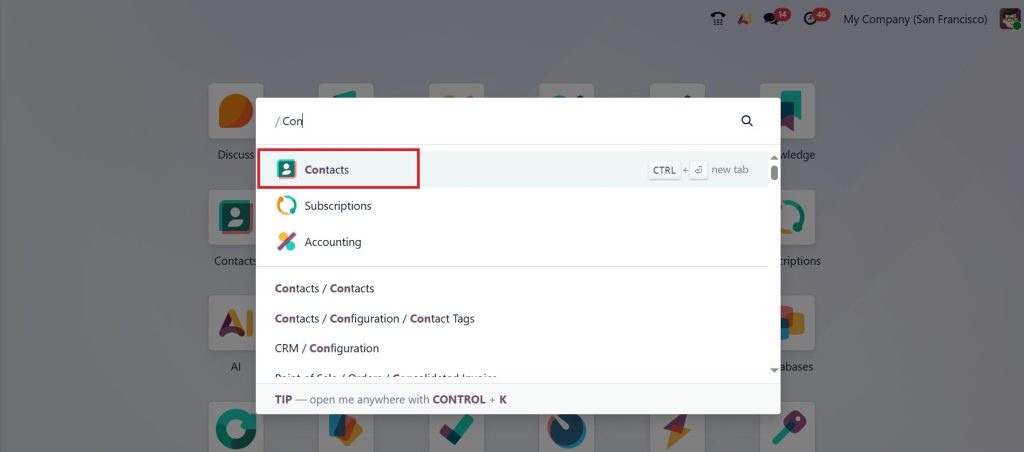
To merge duplicate contacts in Odoo 19, follow a structured process using the system’s built-in tools. First, open the Contacts module.
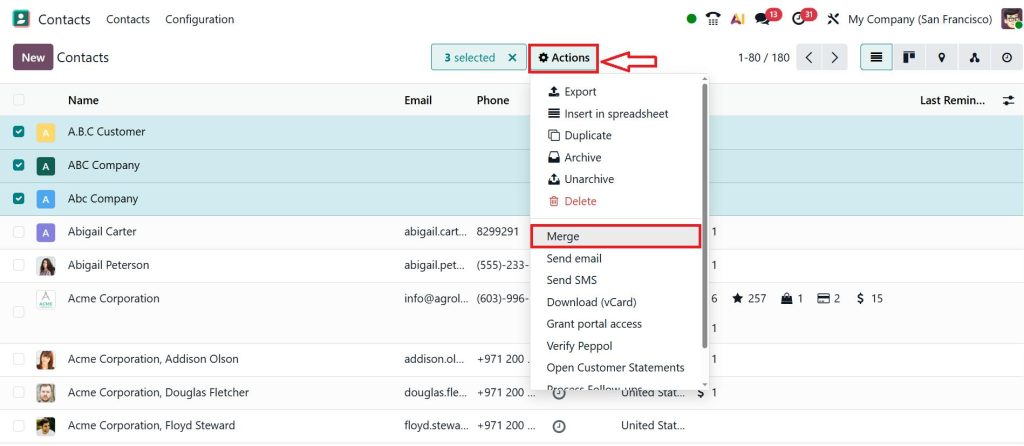
Next, review the listed contacts and select the records that need to be merged. Then click on the Actions smart button and select Merge. It is important to carefully verify that the selected entries belong to the same individual or company.
After that, choose one record as the primary contact and click on Merge Contacts. This will remain as the final record after merging.
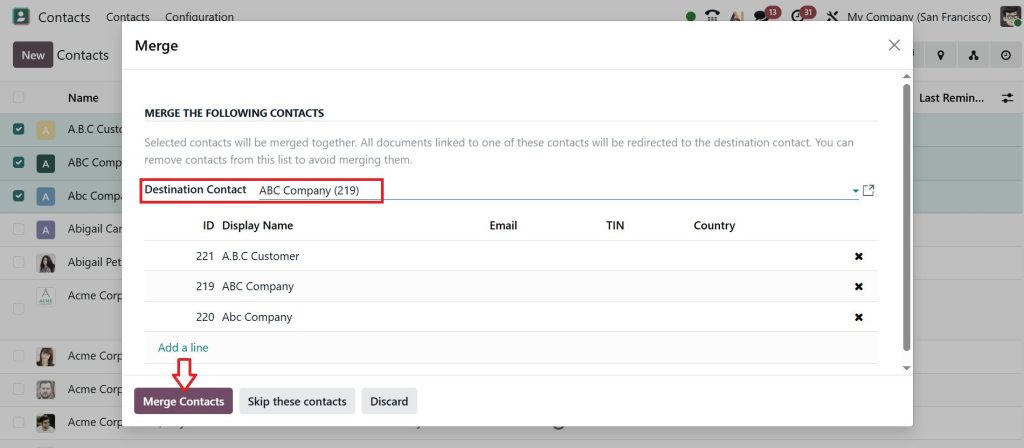
Odoo combines all related data, including communication history, sales records, and invoices. This is how Odoo merges contacts to ensure data consistency without removing important information.
Merge Duplicate Contacts in Odoo 19 Without Data Loss
Data preservation is a key consideration during the merge process. When performing an Odoo ERP duplicate partner merge, it is important to carefully review each record before confirming the action.
The selected primary record should contain the most accurate and complete information, including verified contact details and relevant history.
When executed correctly, merging duplicate contacts in Odoo 19 retains associated data such as sales orders, invoices, and communication logs. A careful review before merging minimizes the risk of missing or incorrect information.
Merge Customers in Odoo 19 For Accurate Sales and Reporting
Customer records often carry transactional data, making it essential to merge customers in Odoo 19 with attention to detail. When duplicate customer entries exist, their sales history may be divided across multiple profiles. By performing a merge, all transactions are unified under a single customer record.
This process improves reporting accuracy and ensures that business decisions are based on complete data. Regularly reviewing and merging customer records supports consistent financial and operational analysis.
Odoo Duplicate Partner Merge and Its Impact on System Data
In Odoo, contacts are stored as partners. The term Odoo ERP duplicate partner merge refers to combining these partner records into one.
During this process, Odoo updates all linked data, including CRM activities, accounting entries, and communication records, to reflect the merged contact.
When you combine partners in Odoo, the system maintains continuity across all modules. This ensures that no historical data is lost and that all departments access the same information.
Odoo Contact Deduplication Best Practices for Long-Term Data Quality
Maintaining clean data requires consistent effort. Implementing effective Odoo ERP contact deduplication practices reduces the frequency of duplicate entries.
Recommended practices include:
- Verifying existing records before creating new contacts
- Standardizing data entry formats for names and phone numbers
- Scheduling regular duplicate checks
- Using system filters and grouping features
These steps help control the growth of duplicate contacts in Odoo and reduce the need for repeated merging.
Merge Partners in Odoo with Proper Validation
Before performing any merge, it is important to confirm that the selected records represent the same individual or organization.
Review key details such as email, phone number, and company name. Similar names do not always indicate duplicate records, so verification is necessary. Accurate validation ensures that combine partners in Odoo do not result in incorrect data consolidation.
How to Merge Contacts in Odoo for Large Databases
Organizations with large datasets often require a structured approach to manage duplicates. Using filters and automated suggestions helps identify duplicate groups more efficiently.
Instead of merging all records at once, handling smaller batches on a regular basis improves accuracy and reduces errors. This method supports scalable Odoo merge contacts operations without disrupting daily workflows.
Duplicate Contacts in Odoo and Their Effect on Business Performance
Unresolved duplicate contacts in Odoo can affect multiple areas of business operations. These include:
- Inconsistent customer communication
- Repeated outreach to the same contact
- Inaccurate reporting and analytics
- Confusion among internal teams
Addressing duplicates through regular merging improves overall system reliability and supports better decision-making.
Keep Your Odoo Contacts Clean and Well Managed
Maintaining a clean and accurate contact database is essential for smooth business operations. When you regularly combine duplicate contacts in Odoo 19, you reduce confusion, improve communication, and ensure that every department works with the same reliable data.
Consistent use of Odoo ERP contact deduplication, along with careful review before every Odoo ERP duplicate partner merge, helps keep your CRM organized and efficient over time.
If your system still contains duplicate contacts in Odoo or your team is facing difficulty managing records, it is important to take action early.
Netilligence can support you with proper setup, data cleaning, and ongoing management so your Odoo environment stays accurate and easy to use.




