Whenever I talk to business owners, one thing I hear again and again is this: they are tired of doing the same billing work every month. They forget renewal dates, lose track of invoices, and spend hours handling small tasks that should take only a few minutes. And this is precisely why Subscriptions in Odoo 19 have become such a relief for everyone who deals with recurring services.
If your business runs on monthly or yearly plans, memberships, retainers, support packages, or digital services, then Subscriptions in Odoo 19 can remove so many daily worries. You can imagine a setup where your invoices go out on time, your customers get reminded without you doing anything, your plans stay organized in one place, and your entire subscription flow moves on its own.
That is why I am writing this guide for you. Because once you understand how Subscriptions in Odoo 19 work, your business will start moving with more confidence.
How Odoo 19 Subscription Setup Helps in Real Life
Whenever I explain Odoo 19 subscription setup to someone, I usually start by asking them one question: “How many times have your customers asked for the same service again?” Because this is where subscription planning begins. If your service repeats, you should not have to manually repeat the same work. Odoo 19 provides a place where every subscription is connected to its invoices, dates, reminders, and plan details. You don’t have to remember everything on your own.
And if you run a company that depends on monthly or yearly cash flow, this setup brings a lot of clarity. When you know which customer is renewing next month, who is expiring soon, and who is upgrading or downgrading, you feel more in control of your daily operations. Many people think setting up subscriptions is complicated, but once you know where everything is in Odoo 19, it becomes surprisingly approachable.
Step-by-Step Guide – How to Set Up Subscriptions in Odoo 19
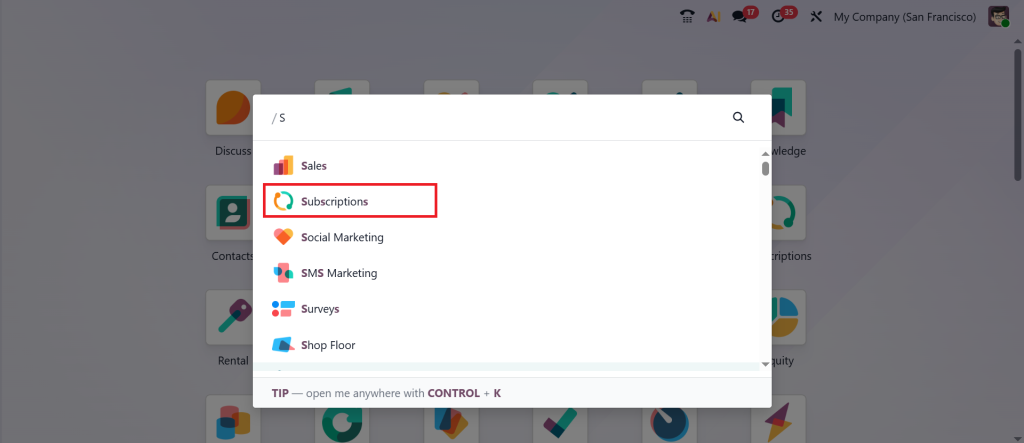
Now, let’s go deep into the actual configuration process. First, open the Subscription module from your Odoo 19 dashboard.
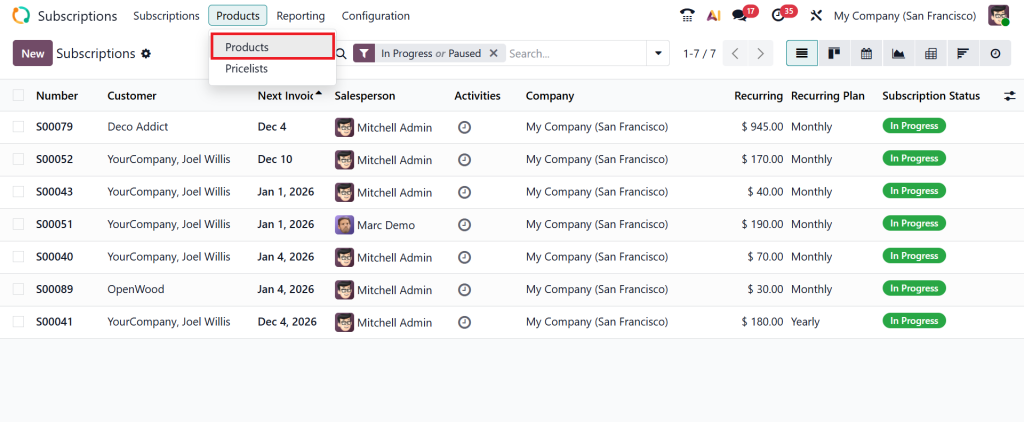
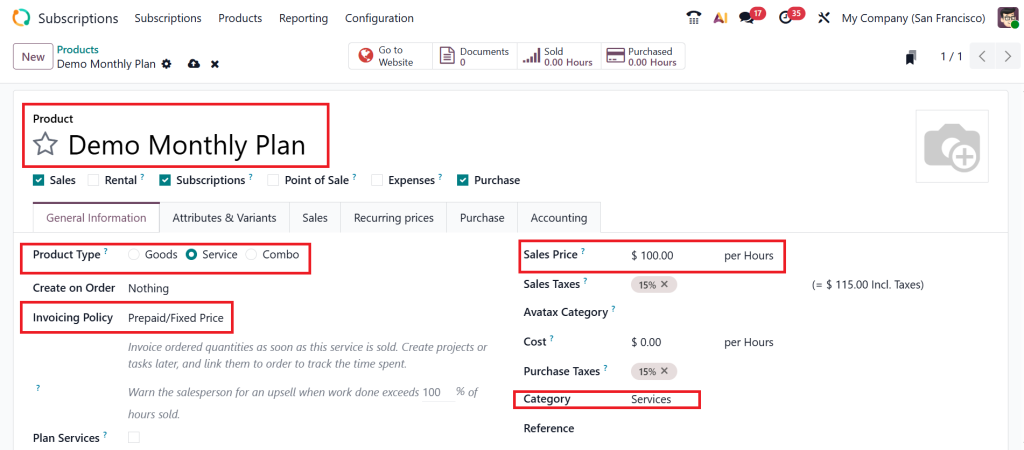
Go to Products > Products.
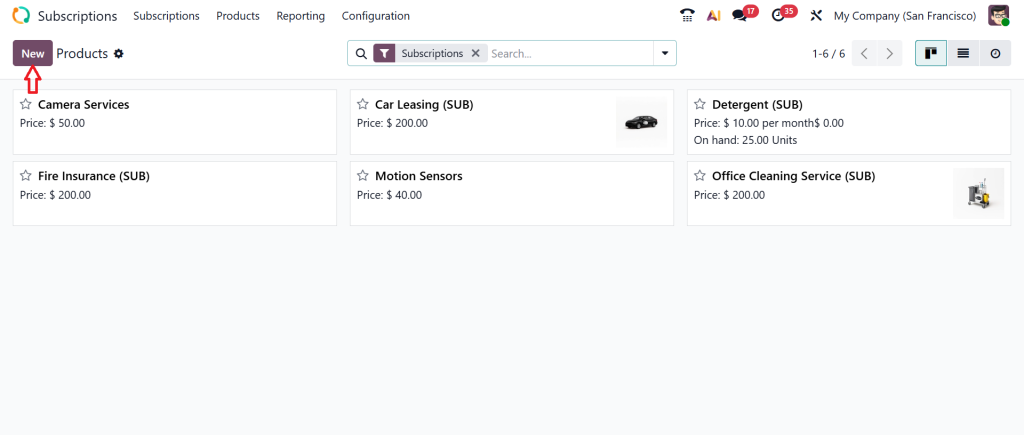
Create a new one by clicking on New.
Fill out the details such as product name, type, invoicing policy, sales price, and category etc.
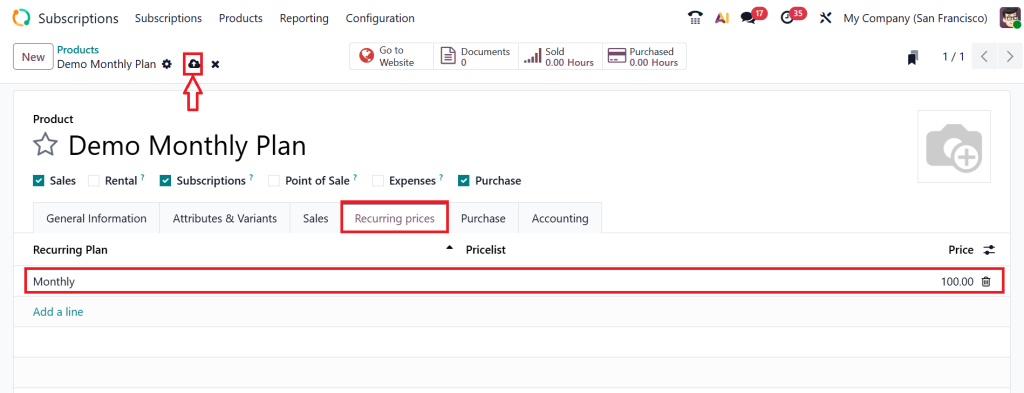
Click on the Recurring Prices tab, add your plan, give a price as per your requirements, and click Save.
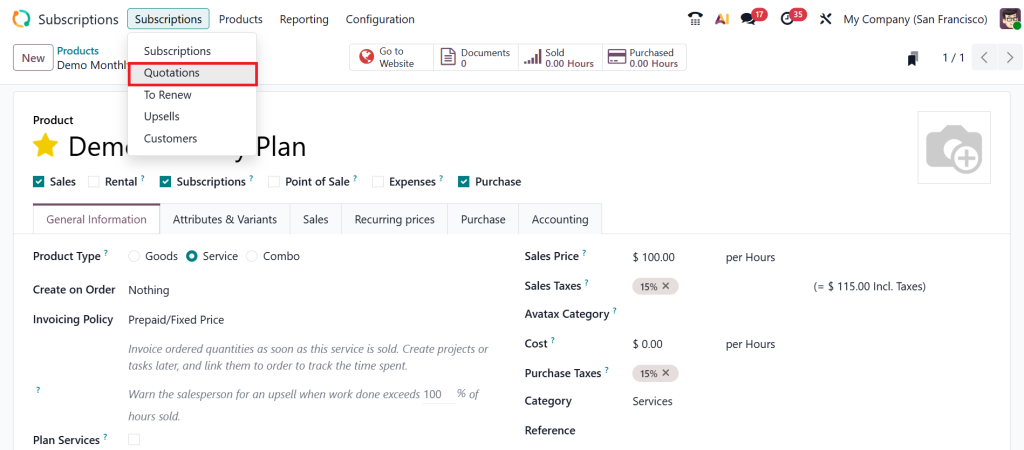
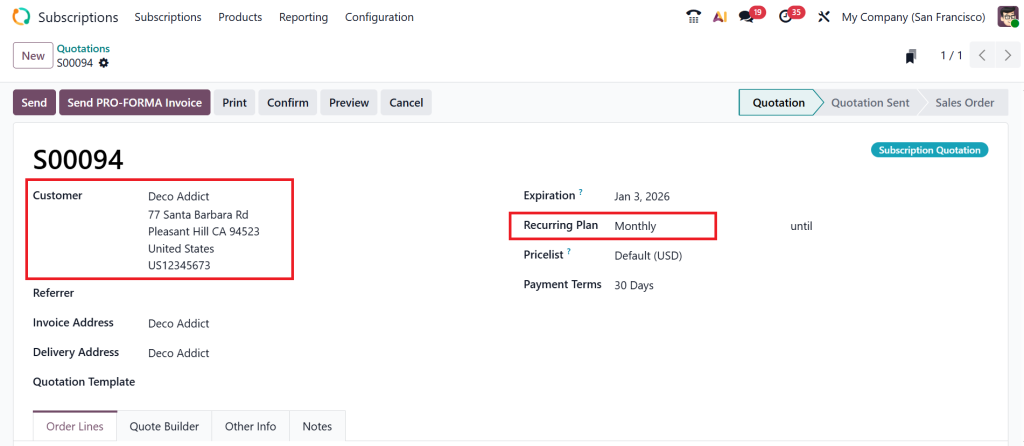
After that, let’s move to the Subscriptions > Quotations.
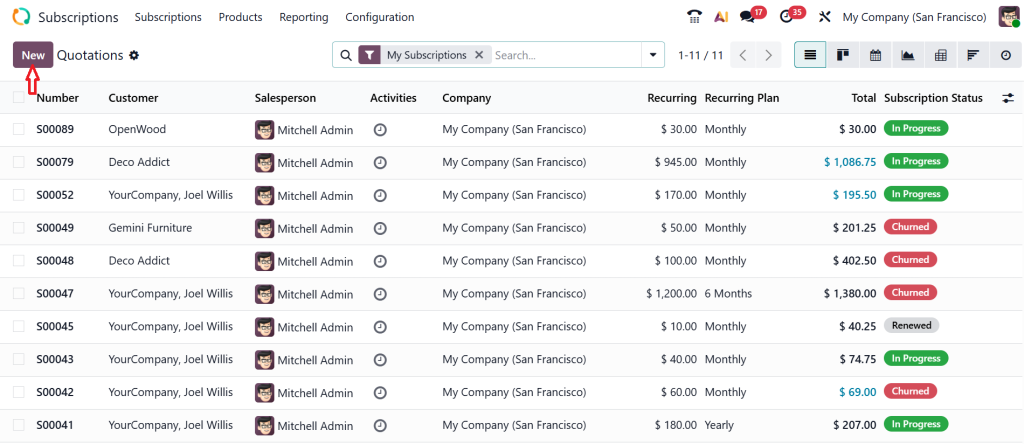
Click New to create a new quotation.
Add all the customer details, then select the recurring plan.
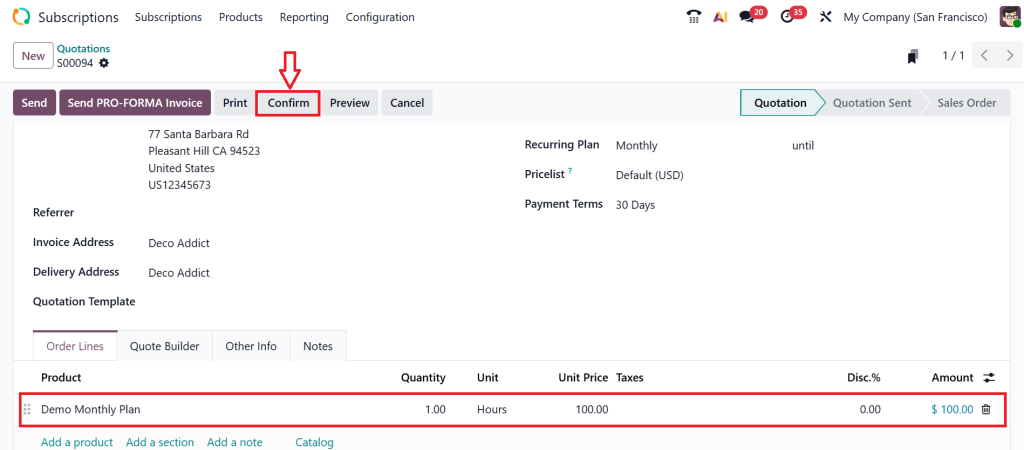
Scroll down, add the product or service, and click the Confirm button.
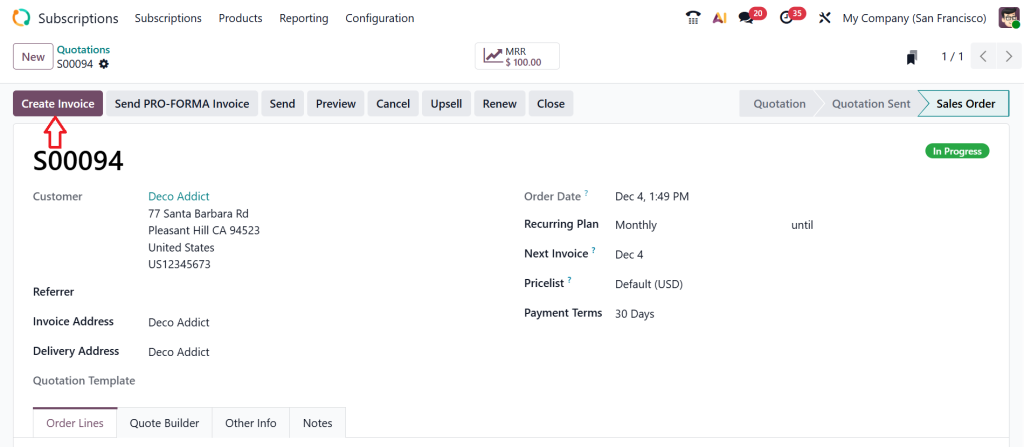
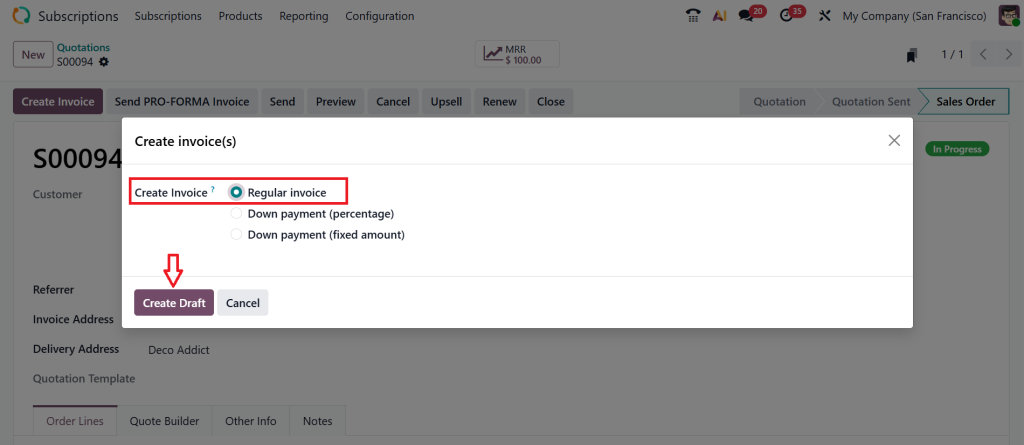
Now, let’s create an Invoice.
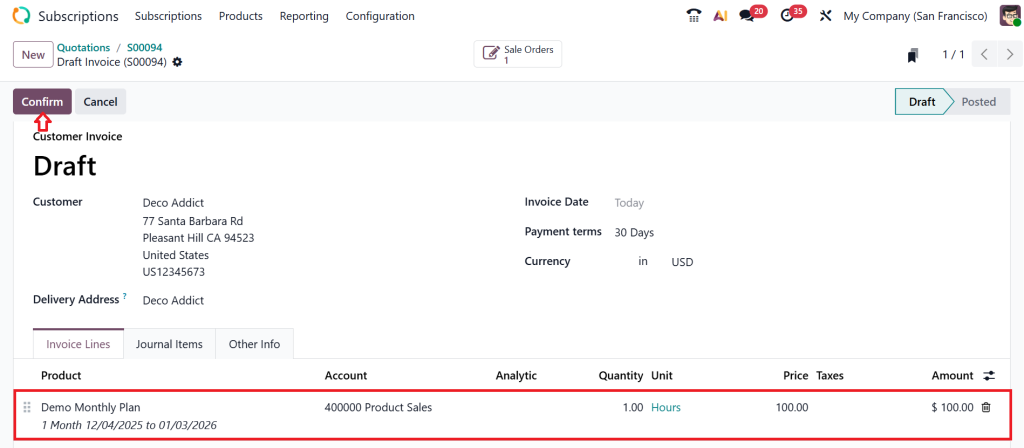
Select Regular Invoice, then click Create Draft.
Now, confirm the invoice by clicking on the Confirm button.
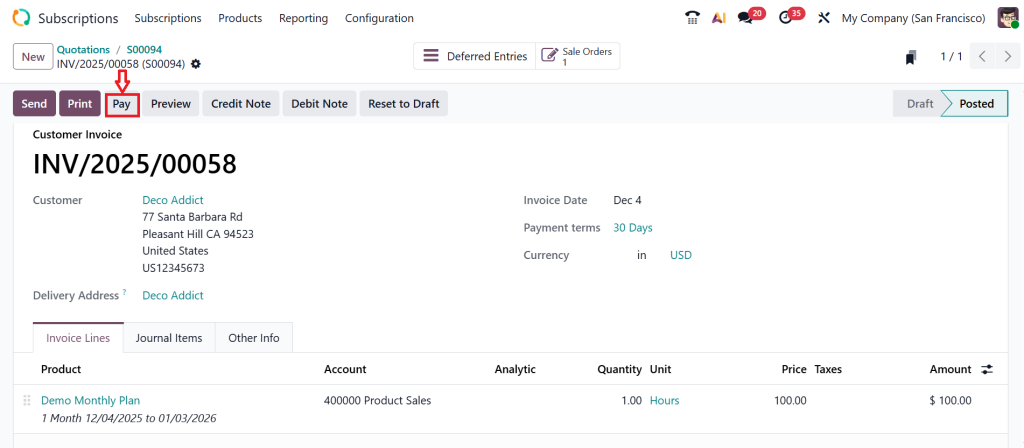
Click Pay.
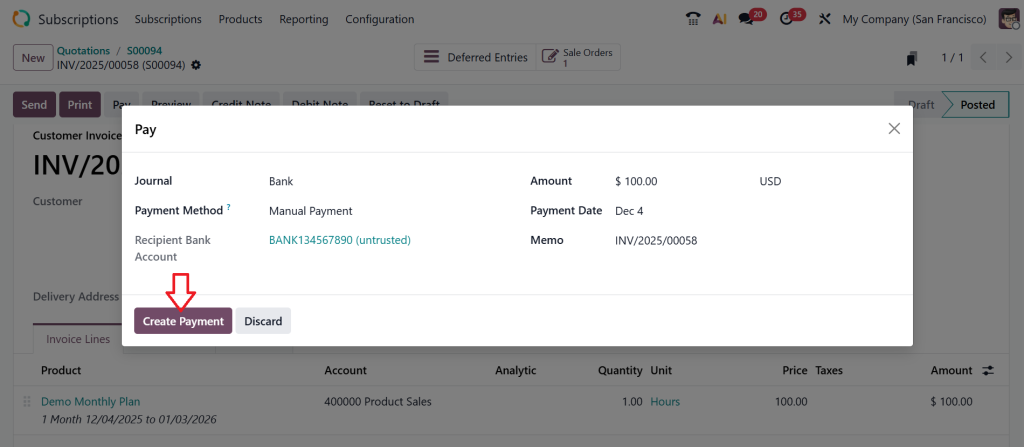
Now, click Create Payment.
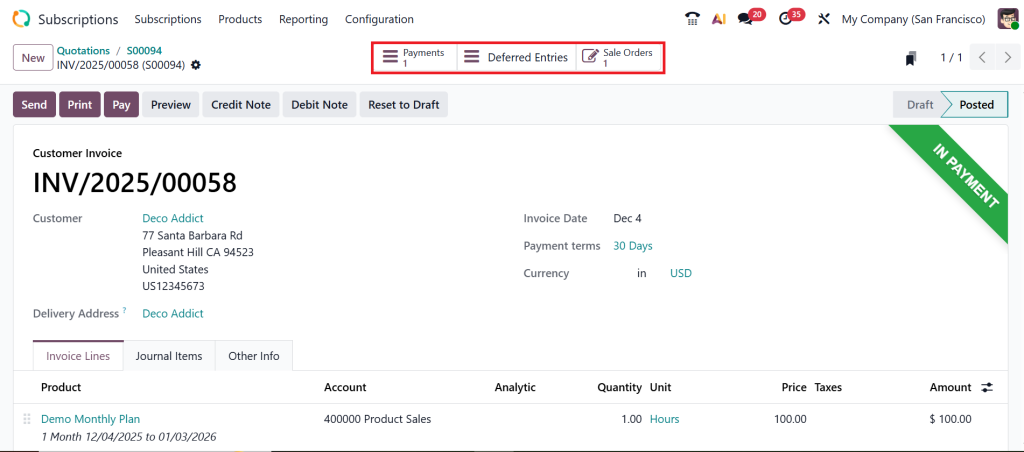
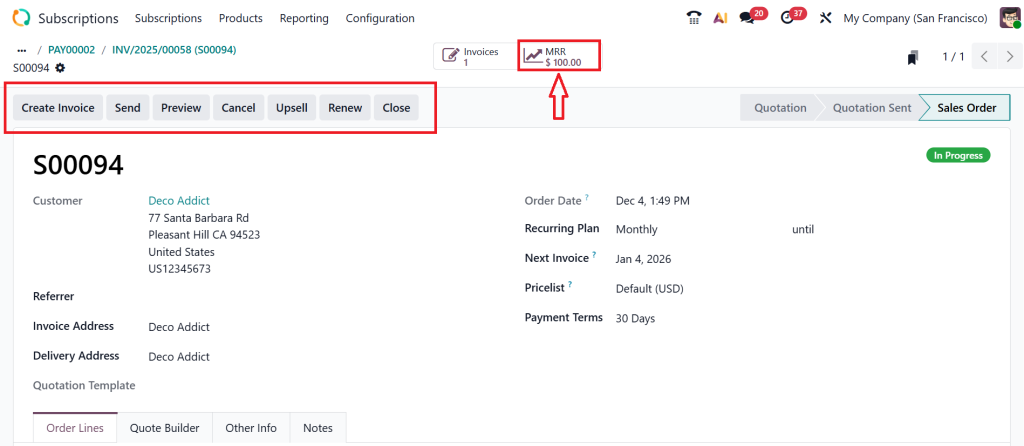
As you can see in the below screenshot it’s in Payment Stage.
If you click on the Sale Orders button you can see all the details related to subscriptions.
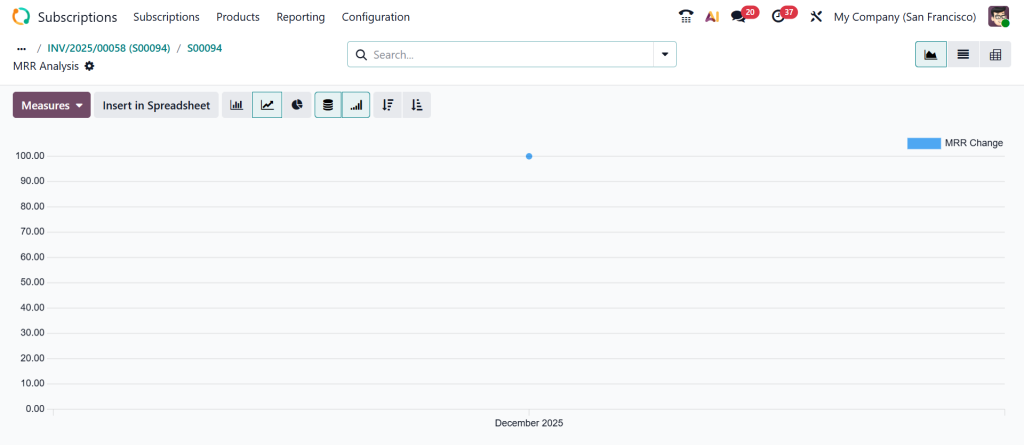
And if you click on the MRR smart button you can see the MRR report.
After renewing this product or service subscription, you can find all the details from the MRR report.
How to Create Subscription Product Odoo 19 Without Confusion
Some people feel stressed when they hear the word “setup,” but creating a subscription product is easier than they expect. When you create a subscription product in Odoo 19, the only thing you really need is clarity about your service. Think about what you offer. Is it monthly support? A yearly digital package? A weekly maintenance service? Once you know this, the product settings become simple. Please choose your product type, enter your price, and mark it as a subscription product.
After that, Odoo guides you to link this product to the right template. What I personally like about this feature is that you don’t have to redo everything for every new customer. Your product already carries the rules you want. You write the instructions once, and Odoo follows those instructions again and again.
How Odoo 19 Recurring Billing Helps You Save Time
If you forget billing dates or get tired of sending invoices manually, Odoo 19’s recurring billing will genuinely ease your workload. I have seen businesses suffer when they miss billing cycles, especially when managing multiple clients. Odoo 19 handles this repeating work automatically based on the dates you set in the template. No matter how many customers you have, the system continues its schedule without stopping.
This is especially helpful for service providers who need a steady monthly income. When you know invoices will go out on the correct date, you can pay attention to the actual service you offer instead of chasing paperwork every week. And the best part is that recurring billing stays connected with every subscription, so you always know who is billed, who is pending, and who has already paid.
How Odoo 19 Subscription Plans Make Your Business More Organized
Whenever you sit down to create Odoo 19 subscription plans, you start thinking about your services more clearly. And this clarity automatically helps you organize your offers. Instead of giving customers random prices, you give them structured plans. Instead of explaining everything from scratch, you show them ready-made packages that look professional.
Subscription plans in Odoo 19 can be monthly, yearly, or custom, depending on what suits your business. Some businesses use three-tier plans, others use single packages, and some use add-ons. Whatever your style, Odoo 19 lets you build it in a neat, straightforward way. When customers see clearly defined plans, it also becomes easier for them to decide what they want. And when they make quick decisions, your sales become easier, and your revenue becomes more predictable.
How Odoo 19 Recurring Invoices Keep You Stress-Free
There is something comforting about Odoo 19 recurring invoices because they help you stay ahead of your cash flow. Instead of waiting for reminders or worrying about who forgot to pay last month, you have a system that keeps you informed. Recurring invoices are automatically generated according to the schedule you set. Every invoice appears in your customer’s history, and you never lose track of it.
Many businesses rely on recurring invoices to maintain stability. When you know which invoices are upcoming, which ones have been sent, and which ones are overdue, you feel more confident about your finances. You don’t have to look for papers or scroll through scattered spreadsheets. Everything stays inside Odoo 19 in one place. And this simplicity brings significant mental relief.
How to Configure Subscription Templates in Odoo Without Getting Lost
Templates are the real foundation of subscriptions, and once you understand how to configure subscription templates in Odoo, your subscription system starts making more sense. The template decides everything: how often the customer is billed, what happens when their contract ends, whether renewal is automatic, and how cancellation works. When your template settings are correct, every subscription that uses that template follows the same rules. This keeps your work consistent and prevents mistakes.
For example, if you offer a monthly plan, your template will send monthly invoices. If you provide annual service, your template will follow yearly dates. You don’t have to change settings again and again. You set them once, and every new customer follows those same terms. This structure helps businesses avoid confusion and stay more organized.
How Odoo Subscription Management 2025 Helps You Stay Ahead
As we walk into the coming years, Odoo subscription management 2025 is becoming increasingly important as businesses shift towards recurring revenue models more than ever. Customers like predictable services, and companies like predictable income. Odoo’s subscription management tools enable you to maintain both. When you can see upcoming renewals, expired contracts, unpaid invoices, upgraded plans, and customer history in one place, you feel more connected to the way your business is growing.
This clarity also helps with decision-making. When you know which plan is performing well or which customers are renewing the most, you start to understand your business better. This awareness is often missing when things are done manually. But when done through Odoo, everything becomes easier to monitor.
Why Subscriptions in Odoo 19 Are Worth Your Time
Now that you have seen how every part connects products, templates, plans, invoices, and billing cycles, you can imagine how much smoother your daily work becomes when Subscriptions in Odoo 19 are set up correctly. Many businesses spend significant time on repetitive tasks without realizing that automation can take over a large portion of that workload. And the good thing about Odoo 19 is that it doesn’t try to complicate your process. It provides you with a space to build your subscription system in a structured way. Once your setup is complete, everything starts moving on its own: invoices go out, renewals appear, templates follow rules, and subscription plans stay organized.
The more you work with Odoo 19, the more confident you feel about your service model. And when you know your subscription system is working correctly, you can focus on improving the service you offer your customers. You start thinking about new plans, better services, and stronger client relationships because your administrative work no longer consumes all your time. This is why learning subscriptions in Odoo 19 are not just a technical step; they support your business’s growth.
Ready to Set Up Subscriptions in Odoo 19 the Right Way?
If you want help setting up your subscription products, templates, plans, and recurring invoices in Odoo 19, Netilligence can handle it from start to finish.
Reach out today and move your business toward a more predictable, confident subscription model.
Hi, I'm Ilsa Shabbir, an Odoo ERP content writer specializing in functional blogs on Odoo modules. I simplify complex Odoo features, creating clear and engaging content to help businesses understand and optimize their ERP solutions.
We use cookies to ensure that we give you the best experience on our website. If you continue to use this site we will assume that you are happy with it.