How to Use Pipeline Stages Effectively in Odoo 18 Community CRM?
Learn the Art to Use Pipeline Stages in Odoo 18 Community CRM
Every business dreams of closing more deals, converting leads into loyal customers, and restructuring its sales process. However, the secret formula behind successful CRM operations lies in how efficiently you use pipeline stages. In the context of Odoo 18 Community CRM, understanding your pipeline stages can mean the difference between chaotic sales efforts and a highly optimized customer journey. If you want to use pipeline stages effectively in the latest version of Odoo 18 Community, this blog will reveal the essentials.
From Odoo 18 CRM pipeline stages to advanced Odoo CRM stage automation, this comprehensive guide gives you the tools to reimagine your Odoo CRM pipeline management. We will discover how to boost productivity through visual Odoo CRM Kanban stages, implement innovative Odoo 18 sales pipeline customization, and leverage data-rich Odoo 18 CRM reporting tools.
You’ll also learn a step-by-step method to achieve accurate Odoo 18 pipeline tracking, ensuring that your team never loses sight of a lead or opportunity. Let’s begin.
Odoo 18 Community CRM has a powerful, Kanban-style pipeline view that allows you to manage your sales flow like a pro. Each stage in the pipeline represents a specific status of your lead or opportunity, such as “New,” “Qualified,” “Proposal Sent,” or “Won.” Customizing these stages to mirror your sales process gives you visual clarity and control over every deal.
Unlike traditional CRM tools that demand heavy customization or costly integrations, Odoo 18 ERP CRM pipeline stages are simple yet highly adaptable. Understanding how to use pipeline stages effectively is a gateway to understanding Odoo ERP CRM pipeline management with minimal effort and maximum results.
How Odoo CRM Pipeline Management Works in the Community Version?
The Odoo 18 Community CRM version equips businesses with essential sales tools to visualize their leads and opportunities. Its pipeline dashboard is based on the Odoo CRM Kanban stages layout, enabling users to drag and drop opportunities as they progress through different stages.
Each Kanban card holds key data like expected revenue, close date, and customer details. This view’s flexibility helps sales teams prioritize and act faster. With built-in features for notes, internal communications, and attachments, it becomes the central control room for all sales activities. Knowing how these cards operate within each stage is essential for using pipeline stages smartly.
Step-by-Step Guide: How to Use Pipeline Stages Effectively in Odoo 18 Community CRM
Step 1: Access Your CRM Pipeline
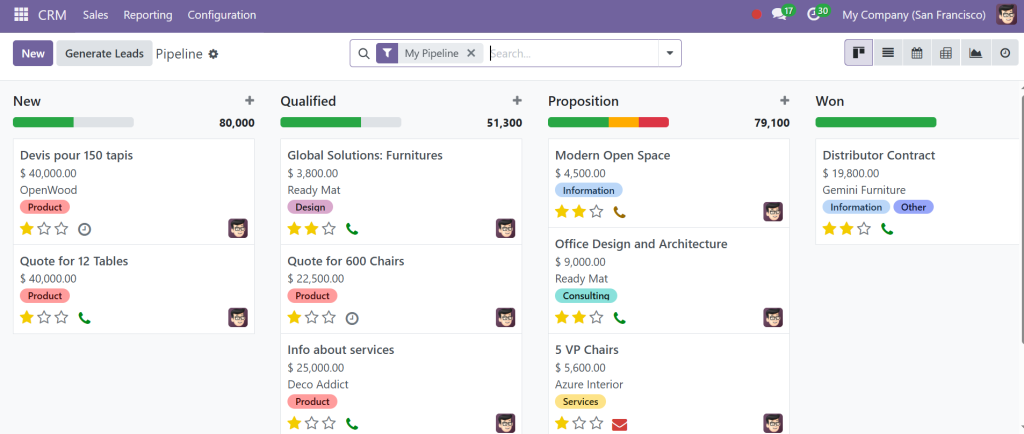
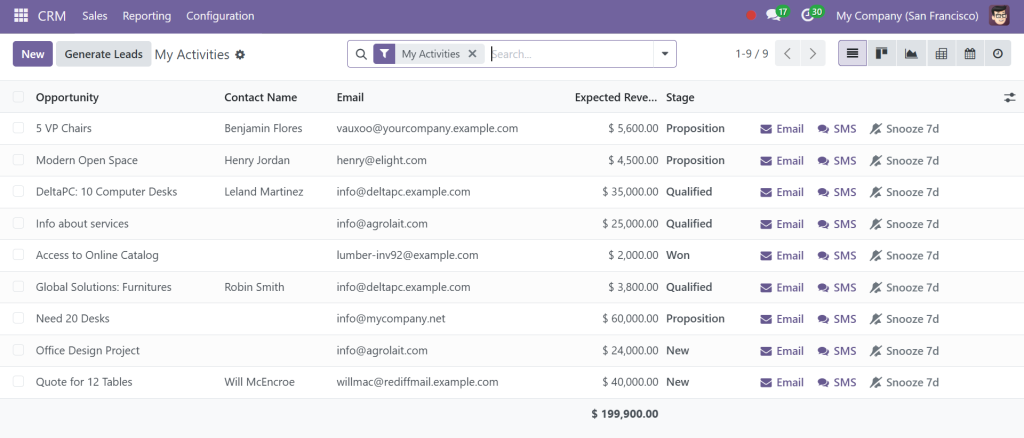
Direct to the CRM module from your Odoo 18 community dashboard. Once inside, you’ll see the pipeline view by default. This is your Odoo CRM Kanban stages screen.
Step 2: Understand Default Pipeline Stages
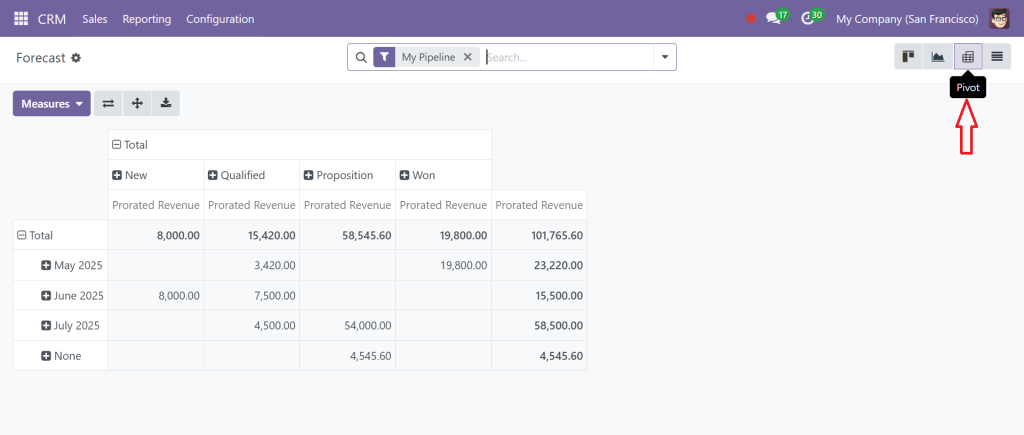
The Community version of Odoo 18 ERP CRM pipeline stages usually includes default stages like “New”, “Qualified”, “Proposition”, and “Won”. These are placeholders. Your business is unique, so these stages should reflect your real-life sales journey.
Step 3: Customize Your Pipeline Stages
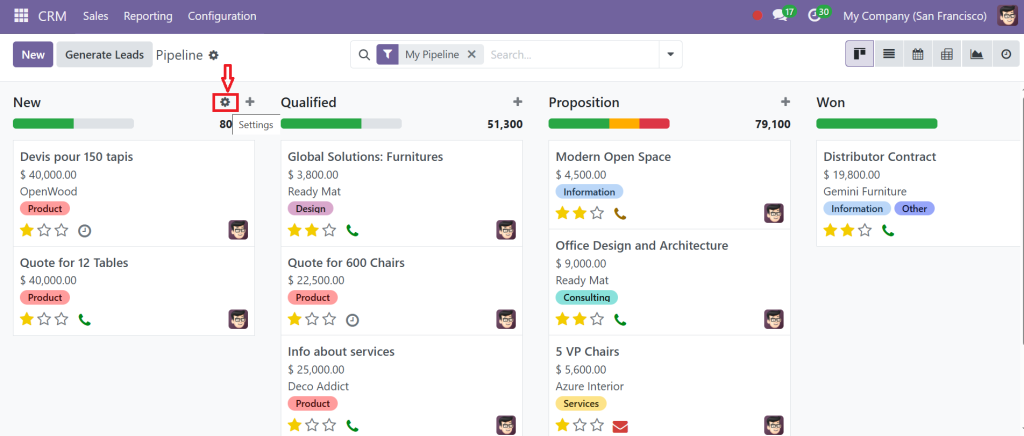
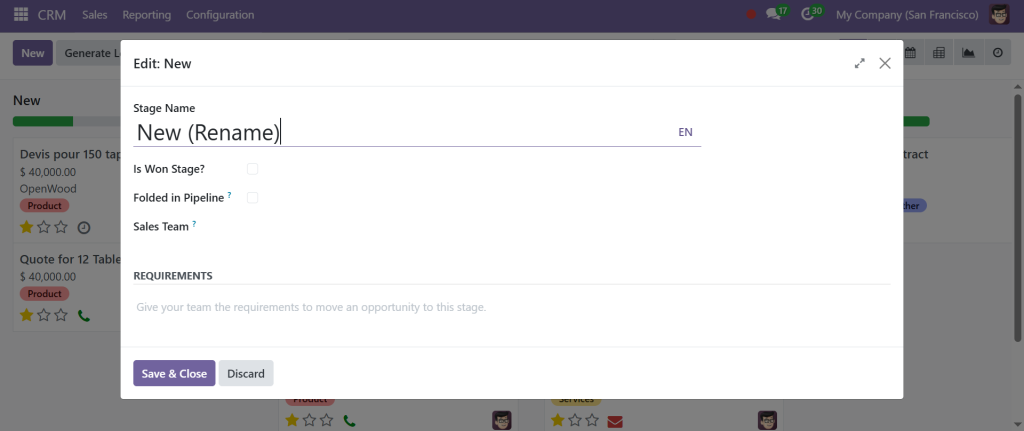
To begin customizing the Odoo 18 sales pipeline, click the gear or settings icon at the top right of any pipeline stage.
You can rename the stage, assign probabilities (likelihood of closing), and set default sales teams.
Example:
Rename “Proposition” to “Demo Scheduled”
Add a new stage called “Negotiation”
Set “Demo Scheduled” probability to 40%
Step 4: Automate Stage Actions (Where Possible)
Though the Community version of Odoo lacks some enterprise-level automation tools, you can still build basic Odoo ERP CRM stage automation using activities.
When you move a lead to a new stage, configure an automatic activity like sending a follow-up email or scheduling a call.
This semi-automation keeps your team consistent and proactive, reducing manual oversight.
Step 5: Track Progress with CRM Reporting Tools
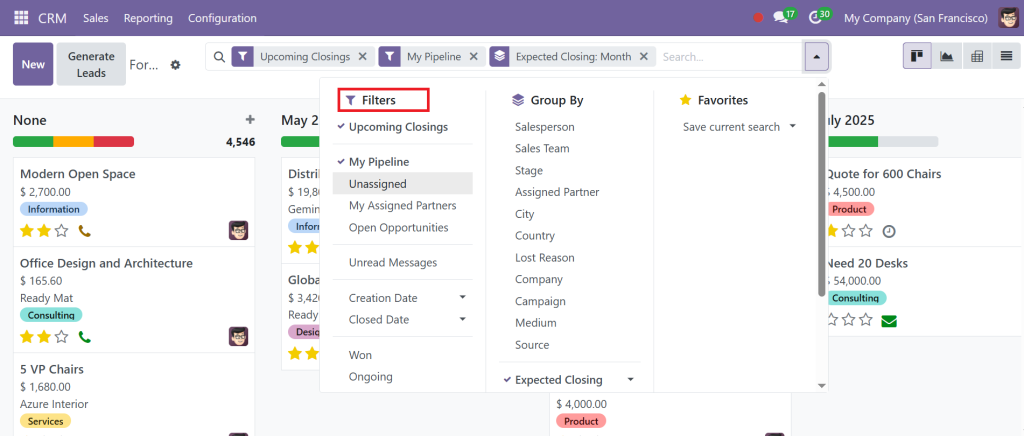
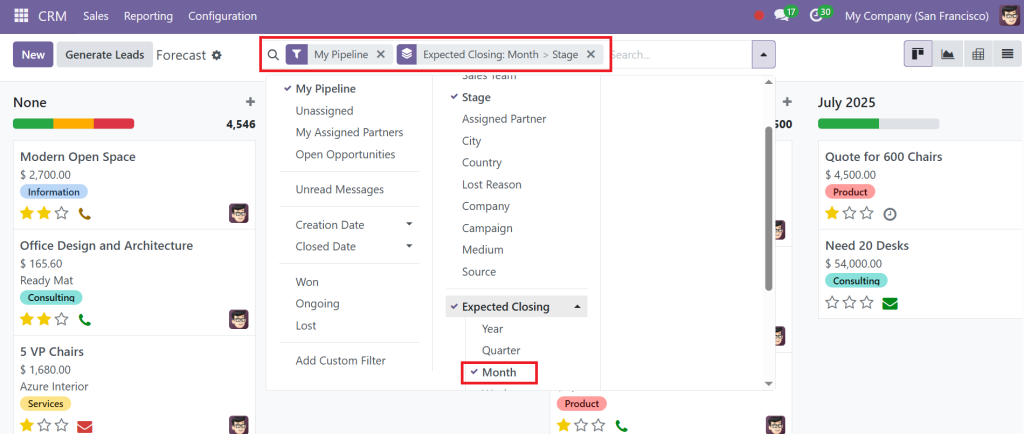
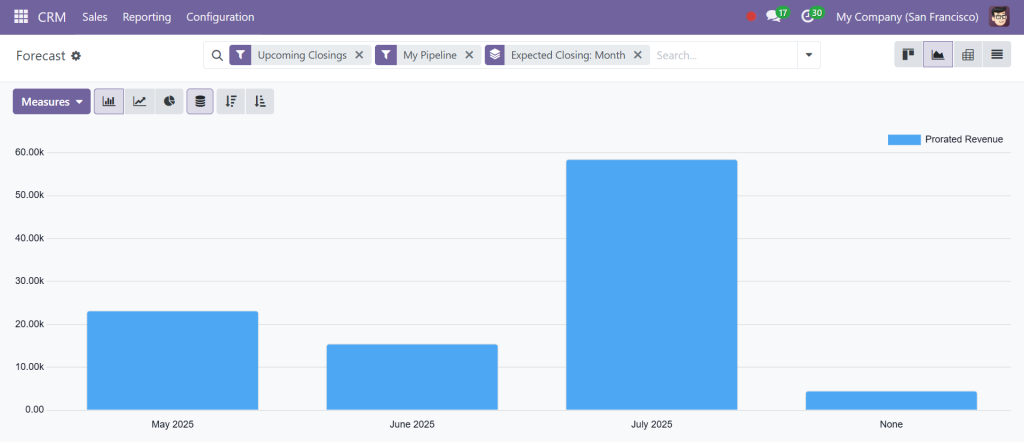
Odoo 18 CRM reporting tools give you visibility into sales performance, stage conversion rates, and team efficiency. Use filters to view reports by salesperson, team, or stage.
Look for:
Upcoming Closings
My Pipeline
Expected Closing
With accurate Odoo 18 ERP pipeline tracking, you can identify bottlenecks, optimize efforts, and improve ROI.
Step 6: Maintain and Refine Stages
Your business evolves, and so should your pipeline. Revisit your Odoo 18 ERP CRM pipeline stages monthly. Are some deals stuck too long in one stage? Is there a redundant stage no one uses?
Regular audits ensure your Odoo ERP CRM pipeline management stays lean and effective.
Advanced Tactics: Odoo 18 Sales Pipeline Customization to Match Real Sales Cycles
Want to go a step further? You can create multiple pipelines for different sales processes. For example, B2B and B2C sales might have different cycle lengths and stages. Create separate pipelines in the Community version and assign specific teams to each.
You can also apply Odoo 18 ERP sales pipeline customization to:
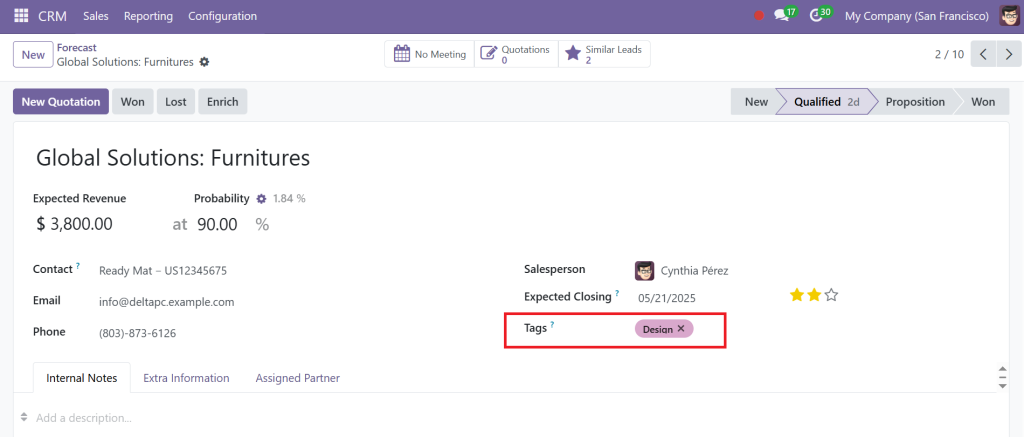
Highlight hot leads with custom tags
Use color-coded cards to signal urgency
Split stages into sub-stages using custom fields
These tweaks add context and significantly enhance your Odoo ERP CRM pipeline management.
Visualizing Sales Progress with Odoo CRM Kanban Stages
The magic of the Odoo CRM Kanban stages lies in their visual storytelling. Your sales team can instantly see where a deal stands and what actions are needed. It’s not just about dragging cards; it’s about cultivating a rhythm of progress.
Some ideas:
Create a “Stalled” stage to catch leads needing re-engagement
Use the “Won” stage as a Launchpad for customer onboarding tasks
Reserve a “Cold” stage for leads on hold or unresponsive
This Kanban approach keeps your pipeline organized and energized.
Leveraging Odoo CRM Stage Automation Without Enterprise Tools
Though the Community version doesn’t offer complete automation workflows, it still supports actionable steps. Use activity types to build workflows within your Odoo CRM pipeline stages:
Automatically assign a task when a card enters “Demo Scheduled”
Set a 48-hour deadline for follow-up after moving to “Proposal Sent”
Create email templates for each pipeline stage
This automation boosts consistency, especially in larger teams, and even basic steps toward Odoo ERP CRM stage automation drive significant results.
Real-Time Pipeline Visibility with Odoo 18 Pipeline Tracking
Good CRM tools are proactive. The Odoo 18 ERP pipeline tracking features offer you immediate updates on:
Stage movement
Time spent per deal
Deal ageing alerts
Want to supercharge tracking? Install the “CRM Activity Planning” module (Community-compatible) to layer additional visual cues on your pipeline stages.
The goal is simple: Don’t let hot leads go cold. With real-time insights from Odoo 18 pipeline tracking, you stay informed and ahead.
Analytics That Drive Strategy: Odoo 18 CRM Reporting Tools
Numbers don’t lie. Your Odoo 18 CRM reporting tools offer a goldmine of actionable insights. Even in the Community version, you get:
Filters by pipeline stage, team, month, and status
Graph views: Bar, Pie, Line
Pivot tables
Use reports to:
Determine which stages take the most time
See how many deals convert at each stage
Spot patterns in lost opportunities
These reports form the strategic backbone of your Odoo CRM pipeline management.
Change Sales Flow by Learning to Use Pipeline Stages
Using pipeline stages effectively in Odoo 18 Community CRM reveals a more intelligent and structured sales process. From visualizing deals in Odoo CRM Kanban stages, enhancing flow with Odoo ERP CRM stage automation, to customizing your process with Odoo 18 ERP sales pipeline customization, each step uplifts your pipeline’s power.
With tools like Odoo 18 CRM reporting tools and Odoo 18 ERP pipeline tracking, you’re not just managing leads, you’re engineering success.
In modern CRM, Odoo 18 Community proves you don’t need to break the bank to simplify your customer journey. You need to know how to build your pipeline, use it effectively, and refine it continuously.
That journey begins now. So dip in, audit your pipeline, rethink your stages, implement the strategies, and watch your CRM turn from a tracking tool into a conversion engine.
Hi, I'm Ilsa Shabbir, an Odoo ERP content writer specializing in functional blogs on Odoo modules. I simplify complex Odoo features, creating clear and engaging content to help businesses understand and optimize their ERP solutions.
We use cookies to ensure that we give you the best experience on our website. If you continue to use this site we will assume that you are happy with it.