

If you are working with inventory in Odoo, you already know that managing stock is not only about quantities. The real challenge is deciding when to reserve that stock. This is where understanding how to use reservation methods in Odoo 19 inventory becomes essential.
In many businesses, inventory issues do not come from a lack of stock. They come from incorrect reservation timing. Stock gets reserved too early and blocks other orders, or it gets reserved too late and delays deliveries. In both cases, operations become difficult to manage. That is why learning how to use reservation methods in Odoo 19 inventory is not just a technical step; it is an operational decision.
In this Odoo 19 reservation methods guide, we will go through each option in a clear and structured way so you can apply it based on how your business actually works. Once you understand how to use reservation methods in Odoo 19 inventory, you will notice better control, fewer delays, and more clarity in your workflow.
Understanding the Core Concept of Odoo 19 Reservation Methods Guide
Before going into different options, it is important to understand what a reservation really means in Odoo. Reservation is the process by which Odoo allocates available stock to a specific order. Once a product is reserved, it is no longer available for other orders.
This decision directly affects:
- Order fulfillment
- Stock availability
- Warehouse operations
If the reservation is done at the wrong time, it can create unnecessary pressure on your system. That is why choosing the right method is important. This Odoo 19 reservation methods guide focuses on helping you make that decision based on your workflow rather than assumptions.
Odoo 19 At Confirmation vs Manual Reservation – Choosing Between Speed and Control
One of the most important decisions in Odoo inventory is selecting between Odoo 19 at confirmation vs manual reservation.
When you use the confirmation, Odoo automatically reserves stock as soon as the order is confirmed. This approach is straightforward and works well in stable environments where stock levels are predictable.
It helps your team move quickly because:
- Reserved stock is immediately visible
- Picking operations can start without delay
- There is less manual involvement
However, this method can become difficult to manage if your stock changes frequently. Early reservations may block stock that could be used for more urgent orders.
On the other hand, manual reservation gives you complete control. Stock is only reserved when you decide to reserve it.
This is useful in situations where:
- Stock is limited
- Orders need prioritization
- Availability is uncertain
When comparing Odoo 19 at confirmation vs manual reservation, the decision depends on your business needs. If your priority is speed and simplicity, automatic reservation works well. If your priority is control and flexibility, manual reservation is more suitable.
Before Scheduled Date Reservation Odoo 19 – Managing Stock with Better Timing
In many businesses, there is a gap between order confirmation and delivery. Reserving stock immediately in such cases may not be the right approach. This is where, before the scheduled date, Odoo 19 becomes useful.
With this method, Odoo delays reservation until closer to the scheduled operation date. This allows stock to remain available for other orders during that time.
This approach is particularly effective when:
- Stock is continuously moving
- Incoming shipments are expected
- Delivery timelines are planned in advance
Using before the scheduled date in Odoo 19 helps maintain balance. It reduces unnecessary stock blocking while still ensuring that products are available when needed.
Reserve Only Full Packagings Odoo 19 – Maintaining Structured Inventory Handling
For businesses dealing with bulk quantities or packaged goods, handling stock at the packaging level is often necessary. By enabling reserve-only full packagings in Odoo 19, Odoo will only reserve stock if complete packages are available. It avoids splitting packages into smaller quantities.
This approach is useful for:
- Wholesale operations
- Distribution businesses
- Standardized packaging workflows
It helps maintain consistency in warehouse operations and reduces handling complexity. When you apply reserve only full packagings in Odoo 19, your team can work more efficiently because they deal with complete units instead of partial quantities.
Reserve Partial Packagings Odoo 19 – Supporting Flexible Order Fulfillment
In contrast, some businesses require flexibility in how stock is allocated. This is where the reserve partial packagings of Odoo 19 play an important role. Instead of limiting reservations to full packages, Odoo allows partial allocation based on order requirements.
This is beneficial when:
- Customers order variable quantities
- Products are sold individually
- Flexibility is required in fulfillment
Using reserve partial packagings, Odoo 19 ensures that orders are not delayed due to packaging limitations. It allows your operations to adapt to real customer demand.
How to Use Reservation Methods in Odoo 19 Inventory: A Step-By-Step Guide
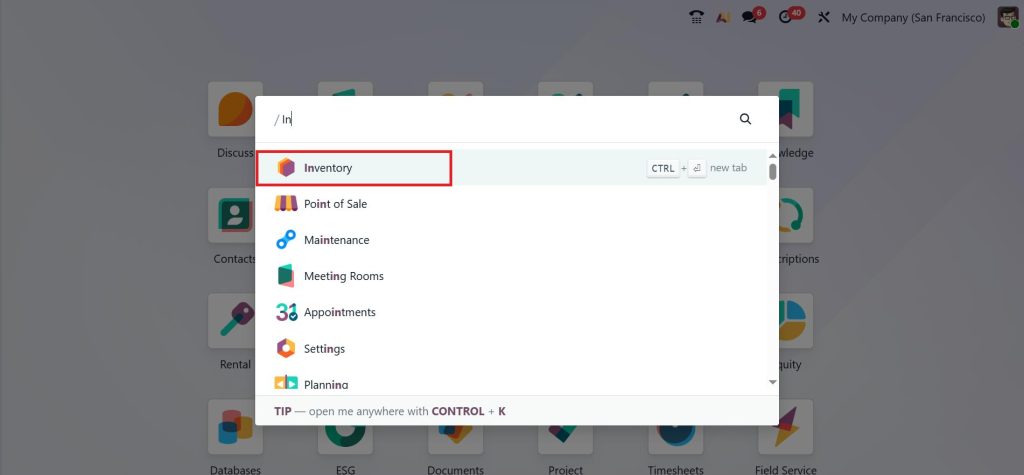
Now let’s talk about how you actually set this up. Open the Inventory module from your Odoo 19 dashboard.
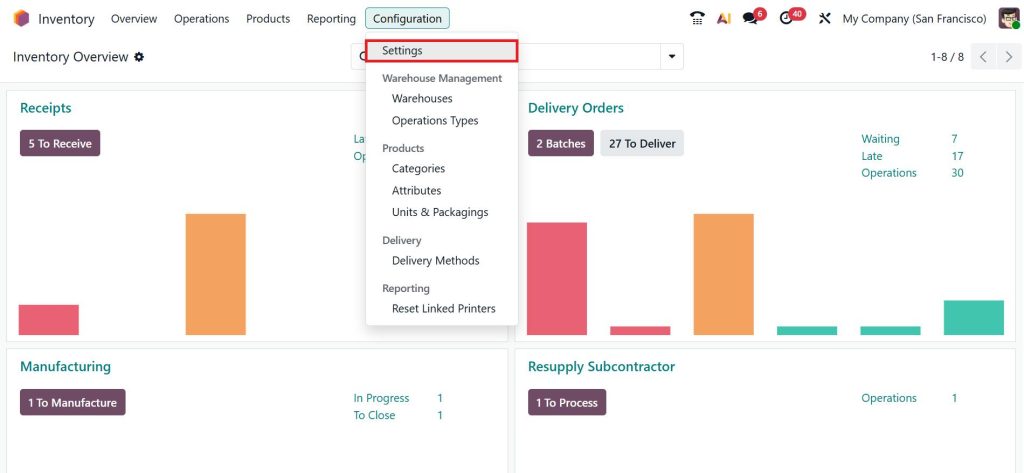
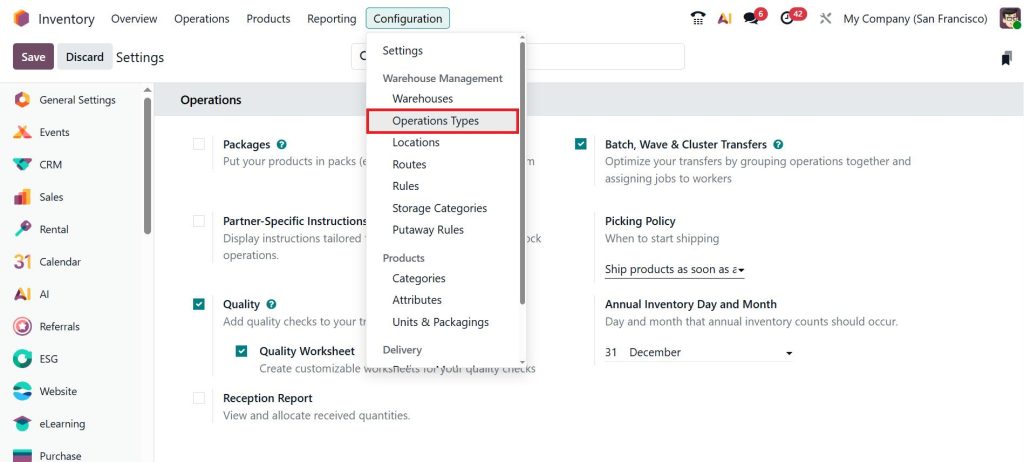
Go to the Configuration > Settings.
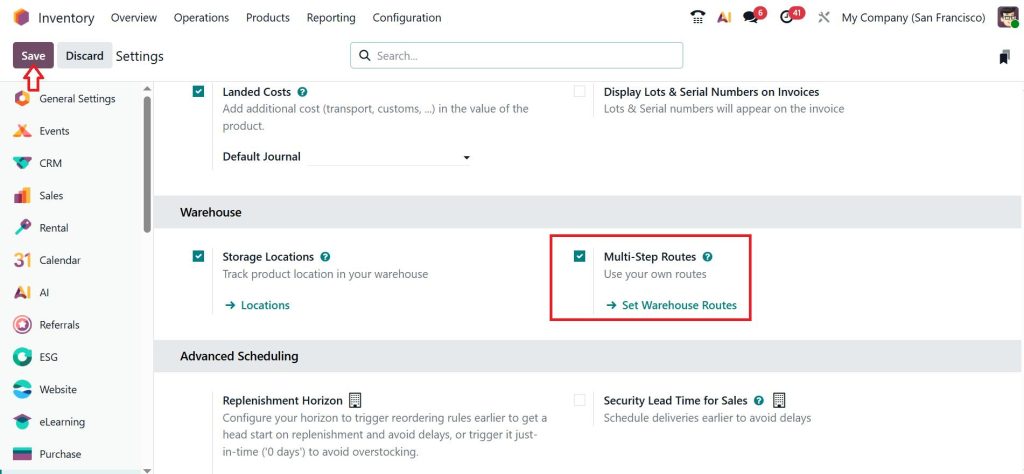
Under the Warehouse section, enable the Multi-Step Routes and click Save.
Move to the Configuration > Operation Types.
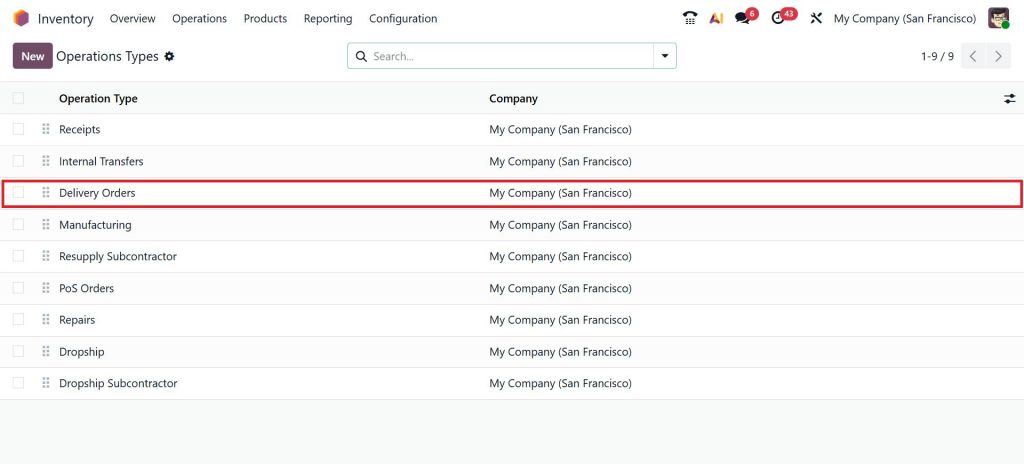
Select the Operation Type based on your business workflow. For example, here I am selecting Delivery Orders.
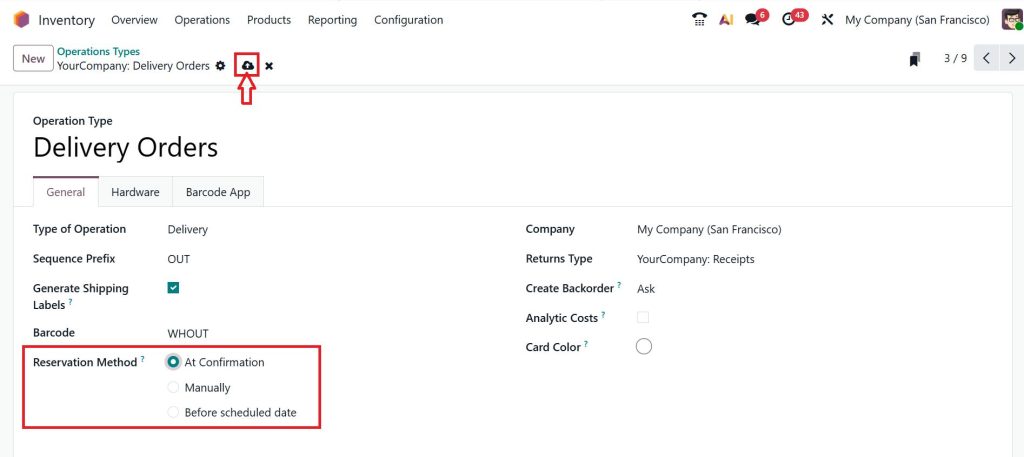
Now, you’ll find the Reservation Method. Choose from the following options:
- At Confirmation
- Manually
- Before the scheduled date
Click Save and your settings.
That’s how you can use reservation methods in Odoo 19 inventory and successfully set up reservations with Odoo.
Best Practices for Inventory Reservation Odoo 19 – Practical Approach for Better Results
To use reservation methods effectively, it is important to follow certain best practices for inventory reservation in Odoo 19.
1. Don’t Reserve Too Early
Reserving stock too early can block inventory unnecessarily. Use a scheduled reservation if your stock flow is dynamic.
2. Use Manual Reservation for High-Priority Orders
If certain clients are more important, manual reservation gives you control. This is one of the key best practices for inventory reservation in Odoo 19.
3. Align Reservation with Procurement
Make sure your reservation method matches your purchasing flow.
For example:
- If stock arrives frequently → use a scheduled reservation
- If stock is stable → use at confirmation
4. Avoid Over-Reservation
Always monitor reserved quantities.
Over-reserving can lead to:
- Delayed deliveries
- Confusion in the warehouse
5. Use Packaging Smartly
If your business deals with bulk goods:
- Use a full packaging reservation
- If flexibility is needed:
- Use partial packaging
These best practices for inventory reservation in Odoo 19 are simple but highly effective when applied consistently.
Applying Reservation Methods Based on Real Business Scenarios
Every business operates differently, and reservation methods should reflect that. For example, a trading company with frequent stock movement may benefit from:
- Scheduled reservations
- Partial packaging
- Selective manual control
On the other hand, a business with stable inventory and standardized operations may prefer:
- Reservation at confirmation
- Full packaging handling
Understanding how to use reservation methods in Odoo 19 inventory means adjusting these settings based on real conditions, not default configurations.
Building Clarity in Inventory Operations
Inventory management becomes much easier when reservation methods are properly configured. Most challenges arise not because the system is complex, but because it is not aligned with how the business operates.
Once you understand how to use reservation methods in Odoo 19 inventory, you gain better control over stock allocation, reduce delays, and improve overall efficiency. It is not about using every option available. It is about choosing the right combination that supports your workflow.
Need Expert Guidance for Your Odoo Inventory Setup?
If you are unsure which reservation method is right for your business, it is always better to review your setup with an expert. At Netilligence, we help businesses implement Odoo in a way that matches their real operational needs.
If you want your inventory to work with clarity and consistency, reach out to our team and let us help you set it up correctly.




