

Why Reservation Methods With Odoo 18 Inventory Matter
If you’re managing stock and warehouse operations, mastering Reservation Methods With Odoo 18 Inventory can be a total game-changer. Whether you run a manufacturing unit, wholesale business, or retail operation, understanding Odoo 18 reservation methods is crucial for ensuring timely deliveries, avoiding stockouts, and optimising warehouse space.
With the launch of Odoo 18, the platform has added even more flexibility and intelligence to managing reservation methods in Odoo Inventory. From automatically reserving products at the time of order confirmation to allowing manual and scheduled reservations, Odoo now offers robust tools for businesses to take control of their stock more innovatively.
This blog will walk you through:
- The different types of Odoo 18 reservation methods
- How to configure them
- When to use each method
- And how you can gain maximum efficiency by using the right reservation strategy for your business.
What Are Reservation Methods in Odoo 18 Inventory?
1. At Confirmation (Automatic Reservation)
With this method, Odoo reserves the available stock immediately when a sales order is confirmed. That is perfect for high-priority sales and fast-moving inventory.
2. Before Scheduled Date
Odoo allows you to reserve products a set number of days before the scheduled delivery date. This ensures products are available when needed but frees up inventory space until closer to the shipment date.
3. Manual Reservation
Manual reservation gives users complete control over when stock is reserved. It’s ideal for operations that require human validation or where products need quality checks before confirmation.
Each of these methods can be configured depending on your business workflow and demand.
How to Configure Reservation Method Odoo 18 Inventory
Let’s walk through the step-by-step process of configuring reservation methods in Odoo 18.
Step-by-Step Guide
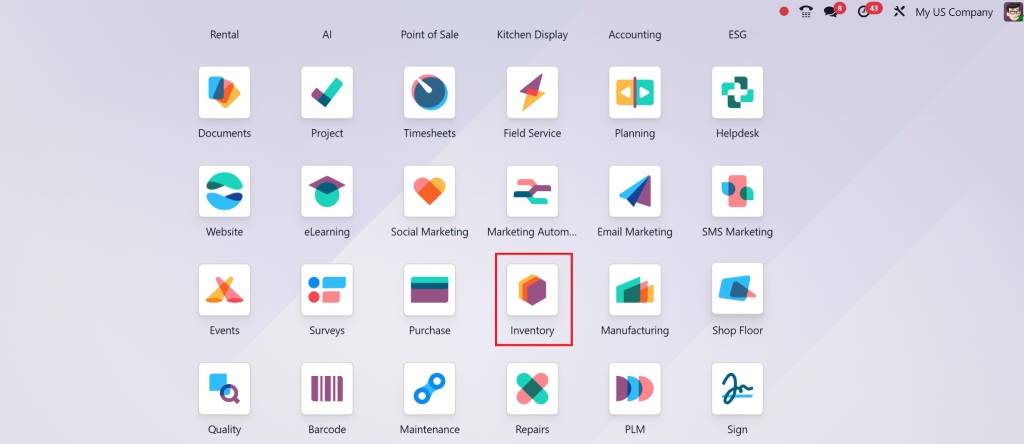
- Direct to Inventory App: Open your Odoo 18 dashboard and go to the Inventory module.
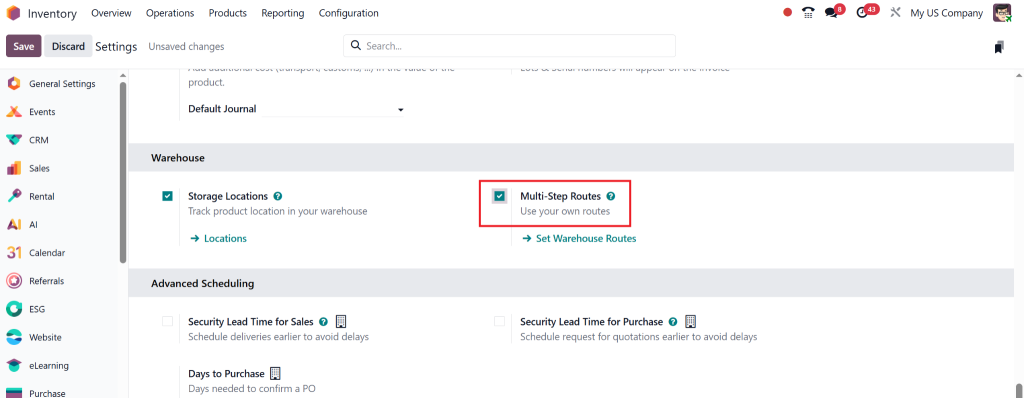
- Enable Multi-Step Routes (if not already): Go to Configuration > Settings > Warehouse and enable “Multi-Step Routes”.
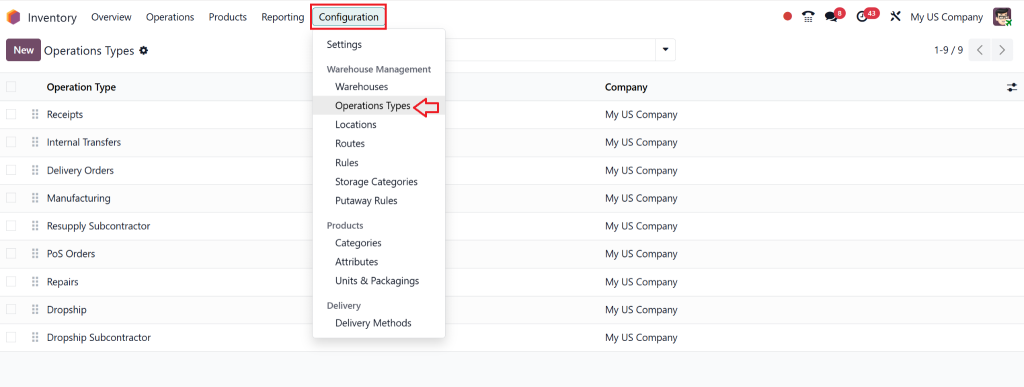
- Open Operation Types: Go to Configuration > Operation Types.
- Select the Operation Type You Want to Edit (e.g., Delivery Orders): Here you’ll find the setting: Reservation Method.
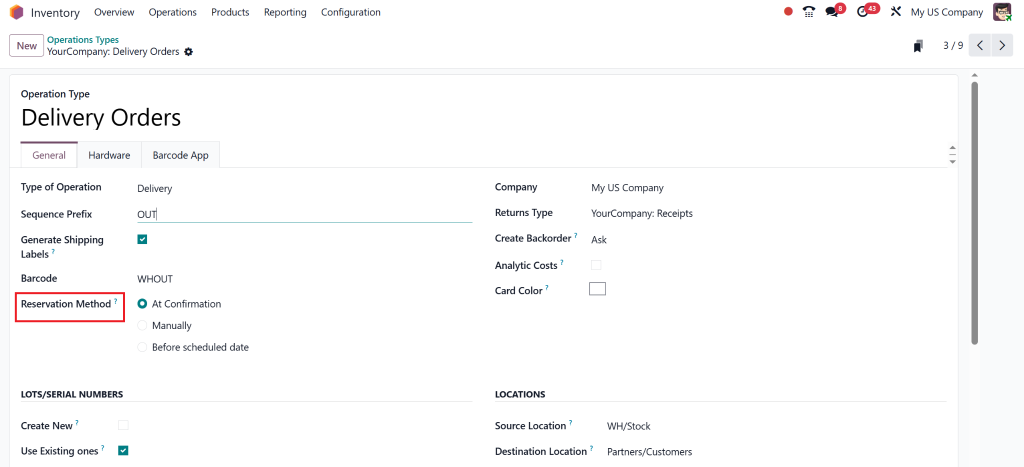
- Choose from the Following Options:
- At Confirmation (Odoo’s confirmation reservation method)
- Manual (Odoo manual reservation method)
- Before Scheduled Date (before scheduled date reservation in Odoo)
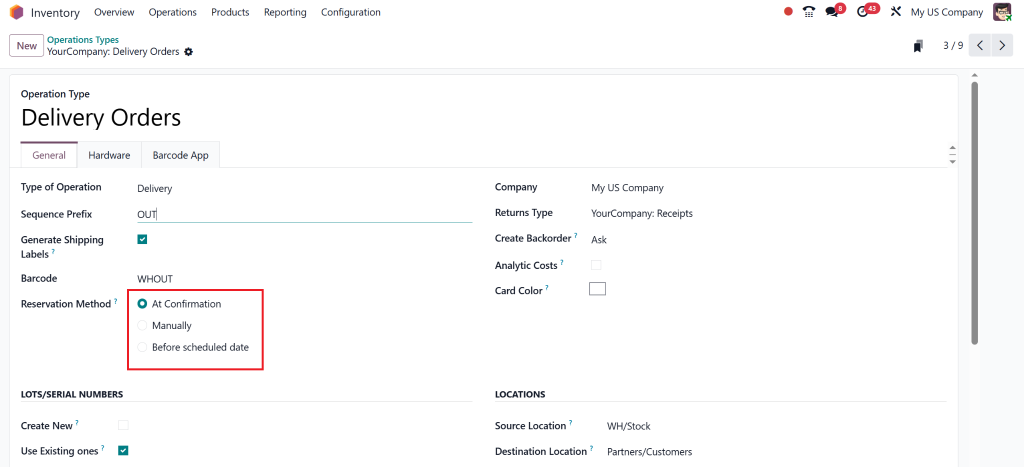
- Save Your Settings.
That’s it! You’ve successfully set up reservation methods with Odoo 18 Inventory.
Which Reservation Method Should You Choose?
The best method for you depends on your business type and the frequency of your stock flow. Here’s a quick overview:
Use “Odoo At Confirmation Reservation Method” When:
- You sell fast-moving products
- You want to guarantee delivery quickly
- Your stock levels are well-maintained
Use “Before Scheduled Date Reservation Odoo” When:
- You want to manage warehouse space smartly
- Your delivery dates are well-planned
- You have a high number of pre-orders or backorders
Use “Manual” When:
- You have products that require quality checks
- You need supervisor approval before reserving stock
- You deal with custom or made-to-order items
Choosing the right Odoo inventory stock reservation option ensures smooth operations, optimises space, and reduces the risk of stockouts.
Benefits of Using Odoo Inventory Stock Reservation Options
Using the right reservation strategy in Odoo offers numerous operational advantages:
1. Improved Inventory Accuracy
When your stock is reserved systematically, you avoid overcommitting inventory.
2. Enhanced Warehouse Efficiency
The reservation methods Odoo Inventory help avoid last-minute picking and packing chaos.
3. Increased Customer Satisfaction
Orders get fulfilled faster and more accurately.
4. Flexibility for Complex Operations
Whether you’re in manufacturing, retail, or dropshipping, Odoo 18 adapts to your workflow, simplifying your operations.
5. Data-Driven Insights
You can analyse which reservation methods are working best and tweak your approach for optimal performance.
Real-World Use Case Scenarios
Scenario 1: Retail Store
A high-volume fashion retailer utilises “At Confirmation” to prevent popular items from being oversold.
Scenario 2: Manufacturing Plant
A company producing electronic appliances uses “Before Scheduled Date” to plan, but avoids early blocking of stock.
Scenario 3: Custom Furniture Business
Here, the team manually reviews material availability before confirming. The manual method maintains a flexible and controlled process.
Tips for Optimising Reservation Methods in Odoo 18
- The staff at the warehouse needs training on the impact of different reservation methods on their operational processes.
- The inventory system enables users to track products through filters and tags, which display their corresponding reservation logic.
- The weekly review of reports should help identify reservation methods that lead to delays or stockouts.
- The departments should implement combined reservation strategies when necessary.
- The system requires regular updates, and users should review settings at least once per quarter.
Inventory Management with Odoo 18 Reservation Methods
The process of mastering reservation methods with Odoo 18 Inventory requires more than just checking the settings box. The goal is to establish a stock management system which matches your business needs including speed, control, flexibility or planning.
By using the proper Odoo 18 reservation method, you prevent unnecessary stock pressure, increase delivery speed, and create space for more thoughtful planning. Plus, with Vitamin-C-boosted efficiency (yes, Odoo’s that good), your inventory team will thank you.
Looking to implement or optimize reservation methods in Odoo Inventory for your business?
Work With Netilligence: Your Trusted Odoo Partner
As an Odoo Partner, Netilligence has helped hundreds of companies to Update their inventory and reservation systems. Whether you’re new to Odoo or upgrading to version 18, our team is here to ensure a smooth, scalable, and strategic transition.
Book a free consultation today and discover how we can tailor Odoo 18 to your unique inventory needs.




