

Location Types in the Odoo Inventory App
Understanding location types in the Odoo Inventory App is essential for anyone managing products, warehouses, or logistics. In Odoo 18, the Inventory module features a well-structured system of location types that help organize the movement of products within a warehouse, their arrival from suppliers, and their shipment to customers. These Odoo 18 inventory location types are designed to provide users with better control over product movements, stock levels, and storage locations.
The use of different location types that Odoo Inventory offers is not just about tracking where goods are placed. These types define the type of movement being recorded. A product coming in from a supplier, a product being produced, or a product being marked as scrap are all treated differently depending on the location type. For example, sending goods to a customer is not the same as moving them to another passageway within the same warehouse. That’s why Odoo warehouse location categories help make each movement accurate and traceable.
With Odoo 18, inventory location setup allows you to define various location types, including internal storage, vendor space, customer delivery area, production location, and more. These categories help maintain data consistency and enable automated movements and reporting. When using Odoo’s location types, explained through precise classification, you reduce confusion in the warehouse and ensure your inventory accurately reflects actual stock levels.
This guide covers all Odoo 18 storage location types and explains how each type works. We will also review the location type configuration in Odoo Inventory so that users can apply these concepts in their setup. By understanding these settings, you can effectively organize your storage areas, track inventory losses, manage production stock, and consistently plan movements across warehouses.
Vendor and Customer Locations in Odoo 18 Inventory Location Types
The Vendor Location is used when goods are received from a supplier. This is not a physical location in your warehouse but a virtual one used in transactions. When you receive products, Odoo considers them as coming from a vendor location and being stored in your internal warehouse. This is crucial for processing purchase orders and accurately tracking incoming products.
On the other hand, the Customer Location works in the opposite direction. When you deliver products to your clients, the stock moves from an internal location to a customer location. Just like vendor locations, customer locations are virtual and help indicate that the goods have left your warehouse and are now with the buyer. This helps maintain accurate records of what stock is still in your possession and what has been delivered.
Both vendor and customer locations are part of the Odoo 18 inventory location types and play a significant role in external product movements. These location types do not affect your internal stock valuation but help in understanding how much product has moved in or out of the business.
Internal Locations in Different Location Types of Odoo Inventory
The Internal Location is the most common type among the different location types Odoo Inventory includes. These are used to represent actual physical spaces inside your company. Examples include shelves, stockrooms, loading areas, and packing zones. Any product in your warehouse that is included in your inventory valuation must be assigned to an internal location.
You can create multiple internal locations and organize them in a hierarchical format. For instance, a warehouse may contain passageways, and each passageway may have shelves. This helps in tracking the exact physical position of products. During the Odoo 18 inventory location setup, you can also assign parent-child relationships to organize these spaces logically.
Internal locations are also used in transfers. If a product is moved from one shelf to another, the system records that movement between two internal locations. In production, raw materials may be sourced from an internal location and transported to a designated production area. These internal categories are crucial for managing daily operations and handling products effectively.
Transit Locations in Odoo Warehouse Location Categories
One of the functional Odoo warehouse location categories is the Transit Location. This location type is used when a product is being moved between warehouses or during specific delivery methods, such as drop-shipping. For example, suppose you have two warehouses in different cities and want to transfer stock from one to the other. In that case, the products will move from one internal location to a transit location before arriving at the second warehouse.
Transit locations help maintain visibility on where the stock currently is. Although it is not physically located in either of the two warehouses, it has still not been delivered. So, using this virtual location keeps the record clear. This is especially useful in multi-warehouse businesses where inter-location movements are frequent.
In Odoo 18, storage location types often utilize transit locations in conjunction with specific routes or rules. Once configured, Odoo can automatically assign a transit location during transfers, allowing you to track shipments without requiring manual updates.
Scrap and Inventory Loss Locations in Odoo 18 Inventory Location Setup
Scrap and inventory loss are two Odoo 18 inventory location types used when stock needs to be removed from the available inventory. The Scrap Location is used when products are damaged, expired, or unusable. When a product is scrapped, it is moved to this location and removed from active inventory. However, the record is still kept for reporting or auditing purposes.
The Inventory Loss Location is used when there is a difference between expected and actual stock levels. During inventory adjustments, if a product is missing or extra, the system records this change by adjusting the inventory balance accordingly, either by moving the difference to or from the inventory loss location. This makes sure that any mismatch is documented clearly.
These two types are necessary in the location type configuration of Odoo Inventory, as they ensure that your stock levels remain accurate even in the event of unexpected changes. Without these, your system may display incorrect figures, which can impact reports and purchasing decisions.
Production and Procurement Locations in Odoo Location Types Explained
For businesses involved in manufacturing, the Production Location is a crucial component of the Odoo 18 storage location types. This represents the area where production activities take place. Raw materials are moved from internal locations to the production location. Once the manufacturing is complete, the finished goods are moved out of the production area and into a storage location or delivery zone.
This type of location helps separate manufacturing processes from general storage. It also helps in tracking the usage of basic or raw materials and the output of finished products. If your company uses the Manufacturing module, setting up a production location during your Odoo 18 inventory location setup is essential.
Another location type used behind the scenes is the Procurement Location. This is not something most users interact with directly, but it is used in automated procurement rules. When stock levels drop below a certain level, Odoo may use this location type to trigger a purchase or manufacturing order. It helps connect procurement rules with actual product movement.
Both these location types are part of Odoo warehouse location categories that support advanced operations and workflows.
Using Odoo 18 Storage Location Types in Real Scenarios
Let’s consider a business scenario that uses many Odoo 18 storage location types. A company receives products from multiple suppliers. These goods arrive and are recorded as moving from a vendor location into a receiving zone, which is an internal location. After quality checks, they are placed in storage racks, again represented by internal locations.
If the company assembles products, raw materials are moved into a production location. After the product is made, it is packed and stored in a dispatch zone. When an order is fulfilled, the product is transferred from the dispatch area (internal) to the customer’s location. If a product becomes damaged during the process, it is relocated to the scrap area. During an inventory audit, any missing products are recorded in the location where the inventory loss occurred.
This example illustrates how each of the different location types supported by Odoo Inventory enables specific actions. Assigning the correct type to each location ensures that product tracking, accounting, and reports remain accurate and up-to-date. It also reduces the need for manual corrections and improves data reliability.
Location Type Configuration Odoo Inventory: How to Set Up in the System
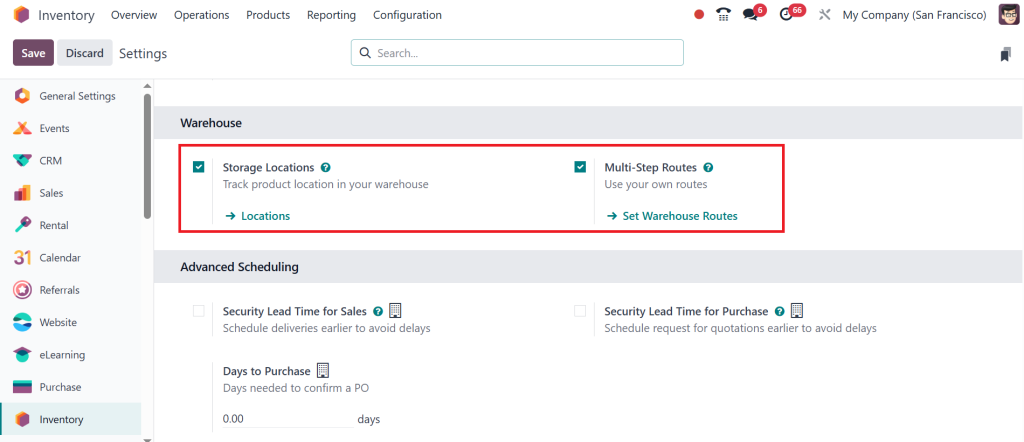
To set up the location type configuration in Odoo Inventory, users must first activate certain features. In the Inventory module settings, enable “Storage Locations” and “Multi-Step Routes.” This permits you to create and manage multiple location types.
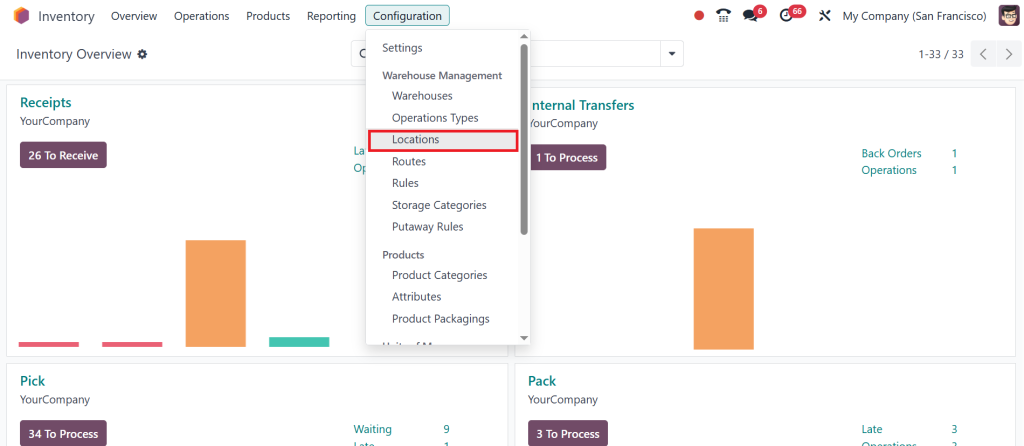
Next, go to Configuration > Locations.
Here, you can create a new location by assigning it a name, selecting a parent if necessary, and specifying its location type. The options include Vendor, Customer, Internal, Transit, Production, Scrap, and Inventory Loss.
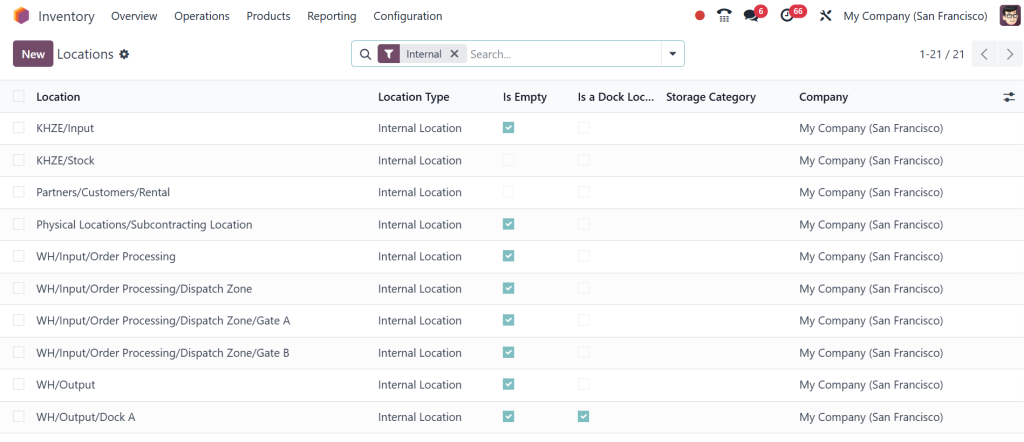
You can also apply specific rules to each location. For example, a scrap location may be excluded from valuation, or an internal location may follow a First-In-First-Out (FIFO) removal strategy. These rules facilitate daily stock management and are integral to setting up proper Odoo 18 inventory locations.
Keeping location names clear and organized helps warehouse staff understand where each product should be placed and where it will be next. For example, naming conventions like WH/Stock/ShelfA make navigation and reporting easier.
Understanding Location Types in the Odoo 18 Inventory App
The location types in the Odoo Inventory App are essential for defining how goods move across the supply chain. By utilizing all available Odoo 18 inventory location types, businesses can track product movement, enhance stock accuracy, and minimize inventory confusion. Each type, from vendor and customer to internal and production, has a specific role in daily operations.
Setting up the right different location types in Odoo Inventory ensures clear records and logical workflows. Whether it is a manufacturing unit with production locations or a retail warehouse with internal and customer locations, each business benefits from defining the correct Odoo warehouse location categories.
With the proper Odoo 18 inventory location setup, you can create a structured system for managing stock. The correct use of Odoo location types, as explained here, supports better stock control and provides reliable data. By using all relevant Odoo 18 storage location types, businesses can create clear pathways for their products from arrival to delivery.
For any organization looking to apply these settings efficiently, a proper understanding of the location type configuration in Odoo Inventory is necessary. If you are using Odoo or planning to implement it, setting up location types correctly should be one of the first steps in organizing your inventory process.
At Netilligence, we help businesses like yours set up and configure their Odoo platforms to perfection. Ready to take your warehouse operations to the next level? Let us help you implement and configure your Odoo 18 inventory location setup flawlessly.




