

If you’re wondering how lead mining works in Odoo 19 CRM, you’re not alone. In today’s digital world, businesses are constantly searching for smarter ways to generate high-quality leads without wasting time or resources. This is where Odoo 19 leads the way in mining, serving as a game-changer.
Understanding how lead mining works in Odoo 19 CRM can completely transform your sales team’s operations. Instead of manually searching for prospects, Odoo 19 CRM generates leads automatically, helping you connect with the right audience at the right time.
With advanced tools like Odoo 19’s lead mining requests configuration, businesses can define exactly what kind of leads they want. Whether it’s filtering by industry, country, or company size, Odoo gives you full control.
Another important aspect of how lead mining works in Odoo 19 CRM is the use of credits. Businesses can easily manage Odoo CRM lead mining credits cost, ensuring efficient budget utilisation while maximising lead generation.
From identifying Odoo 19 lead mining companies and contacts to targeting specific regions using filter leads by industry and country in Odoo 19, this feature is designed to simplify your entire sales funnel.
In this blog, we’ll break down how lead mining works in Odoo 19 CRM and practically, so you can start leveraging it to grow your business faster than ever before.
What is Lead Mining in Odoo 19 CRM?
So, how exactly does lead mining work in Odoo 19 CRM? It all starts with data. Odoo 19 lead mining integrates with a variety of external data sources, automatically collecting valuable information about potential clients. This can include:
- Company Information: Details about the company, such as its name, size, industry, and revenue.
- Contact Details: Key contact information, such as the names and positions of decision-makers within the company.
- Geographical Location: The country or region where the company is located.
Once the data is collected, Odoo automatically filters the leads based on your customised settings. This can include criteria like industry, country, company size, and more. These filtered leads are then entered into your CRM, ready for your team to reach out to.
The beauty of this system lies in its automation. Odoo generates leads automatically by pulling relevant information, eliminating the need for manual data entry and reducing the risk of human error.
The Power of Lead Mining Filters in Odoo 19
Another incredible feature of Odoo 19 lead mining is its ability to filter leads based on specific criteria. For example, you can filter leads by:
- Industry: Are you looking for companies in the healthcare, retail, or manufacturing industry? Odoo can filter leads according to the industry.
- Country: Are you targeting leads in the USA, UK, or Germany? Odoo allows you to filter leads by location.
- Company Size: Whether you’re targeting small startups or large enterprises, Odoo makes it easy to define company size filters.
These filters help ensure that you only get leads that are relevant to your business, making it easier for your sales team to follow up on high-potential prospects.
How Does Lead Mining Work in Odoo 19 CRM? (Step-by-Step Process)
Let’s understand how lead mining works in Odoo 19 CRM in a simple step-by-step process.
1. Configure Lead Mining Requests
The first step is setting up your Odoo 19 lead mining requests configuration. Navigate to the “Lead Mining” section in your Odoo CRM dashboard. Here, you define your target audience based on:
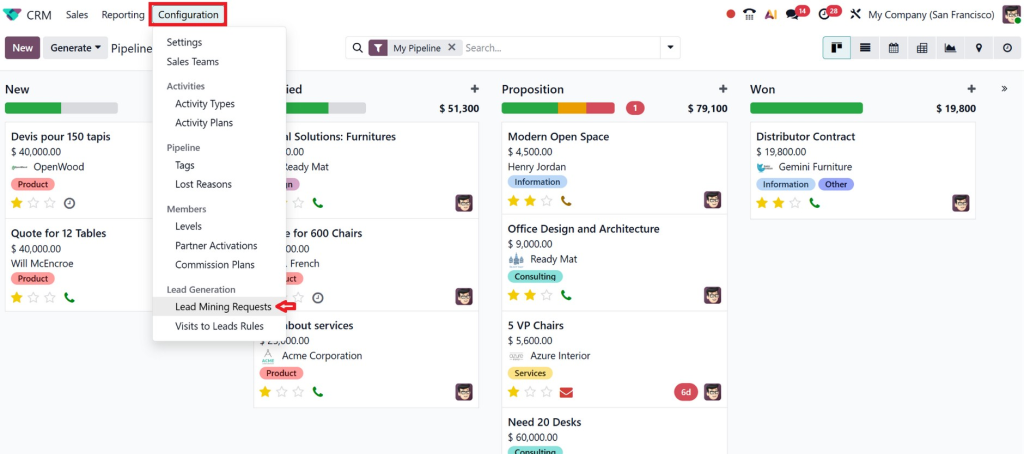
- Industry (e.g., Logistics, IT, Manufacturing)
- Country or region
- Company size
- Number of leads required
This customisation ensures that the system fetches only relevant leads for your business.
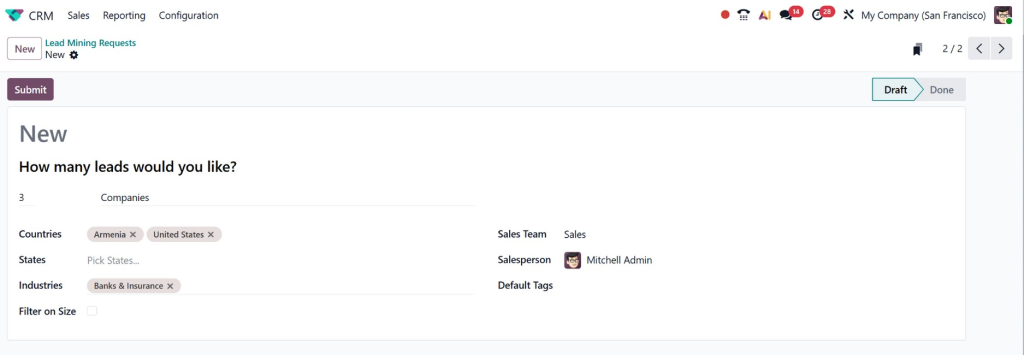
You can create new lead mining requests by clicking the “Create” button. From here, you’ll define the criteria for your lead mining process.
2. Apply Filters for Better Targeting
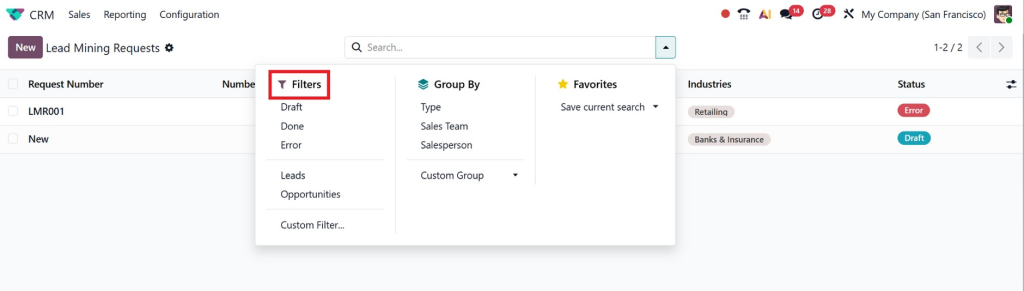
One of the most powerful features is the ability to filter leads by industry and country in Odoo 19.
For example:
- A logistics company can target businesses in the UAE
- A software company can focus on startups in Europe
This targeted approach increases the chances of conversion and ensures your sales team focuses only on high-potential prospects.
3. Understanding Lead Mining Credits in Odoo 19
While Odoo CRM offers fantastic lead mining capabilities, there is a cost associated with it: Odoo 19 lead mining credits. These credits are used to access the system’s lead mining features and pull data from external sources.
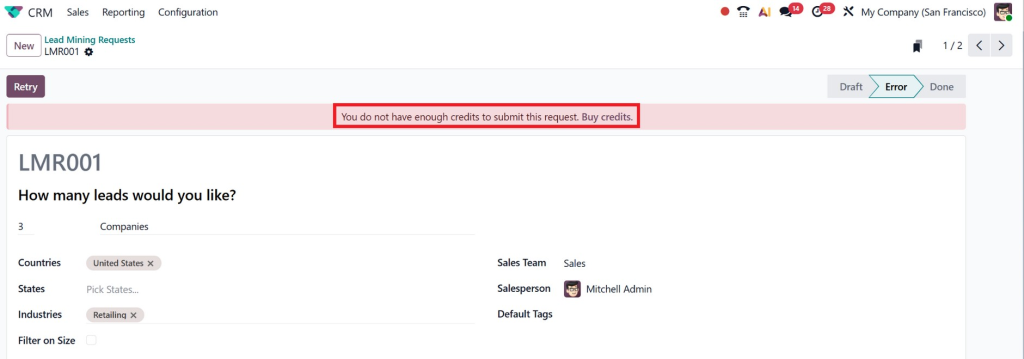
The cost of lead mining credits varies depending on how many you need and the level of functionality you require. In general, the more credits you purchase, the cheaper each credit becomes. This makes it easier for businesses of all sizes to scale their lead mining operations without breaking the bank.
How to Purchase Lead Mining Credits in Odoo 19
- Go to Your Odoo CRM Settings: Navigate to the “Lead Mining” section of your Odoo CRM dashboard.
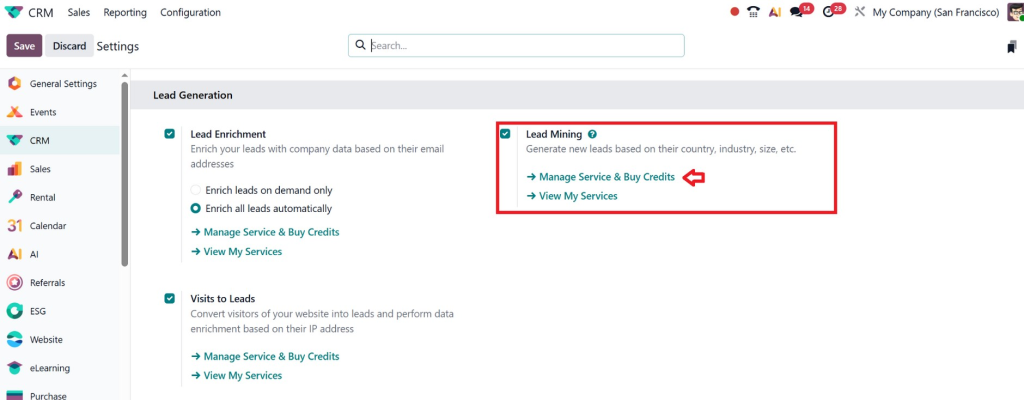
- Select the Number of Credits: Choose how many credits you need based on the number of leads you want to generate.
- Purchase Credits: Credits can be purchased directly through the Odoo platform.
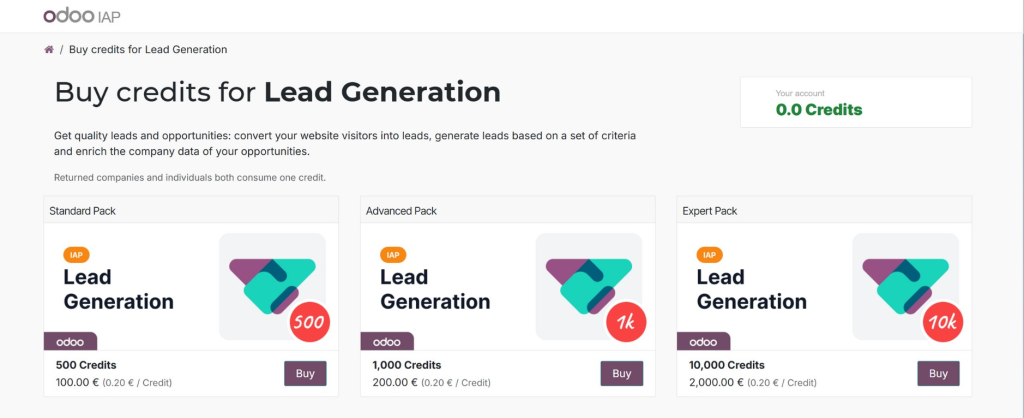
By purchasing Odoo 19 lead mining credits, you’re investing in a more efficient lead generation process that will save your team countless hours, increase your sales efficiency, and lead to more conversions.
4. Generate Leads Automatically
Once everything is configured, Odoo 19 CRM generates leads automatically based on your criteria.
You don’t need to:
- Search manually
- Import external data
- Verify contacts
Odoo handles everything for you, delivering ready-to-use leads directly into your CRM pipeline. You can configure how often Odoo fetches leads, daily, weekly, or monthly.
5. Access Companies and Contacts
With Odoo 19, lead mining companies and contacts, you get detailed information such as:
- Company name
- Contact person
- Email address
- Phone number (if available)
- Industry and location
This allows your sales team to start outreach immediately without any delays. You can also specify where Odoo should source the leads, whether it’s external databases, websites, or your own manually entered information.
How to Filter Leads by Industry and Country in Odoo 19 CRM
Get the Right Leads, Every Time
With Odoo 19 CRM, you can filter your leads by specific criteria to ensure you’re targeting the right audience. Whether it’s filtering leads by industry or country, these powerful tools help you refine your lead generation process.
Here’s how to filter leads in Odoo 19 CRM:
- Industry Filter: You can filter leads by industry type. Whether you’re targeting companies in retail, healthcare, IT, or manufacturing, Odoo allows you to set custom filters that help you focus on the right sectors.
- Country Filter: Odoo 19 makes it easy to focus on specific geographical regions. If you’re targeting the USA, the UK, or even emerging markets in Asia, you can filter leads based on country to ensure you’re reaching the right audience.
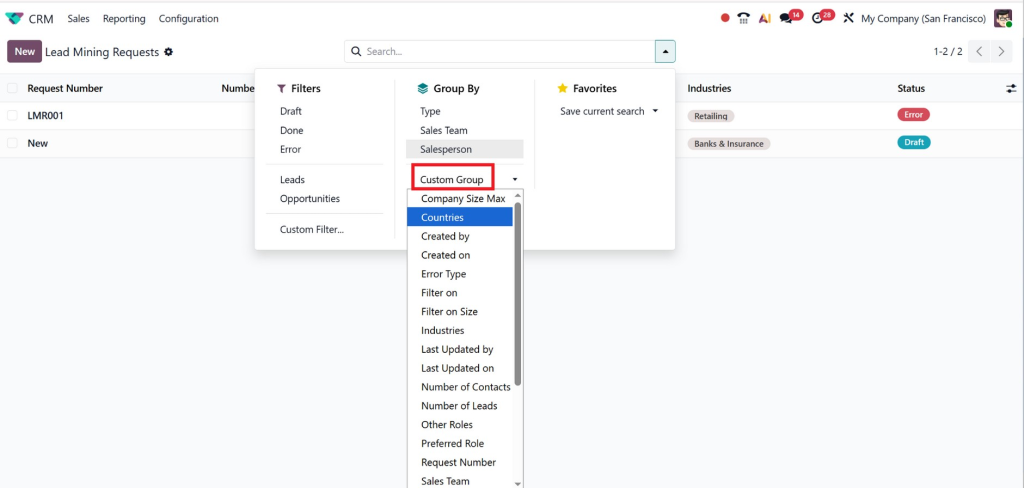
By setting these filters, you can ensure your lead generation efforts are focused on the best prospects, making the sales process much more effective.
Key Features of Odoo 19 Lead Mining
1. Smart Automation
Odoo eliminates manual effort by automating the entire lead generation process.
2. Accurate Targeting
Using filters like industry and country, you can reach your ideal audience.
3. Cost Efficiency
With controlled lead mining credit costs, you can manage your budget effectively.
4. CRM Integration
All leads are directly added to your CRM, making follow-ups easier.
5. Scalable Lead Generation
Whether you need 10 leads or 10,000, Odoo scales with your business.
Benefits of Using Lead Mining in Odoo 19 CRM
1. Saves Time and Effort
Manual lead generation is time-consuming. Odoo automates the entire process, saving hours of work.
2. Improves Lead Quality
Since you define your criteria, the leads generated are highly relevant and more likely to convert.
3. Increases Sales Productivity
Your sales team can focus on closing deals instead of searching for prospects.
4. Data-Driven Decisions
With accurate data and filters, you can create better marketing and sales strategies.
5. Faster Business Growth
Having more leads is a good thing because it gives you more chances to make sales, and that usually means you’ll make more money.
Common Use Cases of Odoo 19 Lead Mining
- B2B Companies looking for new clients
- Logistics firms targeting specific trade regions
- IT companies searching for startups or enterprises
- Consultants expanding their client base
Why Choose Netilligence for Odoo 19 CRM Implementation?
At Netilligence, we don’t just implement Odoo; we transform your business processes.
Here’s what makes us different:
- Expert Odoo consultants
- Customized CRM solutions
- Complete setup of lead mining requests configuration
- Training and ongoing support
- Proven track record of success
We help you fully understand how lead mining works in Odoo 19 CRM and ensure you get the maximum ROI from it.
Ready to Generate High-Quality Leads Automatically?
Now that we’ve explored how lead mining works in Odoo 19 CRM, it’s clear that this feature can revolutionise your sales pipeline. By automatically generating leads, filtering them by industry and country, and providing detailed information about both companies and contacts, Odoo 19 makes lead generation effortless.
While there is a cost associated with lead mining credits, the return on investment is significant. Odoo 19’s lead mining automation helps you save time, improve the quality of your leads, and increase sales efficiency. With features like lead filtering, lead requests configuration, and detailed lead information, you can take your business to the next level.
Don’t miss out on the opportunity to enhance your lead generation process. Start leveraging Odoo 19 CRM lead mining today and see how it can supercharge your sales efforts.




