

Introduction to Bank Transactions and Synchronization Work in Odoo 19
If you’re managing accounts manually, you already know how stressful it gets checking statements, matching payments, and fixing errors. This is where bank transactions and synchronization work in Odoo 19 step in to solve your problem.
In simple words, bank transactions and synchronization work in Odoo 19 help you connect your bank directly with your accounting system. No more manual entries and no more misunderstandings. Everything updates automatically.
When we talk about bank transactions and synchronization work in Odoo 19, we’re talking about real-time financial clarity. Whether it’s incoming payments, outgoing expenses, or bank balances everything stays updated without extra effort.
So, if you’re tired of disorganized spreadsheets and delayed updates, this guide will help you understand how Odoo 19 makes your accounting smooth, simple, and reliable.
Understanding Bank Transactions in Odoo 19 Accounting
Bank transactions are simply the records of money coming in and going out of your business account. These include:
- Customer payments
- Vendor payments
- Bank charges
- Refunds
- Transfers
In Odoo 19, all these transactions are automatically recorded and organized. Instead of manually entering every payment, Odoo captures them directly from your bank or imported statements.
This means:
- No missing entries
- No duplication
- No human errors
Everything is already structured in a way that makes reporting and reconciliation easier.
Odoo 19 Bank Synchronization Overview
Bank synchronization is the process by which Odoo connects with your bank and automatically imports your transactions. There are two main ways this happens:
1. Online Bank Synchronization
This is also called online bank synchronization Odoo 19 accounting. Here, your bank account is connected directly with Odoo. Transactions are fetched automatically at regular intervals.
2. Manual Import of Bank Statements
If your bank doesn’t support direct connection, you can upload bank statements manually. Both methods ensure your system stays updated without manual data entry.
How Bank Feeds Work in Odoo 19
Bank feeds are basically a live connection between your bank and Odoo. Here’s how it works step by step:
- Step 1: Connect Your Bank: You link your bank account to Odoo using secure authentication.
- Step 2: Fetch Transactions: Odoo automatically pulls your latest bank transactions.
- Step 3: Categorize Entries: Odoo tries to match each transaction with existing invoices or expenses.
- Step 4: Reconcile Automatically: Most transactions are matched automatically. You only review and confirm.
- Step 5: Real-Time Updates: Your dashboard updates instantly with your latest financial position.
This process removes the need for repetitive work and saves hours every week.
How to Connect Bank Account to Odoo 19
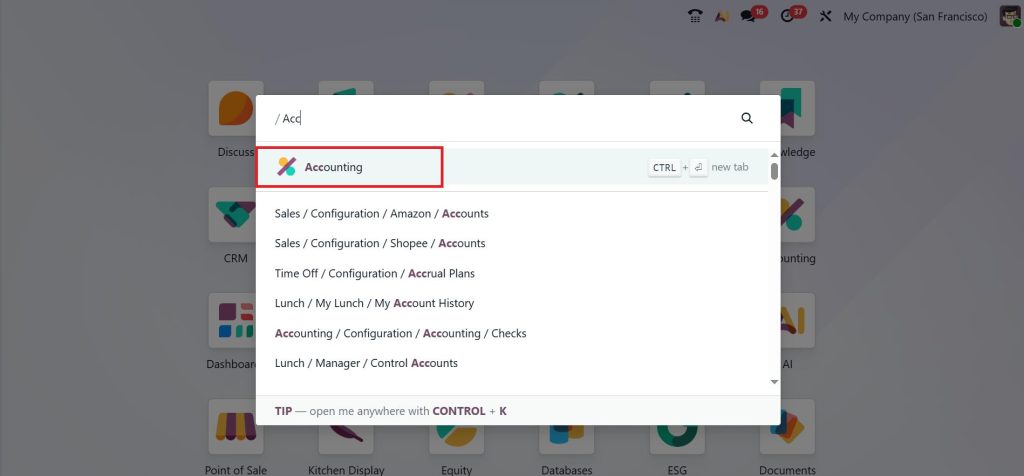
One of the most common questions is how to connect a bank account to Odoo 19. Let’s make it simple. Go to the Accounting module.
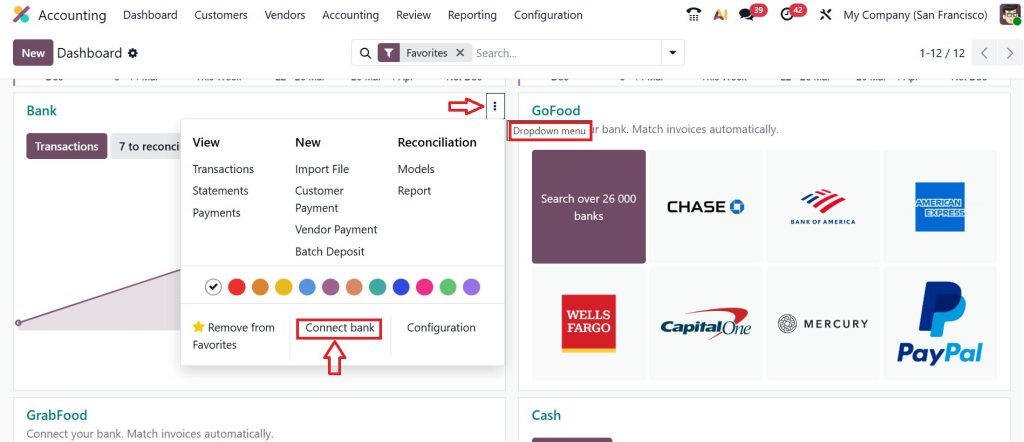
Open the dashboard under the Bank section, click the Dropdown menu (፧) and select Connect Bank.
Add a Bank Account, choose your bank provider and click Connect.
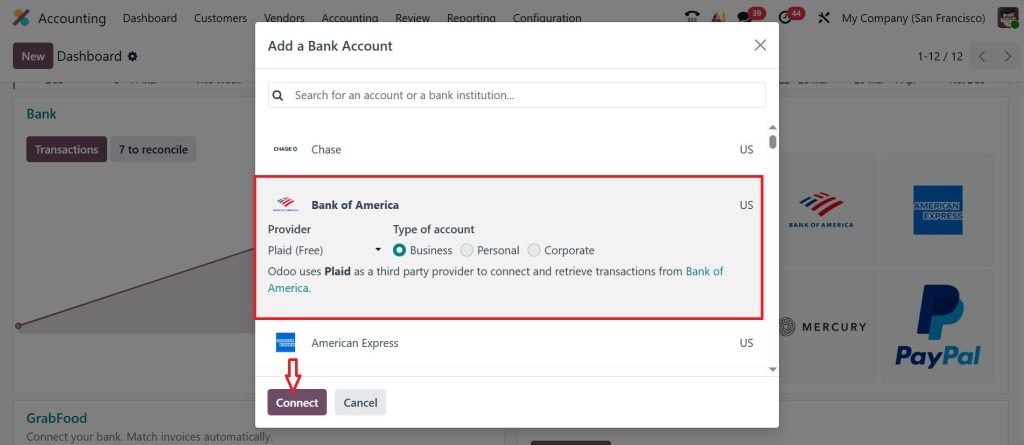
Once connected, Odoo will start importing your transactions automatically.
What If Your Bank Is Not Supported?
No problem. You can still:
- Download bank statements (CSV, OFX, or QIF)
- Upload them to Odoo
- Sync transactions manually
This is called Odoo 19 bank statements import and sync, and it works perfectly for all businesses.
Odoo 19 Bank Statements Import and Sync
If automatic sync is not available, Odoo 19 bank statements import and sync is your backup solution. Here’s how it works:
Import Process
- Download your bank statement
- Upload it to Odoo
- System reads and organizes data
Sync and Match
- Odoo suggests matches
- You confirm or adjust
- Transactions are recorded
Even though it’s manual, it still saves a lot of time compared to full manual entry.
Odoo 19 Bank Reconciliation Basics
Reconciliation means matching your bank transactions with your accounting records.
Why Reconciliation Matters
- Ensures accuracy
- Detects errors
- Prevents fraud
- Keeps records clean
How Odoo Makes It Easy
Odoo automatically suggests matches between:
- Bank transactions
- Customer invoices
- Vendor bills
You just:
- Review suggestions
- Confirm matches
- Done
Smart Matching Features
Odoo uses:
- Amount matching
- Partner matching
- Reference matching
This makes reconciliation faster and almost automatic.
Online Bank Synchronization Odoo 19 Accounting
Now let’s focus on online bank synchronization Odoo 19 accounting, because this is what most businesses prefer. In this method, your bank stays connected all the time. Transactions are updated regularly without you doing anything. So, when you open your system, your latest bank data is already there.
With online bank synchronization Odoo 19 accounting, you don’t have to wait till the end of the day or week to update your records. Everything is happening in the background. This helps you make quick decisions because your numbers are always up to date. And when your data is updated regularly, your reports become more accurate too.
Common Problems in Bank Transactions and How Odoo 19 Handles Them
Let’s be real for a moment. Even with systems, problems can happen. Sometimes transactions are duplicated. Sometimes entries are missing. Sometimes matching is not correct. But in bank transactions and synchronization work in Odoo 19, these issues are already considered.
If a duplicate transaction comes in, Odoo usually detects it. If something is missing, you can easily add it. If the matching is not correct, you can fix it manually. So, instead of struggling with problems, you have options to handle them quickly.
How This Actually Helps You in Daily Work
Now, let’s connect all this with your daily routine. Suppose starting your day and open your system. Your bank transactions are already updated. Payments are already matched. You don’t have to go back and forth between your bank and your records.
This is what bank transactions in Odoo 19 accounting, combined with synchronization actually do. You save time. You avoid confusion. And you feel more in control of your finances. Instead of spending hours on small tasks, you focus on things that really matter for your business.
Why Businesses Are Switching to Odoo 19 for Banking
Businesses today want speed, accuracy, and control. That’s why they are moving towards systems where bank transactions and synchronization work in Odoo 19 efficiently. Here’s why:
- Saves time
- Reduces workload
- Improves accuracy
- Provides real-time insights
- Simplifies accounting
Instead of spending hours on manual tasks, teams can focus on growth.
Future of Banking Automation in Odoo
Odoo is continuously improving its banking features. Future updates may include:
- AI-based transaction categorization
- Smarter reconciliation suggestions
- Faster bank integrations
- Advanced fraud detection
This means your accounting will become even more automated and reliable.
Simplify Your Accounting with Odoo 19 Today
If you’re still managing your accounts manually, you’re wasting time on tasks that can be automated. With bank transactions and synchronization work in Odoo 19, you get a system that handles your financial data smoothly and accurately.
From how bank feeds work in Odoo 19 to Odoo 19 bank reconciliation basics, everything is designed to make your life easier. Whether you choose online bank synchronization Odoo 19 accounting, or Odoo 19 bank statements import and sync, the result is the same: less stress, more clarity.
Now is the right time to upgrade your accounting system. Connect your bank, automate your transactions, and take full control of your finances. Because smart businesses don’t work harder; they work smarter with Odoo 19.
Want help setting up bank synchronization in Odoo 19? Get in touch with our team at Netilligence and let us handle the setup for you.




