

How Odoo 19 Inventory Handles Logistics Automatically in Real Business Operations
Odoo 19 Inventory Handles Logistics Automatically, but what does that really mean when you are running a real business?
For many companies, logistics is one of the most stressful and complex parts of operations. Orders keep coming in, warehouses struggle to keep up, stock levels fluctuate unpredictably, suppliers have different lead times, and customers expect faster deliveries every single day. When logistics is handled manually, even small mistakes can turn into serious business problems.
This is where Odoo 19 Inventory Handle Logistics Automatically changes the entire experience.
Instead of relying on spreadsheets, manual stock checks, and disconnected systems, Odoo 19 creates a fully connected, intelligent logistics flow. It does not just record inventory, it actively manages how inventory moves, when it is replenished, and how it reaches customers.
Through Odoo 19 inventory logistics automation, businesses gain control, visibility, and efficiency without increasing operational workload. From warehouses to suppliers to delivery routes, Odoo 19 makes logistics feel organized, predictable, and scalable.
In this blog, we will clearly explain how Odoo 19 Inventory Handle Logistics Automatically, step by step, in a way that feels practical, human, and easy to understand, not technical or robotic.
Understanding the Core Concept Behind Odoo 19 Inventory Automation
Before getting into processes, it is essential to understand one key idea:
Odoo 19 does not “automate randomly.” It automates based on rules, data, and real business logic.
Every movement in Odoo Inventory is driven by:
- Sales behavior
- Stock availability
- Defined logistics routes
- Supplier and delivery lead times
This is why Odoo 19 Inventory Handle Logistics Automatically feels natural rather than forced. The system behaves like an intelligent operations manager, constantly observing, calculating, and responding.
Instead of reacting to problems after they happen, Odoo 19 prevents logistics issues before they appear.
How to Perform Logistics Automation in Odoo 19 Inventory (Practical Steps)
Odoo 19 Inventory handles logistics automatically only when the system is configured correctly.
Below is the actual functional workflow inside Odoo, showing where to click and what to set.
Step 1: Enable Inventory Automation Features
Menu Path:
Inventory → Configuration → Settings
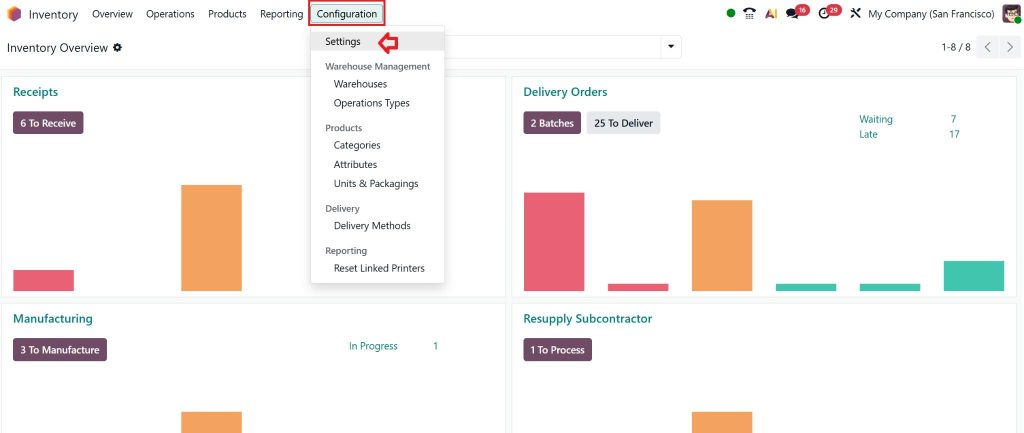
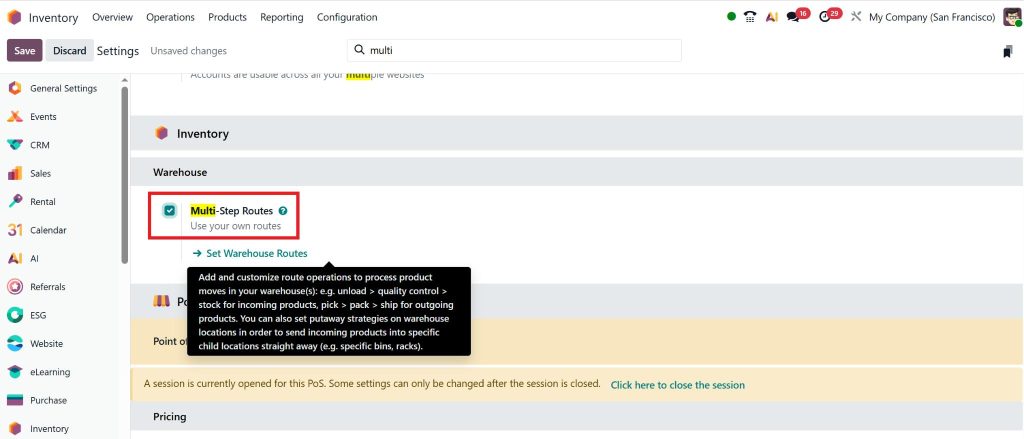
Enable the following options:
- Multi-step Routes under warehouses
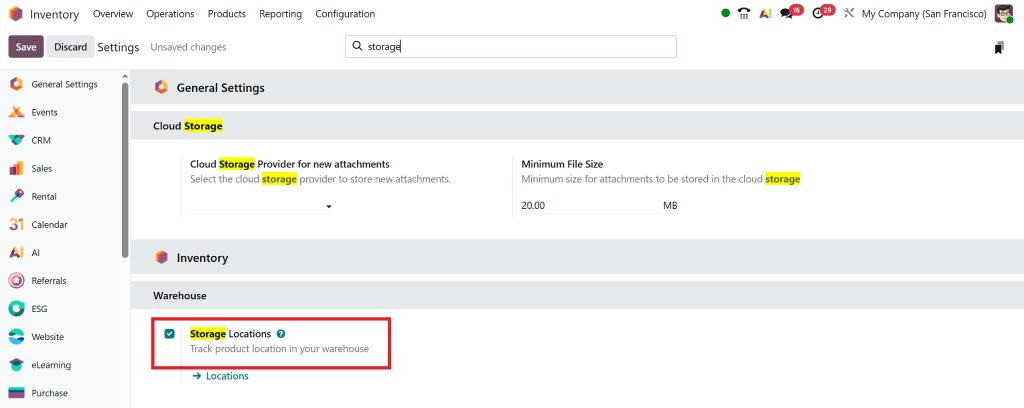
- Storage Locations
- Barcode Scanner
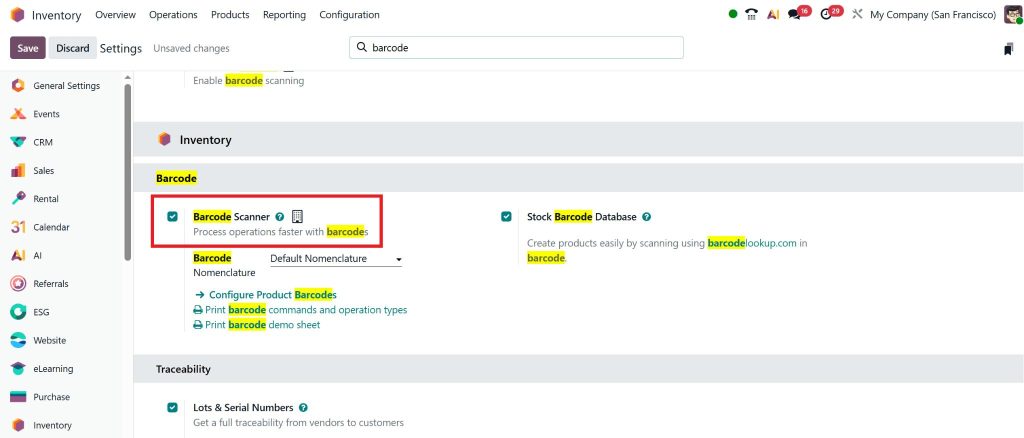
Outcome:
Odoo is now ready to automate inventory and logistics operations.
Step 2: Create and Configure Products Correctly
Menu Path:
Inventory → Products → Products → Create
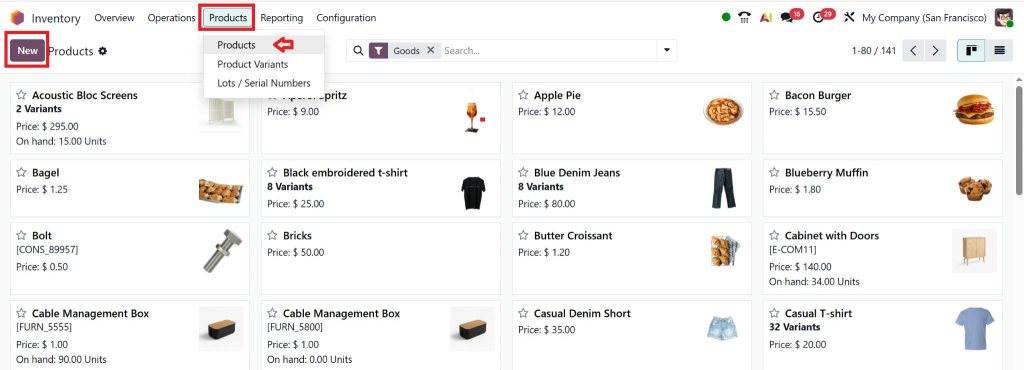
Set:
- Product Type: Storable Product
- Under the Inventory tab:
-
- Select Routes (Buy / Manufacture / Dropship)
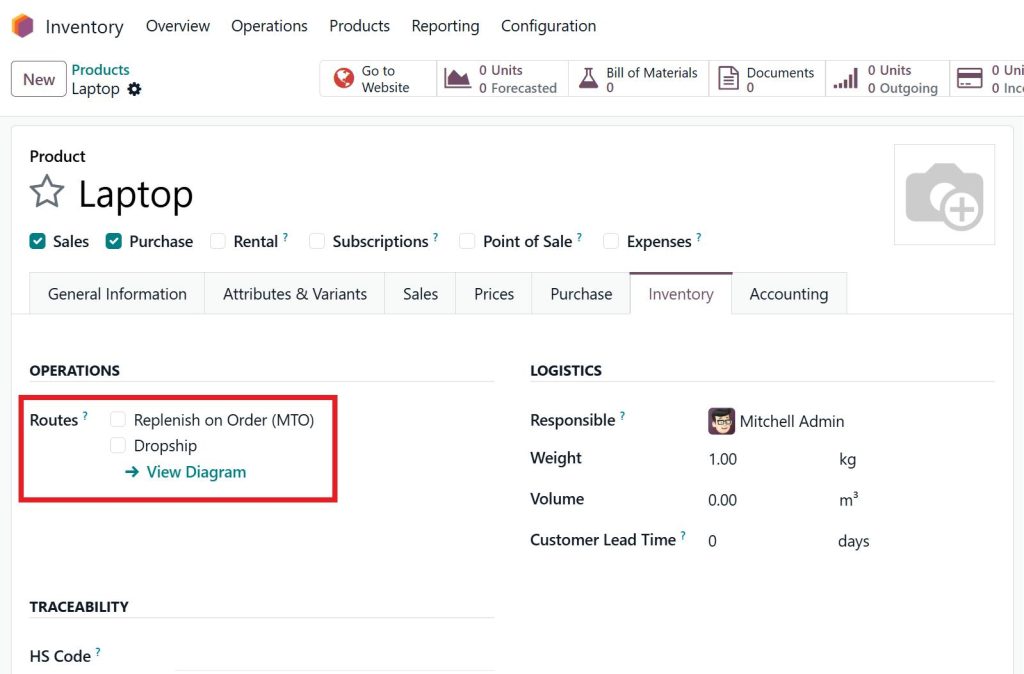
- Set Customer Lead Time
- Set Vendor Lead Time
Outcome:
Odoo understands how and from where the product should move.
Step 3: Set Automatic Replenishment Rules
(This step triggers true automation)
Menu Path:
Inventory → Configuration → Rules
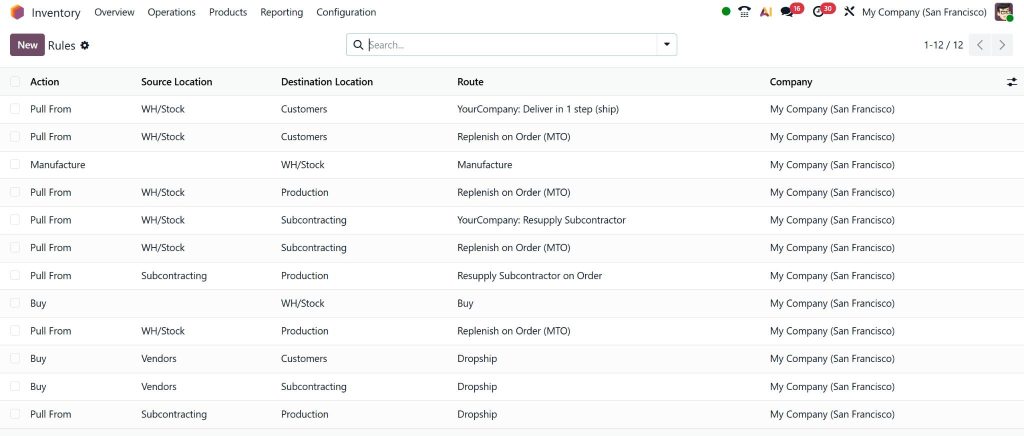
Define:
- Minimum Quantity
- Maximum Quantity
- Warehouse
- Route (Buy or Manufacture)
Example:
If stock falls below the minimum level, Odoo automatically creates a Purchase Order or Manufacturing Order.✔ This is Odoo 19 automatic replenishment rules in action.
Step 4: Configure Warehouses and Locations
Menu Path:
Inventory → Configuration → Warehouses
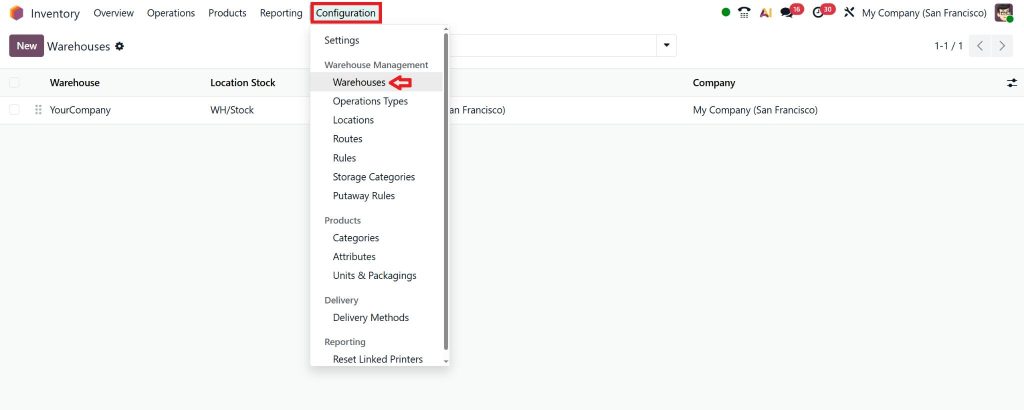
Here you:
- Create multiple warehouses (if required)
- Define receiving, storage, and delivery locations
Outcome:
Odoo automatically selects the correct warehouse for order fulfillment.
Step 5: Enable Barcode-Based Warehouse Automation
Then:
- Install the Barcode app
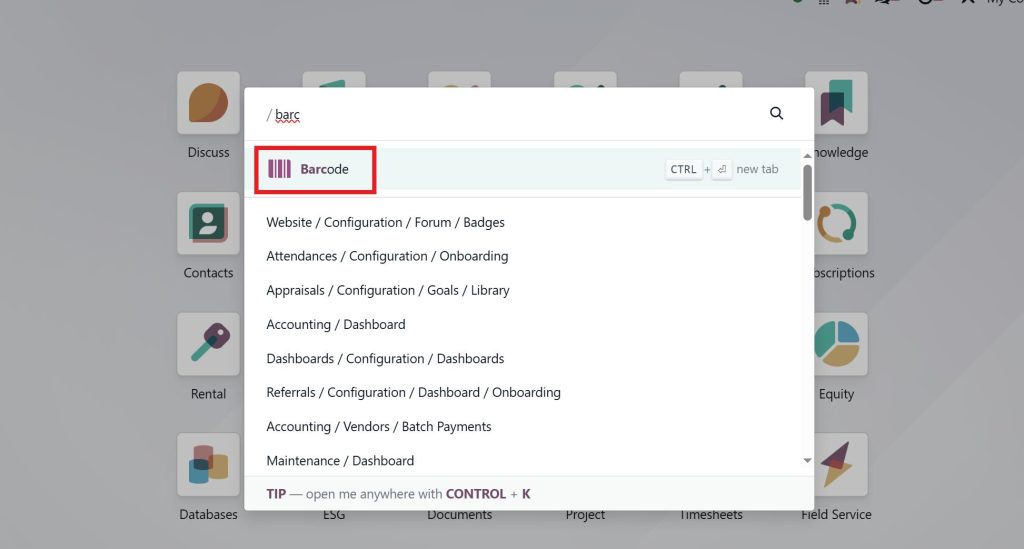
- Assign barcodes to products
Warehouse Flow:
- Picking tasks are generated automatically
- Staff scans items
- Odoo validates quantities instantly
- Inventory updates in real time
✔ This is barcode warehouse automation in Odoo 19.
Step 6: Monitor Logistics in Real Time
Menu Paths:
- Inventory → Operations → Transfers

- Inventory → Reporting → Inventory Report
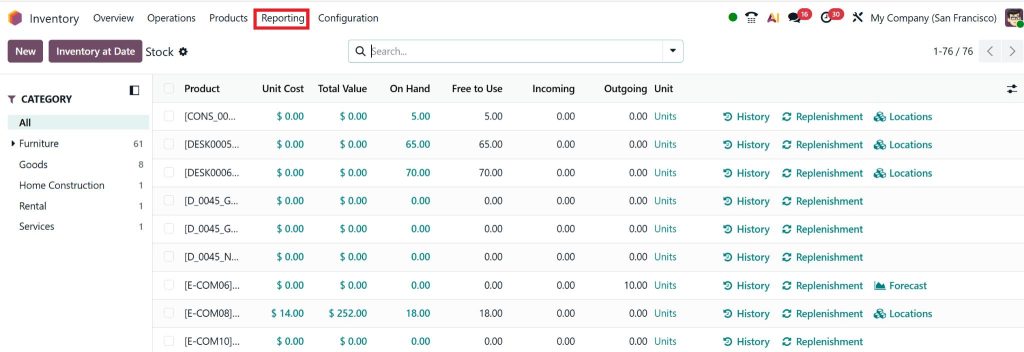
Managers can:
- Track order status
- Monitor warehouse movements
- Identify delays or bottlenecks
✔ This provides real-time logistics tracking in Odoo Inventory.
How Odoo 19 Inventory Handles Logistics Automatically Through Smart demand Planning
The first place where logistics automation truly begins is demand planning.
In traditional systems, demand planning depends heavily on human assumptions. Someone estimates how much stock might be needed next month and places orders accordingly. This often leads to overstocking or stock shortages.
With Odoo 19 automatic replenishment rules, this guessing game disappears.
Odoo 19 continuously analyzes:
- Past sales trends
- Current order volume
- Seasonal demand changes
- Supplier delivery timelines
When the stock reaches a predefined minimum level, the system automatically decides the following action. It may generate a purchase order, initiate a manufacturing order, or move stock from another warehouse. All of this happens without waiting for manual intervention.
This is one of the strongest reasons why Odoo 19 Inventory Handles Logistics Automatically feels reliable and stress-free for growing businesses.
Warehouse Operations that Make the Biggest Difference.
Warehouses are usually where logistics problems are born. Wrong picking, delayed movements, and inaccurate stock counts these issues cost time and money.
Barcode warehouse automation in Odoo 19 transforms warehouse operations into a controlled, accurate environment.
When an order is confirmed:
- Odoo generates a straightforward picking task
- Warehouse staff scan items using barcodes
- The system verifies correctness instantly
- Stock updates in real time
There is no need to update inventory or manually double-check quantities. The system ensures accuracy automatically.
Because Odoo 19 handles inventory logistics automatically, warehouse teams work faster, make fewer mistakes, and follow a standardized process, no matter how large the warehouse becomes.
Odoo 19 Pick Pack Ship Workflow UAE
In fast-moving markets like the UAE, delivery speed is not optional, it is expected.
The Odoo 19 pick, pack, and ship workflow in the UAE is explicitly built to handle high-volume, time-sensitive logistics operations.
Once products are picked, Odoo automatically applies packing rules based on product type, size, or delivery method. After packing, the system assigns shipping carriers and prepares delivery orders without manual coordination.
This connected workflow ensures that:
- Orders move smoothly from the warehouse to delivery
- Delays are minimized
- Customer expectations are consistently met
Because Odoo 19 handles logistics automatically, logistics teams spend less time coordinating tasks and more time improving performance.
Managing Complex Operations with Odoo Inventory Multi-Route Logistics
As businesses grow, logistics complexity increases. Multiple warehouses, different delivery routes, and varying customer locations can quickly become overwhelming.
Odoo inventory multi-route logistics solves this challenge by allowing businesses to define multiple logistics paths for a single product.
For example, Odoo can automatically decide whether a product should:
- Ship from the nearest warehouse
- Be transferred internally
- Be manufactured on demand
- Be dropshipped directly from the supplier
The system evaluates availability, delivery speed, and cost efficiency before making a decision.
This intelligent routing is another reason Odoo 19 handles logistics automatically, even in complex, multi-location supply chains.
Odoo 19 Dropshipping Automation Features
Modern businesses are increasingly adopting dropshipping to reduce inventory risk.
With Odoo ‘s19’s dropshipping automation features, businesses can sell products without physically storing them.
When a customer places an order:
- Odoo automatically creates a purchase order for the supplier
- The supplier ships directly to the customer
- Inventory, accounting, and logistics records update automatically
The business owner does not need to manually coordinate between the supplier and customer. The system handles everything behind the scenes.
This is another practical example of how Odoo 19 Handles Inventory Automatically while keeping operations simple and scalable.
Real-Time Logistics Tracking Odoo Inventory
Automation does not mean losing control. In fact, Odoo 19 provides more visibility than manual systems ever could.
Through real-time logistics tracking in Odoo Inventory, managers can monitor:
- Order status
- Shipment progress
- Warehouse movements
- Delays or bottlenecks
Dashboards provide live data, enabling decision-makers to act before minor issues become big problems.
This balance of automation and transparency is what makes Odoo 19 Inventory Handle Logistics Automatically trustworthy for growing enterprises.
Why Odoo 19 Inventory Automation Is Ideal for UAE Businesses
The UAE is a logistics-driven economy. Speed, accuracy, and compliance are critical.
With Odoo 19, UAE businesses benefit from:
- Multi-warehouse management
- VAT-compliant inventory tracking
- Multi-currency logistics operations
- Seamless integration with shipping partners
When Odoo 19 handles logistics automatically, UAE businesses gain the agility required to compete in regional and international markets.
Why Netilligence Is the Right Partner for Odoo 19 Inventory Implementation
Odoo is powerful, but only when implemented correctly.
At Netilligence, we do more than install software. We study your logistics flow, understand your operational challenges, and design automation that actually fits your business.
We ensure that:
- Replenishment rules match real demand
- Warehouse workflows reflect on-ground reality
- Logistics routes are optimized for growth
With Netilligence, Odoo 19 Inventory handles logistics automatically in a way that feels natural, efficient, and sustainable.
When Logistics Runs Smoothly, Business Grows Faster
Logistics should support growth, not slow it down.
With intelligent automation, real-time visibility, and connected workflows, Odoo 19 automates logistics, removing chaos and restoring control.
For businesses ready to scale confidently, Odoo 19, implemented by Netilligence, is not just software. It is a long-term logistics strategy.




