

Why You Need to Optimize Product Settings in Odoo 19 Sales Before Small Issues Become Daily Problems
If you are using Odoo 19 Sales and feel that your quotations take longer than expected, prices can be confusing, or customers keep asking the same delivery questions again and again, then this blog is for you. Many businesses install Odoo and start selling right away, but they don’t fully optimize product settings in Odoo 19 sales, and that’s where problems slowly begin.
When product settings are not clear, sales teams hesitate. They double-check prices, they manually explain delivery dates, and they sometimes promise things that operations can’t support. Over time, this creates stress, errors, and unhappy customers. To optimize product settings in Odoo 19 sales, you need to look deeper into how products behave inside the system, not just how they look on the screen.
In this blog, I’m going to walk you through real situations that sales teams face daily and show you how Odoo 19’s sales product configuration, pricing logic, product variants, and sales lead time settings quietly solve these issues when done the right way. Think of this as a conversation where I understand your problem and guide you step by step toward clarity.
Understanding Odoo 19 Sales Product Configuration and Why It Shapes Every Sale
When we talk about Odoo 19 sales product configuration, we’re really talking about how Odoo thinks about your products during the sales process. Every time a salesperson creates a quotation, Odoo checks the product type, pricing rules, availability, and lead time. If these details are missing or incorrectly set, Odoo produces confusing results, and the salesperson has to think it through manually.
Many teams assume product configuration is a one-time setup task. In reality, it directly affects how fast your sales team responds to customers. Proper Odoo 19 sales product configuration removes hesitation. Your team knows the price is correct, the delivery date is realistic, and the quotation reflects what the customer actually expects.
Once you understand this, you’ll realize that optimizing product settings is not about technical work. It’s about making daily sales conversations smoother.
Configure Sales Products Odoo Tutorial: Setting Products That Sales Teams Trust
When you start the Odoo configure sales products tutorial, the first goal should be trust. Salespeople must trust the system enough to rely on it during live customer conversations. If they don’t, they will use calculators, spreadsheets, or memory, and that defeats the purpose of Odoo.
While creating or editing a product, enabling “Can be Sold” is obvious, but what matters more is how the Sales tab is handled. This is where you define how the product behaves when it is sold, how it appears on quotations, and how delivery expectations are set.
A well-configured product answers customer questions before they even ask. That’s the level you should aim for when following a Configure Sales Products Odoo tutorial.
Odoo 19 Product Sales Tab Best Practices That Reduce Back-and-Forth with Customers
The Sales tab is often filled quickly and forgotten. But following the best practices for the Odoo 19 product sales tab can save hours every week. This tab controls how your product communicates with the customer through quotations.
When you write a clear sales description, customers understand what they are buying without having to call back for clarification. When you set the correct lead time, salespeople don’t have to explain delivery delays later. These small settings quietly support your team during every sale.
Using Odoo 19 product sales tab best practices means thinking from the customer’s point of view. If a customer reads the quotation, will they feel confident? If the answer is yes, your Sales tab is doing its job.
Sales Lead Time Settings Odoo 19: How Delivery Promises Can Make or Break Trust
One of the biggest pain points in sales is delivering promises. This is where sales lead time settings in Odoo 19 come into play. Lead time is the number of days Odoo adds before promising delivery to the customer.
When this setting is ignored or guessed, customers hear one date from sales and another from operations. That gap creates frustration on both sides. Correct sales lead time settings in Odoo 19 align sales expectations with reality.
When lead times are accurate, sales teams speak with confidence. Customers feel informed instead of uncertain. Over time, this builds stronger relationships without extra effort.
Odoo 19 Pricelist Product Optimization for Clear and Consistent Pricing
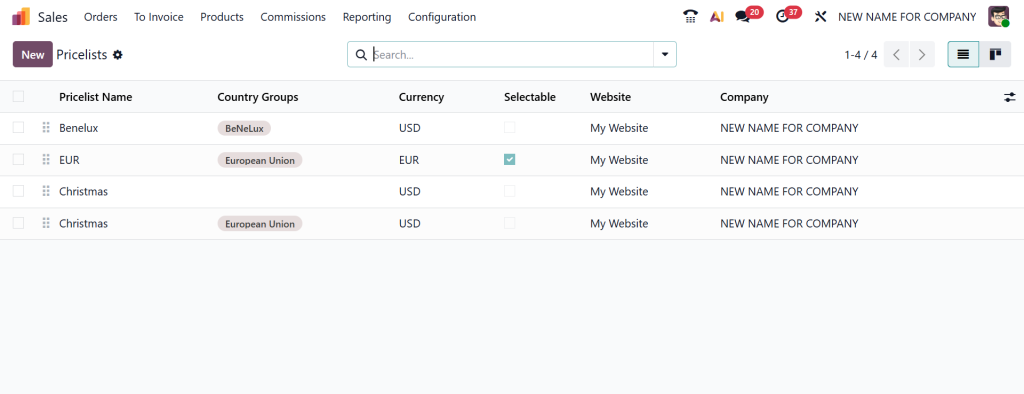
Pricing confusion slows down sales more than most people realize. Odoo 19’s product price list optimization ensures the correct price is displayed automatically for the right customer.
Many businesses work with different customer groups, regions, or order volumes. Without proper Odoo 19 product price list optimization, sales teams manually adjust prices, increasing the risk of mistakes. With smart pricelist rules, Odoo handles this logic quietly in the background.
When pricing feels predictable and fair, customers trust your quotations. Salespeople stop second-guessing. That’s how pricing supports smoother sales conversations.
Product Variants Sales Odoo 19 UAE: Handling Real Market Needs Without Confusion
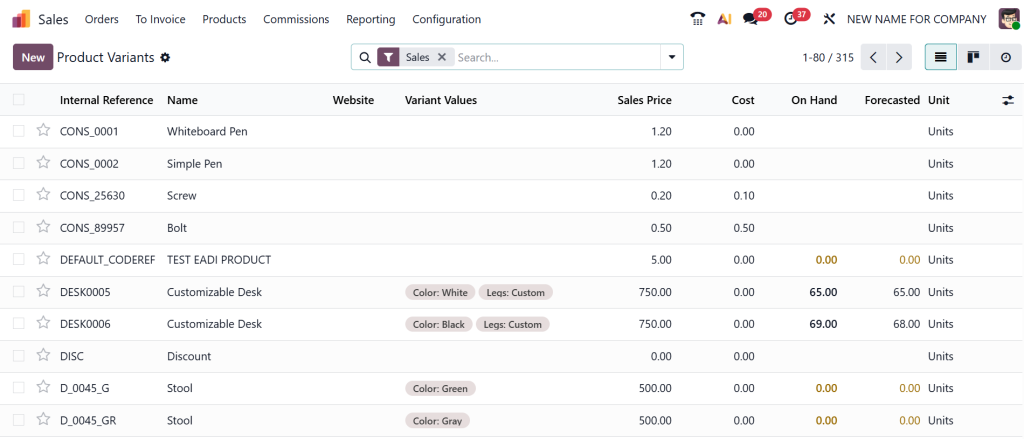
In markets like the UAE, customers often expect options. Different sizes, packaging, or specifications are common. Product variant sales in Odoo 19 UAE allow you to manage these options without creating dozens of separate products.
The key is balance. Too many variants slow down sales teams, while too few limit flexibility. Properly planned product variant sales in Odoo 19 UAE keep product selection clear and fast.
When variants are well-structured, salespeople can select options confidently, and customers feel understood rather than overwhelmed.
How Optimize Product Settings in Odoo 19 Sales Improves Daily Sales Conversations
When you optimize product settings in Odoo 19 sales, something interesting happens. Sales conversations become calmer. Salespeople don’t rush to confirm details. Customers don’t feel unsure.
Every optimized setting removes one small doubt. Pricing rules remove hesitation. Lead times remove awkward explanations. Clear descriptions reduce follow-up calls. Together, they change how sales teams feel during their workday.
This is why businesses that truly optimize product settings in Odoo 19 sales notice fewer internal questions and smoother customer discussions.
Odoo 19 Sales Product Configuration and Its Impact on Sales Speed
Speed matters, but not rushed speed. Proper Odoo 19 sales product configuration allows sales teams to respond quickly without fear of errors.
When products are configured correctly, quotations take minutes instead of half an hour. Salespeople focus on listening to customers instead of fixing system issues. Over time, this improves consistency across the entire sales department.
A Practical View for Growing Businesses
If you’ve read this far, you probably recognize at least one issue described here. That’s because these problems are common, and they don’t mean your team is doing something wrong. They simply mean product settings need more attention.
By following clear Odoo 19 product sales tab best practices, setting realistic sales lead times in Odoo 19, planning product variant sales in Odoo 19 UAE, and applying Odoo 19 product price list optimization, you gradually reduce daily friction in your sales process.
This is how you optimize product settings in Odoo 19 Sales to support real people, real conversations, and real business growth.
A Final Note for Sales Teams Who Want Fewer Headaches
If you are using Odoo 19 and still feel that sales work takes more effort than it should, then it’s time to look closely at your product settings. Most sales problems don’t start with customers. They start inside the system, where small configuration gaps slowly turn into daily confusion.
At Netilligence, we work with businesses that want their sales teams to feel confident while quoting, pricing, and committing to delivery dates. We focus on setting up products to support real sales conversations, not just system requirements.
If you want help reviewing your Odoo 19 sales product configuration, improving pricing logic, resolving lead-time confusion, or setting up product variants properly, our team is ready to guide you.
Reach out to Netilligence, and let’s make your Odoo 19 Sales work the way your team expects.




