

The Odoo 19 Purchase App is not just an ordinary procurement tool, it is a gateway to deep data intelligence and control. In the age of data, purchase decisions should not be guesswork. With Odoo 19 purchase analysis, companies gain visibility over buying trends, vendor performance, and cost drivers at a glance. The purchase dashboard Odoo 19 delivers key metrics and KPIs in an intuitive visual form.
By utilizing AI in Odoo 19 procurement, the system can even provide auto purchase suggestions in Odoo based on historical demand and vendor behavior. The purchase reporting in Odoo 19, along with the purchase analytics app, lets you slice and dice data at will. Want to evaluate suppliers? Odoo 19 vendor performance analysis makes that effortless. In this article, we’ll examine how purchase analysis works in the Odoo 19 Purchase App, show its power, and explain why your business needs it.
In what follows, you’ll see that Odoo 19 Purchase App is built around data-driven workflows, helping you not only monitor but also proactively improve procurement outcomes with thoughtful insights.
Why Purchase Analysis Matters in Odoo 19
From Reactive Buying to Proactive Strategy
You can forecast demand, optimize reorder points, identify vendor reliability issues, and minimize waste. The integrated dashboards and reports turn raw data into actionable intelligence.
Aligning Procurement with Business Goals
The purchase dashboard in Odoo 19 enables executives and procurement teams to communicate effectively, with features such as on-time delivery rates, spend by category, vendor rankings, and purchase forecasts.
Driving AI-Empowered Procurement
With AI in Odoo 19 procurement, the system can analyze your past orders, consumption patterns, vendor lead times, and seasonal fluctuations to suggest what to purchase and when.
How to Enable & Configure Purchase Analysis in Odoo 19
If you’re ready to harness these capabilities, here’s a high-level guide to configuration:
Install & Activate Purchase Analytics Features
- Ensure you have the Purchase app installed
- Activate advanced features like vendor evaluation, forecasting, or auto purchase rules
- Grant access rights to procurement staff and managers
Define Vendor Rating Criteria & Weightages
Set the metrics you want to evaluate, such as on-time delivery, quality, and price stability. Assign weightages to each metric depending on your business priorities.
Set Reorder Rules & Safety Stocks
Define the minimum stock, maximum stock, and reorder rules for each product. These feed into AI models for generating suggestions.
Link Inventory, Sales & Accounting
Ensure your Inventory, Sales, and Accounting modules are fully integrated to provide purchase analysis with complete context.
Set Alerts & Thresholds
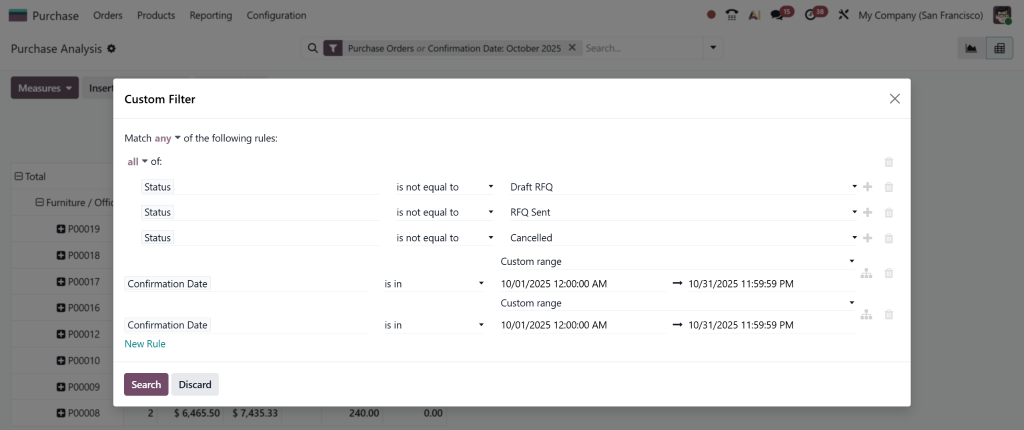
Configure alerts for POs that are overdue, stock levels that dip below thresholds, or vendor reliability that falls. Link these alerts to the Purchase Dashboard in Odoo 19. You can also filter and add custom rules.
Train Users & Iterate
Train your procurement team to effectively interpret dashboards, review suggestions, and take action. As real data flows in, refine vendor weights, threshold levels, and automation rules.
You can also read our blog on How to Manage Purchase Order Approvals in Odoo 18?
Core Components of Purchase Analysis in Odoo 19
To understand how purchase analysis works in the Odoo 19 Purchase App, it is essential to be familiar with its major components.
Purchase Dashboard – Your Command Center
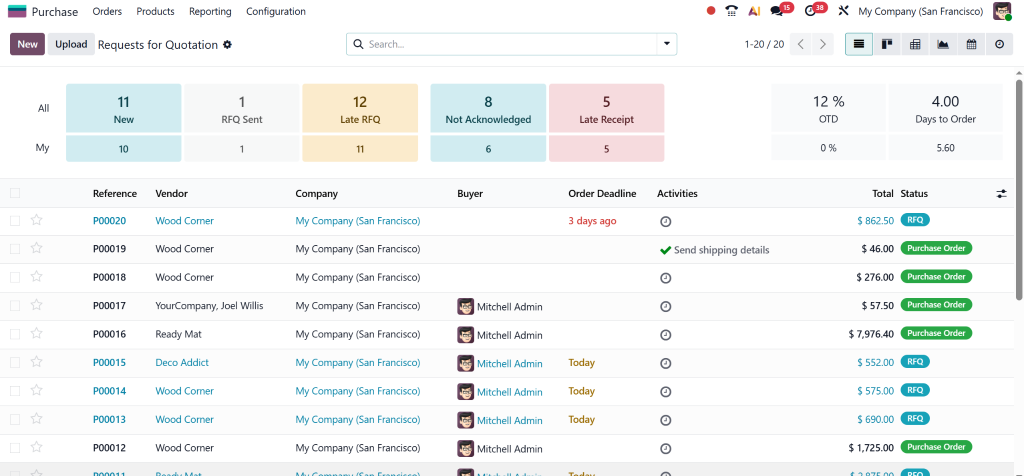
The Purchase Dashboard in Odoo 19 is the landing page for procurement managers. It typically includes:
- Total purchase spend over time
- Top 5 vendors by spend
- Purchase orders by status (draft, confirmed, received, invoiced)
- Purchase lead time average
- Vendor delivery performance summary
- Forecasted demand vs current stock
Purchase Reporting & Analytics
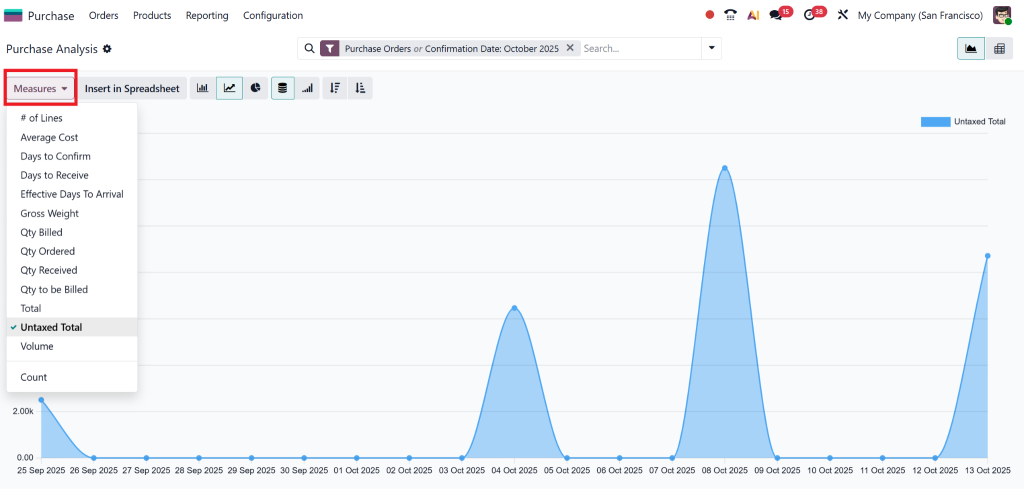
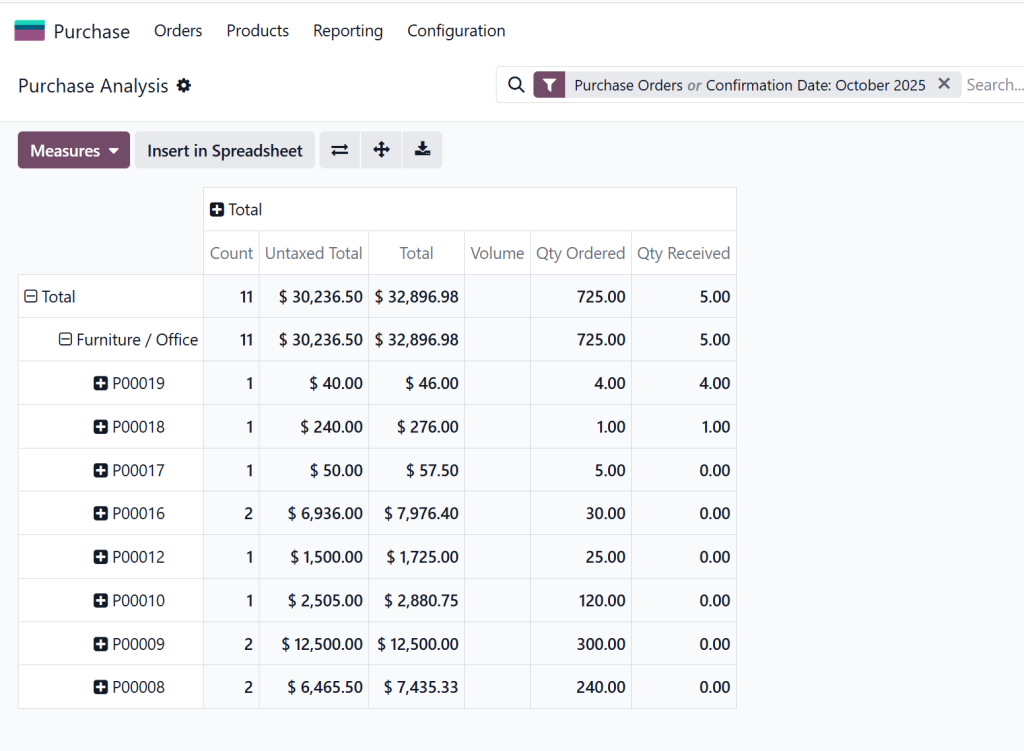
Beneath the dashboard lies the purchase reporting Odoo 19 module. Here you can:
- Drill down by product, vendor, category, or location
- View trends (month to month, quarter to quarter)
- Compare vendor performance over time
- Analyze order vs invoice discrepancies
- Segment spend by internal analytics accounts
Vendor Performance Analysis
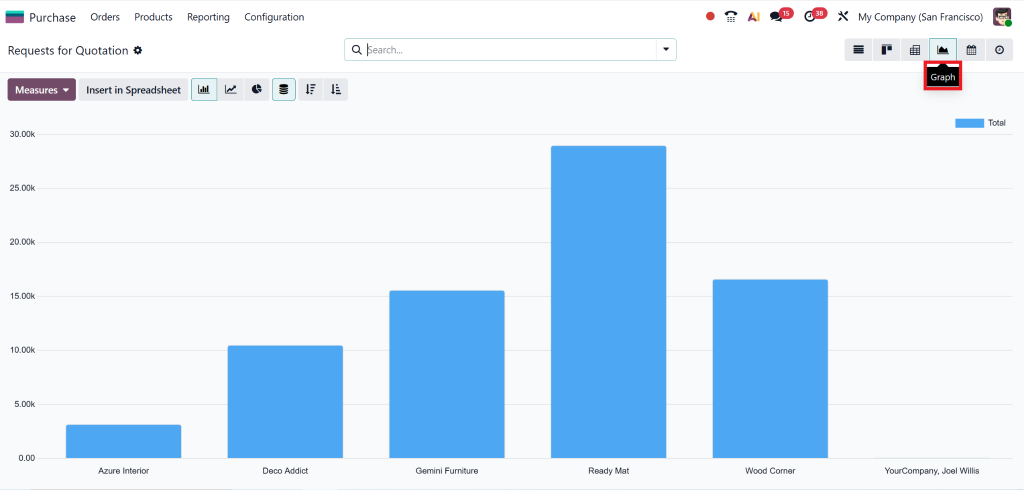
One of the most valuable parts is the Odoo 19 vendor performance analysis. You can rate vendors on metrics such as:
- On-time delivery rate
- Lead time deviation (actual vs promised)
- Quantity accuracy (ordered vs delivered)
- Quality rejection rate
- Price variance
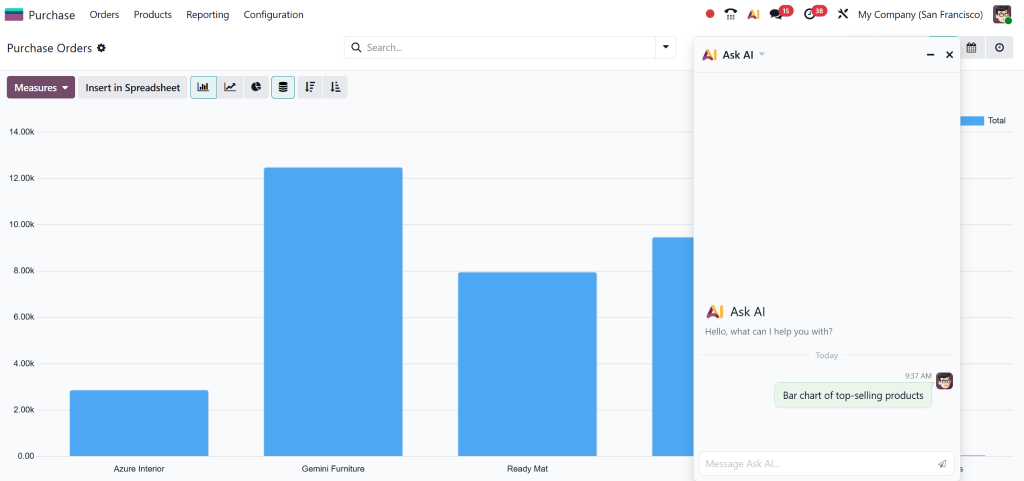
AI & Automation: Auto Purchase Suggestions
The AI in Odoo 19 procurement module monitors historical usage, open sales orders, minimum stock rules, and vendor lead times. It then generates Odoo auto-purchase suggestions, including recommended purchase orders with quantities, dates, and preferred vendors.
Alerts, Notifications & Thresholds
To support proactive oversight, the system can send alerts when:
- Stock falls below a safety threshold
- A vendor fails to deliver on time
- Purchase orders are aging (not confirmed or received)
- Price increases beyond a standard deviation
These alerts feed into the purchase dashboard Odoo 19 and help prevent issues before they cascade.
How Purchase Analysis Is Generated
To gain a deeper understanding of purchase analysis in Odoo 19’s Purchase App, let’s walk through the typical data lifecycle and examine how its components interact.
Data Entry & Integration
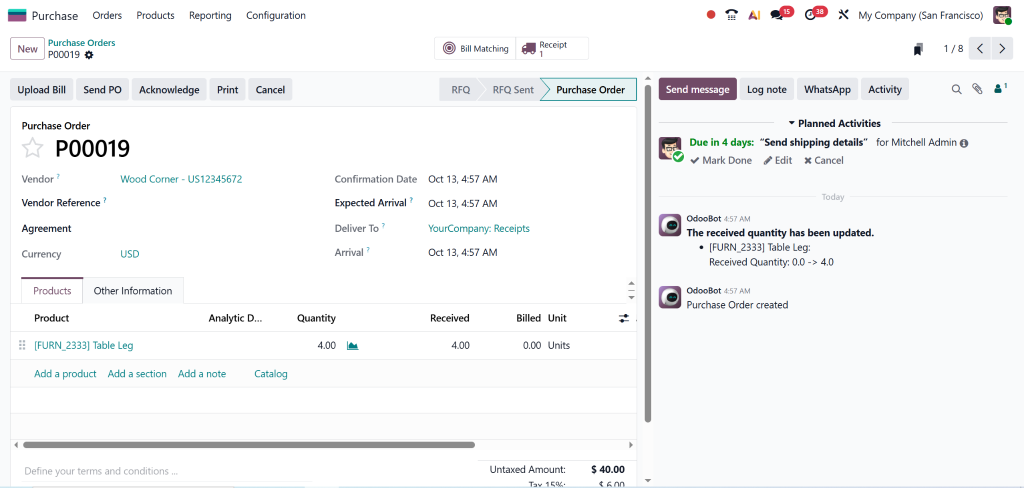
- Purchase orders are created, confirmed, and received within Odoo
- Vendor bills/invoices are matched and recorded
- Inventory movements update stock levels
- Sales or manufacturing demands trigger consumption
- Analytic tags/accounts categorize spend
Data Aggregation & KPIs
The system aggregates this data into metrics such as total spend, delivery times, and fulfillment rates. It populates the purchase dashboard Odoo 19 and builds the base dataset used by purchase reporting Odoo 19 and vendor performance analysis.
AI & Suggestion Models
The AI engine continually processes historical consumption, incoming demand (e.g., confirmed sales orders), safety stock levels, and vendor lead times to optimize inventory management.
User Review & Execution
Procurement managers review suggestions, adjust quantities or dates as needed, assign vendors if necessary, and confirm orders. These executed orders feed back into the cycle, refining future suggestions.
Continuous Feedback & Refinement
As time passes, vendor ratings evolve, trends shift, and demand patterns change. The purchase analytics app Odoo captures these shifts, updating dashboards and reports in real-time.
Benefits You Can't Ignore
When you use the purchase analysis features of Odoo 19 Purchase App, the benefits ripple through the organization:
Smarter Decisions, Reduced Costs
You can identify which SKUs are the most expensive, which vendors are unreliable, and pinpoint where your most enormous inefficiencies lie.
Less Manual Work, Fewer Errors
With Odoo’s auto purchase suggestions and alerts, your team saves time by not having to calculate, compare quotes, or chase vendors manually. Error rates drop.
Stronger Supplier Relationships
Vendor performance dashboards enable you to hold suppliers accountable, negotiate more favorable terms, and recognize high performers.
Better Cashflow & Inventory Management
You avoid overstock, reduce carrying costs, and free up capital. You also mitigate stockouts, minimizing lost sales or production delays.
Proactive Strategy & Scalability
With Odoo 19, purchase analysis enables you to operate at scale, spot trends, optimize for seasonality, and adapt to market dynamics.
Key Purchase Analysis Use Cases
Let’s examine specific scenarios that show how purchase analysis works in the Odoo 19 Purchase App in practice.
Spotting Vendor Reliability Issues
Suppose Vendor A delivers late 30% of the time. Through Odoo 19 vendor performance analysis, you see that although their prices are low, their reliability is hurting production. You may shift volume to Vendor B, which has a slightly higher cost but a better on-time rate.
Forecasting Seasonal demand
Suppose you sell more of Product X every November. The AI model identifies the trend, incorporates it into purchase suggestions, and recommends earlier purchase orders to ensure timely stock arrival, thereby smoothing cash flow.
Improving Safety Stock
By analyzing usage variability and lead time deviations with Odoo’s purchase analytics app, you can fine-tune safety stocks. You avoid overstocking slow-moving items while minimizing the risk of stockouts on critical ones.
Overcoming Challenges & Getting the Most from Odoo 19 Purchase Analysis
Data Quality Is Crucial
Garbage in, garbage out. Make sure suppliers, lead times, cost data, and consumption history are accurate. Insufficient data will yield bad insights.
Start Gradually
Don’t try to automate everything at once. Begin with vendor analysis, then proceed to purchase suggestions, and finally, automate the process further.
Adapt to Your Industry
Procurement in retail, manufacturing, and services has unique patterns. Tune your weighting, safety stocks, and forecasting to your domain.
Monitor & Review Regularly
Even AI needs supervision. Regularly review vendor performance and suggestion acceptance rates, and adjust models as behavior changes.
Combine with Expert Support
An Odoo Partner (like us at Netilligence) can help tailor the Odoo 19 Purchase App to your needs, optimize your dashboards, and train your team so you get real ROI.
Lorem ipsum dolor sit amet, consectetur adipiscing elit. Ut elit tellus, luctus nec ullamcorper mattis, pulvinar dapibus leo.
Why Choose Netilligence as Your Odoo 19 Procurement Partner
As a Netilligence Odoo Partner, we bring deep expertise in customizing and implementing Odoo’s procurement and analytics modules. When you choose us:
- You get personalized purchase dashboards in Odoo 19 that match your KPIs
- You can quickly and correctly implement advanced AI in Odoo 19 procurement features.
- We configure Odoo 19 vendor performance analysis based on your industry.
- We set up the whole integration of purchase reporting in Odoo 19 with your finance & inventory systems.
- We help you adopt Odoo auto purchase suggestions safely and effectively.
- We support training, change management, and continuous improvement.
Summary & Next Steps
- It aggregates transactional data from purchases, inventory, accounting, and demand; then surfaces key metrics via dashboards, analytics, and AI-driven suggestions.
- Features include the purchase dashboard in Odoo 19, deep purchase reporting in Odoo 19, vendor performance analysis, and auto purchase suggestions driven by AI in Odoo 19 procurement.
- To get started, configure vendor metrics, reorder rules, set thresholds, and iterate over time.
- As your partner, Netilligence ensures that your purchase analytics take shape quickly, accurately, and in alignment with your business goals.




